The most popular advice about social video is to make more of it, faster. That's incomplete. A social media marketing video maker is useful only when the finished video helps the right viewer take a clear next step, and still makes sense after you resize it, translate it, and publish it without sound.
Treat the tool as a production assistant, not a strategy engine. Start with a business action, build a script around visible evidence, and review every language version for accessibility. Then judge the published cut by that action, not by cinematic polish or an impressive view count.
Pick One Business Action Before You Generate
Write the desired action in a sentence before opening an editor: Help a qualified buyer book a product demo. Other useful actions include claiming a first-order offer, starting a trial, or requesting a quote.
Don't combine them. A video asking viewers to follow, subscribe, visit a website, and buy leaves you with competing messages and an unclear result.
Match the action to a measurable event
Choose a primary KPI, the measure you'll use to decide whether the video worked. Completed views can support an awareness objective, qualified clicks can support traffic, and accepted leads or completed purchases can support revenue goals.
Make the qualification explicit. For a demo campaign, a submitted form isn't necessarily a useful lead if the person doesn't match your service area, budget, or product requirements.
Measurement focus among video marketers
Wyzowl's video marketing survey reports the following shares of video marketers measuring ROI through each metric.
| Metric | Share of marketers |
|---|---|
| Views | 67% |
| Engagement | 63% |
| Leads or clicks | 52% |
| Bottom-line sales | 32% |
The distinction matters because attention isn't the same as a business outcome. Someone can watch an entertaining clip without needing the product, understanding the offer, or intending to buy.
Production rule: Write the conversion event into the creative brief, not just into the reporting dashboard.
Define intent before appearance
Choose an audience by what people are trying to accomplish, not just their age or job title. Useful signals include search behavior, relevant page context, prior engagement, and interest in the product category.
Say you sell scheduling software. Someone comparing appointment-reminder tools needs a different demonstration from someone who has never considered automating reminders.
Your brief should record:
- Viewer situation: What task or frustration brought this person to the video?
- Promised result: What useful change can you demonstrate?
- Primary action: What should the viewer do next?
- Success event: What recorded event will count as a qualified result?
Distribution decisions belong here, too. A musician choosing between audience-building and release-promotion support can compare music promotion service types through Premierely before deciding what the video should ask listeners to do.
Carry that brief into the video creation workspace. Leave avatar selection, music, and transitions until the action and audience are settled. Otherwise, you're making production choices without a reliable way to judge them.
Platform Cut Sheet for Every Social Video
A wide video cropped into a vertical frame can lose the demonstration, the presenter's hands, or the offer beneath interface buttons. Build a cut sheet, a simple export plan, before generating scenes.
The distribution opportunity is substantial: DataReportal's Digital 2025 Global Overview reported 5.24 billion social media user identities worldwide in early 2025. That measure counts identities, not necessarily unique people, so it shouldn't be read as an exact audience headcount.
Use placement-specific production targets
The table below gives working production targets, not a definitive list of platform upload limits. Check the current placement requirements in the publishing interface before approving an export, especially for paid campaigns.
Social video cuts by platform
| Placement | Aspect | Useful length | Text safe area |
|---|---|---|---|
| TikTok organic or ad | Vertical, 9:16 | Start with a concise hook-to-action cut | Center third; avoid bottom 20 percent |
| Instagram Reels | Vertical, 9:16 | 15-90 seconds | Center third; buttons cover side and bottom edges |
| Instagram Feed | 4:5 | Enough time to demonstrate the offer clearly | Larger type; less interface clash than Reels |
| Facebook Feed | 4:5 or 1:1 | Short offer cut or explanatory demo | Captions on; offer readable without sound |
| YouTube Shorts | Vertical, 9:16 | Concise demonstration; verify current eligibility | Hook in first 2 seconds; keep CTA above the bottom UI |
| YouTube in-feed | Landscape, 16:9 | 30 seconds-2 minutes | Leave room for end screens and chapters |
| Portrait or landscape matched to placement | 30-90 seconds | Burned-in captions; no dependence on trending audio |
For a broader starting point, HubSpot's video marketing statistics report that 73% of surveyed marketers considered videos between 30 seconds and two minutes the most effective length. Use that as a planning reference, not a reason to stretch a simple message.
Recompose instead of stretching
Keep the same scene list across formats, but change the composition. A vertical demo might show the relevant interface panel close up, while the wider version can include the surrounding workflow.
- Position the subject: Keep the important face, product, or cursor action away from interface overlays.
- Reserve text space: Don't place captions over the controls you're demonstrating.
- Preview the destination: Review the export with the platform's overlays visible, rather than relying only on the editor canvas.
Advisor Momentum's resource on planning video content for social platforms is useful when turning a campaign idea into placement-specific production decisions.
Use the starter creation workspace to prototype the primary placement first. Approve its framing before producing the remaining formats, so a composition mistake doesn't spread through the entire batch.
Script the Cut in Four Beats
A useful script tells the video maker what viewers hear and what they see. Pasting a blog post into a generator leaves too many production decisions unresolved.
Start with a rough spoken draft, then read it aloud. As a hypothetical planning exercise, you might draft about 75 words for a 30-second cut, or 140 to 150 words for a 60-second cut. These are rehearsal budgets, not guaranteed speaking speeds. Product names, pauses, and unfamiliar terms can change the timing substantially.
Use the process below to connect narration to visible action.
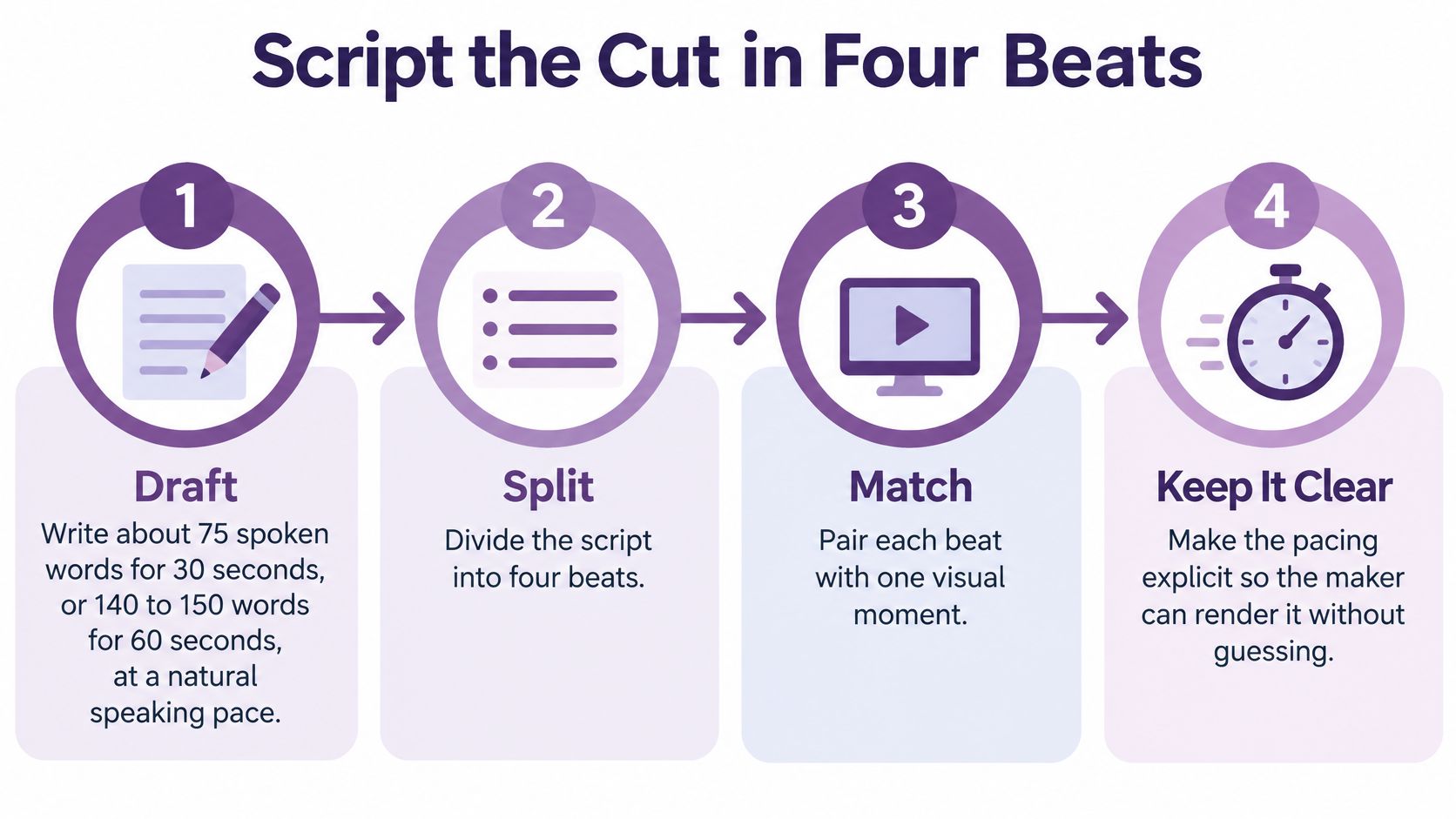
Give each beat a different job
Hook: Name the problem or show the finished result. For scheduling software, open on a booking calendar with conflicting appointments, not a floating logo.
Proof: Provide something viewers can verify. That could be an actual interface state, an approved customer statement, or a clearly labeled demonstration. Don't generate an invented testimonial to fill the space.
Demo: Show the relevant action working. Display the reminder settings being enabled and the resulting message preview, rather than describing a long feature list.
Call to action: Ask for the single next step. A demo-booking campaign should finish with a clear invitation to book, not a separate request to subscribe.
Independent Ipsos/Google attention research found that 62% of YouTube mobile advertising received viewer attention, compared with 45% for television. The practical lesson isn't that mobile viewers automatically care about your ad. It's that you should use their attention to communicate the proposition immediately.
Write a renderable prompt
A strong prompt describes scenes, not just a mood. For the scheduling example, specify:
- Opening visual: A fictional booking calendar with overlapping appointments, with private information removed.
- On-screen text: A short statement of the scheduling problem.
- Demonstration: A close-up of the reminder control and message preview.
- End card: The demo invitation, brand identity, and readable destination instruction.
- Locked wording: Product names, approved offer language, prices, and required disclosures that must remain unchanged.
A realistic presenter can deliver a weak script convincingly. That doesn't make the proposition clearer or the evidence stronger.
Keep spoken claims and visuals aligned. If the narration promises automatic reminders, show that function rather than unrelated office footage.
Make the primary script concise, then create a longer explanation only when the viewer needs more detail to act. A complex service may require eligibility information; a simple product demonstration may not.
Finally, read the draft without looking at the storyboard, then inspect the storyboard without hearing the narration. Each should communicate the central task. Remove secondary features that interrupt the demonstration, and save them for separate videos rather than compressing everything into an unreadable cut.
Avatars Voice Clones and Language Versions
Choose a presenter after approving the script. The right choice depends on the job: explaining a product, introducing a brand, or answering an objection.
A photo-real presenter can suit an instructional introduction. An animated character may fit a light brand reel, while a three-dimensional figure can support a playful concept. None should replace an actual product demonstration when buyers need to inspect how something works.
A localization workspace should let reviewers connect the script, voice track, and scene timing.
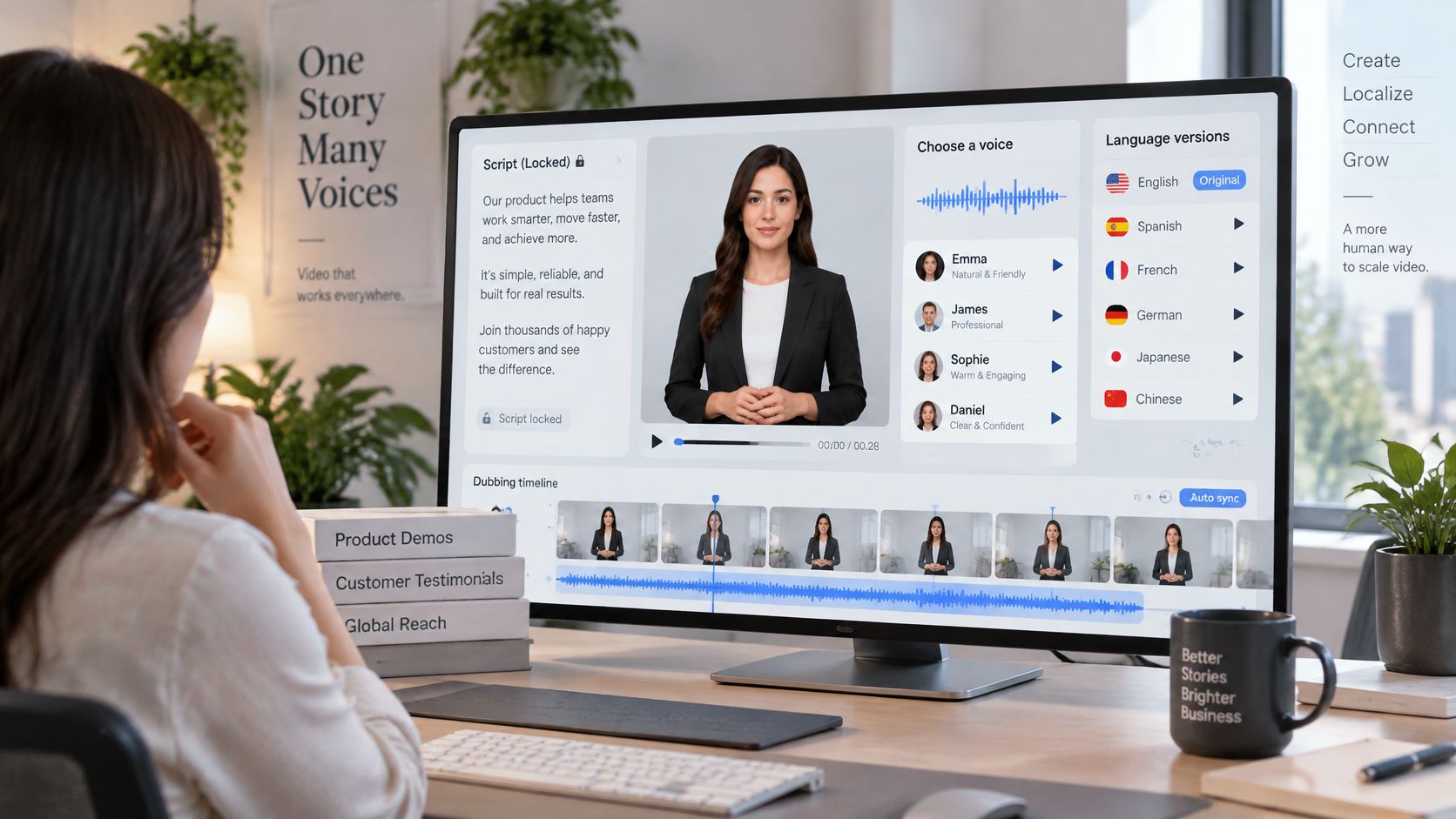
Match the presenter to the evidence
Keep a consistent presenter within a straightforward ad. Changing faces repeatedly introduces visual information without necessarily helping the buyer understand the offer.
Dialogue is useful when the exchange itself teaches something. A buyer asking an objection and a presenter demonstrating the answer can work well. But a synthetic customer must not be presented as a real person giving authentic purchase testimony.
For voice cloning, use a clear recording from someone who has authorized the intended use. Document permission, permitted contexts, and who can approve future versions. Don't assume access to an audio file means you have permission to reproduce the speaker's identity.
LunaBloom AI is one option for this stage, combining custom avatars, cloned voices, localized renders, and editing around a script-based workflow. A conventional editor with recorded presenters and human voice talent remains another route when authentic personal delivery or specialist pronunciation matters more than automated rendering.
Localize meaning, not sentence order
A literal translation can preserve the words while losing the offer's meaning. Ask the language reviewer to protect the promise, evidence, and requested action, while allowing the sentence structure to change.
- Rewrite idioms: Replace expressions that sound unnatural or confusing in the target language.
- Check regional usage: Choose vocabulary and pronunciation that fit the intended buyers.
- Preserve conditions: Keep eligibility, exclusions, and offer details consistent with the approved campaign.
- Review the destination: Make sure the landing page and form match the language and offer in the video.
The embedded video provides additional product context for evaluating a script-led production workflow.
Export a review cut before approving the batch. Have a native speaker check names, product terms, prices where applicable, and the call to action in context, not just in a spreadsheet.
Keep an approval record for each language. If the original offer changes, flag the related versions for review instead of assuming they remain accurate. Consistent brand presentation matters, but consistent commercial meaning matters more.
Caption Checks That Survive Translation
Auto-captions can make a video look finished while leaving the offer inaccurate or inaccessible. A misheard product name can confuse buyers; an omitted condition can change what they think you're promising.
Clemson University's reporting on social media accessibility describes a 2025 analysis of more than 1,000 social posts that found the majority were inaccessible to people with hearing or visual impairments. Treat caption generation as the beginning of review, not proof that the finished post is accessible.
Run the accuracy checks before adjusting decorative styling.
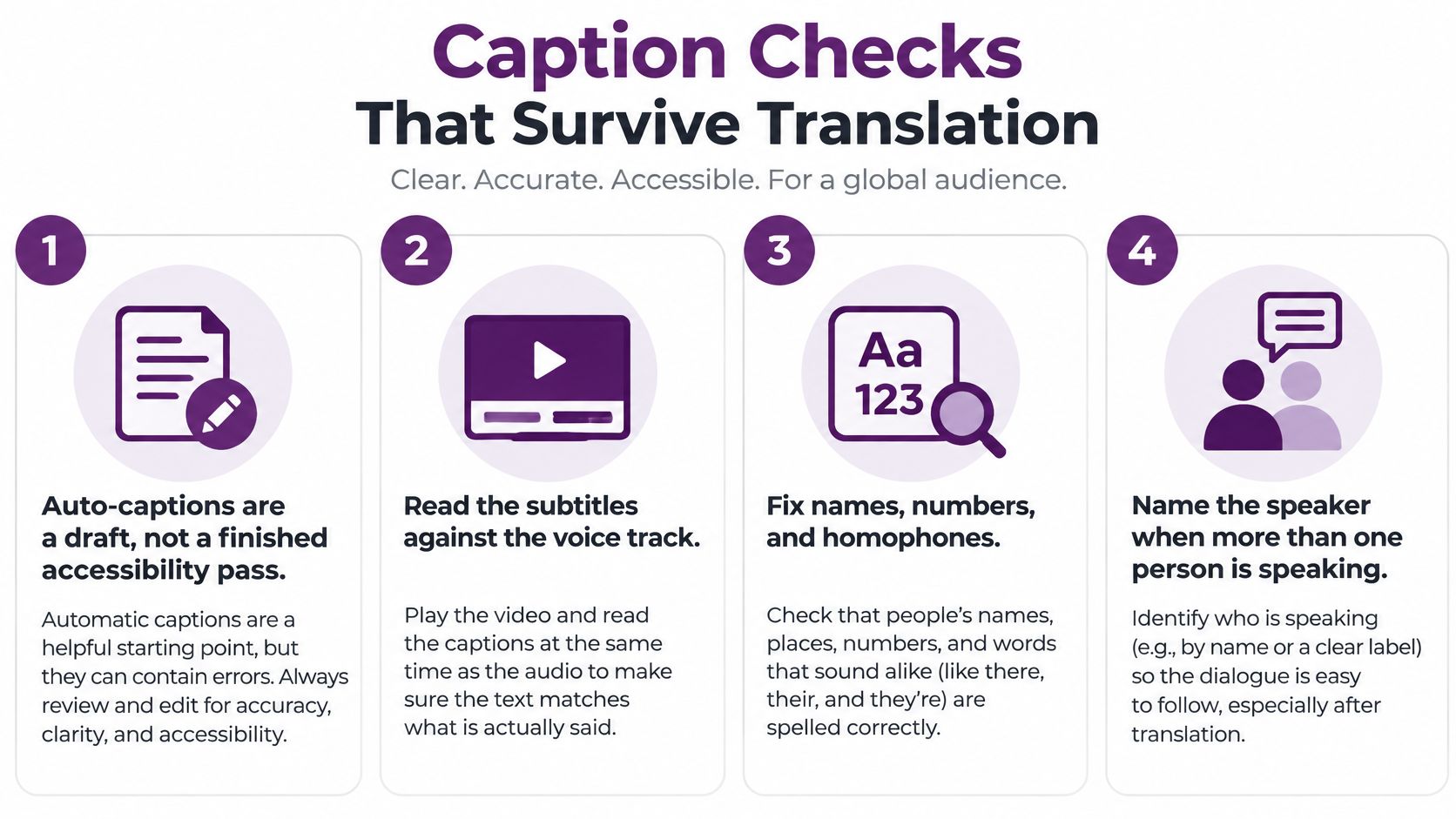
Review words before appearance
Listen to the final voice track while reading the captions. Fix names, numbers, homophones, missing negatives, and punctuation that changes the meaning.
Identify speakers when a change isn't obvious from the audio or context. Include meaningful non-speech sounds when viewers need them to understand what happened, rather than transcribing every incidental noise.
Then compare the narration with the picture. If the visual contains essential information that nobody says aloud, add it to the narration or provide an appropriate descriptive alternative.
Say a demo shows an error changing to a success message. A viewer who can't see that change needs the audio to explain the outcome, not just announce that a button was pressed.
Retiming is part of localization
Translated captions may need different cue boundaries from the source language. Don't preserve the original timestamps mechanically if the new wording becomes cramped or disappears before it can be read.
- Split by meaning: Break lines at natural phrase boundaries, not in the middle of a name or tightly connected expression.
- Shorten carefully: Remove redundancy without deleting offer conditions or changing the claim.
- Check contrast: Test text against the actual moving background, including its brightest and busiest moments.
- Inspect placement: Keep captions clear of platform controls and essential demonstration details.
- Publish supported alternatives: Add caption files, descriptive post text, and alt text where the network supports them.
Accessibility check: A translation isn't approved until someone has reviewed how it reads, sounds, and appears in the finished cut.
Run separate sensory checks. First, mute the video and confirm that the offer, demonstration, and next step remain understandable through visuals and captions.
Then listen without watching. Essential visual-only information should be explained in the audio or an available descriptive alternative. Captions alone can't solve missing information for someone who can't see the screen.
Finally, inspect the published preview on a phone. A readable editor preview doesn't guarantee readable captions after platform controls, compression, and a smaller display are involved. These checks improve access, but they aren't a blanket certification of legal compliance.
Titles Thumbnails and Publish Metadata
An exported file isn't a complete publishing package. Viewers need an accurate title and recognizable cover, while search systems need accessible page content and explicit video information.
For videos hosted on your own site, Google's video SEO guidance identifies structured data, video sitemaps, and Open Graph as discovery mechanisms. Google also explains that the watch page must be indexed and performing well in Search before its video may be considered for indexing.
Prepare the publishing package in order
Start with the destination page, then prepare the visible information and technical fields together. This helps prevent a mismatch between the social promise and what a visitor finds after clicking.
- Watch page: Give the video a page where watching it is a central purpose, rather than hiding it among unrelated content.
- Title: State the viewer's task or result accurately. A scheduling tutorial should describe the scheduling task, not repeat a string of marketing keywords.
- Description: Explain what the video demonstrates, including relevant conditions or prerequisites.
- Thumbnail: Choose a clear subject and a short, readable phrase. Show the actual result rather than an unrelated dramatic image.
- Video details: Record the upload date, duration, and thumbnail location alongside the other publishing fields.
- Key moments: Add useful navigation when viewers can effectively jump between distinct steps.
Google's VideoObject documentation describes properties including description, thumbnail URL, upload date, and duration, along with SeekToAction markup for identifying key moments. It recommends validating markup with the Rich Results Test, inspecting the page with URL Inspection, and checking that access isn't blocked by robots.txt, noindex directives, or login requirements.
Don't assume valid markup guarantees a search appearance. Validation checks implementation; it doesn't promise indexing or visibility.
Adapt the cover and post to the destination
A vertical social cover and a watch-page thumbnail need different compositions. Keep the same promise, but reposition the subject and text so each remains legible at its intended size.
For the social post, put the useful offer or task near the beginning. Avoid burying eligibility details below a long introduction, and give viewers an unambiguous destination.
Before scheduling a professional-feed version, consult Narrareach's LinkedIn formatting guidance for independent creators to review the post's presentation and placement requirements.
Check the publication package against a short release list:
- Promise alignment: The title, cover, opening scene, and destination describe the same task.
- Access: The watch page and media load without an unexpected login barrier.
- Preview quality: The social preview uses the intended title and thumbnail.
- Tracking readiness: The destination records the conversion event you intend to evaluate.
End the setup with a consistent UTM naming rule. Use separate campaign parameters for each platform and creative version, keeping capitalization and naming conventions stable. Put the version identifier in utm_content, then test the complete destination before scheduling so later reporting can distinguish the cuts.
Test One Change Before You Scale
Publish the primary cut, then make a variant that changes one creative element. You might replace the opening hook while leaving the presenter, demonstration, offer, and destination unchanged.
Keep the audience, placement, budget, and optimization event stable. If you change the audience and hook together, you won't know which change contributed to the result.
Read the funnel, not just the view count
Compare early retention, click-through rate, conversion rate, and cost per qualified result. Each answers a different production question.
| Observation | What to investigate |
|---|---|
| Viewers leave early | Whether the opening makes the task and relevance clear |
| Viewers watch but don't click | Whether the offer or next step is compelling and understandable |
| Clicks rise but qualified leads don't | Whether the creative attracts the wrong intent or overstates the destination |
| Leads increase but sales don't | Lead quality, sales follow-up, and the fit between promise and product |
A highly completed video can still be a poor sales asset. Pause a variant that attracts curiosity without qualified action, even if its attention metrics look better.
Platform attribution is also a reporting method, not proof that the video caused incremental revenue. Use a holdout or suitable conversion experiment when you need to estimate causal impact, and avoid declaring a winner before the conversion process has had time to complete.
Scale the learning rather than the output
Disclose synthetic presenters when viewers could reasonably mistake them for actual employees or customers. Keep genuine proof points human-approved, and don't let a generated face imply experience it never had.
Maintain a small library of FAQ and objection-handling cuts. Update them when the product or offer changes, so the team doesn't keep publishing an outdated answer.
Before increasing production, compare the available plans and pricing with the actual workflow you need, including language review, exports, collaboration, and revision work. A lower generation cost doesn't remove the need for editorial approval.
The useful result is a repeatable process: a clear promise, a reviewable production package, an accessible localized version, and a test that tells you what to change next.
LunaBloom AI offers script-based video creation with custom avatars, voice cloning, captions, localization, and social publishing. Visit LunaBloom AI to build a platform-ready cut, review its language and accessibility, and test it against a clearly defined business action.