Welcome to the future of video creation! Long gone are the days of needing a film crew and complex software to produce professional-looking videos. Now, the best AI video creation tools let anyone—marketers, educators, and creators—turn simple ideas into polished videos in minutes, not days. This isn't just a fleeting trend; it’s a seismic shift in how we create, communicate, and sell.
This revolution unlocks incredible new possibilities. To harness its full potential, it helps to explore the diverse landscape of dedicated AI video generator tools. But with so many options popping up, how do you find the right one for you? Are you making corporate training videos, viral social media clips, or slick marketing presentations?
Think of this guide as your roadmap. We’ve cut through the hype to bring you clear, actionable insights on the top platforms. We'll break down their strengths, who they're best for, what they cost, and any hidden limitations. You'll find direct links and screenshots for each tool to help you visualize what they can do. Whether you're a solo creator on a shoestring budget or an enterprise team looking to scale up, this list will help you find the perfect AI partner to bring your vision to life.
1. LunaBloom AI
LunaBloom AI stands out as a powerful, all-in-one solution among the best ai video creation tools, especially for those who need to create professional content quickly without a steep learning curve. Its core strength is a seamless text-to-video workflow that turns simple scripts into polished videos, complete with AI presenters, voiceovers, and subtitles. This makes it a fantastic choice for marketers, educators, and businesses that need to produce content for global audiences.
The platform’s feature set is impressively comprehensive, bundling tools that often require multiple different subscriptions. It effectively streamlines a complex production process into a single, intuitive interface. Within the same environment, you can generate a video from text, choose a customizable AI avatar to present it, and even clone your own voice for a personal touch.
Key Differentiators and Use Cases
What truly sets LunaBloom AI apart is its focus on accessibility and global reach. Supporting over 50 languages, it empowers you to produce localized marketing campaigns, multilingual corporate training, or social media content for diverse audiences with minimal effort. This multilingual capability, combined with automatic subtitles, ensures your content is not only accessible but also has a much broader impact.
- Best For: Marketing professionals, corporate trainers, social media influencers, and small businesses needing to scale video production efficiently.
- Practical Application: A marketing team could generate a dozen localized product demo videos for different regions in a single afternoon. An educator could convert entire lesson plans into engaging video lectures presented by an AI avatar, complete with accurate subtitles.
Platform and Pricing Insights
The user experience is designed for beginners, removing the technical headaches often associated with video editing. While specific pricing details aren't on the main site, LunaBloom AI offers a valuable free tier, allowing users to test its core features. This, along with scalable plans for individuals and enterprises, suggests a flexible model adaptable to various budgets. Ready to see it in action? You can get started directly within the LunaBloom AI app.
Pros:
- Extremely fast text-to-video workflow ideal for beginners.
- Comprehensive support for 50+ languages for global content creation.
- Bundles advanced features like AI avatars, voice cloning, and auto-subtitles.
- Offers a free generator option and scalable plans for all user levels.
Cons:
- Advanced creative control might still require traditional editing software.
- The use of AI avatars and cloned voices can introduce ethical and quality-consistency considerations.
2. Synthesia
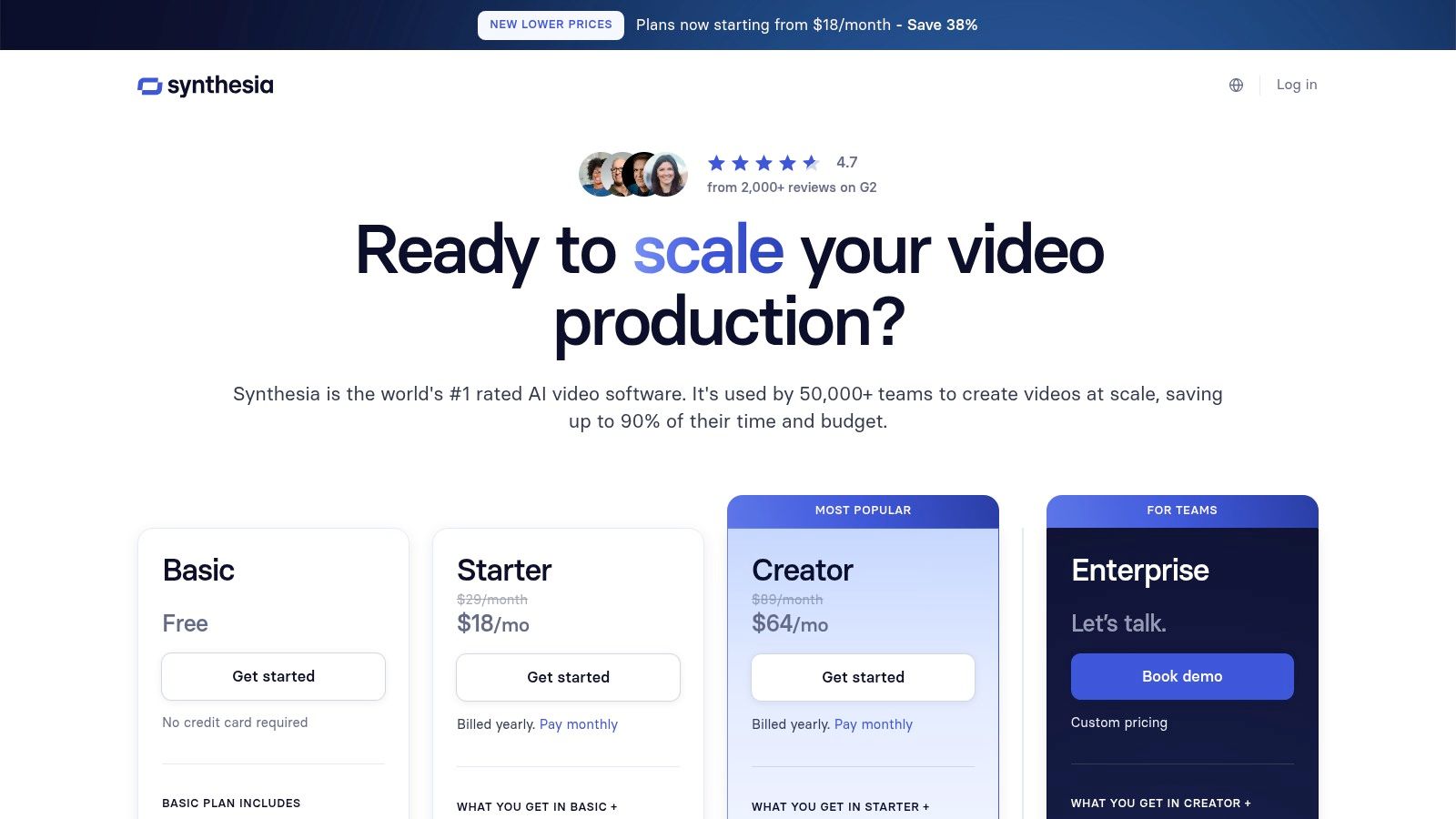
Synthesia is a titan in the AI video space, especially for businesses that need polished, professional talking-head videos. It's one of the best AI video creation tools for corporate training, internal communications, and marketing explainers where consistency and clarity are key. The platform's main draw is its massive library of over 180 realistic AI avatars and its smooth, template-driven workflow.
You start by picking an avatar, typing or pasting a script, and then building out scenes like a PowerPoint presentation. Synthesia's interface is incredibly intuitive, built for users with zero video editing experience. This avatar-led approach is also a game-changer for localization. Its AI can translate your script into over 120 languages and automatically sync the avatar's lip movements to the new audio—a huge time-saver for global companies.
Key Features & Use Cases
Synthesia is all about structured, repeatable video production. Its enterprise-ready features and sharp focus on corporate needs set it apart.
- Best For: Corporate training modules, HR onboarding videos, and multilingual product demonstrations.
- Standout Feature: The ability to create a custom AI avatar of yourself or a key leader adds a powerful, personal touch to communications.
- Security: It offers enterprise-level security with SSO and SAML, making it a safe choice for large organizations.
- Integrations: Supports SCORM exports, so training videos can be dropped seamlessly into existing Learning Management Systems (LMS).
While Synthesia is powerful for its niche, its avatar-centric model means it’s not the right tool for creating dynamic, cinematic B-roll or highly creative social media content. Its credit-based system, where you purchase video minutes in advance, can also be a bit of a learning curve for teams to manage. For a broader look at different AI video styles, our guide to AI video trends offers more context.
Website: https://www.synthesia.io/pricing-options
3. Runway
Runway has cemented itself at the cutting edge of generative video, catering to artists, filmmakers, and creators who demand cinematic quality from AI. It's one of the best AI video creation tools for pushing creative boundaries, offering state-of-the-art text-to-video and image-to-video models like Gen-3 Alpha. This platform is less about templatized corporate videos and more about providing a powerful suite for experimental motion design and high-fidelity video generation.
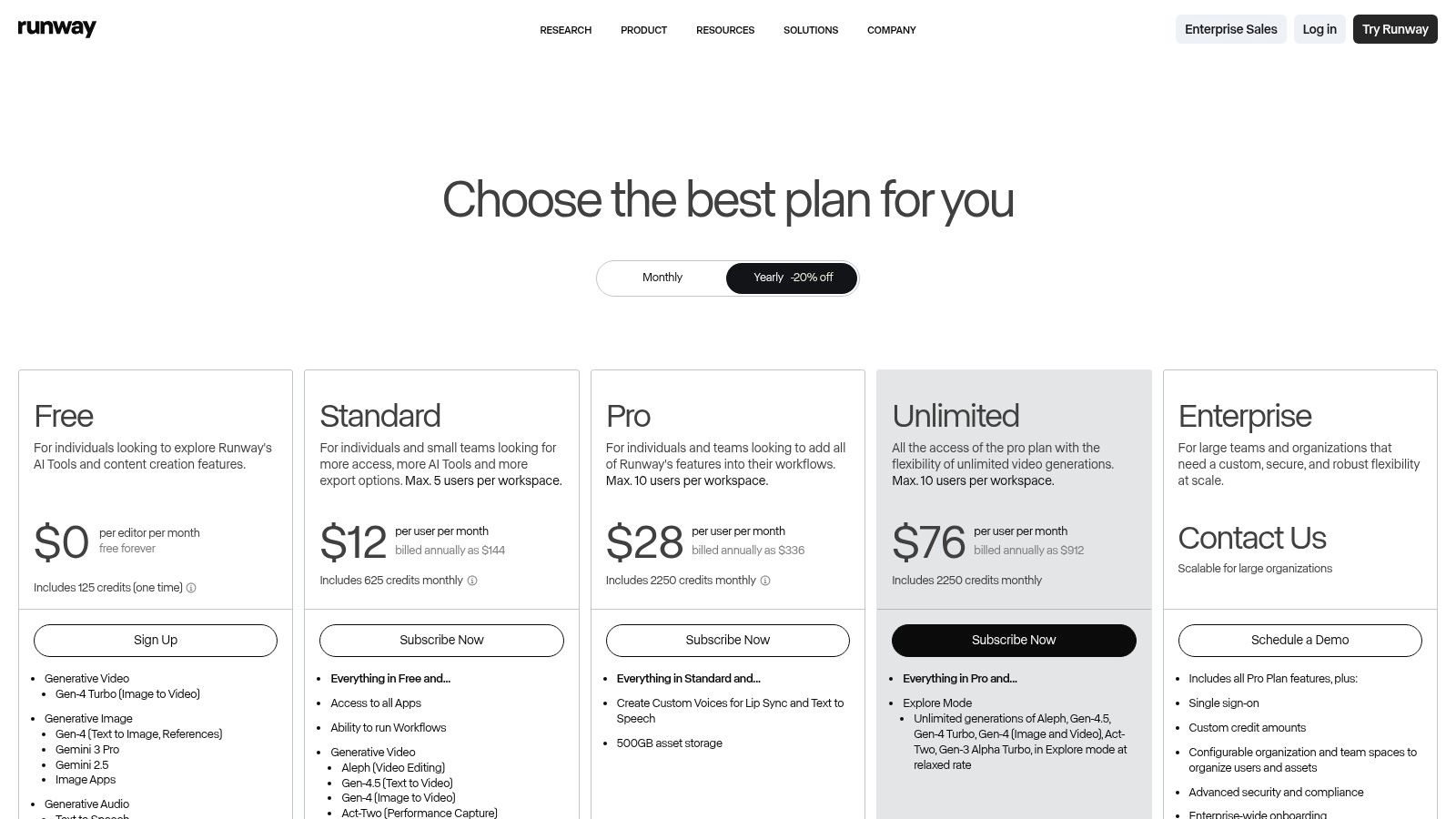
The platform combines its powerful generative tools with a full-fledged online video editor, letting you generate, refine, and composite clips all in one place. Its interface feels more like professional editing software, offering a high degree of control but also a steeper learning curve than simpler tools. For users on higher-tier plans, Runway’s “Explore” mode offers unlimited (though slower) generations, which is perfect for brainstorming and experimenting without burning through credits.
Key Features & Use Cases
Runway excels at producing unique, artistic, and cinematic footage that truly stands out. Its focus on model quality and advanced editing features makes it a creator-centric powerhouse.
- Best For: Short films, music videos, conceptual advertising, and advanced motion graphics.
- Standout Feature: Access to multiple top-tier video models (Gen-3 Alpha, Gen-2) gives creators a choice between the latest quality and established performance.
- Advanced Tooling: Includes a robust set of "AI Magic Tools" for tasks like inpainting, motion tracking, and super-slow motion, all integrated directly into the editor.
- Workflow Integration: Offers features like green screen removal and asset storage, streamlining the entire creative process from generation to final cut.
While Runway leads in generative quality, its credit-based system means producing longer, high-resolution videos can get expensive. The complexity of its interface might also be intimidating for beginners or teams looking for a quick, template-driven solution. To get the most value, it helps to understand the nuances of its different models and tools. For those curious about how these powerful tools are made, you can learn more about the teams behind AI innovations like these.
Website: https://runwayml.com/pricing
4. Luma Labs (Dream Machine)
Luma Labs has quickly become a major player among the best AI video creation tools by focusing on high-fidelity, photorealistic motion from text and image prompts. Its Dream Machine model is built to generate short, cinematic clips with a strong grasp of physics and fluid character movement. This makes it ideal for creating dynamic B-roll, brainstorming ad campaigns, or producing captivating social media content. The platform's strength is its ability to render complex scenes with a level of realism that sets it apart.
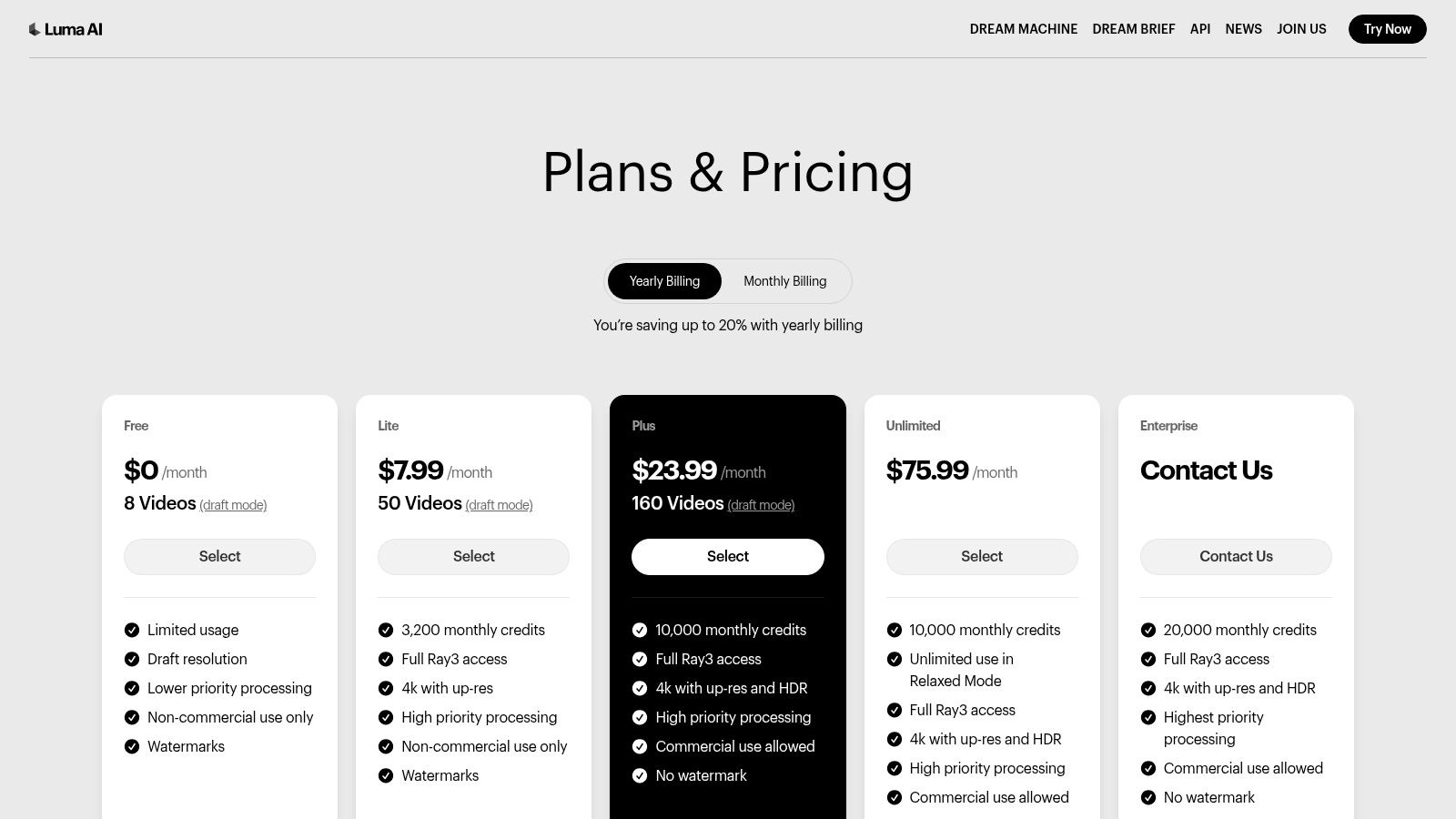
The user experience is built around a simple prompt interface but offers advanced controls for those who need more. Luma Labs provides clear options for generation quality, like "Draft" versus high-fidelity modes, with a transparent credit system that shows exactly what you get at each tier. This clarity helps you manage your resources effectively while experimenting with different creative ideas.
Key Features & Use Cases
Luma Labs excels at producing visually stunning, motion-rich clips that feel authentic. Its focus on physical realism and high-end output defines its best use cases.
- Best For: Short-form social media ads, creative concepting, and generating realistic B-roll for larger video projects.
- Standout Feature: The "Ray" models deliver exceptional motion physics and an HDR-like visual quality, resulting in video that looks less computer-generated and more cinematic.
- Pricing Transparency: The credit table is easy to understand, clearly breaking down costs by model, resolution, and video duration. Higher-tier plans also offer a "Relaxed" unlimited generation mode.
- Commercial Use: The Plus plan and higher grant commercial usage rights and remove watermarks, making it a viable tool for professional marketing and content creation.
The main limitation of Dream Machine is its focus on short clips, typically 5-10 seconds long, which makes it less suitable for long-form stories. Lower-tier plans also include watermarks and are limited to a lower-quality Draft mode, which might not be enough for final productions.
Website: https://lumalabs.ai/pricing
5. HeyGen
HeyGen has quickly become a favorite for creating engaging AI-driven videos, especially for marketing, sales, and social media. It positions itself as an intuitive, all-in-one video studio that makes professional-quality production accessible to everyone, regardless of skill level. The platform's main appeal is its impressive library of over 700 stock avatars, seamless voice cloning, and a user-friendly interface that simplifies making talking-head videos.
You can quickly generate content by choosing an avatar, inputting a script, and customizing scenes with backgrounds, text, and your brand assets. Where HeyGen truly shines is in its localization capabilities. It supports over 175 languages and dialects, making it one of the best AI video creation tools for global marketing campaigns. This, combined with its innovative talking-photo feature that animates still images, provides a flexible toolkit for dynamic, script-based video production.
Key Features & Use Cases
HeyGen is designed for speed and efficiency, focusing on repeatable video formats that need a human touch without a live-action shoot.
- Best For: Marketing explainers, personalized sales videos at scale, and multilingual educational content.
- Standout Feature: Its high-quality voice cloning and automatic translation features provide an exceptionally smooth workflow for localizing content across different regions.
- Flexibility: The platform offers robust customization, including 4K video export and brand kit uploads on paid plans, ensuring content aligns with brand guidelines.
- Integrations: Offers API access on enterprise plans, allowing for the programmatic creation of personalized videos for sales and marketing automation.
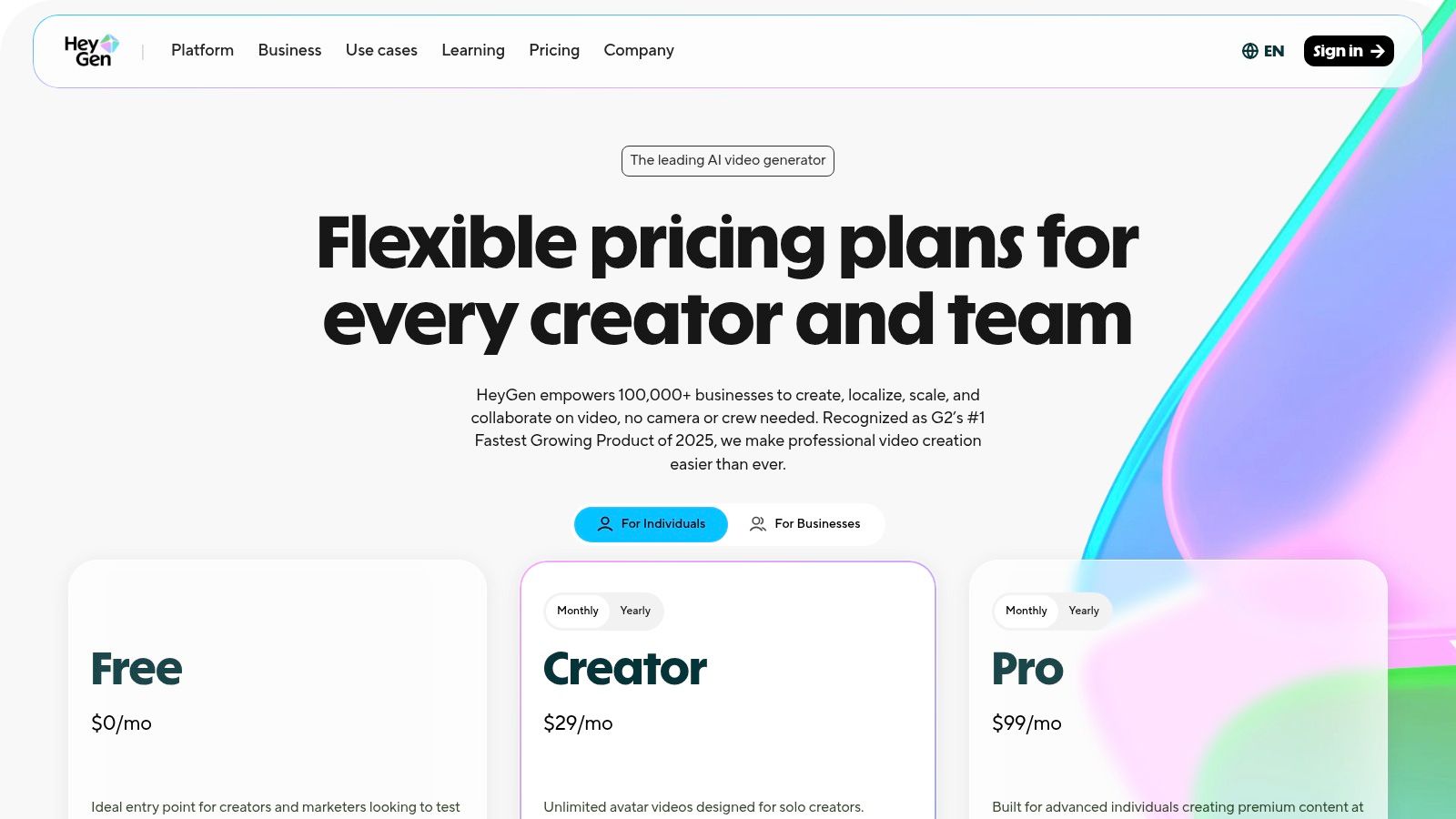
While excellent for avatar-led videos, HeyGen is less suited for generating complex cinematic scenes or abstract visuals. Its credit-based system means you'll need to monitor your usage to avoid having to upgrade your plan.
Website: https://www.heygen.com/pricing
6. Invideo AI
Invideo AI positions itself as a complete video creation assistant, designed to take a simple text prompt and turn it into a fully produced video. This makes it one of the best AI video creation tools for marketers and creators who need to churn out social media videos, listicles, or explainer content at high speed. The platform's biggest advantage is its comprehensive workflow automation; it handles scripting, voiceover generation, scene selection from a huge stock media library, and subtitle creation in a single, fluid process.
The user experience is built around a guided, prompt-based interface. You describe the video you want, select a target audience and platform (like YouTube or Instagram), and let the AI assemble the first draft. From there, you can easily edit the script, swap out stock clips, and change the AI-generated voiceover. This "idea-to-video" model significantly lowers the barrier to entry, making video production accessible to people and small teams without dedicated editing resources or big budgets.
Key Features & Use Cases
Invideo AI excels at rapidly producing content from a single prompt, streamlining what is normally a multi-step process into one cohesive workflow.
- Best For: YouTube shorts, social media marketing content, and quick informational videos.
- Standout Feature: The all-in-one workflow that drafts a script, creates scenes with relevant stock media, adds a voiceover, and applies branding in minutes.
- Stock Libraries: Integrates with premium stock libraries like Storyblocks and Shutterstock on higher-tier plans, giving you access to a massive selection of high-quality visuals.
- Collaboration: Offers team-based plans that make it easy for marketing agencies and small businesses to collaborate on video editing and asset management.
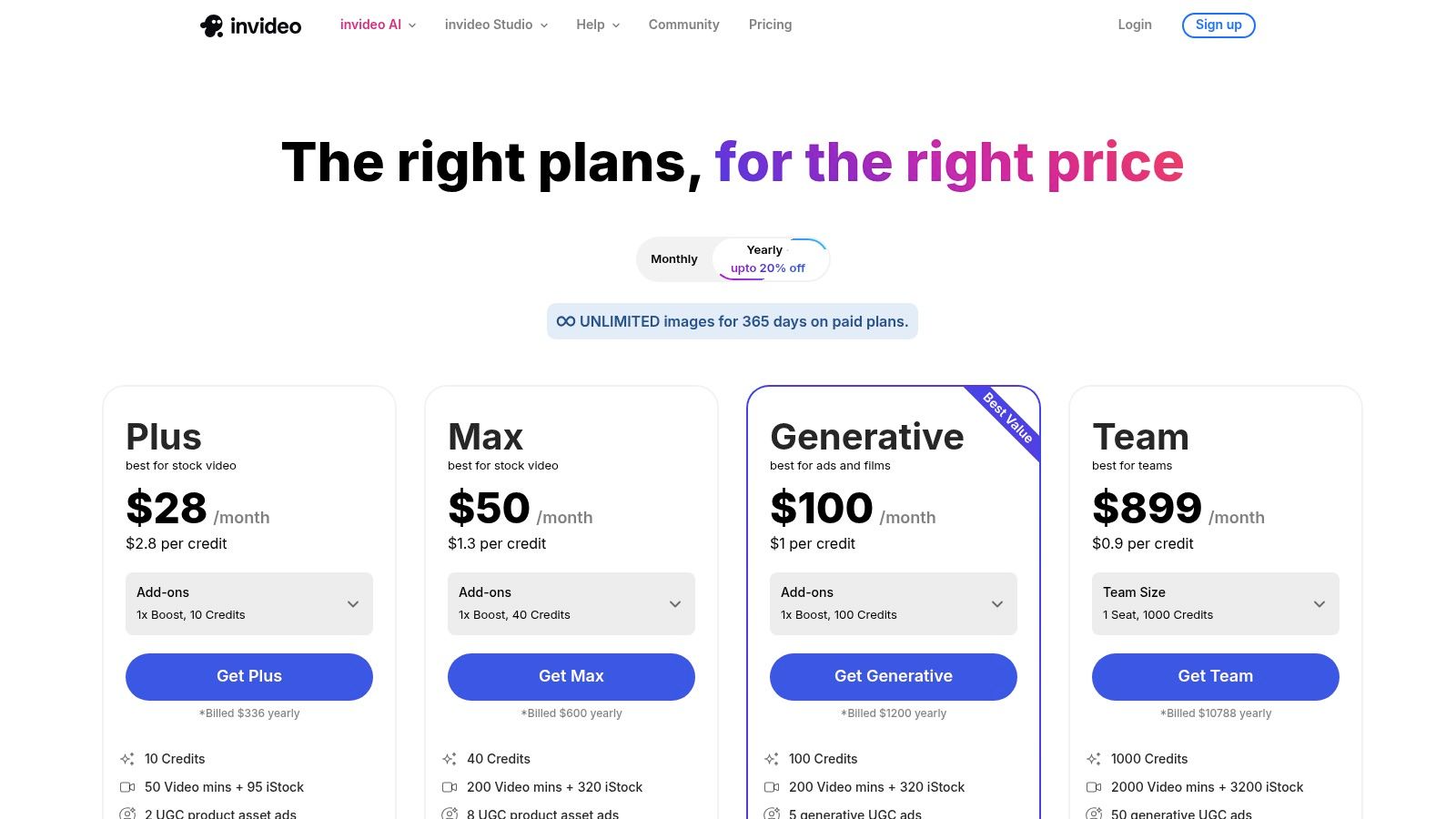
While its automated workflow is a huge time-saver, the heavy reliance on stock media means it's less suited for creating highly original or brand-specific cinematic visuals. The free plan is quite limited, including a prominent watermark and a small weekly quota of AI generation minutes, making paid plans a necessity for any serious or commercial use.
Website: https://invideo.io/pricing
7. Descript
Descript carves out a unique niche among the best AI video creation tools by being an AI-powered editor rather than a pure generator. Its core innovation is a powerful, text-based workflow that lets you edit video and audio as easily as a text document. This makes it exceptionally well-suited for creators focused on narrative content like podcasts, tutorials, and interviews, where precise control is crucial. The platform combines a familiar multi-track editor with advanced AI features, creating a hybrid tool that streamlines post-production.
Instead of making video from a prompt, Descript uses AI to supercharge the editing process. You transcribe your media, and then you can cut, copy, and paste the text to edit the corresponding video clips. It automatically finds and removes filler words like "um" and "uh" with a single click. Its "Underlord" AI assistant can help script, summarize, and find the best clips, acting as a creative partner. This editor-first approach gives you a level of granular control that many text-to-video generators lack.
Key Features & Use Cases
Descript excels at accelerating the workflow for content that is dialogue-heavy and requires detailed editing. Its blend of traditional editing with smart AI assistance is its key differentiator.
- Best For: Podcasters repurposing content for video, creating educational tutorials, editing interviews, and making short-form social media clips from long-form content.
- Standout Feature: The text-based video editing is revolutionary. It allows for incredibly fast rough cuts and effortless removal of mistakes by simply deleting text from the transcript.
- Audio Enhancement: "Studio Sound" processing can make amateur recordings sound professionally mastered, while AI Overdub lets you clone your voice to fix misspoken words.
- Workflow: It is built for both solo creators and collaborative teams, offering features that scale from simple projects to complex, multi-person workflows.
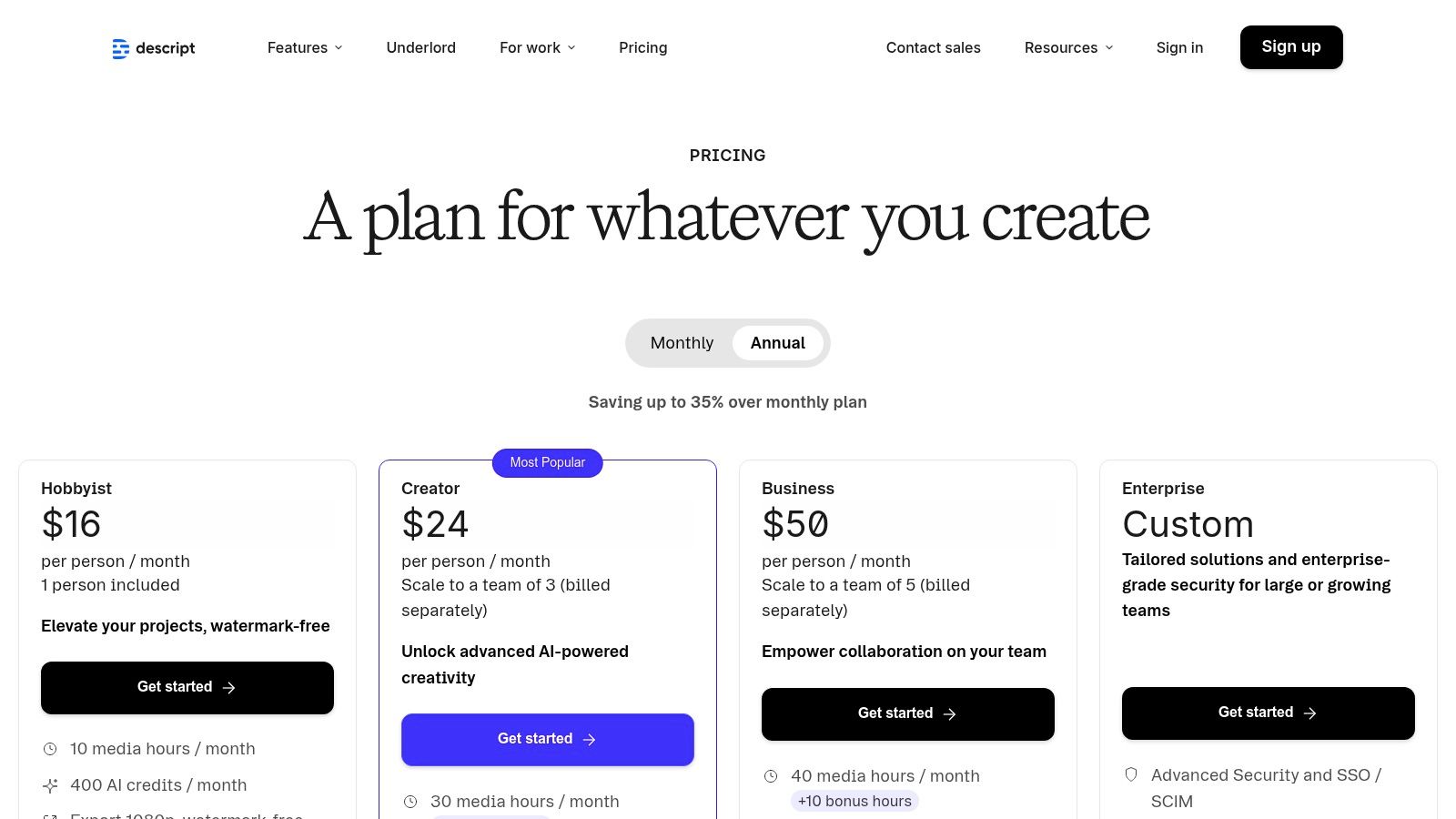
While Descript is a powerhouse for editing existing footage, it is not a text-to-video generator. You must provide your own video or audio to start. The platform also operates on a system of monthly transcription hours and AI feature credits, which requires users to monitor their usage to avoid overages on their plan.
Website: https://www.descript.com/pricing
8. Adobe Express
Adobe Express brings the power of Adobe's creative ecosystem into an accessible, browser-based platform perfect for social media and marketing content. Powered by Adobe Firefly, it's one of the best AI video creation tools for users who want a blend of template-driven design and generative AI without the steep learning curve of professional editors like Premiere Pro. Its core value is providing a massive stock library and intuitive tools for rapid, brand-consistent content creation.
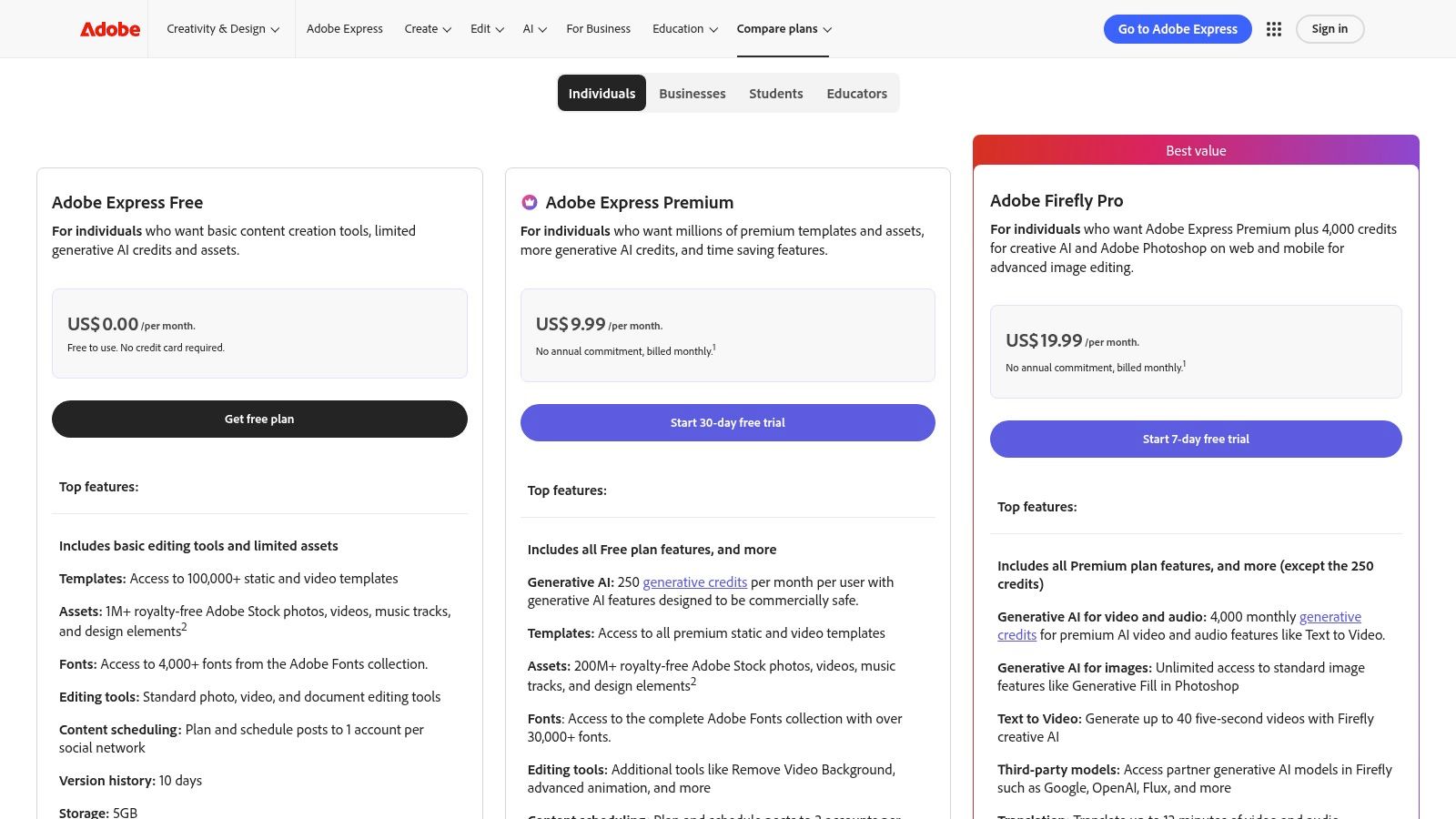
The workflow is built for speed and simplicity. You can start from thousands of templates, customize them with a drag-and-drop interface, and use AI features like background removal and text-to-image generation. The platform includes a generous library of over 200 million Adobe Stock assets on its Premium plan, giving marketers and creators a vast pool of high-quality photos, videos, and music to work with, all in a single interface.
Key Features & Use Cases
Adobe Express shines for teams that need to produce a high volume of quality social and marketing assets quickly, with strong brand management tools.
- Best For: Marketing teams, social media managers, and small businesses needing to create branded video ads, social posts, and promotional content.
- Standout Feature: The seamless integration with Adobe Firefly and the enormous Adobe Stock library (200M+ assets) provides unparalleled creative resources directly within the editor.
- Brand Management: Premium plans offer robust brand kit management, allowing teams to store logos, colors, and fonts to ensure all video content stays consistent.
- Integrations: It connects with the broader Adobe Creative Cloud, allowing for smoother workflows between Express, Photoshop, and Illustrator.
While exceptionally user-friendly, Adobe Express's generative features run on a credit system, which requires careful planning for teams with heavy usage. Its timeline editing capabilities are also more streamlined and less advanced than a dedicated video editor like Premiere Pro. For those seeking different approaches to AI-powered creation, you can explore the evolving landscape of AI video on the LunaBloom AI blog.
Website: https://www.adobe.com/express/pricing.html
9. Canva
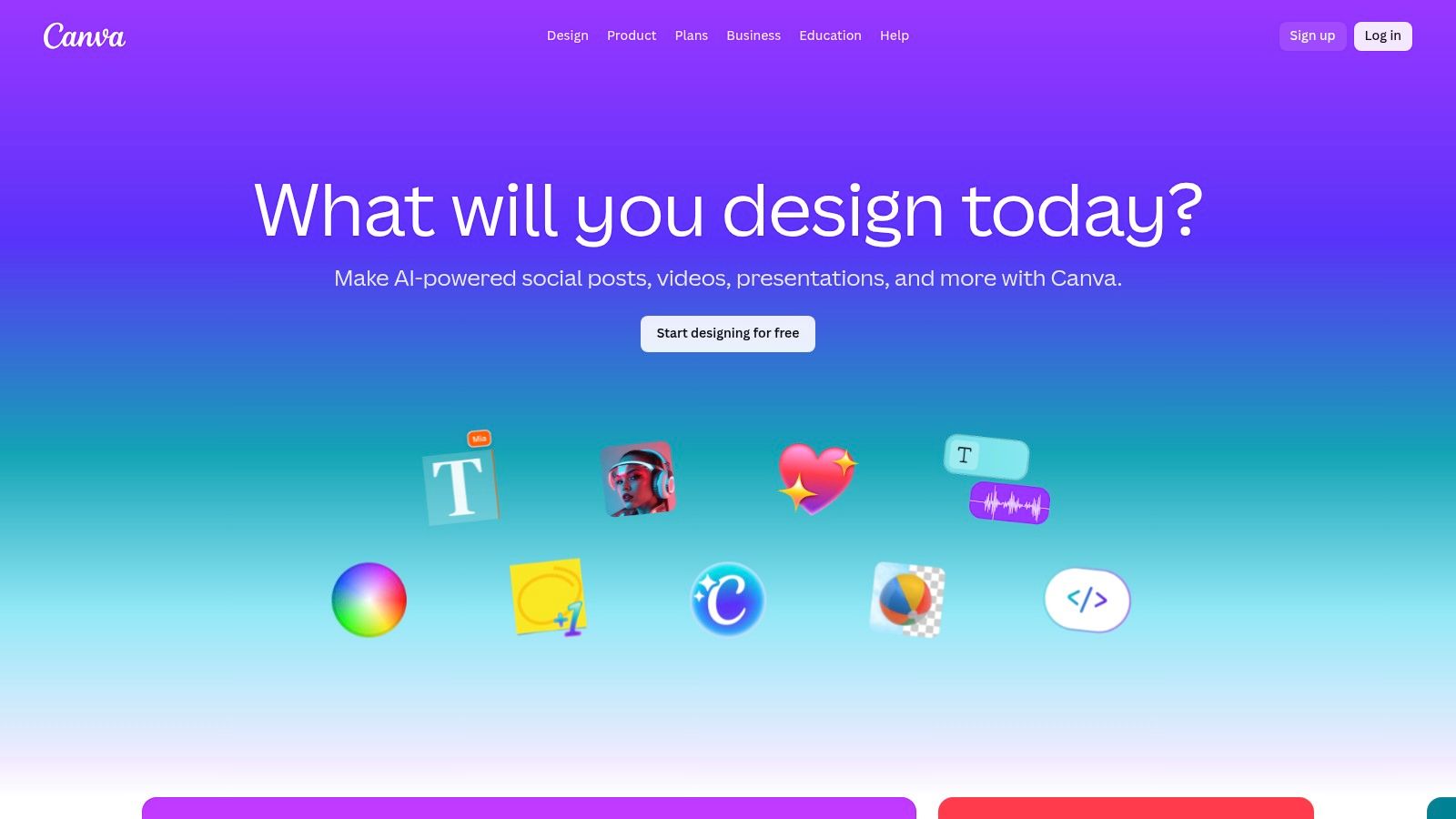
Canva has evolved from a simple graphic design tool into a comprehensive visual communication suite, making it one of the best AI video creation tools for users who prioritize speed and simplicity. It's an ideal choice for social media teams, small businesses, and marketers who need a fast, template-driven workflow without a steep learning curve. The platform's "Magic" suite of AI tools, including Magic Video, is designed to accelerate content creation from start to finish in a familiar, user-friendly environment.
The process is incredibly streamlined. You can use a vast library of templates, add your own media, or generate clips with AI, and then use the drag-and-drop editor to customize everything. Canva’s strength lies in its ecosystem. It provides everything from stock photos and video clips to brand kits and scheduling tools, all in one place. This integration makes it a powerhouse for teams looking to maintain brand consistency and manage their entire content calendar without juggling multiple apps.
Key Features & Use Cases
Canva excels at quickly producing good-looking, on-brand video content, especially for social media and marketing campaigns where volume and speed are critical.
- Best For: Social media content creators, small business marketing, and teams needing a unified design and video platform.
- Standout Feature: The huge template and asset library, combined with Brand Kit management, allows teams to produce consistent, high-quality videos at scale with minimal effort.
- Workflow: The integrated workflow lets you design, collaborate, get approvals, and schedule posts directly from the platform—a major time-saver.
- Collaboration: Real-time collaboration features are built-in, making it easy for team members to work on video projects together.
While Canva's AI video features are powerful for quick edits and generation, they offer less granular control compared to specialized generative AI video platforms. The focus is more on assisting and speeding up the traditional editing process rather than creating complex scenes from text prompts alone.
Website: https://www.canva.com
10. Colossyan
Colossyan positions itself as a top-tier AI video creation tool specifically designed for learning and development (L&D) and workplace communication. It excels at turning complex training materials, corporate announcements, and how-to guides into engaging, avatar-led video content. The platform is built to handle content production at an enterprise scale, providing a streamlined workflow that allows teams to create consistent, high-quality videos without specialized equipment or skills.
Its core function revolves around a prompt-to-video workflow, supercharged by an AI script assistant that helps refine your message. You can choose from a diverse range of avatars and bring them to life using text-to-speech in over 40 languages. Colossyan’s unique feature is the ability to stage scenes with multiple AI actors interacting, which is especially useful for scenario-based training and conversational explainers.
Key Features & Use Cases
Colossyan is finely tuned for organizations that need to produce and localize instructional content efficiently and securely. Its enterprise-first approach ensures reliability and scalability.
- Best For: Creating scalable corporate training programs, localizing HR materials, and producing internal communication videos.
- Standout Feature: The ability to create multi-actor scenes allows for more dynamic and realistic dialogue-based training simulations.
- Security: Offers robust enterprise-grade security with SSO, dedicated support, and even optional dedicated data centers for maximum data privacy.
- Collaboration: Includes built-in collaboration tools, enabling L&D teams to work together seamlessly on video projects from script to final render.
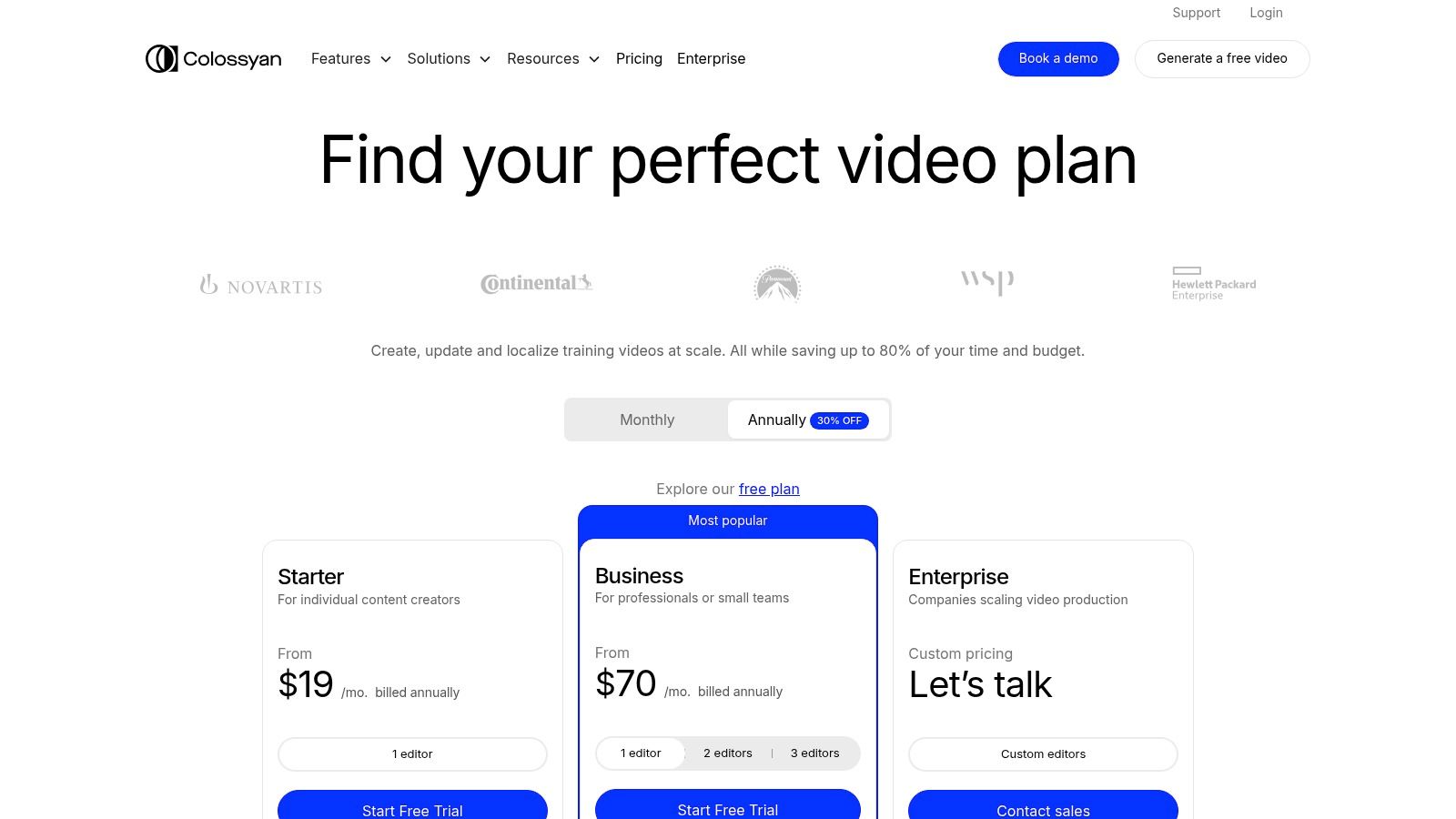
While Colossyan is a powerhouse for structured educational content, its focus on avatar-driven videos makes it less ideal for projects that need dynamic, real-world footage or highly artistic visuals. The pricing is also geared more towards corporate budgets than individual creators, reflecting its enterprise focus.
Website: https://www.colossyan.com/pricing
11. OpusClip
OpusClip has carved out a powerful niche among AI video creation tools by focusing on one specific, high-demand task: repurposing long-form content. It's designed for creators, podcasters, and marketers who want to transform lengthy videos—like interviews or webinars—into a series of engaging, shareable short clips for TikTok, Instagram Reels, and YouTube Shorts. The platform’s "one-long-video-to-ten-viral-clips" promise is its core value.
The workflow is incredibly simple. You upload a long video, and OpusClip's AI analyzes it to find the most compelling hooks and highlights. It then automatically reframes the shots to a vertical 9:16 aspect ratio, adds dynamic animated captions, and generates a "virality score" for each clip to help you decide what to post first. This AI-driven process saves countless hours of manual editing, making it an essential tool for maximizing content reach with minimal effort.
Key Features & Use Cases
OpusClip excels at high-speed content repurposing, bridging the gap between long-form value and short-form reach. Its specialized feature set is built for speed and social media optimization.
- Best For: Podcasters, streamers, and marketers needing to quickly create social media clips from existing long-form content.
- Standout Feature: The "AI Curation" with virality scoring intelligently identifies and ranks potential clips based on their likelihood of performing well, removing the guesswork from content selection.
- Workflow Integration: It offers exports to professional editing software like Premiere Pro and DaVinci Resolve, allowing for further refinement if needed.
- Accessibility: With a generous free-forever plan, web and iOS apps, and a developer API, OpusClip is accessible to creators at all levels.
While OpusClip is incredibly efficient for what it does, it's not a comprehensive video editor for creating content from scratch. Its strength is in clipping and repurposing, not full-scale production. For those evaluating different repurposing tools, it's worth exploring various alternatives to OpusClip to find the perfect fit for your content strategy. The credit-based system on paid plans may also require management for high-volume users.
Website: https://www.opusclip.io
12. G2 (AI Video Generators category)
Instead of being a single tool, G2's AI Video Generators category is a vital research hub for anyone comparing the best AI video creation tools. It’s a B2B software marketplace driven by verified user reviews, providing a real-world perspective on this crowded landscape. For businesses doing their homework before committing to a subscription, G2 offers an invaluable layer of social proof and side-by-side product data.
The platform lets you filter vendors by market segment, user satisfaction scores, and specific features. This helps you move beyond marketing claims and see how tools actually perform for teams of your size and in your industry. G2's Grid reports, which plot platforms based on market presence and user satisfaction, are particularly useful for quickly spotting established leaders and rising stars in the AI video space. It centralizes the discovery process, saving you a ton of time.
Key Features & Use Cases
G2 is less about creating and more about making smart decisions. It’s the starting point for building a software shortlist and checking vendor promises against real user experiences.
- Best For: Marketing teams, IT departments, and business owners comparing AI video tools before purchase.
- Standout Feature: The detailed, verified user reviews often include specific pros and cons that provide insights you won't find on a product’s homepage.
- Discovery: Excellent for discovering niche or newer tools that may not have the marketing budget of larger players but offer innovative features.
- Comparison: The feature comparison tables allow for a direct, data-driven evaluation of multiple platforms at once.
While G2 is an essential free resource, be aware that sponsored placements can influence visibility. It's always wise to cross-reference the reviews with product trials. The platform's feature data might also occasionally lag behind the rapid development of the tools themselves.
Website: https://www.g2.com/categories/ai-video-generators
Top 12 AI Video Tools Comparison
| Product | Core features | UX & Quality (★) | Price/Value (💰) | Target (👥) | Unique selling point (✨) |
|---|---|---|---|---|---|
| LunaBloom AI 🏆 | Text→video (50+ languages), AI avatars, voice cloning, auto-subtitles | ★★★★☆ | 💰 Free tier + scalable plans | 👥 Marketers, educators, creators, SMBs | ✨ Multilingual avatar-driven pipeline compresses production |
| Synthesia | Template-driven talking-heads, dubbing, team tools | ★★★★☆ | 💰 Enterprise / credit-based | 👥 Enterprise training & comms teams | ✨ Large avatar library + enterprise security |
| Runway | Frontier generative models, editor, upscaling, lip-sync | ★★★★☆ | 💰 Credit-based; can be costly for long clips | 👥 Filmmakers, generative creators | ✨ State-of-the-art generative video models |
| Luma Labs (Dream Machine) | Ray models, HDR-like motion, up-res to 4K (short clips) | ★★★★☆ | 💰 Transparent credit tiers; Plus removes watermark | 👥 Ad/social creators, concept teams | ✨ High-fidelity short-motion realism |
| HeyGen | 700+ avatars, voice cloning, 175+ languages, 4K export | ★★★★☆ | 💰 Competitive Pro/Team tiers | 👥 Marketers, localization teams | ✨ Extensive avatar/localization support |
| InVideo AI | Script→voice→visuals pipeline, stock libraries, templates | ★★★☆☆ | 💰 Mid-market; free tier with watermark | 👥 Marketers, social teams | ✨ End-to-end prompt→publish workflow |
| Descript | Text-based editing, Overdub, dubbing, Studio Sound | ★★★★☆ | 💰 Tiered (media hours / credits) | 👥 Podcasters, tutorial creators, editors | ✨ Text-first editor + AI overdub |
| Adobe Express | Firefly generative video/audio, vast stock, templates | ★★★★☆ | 💰 Premium stock + generative credits | 👥 Marketing & design teams | ✨ Adobe Stock + brand/tooling integration |
| Canva | Magic Video, templates, brand kits, collaboration | ★★★★☆ | 💰 Freemium; Pro/Teams plans | 👥 Small businesses, social teams | ✨ Massive templates & easy collaboration |
| Colossyan | Prompt-to-video avatar workflow, translations, SSO | ★★★★☆ | 💰 Higher / enterprise-focused pricing | 👥 L&D, internal comms, enterprises | ✨ Training-scale localization & security |
| OpusClip | Auto-clipping, captions, reframing, scheduler | ★★★★☆ | 💰 Free trial / free-forever; Pro features paid | 👥 Creators, podcasters, social marketers | ✨ Fast repurposing to viral short-form clips |
| G2 (AI Video category) | Reviews, comparisons, filters, vendor links | ★★★☆☆ | 💰 Free to browse | 👥 Buyers, researchers | ✨ Peer reviews & market rankings |
Choosing Your Creative Partner: Final Thoughts on AI Video
We've journeyed through a dynamic landscape, exploring twelve of the most compelling AI video creation tools out there today. The market is no longer a single entity; it's a vibrant ecosystem of specialized platforms, each designed to solve a different creative or business challenge. From the cinematic power of Runway and Luma Labs to the professional, avatar-driven presentations of Synthesia and HeyGen, the diversity is stunning.
This journey has revealed a clear trend: the democratization of high-quality video production. What once required expensive gear, special software, and deep technical skills is now accessible through intuitive, browser-based tools. Platforms like Canva and Adobe Express are bringing AI-powered video features to millions of existing users, while newcomers like LunaBloom AI are building comprehensive, all-in-one solutions designed for efficiency and scale.
Key Takeaways from Our Deep Dive
Reflecting on our analysis, a few core principles emerge for anyone looking to choose from the best AI video creation tools:
- There is no single "best" tool, only the "best fit" for your specific goal. A marketing agency needing quick, branded social media clips has vastly different needs than a filmmaker experimenting with generative art or a corporation developing multilingual training modules.
- Workflow integration is paramount. The most powerful tools don't just generate video; they fit seamlessly into your existing process. Consider platforms like Descript, which merges transcription with video editing, or tools that offer robust API access for custom integrations.
- Avatar realism and voice cloning are major differentiators. For corporate communications, training, and sales videos, the quality of digital avatars and the ability to create a consistent, branded voice are critical. Platforms like Synthesia, HeyGen, and Colossyan are leading the charge here.
- The balance between creative control and automation is key. Some tools, like Runway, offer granular control for artists, while others, like Invideo AI, prioritize a fast, prompt-to-video workflow. Know how much hands-on control you need versus how much you want to automate.
Your Actionable Next Steps: A Framework for Selection
Feeling overwhelmed by the options? Don't be. Use this simple framework to narrow down your choices and make a smart decision that aligns with your goals.
Define Your Primary Use Case: Be specific. Are you creating internal training videos, viral social media shorts, product demonstration ads, or educational explainers? Your primary application will immediately rule out some tools and highlight others. For example, OpusClip is purpose-built for repurposing content, making it a poor choice for creating original marketing videos from scratch.
Audit Your Existing Resources and Skills: Be honest about your team's technical abilities. If you have experienced video editors, a tool that integrates with professional software might be ideal. If you're a solo entrepreneur or a small marketing team, a user-friendly, template-driven platform like Canva or LunaBloom AI will deliver the most value with the least friction.
Leverage Free Trials and Demos: This is the most critical step. You can read reviews all day, but nothing replaces hands-on experience. Spend a few hours with the free versions or trials of your top 2-3 contenders. Test the same prompt or upload the same script to each. Evaluate the user interface, the output quality, the rendering speed, and the overall "feel" of the platform.
Consider Long-Term Scalability: Think about your needs six months or a year from now. Will you need to expand to multiple languages? Will you need API access to connect the tool to your CRM? Choosing a platform that can grow with you, like those with enterprise-grade features, can save you a costly migration down the line.
The AI video revolution isn't coming—it's already here. By carefully considering your goals and using the insights from this guide, you can confidently select the right creative partner. This choice will empower you to not just keep pace with the evolving digital landscape but to lead the charge, turning your ideas into compelling visual stories with unprecedented speed and efficiency.
Ready to move from research to results? If you're looking for a comprehensive, all-in-one platform that combines powerful AI features with an intuitive workflow designed for marketers, educators, and businesses, explore what LunaBloom AI has to offer. Experience the difference a unified, purpose-built tool can make in your content strategy by visiting LunaBloom AI and starting your creative journey today.