If you make videos for a living, you've probably hit the same wall again and again. You need one version for YouTube, another for paid social, a shorter one for onboarding, and maybe a translated version for a new market. The script changes. The voice changes. Your face still needs to be there. But you can't keep reshooting everything.
That's where cloning in video starts to matter.
At its simplest, cloning in video means creating a synthetic version of part of a person's on-camera presence. That could be their voice, their face, their delivery style, or a fuller avatar that can appear in new videos without a traditional shoot. It's not the same as trimming clips, swapping backgrounds, or adding beauty filters. Those edit existing footage. Cloning systems generate new performance elements that imitate a real person.
This matters now because video production has shifted from “make one polished asset” to “maintain a whole content system.” Teams want localization, versioning, personalization, and faster turnaround. Creators want to be present in more places without recording all day. Brands want consistency across tutorials, ads, internal communications, and product demos. If you're trying to understand how that works, this guide will help.
Introduction to Cloning in Video and Why It Matters Now
A common scenario looks like this: a founder records a product explainer in English, then realizes the sales team needs the same message for other regions, support wants a help-center version, and paid media wants shorter cuts for testing. The old solution was a new shoot, or a compromise that made the content feel stitched together.
Cloning in video changes that workflow. Instead of treating each new version as a fresh production, teams can treat video more like a modular system. One likeness becomes reusable across many outputs, as long as the process is ethical and the result is good enough to hold up on screen.
Cloning in video is less about novelty and more about turning one human performance into a reusable production asset.
That shift is easier to understand when you separate cloning from gimmicks. A face filter decorates footage. A clone attempts to recreate identity cues that viewers recognize, such as mouth movement, tone, expression, and pacing. That's why people often confuse cloning with deepfakes, but the practical use case is often far more ordinary: localization, training, product education, and personalized messaging.
Why interest has grown
Several forces are pushing teams toward cloned video workflows:
- Localization pressure: Audiences expect content in their own language and accent.
- Publishing volume: Social, sales, support, and education teams all need video.
- On-camera bottlenecks: Founders, educators, and spokespeople can't record endlessly.
- Consistency needs: A cloned workflow can keep delivery more uniform across versions.
The conversation also shifted from “Can this fool people?” to “Can this help teams produce useful video responsibly?” That's a much better question.
If you want context on the company behind this perspective, LunaBloom AI's overview lays out its focus on AI video creation, avatars, voice, and localization.
What makes this topic worth learning
There's also a long technical history behind today's tools. A foundational milestone came in 1997, when Christoph Bregler, Michele Covell, and Malcolm Slaney created Video Rewrite, described as the first fully automated system for facial reanimation. It altered footage so a person appeared to mouth words from a different audio track, establishing the core speech-to-face pipeline later systems still rely on. The term deepfake didn't appear until 2017, two decades later, which shows how much older the technical roots are than the public label itself, according to this historical overview of Video Rewrite.
What Cloning in Video Really Means
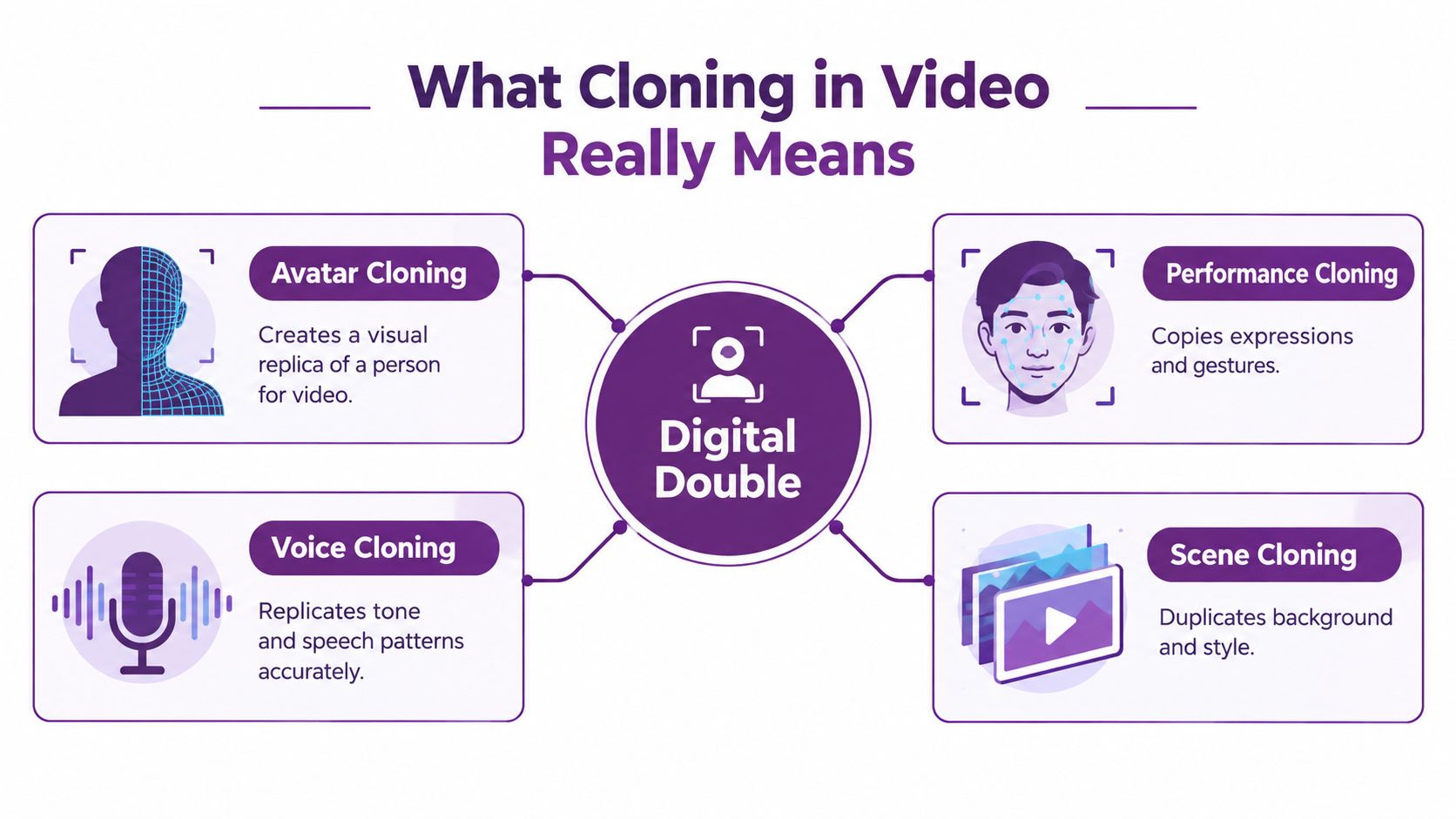
The easiest way to understand cloning in video is to think about a digital double. Not a perfect copy of a whole human being, but a trained stand-in for specific parts of how that person appears on screen.
Four forms people usually mean
When people say “video cloning,” they often bundle together several different techniques:
- Avatar cloning: A system creates a visual presenter that looks like a specific person and can deliver new lines.
- Voice cloning: The system learns someone's vocal qualities so new speech can sound like them.
- Performance cloning: Expressions, mouth shapes, and facial motion are transferred or generated to match speech.
- Scene cloning: The visual setup, framing, style, or layered composition gets replicated across versions.
Those are related, but they're not identical. You can clone a voice without cloning a face. You can create a lip-synced presenter without fully cloning body performance. You can also place one actor into a multi-character scene by combining cloned takes and compositing.
A simple analogy that makes it click
Think of a film set.
A stunt double stands in for physical action. A voice impressionist stands in for sound. A body double can match framing or silhouette. Cloning in video is the software version of those substitutions, except the model learns from real recordings and generates fresh output.
That's why one cloned video can feel convincing in one dimension and weak in another. The voice may sound right, while the mouth timing looks off. Or the face may look polished, but the cadence feels unnatural.
A believable clone isn't one trick. It's several layers lining up at the same time.
How cloning differs from a deepfake
People often use the terms interchangeably, but the intent and production context can differ.
A deepfake usually refers to manipulated media that changes someone's likeness in a deceptive or controversial way. Cloning in video is broader. It includes business and creator workflows where the person being cloned has given permission and the goal is practical production, such as dubbing a course, scaling a product demo, or building an avatar presenter.
That doesn't make cloning automatically safe or trustworthy. It just means the category is larger than malicious impersonation.
Where beginners usually get confused
Most confusion happens in three places:
Editing versus generation
Swapping a background or cutting takes isn't cloning. Generating new speech, new lip movement, or a reusable avatar is.Voice versus full identity
A cloned voice is only one piece. Viewers judge realism from timing, expression, and consistency too.Single clip versus production system
A one-off demo can look impressive. A repeatable workflow is harder. It has to hold up across scripts, languages, formats, and delivery channels.
Once you see those differences, the rest of the topic becomes much less mysterious.
How Video Cloning Works Behind the Scenes
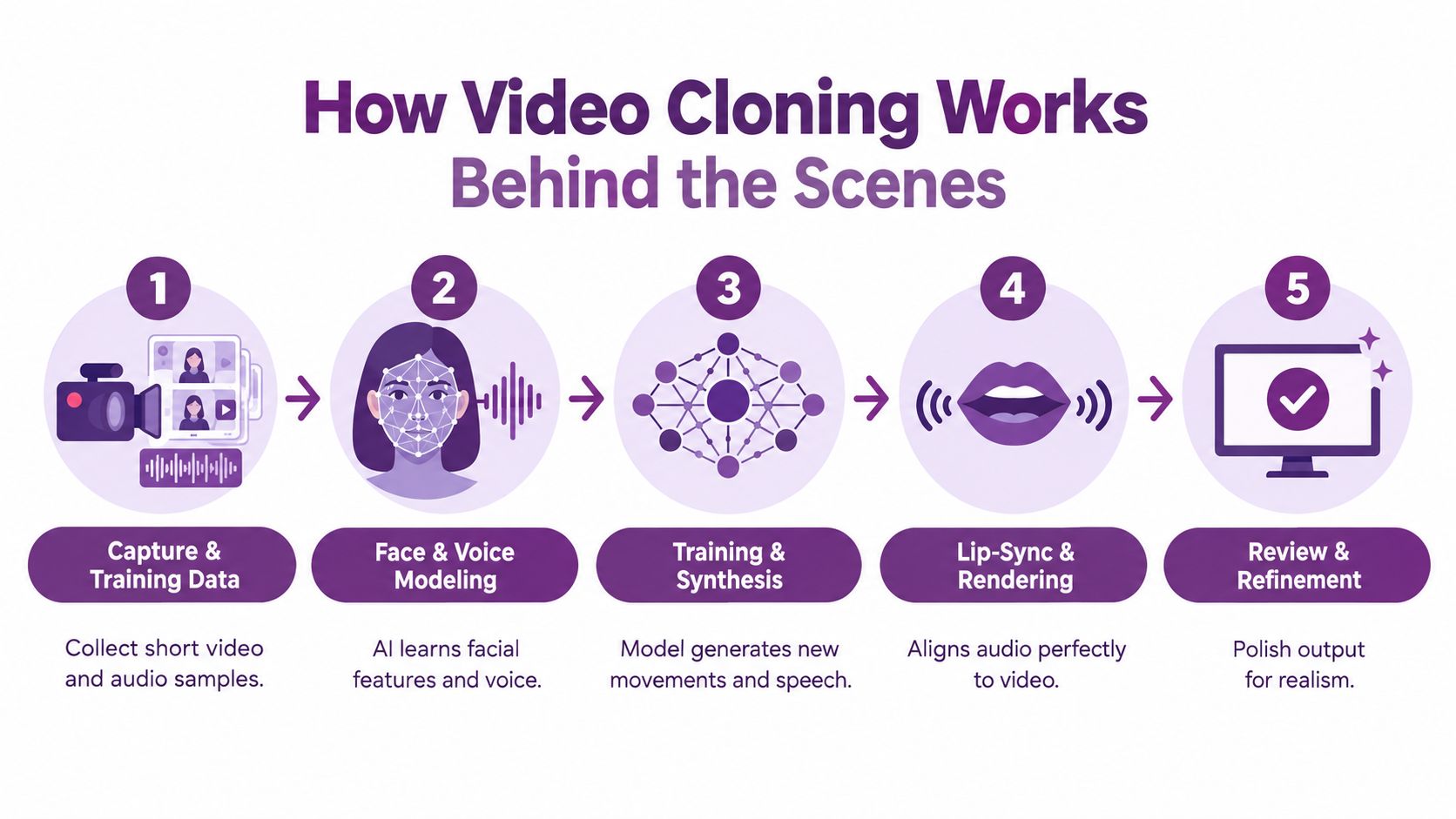
Most video cloning tools feel simple from the front end. Upload samples, paste a script, choose a language, export. Under the hood, the process is a chain, and the chain is only as strong as its weakest link.
This visual captures the basic production flow.
Step one through three
Most systems begin with three foundations:
Capture and training data
The model needs examples of the person's voice, face, and delivery. Clean source material helps. So does variety in lighting, angles, and expressions.Face and voice modeling
The system learns patterns. For voice, that means vocal identity cues such as tone and rhythm. For face and motion, it means learning how speech relates to visible facial movement.Synthesis
Once the model has learned those relationships, it generates new content from a script, audio input, or another driving signal.
A major clue to how fast this field matured comes from public datasets. A review of deepfake datasets reports DeepfakeTIMIT in 2018 with 620 videos across 32 subjects, FaceForensics in 2018 with 1,004 videos and more than 500,000 frames, and FaceForensics++ in 2019 with 5,000 videos. By 2021, ForgeryNet had expanded to 2,896,062 images and 221,247 videos, showing how quickly the field moved from small experiments to large benchmark-driven development, according to this dataset review.
The part that viewers notice first
After synthesis, the system has to match sound and picture. A lot of “almost good” output falls apart.
A cloned presenter may sound convincing, but if the mouth closes a beat too early, or if side angles break facial consistency, people notice immediately. Surveys of audio-visual cloning pipelines describe Wav2Lip and related lip-sync methods as important baselines, while SV2TTS-style transfer learning is treated as a strong voice-cloning approach. The practical lesson from this survey on speech and lip-sync cloning systems is simple: strong speaker adaptation can improve voice identity, but realism still depends on accurate lip alignment under pose changes and occlusion.
A lot of creators assume “voice cloned” means “video solved.” It doesn't.
Why quality breaks in the real world
Benchmarking has also taught an important lesson. Video cloning and deepfake evaluation now relies on face-forgery datasets such as FaceForensics++ (2019), Celeb-DF (2020), DFDC (2020), DeeperForensics-1.0 (2020), and FFIW (2021). These benchmarks differ in realism, compression, actor setup, and in-the-wild conditions, and research discussing these evaluation sets notes that performance often depends heavily on the dataset conditions, not only on the cloning method itself.
That matters because production teams don't publish to a benchmark. They publish to email, paid social, learning portals, and mobile feeds with different compression and playback behavior.
Practical rule: Test cloned output where it will actually live. A video that looks clean in an editor can break after platform compression.
If you want to try this kind of workflow in a live production tool, LunaBloom AI's app includes script-to-video, cloned voiceovers, avatars, captions, and localization in one workflow.
A quick example helps. If you dub a presenter into another language, the text may be accurate and the voice may feel close, but syllables can expand or contract compared with the original speech. That changes mouth timing. The software then has to decide whether to prioritize natural-sounding audio, strict lip sync, or visual smoothness. Good tools balance all three, but there's always a tradeoff.
A useful demo of how these systems are discussed visually is below.
Comparing the Main Technical Approaches to Video Cloning
Not every project needs the most advanced form of cloning. In many cases, the smartest choice is the simplest one that gets the job done without making the output feel synthetic.
Three common approaches
Most production teams end up choosing between these paths:
Face reenactment or lip-sync dubbing
Best when you already have footage of a presenter and want to update the spoken track or localize it into another language.Full avatar generation
Best when you want a reusable presenter who can deliver many scripts without repeated filming.Multi-clone compositing
Best when one performer needs to appear as several characters, or when you want dialogue scenes built from cloned elements and layered edits.
Each path solves a different bottleneck. The mistake is choosing the most complex one because it sounds more advanced.
Choosing Your Video Cloning Approach
| Approach | Best For | Key Limitation |
|---|---|---|
| Face reenactment and lip-sync dubbing | Localization, redubbing explainers, updating spoken lines in existing footage | Can break on difficult angles, heavy motion, or long-form emotional delivery |
| Full avatar generation from text or image | Tutorials, training, onboarding, product explainers, repeatable presenter workflows | May feel less organic than a fresh human performance in high-emotion content |
| Multi-clone compositing | Creative storytelling, dialogue scenes, character-based marketing, music and entertainment formats | Requires more planning for staging, continuity, and edit realism |
How to decide without overcomplicating it
Use your production goal as the filter.
If your problem is, “We already have a good video, but need it in other languages,” lip-sync dubbing is usually the shortest path.
If your problem is, “Our subject matter expert can't keep recording every update,” an avatar workflow often makes more sense.
If your problem is, “We want one performer to play multiple roles,” compositing and scene-level cloning become the more relevant tools.
Don't buy complexity you won't use. Match the method to the bottleneck.
A quick decision checklist
Ask these before choosing:
- Do you already have usable footage? Existing footage favors reenactment and dubbing.
- Do you need repeatability? A recurring series favors an avatar workflow.
- Will viewers expect emotional nuance? High-stakes testimonials and founder stories may still benefit from a real shoot.
- Are there multiple characters on screen? That pushes the project toward compositing and scene planning.
- Will you localize often? If yes, choose a system built for script, voice, and lip-sync coordination rather than isolated edits.
Cloning becomes a production decision, not just a technical one.
Real World Use Cases and Examples That Show Cloning in Action
The easiest way to judge cloning in video is to stop thinking like a researcher and start thinking like a working team with a deadline.
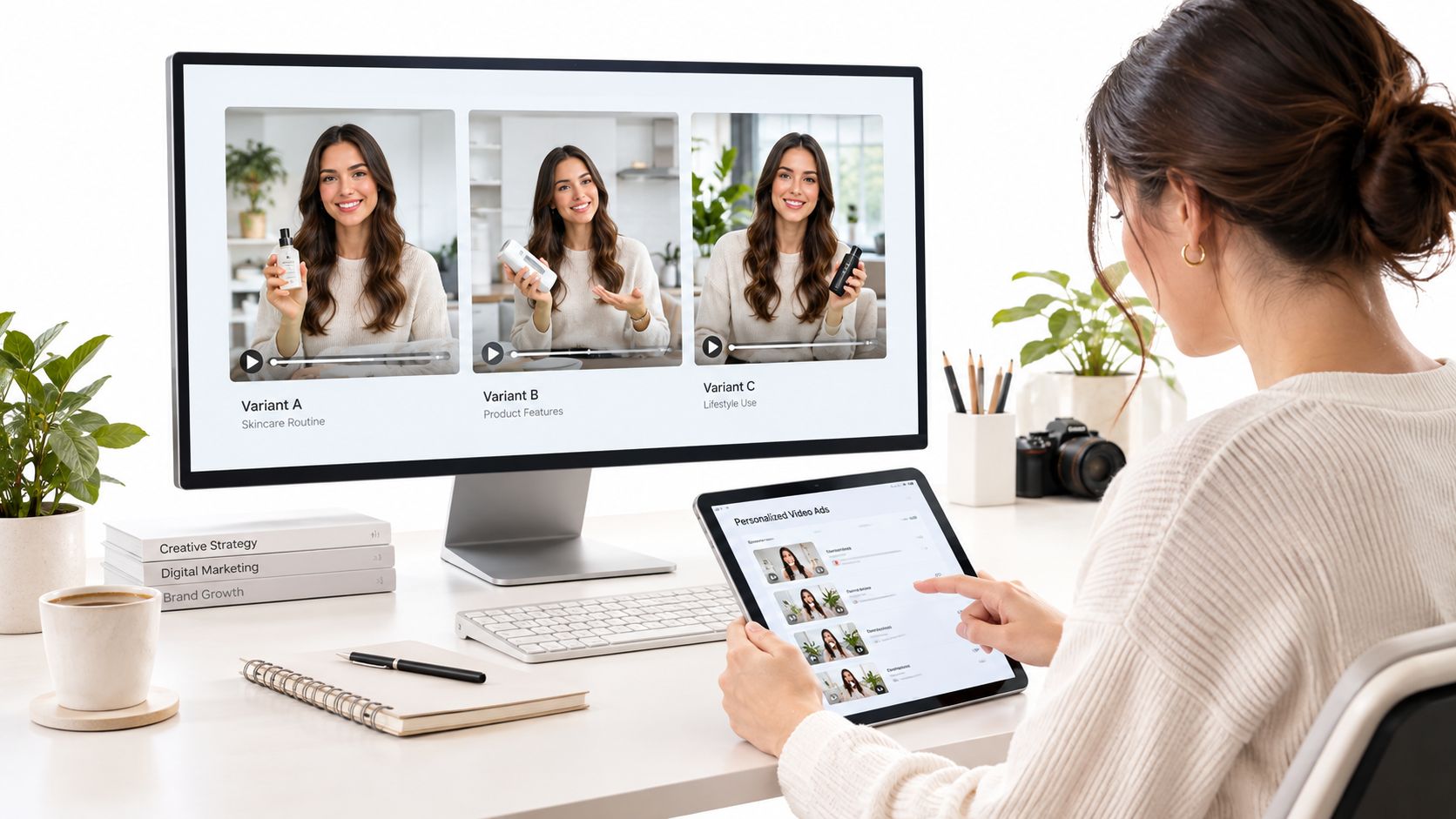
A marketer has one offer, but needs versions for different audiences. An educator has one lesson, but needs multiple languages. A product team has one update, but wants support, sales, and onboarding versions. Cloning is useful when one core message has to branch into many outputs.
Where teams get the most practical value
Here are the use cases where cloning tends to fit naturally:
Personalized marketing variants
A brand spokesperson records once, then the team adapts the message for different products, segments, or channels without rebuilding from zero.Product demos and tutorials
When UI details change, teams can update narration and presenter delivery without scheduling another studio session.Training and onboarding
HR, ops, and enablement teams often need consistent internal videos. Cloned presenters help maintain a familiar face and voice across modules.Multilingual localization
Recent industry coverage suggests the strongest business use case has shifted toward localization rather than impersonation, while buyers increasingly want evidence of audience acceptance and campaign performance by format and market, according to this analysis of AI video trends and the trust gap.Creative multi-character formats
One creator can appear as multiple roles in a sketch, explainer dialogue, or music-driven format without hiring a full cast.
Before and after in real production terms
A traditional workflow for localized video often means rewriting, rehiring voice talent, reshooting pickups, and manually adjusting edits. A cloned workflow can keep the visual identity more stable while swapping language, accent, and spoken detail inside the same creative system.
That doesn't mean every cloned video should replace a shoot. If the content depends on spontaneous emotion, live interaction, or documentary credibility, viewers often respond better to visible human presence. But for repeatable formats, cloning can remove a lot of friction.
If you're evaluating what “good” synthetic presenter content should look like in campaign settings, this Realistic AI Video guide for marketers is a useful companion because it frames realism around practical marketing output, not just technical novelty.
A creator-friendly example
Say you run a course business. You have one solid lesson on customer research. You want:
- A full lesson for your members.
- A shorter social version.
- A version for Spanish-speaking prospects.
- A branded onboarding clip for new students.
That's not four separate creative concepts. It's one core message with several delivery contexts. A cloning workflow lets you keep the teacher's identity present while adapting format and language.
For teams testing tools, LunaBloom AI's starter app is one example of a workflow that combines avatars, cloned voice, multilingual output, and social-ready editing for these kinds of repeated content tasks.
Risks Ethics and Legal Guidance for Responsible Video Cloning
Cloning in video becomes risky the moment people skip consent, hide manipulation, or deploy synthetic content at scale without review. The technology itself isn't the whole issue. The workflow is.
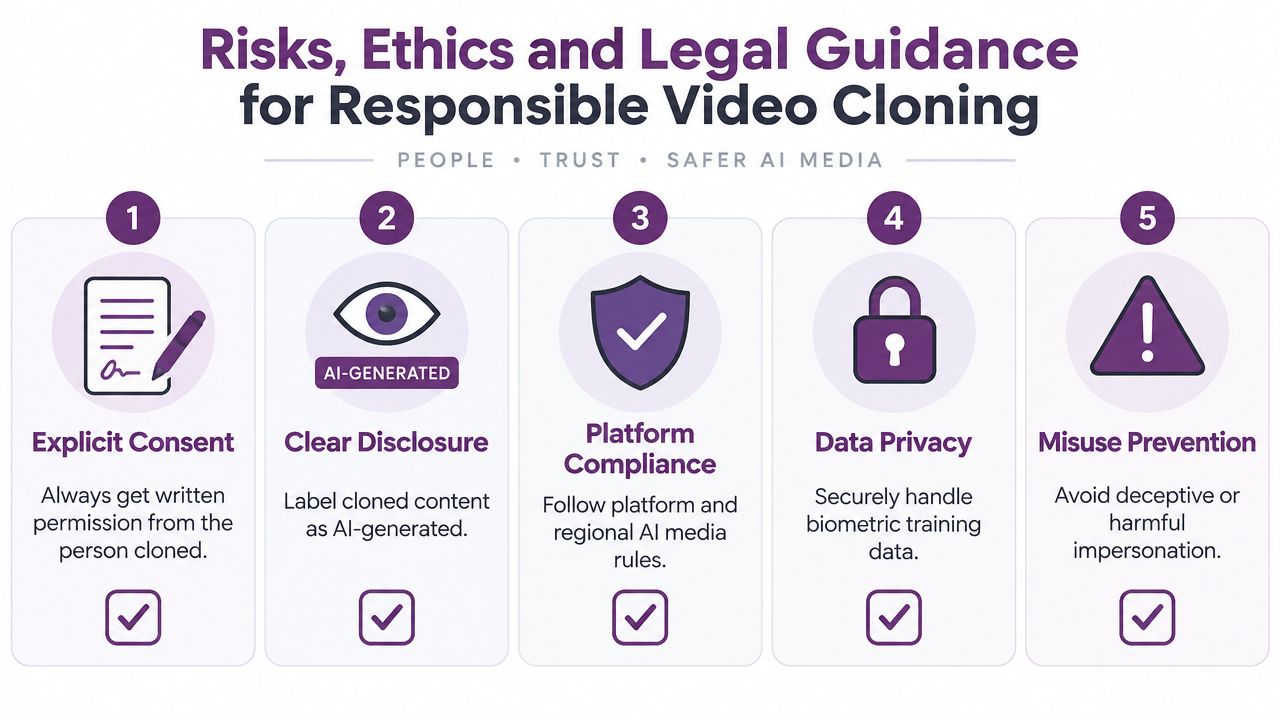
The baseline rules every team should follow
Start with the obvious, because it's where many problems begin:
- Get explicit consent: If you're cloning someone's face or voice, written permission should come first.
- Label synthetic content clearly: Viewers shouldn't have to guess whether key elements were artificially generated or manipulated.
- Protect training material: Voice samples, face data, and source recordings are sensitive assets.
- Limit impersonation risk: Internal policy should ban deceptive uses, even if the tool technically allows them.
Audience suspicion has grown because voice-cloning fraud made synthetic audio less trustworthy. At the same time, trend reporting points to stricter platform scrutiny for mass-produced AI video and a need to balance scale with originality, disclosure, and regional consent requirements, according to this review of AI video production trends and platform policy pressure.
What the law is starting to require
The clearest hard requirement in the provided record comes from the European Union. The EU AI Act entered into force on August 1, 2024, and its deepfake transparency rule applies from August 2, 2026. Under that rule, deployers of an AI system that generates or manipulates image, audio, or video content constituting a deepfake must disclose that the content has been artificially generated or manipulated, as stated in the EU AI Act text.
That doesn't mean disclosure is only for Europe, or only for that date. It means formal transparency obligations are becoming concrete, and smart teams won't wait for enforcement pressure to build a labeling habit.
Clear disclosure protects the audience and the publisher at the same time.
Governance for scale
Once cloned content expands across languages, regions, and ad variants, governance becomes operational, not theoretical.
Use a checklist like this:
Consent records
Store approvals alongside the cloned asset and define where the likeness may be used.Disclosure standards
Decide how your team labels AI-generated or AI-manipulated video in customer-facing content.Channel testing
Review exports after platform compression, not just before upload.Regional review
Check whether a market has stricter consent, advertising, or biometric data expectations.Version control
Track which clone, script, and language version went live in which channel.
If your workflow involves personal data and likeness handling, LunaBloom AI's privacy information is the place to review how that side of the process is framed.
Conclusion and Next Steps for Using Video Cloning Wisely
Cloning in video makes the most sense when you treat it as a production system, not a magic trick. The useful building blocks are straightforward: avatar cloning, voice cloning, and performance or scene-level cloning. What matters is how they work together in a workflow that can scale without losing trust.
The technical side comes down to a few essentials. Good source material improves the model. Strong voice output doesn't guarantee believable video. Lip sync, pose handling, and output review matter more than many beginners expect. And the right approach depends on the job. Dubbing solves different problems than avatar generation. Multi-character compositing solves a different problem again.
A practical decision checklist
Use cloning when these are true:
- You need repeatable versions of the same core message.
- Localization is a priority and reshooting would slow the team down.
- The subject can't be on camera constantly but still needs a consistent presence.
- You can disclose usage clearly and manage consent responsibly.
Skip cloning, or use it sparingly, when these are true:
- The moment depends on raw authenticity, such as a founder apology or documentary interview.
- You don't have clear rights to the likeness or voice.
- The content would confuse viewers if they learned it was synthetic after the fact.
A smart next move is a small pilot. Choose one repeatable format, such as an onboarding clip, product tutorial, or localized ad variant. Measure audience comfort, review quality after compression, and document your disclosure and approval process from day one.
If you want to explore the broader ecosystem around avatar video, voice, and localization workflows, LunaBloom AI is a useful place to continue that research.
LunaBloom AI helps creators and teams turn scripts, prompts, and images into finished videos with avatars, cloned voiceovers, lip-synced visuals, and multilingual localization. If cloning in video is part of your production workflow, visit LunaBloom AI to see how those pieces can fit into one end-to-end creation system.