Thursday afternoon, a product launch video is still sitting on your task list. Leadership wants it by Friday, the usual presenter is unavailable, and there's no time to book a studio, write a teleprompter brief, or coordinate a reshoot. What you need is a presenter who's always ready, not another production bottleneck.
An AI avatar video maker turns a written script into a finished video with a synthetic on-screen presenter, voice, facial movement, and often gestures. The useful question isn't which platform has the most avatars. It's whether the output looks appropriate for the audience, communicates clearly, discloses its synthetic nature when needed, and fits the way your team already produces content.
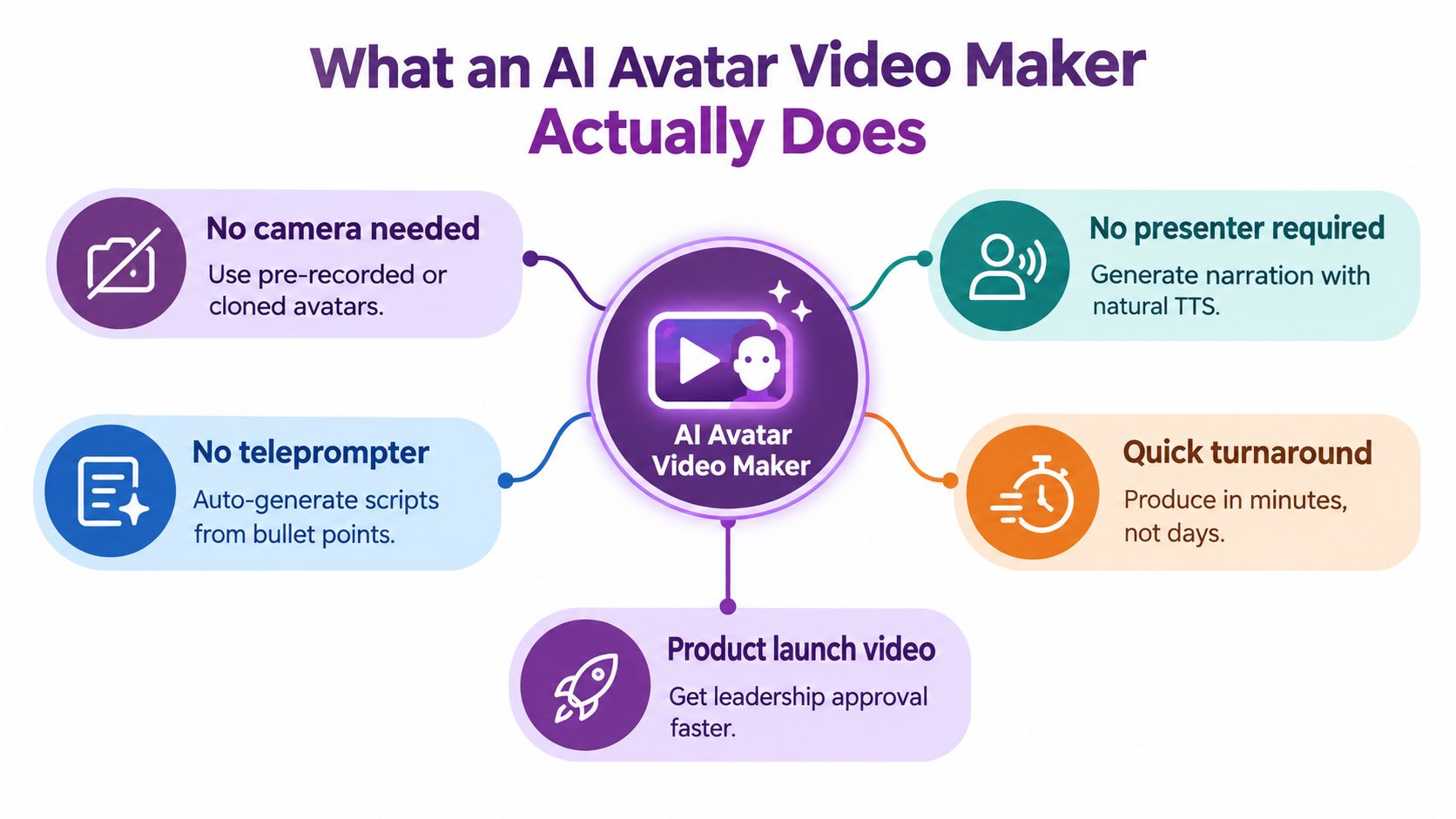
What an AI Avatar Video Maker Actually Does
At a practical level, an AI avatar video maker handles three jobs that traditionally required separate people or production steps.
First, it creates or supplies the avatar. That presenter might be photo-realistic, stylized, illustrated, or three-dimensional. You choose a ready-made character, upload an approved image, or create a custom avatar where the platform supports identity verification and consent controls.
Second, it manages the speech pipeline. You provide the words, and text-to-speech generates the narration. The system then synchronizes mouth shapes with the spoken phonemes, while animating facial expressions, blinking, head movement, and sometimes hand gestures. Good synchronization matters because viewers notice even small gaps between sound and mouth movement.
Third, it builds the scene around the presenter. Depending on the tool, that may include backgrounds, captions, layouts, logos, product screenshots, B-roll, music, and transitions. Some platforms focus on a presenter in a clean studio-style frame. Others combine avatars with a broader text-to-video or editing workflow.
A simple production example
Suppose you have a 90-second product overview. You paste the approved copy, choose an avatar, select a voice, add your brand background, review the captions, and generate the draft. If the first version is clear and credible, you can place it on a landing page or send it to leadership for review without scheduling a camera session.
That workflow is useful for marketers who need repeatable output. A platform such as LunaBloom AI can combine script-based video creation, synchronized narration, captions, and avatar-led scenes in one workspace, although the exact controls and output quality should still be tested against your own content.
The important distinction is between automation and judgment. The software can render a presenter quickly, but your team still needs to decide whether the script is accurate, whether the tone suits the audience, and whether an avatar is the right messenger for the topic.
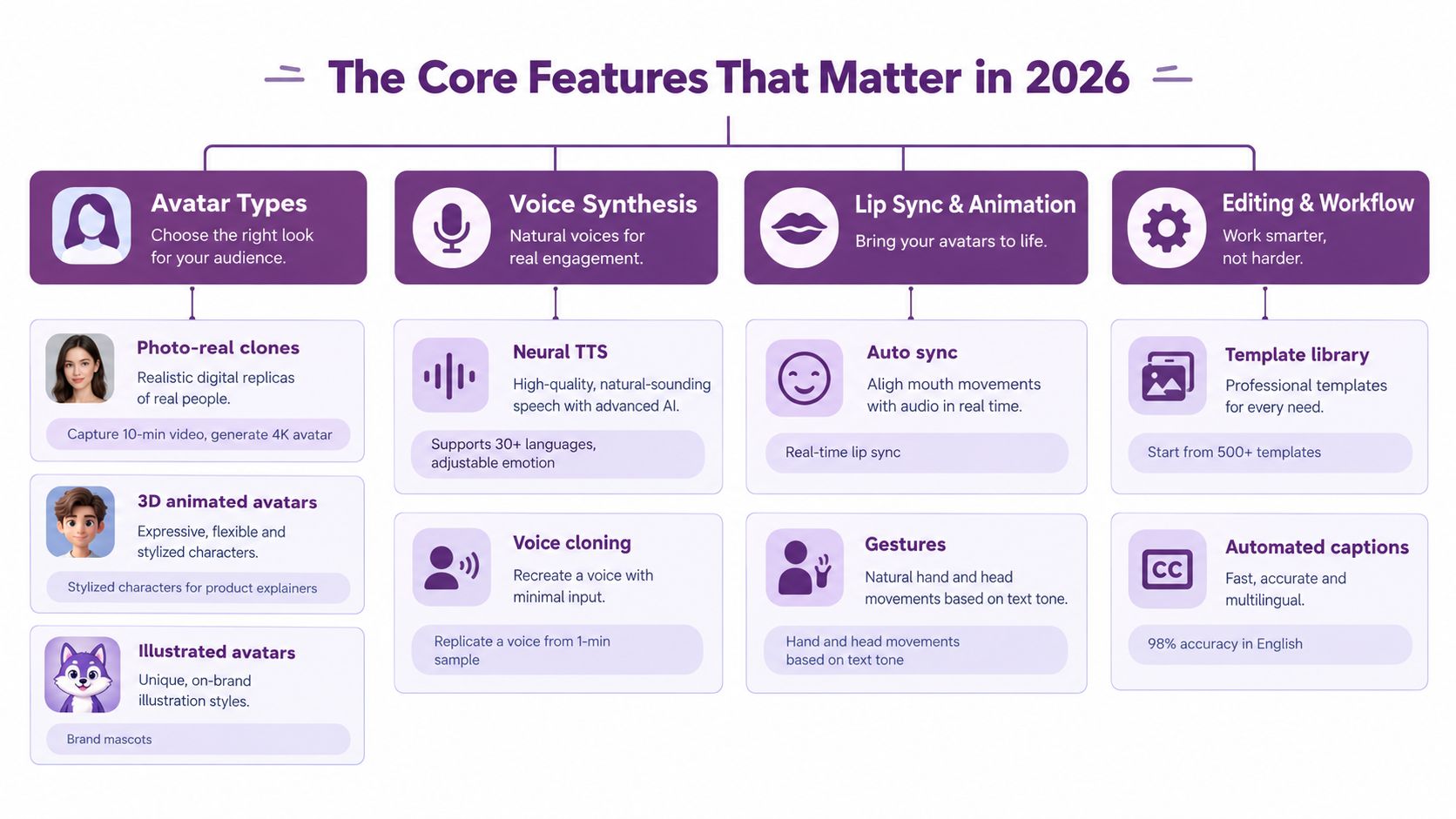
The Core Features That Matter in 2026
A vendor's feature list can look impressive while hiding the details that affect the finished video. Compare these four building blocks before you compare templates or subscription tiers.
Avatar types
Photo-real clones work well when the presenter needs to feel familiar and professional. A safety training team might select a photo-real avatar because warehouse workers need a clear instructor who looks consistent across recurring modules.
Stylized and illustrated avatars create more distance from reality. They're often a better fit for brand explainers, mascots, playful onboarding, or subjects where a human-looking presenter could create the wrong expectation. Three-dimensional avatars add flexibility for scenes that require repositioning, character interaction, or a more designed visual world.
Lip sync and facial motion
Look beyond a moving mouth. A credible system should coordinate phoneme-level mouth movement, blink timing, head pose, expression, and gestures with the narration. One technical benchmark reported facial movement synchronization at about 0.02 seconds, a level of timing that supports precise talking-head delivery across multiple languages, according to HeyGen's avatar generator evaluation.
Test the system with your own script. Names, acronyms, product terms, and numbers expose weak pronunciation and synchronization faster than generic sample copy.
Multi-character dialogue
Two-avatar scenes can support interview formats, role-play, objection handling, and customer-versus-sales simulations. For example, a sales enablement team could stage a buyer question followed by a product specialist's response, rather than presenting every point as a single uninterrupted monologue.
Voice and language
Voice quality includes more than natural pronunciation. Check whether you can control pacing, emphasis, pauses, and emotional direction. A calm onboarding lesson needs different delivery from an urgent security announcement.
Voice cloning also affects governance. Some platforms treat a cloned voice as a separate reusable asset from the avatar, which can help teams produce localized versions while keeping the approved narrator consistent. Confirm exactly how consent, ownership, deletion, and reuse work before uploading anyone's voice or likeness.
Features get a project started. Trust signals determine whether viewers stay with it. Realism, disclosure, moderation, and human review belong in the buying decision from the first demo.
Why the AI Avatar Market Is Growing So Fast
The category has moved beyond niche tooling. One independent industry report estimates the broader AI avatars market at USD 6.3 billion in 2025 and USD 8.4 billion in 2026, with a projection of USD 93.4 billion by 2035 at a 30.6% CAGR. In the same report, AI video generation platforms account for an estimated USD 2.8 billion in 2025, or 44.3% of revenue, showing that video is a substantial part of the avatar economy, not a peripheral feature. See the AI avatars market forecast from Global Market Insights.
The operational signal is just as important. Industry reporting notes that maximum generated clip length rose from 4 seconds to 60 seconds within two years, while xAI's Grok Imagine generated 1.245 billion videos in January 2026 alone, according to Gradually's AI video statistics overview. These figures describe a technology moving toward higher volume and longer-form production.
| Driver | What changed | Buyer implication |
|---|---|---|
| Video-first demand | Avatar video now represents a major share of the broader AI avatar category. | Assess video editing, localization, and export workflows, not just avatar variety. |
| Production scale | Generation capacity and clip length have expanded rapidly. | Ask whether rendering limits, queues, and approval workflows can support repeat production. |
| Business adoption | Businesses are using avatars in customer-facing workflows, while video is widely used in marketing. | Treat the platform as an operational system that needs governance, support, and predictable access. |
The market data doesn't prove that every avatar video will work. It does establish that buyers are choosing among real production platforms, not evaluating a temporary novelty. Pricing transparency, security, consent records, moderation, and support now deserve as much scrutiny as a clever demo.
Where AI Avatar Video Makers Fit in Real Workflows
The strongest use cases share a recognizable shape. The script changes often, the audience spans regions, and the visual style can remain controlled rather than fully documentary.
Marketing teams
A demand generation manager has a webinar recording and a product update to promote. Instead of asking the presenter to record fresh introductions for every market, the team can adapt the script, switch languages, and create explainer or ad variants around the same approved message.
This works particularly well for product demos, campaign FAQs, paid-media variations, and landing-page videos. It works less well when the campaign depends on spontaneous personality or live audience interaction.
Learning and development
An L&D lead needs to refresh onboarding before a new group starts. The underlying policy and slide deck already exist, but the old presenter is no longer available. An avatar can deliver the revised module while the team updates scenes, captions, and localized narration without rebuilding a studio shoot.
Training teams should keep a human reviewer involved. Learners need accurate instructions, accessible captions, and a clear route to ask questions when the subject is complex.
Product and product marketing
A product marketing manager receives final release notes on Friday afternoon. The team can turn the approved copy into a concise feature explainer, pair the presenter with interface footage, and publish the update while the launch window is still relevant.
The avatar should support the product story, not cover a confusing interface. Use screen captures, callouts, and specific examples where the viewer needs to understand how the feature behaves.
Internal communications and support
A people operations partner is rolling out a hybrid work policy across regions. An avatar-led announcement can provide a consistent explanation, while local versions handle language and policy terminology. Customer support teams can use a similar workflow for troubleshooting guides and multilingual FAQ videos.
Before publishing, review the privacy expectations around internal content and employee data. LunaBloom's privacy information is one example of the documentation buyers should examine when comparing how a platform handles uploaded material.
Workflow test: Choose an initial project with repeatable scripts, frequent localization, and a controlled visual style. Those conditions reveal the tool's practical value without asking it to imitate every kind of human production.
Honest Pros and Cons of AI Avatar Videos
The benefit is straightforward. Once the script and visual system are approved, your team can iterate without coordinating a presenter, camera, room, and reshoot. That makes it easier to test different openings, explanations, voices, or presenters while the message is still fresh.
Language coverage can also simplify regional production. A reusable voice or avatar may support localized versions, but a translation still needs review for terminology, cultural meaning, pronunciation, and legal accuracy. The platform's language count matters less than whether it handles your actual markets well.
The advantages
- Faster iteration: Change a weak sentence or scene without restarting the whole production.
- Repeatable presentation: Keep a consistent presenter and visual format across a content series.
- Flexible localization: Produce language versions from a shared script and review them centrally.
- More testing options: Compare scripts, calls to action, and scene structures without booking another shoot.
The limitations
- Uncanny valley risk: Close-up facial footage can feel distracting when expression, gaze, or timing falls short.
- Body movement inconsistency: Hands and posture may look unnatural, particularly in gestures-heavy scenes.
- Limited live responsiveness: An avatar can deliver prepared dialogue, but it can't respond to an unexpected question.
- Consent and misuse concerns: Synthetic likeness and voice creation require explicit permission and clear ownership rules.
Trust is the issue many feature comparisons underplay. Independent research found that highly realistic avatars were rated significantly more realistic than stylized avatars, with ratings of M = 2.90 versus M = 2.07, and a statistical result of t(489) = 7.00, p < .001, in a controlled study documented by the Journal of Science Communication. Realism can improve credibility, but it can also make disclosure more important when viewers might mistake a synthetic presenter for a real executive or employee.
Research also found that 85.4% of Americans became less likely to trust online news, photos, or videos because of realistic deepfakes in the previous 12 months, while 73.5% identified deepfake video as their main concern, according to Mean CEO's deepfake trend summary. A visible disclosure, internal approval record, and careful choice of avatar can protect trust better than realism alone.
How to Choose the Right AI Avatar Video Maker
Treat vendor selection like a production test, not a shopping exercise. Ask each platform the same questions, then render the same script wherever possible.
Start with realism
Can the avatar hold attention in your intended framing? Check facial movement, eye direction, hands, body posture, resolution, and background edges. Request a sample using your own script, not only the vendor's polished demo.
Pay special attention to proper names, acronyms, product terminology, and pauses. A tool can look excellent in a generic greeting and still struggle with the language your customers hear every day.
Verify voice and language rights
Ask whether voice cloning requires a live consent recording, whether the clone can be reused independently, and how the platform stores or deletes the source. Personal-avatar systems may require the consent video to be live, match the person in the avatar footage, and confirm that the person is at least 18 years old, as described in Synthesia's avatar policy.
Then test localization. A translated script should preserve meaning and timing, not merely substitute words. Review regional accents with native speakers before publishing customer-facing content.
Check disclosure and compliance
Find out whether the platform supports disclosure text, watermarking, consent logs, moderation, and approval history. Product guidance from VEED instructs users to warn viewers that content is AI-generated, and its workflow states that videos undergo moderation before delivery, as explained in VEED's AI avatar guidance.
Your legal or brand team may need stronger controls than the default settings provide. Ask who can create a personal avatar, who can approve it, and how your organization can prove consent later.
Understand the commercial model
Compare the full cost, including generation minutes, rendering credits, seats, storage, premium voices, translation, exports, and API access. Confirm whether paid-media use, client delivery, and internal redistribution are included.
For broader tool research beyond avatar platforms, this marketing stack AI guide can help place video creation alongside the other systems your team already uses. Also review LunaBloom's company information when you're assessing the product context and intended workflow.
Test workflow fit
A good platform should fit your approval process. Look for script imports, brand kits, reusable scenes, captions, version control, export rights, and routing for review. The cheapest subscription can become expensive if every localization requires manual rebuilding or if your team can't retain the exported assets it paid to create.
Creating Your First Avatar Video with LunaBloom
Your first session should be a controlled test, not a major campaign. Use a script your team already understands, with a clear audience, a single purpose, and enough visual material to judge the result.
Open the LunaBloom application and make five decisions before generating anything:
- Choose the presenter: Start with the avatar library, or upload an approved custom image where the workflow permits it. Pick a style that matches the audience's expectations rather than choosing the most realistic face by default.
- Set the destination format: Select the aspect ratio for the channel where the video will appear. A product-page explainer, vertical social clip, and internal training module may need different framing.
- Prepare the script: Paste existing copy into the script field. Add punctuation and line breaks where you want pauses, and rewrite long sentences that sound unnatural when spoken.
- Pair the voice: Select a voice that matches the subject and audience. If you're creating a localized version, switch the language and review names, technical terms, and emphasis.
- Decide on dialogue: Use a multi-character setup only when the script benefits from an exchange. Two presenters can clarify a question-and-answer format, but they can also add visual noise to a simple announcement.
Preview a short sample before committing to the complete render. Listen for pronunciation, inspect the mouth movement, and watch the hands and eyes. If one sentence feels stiff, regenerate that section rather than accepting the entire draft as finished.
Review captions against the narration, check logos and backgrounds, and make sure the presenter isn't covering important product detail. Export with captions when accessibility and silent viewing matter, then save the approved script and final version together so future edits have a reliable reference.
Final Thoughts and Smart Next Steps
The right AI avatar video maker passes three tests.
- Realism fit: The presenter looks and moves appropriately for the audience and subject.
- Disclosure readiness: Your team can explain the synthetic presentation and document consent where required.
- Workflow fit: Scripts, localization, review, captions, exports, and brand assets move through the system without unnecessary manual work.
An avatar amplifies a clear brief. It doesn't replace one. If the message is vague, the avatar delivers vague information with a polished face.
Start with a small pilot:
- Marketers: Write a focused 60-second ad or product explainer.
- Training teams: Convert one compliance or onboarding module.
- Product teams: Draft a feature announcement using real interface footage.
- Internal communications teams: Test a routine policy update before using avatars for sensitive announcements.
Choose a human presenter for high-empathy interviews, crisis communication, or messages that require visible personal accountability. For other projects, create one test video, review completion and trust signals, gather audience feedback, and scale only the pattern that earns attention without creating doubt. The LunaBloom starter app gives teams a place to begin that controlled experiment.
LunaBloom AI helps creators and business teams turn scripts, prompts, and images into avatar-led videos with synchronized voiceovers, captions, multilingual localization, and editable scenes. Visit LunaBloom AI to create a small test video, review the trust signals, and decide whether the workflow fits your next campaign.