In a July 2013 survey, Pew Research Center found that 78% of adult internet users watched or downloaded online video, up from 69% in 2009, while the share who uploaded or posted video doubled from 14% to 31%. Video stopped being a niche publishing habit more than a decade ago. What still trips up publishers isn't the filming. It's everything the video does to the page around it.
The format is older than most content calendars, too. The first generally recognized vlog dates to January 2, 2000, when Adam Kontras posted a short video alongside a blog entry about moving to Los Angeles, according to this account of vlogging history. Video lived inside a written narrative from the start, not on a separate media island.
That's the standard I hold every embed to. Video on blogs has to earn three things: its load time, its search visibility and its accessibility. A clip that wins on watch time but pushes your text down the screen, hides from crawlers behind a JavaScript player, or ships with unreviewed auto-captions hasn't earned its place yet. Here's how to make it earn all three.
Embedding Methods for Blog Videos Compared
A video reaches a blog post in one of five ways, and each one trades reach, control and page speed differently. There's no universally correct method. There's a correct method for the page you're publishing.
| Method | How it works | Best for | Main trade-off |
|---|---|---|---|
| Platform embed (YouTube or Vimeo) | Paste the share link or embed code and the host serves the file | Tutorials and reach through the host's audience | Host branding, related videos and less control over loading |
| Self-hosted MP4 in a native player | Upload the file to your own media library and insert the player block | Brand-controlled product demos and ads | You carry bandwidth and performance costs |
| Native video block with poster image | Player shows a still image until the reader presses play | Pages where speed and layout stability matter most | Needs a clear poster frame and a visible play button |
| Short silent loop | A short clip loops inside the article | Quick demonstrations of one action | Viewed muted, so the meaning must come through without audio |
| Vertical Shorts or Reels embed | A 9:16 clip sits inside a narrow column | Teasers and social-first clips | Small display, and narrow layouts crop or letterbox the frame |
The deciding question
Ask two things before you paste anything: who needs to see this video, and how much page speed are you willing to spend on it? A tutorial you want discovered by people who've never heard of you belongs on a platform that has its own audience and search surface. A demo that exists to move a reader toward a purchase belongs on your own domain, where nothing competes with your call to action.
Two cases, two answers
Say a hardware store publishes a guide to sharpening a chisel. The audience is broad, the search intent is generic, and YouTube's related videos are a discovery channel rather than a leak. Platform embed wins.
Now say a skincare brand publishes a product page explaining how a serum layers under sunscreen. Every second of attention should stay on that brand's page, and the player must not delay the ingredient list above it. Self-hosted MP4 with a poster image wins, and the bandwidth bill is a fair price for that control.
Practical rule: choose the method that puts the message in front of the reader without making the text wait.
One more consideration people skip: platform embeds inherit someone else's player roadmap. Related-video panels, end screens and consent banners can change under you. If a post is a permanent revenue asset, that dependency is worth pricing in before you commit.
Why Video Pays Off on Blog Posts
Most blogs still leave the gap open. In Orbit Media's 2024 blogger survey, 25% of bloggers added video to their articles, even though video usage had doubled since 2015. Three out of four posts you compete with are still text and images.
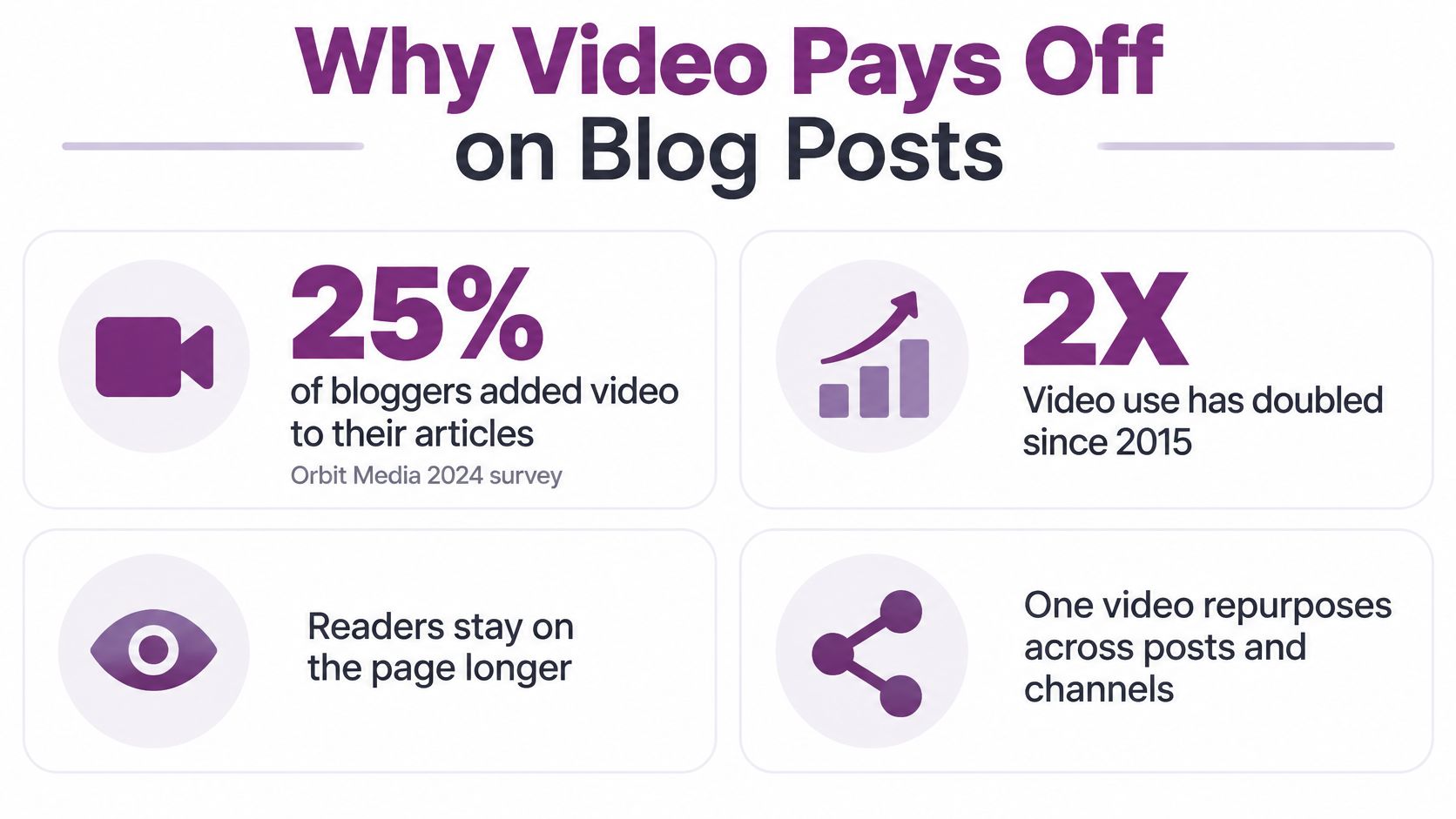
Businesses have moved faster than individual bloggers. HubSpot's survey of more than 500 marketers found that in 2025, 81% of businesses that produce blog content also invested in video. The production capacity exists. The publishing habit is what lags.
The strongest search argument
Links, not views, are where video shows measurable search value. According to Rocketwheel's compilation of video-marketing research, in 2023 blog posts incorporating video attracted three times as many inbound links as blog posts without video. Original demonstrations get cited. Rewritten listicles don't.
Return is more modest and more uneven. HubSpot's video marketing report found that in 2024, blog or website video was identified as the highest-ROI channel by 10% of video marketers surveyed. Not most. A tenth.
What these numbers don't prove
Adoption figures tell you what publishers do, not what your audience will do. Link multiples describe an association across a compilation, not a promise for your next post. Treat them as reasons to test, not as forecasts.
The gain comes from a video doing a job text can't. A how-to post about a kitchen tool gains more from a 90-second demonstration of the wrist motion than from a paragraph trying to describe it. Readers watch the movement once and stop guessing.
Video does three jobs best inside an article: demonstrate a process, reassure a hesitant buyer with a real product in motion, and hold the reader on the page long enough to reach your next step. If your clip does none of those, cut it.
Video Formats, Aspect Ratios and Lengths to Publish
Start with the file every browser plays, then deviate only where the layout or the file size gives you a reason. MP4 with H.264 is that baseline. It plays in Safari, Chrome, Firefox and Edge without a fallback, and it's what your editor should export by default.
| Format | Aspect ratio | Typical length | Where it fits |
|---|---|---|---|
| MP4 (H.264) | 16:9 | 1-5 minutes | Main in-article player that every browser can play |
| WebM or AV1 with MP4 fallback | 16:9 | 1-5 minutes | Smaller files where the browser supports them |
| MP4 vertical | 9:16 | Under 60 seconds | Teaser or product clip in a narrow column |
| MP4 square | 1:1 | 15-60 seconds | Clip shared from the post into social feeds |
| Short silent loop | 16:9 or 1:1 | 3-10 seconds | One demonstrated action placed inline |
Match the ratio to the column
16:9 is the default for in-article players because it fits the content column on desktop and scales cleanly to a phone held upright. You get a predictable box, which makes reserving space in the layout straightforward.
9:16 earns its place when the clip sits in a narrow column beside text, or when you're repurposing a social-first teaser. Give it a poster frame with the subject centered, because a tall video in a short container gets cropped in ways that hide the action. 1:1 is the compromise ratio for clips you plan to share straight from the post into a feed.
Length is a publishing decision
I'd keep most in-article tutorials between one and five minutes and cut teasers to under a minute. Past five minutes, the video stops being part of the article and becomes the destination, which is a different page architecture.
Longer clips need navigation. Add a chapter list with timestamps or a transcript with headings so a reader who came for step four doesn't scrub through steps one to three. That's also how you keep a long video from inflating your bounce rate.
For encoding settings, export at your source resolution and a constant frame rate matching your footage (usually 30 fps), keep H.264 in an MP4 container, and add a WebM or AV1 rendition only when the size saving is real. A 40 MB file that becomes 28 MB is worth the extra pipeline step. A small file that barely shrinks isn't.
Quick check before you upload: open the export on your phone first. If it reads well there, add other renditions only where they earn their file size.
How to Add a Video to a Blog Post Step by Step
Publishing day should be mechanical. The creative decisions happened earlier, so the embed itself is a checklist you can run in ten minutes.
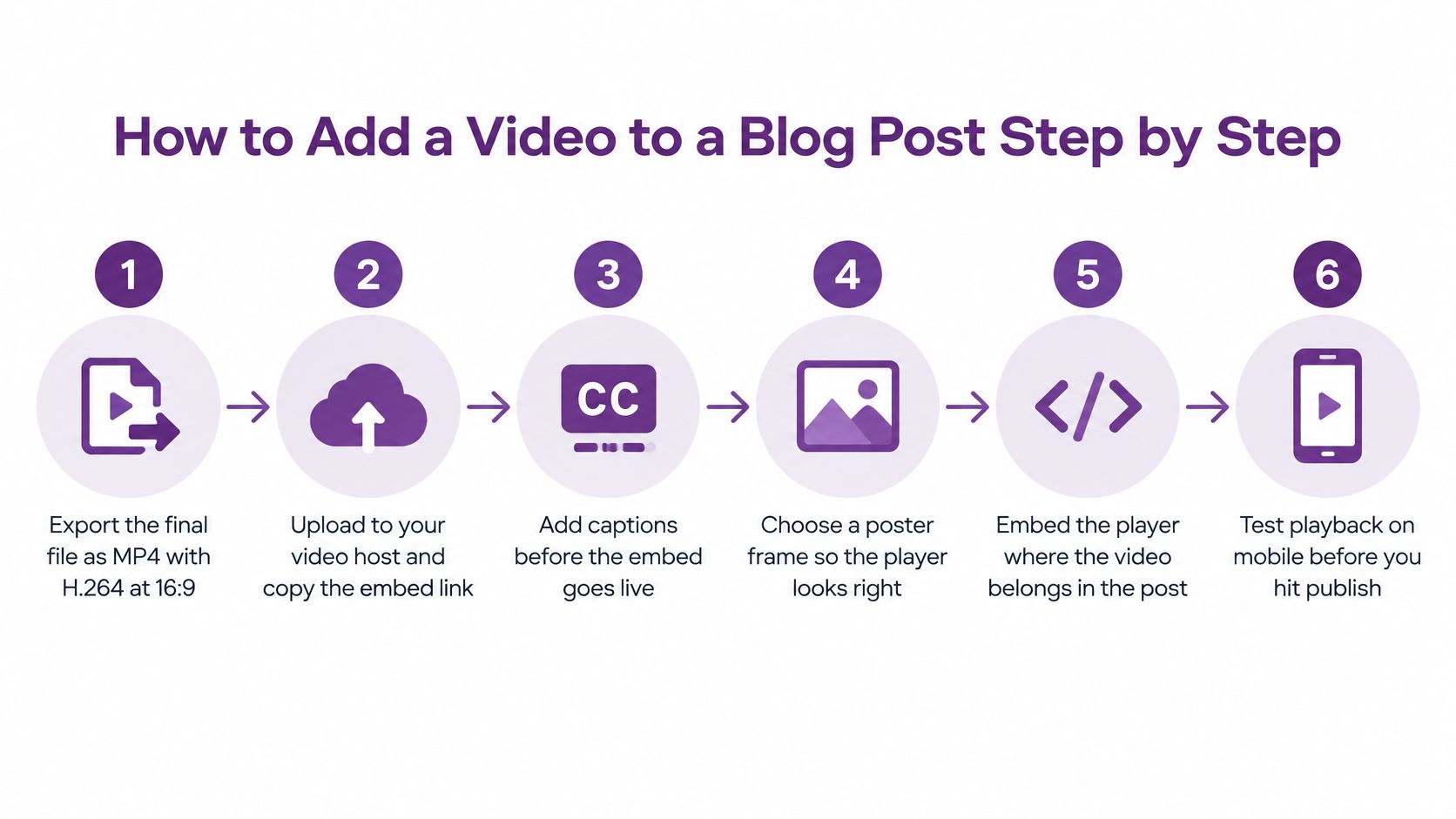
The publishing-day sequence
- Export as MP4 with H.264 at 16:9, unless your layout needs another ratio. This is the format that plays everywhere without a fallback, so it removes an entire class of support tickets.
- Upload the file to your host or media library and rename it something descriptive that includes the post's main topic, such as
burr-grinder-setting-guide.mp4. A file name likefinal_v3_EDIT.mp4tells nobody anything. - Build the poster image from a frame that clearly shows the subject. Check it at phone width, because a frame that reads fine on a desktop monitor can turn into mud on a small screen.
- Insert the player or embed code directly after the paragraph that introduces the topic. Not at the very top, where it delays the text, and not buried at the bottom, where nobody reaches it.
- Write a visible heading or caption above the player saying what the video shows. Readers scanning the page decide from that line whether to press play, and search engines read it as context.
- Place the transcript or a short summary directly below the player, in the page HTML rather than in a downloadable file.
- Keep the player set to load on click with no autoplay at all. Autoplay can trigger early media downloads that delay the text, and the performance section below covers exactly what that costs.
- Preview on a phone and a desktop, then tab through the player with the keyboard alone. If you can't reach play, pause and the caption toggle without a mouse, the embed isn't finished.
Here's the kind of embed those steps produce, sitting inside the article at the point where a reader wants it:
What a finished embed looks like
A clear poster frame. A one-line caption that promises something specific. A transcript underneath. And a page that renders its text without waiting on the video.
If you're using a WordPress block editor, the native Video block accepts a poster image in its settings panel, which saves you writing custom HTML. For platform embeds, paste the iframe into a Custom HTML block and add loading="lazy" so the player waits until it's near the viewport.
The embed is the last five percent of the work. The script, the captions and the poster frame are the other ninety-five.
Accessibility Checks Before You Publish
Captioning is usually treated as a checkbox. It's a content-design problem, and the gap is well documented: 32% of accessibility professionals identified videos without captions as a top digital-quality issue in a 2025 Applause survey of more than 1,500 professionals. In the same findings, only 16% of K–12 teachers reported captioning 76–100% of their videos, compared with 37% of higher-education faculty.
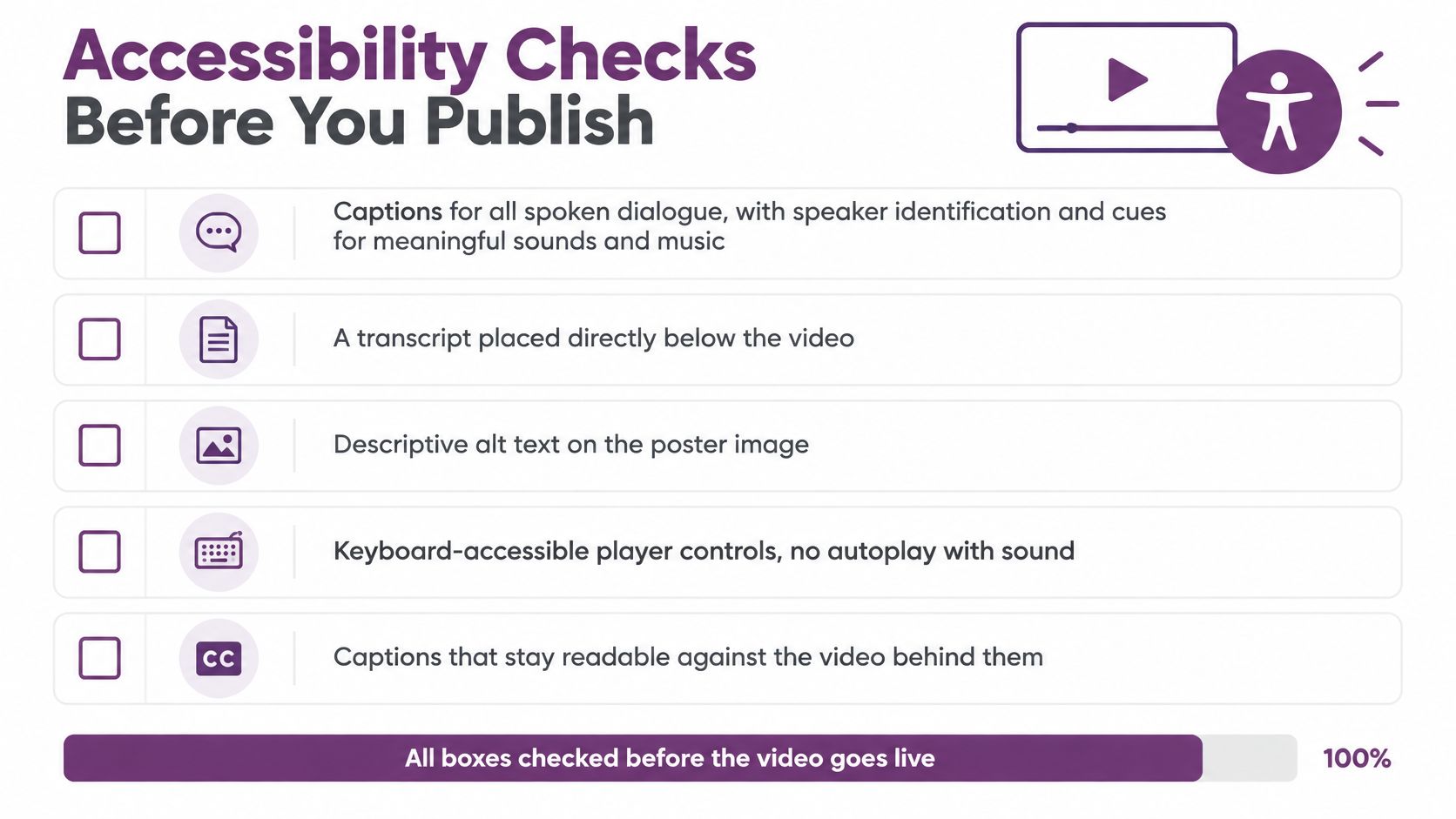
The baseline you're working to
The W3C's captioning guidance sets WCAG Level A as requiring captions for prerecorded audio content in synchronized media, except when the media is clearly labeled as an alternative to text. Captions also need to carry more than dialogue when comprehension depends on sound: meaningful sound effects, music, laughter, speaker identification and relevant audio context.
Video-only content has its own rule. W3C's accessible media guidance says prerecorded video-only media requires either an equivalent time-based text alternative or an audio track presenting the same information, and synchronized video can require audio description or a media alternative at Level A.
Run this before the post goes live
- Caption every spoken word, with speaker labels when more than one person talks. A reader who can't hear needs to know who changed the subject.
- Put a transcript on the page below the player. It serves screen-reader users, search crawlers and anyone who'd rather read than watch.
- Describe essential on-screen actions, text and data in the transcript or the surrounding prose. If a setting appears only in the footage, it doesn't exist for part of your audience.
- Add audio description or a full text alternative when the visuals carry the message on their own.
- Human-review any AI-generated captions for names, technical terms and numbers. Automatic captions mangle product names and decimal points with total confidence, and those are exactly the details a tutorial exists to deliver.
- No autoplay with sound. It hijacks screen-reader audio and startles everyone else.
- Check keyboard access and a visible focus state on every player control, including the caption toggle and full-screen button.
- Test with a screen reader on mobile, not just desktop. VoiceOver and TalkBack interact with players differently than NVDA does.
For translated versions, localize captions rather than running a literal translation. Idioms, units and on-screen terminology need a native pass, and reading speed differs by language.
Legal obligations vary by jurisdiction and organization type, so review by risk. A public-sector education site and a small hobby blog aren't held to the same standard, and pretending one rule covers every post helps nobody.
Making Blog Videos Discoverable in Search
An embedded player is not a discoverable video. Search engines need the video to be independently findable on the page, which means a stable watch-page URL, a descriptive HTML heading, a visible thumbnail and a transcript or summary in the rendered HTML.
Google's VideoObject documentation sets a concrete eligibility threshold: the video must be at least 30 seconds long, and the markup must appear on a page where users can watch it. Required properties include the video name, a unique thumbnail URL and the original upload date in ISO 8601 format.
| Property | What to enter | Status |
|---|---|---|
| name | A unique title that matches the on-page heading | Required |
| description | Two or three sentences summarizing what the video shows | Required |
| thumbnailUrl | Stable URL of a visible, relevant thumbnail | Required |
| uploadDate | The date the video was first published, in ISO 8601 format | Required |
| duration | Video length in ISO 8601 format | Recommended |
| contentUrl | Direct URL of the video file | Recommended, the most effective property for fetching the file |
| embedUrl | Player URL when the file is not directly hosted | Alternative to contentUrl |
Walking the properties in plain language
name and description should describe this video, not the article it sits in. If your post is "Choosing a Burr Grinder" and the clip shows the dial adjustment, name the clip for the dial adjustment.
thumbnailUrl must point at an image that's visible on the page and reachable by the crawler, not a file behind a login or a robots-blocked path. uploadDate is the first publication date, not the date you last edited the post. Write duration as an ISO 8601 value such as PT2M30S for a two-and-a-half-minute clip.
Google's video search guidance identifies contentUrl as the most effective property for letting Google fetch the actual file, with embedUrl as the alternative when you don't host the file yourself. If you self-host, supply contentUrl. If you embed from a platform, supply embedUrl and accept that you've handed some control to the host.
Habits that keep videos indexable
Give every video its own title, description and thumbnail. Copying identical metadata across localized or repurposed posts creates duplicates that compete with each other, and canonical relationships should point at the version you want ranked.
Keep the JSON-LD matched to what the page renders. Don't hide the player behind tabs, carousels or click-to-reveal interactions, because content that isn't present during initial rendering may never be discovered.
A 3-10 second silent loop and any vertical teaser under 30 seconds won't qualify for video search features. If you want a clip found, publish a full-length version with its own watch page.
Finish with validation: run the markup through Google's structured-data testing tools, then monitor video indexing in Search Console. Markup improves how Google understands your video. It doesn't guarantee ranking.
Keeping Video Pages Fast Without Autoplay
Autoplay costs more than it earns on a blog page. The reader arrived to read, and an autoplaying player spends their bandwidth and CPU before the first paragraph paints.
Google's web.dev video performance guidance notes that choosing suitable containers and codecs reduces bandwidth and can improve Largest Contentful Paint (LCP), one of the three Core Web Vitals. HTTP Archive data cited by Google indicates that approximately 20% of videos on the web include the autoplay attribute. That's a fifth of the web making an early media request it didn't need to make.
The fixes, in the order I'd apply them
- Poster image first: render a lightweight still, compressed as WebP or AVIF, so the first paint is an image rather than a media stream.
- Reserve the space: set the aspect ratio on the container (
aspect-ratio: 16 / 9) so the layout doesn't jump when the player initializes. - Lazy-load the player: initialize it only when it approaches the viewport, using an Intersection Observer or your platform's native lazy embed.
- Defer the extras: analytics, heatmaps and third-party widgets wait until after the main content renders.
- Ship responsive renditions: AV1 or WebM where supported, MP4/H.264 as fallback, and adaptive delivery for long clips or mobile networks.
- Keep the first frame informative: a black rectangle with a play triangle wastes the most valuable pixels on the page.
The trade-off is real and worth naming. A cinematic opener can lift engagement and simultaneously hurt LCP, bandwidth consumption and interaction responsiveness if it loads too early. You don't get to claim the engagement win without checking the performance cost.
Test it, don't assume it
Pick three representative posts, one short article, one long tutorial and one product page. Record real-user Core Web Vitals for each, add the video, then record again over a comparable period. Watch LCP and Interaction to Next Paint specifically, and check mobile separately from desktop.
If LCP regresses, the fix is almost always loading order rather than the video itself. Move the player further down, swap the poster format, or delay the embed script. Re-encode last.
Engagement and Conversion Tactics for Video Posts
Placement decides most of the outcome. Put the player after the paragraph that introduces the problem, so the video answers a question the reader already has rather than interrupting one they haven't formed yet.
Five tactics that change what readers do next:
- Open with the outcome in the first five seconds. Show the finished result, then explain how you got there.
- Add chapter timestamps for anything longer than two minutes so readers can jump straight to their step.
- Put one clear next step directly under the transcript, a product page or a related how-to, instead of a banner competing with the player.
- Write the caption as a promise. "See the grind setting change in real time" beats "Product video."
- Test one change at a time. Swap the poster frame or move the call to action, then compare clicks and scroll depth over two weeks.
Track watch time and conversions together. A video that holds attention but pushes the product link below the fold can lift engagement and lose sales in the same week. For a demo tied to a purchase, show the product in use before any price or offer appears, the same way a celebratory birthday video leads with the moment rather than the credits. Engagement metrics describe behavior. They don't promise revenue.
Plan Your First Blog Video Workflow
Take a post you've already published: a guide to choosing a coffee grinder. It ranks modestly, readers ask the same question in the comments, and the answer is a movement that text describes badly. That's your first video, and it should be a 90-second explainer.
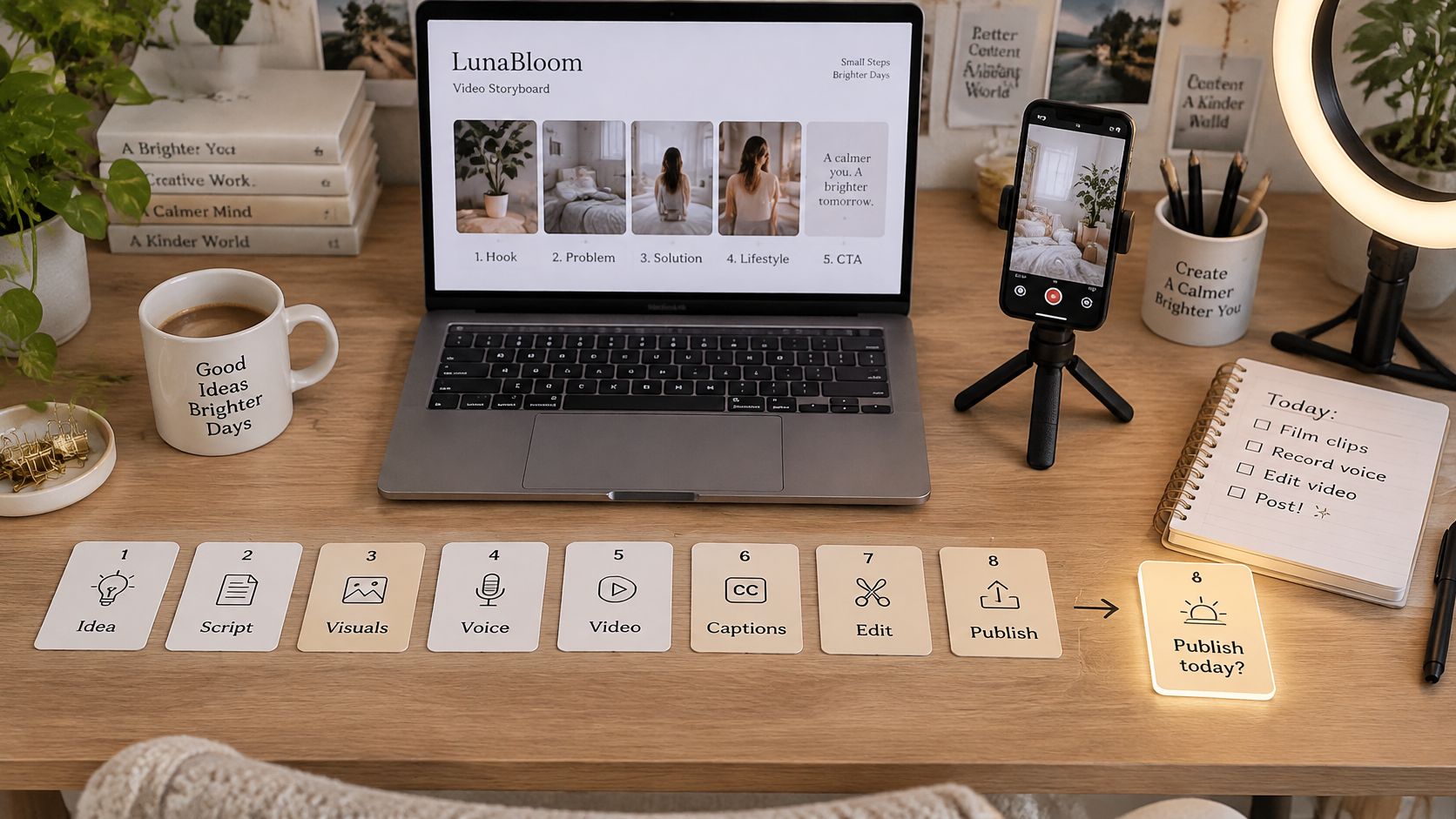
From outline to published embed
Our creator workflow runs through eight steps: Idea, Script, Visuals, Voice, Video, Music/SFX, Captions and Publish. Each one maps onto something the blog post already gives you.
- Idea: the post's headline question becomes the video's single promise. "Which grind setting for pour-over?" is a video. "Everything about coffee" isn't.
- Script: lift the post's outline. The H2s become beats, and the paragraph under each becomes two or three spoken sentences. Read it aloud and cut anything you stumble over.
- Visuals: your product shots become motion through image-to-video, so you don't need a studio day to show the grinder from three angles.
- Voice: add narration that matches the article's register. If the post is plain and direct, the voiceover shouldn't sound like a trailer.
- Video: assemble the scenes in the order the reader needs them, outcome first.
- Music/SFX: keep background music low enough that the narration stays intelligible on phone speakers, or leave it out.
- Captions: generate them, then run the human review pass for product names, numbers and speaker labels before anything goes live.
- Publish: export at 16:9, push the final edit through YouTube Publishing in the studio, then embed it in the post at the paragraph that introduces the grind-setting question.
Be honest about the free tier
The Starter plan is free to start and includes 2 free videos of up to 10 seconds each, with no monthly commitment. That's enough to test whether your visuals and captions look right, and it's useful for a silent inline loop.
It isn't enough for a 90-second explainer. Before you commit to a full production run, check the current plan limits against the length you need, because a script written for 90 seconds and a 10-second allowance don't reconcile. The app shows the exact credit cost for a video's length, model and options before generation, and you only pay when the video finishes, so you can price the explainer before you render it.
This week's decision
Pick one existing post with a clear process or a product question. Write the script from its outline today, produce one video, embed it after the paragraph that raises the question, and add the transcript and schema. Then compare that post's clicks, scroll depth and inbound links against its own previous performance, not against someone else's benchmark.
One post, one video, one measurement. That's how you find out whether video earns its place on your blog, and you'll know within a month.
If you'd rather build that first explainer from your post outline than from a blank timeline, we turn scripts and product shots into finished videos with voiceover, captions and 16:9 export, then publish straight to YouTube for embedding. Start with the free Starter clips to test your visuals and caption accuracy, then scale up once you know the format works. Visit LunaBloom AI and produce the video your best-performing post is still missing.