In 2025, 86% of surveyed creators were actively using creative generative AI, according to Market.us's Generative AI in Animation Market report. That number reframes the whole conversation. The question isn't whether animated video can be produced by software anymore. It's whether the output is good enough to publish, accessible enough to be understood, and documented well enough to defend when a client asks where it came from.
The most common mistake in AI motion production is treating those three checks as polish, something a team does at the end if there's time. They aren't polish. Quality, accessibility and provenance are production stages, and they belong in the middle of the pipeline, right next to timing and layout.
What Motion Graphic AI Is and Where It Came From
A bakery has a weekend loaf to announce and fifteen seconds to do it. A traditional motion designer opens After Effects, places the headline, sets a position keyframe at frame zero and another at frame twenty, then shapes the easing curve so the text settles instead of stopping dead. Motion graphic AI starts from the same kind of message, a script, prompt, product photo or written brief, and drafts the timed visuals: titles, lower thirds, icons, product motion and scene transitions. Little or no hand-set keyframing is involved.
The system works like a fast junior animator who never tires and never complains. It still needs clear direction, a brand reference and someone senior to approve the cut. That matters because the software can move a shape, set a transition and generate a voice, but it cannot decide what your audience should believe afterward. Three parts stay human: the message, the brand rules and the final judgment.
Treat provenance as part of the setup, not a last-minute cleanup task. Before you feed anything into a generator, know where your reference images came from. If a logo file or a product photo arrives in a shared folder with no history, a search by image tool from PeopleFinder gives you a way to check where that picture already appears online. That check helps you separate an official asset from a repost before it enters the storyboard, the voice track or the client review. Quality, accessibility and provenance all become easier to manage when they are checked while the video is being built.
Six decades of automating pictures
Computer graphics emerged in the 1950s as a visualization technology inside government and corporate research centers such as Bell Labs and Boeing. John Whitney founded Motion Graphics Inc. in 1960 and later created the digital computer short "Permutations" in 1966 with support from IBM and programmer Jack Citron, as documented in the computer graphics history archive hosted by Carnegie Mellon.
The field then professionalized fast. Conferences, research labs and studios gave motion designers a shared vocabulary for timing, layout and visual systems. Seen in that light, AI-assisted motion design is a continuation of a long habit: hand repetitive visual labor to machines, then spend human attention on meaning, taste and approval.
A definition you can reuse
Motion graphic AI drafts timed animation from a message, and a human owns the message, the brand and the approval.
A simple test tells you whether this kind of tool is worth adding to your workflow: do you make the same kind of short animated message again and again? If yes, automation pays. If you make one hero film a year, hire a designer. For repeated work, AI gives you speed; you supply the structure and the standard.
How the Pipeline Turns Text into Motion
Every text-driven motion graphic passes through the same seven stages. Knowing them turns vague frustration ("the video looks wrong") into a fixable problem ("the caption timing is off").
| Stage | What the AI does | What you control |
|---|---|---|
| Input | Reads the script, prompt or uploaded image and detects the core message | Wording, length and tone |
| Scene planning | Splits the message into scenes with durations and layout | Scene order and scene length |
| Asset selection | Picks or generates shapes, footage, icons or avatars | Brand colors and approved assets |
| Motion | Animates position, scale, opacity and transitions between states | Speed, easing and transition style |
| Voice and music | Generates narration and aligns sound to scene cues | Voice, language and music level |
| Captions | Transcribes speech and times on-screen text | Spelling, speaker labels and reading speed |
| Render and export | Compiles frames at the chosen resolution and format | Resolution, aspect ratio and file format |
From words to scenes
The input stage reads your script or prompt and infers what matters and how it should feel. Feed it a paragraph with four ideas and it will guess which one leads. Feed it one sentence per idea and it won't have to guess.
Scene planning then divides the message into beats with durations and layouts. At this stage a thirty-second script becomes six scenes of roughly five seconds each. If your video feels rushed, the cause usually lives here, not in the animation.
Asset selection picks or generates the visual pieces: shapes, footage, icons, sometimes an avatar. This is the stage where brand discipline matters most, because a generated logo is a drawing of a logo, not your logo.
From scenes to a finished file
Motion is the stage people picture when they hear "AI animation." The system writes the position, scale and opacity changes that a designer would otherwise keyframe by hand, plus the transitions between states.
Voice and music adds narration and aligns sound to scene cues, setting the pacing for everything else. Captions transcribes that speech and times on-screen text against it. Render and export compiles frames at your chosen resolution and aspect ratio.
Diagnostic habit: name the stage before you rewrite the script.
Wrong headline text points to input or asset selection. A transition that jumps points to motion. Captions drifting behind the voice point to voice and caption timing, and no amount of re-prompting the visuals will fix that.
Teams producing at volume often wire these stages into their own systems rather than clicking through a studio, which is what the LunaBloom developer API is for. Whether you automate it or not, the stage map is the same, and it's the fastest way to stop guessing.
Where Teams Use Motion Graphic AI First
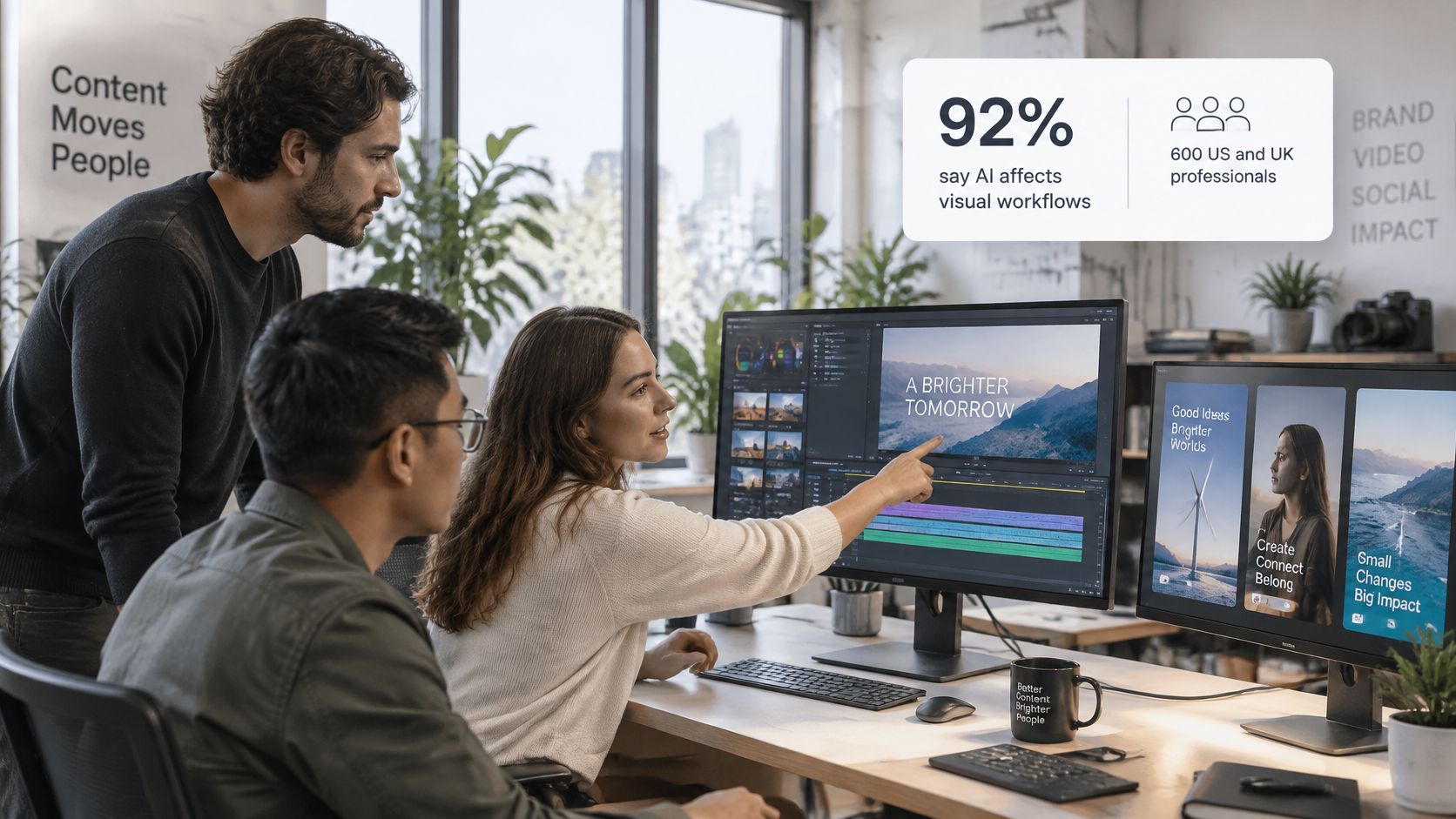
An Adobe survey of 600 enterprise professionals in the United States and United Kingdom found that 92% said AI was already affecting their visual-content workflows. The same research identified social-media content as a visual-work category for 62% of respondents, training and onboarding materials for 58%, and videos or motion graphics for 57%.
Read those categories together and the pattern is obvious: the work getting automated first is the work that repeats.
Five places to start, in order of return
- Social ads and short-form posts. Best for performance marketers who need eight versions of one message across placements. Keep these in the fifteen to thirty second range and change the hook, not the whole edit.
- Product demos and explainers. Best for small business owners with decent product photos and no camera crew. Image-to-video turns a still shot into a thirty to sixty second walkthrough with narration.
- Training and onboarding modules. Best for HR and operations leads who update the same module every quarter. One to three minutes, simple diagrams, captions that survive a translation pass.
- Internal communications. Best for teams that want one consistent presenter across weekly updates. Thirty to ninety seconds, same avatar, same voice, same lower third.
- Music and sing-along visuals. Best for creators and educators who want animation that follows a track, from a classroom counting song to a personalized birthday video greeting.
Regulated categories show the same logic in a narrower form. Cannabis operators, for example, repeat label and packaging messages across states with different rules, and this AI packaging guide for multistate operators shows how teams handle templated visual output where compliance wording can't drift.
Where it's still a poor fit
Brand hero films. Sequences that depend on exact typography timing, where a word must land on a specific beat. Anything where a single frame has to be perfect because it'll be printed, paused or scrutinized.
The rule that decides all of this: match the use case to how much error the audience will tolerate. A social viewer forgives a slightly odd transition. A new hire learning a safety procedure doesn't forgive a wrong step, and a client's legal team doesn't forgive a logo that morphs.
How to Make a Motion Graphic with AI, Step by Step
Here's the routine I teach, with the reason behind each step and the slip that trips people up.
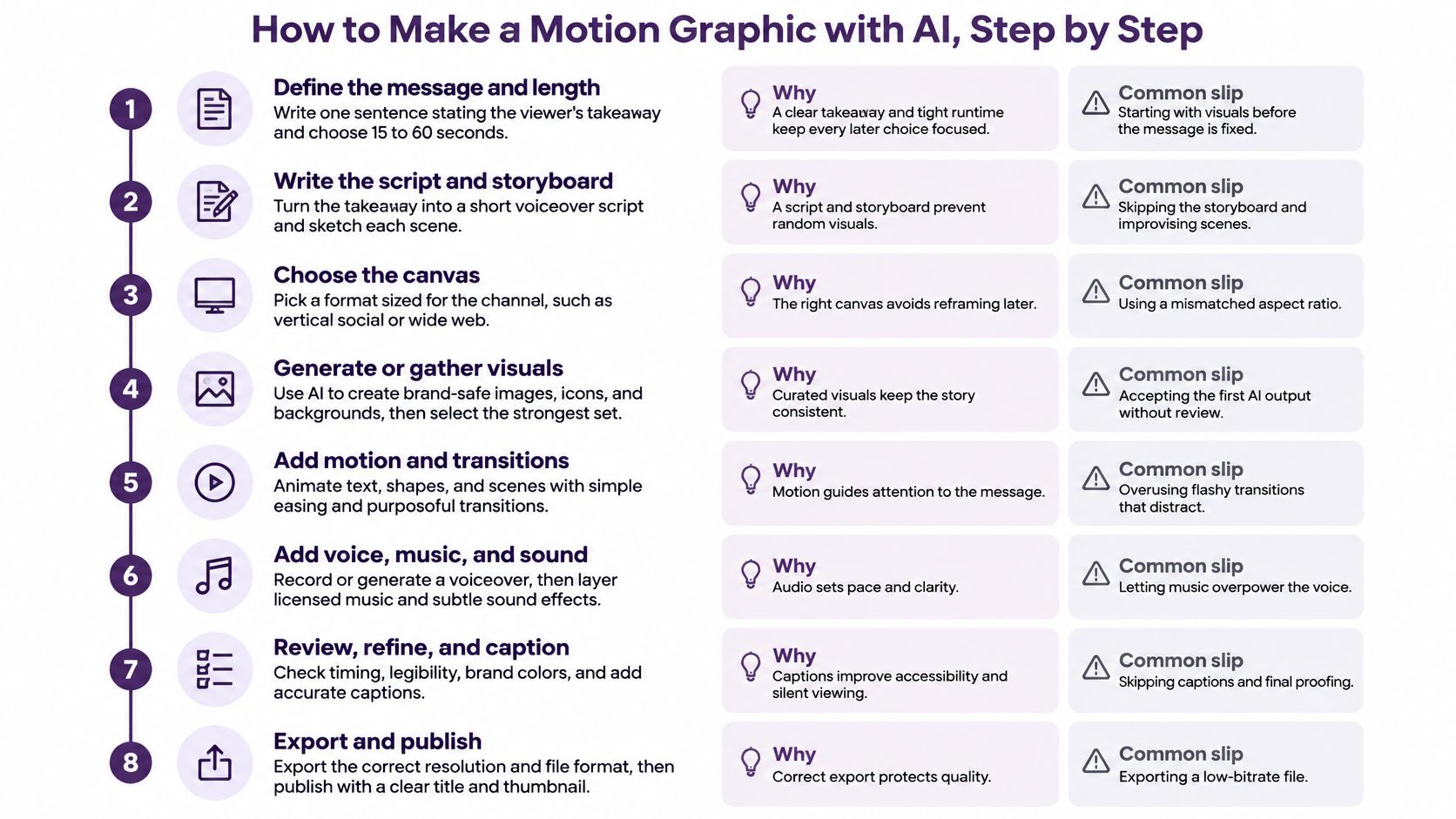
- Define the message and length. Write one sentence stating what the viewer should take away, then pick a runtime between fifteen and sixty seconds. Without that sentence, teams regenerate endlessly because nothing can be judged wrong.
- Write the script in scenes. One idea per scene, about five to ten seconds each. Long paragraphs become cramped on-screen text, and cramped text is unreadable on a phone.
- Choose the visual source. Upload approved brand assets, use image-to-video for real product shots, or generate new elements. The common slip is letting the model draw your logo, which then drifts from the brand across scenes.
- Set voice, language and music. Match tone to audience and keep music clearly below narration. If the bed is louder than the voice, the message disappears no matter how good the animation is.
- Generate a first draft, then check scene by scene. Look at text, logos and motion using the six checks in the quality scorecard before you touch anything else. Fixing scene two is cheap. Fixing a finished render isn't.
- Adjust timing in the timeline. Trim dead holds, align cuts to the voiceover, and land on-screen text on the spoken word. A draft starts feeling directed rather than assembled at this stage.
- Add captions and verify them. Check them against speech, speaker labels and sound cues with the accessibility checklist below, not by eyeballing the first line.
- Export and start the record. Save prompts, asset versions and tool settings as the first entries in your provenance packet.
What finished looks like
A thirty-second explainer for a subscription coffee brand: one takeaway sentence, six scenes, the roaster's actual product photo animated in scene one, a warm mid-range voice, music sitting well under it, captions timed to speech, exported vertical for social and wide for the site.
If that explainer is meant to earn search visibility, the export needs a longer plan. Google's VideoObject structured-data documentation sets a minimum duration of 30 seconds for its video structured-data features, and Google's video SEO guidance requires an indexed watch page with the video embedded and a valid thumbnail at a stable URL. Decorative loops and SEO assets are different deliverables.
Watch the pipeline in motion before you run your own:
The eight-step flow isn't unique to one platform. Our own creator workflow at LunaBloom AI runs Idea, Script, Visuals, Voice, Video, Music/SFX, Captions and Publish, which maps onto the same sequence with the checks sitting between steps rather than after them.
Scoring Motion Quality Before You Publish
A clip can look excellent as a still frame and still fail as motion. Score each scene on specific dimensions instead of asking whether the video looks nice.
| Check | What it catches | Example failure | Fix |
|---|---|---|---|
| Prompt alignment | Copy and layout match the brief | Headline shows the wrong product name | Regenerate that scene with corrected text |
| Temporal consistency | Logos and avatars hold their shape from frame to frame | Logo flickers or drifts | Use a locked brand asset |
| Motion smoothness | Transitions move without jitter or jumps | Camera jumps between two frames | Shorten or re-time the transition |
| Timing | Objects enter, hold and exit on cue | Caption appears after the line is spoken | Retime keyframes to the audio |
| Layer order and position | Elements sit where the layout intends | Text hidden behind a shape | Reorder layers and recheck |
| Audio-visual sync | Speech and music match visual beats | Lip movement drifts from the voice | Re-render with corrected timing |
Why one overall score hides real problems
The VBench benchmark suite published at CVPR 2024 separates quality into hierarchical dimensions including motion smoothness, temporal consistency, spatial relationships and prompt adherence, while EvalCrafter evaluates visual quality, text-video alignment, motion quality and temporal consistency. A clip can match its prompt frame by frame and still flicker, drift in identity, or move the camera discontinuously.
Deterministic checks work better than vibes here. MotionGraphicsBench verifies animation with programmatic rules for object position, scale, opacity, timing, layer order and duration, and its verification reached 93.3% agreement with human judgments on a balanced set of 180 animations. You can apply the same idea manually: pause, measure, compare against the brief.
Regenerate the scene or fix the template
Working rule: one bad scene means regenerate that scene. The same flaw in every scene means fix the template or the brand asset first.
Say a lower third sits behind a colored shape in all six scenes. Regenerating six times wastes credits and time. Reorder the layers in the template once, then re-render.
Before every export, run three passes: play at full speed and watch for jumps, pause on each scene change and inspect layout, then check text, logo and audio sync against the voice. Ninety seconds of discipline, and most embarrassing failures never reach a feed.
Captions, Accessibility and Disclosure Rules
Automatic captions are not a finished feature. They're a first draft of a legal and human obligation.
The W3C understanding document for WCAG Success Criterion 1.2.2 requires captions for all prerecorded audio content in synchronized media at Level A, unless the media is itself a clearly labeled alternative for text. Useful captions also carry more than dialogue: relevant non-speech audio such as music, sound effects, laughter, speaker identification and location.
Interviews with 20 creators with visual and hearing impairments in Kenya, reported in accessibility research on AI video creation, found that automated captions can distort cultural nuances and demand extensive manual correction, with limited creator control in current editing environments. That's not a niche problem. It's the same problem a translated training video has in any market.
The pre-publish accessibility checklist
- Timing: play the timeline and confirm each caption lands with the spoken line, not after it.
- Speaker labels: in dialogue or multi-character scenes, name who's talking.
- Sound cues: describe music or effects when they change meaning, and keep them editable.
- Cultural wording: review translations for idioms and sensitive phrasing rather than trusting the first pass.
- Reading load: check the target language on a phone, since richer captions can raise cognitive load.
- Synthetic status: confirm which assets are AI-generated before you write the disclosure.
Disclosure is tied to the output, not the software
The European Commission's FAQ on transparency obligations under Article 50 of the AI Act requires providers of systems generating synthetic audio, images, video or text to mark outputs in a machine-readable format detectable as artificially generated or manipulated, and requires deployers to disclose deepfake content, meaning content resembling existing people, places, entities or events that could falsely appear authentic.
Realistic avatars and cloned voices land squarely in that review. A stylized icon animation doesn't raise the same question.
Captions count as accessible only after a person has checked them against the speech, the speakers and the sounds.
Building a Provenance Packet for Commercial Videos
A finished motion video is defensible only when its parts can be traced. Treat provenance like a receipt trail for a kitchen: the meal can look perfect, but the question still remains, what went into it, who supplied it, and what permissions came with it?
A 2026 survey of 446 animation-industry stakeholders, catalogued in the University of Liège institutional repository, found respondents viewed generative AI more as a risk than an opportunity, with intellectual property, authorship, remuneration, working conditions and retention of rights among the central concerns. The same record reports that 70.5% of U.S. and 74.9% of U.K. creative professionals believed AI models should not be trained on artists' work without consent, while 56.7% of U.K. respondents were concerned about copyright or trademark infringement in AI outputs.
Your client's legal team may share those worries. Answer them with a folder, not a reassurance.
What goes in the packet
One folder per deliverable, containing:
- Prompts and script versions, dated, including the ones you rejected.
- Source assets with license terms, including stock receipts and brand files.
- Model or tool version and the settings used for the final render.
- Voice and likeness permissions for any cloned voice or real presenter.
- Edit history and export record, with file names, resolutions and publish dates.
Keep the packet beside approved brand and press materials in a shared company location that the whole delivery team can access. That way it travels with the asset instead of living in one editor's downloads folder. If the video includes an AI presenter, Synthetic status should be noted there too, beside the permissions and final export details.
Three ideas people constantly merge
Creator credit is who gets named. Contractual ownership is who holds rights under the client agreement. Copyright eligibility is whether the output qualifies for protection at all. You can credit a designer, assign rights to a client by contract, and still have an output whose copyright status is unsettled. Those are three separate questions with three separate answers.
The packet is a working record, not a legal opinion. Contracts and qualified advice decide the final position.
Build it from step one. A shared media room can hold the working materials alongside the finished file, but the packet itself should be assembled as prompts, assets, settings, permissions and exports are created. Reconstructing all of that months later is close to impossible.
Choose Your First Motion Graphic AI Tool
Pick the category that matches your main deliverable, then run one pilot before you commit to a plan. Feature lists are marketing. A pilot is evidence.
| Tool category | Best for | Strength | Limit to check |
|---|---|---|---|
| Prompt-to-video generators | Fast first drafts from a script | Turns text into a full scene quickly | Less control over exact brand layout |
| Template-based editors | Repeatable social posts and captions | Consistent branding with little setup | Limited originality across projects |
| Avatar presenter tools | Explainers and training with a spokesperson | One presenter across many videos | Likeness rights and disclosure |
| AI with After Effects assistance | Designers who already work in After Effects | Keeps editable layers and project files | Requires design and motion skills |
| Cinematic and image-to-video platforms (LunaBloom is one example) | Product shots, storyboards and cinematic scenes | Scene generation from text or images with timeline editing | Verify credit cost, export limits and commercial rights |
Match the category to the job
- Repeated short social posts: a template-based editor, because consistency beats novelty at volume.
- A recurring spokesperson: an avatar tool, with likeness rights and disclosure settled before you build a series.
- An existing After Effects practice: favor tools that hand back editable layers rather than flattened video.
- Scripts or product photos: prompt-to-video or image-to-video support is the deciding feature.
We sit in that last row. Our Text-to-Video creates scenes directly from your words, and Timeline Editing refines scenes, sound and timing in one place, so judge us on the same criteria as everyone else: which scene types generate well from text versus images, how far the timeline lets you push timing and captions, and what rights your plan carries. All our business plans include commercial use rights, text and image to video, dialogue videos, avatar videos, and AI voice and narration. Confirm current tiers and terms on the LunaBloom pricing page before you buy.
Compare cost per finished video, not per generation
One generation is a draft. A finished thirty-second video may include two rejected scenes, a re-timed transition and a second export. Price the deliverable, not the attempt. We show the exact credit cost for a video's length, model and options before it runs, and you only pay when the video finishes, which makes that math possible.
Make the pilot concrete: write a thirty-second, three-scene script, run the eight steps, score the result against the six quality checks, and log credits used and export limits. Then decide.
Run that pilot this week, and open the provenance folder on day one rather than at delivery.
We built LunaBloom AI to handle the parts of motion graphics that eat hours: scenes generated from your script or product photos, avatars and narration, automatic captions, and timeline editing for the timing calls that still need a human. If you're producing social ads, product explainers or training modules on a repeating schedule, bring one thirty-second script and test it against the quality, accessibility and provenance checks in this article. Start with the free pay-as-you-go trial at LunaBloom AI and see whether the pipeline holds up on your own brand.