The birthday is tomorrow. Your photos are scattered across chats, someone still owes you a greeting clip, and the video needs to work on both a phone and the living-room TV. A good birthday videos maker helps with assembly, but the decisions that save your evening happen before you generate anything.
Treat the project as a set of outputs, not one universal file: a private family master, a captions-first social cut, a privacy-checked public version, and, when appropriate, a searchable watch page. Start with the message. Then build only what each audience needs.
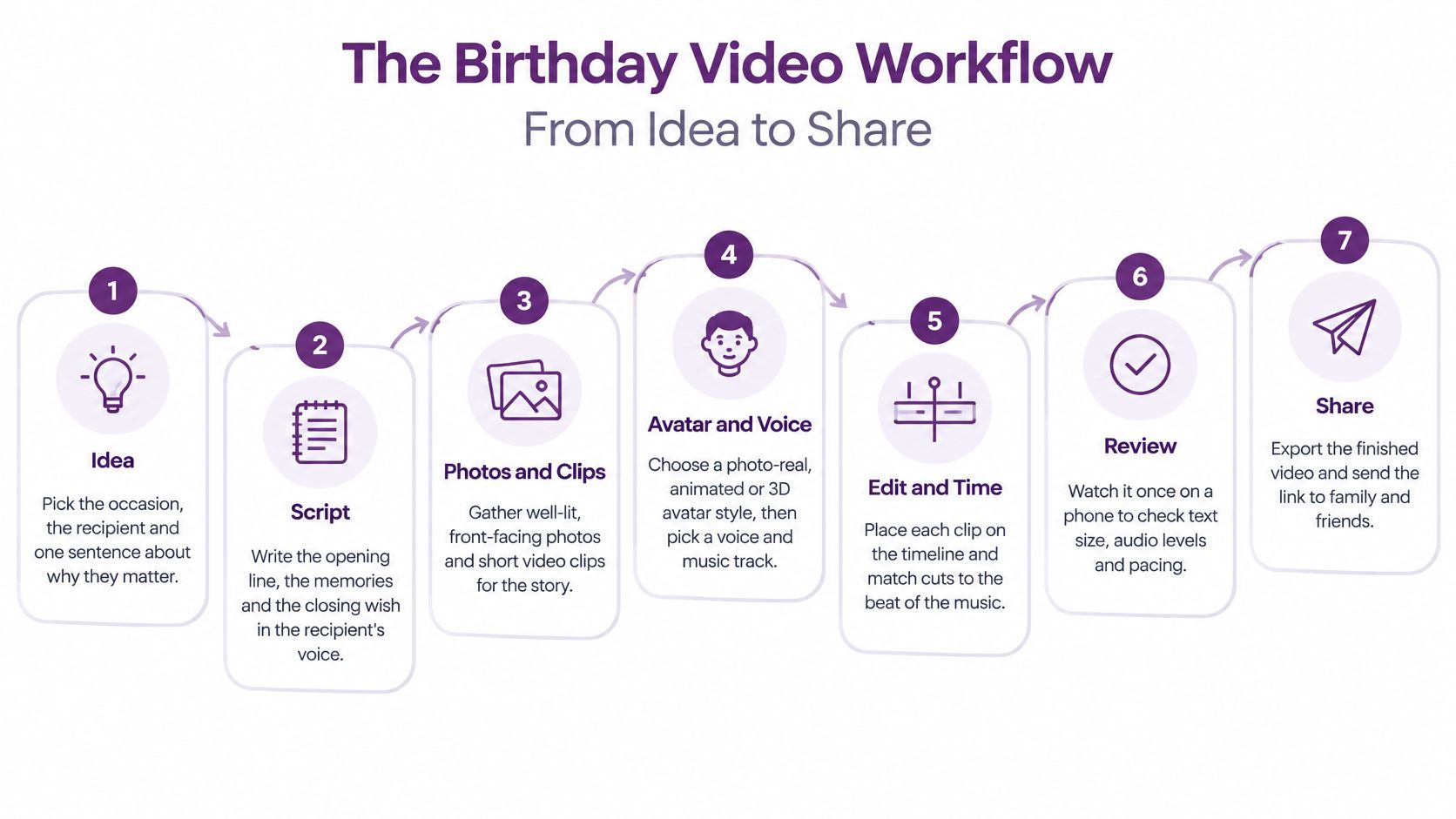
The Birthday Video Workflow From Idea to Share
The deadline's close, so settle the creative decisions before opening a timeline. Use this sequence to avoid rebuilding scenes after the narration, music, or destination changes.
- Idea. Pick the occasion, recipient, and one sentence about why they matter. Choosing a visual style before deciding what you want to say creates attractive filler.
- Script. Draft an opening, a specific memory, and a closing wish. For an initial exercise, try 40 to 90 words, then trim against an actual read. Editing pictures around unfinished wording wastes time.
- Visuals. Choose a template and gather photos or clips. Compose widescreen scenes for TV and vertical scenes for phones. Don't assume an automatic crop will preserve everyone's face.
- Voice. Record a short read, perhaps a 20-second test, or select a generated voice. Approve its tone before generating every scene.
- Music. Choose a background track or sing-along treatment. Keep accompaniment beneath speech. Starting with loud music makes it harder to judge narration.
- Captions. Review names, pronunciation, and birthday wording before the final render. Leaving corrections until delivery creates unnecessary exports.
- Export and publish. Make a version for each destination. Sending the first finished file everywhere is the shortcut that creates framing problems.
Keep this workflow beside your asset folder:
Set the occasion before the effects
If the party itself still needs a direction, ZOVB SG's guide lets you compare birthday celebration ideas for adults before choosing the video's mood. A dinner tribute needs different pacing from a playful activity-party opener.
Keep the LunaBloom AI website bookmarked alongside your script and asset folder, rather than scattering project decisions across chats.
For a simple template-based greeting, budget about 30 minutes for your first attempt and aim for under 10 minutes once the format feels familiar. Those are working targets, not promises; collecting contributions and correcting generated material can take longer.
Write the Script and Choose a Template
Build the script around three beats: name the person, recall something specific, and finish with a wish. The memory does the emotional work. The template should support it, not compete with it.
For a hypothetical 30-second partner video, start with this draft:
Happy birthday, Maya. Remember the Lisbon trip when you insisted the map was upside down? You were right about the tram. Here's to another year of being right and making me laugh.
That's enough story for a small photo sequence. Leave room for a smile, a held photograph, and a closing card instead of filling every moment with narration.
Turn the memory into a usable prompt
A practical prompt specifies the recipient, mood, assets, and ending:
Create a 30-second birthday video for my sister Anna, turning 30. Warm and funny tone, pastel template, upbeat acoustic music, three photos, ending on a card that reads Happy 30th.
Treat word count as a drafting aid, not a timing guarantee. You can test a 40-to-90-word draft against a half-minute timeline, but the upper end will need substantial trimming for relaxed delivery. Names, pauses, and laughter all need space.
Template and length by recipient
| Recipient | Template Style | Target Length | Script Beats |
|---|---|---|---|
| Young child (ages 4-8) | Bright animated template | 15-20 seconds | Name, favorite thing, short wish |
| Partner | Cinematic photo montage with slow music | 30-45 seconds | Shared memory, one inside joke, closing line |
| Parent or grandparent | Classic slideshow with warm colors | 45-60 seconds | Decades of photos, thank-you line, family voices |
| Coworker or team member | Clean corporate-style template | 10-20 seconds | Role, team moment, group signature |
| Friend or teen | Vertical short-form template with trending audio | 15-25 seconds | In-joke, quick clips, playful challenge |
| Family montage | Multi-scene template with chapter titles | 60-90 seconds | One section per family member, group finale |
These are editing targets, not rules about attention spans. A wonderful family message deserves room; an empty title animation doesn't.
For an activity-led celebration, JC Sports Houston's birthday party games by age group can help you choose an appropriate playful reference. Use a game the recipient enjoys rather than adding generic sports imagery.
Before committing to production, review the pricing information against your intended duration and output needs. Then read the script aloud and cut any line that outlasts the photograph it accompanies.
Customize Avatars, Voices and Music
Personalization works best when the source assets are clean. A familiar face with distracting mouth movement is less convincing than an ordinary photograph paired with a sincere recording.
Use this asset-preparation view as a starting point:
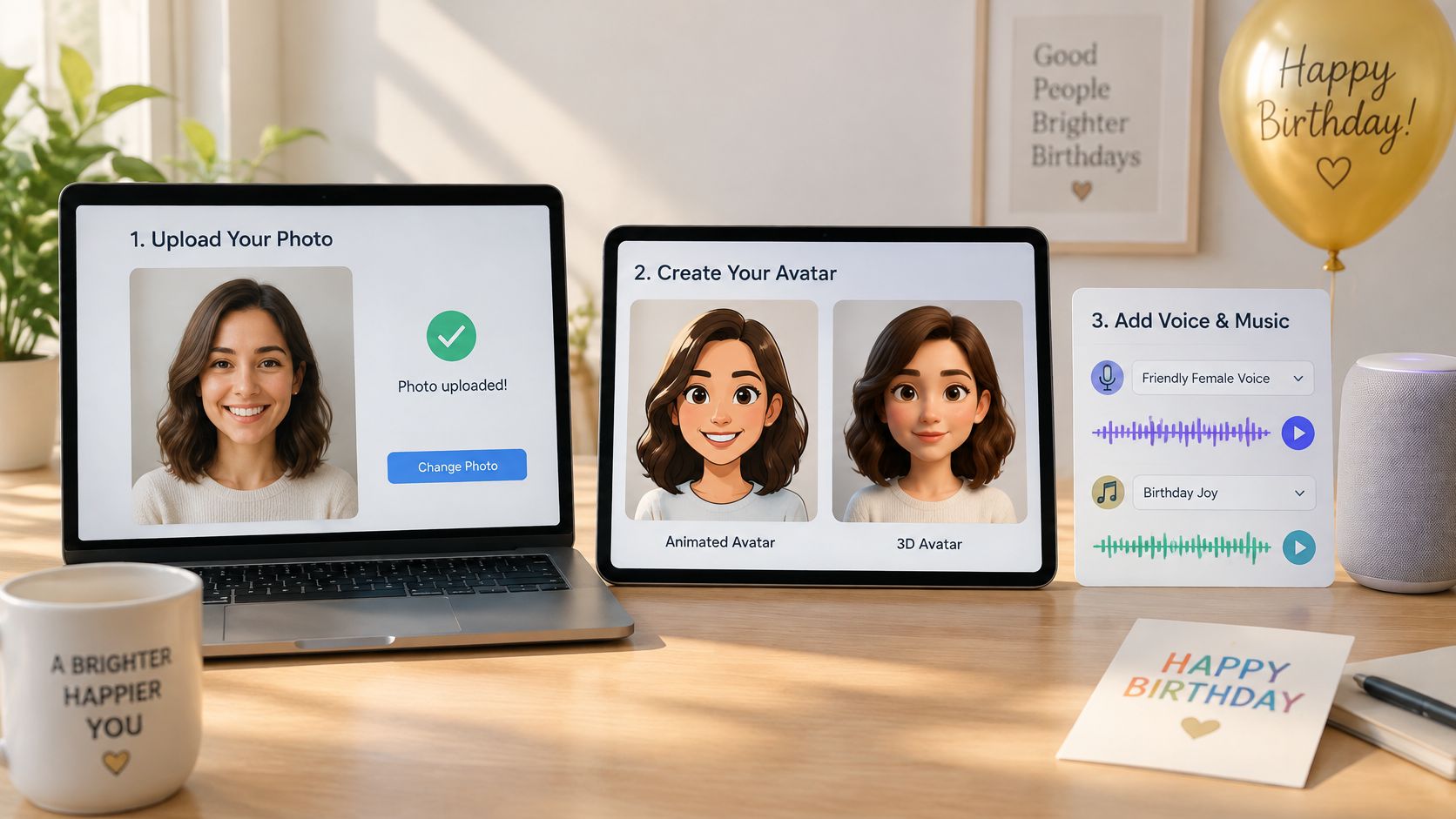
Prepare the face and voice separately
Photo-real, animated, and 3D avatars serve different tones. Photo-real suits a presenter-style greeting, while animated or 3D characters can make an intentionally playful host. Don't use realism to imply that someone recorded words they never approved.
As an asset-preparation target, choose a front-facing photo at least 1080 pixels wide. Use even lighting, visible eyes, and no sunglasses or heavy filters. Extra resolution won't rescue a face hidden in shadow.
For a cloned voice, prepare one to two minutes of clean speech as a starting sample, subject to the selected tool's requirements. Record in a quiet room at a steady pace, without background music. Obtain explicit permission before cloning someone else's voice.
Multi-character dialogue can suit a joint greeting from two people. Give each speaker a distinct line and avoid overlapping speech until the individual voices sound right.
Build the soundtrack around the message
Upload a track you have permission to use, or generate a song around recognizable details. For example:
Write a 30-second upbeat birthday song for Dan, who loves cycling and bad puns, with a chorus that repeats his name and handclaps in the bridge.
For singing lip-sync, supply the vocal track when possible. A vocal-only stem gives the synchronizer a cleaner signal than a dense backing track, though source timing and model behavior still matter.
If the celebration has an adventure theme, the Chronos One Escape Rooms party guide can inspire a puzzle-host character or a closing clue. Keep the birthday message understandable to guests who don't know the theme.
Use the demonstration as a companion while checking your own preview:
Follow a short approval loop:
- Upload the photo and inspect the face crop.
- Record or select the voice, then approve pronunciation.
- Add music or the song prompt without burying the vocal.
- Generate a 10-second preview before committing.
- Adjust synchronization, then render the full video.
Preview rule: If the opening five seconds already look wrong, a longer render won't fix them.
Add Captions and Translations That Land
Captions aren't an optional finishing touch. A birthday message should still make sense on a muted phone, in a noisy party room, or to someone who can't hear the soundtrack.
The W3C caption guidance defines captions as synchronized text that includes speech and relevant non-speech audio. That means meaningful laughter, singing, and applause belong in the caption plan, not just the spoken greeting.
Correct the transcript before styling it
Use a deliberate review sequence:
- Generate a time-aligned transcript. Check that each phrase appears with the corresponding speech.
- Correct personal wording. Review names, nicknames, culturally specific terms, and birthday-song lyrics manually.
- Identify speakers and meaningful events. Label unclear voices, singing, applause, or candles being blown out when those details help viewers follow the moment.
- Create separate caption treatments. Burn readable captions into the social cut; use toggleable captions for the presentation version when the player supports them.
The Event Uploader birthday-video guide recommends this transcript-review approach alongside caption-safe placement and checks on mobile and large screens. Keep text away from faces and interface controls, and use strong contrast rather than decorative lettering.
Translate the meaning, not just the words
When using 50+ language options, treat the generated translation as a draft. Ask a native speaker to review jokes, idioms, family relationships, and regional wording. A technically literal translation can turn affectionate teasing into an insult.
For a line such as Happy birthday dear Oluwaseun, preserve the name. Add a pronunciation note to the production transcript or caption-file notes if needed, rather than translating the name or displaying distracting phonetic instructions to every viewer.
A shorter caption-first cut can be a better mobile experience than a beautiful montage that needs uninterrupted sound.
If an important visual moment has no verbal explanation, consider a brief descriptive narration in the family presentation. Finally, play the social version with sound off. The greeting, joke, and closing wish should all remain understandable.
Protect Privacy Before You Share
A birthday video may combine a child's face, voice, full name, birth date, school logo, and venue sign. Check the details together: individually they may seem harmless, but combined they can identify a child.
In 2025, the UK Information Commissioner's Office said it was focusing on how social-media and video-sharing platforms collect and use children's data, and highlighted its Age Appropriate Design Code for services likely to be accessed by children. For creators, the practical response is to limit what goes into each version. Keep one private family master, make a captions-first social cut, then check a separate public version for identifying details.
Use a privacy checklist before generation
- Get permission. Obtain parent or guardian consent before uploading a child's images or recordings. Respect the child's wishes where appropriate.
- Remove identifying surroundings. Crop school names, venue details, street signs, and exact birth dates.
- Reserve personal details for family. Keep a first name and age in the restricted family export.
- Simplify public wording. Use a nickname or generic greeting in public posts.
- Restrict access. Prefer authenticated or recipient-restricted sharing. An unlisted link can still be forwarded.
- Prepare a public-safe edit. Blur faces where appropriate and remove identifying speech, not just visible text.
- Delete reusable assets. When the project ends, remove source photos, voice recordings, avatar clones, and unnecessary cloud copies.
Give synthetic identities stricter controls
A slideshow shows selected photographs. A reusable voice clone or avatar can generate new material, so permission should cover that specific use, not just appearing in a birthday video.
Review the LunaBloom AI privacy policy before uploading sensitive assets. Check how uploads and generated files are stored and deleted. Do not assume deleting an exported video also removes its source material.
Keep personal details in the family version and use generic wording in public. A meaningful birthday gift does not need public distribution. Before sharing, check the public cut for names, faces, voices, and background clues that could reveal a child's identity.
Export, Test and Share Each Version
Keep a high-resolution master, then make destination-specific exports from the editable project. Reframing the source timeline preserves more control than repeatedly cropping a compressed download.
The AlbumMap birthday-montage guide recommends 1080p H.264 or HEVC at 30 fps, with a higher-resolution master when supported; it also distinguishes a 24-fps family edit from 60-fps footage intended for slow motion. H.264 is a practical starting point when playback compatibility matters.
Export settings by destination
| Destination | Aspect Ratio | Resolution | Frame Rate | Best Use |
|---|---|---|---|---|
| Reels, TikTok, YouTube Shorts | 9:16 | 1080 x 1920 | 30 fps | Social-first cut with burned-in captions |
| Instagram feed | 4:5 | 1080 x 1350 | 30 fps | Post in grid and feed |
| Cross-post square | 1:1 | 1080 x 1080 | 30 fps | Messaging and multi-platform posts |
| Family screen or TV | 16:9 | 1920 x 1080 | 24 or 30 fps | Private viewing with toggled captions |
| Master file | 16:9 | Highest the source supports | Match source | Archive and future re-exports |
These are recommended delivery presets, not universal upload requirements. A portrait file may leave side bars on TV; a wide scene cropped for phones may lose the people at its edges.
Run a delivery rehearsal
Set aside a ten-minute test window:
- Watch on a phone. Check caption margins against the destination's interface.
- Play on the presentation screen. Listen for narration getting buried beneath music.
- Compare names with the script. Inspect the final rendered wording, not just the editor.
- Open the actual delivery file or link. Use the device guests will rely on and confirm access works.
For a small trial, our Starter plan is free to start and includes 2 free videos of up to 10 seconds each, with no monthly commitment and 720p export. Before every video, the app shows the exact credit cost for its length, model, and options, and customers only pay when the video finishes. Those trial clips suit previewing an idea, not assuming a full-length, Full HD montage is included.
Fix the Most Common Birthday Video Problems
Start with the source assets, then check synchronization, audio balance, captions, and delivery framing. Changing several things at once makes it difficult to tell which adjustment helped.
Birthday video symptoms, causes and fixes
| Symptom | Likely Cause | Fix |
|---|---|---|
| Lip-sync drifts after a few seconds | Full music mix used instead of a vocal track | Upload a vocal-only stem and re-sync |
| Names and jokes wrong in captions | Raw automatic transcript accepted | Correct names and wording in the transcript before export |
| Text cut off on phones | Captions placed outside the safe margins | Move captions inside the safe zone and re-render |
| Music overwhelms voice on TV | Music level too high relative to narration | Lower the music under the voice and re-check on a large screen |
| Black bars on TV | Portrait export shown on landscape screen | Export a 16:9 version for TV |
| Avatar looks distorted | Low-resolution or angled source photo | Use a well-lit, front-facing photo at 1080 pixels or wider |
Fix the cause before adding effects
The table is a diagnostic starting point, not a guarantee. Lip-sync drift can also come from mismatched timing, and distorted faces may require changing the crop or avatar treatment.
Don't sharpen a poor face image repeatedly or add louder narration to overpower an already loud soundtrack. Replace the weak input or correct the balance.
Render discipline: Keep a short change log with the symptom, adjustment, and result. Approve a preview before generating the complete replacement.
Save clearly named versions so the corrected file doesn't get confused with an earlier export.
Publish a Watch Page That Search Can Find
A search-ready page serves a different purpose from a social post. Use one for a consented celebration example or business portfolio, not as a default home for a private family tribute. Keep the family master private, and publish only a version checked for personal details, especially children's names, locations and other identifying information.
Google's video indexing guidance recommends a dedicated watch page, accessible video playback and a stable thumbnail. Make the video easy to find and play rather than placing it behind unrelated page elements.
Prepare the page and metadata
- Create a dedicated watch page. Make the video's location and playback clear to visitors.
- Write a unique title and description. Describe the greeting or montage accurately without exposing private details.
- Provide a stable, valid thumbnail URL. Choose an image made for that video.
- Add an ISO 8601 upload date. Keep the structured data consistent with the published video.
- Mark restricted access appropriately. Use applicable paywall structured data for login or subscription pages. This does not override privacy controls or guarantee indexing.
Choose the public cut deliberately
The VideoObject structured-data documentation helps describe a video to search engines; it does not guarantee discovery. Let the public cut's length follow the story. A 45-to-60-second edit can suit a longer tribute, while a short greeting can work well for social sharing. Don't pad the video to chase visibility.
Treat the birthday video as several outputs: a private family master, a captions-first social cut, and a privacy-checked public version. The watch page should describe only that public cut. Accurate metadata helps people and search systems understand the video, but it is no reason to publish personal material.
LunaBloom AI can turn text and images into birthday videos with multilingual voiceovers, background music and customizable visuals, without advanced editing skills. Use it to shape the greeting, then prepare separate versions for family, social sharing and public discovery.