Your TikTok edit is almost finished, but the narration isn't. Recording means finding a quiet room, repeating the same sentence, and discovering that your best take no longer fits the cut. An AI voiceover can remove that bottleneck, provided you don't replace recording work with robotic delivery and mismatched captions.
To make an AI voiceover for TikTok, write a spoken script, generate the narration, sync it to the action, correct the captions, and apply the appropriate disclosure before publishing. The useful question isn't whether a voice sounds impressive in a preview. It's whether viewers can follow it, trust it, and act on the message.
How to Make an AI Voiceover for TikTok, Step by Step
Creators using AI-generated voice produced 24% more videos per week, with 63% longer total weekly video duration, than comparable creators who didn't use it, according to the University of British Columbia's study of TikTok creators. That's a production-efficiency finding, not a promise of stronger engagement.
The practical benefit is repeatability. You can revise a product explanation without rebuilding a recording setup, but you still need to direct the performance.
This workflow keeps the script, narration, and edit connected.
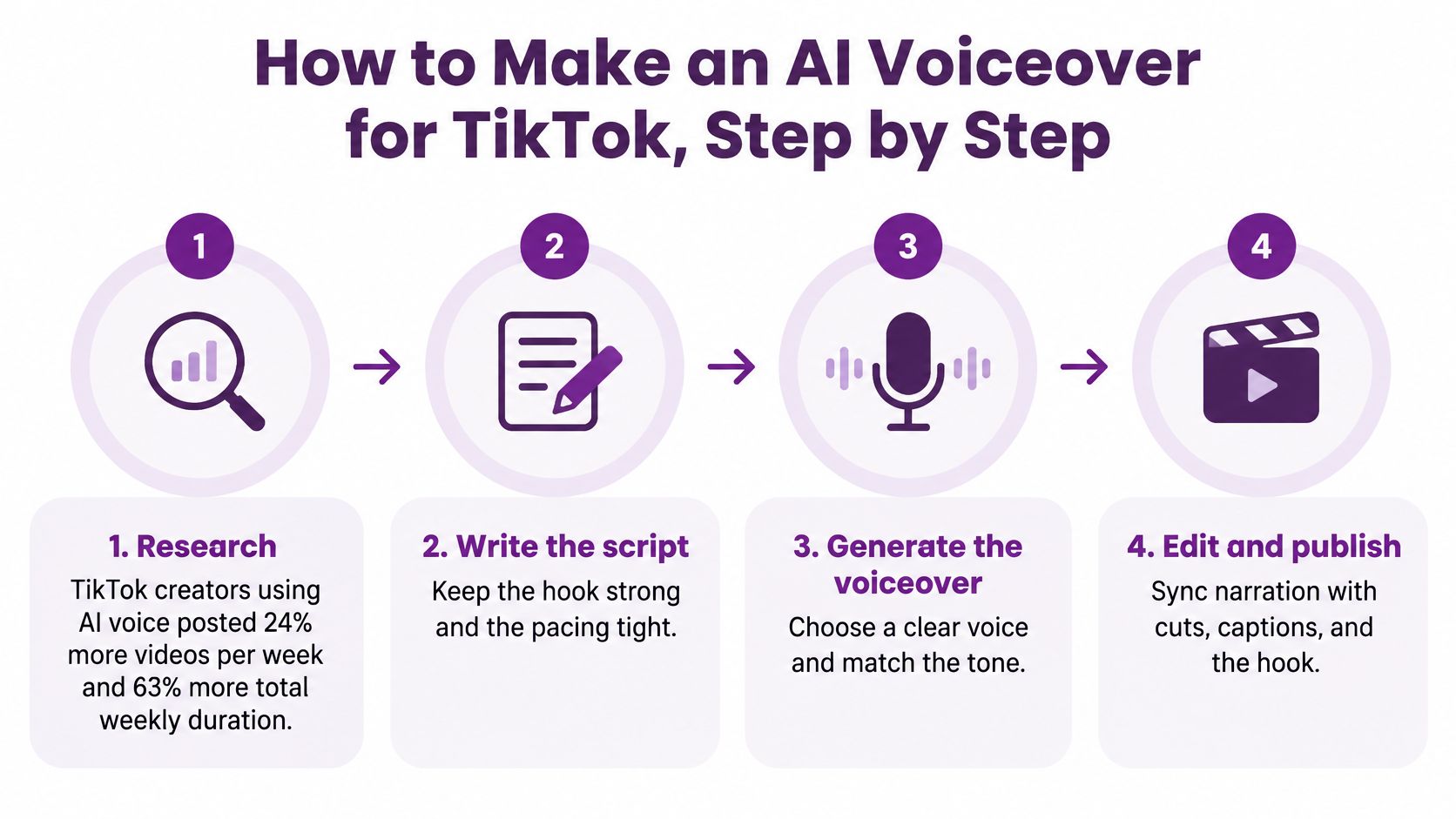
Build the narration before polishing the edit
Write for speaking, not reading. Put the hook in the opening line, then use short clauses and familiar words. As a planning example, budget about 2.5 words per second of target length, then reduce the script wherever a natural pause needs room. An essay-style script forces the narrator to rush through transitions that should be cut.
Choose a voice that fits the job. A product walkthrough needs intelligibility before personality; a comic character needs intentional exaggeration rather than accidental stiffness. Audition the actual script, because a polished demo won't reveal how the voice handles your product names.
Generate at a natural speed and export clean audio. Start with the voice's normal delivery, adjust punctuation and pronunciation, and export without music where possible. Keep the final generation speed consistent with your test clip, or the timing you approved may drift by the closing shot.
Normalize the narration so it stays at a steady perceived level, then add music underneath. As an initial mixing example, try music roughly 10 to 15 dB below the voice and adjust by ear on a phone speaker. Don't assume that matching meter readings makes different voices equally easy to understand.
Import the audio and align the opening phrase with the first visible action. In CapCut or another timeline editor, place a marker where the meaningful action starts and align the relevant spoken word to it. A slow logo reveal before the narration's promise creates an unnecessary wait.
Build captions from the approved script or transcribe the generated audio. Check every line against what the voice says, especially after regenerating a sentence. The common slip is correcting the script while leaving an older audio file or caption track in the timeline.
Prepare disclosure before export and confirm it during upload. Add any on-screen explanation to the edit, then check TikTok's applicable disclosure setting when publishing. Review the exported file on a phone with sound on and off, not just inside the editor.
Approve the result, not the preview
Practical rule: If a sentence only works when you read the script alongside it, the narration isn't ready.
Listen for clipped endings, abrupt changes between generated passages, and pauses that interrupt a connected thought. Regenerate the troublesome phrase rather than speeding up the entire track.
Finish with a simple production target: does the hook land within the opening two seconds, and does the video still make sense muted?
Neutral, Stylized or Cloned
| Voice type | Best for | Disclosure need | Main risk |
|---|---|---|---|
| Neutral text-to-speech narrator | Tutorials, explainers, product walkthroughs | Required in a realistic synthetic scene; not automatic for plain narration | Sounds generic and can lower trust |
| Stylized character voice | Comedy, storytelling, recurring branded series | Label realistic synthetic audio when the rule applies | Feels gimmicky when overused |
| Consented voice clone of you or a staff member | Founder updates, recurring creator series | Disclose the clone and keep written consent | Mispronounces names or delivers them unnaturally |
| Voice imitating a real public figure or unconsented person | No legitimate use in this workflow | Do not publish | Impersonation, removal, and legal exposure |
Choose by use case, not by whichever voice sounds most human in isolation. A neutral narrator leaves room for a tutorial's instructions. A stylized character can give a recurring series a recognizable identity without pretending to be an actual person.
A consented clone makes sense when familiarity matters, such as a founder's recurring updates. It still needs direction: a recognizable timbre doesn't guarantee believable emphasis, appropriate emotion, or accurate pronunciation.
Test delivery instead of accepting the default
Research published in the International Journal of Information Management found lower consumer engagement for TikTok ads using AI voices than human voices, with a lower synthetic pitch mitigating the negative effect; an AI-generated celebrity voice also performed comparably to human voices in an experiment. That experimental result isn't permission to imitate a celebrity.
Imitating a real public figure or an unconsented person is not a valid production option. Don't treat recognizability as a shortcut to credibility.
For an audition, generate two or three variants with identical scripts and speech rates. Normalize their loudness, then change pitch without simultaneously changing music, emotional intensity, or speed.
An overly low voice can lose warmth and fit educational or youth-oriented material poorly. Choose the delivery that supports the message, not the deepest available setting.
Run a phone-speaker audition
Set aside ten minutes and play the first fifteen seconds of each candidate as a practical screening exercise.
- Pronunciation: Check names, abbreviations, and product terms without looking at the script.
- Claim fit: Reject cheerful delivery for serious warnings or authoritative delivery for uncertain claims.
- Local fit: Review each language and regional accent independently instead of assuming the original voice choice transfers.
Keep the version you can understand comfortably at ordinary listening volume.
Syncing Narration to Cuts, Captions and Hooks
| Video length | Script length | Pacing structure |
|---|---|---|
| 15 seconds | About 40 words | Tight hook and one point |
| 30 seconds | About 75 words | Hook, two points, and one call to action |
| 60 seconds | About 150 words | Hook, three beats, and a pause at each major cut |
| 3 minutes | About 450 words | Chapters with a visual change every 15 seconds |
These are planning examples at about 2.5 words per second, with the shortest example rounded. They're drafting budgets, not requirements: demonstrations, unfamiliar terms, and emotional passages need more breathing room.
Keep the script, waveform, and visual sequence visible together while editing.
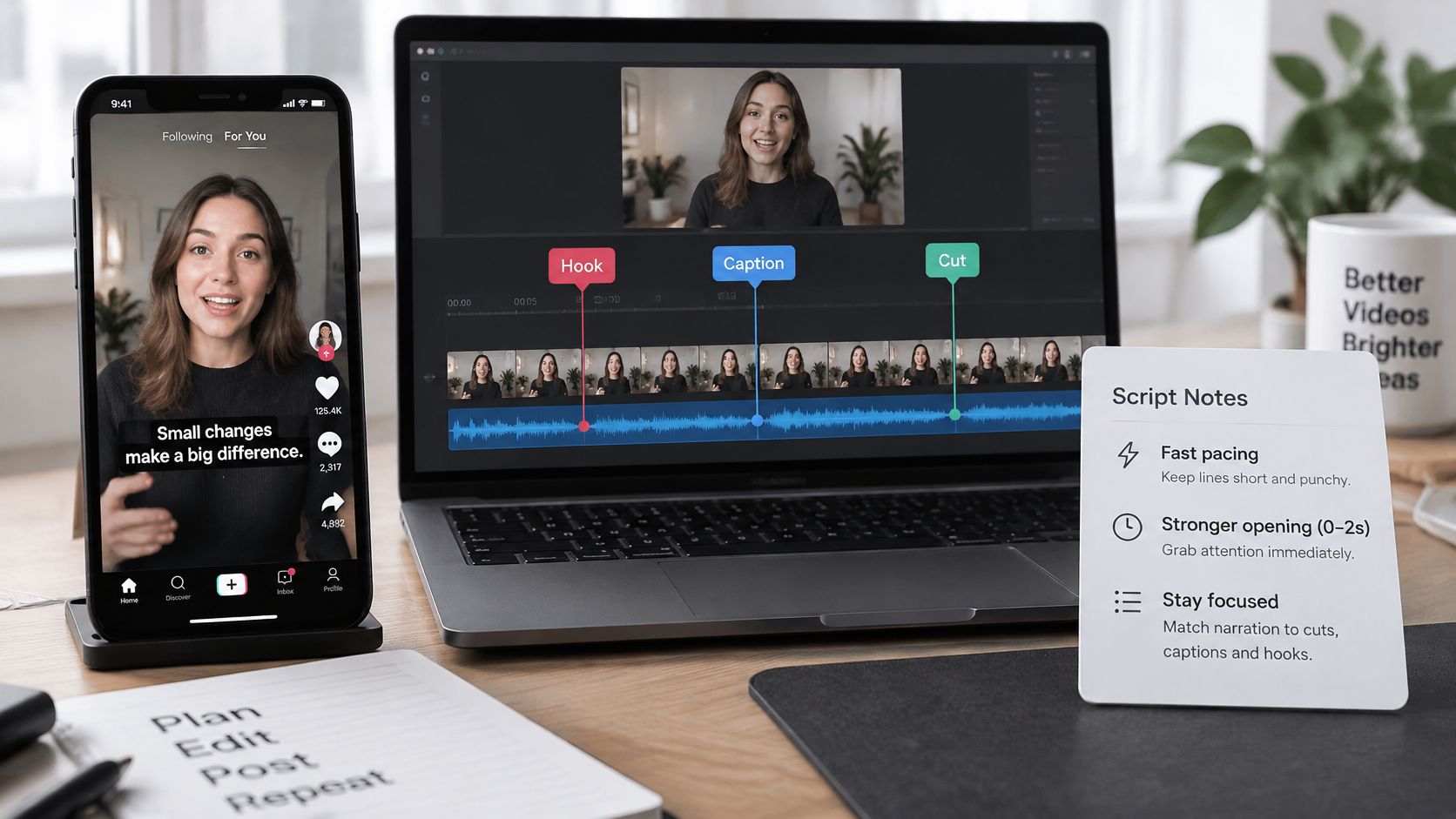
Give each visual beat one job
Treat the opening two seconds as your hook budget rather than a guaranteed audience-behavior threshold. Give the hook its own short line and place the first meaningful visual change on the same beat.
For a product demonstration, show the relevant control when the narrator names it. Don't show packaging while the voice explains a setting the viewer can't see.
- Align speech to useful cuts: Preserve the action that proves the point, then trim or regenerate narration to fit.
- Leave a short pause: Put breathing room at a change of idea rather than cutting through a connected phrase.
- Keep one idea per beat: Separate the problem, action, and result instead of making viewers decode them simultaneously.
A cut should help viewers understand the next thought, not merely make the timeline look busy.
Use this video as a companion while checking your editing sequence.
Correct captions after the audio is locked
Generate captions from the final audio or align the approved script to it. Manually correct every name, number, and product term, then inspect line breaks on the phone rather than the desktop preview.
As a practical layout starting point, try short lines of about six words, keeping them clear of TikTok's right-side controls and bottom interface. Don't divide a name or tightly connected phrase just to meet that target.
If you're importing subtitle files, Translate AI's guide can help you fix common SRT formatting errors before troubleshooting the edit itself.
Watch for voice running ahead of captions, or captions revealing the next thought prematurely. Both make viewers choose between reading and listening. Play the export at normal speed and flag any voice-to-visual disagreement greater than half a second as a working correction threshold.
Disclosure and Rights Checklist Before You Publish
| Scenario | Label needed? | What to do |
|---|---|---|
| Generic text-to-speech narration over your own footage | Often not, if it doesn't change how a person looks or sounds | Keep a note of the tool and voice settings |
| Realistic AI scene or altered footage with narration | Yes | Enable TikTok's AI-generated-content label and add an on-screen statement |
| Paid ad with fully AI-generated audio | Yes | Disclose before submission |
| Cloned voice of yourself or a consenting person | Yes | Disclose the clone and keep written consent |
| Voice that imitates a real public figure or private person without authorization | Not an option | Do not publish |
| Footage, music, or script you don't own | Not a labeling question | Replace it or license it first |
Generic narration and impersonation aren't the same thing. TikTok's synthetic-media policy requires labeling for realistic AI-generated or significantly AI-edited content, including relevant changes to how real people appear or sound.
Work through the scenarios from the finished video, not the audio file alone. Ordinary narration over your own demonstration presents a different question from a realistic generated presenter delivering that narration.
Paid ads containing fully or significantly AI-generated audio require disclosure, and TikTok can automatically apply labels that creators can't remove, according to TikTok's explanation of AI-content labeling. The same guidance states that compliant content isn't penalized solely for carrying an AI label.
Keep permissions separate from labeling
Replacing a soundtrack doesn't clear the underlying footage, written script, or music rights. TikTok's copyright guidance treats copyright as a separate obligation, so newly generated narration doesn't make someone else's video yours to reuse.
For a consented clone, retain written authorization covering the intended use. Don't imply that the person recorded or endorsed words they didn't approve.
- Record provenance: Save the tool, voice setting, script version, and source assets with the project.
- Explain plainly: Use an on-screen statement such as AI-generated narration where appropriate, alongside the required platform setting.
- Check the implication: Remove captions or visuals suggesting an authentic endorsement that doesn't exist.
- Retain evidence: Keep licenses and voice permissions accessible to whoever publishes the post.
Lumi Humanizer's explanation of AI content detection and disclosure offers useful background for understanding the distinction between identifying synthetic content and explaining it to viewers.
Trust check: A label explains how media was made. It doesn't authorize the assets or make a misleading claim acceptable.
Treat disclosure as a documented publishing step, not an awkward addition after approval.
Testing Your Voiceover and Running the Final Check
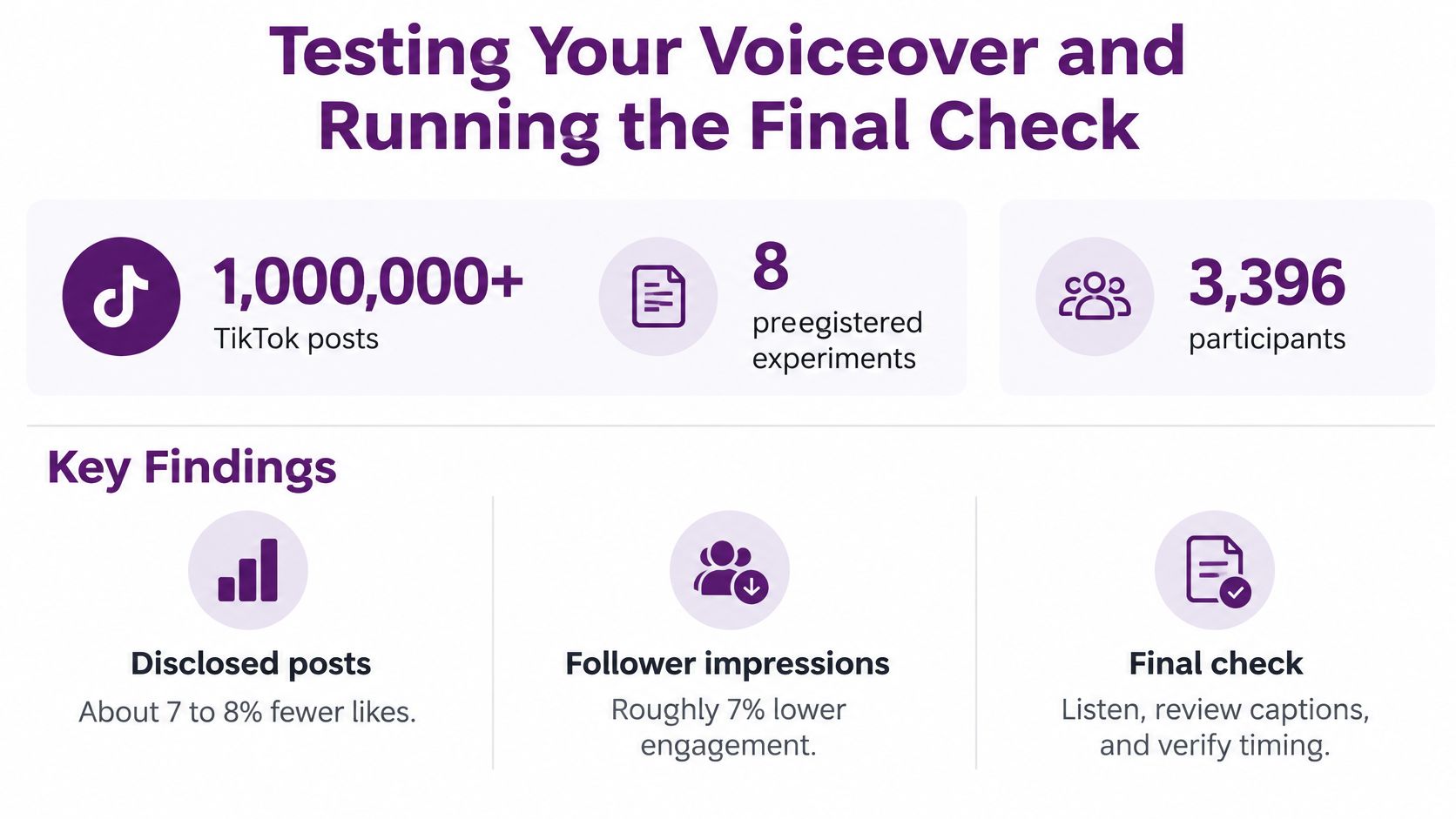
Engagement benchmark: A Journal of Consumer Research study covering more than one million TikTok posts, supplemented by eight preregistered experiments involving 3,396 participants, found approximately 7–8% fewer likes and 7% lower combined engagement for disclosed posts than comparable undisclosed posts, conditional on views.
That isn't a universal penalty or a reason to hide a required label. Treat voice treatment and disclosure presentation as variables to test while keeping compliance fixed.
The infographic summarizes the benchmark; use the conditional-on-views comparison above when interpreting engagement.
Run a matched split test
- Duplicate one finished video. Keep visuals, script, duration, captions, call to action, and posting conditions matched. For paid distribution, also match targeting and budget.
- Change only the voice treatment, such as neutral versus lower pitch. Alternatively, test the placement of a supplemental on-screen disclosure while retaining the required platform label in both versions.
- Compare equivalent viewing windows. Keep the observation period consistent and compare at similar view counts where practical. Sequential organic posts aren't a randomized experiment, so audience differences remain a limitation.
- Evaluate likes, comments, and shares relative to views, alongside watch time and conversion rate. Raw reach alone won't tell you whether the narration helped people understand or act.
Don't change the hook while testing pitch. Don't combine a new voice, faster music, and shorter captions, then attribute the result to narration.
A separate analysis of 21,541 TikTok videos associated AI voice use with average declines of 5.4% in likes, 5.2% in comments, and 7.4% in shares, according to Hooked's industry reporting. Those associations don't establish that synthetic narration caused the declines.
Make the final human pass
Read the script aloud and remove lines you wouldn't naturally say. Fix pronunciation, check captions against the exported audio, confirm the disclosure setting, and ensure the cover communicates without sound.
Our LunaBloom AI studio includes Automatic Captions to help make videos clear, accessible, and ready to watch. Review generated captions as editorial work, not a finished accuracy check.
This week, choose a recurring video format and produce a neutral-voice version and a different-pitch version. Keep everything else matched, retain the appropriate disclosure, and use the results to choose your next production setting.
LunaBloom AI generates videos with multilingual voiceovers, background music, and customizable visuals without requiring advanced editing skills. Visit LunaBloom AI to build your next narrated TikTok, then prepare matched voice variants and review the captions before publishing.