You've finished editing a video, but the clock is ticking and captions still need to be added. An automatic subtitles generator can turn speech into timed text quickly, but the first draft isn't always ready to publish. Names can be misspelled, lines can appear too early, and a transcript can leave out sounds that matter to viewers.
The useful way to think about automatic subtitles is as an editing workflow, not a one-click finish. Once you understand how speech recognition, timing, speaker labels, formatting, and human review fit together, you can spot problems faster and decide whether your video needs subtitles for comprehension or accessibility captions.
What Happens When You Click Generate Subtitles
A creator uploads a product demo, chooses its spoken language, and clicks Generate Subtitles. Soon, text appears beside the video timeline. It looks complete, but that draft has passed through several steps, and each step can introduce a different kind of error.
The process starts with audio. The generator identifies speech and turns it into words. It then divides those words into short sections, assigns timestamps, and may try to identify different speakers. Finally, it presents the text in a format you can edit, style, or export.
You can try this workflow with LunaBloom AI's video creation app. Whatever tool you use, treat the generated text as a starting point. A clean transcript can still have poor timing, hard-to-read line breaks, or missing sound cues.
A practical mental map has five parts:
- Recognize speech: Convert the audio into a draft transcript.
- Set timing: Decide when each caption appears and disappears.
- Separate speakers: Identify voice changes where the system can.
- Format text: Break words into readable on-screen cues.
- Review the result: Correct errors and check the captions against the video.
That final review matters because these stages don't all solve the same problem. Speech recognition can get the words right while timing places them awkwardly. A useful caption track needs the words, timing, and presentation to work together.
How Automatic Subtitle Generators Actually Work
An automatic subtitles generator works like a small production team processing a video's sound and turning it into on-screen text. Some tools combine these jobs behind one button, but it helps to understand the layers underneath.
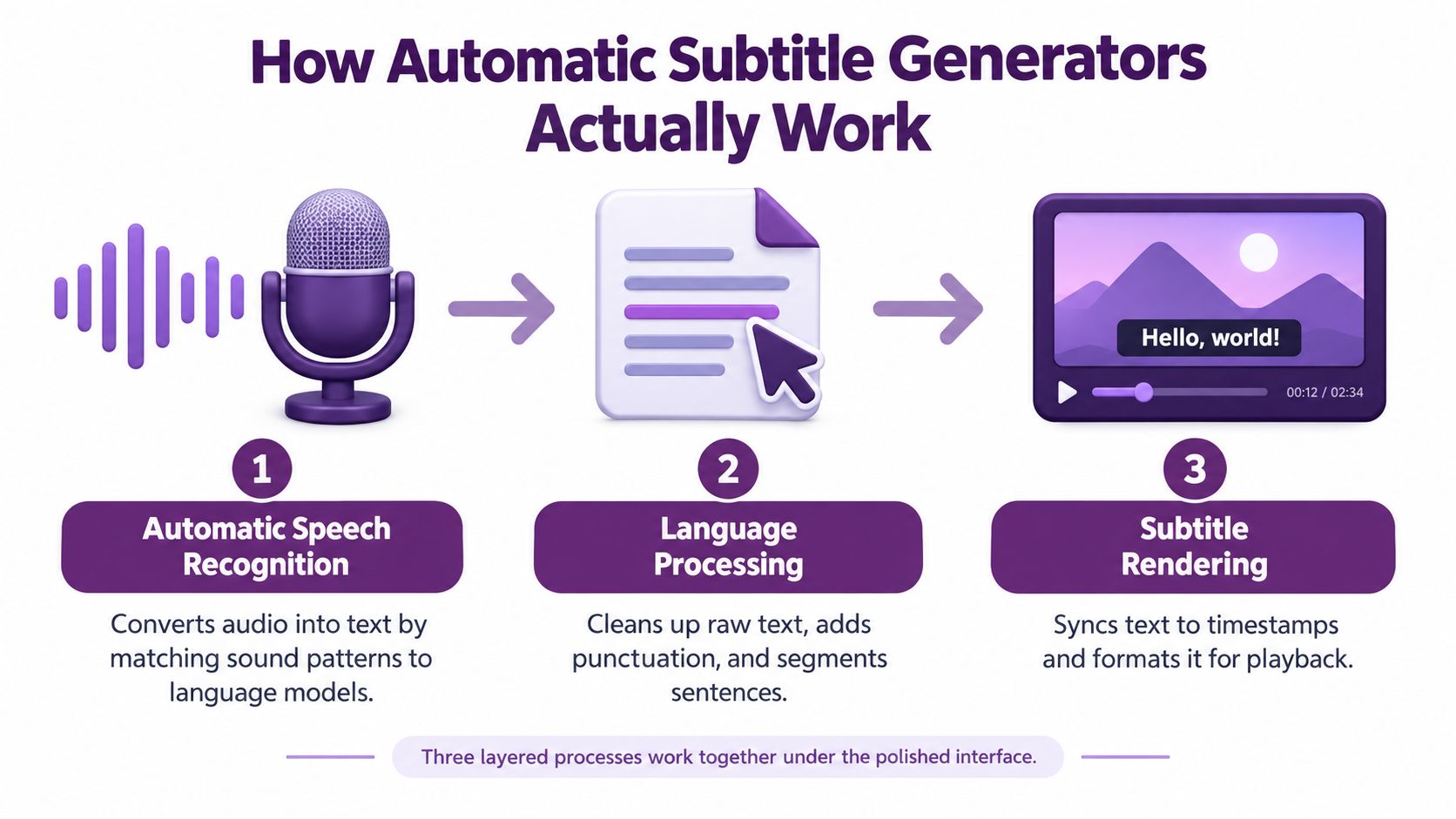
Speech recognition listens for words
Automatic speech recognition (ASR) analyzes sound and predicts the words being spoken. Think of it as a fast typist who doesn't see the speaker's face or know what's on the screen. The system matches sound patterns to likely language, but a muffled consonant, an unfamiliar name, or overlapping voices can send it toward the wrong word.
Modern neural-network and Transformer-based systems have expanded speech-to-text from recognizing isolated commands to handling continuous dialogue. That development makes it possible to generate captions while a video is being recorded or streamed, as described in research on the development of interpreting technology.
Timing turns a transcript into cues
A transcript is a stream of text. Captions need timestamps. A timing model works like a stopwatch and editor, cutting the transcript into short pieces and deciding when each piece should appear. It has to balance natural pauses with how quickly a viewer can read.
Speaker detection sorts the voices
Some systems also perform speaker diarization, the process of estimating who spoke when. You can picture it as matching sections of audio to voice fingerprints. If one person asks a question and another answers, speaker labels can make the change clear. But similar voices or interruptions can confuse the model.
For creators exploring how spoken language can be translated during a call or live exchange, this guide to live speech translation technology offers useful context. Translation adds another layer beyond recognizing and timing the original speech, so each stage deserves its own review.
Subtitles, Captions, and Transcripts Are Not the Same
A creator preparing a translated product tutorial might need subtitles. A viewer who is deaf or hard of hearing needs more than dialogue alone. The right format depends on what information viewers need to get from the video.
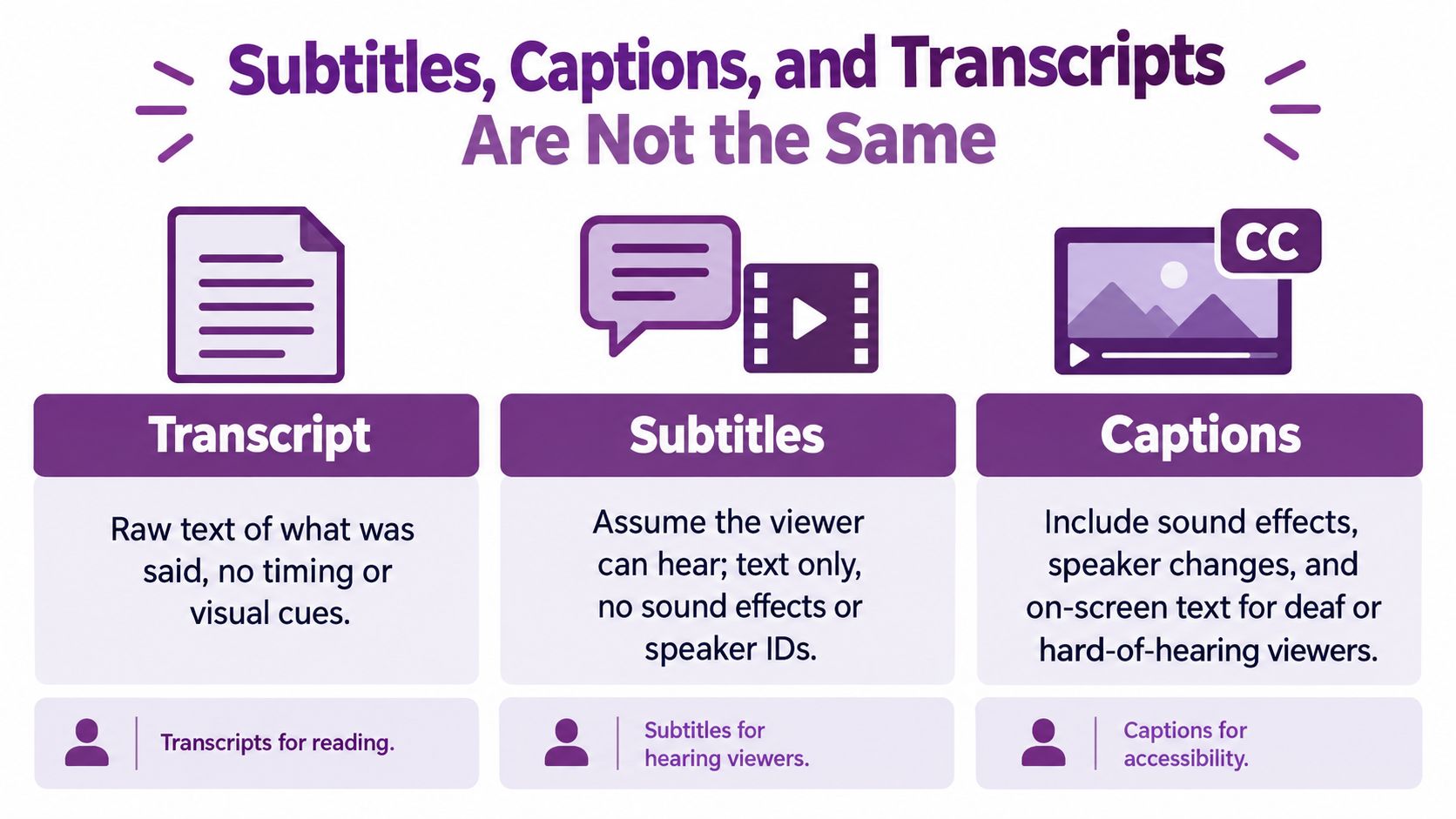
| Format | What it provides | Typical purpose |
|---|---|---|
| Transcript | A text record of spoken content, often without synchronized display | Reading, searching, or referencing what was said |
| Subtitles | Timed text for spoken dialogue, often translated into another language | Helping viewers understand speech they can hear but may not understand |
| Captions | Timed dialogue plus meaningful non-speech audio information | Supporting viewers who are deaf or hard of hearing |
A transcript records the words; subtitles time dialogue on screen; captions also describe meaningful sounds. The W3C's guidance on captions and subtitles explains this distinction and WCAG requirements, including prerecorded video at Level A and live video at Level AA when important audio is present.
An accessibility caption carries the full audio picture: dialogue, speaker changes, and sounds that matter, such as laughter, a door slamming, or a change in background music. A transcript of dialogue alone leaves those cues out. Automated text can give you a useful starting point, but review is what turns it into the format your audience needs.
Choose subtitles when viewers need help following spoken dialogue, such as in a translated product tutorial. Choose captions when viewers need important audio represented in text. Some videos call for both original-language captions and translated subtitles.
Before publishing, check the output against its purpose: Does it include every spoken line? Are meaningful sound cues described? Are speaker changes clear? Is translated dialogue presented as subtitles rather than as a replacement for original-language accessibility captions? A one-click transcript is a draft in an editing workflow, not evidence that the finished video meets accessibility needs.
What Really Drives Subtitle Accuracy
No single accuracy figure can predict how well an automatic subtitles generator will handle every video. Performance changes with the recording, the speaker, the vocabulary, and the language. A quiet, clear explanation is a different challenge from a group discussion recorded in a noisy room.
Audio quality is an obvious starting point. Background noise, echo, music under speech, and a distant microphone can make words harder to distinguish. When speakers interrupt each other, a system may struggle to identify both the words and who said them.
Accent and dialect matter too. A peer-reviewed Interspeech study comparing Bing Speech and YouTube automatic captions across gender, race, and four American English dialects reported a YouTube word error rate of 0.31, with a standard deviation of 0.07. In that test sample, the mean corresponds to roughly 69% word-level accuracy, not a universal performance guarantee. The Interspeech study on speech recognition and dialect variation illustrates why a headline average can conceal uneven results across speakers.
Vocabulary can trip up fluent speech
A speaker may pronounce every word clearly and still be misunderstood if the system hasn't encountered a company name, specialist term, or product model often enough. For example, a medical lecture or software tutorial can contain phrases that sound unfamiliar to a general-purpose model. Compare the draft against any glossary or product notes you already use.
Teams building tools around specialized language may find this practical guide to domain-specific LLMs helpful for understanding why domain knowledge affects language processing. For subtitle review, the practical lesson is straightforward: pay extra attention to the vocabulary that's unique to your organization or subject.
Longer recordings give errors more chances to appear, while fast speech can make sentence boundaries and punctuation harder to infer. Before generating captions, improve what you can: place the microphone closer, reduce background noise, and avoid recording several people speaking at once.
The Editing Workflow That Makes Captions Publish Ready
A reliable review checks more than whether the transcript sounds plausible. The FCC groups caption quality around accuracy, synchronicity, completeness, and placement. The FCC's caption quality standards provide a useful frame for checking an automatic draft.
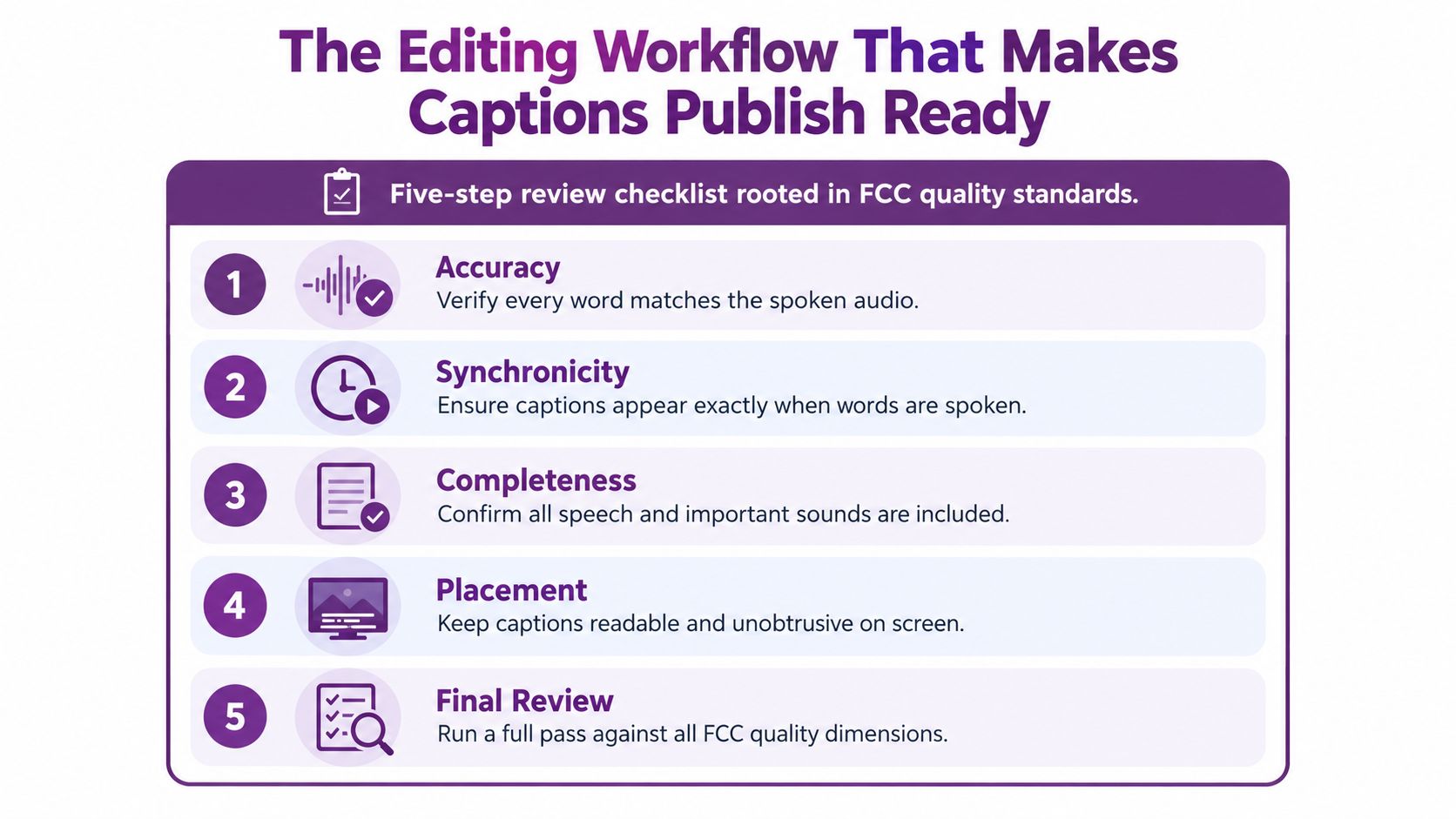
A five-step review checklist
Read along with the audio. Play the video and check every line against what the speaker says. Fix missing words, names, numbers, and punctuation. Don't rely on a spell-checker to catch a correctly spelled but wrong name.
Polish the timing. Captions should appear when the corresponding speech begins and disappear when it ends. If a line flashes up before the speaker reaches that phrase, or lingers over the next thought, adjust its timestamps.
Complete the audio picture. Add speaker labels and meaningful sound descriptions where viewers need them. For example, (laughs) or (music fades in) can give a caption track information that a dialogue transcript leaves out.
Make each cue easy to read. The Australian Government Style Manual recommends no more than two lines, with no more than 42 characters per line, and natural line breaks. It also recommends a gap of at least four frames between subtitles. See the Australian Government guidance on video and audio standards. These are readability benchmarks, not a reason to split a sentence where the meaning breaks.
Watch the finished video on a phone. Confirm that captions remain readable on a small screen, don't cover important text or action, and stay within the visible frame. Check the opening and ending as carefully as the middle.
The FCC dimensions give you a final acceptance test: captions should match the audio, align with it, include the program's important speech and sounds, and sit where they won't obscure essential visuals. Placement matters in a tutorial, for instance, if captions cover the button the presenter is explaining.
Practical rule: If viewers need a sound cue to understand what happened, include it in the captions rather than assuming the dialogue tells the whole story.
The video below can help you see how an editing workflow fits into the finished result.
Multilingual Subtitles Require More Than Language Lists
A tool's language menu tells you what it can attempt, not how well it will handle every speaker or subject. A video that reads clearly in one language may contain errors in another because names, regional expressions, accents, and mixed-language speech can challenge recognition and translation in different ways.
Reported word error rates in a 2025 CHI paper show variation across languages and evaluations. The CHI research on multilingual captioning and language justice reports these ranges:
| Source | Language | Reported word error rate |
|---|---|---|
| Cited evaluations | Hindi | 13–25% |
| Cited evaluations | Japanese | 16–22% |
| Cited evaluations | Arabic | 13–30% |
| Multilingual Whisper evaluation | English and German | 5% |
| Multilingual Whisper evaluation | Hebrew | 30% |
These results aren't a guarantee of how any particular product or recording will perform. They show why “supported language” and “validated for my audience” are different claims. A brand name may be transcribed correctly in English and distorted in a translated subtitle; an idiom may be transcribed accurately but translated too closely.
Test the language you plan to publish
For each target market, check a short sample that includes the speech patterns and vocabulary your audience is likely to hear. Include regional names, technical terms, numerals, and phrases that switch between languages. Then review the translated meaning, not only whether the translated lines sound fluent.
If a video supports training, health, legal, or brand-critical communication, decide in advance who can verify the language. A native speaker or qualified reviewer can catch a translation that looks polished but changes the intended meaning.
LunaBloom AI supports automated subtitles and translated subtitles across more than 50 languages. Language breadth can help creators prepare localized drafts, but the same principle applies: check the output for the specific speakers, terms, and market before publishing.
Accessibility Wins and SEO Gains From Better Captions
A viewer watching a video in a quiet waiting room may rely on its captions to follow the message. Well-prepared captions support accessibility and content discovery when they are accurate, readable, and aligned with what the video communicates.
A 2024 experiment involving 23 professional simultaneous interpreters found that subtitles significantly improved interpreting accuracy, with approximately 90% precision or higher identified as the optimal threshold. The finding shows why subtitle quality matters when viewers are processing specialized spoken material, though it does not make an automatic draft ready to publish.
Captions also help viewers follow a video when sound is unavailable or unwanted. For search, a transcript or subtitle file can give platforms text associated with spoken content. It works like a text companion to the video, not a replacement for clear titles, descriptions, or useful page context. A wider publishing strategy can connect video assets with other content through content SEO services.
Before publishing, use a quality check: confirm the wording matches the audio, make line breaks easy to read, and check that captions appear in time with speech. Then ask whether they include the information viewers need, rather than only the words spoken. Comprehension subtitles may convey dialogue, while accessibility captions also need meaningful sound information, such as a relevant alarm or speaker change. Use natural terms that describe the video; forcing keywords into captions can make them harder to follow. These checks put viewers first and help make the text useful and discoverable in context.
Putting It All Together and Looking Ahead to 2026
An automatic subtitles generator can do the first pass quickly, but publish-ready output still needs judgment. Generate the draft, check the words, refine timing, label speakers and meaningful sounds, format the cues, and watch the final video on a phone. That routine helps you decide whether you have comprehension subtitles or accessibility captions rather than assuming every text track does both.
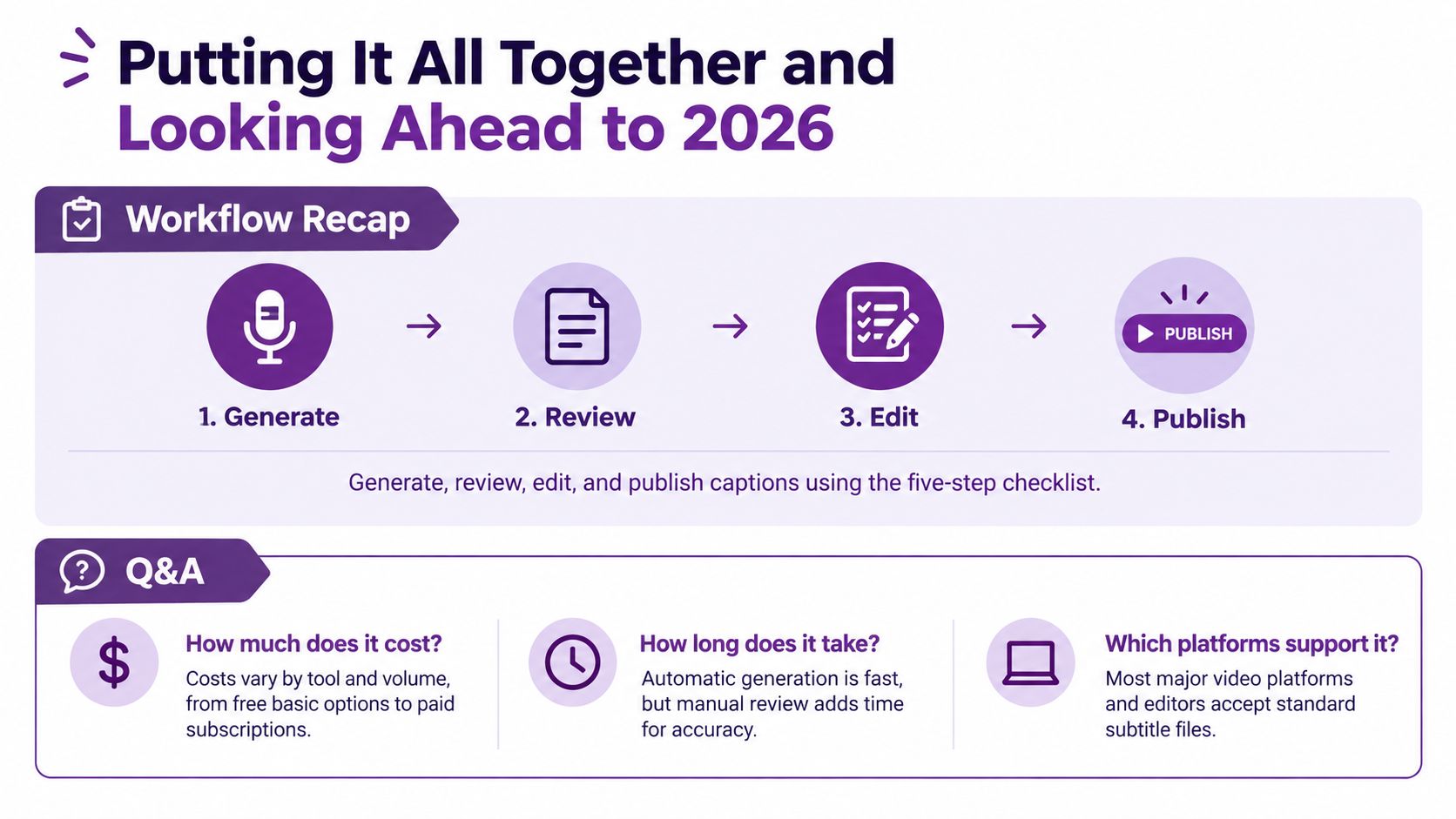
Questions creators often ask
How much does captioning cost? Options range from built-in or free basic tools to paid subscriptions and professional review. The right choice depends on how much editing control you need and how consequential a mistake would be. You can review LunaBloom AI's pricing options to see what's available for different workflows.
Can I publish automatic captions without human review? You can, but it's risky when a video includes unfamiliar names, technical language, overlapping speakers, or material where accuracy matters. At minimum, check the words, timing, sound cues, and placement before release.
Which languages need native review? Don't assume any language is error-free just because a tool lists it. Review the languages, dialects, and vocabulary used in your actual video, and ask a fluent reviewer to check translated meaning when the content is important.
By 2026, creators may see captioning become more closely connected with on-device processing, real-time multilingual dubbing, and video metadata. Those developments should make production workflows more integrated, but they won't remove the need to check whether captions are clear, complete, and true to the speaker.
LunaBloom AI turns prompts, scripts, and images into edited videos with voiceovers, timed subtitles, and translated versions across more than 50 languages. Try LunaBloom AI to create a video, review its captions, and prepare it for publishing.