You've got a script, a product explanation, or a blog post that could work as a YouTube video. You'd rather not assemble a camera crew just to test the idea, so you paste the text into an AI video tool and wait for a finished draft. The result may look polished, but polish alone won't hold attention, earn trust, or keep a channel monetization-safe.
Text to video for YouTube works best as an editorial workflow, not a one-click shortcut. Decide what the viewer should get, shape scenes around that promise, then review visuals, narration, captions, metadata, and disclosures before publishing. The tool can speed up production. It can't make those decisions for you.
Turning a Script into a YouTube-Ready Plan
Start with the material you already have, but don't feed a full article into a generator unchanged. A blog post may repeat context for readers who skim, while a YouTube script needs a clear opening and a reason to keep watching. Before prompting, identify the single promise the video makes and the evidence or demonstration that will deliver it.
Write the title early. A compact, audience-focused title gives you a practical test for every scene: does this beat help fulfill the promise, or is it leftover material from the source document? A title like “How to Choose a Project Management Tool” sets a clearer expectation than a clever phrase that only makes sense after the video ends.
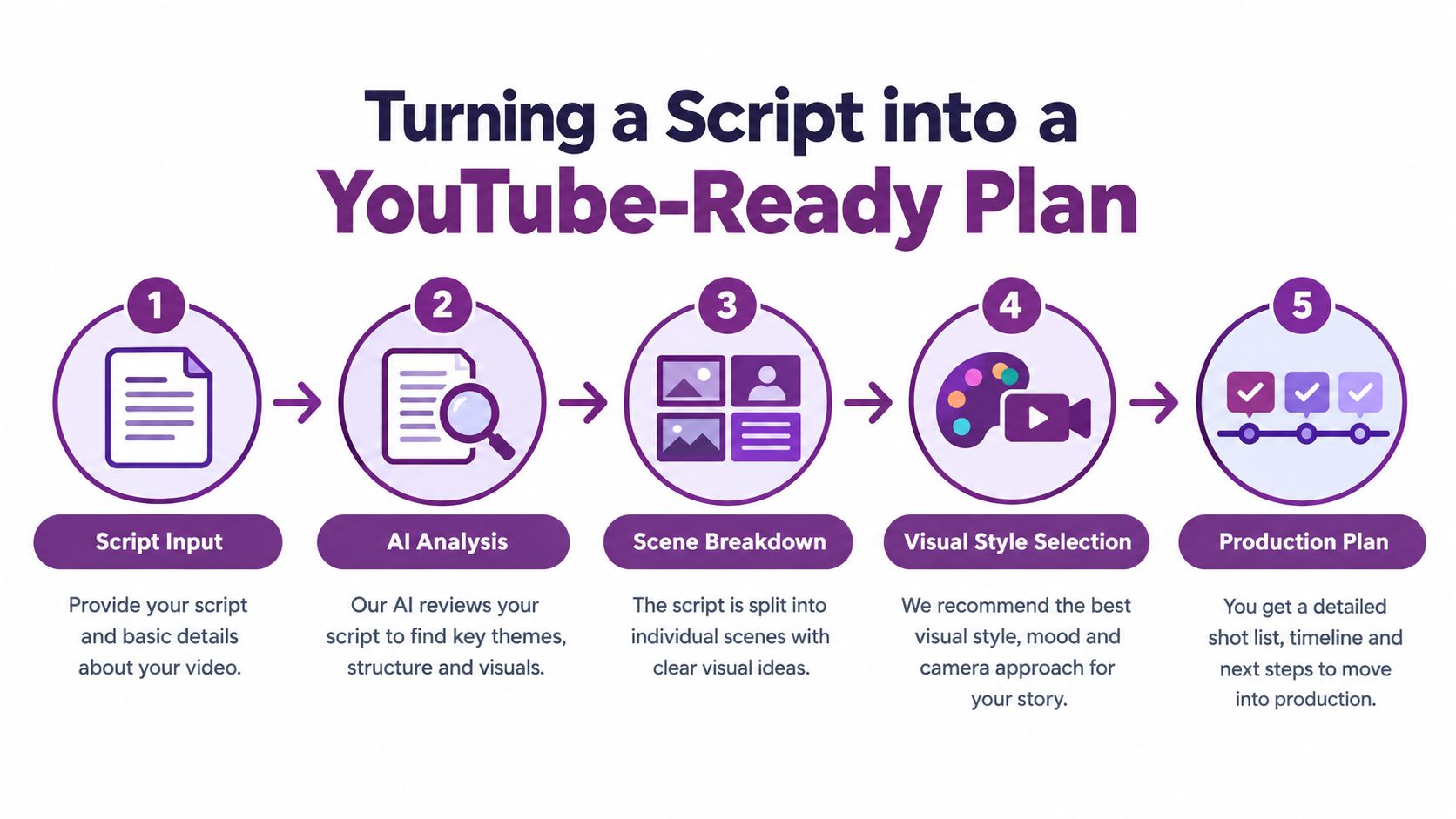
Break the script into scenes according to changes in the argument, not arbitrary sentence boundaries. If a section introduces a problem, show the problem. If the next section demonstrates a solution, change the visual to match. A script about choosing software might move from a presenter-style avatar for the opening, to screen-style visuals for a feature comparison, then to a concise summary card for the decision criteria.
Make the visual plan before generation
For each beat, note the narration, the visual job, and the transition to the next idea. Choose an avatar when a direct explanation or human presence helps the viewer follow the material. Use generated B-roll, diagrams, or product imagery when the narration needs evidence, atmosphere, or a concrete example instead.
A working scene list can be simple:
- Hook: State the viewer's problem or desired outcome.
- Proof: Show a demonstration, example, or source-backed explanation.
- Payoff: Deliver the decision, lesson, or next step the opening promised.
A useful plan leaves you with a hook line, a title promise, and a visual direction for each beat. That gives an AI generator specific work to do instead of asking it to guess what the video means.
Generating Visuals, Avatars, and Voiceovers
Generated visuals set the style of the finished video, so decide what the viewer needs to see before you settle on narration or pacing. An avatar can work well for training, onboarding, and explainers where a consistent presenter makes the material easier to follow. Generated B-roll is often a better fit for illustrating a place, object, or process that an avatar would only describe.
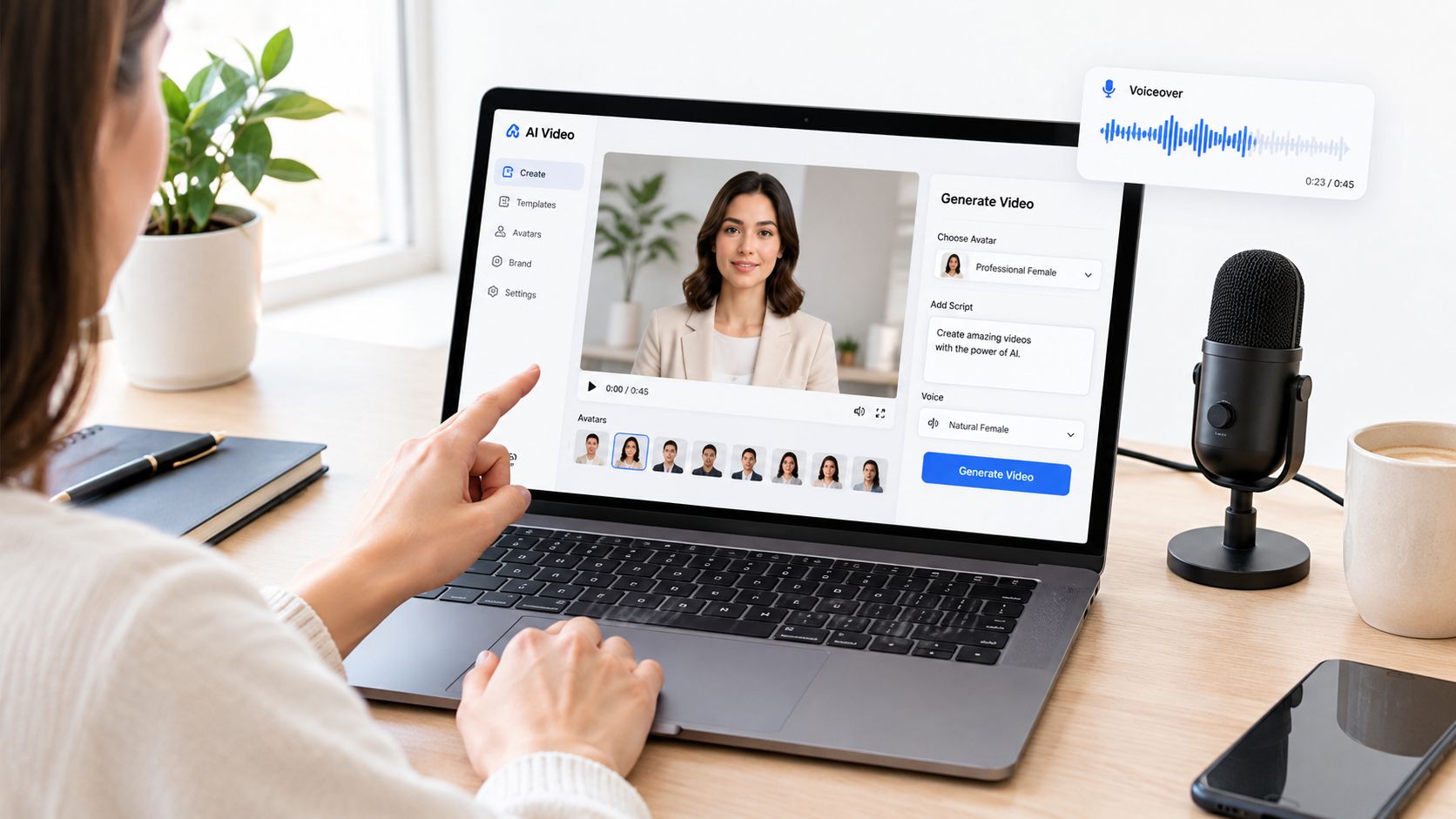
Prompt scene by scene. Specify the subject, setting, shot type, movement, and what changes from the previous visual. “A close shot of a mechanic inspecting a bicycle chain in a bright workshop” gives the generator more direction than “show bicycle maintenance.” For the next scene, ask for a different composition or action, not another generic workshop shot. Repeated images with minor changes make a video feel automated even when the narration is useful.
Match narration to the viewer and the image
Pick a voice that fits the audience and the promise. A technical walkthrough may benefit from measured delivery; a lively product introduction may need more energy. Rewrite sentences that sound unnatural when spoken, then listen for pauses and emphasis rather than relying on the default text-to-speech pace.
The same review matters when cloning a voice. Get appropriate permission, check that the generated narration still sounds like the intended speaker, and make sure the delivery doesn't imply a real person endorsed or said something they didn't. Visual realism and voice realism can raise trust issues that a technically clean export won't fix.
Editing rule: Cut when the argument changes. Keep a visual only while it adds information, and remove any shot that merely decorates the narration.
Review the draft with the sound on and captions visible. Check that the on-screen action supports the spoken line, then trim scenes that repeat a point. LunaBloom AI is one option for turning scripts and prompts into videos with generated voice, captions, editing, and YouTube publishing; creators comparing adjacent creative workflows may also find this overview of AI tools for merchandising workflows useful. You can also open LunaBloom AI's video workspace to review its creation workflow.
A short demonstration of generated video production can make the process easier to assess:
Automating Captions, Translations, and Thumbnails
Automation can produce a useful first pass of captions, translations, and thumbnail concepts. It can also produce mistakes that are hard to spot if you approve everything at a glance. Treat every generated asset as a draft, especially where wording, timing, or regional meaning affects what viewers understand.
Start with captions in the video's original language. Correct names, technical terms, punctuation, and line breaks, then check synchronization manually during the opening. A caption that arrives late or splits a phrase awkwardly can make a clear explanation harder to follow. Don't assume a translation track will repair an inaccurate original transcript.
Decide whether to subtitle or dub
Translated captions usually preserve the original speaker's voice and performance, while dubbed narration can make a video feel more natural to viewers who prefer listening in their language. Neither option removes the need for review. Have a fluent reviewer check meaning, terminology, names, dates, and numbers before publishing; a fluent speaker can catch a mistranslated qualification that an automated check misses.
Use stricter review for health, finance, news, and other sensitive subjects. YouTube says more prominent AI labels may appear for sensitive topics, and realistic synthetic content can mislead viewers if it changes the perceived speaker, event, or claim. The platform's guidance on disclosing AI-generated content describes when creators need to disclose realistic altered or synthetic media.
Design thumbnails as part of the same workflow
Create concepts that communicate different ideas rather than minor variations of one image:
- Human or character emotion: Use a facial expression that fits the actual subject.
- Concrete result: Show the object, change, or outcome discussed in the video.
- Curiosity through contrast: Pair two relevant states or choices to prompt a question.
Check every version at small size. Keep the thumbnail's message complementary to the title, and avoid dense copy that becomes difficult to read on mobile. A striking image that implies a result the video doesn't deliver may attract a click, but it can disappoint the viewer and weaken trust.
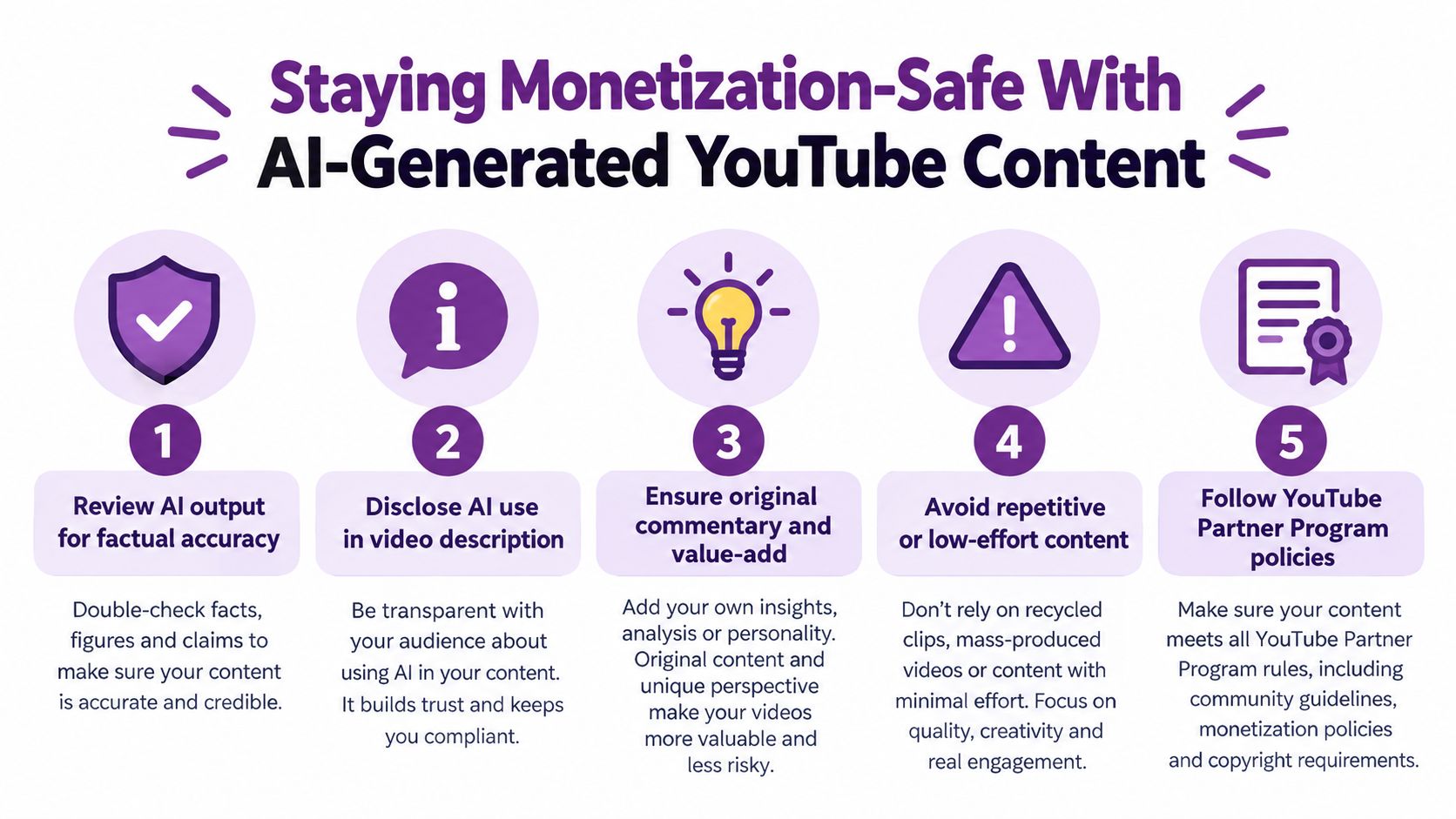
Staying Monetization-Safe With AI-Generated YouTube Content
AI use alone doesn't automatically disqualify a video from YouTube monetization. The important distinction is whether the finished work offers original, authentic value or looks like interchangeable material generated from an unoriginal template. YouTube's Partner Program monetization policies identify generic or repetitive content as a potential eligibility problem.
That distinction matters across a channel, not just within one upload. A single AI-assisted explainer can include careful research and a distinctive demonstration. A feed of videos that share the same structure, generic narration, and recycled visuals can look mass-produced even if each upload was technically edited.
Review the video's original contribution
Before publishing, ask what the finished video adds beyond the prompt or source text. Strong contributions include original research, source verification, first-hand demonstrations, clear analysis, or storytelling shaped by the creator's perspective. Editing also counts as judgment when it makes the explanation clearer, rather than assembling generated scenes.
Use this practical self-audit:
- Verify the claims: Check names, figures, and assertions against dependable material.
- Add a point of view: Include commentary or analysis that belongs to the creator.
- Check for repetition: Remove generic scenes and passages that could appear unchanged in another upload.
- Review the channel pattern: Make sure the video adds to a distinct body of work, not a template-driven stream.
Disclosure is a separate question from monetization. YouTube's disclosure guidance covers realistic scenes that never happened, manipulated depictions of real people or events, and synthetic music when it's the main focus. Ordinary productivity uses, such as script ideation or automatic captions, don't require disclosure under that guidance. When a video includes realistic altered or synthetic material, review the platform's current rules and label it when required.
Packaging the Title, Thumbnail, and Description for Clicks
A good video can still miss its audience if its title, thumbnail, and description send mixed signals. Build them together as one information system. The title states the problem or outcome, the thumbnail adds a complementary visual cue, and the description supplies context the title can't fit.
YouTube's video-management guidance sets a 100-character title limit and describes titles, thumbnails, and descriptions as important metadata. It also identifies captions and subtitles as ways to reach a broader audience. Treat those fields as part of production, and review generated suggestions for accuracy and fit with the finished video using YouTube's video upload guidance.
Keep the promise compact and consistent
Research on YouTube science videos found that concise titles generally performed better than long titles, which can be truncated in results. Separate research on 16,215 YouTube video covers associated strong positive or negative sentiment in thumbnails with more views, while strong sentiment in thumbnail captions had the opposite relationship; positive-sentiment titles were also associated with more views. These findings are useful direction, not a guarantee that a particular design will win. The thumbnail and title research also found that brightness, colorfulness, and image quality alone didn't significantly influence engagement for the studied narratives.
| Element | Job | Common Mistake |
|---|---|---|
| Title | State the audience-relevant subject or benefit | Overloading it with clauses or giving away the whole payoff |
| Thumbnail | Add a quick visual question or signal | Repeating the title or using illegible text |
| Description | Provide searchable context and accurate detail | Restating the title without adding useful information |
Create several genuinely different thumbnail treatments, then compare them based on whether people choose to watch and whether the opening delivers on the promise. Use tags to clarify relevant terms, not to stuff unrelated keywords into the upload. Above all, keep the title and image honest: misleading packaging may earn attention without earning satisfaction.
Export Settings, Publishing, and the First 48 Hours
Export decisions should protect the viewing experience, not turn into a technical project for its own sake. Check that text is readable, audio is clear, the image holds together, and the exported file matches the settings available in your editing workflow. Use a resolution that suits the visuals and intended viewing experience, then watch the export through before uploading. Don't assume a clean preview means the final file has clean audio or captions.
Scheduling should follow audience evidence rather than guesswork. Use your channel's available audience information to choose a sensible release time, then stay available to respond to early questions while viewers are forming an impression. A comment that reveals confusion can point to an unclear explanation, but don't rewrite the strategy based on one reaction alone.
Read retention before changing everything
When the video has enough viewing activity to make its audience response useful, open YouTube Studio and look at the retention curve. Identify where viewers leave, then inspect the scene, claim, caption, or transition at that moment. A retention-first workflow tracks completed-view percentage, average view duration, early abandonment, and likes per impression rather than celebrating the amount of footage generated.
Production note: Treat every scene as a testable unit. Record where a claim appears, when the visual changes, and whether the caption matches the narration.
Make one clear editorial adjustment before the next upload. If viewers leave during a slow explanation, tighten the opening or show the evidence sooner. If they stay through the explanation but drop during a repeated summary, cut the repetition. The point is to carry a specific learning into the next script, not to change the title, edit, and visual style all at once and lose track of what helped.
Localizing AI Videos Without Losing Trust
Publishing in more languages doesn't automatically make a video more useful. A rushed translation can change the claim, flatten a regional expression, or make an instructional video unsafe to follow. For localization, prioritize meaning and comprehension over the number of versions produced.
Build a review process before duplicating a video. A native speaker should check the script, captions, and voice performance. Keep a terminology glossary for recurring product names and technical language, and verify dates, measurements, currencies, and qualifications directly against the original. Approve titles and thumbnails separately for each region because a phrase or image that works in one market may confuse viewers in another.
Match the review to the subject
Instructional, medical, financial, legal, and public-interest videos need careful factual review in every language. A mistranslated number or omitted condition can change the meaning even when the narration sounds fluent. Ask reviewers to flag uncertainty, not just grammar problems, and give them a way to confirm terminology with a subject-matter expert.
Synthetic voices and realistic avatars need particular care when they represent real people or events. YouTube says more prominent AI labels may appear for sensitive subjects such as health, news, elections, and finance, and its disclosure guidance applies when AI makes a real person appear to say or do something they didn't or generates a realistic scene that never occurred. Check the applicable disclosure rules for each version rather than assuming one approval covers every language.
Choose languages based on evidence that viewers in those markets can benefit from the content. After publishing, look beyond views: review comments, recurring questions, and whether the localized audience appears to understand the promised instruction or explanation. If a version attracts attention but leaves viewers confused, fix the localization before expanding it further.
LunaBloom AI turns scripts and prompts into videos with generated voiceovers, captions, editing, and YouTube publishing features. If you're ready to build a reviewed, trust-aware production workflow for your channel, visit LunaBloom AI and explore how its video creation tools fit your next upload.