A marketer needs twelve short ad variations by Friday. The product is ready, the offer is clear, and the team has access to an AI video generator, but the prompt box still contains only “make a cinematic ad.” The first result looks polished and says almost nothing. The second changes the product shape. The third has attractive movement, but the presenter skips the key line.
That failure usually starts with an underspecified brief, not a weak tool. Effective AI video generation prompts tell the system what must appear, what must happen, what should remain stable, and how the viewer should experience the scene. They don't need to become long blocks of cinematic prose. A foundational benchmark found that most real-world prompts contained 3 to 40 words, with an average of 12.3 words, while its benchmark used more than 700 annotated prompts across humans, animals, objects, and scenes. The benchmark research supports a practical lesson: concise prompts work when they carry precise intent.
The eight patterns below are organized by job, not generator brand. You'll find prompts for product demos, avatars, vertical ads, tutorials, dialogue, music, localization, and image animation, plus the limitations that appear after the first generation. For broader prompt-writing context, Netco Design LLC's AI prompt guide is a useful companion.
1. AI Video Generation Prompt for a Cinematic Product Demo
A product demo works best when the product has one clear role in the frame. If the clip tries to show a sneaker, a person tying it, a city street, a rainstorm, and a complex tracking shot at once, the result usually loses the product. Start with the object, keep the environment controlled, then give the camera one job.
Usable prompt
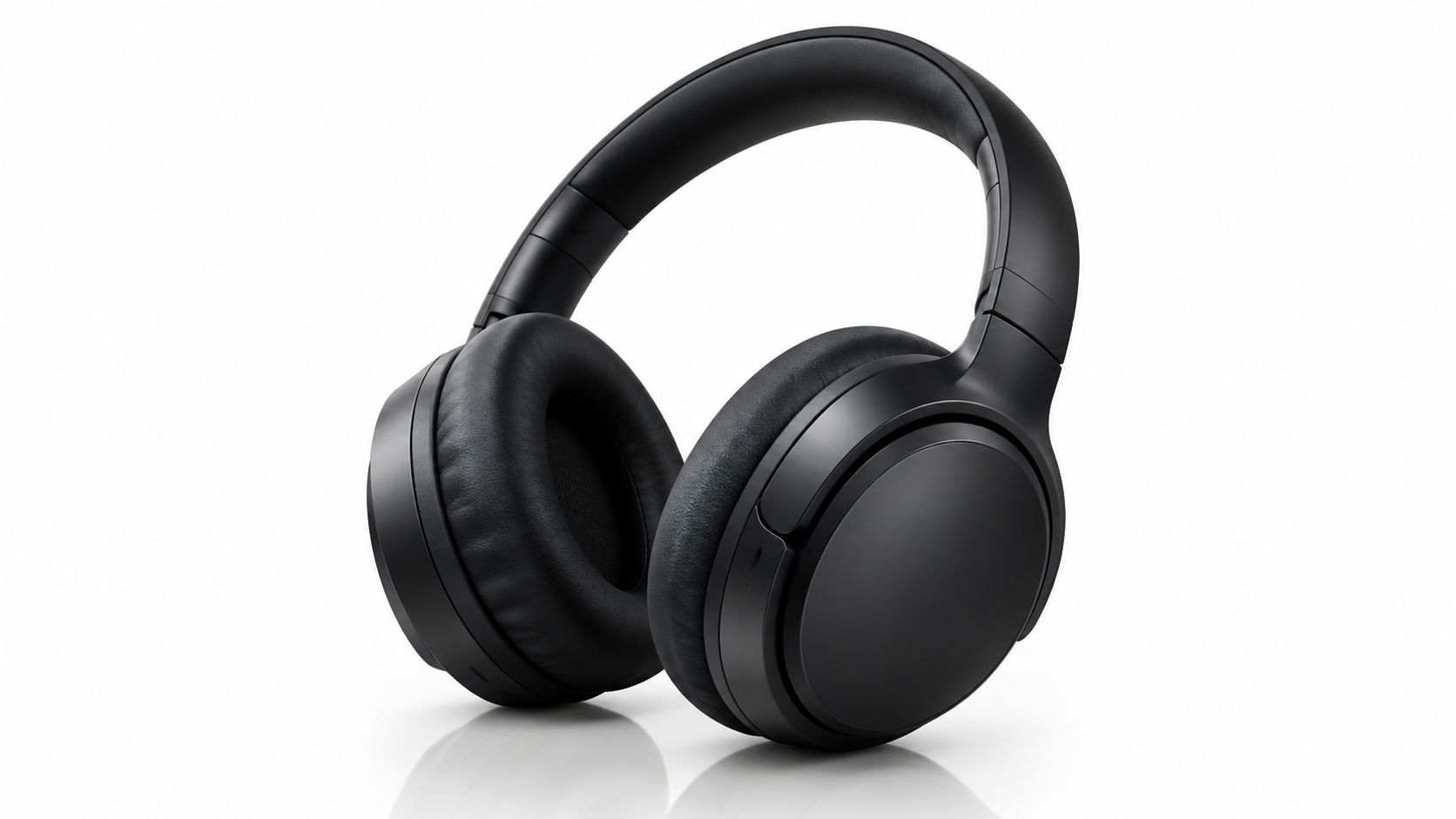
Premium black wireless over-ear headphones on a clean white reflective surface, soft studio light from the upper left, subtle highlight on the ear cups, slow orbit left around the product, crisp edges, unchanged logo and shape, shallow depth of field, luxury electronics launch style, short hero clip.
That prompt gives the generator a subject, setting, light direction, motion, and a preservation rule. It also avoids competing camera instructions. A slow orbit and a fast handheld push are different choices, and mixing them usually creates visual instability rather than drama.
What the first output gets wrong
The early failures are easy to spot:
- Product geometry: Ear cups may warp, buttons can multiply, and a logo may drift between frames.
- Reflective surfaces: A bright surface can steal attention or hide the product edge.
- Overactive motion: “Cinematic” often triggers extra lens flare, rotation, or background movement.
- Text accuracy: Product labels and packaging copy stay unreliable unless you replace them in post-production.
For e-commerce, start with an image-to-video workflow if product accuracy matters most. A reference image gives the model a stronger anchor than text alone. Keep the background simple, use one camera move such as “slow dolly in” or “orbit left,” and generate several variants before you choose the clip with the cleanest product edges.
Practical rule: Treat the product image as fixed and the camera motion as adjustable.
This approach fits consumer electronics launch teasers and direct-to-consumer skincare ads, where a bottle or device needs to stay recognizable. A workflow such as LunaBloom AI can help turn a product concept or image into an edited video, but every frame still needs review before publishing. A clip can look polished and still misrepresent the product, so judge accuracy separately from appeal.
2. AI Video Generation Prompt for a Custom Avatar Explainer
An avatar explainer is a direct-to-camera presentation without a camera booking, microphone setup, or physical retake. It works especially well for onboarding, feature updates, internal announcements, and product walkthroughs, where the information matters more than elaborate visual action.
Usable prompt
Photo-real professional presenter in a bright, quiet office, framed from the chest up and looking directly into camera. Warm natural window light, neutral background, calm and approachable delivery. Speak the following script exactly: “Your new dashboard is ready. Open Settings, select Notifications, and choose the updates you want to receive.” Add accurate captions, natural pauses after each sentence, steady eye contact, and no extra gestures.
The phrase “speak the following script exactly” separates the visual brief from the spoken requirement. That distinction matters. A character-stability study reported mean prompt adherence of 4.47 out of 5, while mean script adherence was 3.49 out of 5. Only 36% of clips reached at least 4 for script adherence, compared with approximately 86% for prompt adherence. The study shows why a convincing presenter can still skip, reorder, or paraphrase important lines.
Make the presenter easy to trust
Write the script the way people speak. Short sentences produce more natural pauses and make caption timing easier to review. Break a long explanation into separate segments rather than forcing one generation to handle every idea.
For onboarding, an avatar can introduce the task, while a real screen capture shows the interface. That combination is usually more trustworthy than asking an avatar to imitate a changing software screen. Software companies can also create language versions from one approved script, but each version still needs human review for pronunciation, timing, and meaning.
Consent is essential when you clone a person's likeness or voice. Get written permission from the person involved, document the approved use, and disclose synthetic media where the context or platform requires it. You can explore a workflow for these formats through LunaBloom AI's platform overview, but no generator can obtain consent on your behalf.
Keep captions on by default. They support accessibility and help viewers who watch without sound. The practical limit isn't only technical quality. It's audience patience, clarity, and whether the presenter sounds like a person delivering useful information rather than a voice reading a document.
3. AI Video Generation Prompt for a Vertical Social Ad
Vertical ads need a different priority order. The opening visual must earn attention before the viewer understands the whole offer. A product reveal can come later, but the first moment should make the subject and tension obvious.
Usable prompt
Vertical 9:16 social ad for a sparkling citrus drink. Open with an extreme close-up of ice cracking in a glass as bright citrus peel drops into frame. Cut quickly to a hand lifting the can from a colorful picnic table, then show the first sip in warm afternoon light. Bold yellow and green palette, readable captions centered inside safe margins, upbeat pacing, clear product reveal, end with: “Try the bright side.” Keep the can shape and label unchanged.
The prompt gives the generator a hook, sequence, aspect ratio, color direction, caption placement, product constraint, and call to action. It doesn't depend on a vague command such as “make it viral.” No prompt can guarantee distribution or response, but a structured opening gives the editor something testable.
Keep the body constant while testing hooks
Beverage and apparel brands often need multiple creative openings without rebuilding the entire ad. Hold the product shot, body copy, and call to action steady. Change only the first visual:
- Curiosity hook: Show an unexpected ingredient entering the frame.
- Problem hook: Show a warm, flat drink before the chilled product appears.
- Sensory hook: Lead with condensation, fizz, sound cues, or texture.
Captions should be designed for sound-off viewing, with enough contrast against the background and enough space from interface controls. Review the current AI disclosure requirements for TikTok, Instagram, YouTube, or any other platform before publishing. Policies can change, and a clean-looking ad can still create compliance work if the production process isn't documented.
A vertical clip also needs a different review than a horizontal commercial. Check whether the main product survives cropping, whether hands or text sit under platform controls, and whether the opening still reads when watched without audio. You can assess workflow options on LunaBloom AI's pricing page, but treat the platform as a production aid, not a substitute for creative testing.
4. AI Video Generation Prompt for a Step-by-Step Tutorial
Tutorials fail when they look informative but teach the wrong sequence. A beautiful shot of a presenter beside a product doesn't help if the viewer can't tell which part moves first, where to place a component, or what success looks like.
Usable prompt
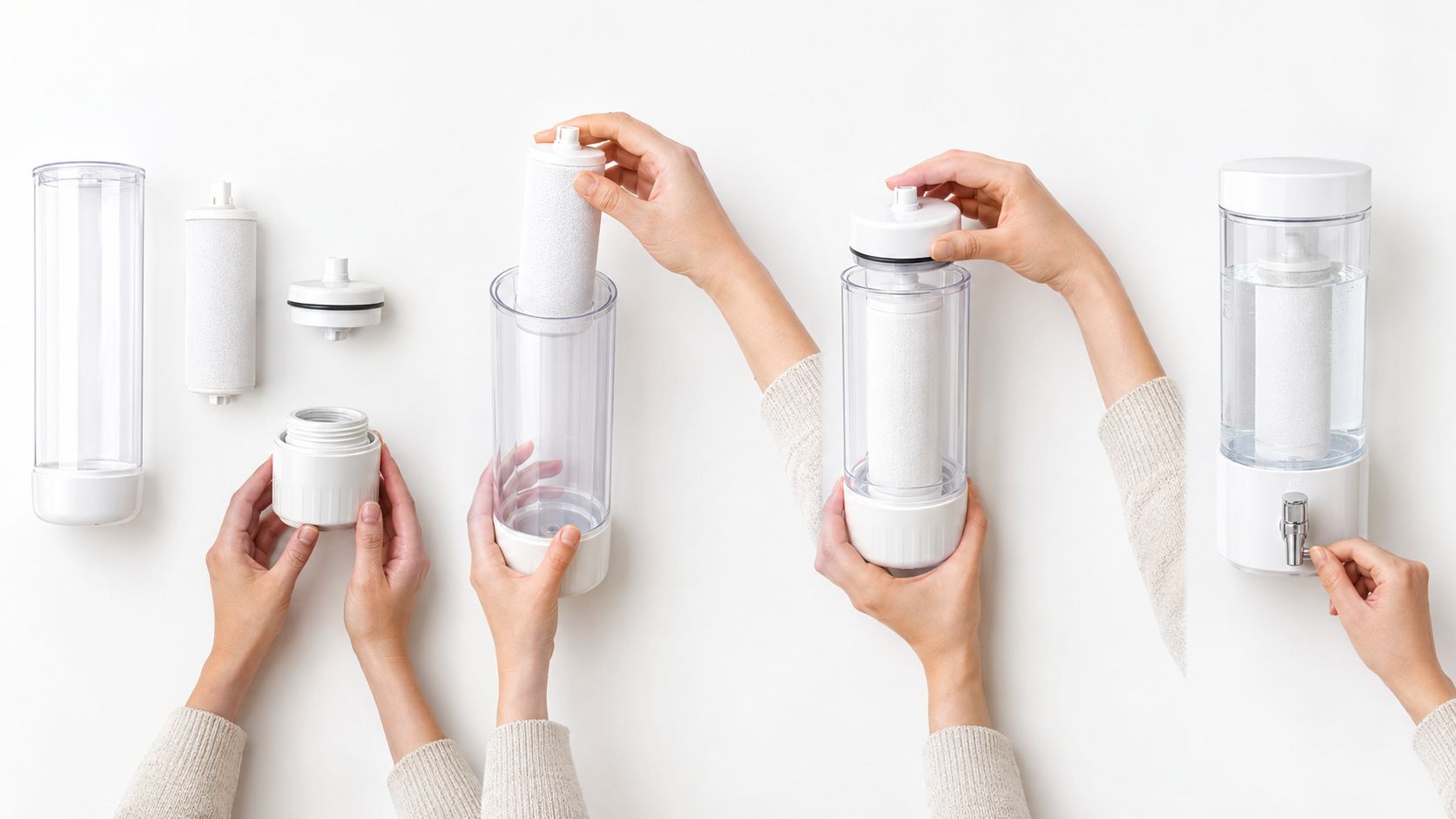
Clean instructional video showing how to install a replacement filter in a white desktop water dispenser. Use five labeled steps: remove the lid, take out the old cartridge, rinse the new cartridge, press it firmly into the holder, and close the lid. Overhead close-up for hand movements, clear on-screen label for each step, calm narration, uncluttered white counter, consistent product shape, end by showing the correctly assembled dispenser.
The sequence is deliberately short. Breaking a process into five steps or fewer keeps each action reviewable. The prompt also names the viewpoint, labels, environment, and ending state. Those details turn a general how-to into a set of checkpoints.
Separate explanation from demonstration
Online course creators can use generated visuals for lesson previews, concepts, and simple physical processes. Customer support teams can create troubleshooting clips for common issues. Software teams should use real screen captures for interface-specific instructions, because an AI-generated dashboard may display controls that don't exist.
Before publishing, verify every instruction against the actual product. Check the order of actions, hand placement, button names, safety language, and final result. A generated clip can make an incorrect step look authoritative, which is more dangerous in a tutorial than a strange background is in a social ad.
Research on text-to-video evaluation supports this stricter review. VBench assesses 16 dimensions, including subject consistency, background consistency, motion smoothness, dynamic range, and text-to-video alignment. The VBench review describes a useful prompt pattern: subject identity, starting state, action sequence, camera behavior, environment invariants, and ending state. For practical production, LunaBloom AI's starter app can support the creation workflow, but a human should approve the lesson as if they were checking a manual.
5. AI Video Generation Prompt for a Multi-Character Dialogue Scene
Dialogue scenes break when the generator has to track too many identities at once. Two people may share facial features, swap clothing, speak with the wrong voice, or perform an action belonging to the other character. Give each person a stable identity, a screen position, and a distinct speaking pattern.
Usable prompt
Short sales-training dialogue in a bright meeting room. Maya, a customer success manager in a navy blazer, sits on the left facing right. Daniel, a skeptical client in a gray sweater, sits on the right facing left. Use a medium shot for the opening, then cut to one close-up per speaker. Maya says, “I understand the concern. Let me show you the reporting workflow.” Daniel says, “Will my team need technical training?” Maya answers, “The dashboard uses your existing account structure.” Keep each line under 15 words, preserve screen direction, use distinct natural voices, and end with both characters looking at the dashboard.
The prompt assigns identity, location, shot plan, dialogue, and continuity. The short lines help lip sync, but they also make editing easier. A long sentence gives the model more timing and mouth movement to get wrong.
Use coverage instead of one crowded shot
Sales teams can use this pattern for objection-handling rehearsal. Brands can use it for a customer story or everyday product scene. In both cases, separate shots are safer than asking for a crowded two-shot with several gestures and moving props.
Use these controls:
- Identity lock: Repeat each character's clothing, age range, hair, and position in every shot.
- Voice separation: Give each speaker a distinct voice and speaking pace.
- Action ownership: State who picks up, points to, or moves each object.
- Screen direction: Keep Maya on the left and Daniel on the right unless the story intentionally changes orientation.
Research from T2V-CompBench shows why this structure matters. The benchmark contains 1,400 prompts across seven categories, with 200 prompts per category, testing attribute binding, spatial relationships, motion binding, action binding, object interactions, and numerical reasoning. The benchmark was developed after analysis of 1.67 million unique text-to-video prompts, and its design focuses on whether models preserve identities, attributes, positions, actions, and motion over time.
The main limitation is continuity. Generate each shot as a manageable unit, then assemble the scene in an editor. One impressive two-person clip is less useful than four clean shots that cut together.
6. AI Video Generation Prompt for a Sing-and-Dance Music Video
The failure usually shows up at the chorus. The clip looks polished for a few seconds, then the mouth slips off the lyric, the hands stop matching the beat, and a dance move turns into a rubber-arm blur. Music videos ask the model to hold rhythm, identity, lip sync, costume, and camera motion at the same time, so the prompt has to reduce the performance problem instead of inflating it.
Here is a version that stays inside what current generators handle reasonably well.
Create a stylized performance video for an upbeat pop track at a moderate tempo. Use one solo performer in a cobalt jacket on a warm coral studio set. Keep the face, jacket, hairstyle, and lighting consistent across all shots. Structure the video around verse, pre-chorus, chorus, and final refrain. Start on a medium shot, switch to close-ups for the verse, use controlled upper-body choreography in the chorus, and add a slow camera arc only during the final refrain. Sync mouth movements to the uploaded vocal track. End on a held pose with the song title in clean on-screen text.
That prompt works because each instruction has one job. Song sections control edit timing. The wardrobe and background lock visual identity. Upper-body movement lowers the odds of broken footwork and sliding limbs, which still show up fast in full-body dance generations.
A good output from this prompt looks like this: verse in medium close-up, clear lip sync on the lead line, chorus with repeatable shoulder and arm phrases, then a final camera arc that adds lift without forcing the performer to travel across frame. A weak output usually misses in one of three places. The mouth follows vowel shapes but not actual words. The chorus movement grows larger with each cut until the pose breaks. The camera motion starts smooth, then drifts into an unwanted zoom or orbit.
I get better results by treating music prompts like shot design, not like performance fantasy. Ask for eight clean counts, one repeated gesture, one camera move, and one background. If you ask for backup dancers, confetti, floorwork, wardrobe changes, and a flying camera in the same pass, you are asking the model to fail in several ways at once.
Three tuning moves fix a lot:
- Cut by section, not by line. Generate verse, chorus, and outro separately, then edit them together.
- Keep choreography loopable. Repeated arm, shoulder, and head movements survive regeneration better than traveling steps.
- Reserve typography for the end or for dedicated lyric shots. Text over active singing shots often competes with the face and exposes timing errors.
This job also has a rights layer that creators sometimes gloss over. Syncing to an uploaded song does not grant permission to use the composition, recording, voice, or likeness. If the video is for a brand jingle, artist promo, or paid ad, clear those rights before the render leaves draft status.
Review the clip like an editor, in passes. First watch with audio and check whether cuts land where the verse and chorus change. Then mute it and watch the body mechanics. Bad timing can hide behind a catchy track. Bad anatomy cannot.
For this category, restraint beats ambition. A memorable 20-second performance with accurate lip sync and two solid movement phrases is more usable than a larger routine that collapses on frame twelve.
7. AI Video Generation Prompt for a Multilingual Localized Announcement
A localized announcement usually breaks in the last 10 percent. The English master fits the frame, the German line runs long, the Japanese pacing changes the mouth shapes, and the subtitle safe area suddenly matters more than the background design. If you want one update rendered in four languages without rebuilding the whole piece each time, prompt for controlled variation from the start.
Use a prompt that separates what can change from what cannot:
Create a 30-second product update announcement using the approved English master as the source meaning. Keep the presenter, camera angle, lighting, background, logo placement, and brand colors identical across all versions. Generate separate outputs in French, German, Japanese, and Spanish with native pronunciation for each language. Preserve product names, legal disclaimers, restricted claims, and the call to action exactly as approved. Allow subtitle timing and line breaks to adapt per language. Leave extra lower-third space for longer translated lines. If a phrase has no direct local equivalent, flag it for human review instead of improvising.
That prompt does two jobs at once. It protects the parts legal and brand teams care about, and it gives the model room to handle the parts that need to shift by market.
Here is the kind of output that is usually usable on a first pass:
English version: “New admin controls are now available.”
German version: “Die neuen Administrationsfunktionen sind jetzt verfügbar.”
Visuals stay fixed. Subtitle lines reflow. The spoken pace slows slightly to keep lip sync from rushing the final clause.
That is the level of localization these tools handle best. Short announcements. Clear claims. Stable visuals.
Where they fail is predictable. Direct translation often preserves words but loses sales intent. Tighter languages can make the voice sound clipped. Longer languages can force either rushed delivery or ugly caption breaks. Proper nouns also drift. I have seen generators pronounce a product name three different ways across one batch if the prompt does not lock it down.
The fix is operational, not magical. Build a localization packet before you render: approved source script, pronunciation notes for product names, terms that must remain untranslated, subtitle character limits, and a list of claims that legal has already cleared by region. If the announcement includes UI shots, specify whether the interface should stay in the master language or switch per market. Both choices are valid. Mixing them by accident looks sloppy.
A few tuning moves save time:
- Ask for one language per render, not one multilingual montage.
- Specify regional flavor only when it matters, such as Mexican Spanish versus Castilian Spanish.
- Keep on-screen text editable outside the generated video if the announcement may need late legal changes.
- Treat captions as a separate QC pass, because auto-burned subtitles are often the first thing to slip.
Adobe reported in its creator survey announcement that creators are concerned about permission, provenance, and output reliability in AI workflows, which is exactly why localized announcements need human review before publication. Adobe's survey announcement
The final check should happen like a release review, not a language spot check. Watch each version once for meaning, once for pronunciation, and once with the sound off to catch caption overflow, line-break glitches, and any visual that no longer matches the spoken script. Each language version is its own deliverable. Treat it that way.
8. AI Video Generation Prompt for Image-to-Video Animation
A still image can carry a controlled movement plan: a slow drift across a restaurant photo, steam rising from a coffee mug, or a blink in an illustrated character. Good image-to-video work protects the source asset while adding one clear motion idea. The more objects you ask to move, the more opportunities the render has to distort the scene.
Animate the supplied coffee photo with subtle, realistic motion. Use a slow camera push toward the steaming mug. Let the steam drift upward and slightly to the right, add gentle movement to the curtain, and preserve the mug shape, window frame, wooden sill, café sign, and sunset colors. Keep all printed text and logos unchanged. No object morphing, no new hands, no sudden camera shake, and no composition changes. End with a calm three-second hold.
This prompt defines both the animated and protected elements. If the result feels too static, adjust one variable in the next render. Increase the camera push or the steam movement, rather than adding wind, camera rotation, passing people, and changing light at once.
Protect the source asset
Restaurants can animate menu photos for social posts and website banners. Real estate agencies can add gentle movement to listing images, provided the system does not invent a room feature, alter the view, or make the property appear larger. Start with a high-resolution image and clean edges around text, logos, glass, hair, and product outlines.
Review the output in this order:
- Check identity: Does the main object keep its shape?
- Check fixed elements: Do text, logos, architecture, and product labels remain unchanged?
- Check motion: Does the requested movement occur without warping?
- Check disclosure: Could the animation mislead viewers about the original scene?
The EvalCrafter benchmark evaluates visual quality, content quality, motion quality, temporal consistency, and text-to-video alignment across 17 objective metrics. It also reports stronger correlations between warping error and human judgments of temporal consistency than CLIP-Temp, with Spearman and Kendall correlations of 69.0 and 51.7, compared with 49.8 and 35.7 for CLIP-Temp. The benchmark details reinforce a practical review method: inspect geometry across frames, not only whether one frame resembles the source.
LunaBloom AI's app can turn source images into video concepts for a short banner loop or a longer social clip. Controlled image animation also gives creators a practical entry point for exploring the professional animator career path without A levels.
Comparison of 8 AI Video Generation Prompts
| Prompt | 🔄 Implementation complexity | ⚡ Resources & speed | ⭐ Expected outcomes / 📊 Impact | 💡 Ideal use cases | Key advantages |
|---|---|---|---|---|---|
| Cinematic Product Demo | 🔄 Low, single-shot, defined camera move | ⚡ Fast; minimal crew or studio needed | ⭐⭐⭐⭐ Polished hero shots; high visual appeal, minor detail risk | E‑commerce pages, product launches, ads | Studio-style visuals without production; easy to scale across variants |
| Custom Avatar Explainer | 🔄 Medium, script, presenter & voice config | ⚡ Very fast to update; needs voice/likeness rights | ⭐⭐⭐⭐ Consistent presenter delivery; may feel stiff in long clips | Onboarding, training, product walkthroughs | Quick edits/translations; consistent branding and re‑useable presenter |
| Vertical Social Ad | 🔄 Low, hook-first, fast cuts | ⚡ Very fast; cheap to produce many variants | ⭐⭐⭐⭐ High engagement potential if hook succeeds; risk of blending in | TikTok/Reels/Shorts, A/B testing ad creatives | Mobile-optimized, rapid iteration, lower per-creative cost |
| Step-by-Step Tutorial | 🔄 Medium, ordered steps, synced narration | ⚡ Moderate; needs accurate process verification | ⭐⭐⭐ Clear instructional clarity; useful for learning, may need real captures | Educational lessons, support clips, how‑tos | Makes complex tasks easier to follow; quick localization |
| Multi-Character Dialogue Scene | 🔄 High, multiple characters, voice assignments | ⚡ Slower; may require stitching and more compute | ⭐⭐⭐ Brings scenarios to life; risks: appearance drift, lip-sync slip | Role‑play training, sales scenarios, short narratives | Actor-free scripted interaction; test tones and scenarios quickly |
| Sing-and-Dance Music Video | 🔄 High, lip‑sync & beat-matched choreography | ⚡ Moderate; needs audio/BPM and rights checks | ⭐⭐⭐ Good teaser/performance visuals; dance/lip quality varies | Indie music releases, teasers, visualizers | Affordable performance visuals; can generate song + visuals |
| Multilingual Localized Announcement | 🔄 Medium, translate + adapt lip sync per language | ⚡ Fast scaling across markets; requires native review | ⭐⭐⭐⭐ Consistent global messaging; translation nuance may vary | Global product launches, corporate comms | Single master script → many localized versions; consistent presenter |
| Image-to-Video Animation | 🔄 Low, animate existing stills with motion cues | ⚡ Very fast; reuses assets, low production cost | ⭐⭐⭐ Engaging motion for static assets; strong motion can distort | Social posts, site banners, asset refreshes | Reuses brand assets, loop-friendly, maintains original look |
Turn These Prompts Into Your First Test Batch
All eight formats use the same underlying discipline. Name the subject clearly. Give it one primary action. Specify one camera move, a controlled lighting direction, and a short duration or sequence. Then state what must not change, such as a product logo, a character identity, screen direction, caption meaning, or the final state of an instructional task.
Longer prompts aren't automatically better. The foundational text-to-video benchmark described earlier found that real prompts are often short, while T2V-CompBench showed that models struggle with relationships between entities, attributes, positions, and actions. The useful detail is not decorative language. It's the detail that tells the generator what belongs where and what happens next.
Separate visual adherence from narrative adherence. A product can look correct while failing to show the requested action. An avatar can look natural while skipping a sentence. A tutorial can contain the right objects while showing the wrong order. Review the output against individual requirements instead of asking only whether the clip feels polished.
A practical test batch starts with one use case, not all eight. Choose the format closest to your immediate need:
- Product demo: Hold the product image and background steady, then test camera motion.
- Avatar explainer: Hold the script steady, then test presenter, framing, and delivery.
- Vertical ad: Hold the body and call to action steady, then test opening hooks.
- Tutorial: Hold the verified steps steady, then test presenter and demonstration style.
- Dialogue: Hold character descriptions steady, then test coverage and voice separation.
- Music video: Hold the track and palette steady, then test movement intensity.
- Localization: Hold the approved meaning steady, then test language, captions, and timing.
- Image animation: Hold the source image steady, then add one motion at a time.
Generate three variations with one controlled change between them. Watch each clip all the way through. Record whether the subject appears, whether the action completes, whether the camera follows the request, whether the identity remains stable, and whether any unwanted movement or text error appears.
Research using multiple generations supports this approach. One published dataset used 201 text prompts to generate 1,005 videos across five text-to-video models, with each video manually assessed by 24 annotators for prompt alignment, perceived quality, and overall quality. The dataset study reinforces the point that one lucky generation doesn't tell you how reliable a prompt is.
LunaBloom AI can handle scripts, avatars, captions, and translations in one workflow at lunabloomai.com. Whether you use it or another generator, keep the creative brief structured, keep the test variable narrow, and let human review decide which version is ready for a customer, learner, or viewer.
LunaBloom AI turns text prompts, scripts, and static images into edited videos with voiceovers, music, captions, avatars, and translations. Start with one of the prompt patterns above, create a small comparison batch, and visit LunaBloom AI when you're ready to move from prompt testing to a repeatable video workflow.