A campaign needs a new presenter, but the person on camera is unavailable. The launch date hasn't moved, and the same message needs to work in several languages. You could reschedule filming, or use an AI avatar generator app to turn a script into a presenter-led video without arranging another shoot.
That can save production steps, but it doesn't make the creative and operational decisions disappear. You still need the right voice and avatar, a clear script, and a plan for permissions, disclosure, and data handling. Knowing how the tools work makes it easier to choose one and publish with care.
The Creator Moment an Avatar App Has to Solve
A marketer has a product update ready, a short window to promote it, and no presenter available to record. The team also wants versions for audiences who speak different languages. A traditional shoot can mean coordinating schedules, locations, edits, and pickups. An avatar app offers a different route: enter or upload a script, choose a digital presenter and voice, and assemble a video inside the tool.
The advantage is a shorter production loop, not a replacement for human storytelling. The app can deliver the words, but a person still needs to decide what the audience should understand, what tone fits the message, and whether a synthetic presenter is appropriate. A weak script won't become persuasive just because a lifelike face reads it.
The idea is straightforward: use a repeatable workflow for tasks that benefit from consistent delivery. A solo creator might turn a product tip into a presenter-led social clip. A small business could explain a service without booking a studio. A larger team might adapt training material for employees in different regions, while checking translations and approvals before publishing.
The important questions go beyond appearance. What does the app generate? Which features match your job? Who gave permission for the face or voice? And how will viewers know the presenter is synthetic when that matters? Answer those questions before you commit to a tool, and your first video is more likely to be usable, trustworthy, and easy to revise.
How AI Avatar Generator Apps Actually Work
Think of an AI avatar generator app as a small video production line. Your script is the starting material. Different components turn it into a performance, then package that performance as a file you can edit or publish.
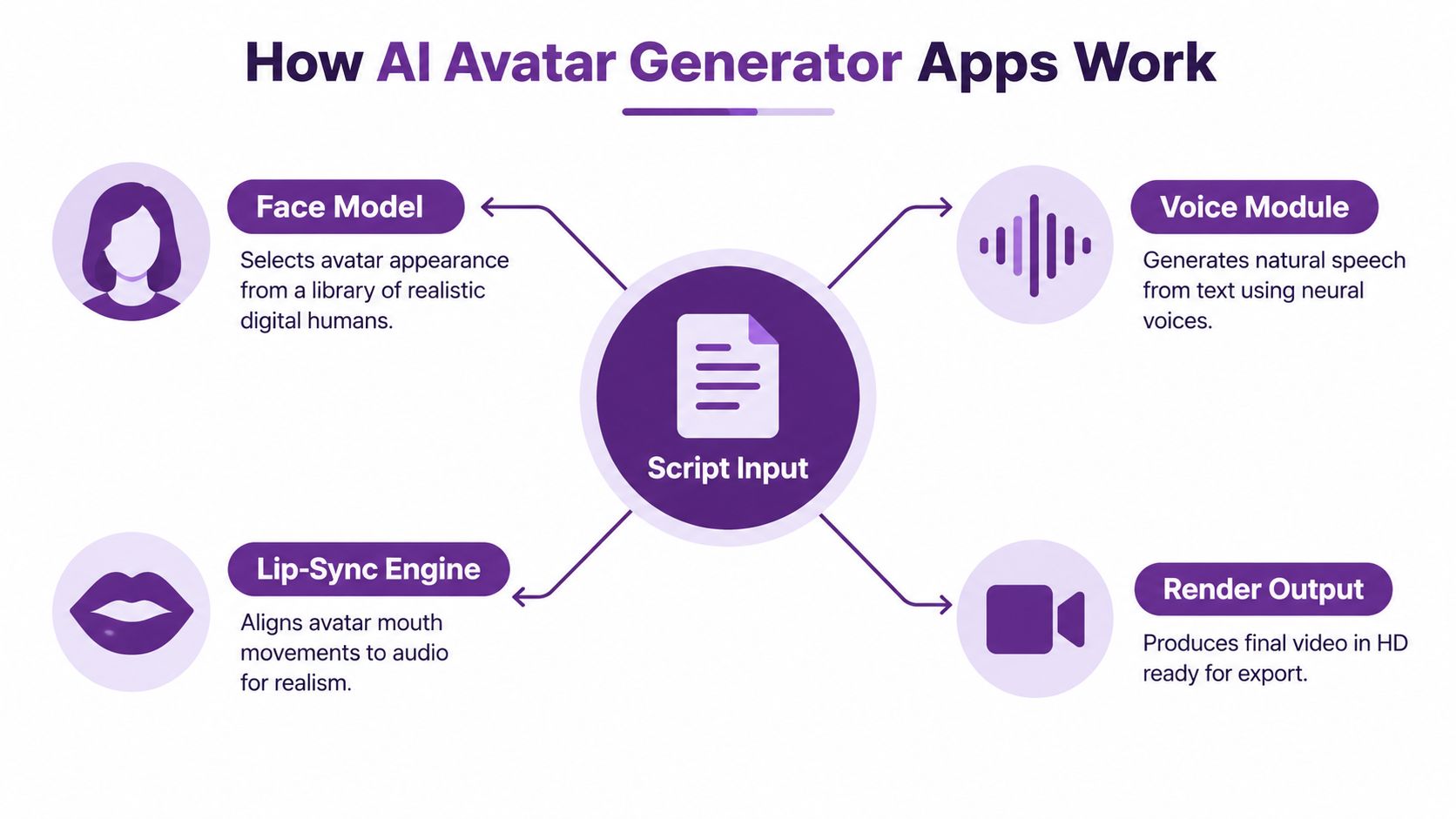
From words to a digital presenter
The script gives the system words to speak. You might paste a short product description, then revise it so it sounds natural aloud. Short sentences, familiar words, and clear pauses tend to be easier to deliver than dense copy full of jargon.
The face model determines what the presenter looks like and how the face moves. An app may offer a library of digital people, an animated character, or an option to create an avatar from a photo. A talking photo animates a still image, while face reenactment refers to using a model to reproduce facial movements or expressions. These terms describe different methods, so check what a product means by them before uploading anyone's image.
Voice, synchronization, and the finished video
A text-to-speech system turns written words into spoken audio. Some apps use neural voices, meaning AI-generated speech designed to sound more natural than basic synthetic narration. Voice cloning attempts to reproduce a particular person's voice, which makes permission and commercial-use terms especially important.
The lip-sync engine aligns the avatar's mouth movements with the audio. If the timing is off, the viewer may notice even when the voice sounds convincing. A generative video feature may create or animate video content from text, images, or other inputs, while the editor assembles scenes, captions, and visual elements into the final export.
For example, a team could adapt a brief product explanation into a localized presenter video. The app can help generate the speech and match the mouth movements, but a person should still review pronunciation, translation, pacing, and meaning. For teams combining spoken content with synthetic production, brand-safe AI podcast workflows offer useful context on keeping AI-assisted audio processes responsible.
Forrester reported that, three years after ChatGPT's introduction, 38% of U.S. online adults had used generative AI. Among people globally who use generative AI, 62% said they used it at least weekly and 24% daily (Forrester's consumer GenAI overview). That broader adoption helps explain why prompt-based media tools are becoming familiar, but it doesn't tell you whether a specific avatar app is right for your work.
Core Features That Actually Matter
An avatar app's feature list can look impressive and still miss the job you need done. Sort its capabilities by the work they support, then check the limits behind each feature name.
Four clusters to compare
Avatar types include photo-real digital presenters, animated characters, 3D avatars, and talking photos. A realistic presenter may fit a product walkthrough; a stylized character may suit a lighter social series. The trap is assuming that “realistic” automatically means credible. For a sensitive or personal message, an obviously synthetic style may be clearer and more appropriate.
Voice and audio features can include built-in text-to-speech, voice cloning, accents, and layered audio. A cloned voice may help maintain a consistent presenter, but check whether the terms permit commercial use and what proof of permission the app requires. Also listen to the actual voice with your script. A polished demo voice can struggle with brand names or technical terms.
Localization can involve translated scripts, language and regional-accent options, and translated captions. Don't confuse a language selector with a fully reviewed localization workflow. Someone should check whether the translation preserves the intended meaning and whether speech and captions agree.
Production tools include captions, templates, aspect ratios, export quality, and social publishing. These determine how much finishing work you'll need after the avatar speaks. A template can speed up production, but it may not meet your accessibility, branding, or platform requirements.
| User Need | Key Feature Cluster | Watch Out For |
|---|---|---|
| A consistent presenter for explainers | Avatar types and voice | Permission for custom likenesses and voice use |
| Content for different language audiences | Localization | Unreviewed translation or pronunciation |
| Ready-to-publish social videos | Production tools | Caption quality and export suitability |
| An identifiable brand voice | Voice and audio | Limits on voice-clone reuse |
For a broader look at how tools fit into a content workflow, this guide to AI creation tools for 2026 can help you compare adjacent capabilities. If you're assessing a particular service, review its pricing options against your expected workflow, not just the headline plan.
More features aren't automatically better. Choose the combination that supports your use case, then test it with your own script, audience, and approval process.
Real Use Cases for Businesses and Creators
The best way to judge an avatar tool is to ask what you need to produce this week. A social ad and an employee tutorial may both feature a digital presenter, but they need different scripts, pacing, review, and distribution choices.
Social ads often need a clear hook and a direct call to action. A small business could draft a short offer, select a presenter that suits its brand, and make a version for a social feed. The team should review the claim and make sure the avatar doesn't imply that a real customer personally endorsed the product.
Product demos work well when the script focuses on a task rather than a string of features. A creator might show how to use a new setting, with the avatar introducing each action while screen footage or product images supply the detail.
Training and onboarding videos can help teams explain recurring processes in a consistent format. A training department could convert written guidance into a presenter-led introduction, then have a subject-matter expert verify that the wording is accurate and current.
Localized campaigns start with one approved message and adapt it for different audiences. The workflow may involve translated narration and captions, but a fluent reviewer should check wording, cultural context, pronunciation, and timing before release.
Multi-character dialogue can suit storytelling or internal communications. For example, a small team could script a short exchange between a manager avatar and a new employee avatar to introduce a process. That format can make a conversation easier to follow, but it also needs clear speaker labels and careful review so viewers don't mistake synthetic dialogue for a real interaction.
The same app may serve a solo creator, an agency, or an enterprise team. A creator may care most about ease of editing; an agency may prioritize client approvals and rights records; a training team may need repeatable localization and collaboration. Teams mapping content for both search and generative discovery can also explore these GEO and SEO insights for content teams.
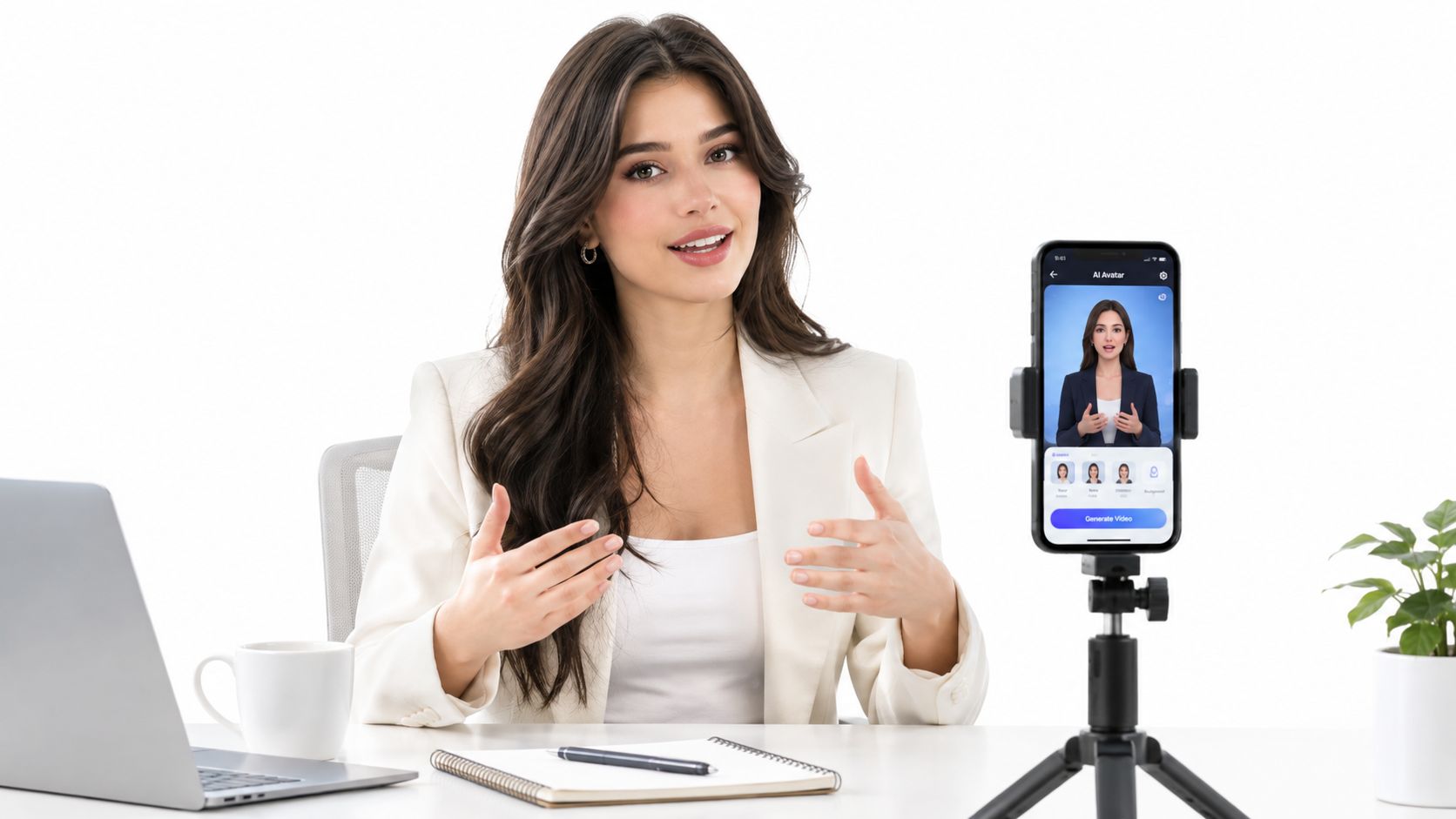
Here's a visual example of how a presenter-led video can fit into a mobile-oriented production setup:
A Practical Workflow From Prompt to Export
A first avatar video doesn't need a complicated production plan. It does need a deliberate order: write for speech, choose a suitable presenter, check the performance, and review the export before sharing.
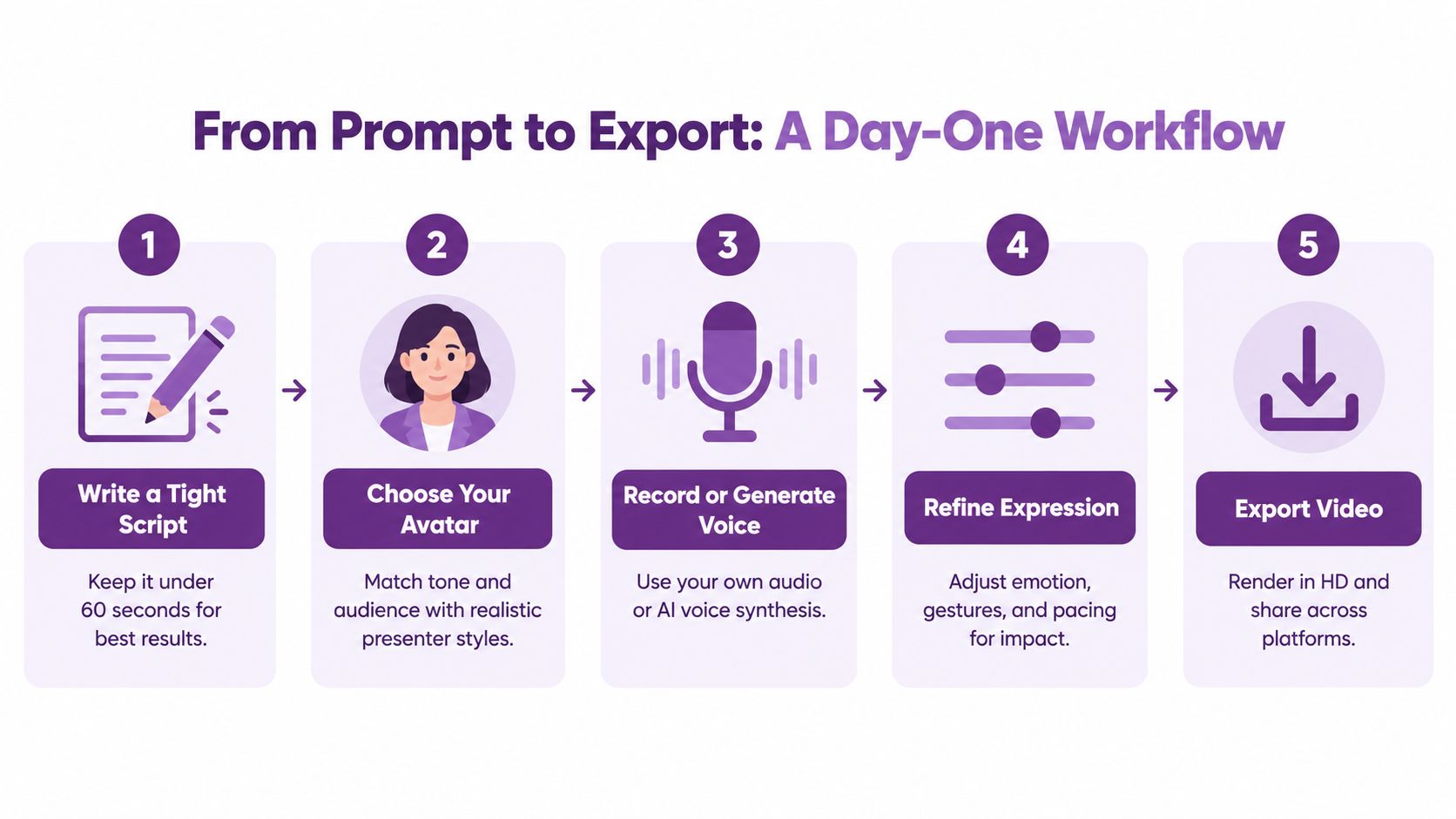
Build the video in a clear sequence
Write a tight script. Start with one audience and one main point. Read the script aloud, remove sentences that sound stiff, and replace acronyms or uncommon names the voice model may mispronounce.
Choose an avatar for the message. Match its style to the context. A polished presenter can suit a product explainer, while a more animated character may fit a playful social post. If you're using a person's likeness, get and record permission first.
Record or generate the voice. For text-to-speech, audition the voice with the actual script. If you're cloning a voice, use clean audio and confirm that the speaker has agreed to the intended use. Keep that permission record with the project.
Refine expression and pacing. If the app offers controls for emotion, gestures, or pauses, use them to support the meaning rather than adding movement for its own sake. Preview the whole clip. A voice that sounds natural in a short sample may feel rushed across a full script.
Add captions and export for the destination. One 2025 mobile-video compilation reports that 74% of users watch mobile videos without sound and rely on captions or visuals (Zebracat's mobile video statistics compilation). For silent viewing, consider captions burned into the video; when the platform supports it, a separate subtitle track can also be useful. Set the aspect ratio for the platform, then preview the exported file on a phone and desktop before publishing.
For a first test, the LunaBloom starter app is one place to explore a script-to-video workflow. Use your own draft and a permitted avatar so the test reflects what you would publish.
Fix common first-video problems
Misaligned lips? Check whether the audio track changed after the avatar was rendered. If you edited the voice or timing, regenerate the lip-sync rather than relying on the old animation.
Awkward pacing? Break long sentences into shorter spoken lines, then add pauses where the audience needs time to absorb an idea. Listen without watching the picture to catch rushed delivery.
Names pronounced incorrectly? Try a phonetic spelling or a pronunciation field if the app provides one. Preview the corrected word in context, and check captions separately because they may not update with the audio.
Privacy Ethics and Pricing You Should Weigh First
The displayed price isn't the whole cost of an avatar app. A free or inexpensive plan may still ask you to upload a face, voice, or video recording, so check what the service does with those files before you use it for yourself, a client, or an employee.
Under the GDPR, a facial image becomes biometric personal data when it's processed to uniquely identify someone; biometric data used for unique identification is treated as a special category of personal data. The details of the rules depend on the use and context, so businesses should get appropriate privacy advice rather than assuming every selfie is legally the same. A practical starting point is the Dutch data-protection authority's explanation of facial recognition and biometric data.
Consent for creating an avatar also doesn't automatically cover voice cloning, model training, marketing reuse, or future videos. Ask who controls uploaded files, how long they're retained, how to request deletion, whether the provider uses them to train models, and whether other companies process the data. For commercial use, document the person's permission and define allowed channels, languages, duration, and approval rights.
Make trust and cost part of the purchase
A 2026 report summarizing a Clutch survey of 601 consumers found that nearly 90% said brands and creators should disclose AI-generated content (the report's survey summary). Put disclosure where viewers can understand it, near the video rather than buried in an unrelated profile or description. A simple label such as “AI-generated avatar” can clarify what the audience is seeing.
Practical rule: Treat permission, disclosure, and deletion as production requirements. Don't wait until the video is ready to publish.
Compare the plan and the data terms together:
- Consent and rights: Record permission for the person's face and voice, and specify where and how the avatar can appear.
- Retention and deletion: Check how to remove uploads and generated assets, and what happens when an account or contract ends.
- Training and third parties: Look for model-training opt-outs and disclosure about external processors.
- Pricing structure: Compare a trial, pay-as-you-go access, subscriptions, and enterprise terms based on the work you expect to do, not on features you may never use.
For details about a specific service's handling practices, read its privacy information before uploading sensitive or client-provided material.
How LunaBloom AI Fits Common Needs
A tutorial for new customers has different requirements from a short social ad. Choose an app by matching its capabilities to the work you need to publish: presenter style, languages, review process, and destination all matter more than a long feature list.
Use this checklist to compare options:
- Avatar choice: Do you need photo-real, animated, 3D, or photo-based presenters?
- Voice: Will built-in speech work, or do you need voice cloning and layered audio?
- Localization: Can you create the languages and regional accents your audience needs, then review translated output?
- Captions and export: Can the app produce readable captions and the file formats and aspect ratios you plan to publish?
- Dialogue and collaboration: Do you need multiple presenters, team review, version control, or analytics?
- Integration and cost: Does API access matter, and does the pricing model fit your expected production?
Based on its described capabilities, LunaBloom AI combines script- and prompt-based video creation with photo-real, animated, and 3D avatars, voice cloning, multilingual output, captions, translations, and multi-character dialogue. Its offering also includes collaboration, version control, analytics, API integrations, and flexible pricing with a free pay-as-you-go trial. These tools may fit creators, marketers, educators, agencies, or teams making explainers, social ads, onboarding videos, and internal communications. Treat the feature list as a starting point, then confirm permissions, data terms, export options, and review controls against your organization's requirements.
The wider category has a mobile audience beyond avatar products. Industry usage data reported nearly 1.7 billion generative-AI app downloads worldwide during the first half of 2025, alongside almost $1.9 billion in in-app-purchase revenue during the same period (mobile AI app usage data). These figures cover generative-AI apps generally, not avatar generators specifically. They offer context for assessing mobile distribution and paid features, but do not measure the avatar market.
Test the app with a real script and an approved likeness before building a larger workflow. Check that a person has agreed to the intended use, keep a record of that permission, and review the final video before publishing. This creates a clear rights trail from the source likeness to the exported content. If the checklist does not fit, use the same questions to compare another app. A dependable choice fits both the creative task and your standards for consent, disclosure, and data handling.
Try LunaBloom AI with a short script to see how its avatars, voice, captions, and video workflow fit your project. Before publishing, review the output, confirm permissions, and make sure viewers can tell when a presenter is synthetic.