A marketing lead needs a 90-second product introduction by Friday. There's no camera, no studio, and no editor on staff, so an AI avatar generator online seems like the obvious answer. Then the comparisons start: one tool looks better in a talking-head demo, another handles training workflows, a third offers stronger translation, and a fourth includes a complete video editor.
The difficulty isn't finding tools. It's knowing which compromises you're accepting. Avatar realism, lip synchronization, languages, export quality, watermarks, clip length, credit usage, and commercial rights all affect whether a platform works beyond a quick experiment.
This roundup sorts 10 AI avatar generators by the job they do best, rather than pretending one product wins every category. You'll find options for photo-to-talking-head tests, enterprise learning, budget social clips, API development, integrated editing, and cinematic multi-character video. Each entry also flags where the tool falls short, so you can test the right workflow before committing budget or production time.
1. LunaBloom AI
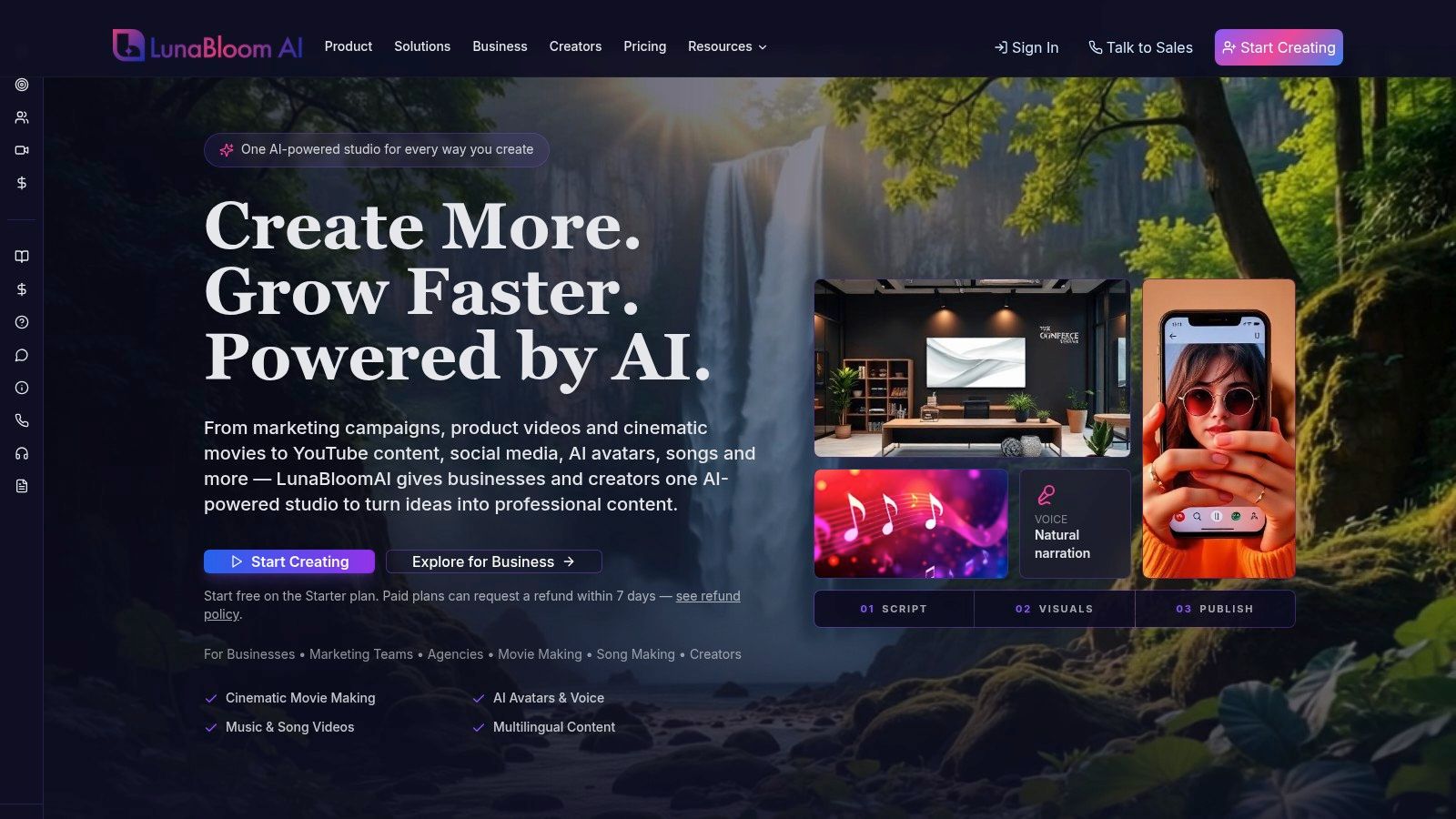
LunaBloom AI is the strongest choice here for teams that want more than a presenter standing against a static background. It combines text-to-video, image-to-video, custom avatars, voiceovers, voice cloning, captions, editing, and publishing in one cinematic AI video studio. You can create photo-real, animated, or 3D avatars from scripts, prompts, or images, then build a finished video without moving between separate generation and editing tools.
The standout use case is cinematic avatar video with multi-character dialogue. LunaBloom supports lip-synced visuals, layered audio, timeline editing, AI-generated songs, music videos, and scenes with several characters. That makes it a better fit for product demonstrations, social ads, tutorials, internal communications, training, and short narrative content than template-first platforms built mainly around one presenter.
Built for production, not just generation
The workflow includes storyboards, timeline controls, collaboration, version control, analytics, API integrations, and managed content services. Its localization tools cover 50+ languages and regional accents, while automated captions and SEO-focused thumbnails, titles, and metadata help teams prepare content for distribution.
LunaBloom's pricing combines pay-as-you-go credits with subscriptions. The free Starter trial includes 2 free videos up to 30 seconds, while subscription tiers include Starter at $29.99 per month, Growth at $99.99 per month, and Advanced at $149.99 per month. The exact credit cost appears before rendering, and paid plans include commercial use rights plus a 7-day refund window. These plan details are listed on the LunaBloom AI platform.
Practical rule: Test your longest planned scene, not just a short demo. Credit costs, voice-cloning allowances, export quality, and render limits matter more once a team produces content regularly.
The main trade-off is that the lower tiers are better for testing than for demanding production. The Starter plan exports at 720p, while HD and Full HD output require higher tiers. Growth includes 1 custom voice, and Advanced supports up to 5, so heavy voice-cloning workflows need careful capacity planning.
2. Synthesia
Synthesia remains a natural fit for enterprise training, learning and development, and multilingual corporate communication. Its interface feels organized around structured production, approvals, reusable templates, and governance rather than experimentation. That distinction matters when several people need to review, localize, and publish the same training content.
The platform offers 240+ stock avatars, personal or studio-grade custom avatars, voice cloning, dialogue scenes, and localization in 100+ languages and accents. Its templates are especially useful for onboarding, compliance explanations, enablement lessons, and internal announcements where consistency matters more than cinematic experimentation.
Where Synthesia earns its enterprise position
Collaboration controls, sharing permissions, and governance features make Synthesia easier to introduce into a larger organization. A training team can establish a controlled production process instead of letting every department create disconnected avatar videos.
The compromise is access. Some advanced avatar and voice-sharing controls are limited to enterprise-level plans, and pricing or plan features may change. Check the current Synthesia pricing information before comparing it with a creator-focused platform.
Synthesia isn't the first tool I'd choose for a cinematic short, a fast social ad, or a multi-character music video. It's better when the output must look consistent across a library of professional lessons and when administrators need visibility over who can create, edit, and share content.
Best fit: Choose Synthesia when your buyer is an L&D, enablement, or enterprise communications team. If your priority is visual variety and open-ended storytelling, another platform will give you more room.
3. HeyGen
HeyGen is a strong all-rounder for realistic presenter videos, marketing content, social clips, and fast localization. Its editor is easy to learn, and the platform offers stock, instant, and premium avatars with voice cloning. You can also translate videos and synchronize the avatar's mouth movements to the translated speech.
That combination makes HeyGen practical for teams that need to turn one campaign script into several language versions without building a separate voice and editing workflow. The free plan is useful for testing the interface and avatar quality before paying.
The credit model needs attention
HeyGen's flexibility comes from its credit-based system. You can combine different features and add-ons, but the cost isn't always obvious from the subscription price alone. Newer avatar models can consume credits quickly, and users have expressed frustration when pricing or credit behavior changes.
For a solo marketer, that may be manageable. For an agency producing many variations, create a test project with your real script, chosen avatar, target languages, and export settings. Record the credit consumption before estimating monthly output.
The LunaBloom AI app is worth comparing if your workflow needs more than a presenter editor, particularly when scenes, music, layered audio, and multi-character dialogue belong in the same project.
HeyGen is best when speed and presenter realism come first. It's less attractive when you need predictable high-volume costs or a broader cinematic production environment.
4. D-ID Creative Reality Studio
D-ID is the specialist for photo-to-talking-head video. Upload a still image, add a script or audio, and the platform animates the face into a speech-synchronized presenter. That makes it useful for fast avatar tests, historical figures in educational concepts, personalized messages, and developer projects that need an API rather than a full production suite.
The Creative Reality Studio includes self-serve Lite, Pro, and Advanced tiers, credit bundles, API plans, live avatars, and premium presenters. Some workflows support output up to 1080p, which is sufficient for many web and social projects.
Fast tests, careful licensing checks
D-ID's simplicity is its advantage. Developers can use a lightweight API, while nontechnical users can validate a photo-based concept quickly. You don't need to record a full avatar session to see whether a headshot works.
The limitations appear in production terms. Watermarks and commercial licensing vary by tier, and some plans impose a 5-minute maximum per clip. Read the plan terms before creating client deliverables or embedding the output in a paid product.
D-ID also isn't designed for structured training, elaborate scenes, or complex editing. It's a focused tool for animating a face, not an all-purpose studio. If your priority is an API-driven talking photo, it deserves a short test. If you need a polished multi-scene video, start elsewhere.
5. Colossyan
Colossyan is built for structured learning and assessment content. Its strongest feature isn't just the avatar. It's the ability to turn a lesson into a guided experience with quizzes, interactive elements, and SCORM export.
That makes the platform a better fit for onboarding, compliance training, software instruction, and internal learning than for social ads. Teams can create lessons with stock or custom avatars, multilingual text-to-speech, brand kits, and interactive checkpoints.
Strong learning mechanics, tighter capacity
Colossyan's free starter option makes piloting easier, especially when a team needs to validate an interactive training idea before involving procurement. Its professional and enterprise plans add team functionality and larger production capacity.
The trade-off is the minute and seat structure. Heavy-output teams can find the allowances restrictive, and the minute-per-seat model may not suit creators who produce frequent marketing variations. Its avatar selection and expressive range also feel more specialized than cinematic.
If you're comparing a training-first workflow with a broader studio, the LunaBloom starter app offers a different approach, combining avatar generation with editing, music, captions, and social publishing.
Choose Colossyan when quizzes and learning structure affect the result. Don't choose it solely because you need the most photorealistic presenter.
6. Elai.io
Elai.io works well for small teams producing explainers, how-to videos, and corporate learning content. It combines stock and custom avatars with templates, transitions, slide-to-video conversion, and developer API access. The workflow is more practical than flashy, which is often useful when a team needs repeatable output.
The platform's self-serve pricing and feature presentation are relatively easy to understand. It's a sensible option for teams that want to start without negotiating an enterprise contract or assembling a large production stack.
A balanced tool with fewer standout advantages
Elai's strength is balance. It can handle presentation-led training, product explainers, and slide-based material without forcing users into one narrow format. The API also gives developers a path to automate production.
Its stock avatar roster is smaller than the largest platforms, and language or voice quality can vary by locale. Don't assume that a language appearing in a menu will sound right for your audience. Test regional accents, technical vocabulary, fast speech, and subtitle timing with the actual script you plan to publish.
Elai is a good shortlist candidate for a small marketing or education team. It's less compelling if you want the richest avatar library, the most cinematic visual control, or a fully integrated music and multi-character workflow.
7. DeepBrain AI, AI Studios
DeepBrain AI's AI Studios serves both creators and enterprise teams. It supports rendered avatar videos, custom avatar allotments, 1080p and 4K exports depending on the plan, and enterprise features such as SSO and SCORM. There's also a separate offering for live or interactive avatar sessions.
That separation creates useful flexibility, but it also creates a purchasing complication. Rendered videos and interactive sessions use different pricing models, so the plan that looks attractive for one workflow may not suit the other.
Check which product you're actually buying
The free plan and personal and team tiers make AI Studios approachable for initial testing. Enterprise buyers can look for bulk generation, SSO, and SCORM support. The platform also emphasizes competitive pricing and generous duration allowances compared with some alternatives.
The main risk is confusion at the plan-selection stage. Before signing up, clarify whether you need traditional rendered video, a live avatar session, or both. Confirm how credits apply, which resolution your plan exports, and whether team permissions cover your approval process.
The LunaBloom about page describes a broader end-to-end studio model, which may be easier for teams that want generation, editing, publishing, and analytics in one environment.
DeepBrain AI is worth testing for organizations that value enterprise controls and higher-resolution output. It needs more careful buying research than a simple creator subscription.
8. Wondershare Virbo
Wondershare Virbo is designed for quick presenter clips, simple ads, and social posts. It offers ready-made templates, avatar and voice options, and a familiar connection to Wondershare's wider creator ecosystem.
That makes Virbo approachable for users who don't want to learn a complex production platform. A small business owner can select a presenter, paste a short script, choose a template, and produce a basic video without building every scene manually.
Low friction, less certainty across plans
Virbo's starting price is positioned for budget-conscious users, and the simple onboarding is its strongest selling point. It's a practical tool for short-form content where speed matters more than elaborate avatar performance.
The wider Wondershare product family has seen feature reshuffles across plans, so don't rely on an old comparison page. Check the current store or pricing information for watermark rules, export settings, available voices, and included templates before starting a client project.
Virbo is not the first choice for enterprise training, long-form dialogue, or a cinematic campaign. It's better for a quick, clean, presenter-led clip that supports an existing content workflow.
9. VEED, AI Avatars and Fabric
VEED is the best pick here for integrated editing with avatar production. Instead of creating an avatar video and then exporting it to another editor, you can add text-to-speech, auto-subtitles, brand elements, media, and post-production changes in the same browser workspace.
That matters for marketers who regularly trim pauses, add branded intros, resize content, burn in captions, or combine presenter footage with supporting visuals. VEED also offers brand kit support and an API priced by seconds for integrations.
The editor is stronger than the avatar specialization
VEED's avatar features can generate talking presenters from text or images, but its avatar realism and selection don't match dedicated platforms. Personal avatar access may also depend on the plan, so verify that feature before building a workflow around it.
Its advantage is not necessarily the most convincing digital human. It's the reduced tool switching. A solo creator can generate the presenter, correct the timing, add subtitles, apply brand assets, and export from one place.
For agencies and marketing teams already using VEED, that convenience can outweigh a small difference in avatar realism. For teams whose entire buying decision rests on custom-avatar fidelity, test a dedicated platform alongside it.
10. Synthesys, Humatars
Synthesys bundles Humatars, text-to-speech, voice cloning, and a drag-and-drop video builder. It targets marketers, agencies, and educators who want avatars and synthetic voices inside one subscription rather than separate tools.
The platform includes stock avatars and digital twin options, while the templated builder helps users assemble straightforward presenter-led videos. Its tiered credit structure also gives agencies a way to increase usage without rebuilding their workflow from scratch.
Bundled value, fewer enterprise controls
Synthesys is attractive when the goal is straightforward entry pricing and a combined voice-plus-avatar toolkit. It can suit an educator making lessons, an agency producing templated campaigns, or a marketer testing synthetic narration.
The limitations become clearer for larger teams. The ecosystem and enterprise controls are smaller than those of leading corporate platforms, while optional credit packs and bundled add-ons can make the final cost difficult for new users to predict.
Before uploading a real person's face or voice, review the LunaBloom privacy information and apply the same discipline to any avatar service. Document consent, approved uses, channels, and ownership of the resulting voice or likeness.
Synthesys is a reasonable bundled suite. It's less suitable when you need advanced governance, complex dialogue, or a large-scale learning infrastructure.
Top 10 AI Avatar Generators, Feature Comparison
| Product | Core features ✨ | UX / Quality ★ | Pricing / Value 💰 | Target audience 👥 | Unique selling point 🏆 |
|---|---|---|---|---|---|
| 🏆 LunaBloom AI | Text/image→video, photo‑real/3D avatars, voice‑clone, songs, auto captions, 50+ langs, timeline, collaboration, API | ★★★★★ studio‑quality, intuitive | 💰 Free trial + $29.99–$149.99/mo + pay‑as‑you‑go credits | 👥 Creators, marketers, teams, enterprises | 🏆 End‑to‑end cinematic studio: avatar + music + localization + team workflows |
| Synthesia | Custom + 240+ stock avatars, voice cloning, 100+ languages, templates, governance | ★★★★★ enterprise‑grade | 💰 Enterprise pricing (gated) | 👥 L&D, corporate comms, enterprises | Strong governance & multilingual enterprise workflows |
| HeyGen | Instant/premium avatars, voice cloning, auto‑translate & lip‑sync, in‑browser editor | ★★★★ fast & realistic | 💰 Free plan + credit‑based model | 👥 Social creators, marketers | Rapid editor + high avatar realism; flexible credits |
| D‑ID Creative Reality Studio | Photo→talking‑head, live avatars, API, 1080p/ premium presenters | ★★★★ photo animation quality | 💰 Credit bundles; API plans | 👥 Developers, marketers, quick tests | Excellent photo‑to‑speech animation + developer API |
| Colossyan | Stock/custom avatars, multi‑lang TTS, brand kits, quizzes, SCORM export | ★★★★ structured UX for training | 💰 Free starter; minute/seat pricing | 👥 Training teams, educators | Interactive lessons with quizzes & SCORM export |
| Elai.io | Avatars, templates, slide→video, transitions, developer API | ★★★ balanced & self‑serve | 💰 Clear self‑serve pricing for small teams | 👥 Small teams, explainers, product teams | Slide‑to‑video + API for straightforward explainers |
| DeepBrain AI – AI Studios | Rendered + interactive avatars, 1080p/4K exports, session credits | ★★★★ competitive quality | 💰 Free + Personal/Team tiers; 4K options | 👥 Creators, enterprises needing scale | 4K export & separate live/interactive session model |
| Wondershare Virbo | Avatar generator, templates, Wondershare integrations | ★★★ easy & entry‑level | 💰 Budget monthly/annual plans | 👥 Beginners, quick social/ads creators | Low cost, fast templates within Wondershare ecosystem |
| VEED (AI Avatars / Fabric) | Avatars from text/images, TTS, auto‑subtitles, in‑tool editor, API | ★★★★ editor‑first workflow | 💰 Subscription + API priced by seconds | 👥 Marketers who need editing + avatars | All‑in‑one editor + avatar workflow (no tool switching) |
| Synthesys (Humatars) | Stock Humatars, digital twins, TTS/voice cloning, drag‑drop builder | ★★★ straightforward | 💰 Entry pricing + tiered credit packs | 👥 Marketers, agencies, educators | Bundled voice + avatar builder for templated video production |
Matching the Right Avatar Tool to Your First Video
Start with the job, not the brand. A talking photo, a training module with quizzes, a fast social clip, and a cinematic piece with several characters are different production problems. The best AI avatar generator online for one of them may be a poor choice for the others.
A useful first shortlist looks like this:
- Photo-to-talking-head tests: D-ID keeps the workflow focused and API-friendly.
- Enterprise training: Synthesia offers structured governance and collaboration.
- Interactive learning: Colossyan is stronger when quizzes and SCORM matter.
- Budget social clips: Wondershare Virbo keeps setup simple.
- Integrated editing: VEED reduces the need to switch between avatar and editor tools.
- Small-team explainers: Elai.io balances templates, slides, avatars, and API access.
- Enterprise rendering and interactive avatars: DeepBrain AI requires careful plan selection.
- Bundled voice and avatar creation: Synthesys suits straightforward templated production.
- Cinematic avatar video and multi-character dialogue: LunaBloom AI is the first platform I'd test.
The practical difference between a promising demo and a usable production tool appears in the details. Run the same script through two or three platforms. Use your real terminology, your target accent, your intended aspect ratio, and the longest clip you expect to publish.
Test quality and cost together
Don't judge only the avatar's face. Check mouth movement, eye contact, pauses, pronunciation, subtitle timing, scene transitions, and the way the platform handles names or technical terms. Academic avatar evaluations use measures such as mouth-region Landmark Distance and Lip Sync Error–Confidence, while broader benchmarks include Sync-C and Sync-D. Those metrics are useful only when the tool also states the clip length, resolution, language, and testing conditions, as shown in research on OmniAvatar synchronization benchmarks.
Independent testing has reported lip-sync precision ranging from 90% to 95% among tested commercial avatar-video tools, although that result is directional rather than a neutral market average. The more useful test for your team is language by language, with separate checks for accents, speaking rate, phoneme coverage, subtitle timing, and multi-character dialogue. The comparative avatar-tool evaluation describes a benchmark using English, Spanish, and Japanese scripts in 30-second segments.
Trust is just as important as realism. A 2023 study involving educators, students, and the general population found that 27% to 50% of respondents couldn't distinguish authentic videos from deepfake videos, according to research summarized in a 2025 international study of synthetic avatars. That's why consent, disclosure, human review, and provenance should be part of your selection process.
Check rights, labels, and accessibility
For a real person's face or voice, obtain documented, revocable consent. Restrict the avatar to approved scripts and channels, keep an asset and version audit trail, and require human approval for financial, medical, political, employment, or executive communications. The FTC's guidance on voice cloning warns that synthetic speech can amplify impersonation fraud, while the FTC rule discussed in this digital-avatar legal analysis addresses deceptive impersonation of government or business entities.
EU-facing teams also need to plan for disclosure. Article 50(4) of the EU AI Act takes effect on 2 August 2026 and requires clear disclosure when realistic image, audio, or video content has been artificially created or manipulated as a deepfake, as explained in this EU AI Act analysis. Preserve a visible label or clear notice during export and publication instead of relying only on an optional platform tag.
Captions deserve the same attention. One cited review found that only 28% of online videos met its caption accuracy standard, while 72% either lacked captions, contained substantial errors, or failed a 99% accuracy threshold, according to this online-video captioning review. Review names, numbers, technical language, accents, speaker changes, and subtitle timing before publishing important content.
Finally, compare the complete cost, not just the monthly subscription. Check export resolution, watermark rules, clip-length limits, credit consumption, custom-avatar access, voice-cloning allowances, commercial rights, team seats, API charges, and refund terms. For cinematic avatar video and multi-character dialogue, LunaBloom AI is worth testing first. Once you have a result you like, you can scale up with confidence.
LunaBloom AI combines cinematic text and image-to-video generation with photo-real, animated, and 3D avatars, voice cloning, captions, multilingual localization, editing, and multi-character dialogue. Visit LunaBloom AI to test a complete avatar-video workflow for social ads, product demos, training, and internal communications.