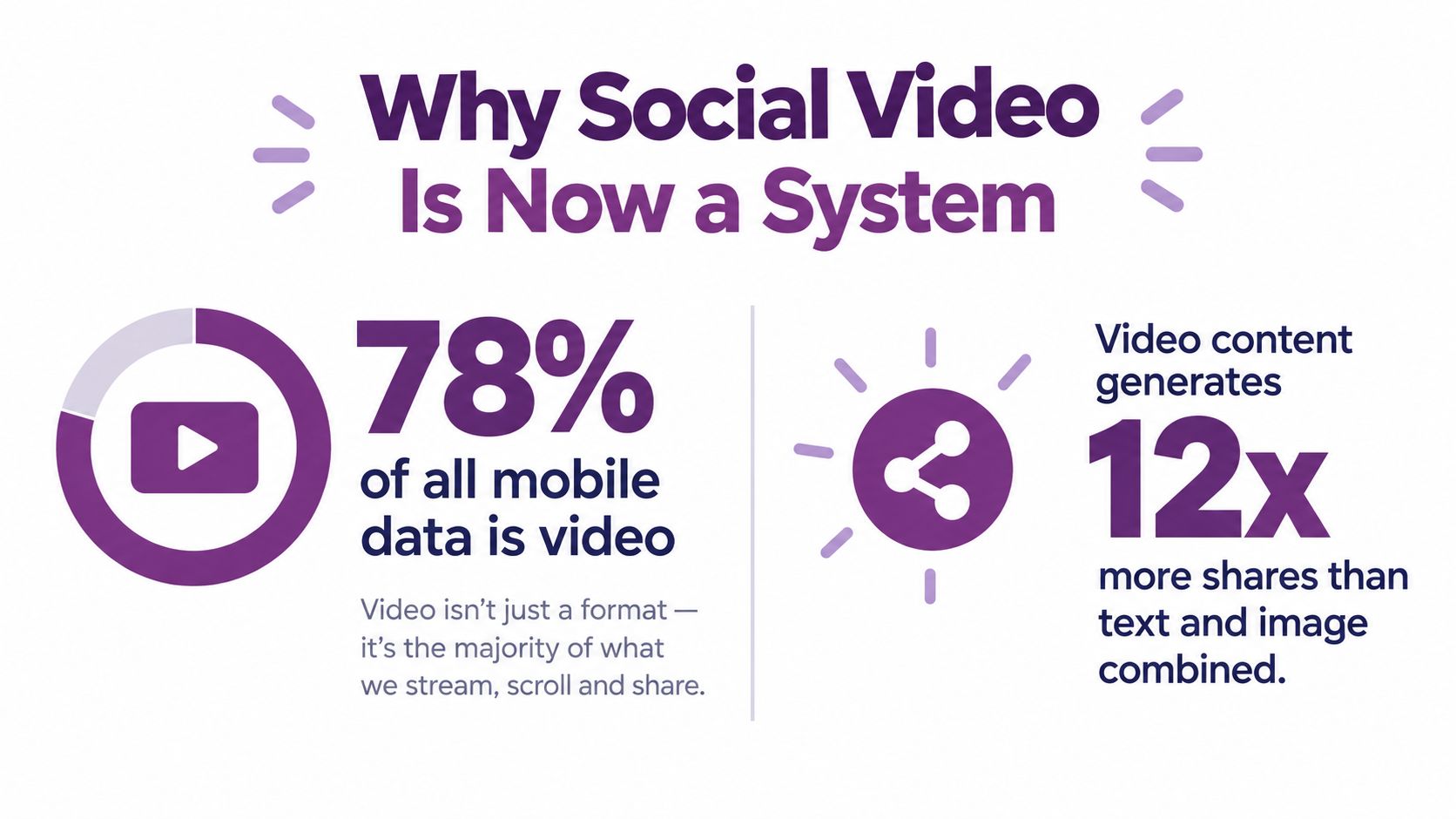
More than three-quarters of cellular data volume is video. DataReportal's 2025 Global Overview, citing Ericsson network measurements, reported that video applications consumed more than 111 exabytes of mobile data per month, compared with roughly 147 exabytes of total smartphone-attributable traffic (DataReportal data via Wyzowl). If you create videos for social media as though you're producing one finished file, you're solving the wrong problem.
The practical challenge is building a repeatable system that turns one idea into several platform-ready assets, holds attention on a small screen, works without sound, survives localization, and gives you enough evidence to improve the next cut. The workflow below combines retention-first scripting, mobile-native editing, AI-assisted production, and a measurement loop tied to completion and conversions.
Why Social Video Is Now a System Not a Single Asset
89% of businesses used video as a marketing tool in 2025, up from 61% in 2016, according to Wyzowl's video marketing statistics. The same research found that 95% considered video important to their strategy and 93% said it generated good ROI. That level of adoption changes the job. Social video production is no longer about exporting one polished file. It is about building a repeatable system that can produce variations, survive platform constraints, and give you enough signal to improve the next round.
In practice, one script has to do several jobs. It needs a fast hook for a feed placement, a stronger proof sequence for a paid cut, captions that still carry the message with sound off, and alternate versions for language, format, and channel intent. I treat the script as the system's source file. The edit, framing, subtitles, voice, and CTA all change around that core message.
That shift matters because mobile feeds punish waste. Open too slowly, frame too wide for 9:16, or leave the main claim buried halfway through, and the audience leaves before the value appears. A good system solves that upstream. It starts with a clear viewer, one conversion goal, and a message that can hold together across organic, paid, and landing-page use.
Tools can help with scale. LunaBloom AI video workflows can turn scripts, prompts, and images into edited videos with voiceovers, captions, and publishing support. That saves production time, especially when you need multiple cuts from the same idea. The trade-off is obvious to anyone who has shipped campaigns at volume. AI can assemble assets quickly, but it will not make the strategic decisions for you. You still have to decide what the viewer should understand in the first seconds, what proof belongs in the middle, and what action the video should drive.
The seven-stage workflow
- Define the brief. Set the audience, offer, pain point, and conversion action.
- Write the hook. Put the payoff in the first few seconds. Do not spend the opening on a logo, a scene-setter, or backstory.
- Build the core cut. Keep the main message inside a sub-60-second version.
- Produce the master. Use self-shot footage, stock, AI-generated scenes, or a combination.
- Format for mobile. Start with a 9:16 composition, captions, clear audio, and safe zones.
- Localize and publish. Adapt language, voice, metadata, thumbnails, and platform-specific edits.
- Measure and iterate. Compare hook performance, completion, shares, clicks, and conversions, then feed the result into the next cycle.
The production mindset: You're building a set of controlled variations around one useful message.
Turn the idea into a tight brief
Before you record or generate anything, reduce the idea to five fields:
- Audience: “Independent fitness coaches who need more consultations,” not “everyone interested in fitness.”
- Objective: One action, such as book a call, download a guide, or visit a product page.
- Problem: The friction the viewer recognizes immediately.
- Payoff: The result or insight promised in the opening.
- Proof and CTA: Why the viewer should trust the claim, and what to do next.
Use a reusable script structure: hook, problem, proof, payoff, call to action. Write at least three opening variants while keeping the audience, offer, and CTA fixed. One can lead with a mistake, another with a direct benefit, and a third with a visual demonstration. That gives you a real hook test. If performance changes, you have a better chance of knowing whether the opening changed the result instead of confusing the test by rewriting the whole creative.
Slow openings usually fail for a simple reason. They spend the viewer's attention before giving a reason to stay.
Batching keeps the system workable. Script four related videos in one session, then cut each idea into platform-specific versions instead of writing every asset from scratch. During quality control, check the basics:
- Does the opening promise a clear payoff?
- Can a viewer understand the topic without prior context?
- Is the core message short enough to edit tightly?
- Does each sentence support the one conversion objective?
- Is the CTA specific and easy to follow?
Where AI, Stock, and Self-Shot Footage Each Fit
Production quality should follow the job, not personal preference. A product demonstration may need controlled lighting, consistent visuals, and polished AI-generated scenes. An organic founder update may work better when it looks like it was recorded on a phone between meetings.
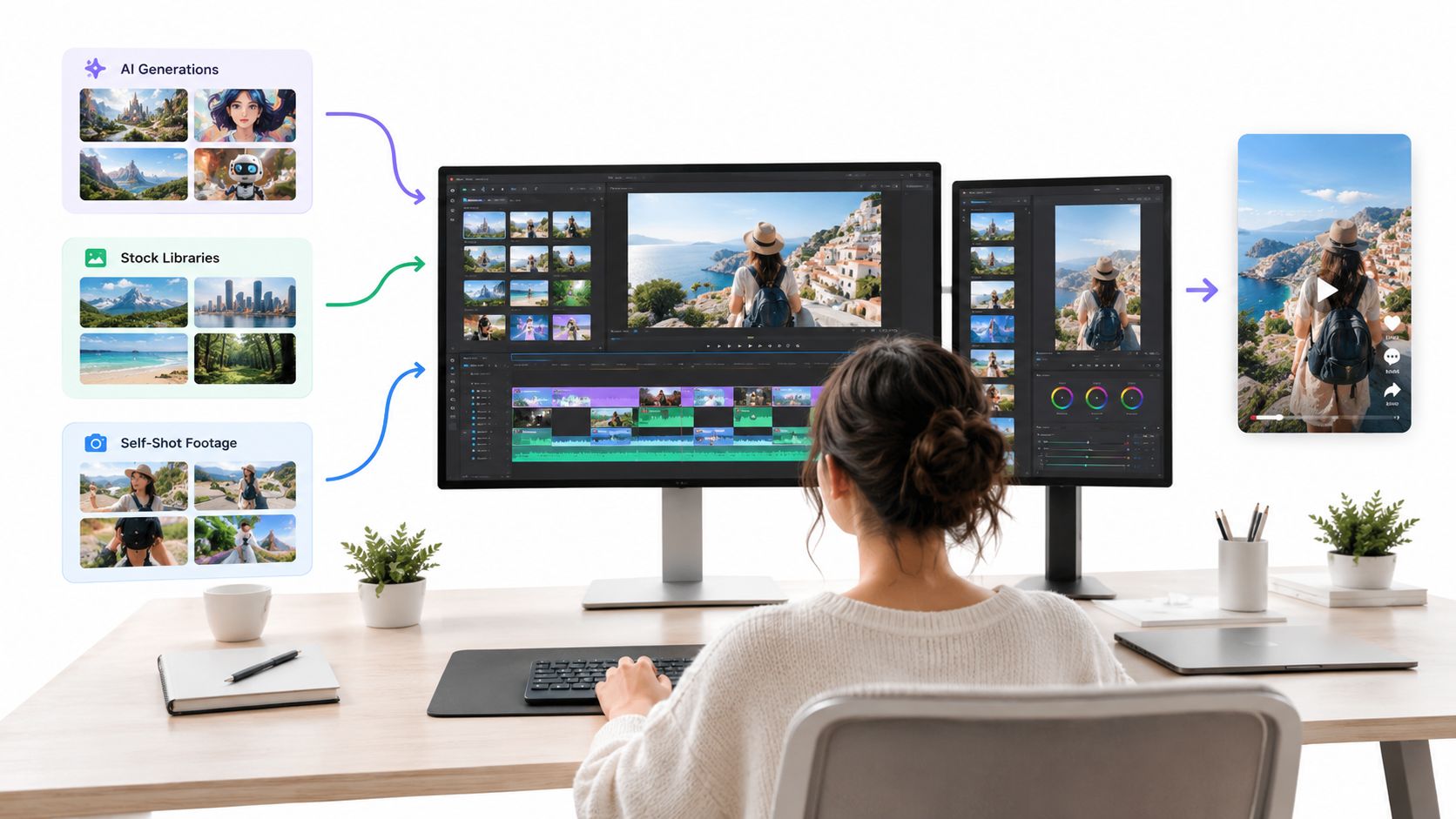
AI-generated footage fits campaigns that need repeatable visual direction, avatar-led explainers, product scenes, or multiple language versions. Stock footage works when the story is contextual and the visuals don't need to prove ownership, such as general workplace scenes or abstract b-roll. Self-shot footage carries the strongest sense of presence for testimonials, behind-the-scenes posts, customer questions, and community updates.
Use these criteria before choosing a production track:
- Budget allocation: 46.9% of companies allocate less than 10% of their marketing budgets to social media (Influencer Marketing Hub's benchmark report). A workflow that requires a full shoot for every post won't survive that constraint.
- Channel intent: Paid ads and product pages generally benefit from controlled presentation. Organic community posts can benefit from a native, less polished feel.
- Posting frequency: Businesses publishing three to four short videos per week tend to see stronger compounding reach than those posting monthly, according to the same benchmark source.
- Message sensitivity: Use owned footage when the viewer needs to see the actual product, person, location, or result.
- Variation requirement: Choose AI or stock when you need many visual versions from one script without repeating a shoot.
Highly produced videos can underperform casual clips in organic feeds because viewers often respond to relevance and human presence before visual perfection. The best small-business workflow is usually hybrid: create one polished master for an ad, landing page, or product explanation, then record a batch of phone-shot clips that answer objections, show process, and give the channel a recognizable voice. An AI-assisted workspace such as LunaBloom AI's app can sit alongside those phone clips rather than replacing them.
The editing choice also affects trust. Don't use an AI avatar to deliver a personal customer story that depends on real emotion. Don't force a shaky phone recording into a high-budget product launch if the visual inconsistency weakens confidence. Match the production level to the viewer's question.
Editing and Formatting for Mobile-First Feeds
A mobile edit should communicate its point even when the viewer has sound disabled. Start with a 9:16 vertical master, then protect the central area where faces, products, captions, and CTAs remain visible beneath platform interface elements. Export separate cuts when the pacing or framing needs to change. Resizing a edit often leaves small subjects, awkward headroom, and captions in the wrong place.
The edit that survives the feed
Use burned-in captions with strong contrast and tight synchronization. Captions aren't just an accessibility feature. They're a deliverability feature because they help the message travel through silent autoplay environments. WCAG Success Criterion 1.2.2 requires captions for prerecorded synchronized audio unless the media is clearly labeled as a text alternative, and effective captions should identify speakers and meaningful non-speech audio (W3C guidance on prerecorded captions).
Audio needs the same care. Voiceovers are associated with stronger reported video performance by 66% of companies, music by 81%, and about 65% of companies add captions (WebFX video marketing statistics). Keep dialogue intelligible on phone speakers, reduce music beneath speech, and use sound effects only when they clarify the action.
| Platform | Aspect Ratio | Length Range | Caption Treatment | Thumbnail Note |
|---|---|---|---|---|
| TikTok | 9:16 | Short-form cut | Large, high-contrast, tightly timed | Use a clear first-frame subject |
| Instagram Reels | 9:16 | Short-form cut | Keep text inside central safe zones | Make the cover readable in the profile grid |
| YouTube Shorts | 9:16 | Short-form cut | Include speech and key audio cues | Use a distinct, topic-specific frame |
| YouTube long form | 16:9 | Extended explanation | Add accurate captions and chapters where useful | Show the result or subject clearly |
| 1:1 or 16:9 | Concise professional cut | Prioritize silent comprehension | Use a clean professional still |
For current Instagram dimensions and placement details, consult the 2026 Instagram video specs from Scheduler.social before exporting. Platform interfaces change, so keep a production preset library and review it periodically.
A reusable finishing checklist
- Opening frame: Show the subject, result, or tension immediately.
- Text hierarchy: Make one phrase dominant instead of competing with several labels.
- Safe zones: Keep faces, products, captions, and CTAs away from edge overlays.
- Audio balance: Test the mix through ordinary phone speakers.
- Export set: Prepare the 9:16 master plus square or horizontal versions when the channel requires them.
- Accessibility: Check caption accuracy, speaker labels, contrast, timing, and non-speech cues.
Use LunaBloom AI's starter app when you want automated voice, caption, and edit generation as part of a broader production workflow, then review every export manually. Automation creates a draft. Editorial review protects clarity.
Localizing for Languages, Accents, and Cultures
Social video already shapes buying behavior for 63% of Gen Z and 49% of millennials, and 56% of Gen Z say social content feels more relevant than traditional television and movies. In 2025, marketers planned to increase investment in YouTube (29.58%), Instagram (28.84%), and TikTok (27.64%) (Deloitte's digital media trends research). If a market matters, localization belongs in production from the first script draft, not as a last translation task after the edit is locked.
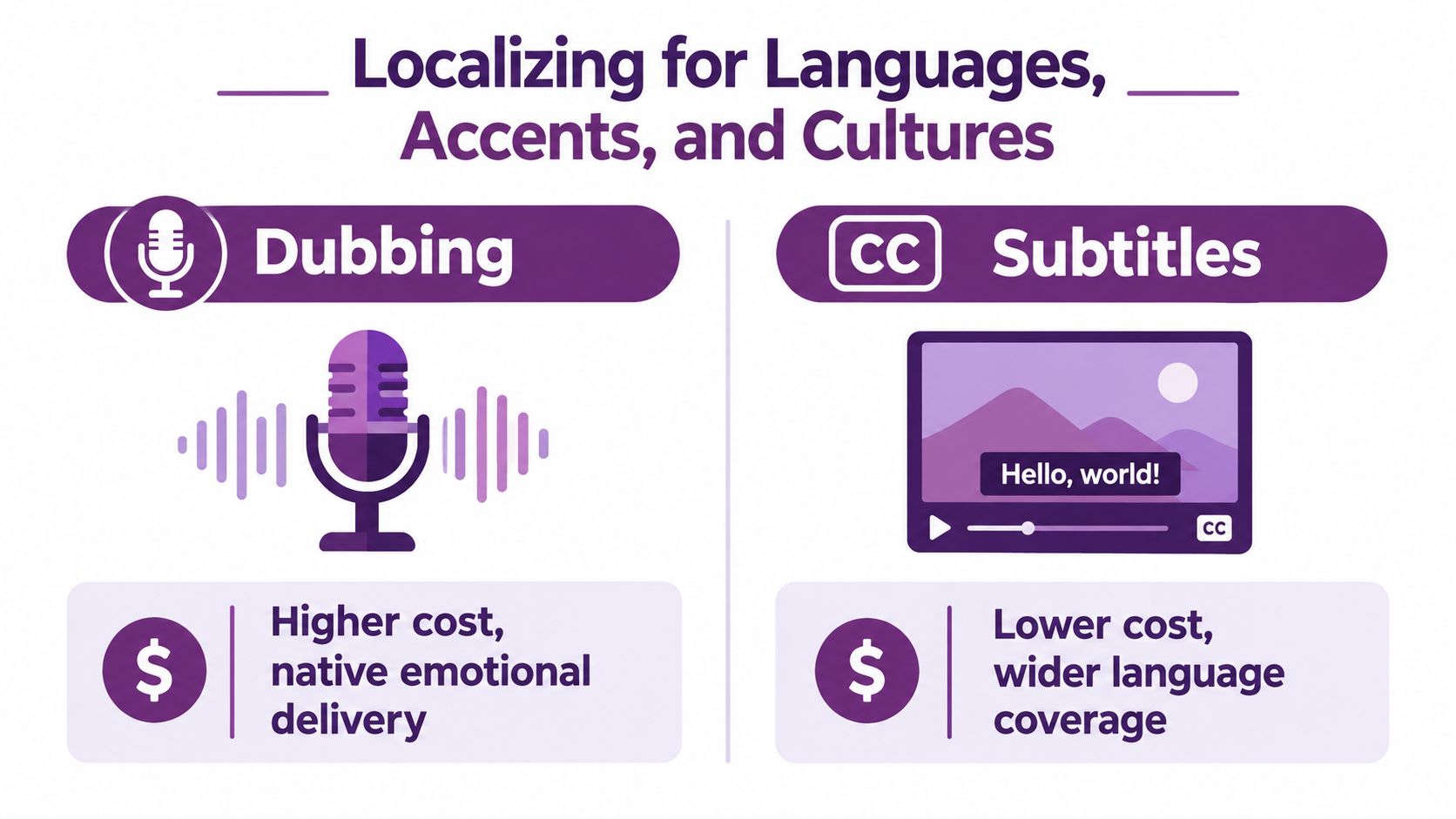
Dubbing versus subtitles
Dubbing usually holds attention better because viewers can stay on the image instead of splitting focus between visuals and text. It fits ads, explainers, and creator-style spots where tone, pronunciation, and pacing carry the sell. The cost is in the details. Voice casting, accent choice, timing, and lip sync all need review, and AI-assisted dubbing still needs a human pass before it goes live.
Subtitles are faster to scale across markets and often cheaper, but they change how a cut plays. A direct translation can preserve the words and still miss the joke, flatten the promise, or weaken the CTA. Build separate subtitle files for each language instead of dropping one translated text layer across every version. Then check reading speed, line breaks, speaker labels, and contrast on an actual phone screen.
Language is only one layer.
Thumbnails, titles, metadata, examples, and calls to action also need market-specific decisions. A visual that reads as polished in one region can feel staged or unclear in another. Names, gestures, humor, product references, and regional accents should go through native review before publishing, especially when one master script is being adapted into several cuts for different feeds.
A lightweight quality gate keeps the system practical:
- A native reviewer checks names, pronunciation, and accent fit.
- A second reviewer checks idioms, tone, and the CTA.
- The editor reviews reading speed, caption contrast, framing, and safe-zone placement.
- The marketing owner compares watch time, completion, saves, and conversions by market.
- The team logs the winning language, voice, caption, thumbnail, and pacing choices in the version library.
The story can stay consistent across markets, but the delivery should change where it affects retention and response. Treat the script as a system. Voice, captions, thumbnail, metadata, and pacing are separate production layers tied back to completion rate and conversions. LunaBloom AI's company information describes support for multilingual production and regional accents, which can help teams manage those variations alongside human review.
Publishing Workflow and SEO for Discoverability
A finished edit still needs a publishing package. Prepare a distinct thumbnail, descriptive title, accurate description, platform-native caption, and landing-page destination for every important cut. Don't reuse one generic thumbnail across an entire campaign. The image should show what that specific version delivers.
Google recommends unique values for thumbnailUrl, name, and description in VideoObject markup, and the structured data must match the actual video and the other metadata on the page (Google's video SEO documentation). If the published cut changes, update the metadata. A description written for a longer tutorial shouldn't remain attached to a short product teaser.
Metadata rule: Describe the video that users can actually watch, not the campaign you wish they had watched.
A practical publishing stack
- Export: Create the master and platform-specific cuts from the approved script.
- Package: Write accurate titles, descriptions, captions, thumbnails, and CTAs.
- Publish: Post natively or use a scheduling tool that preserves the correct version for each channel.
- Support search: Embed important videos on a standalone page near relevant text, with matching VideoObject data.
- Record context: Keep a simple spreadsheet showing the audience, hook, offer, format, destination, and publication date for each cut.
Google also supports video discovery through structured data, video sitemaps, and the Open Graph protocol (Google's video SEO resources). The technical layer works best when the page itself is useful. Surround the embedded video with explanatory copy, relevant headings, and a clear next step instead of treating the page as an empty container.
For teams publishing across several accounts, template-driven social scheduling can reduce repetitive setup. Scheduling doesn't remove the need for platform-specific judgment. Check each preview, caption, link, crop, and thumbnail before the post goes live.
Measuring What Actually Drives Results
Raw views tell you that a video was served. They don't tell you whether the opening earned attention or whether the message created action. Track the sequence: hook view rate, average watch time, completion rate, shares, and click-through rate. Treat likes and total views as context, not the final verdict.
Short-form video delivers the highest ROI for 21% of marketers, while live-streaming ranks third at 15.53%. Short-form is also the most commonly used format at 29.18%, and 73% of respondents identified videos between 30 seconds and two minutes as the most effective length range (HubSpot's video marketing statistics). Those figures support concise cuts, but your own completion and conversion data should decide what stays in rotation.
Completion rate is the primary diagnostic. Low early retention points to a weak hook or slow setup. Strong retention with weak clicks usually points to an unclear value proposition or CTA.
Run a controlled hook test by changing only the opening three seconds. Keep the audience, offer, proof, body, and CTA constant. Create at least three variants, then compare early retention, completion, shares, and clicks. If one hook attracts views but loses viewers immediately, it may be promising something the body doesn't deliver. If viewers finish but don't click, rewrite the offer or next step rather than chasing another visual effect.
A simple monthly review should answer:
- Which opening retained attention longest?
- Where did viewers leave?
- Which cut generated qualified clicks?
- Did localization change completion or conversions?
- What should enter the hook library for the next batch?
For agencies managing several clients, a documented approach to KPI tracking for growth agencies can help standardize these reviews without flattening the creative differences between accounts.
A Repeatable Monthly Production Cadence
A monthly cadence works when one script is treated like a system. The job is not to produce one finished video. The job is to build a repeatable batch: a strong hook, a 9:16 master, platform cuts, localized versions, and a review loop tied to completion rate and conversions.
Week 1 is planning. Pick the audience, the conversion goal, and the one problem the video needs to solve. Review last month's retention drop-offs, click patterns, and conversion quality before choosing concepts. Then write a tight one-page brief for each priority idea and add any winning openings to a shared hook library. A hook belongs there only if it earns attention and matches what the body delivers.
Week 2 is scripting and generation. Batch scripts while the message is still fresh, then write three opening variants for the concepts that matter most. Produce the core footage once, with mobile framing in mind from the start, so the 9:16 version feels native instead of cropped as an afterthought. AI is useful here for alternate scenes, captions, voice options, avatars, and versioning. Self-shot footage still does the heavy lifting when trust depends on real people, product proof, or hands-on demonstration. Approve message and structure before anyone spends hours polishing transitions.
Week 3 is adaptation. Cut the vertical master first, then build square or horizontal versions only where the channel requires them. Check safe zones, subtitle timing, thumbnail readability, and whether the opening still lands without sound. Localize voice, captions, and on-screen text with the same care you give the original. If the line depends on idiom, pronunciation, or cultural context, have a native speaker review it before publishing. That step saves expensive re-edits later.
Week 4 is distribution and learning. Schedule posts by platform, publish the supporting landing pages, and document exactly what changed between versions. Keep the log simple: hook used, offer, CTA, edit length, localization choices, and result. Then feed the strongest openings, the clearest objections, and the best-performing cuts into next month's batch.
| Channel | Recommended Production Level | Frequency | Primary Goal |
|---|---|---|---|
| TikTok | Native-looking phone clips plus selected polished cuts | Consistent short-form publishing | Reach, retention, and community response |
| Instagram Reels | Hybrid, polished campaign assets and authentic clips | Consistent short-form publishing | Discovery, saves, and profile action |
| YouTube Shorts | Clear vertical explainers and demonstrations | Consistent short-form publishing | Searchable reach and completion |
| YouTube long form | Polished tutorials, demos, and detailed explainers | Planned evergreen publishing | Education and qualified traffic |
| Clean professional edits with human commentary | Regular business-focused publishing | Trust, discussion, and lead intent |
The teams that get the best results usually are not the ones making the fanciest edits. They build a system that turns one sound idea into useful variations, measures viewer response, and improves the next batch.
Use LunaBloom AI's pricing options to judge whether an AI-assisted workflow matches your production volume, then test it on one campaign first. Create the brief this week, produce three hook variants, publish the platform-specific cuts, and review performance against completion and conversions before scaling.