You've got a vocal stem, a melody, and a deadline. The demo needs a singer, but the original performer isn't available for another take. An AI voice clone seems like the obvious shortcut, until the output sounds flat, the consonants miss the beat, or the release raises questions about consent and disclosure.
AI voice cloning singing works best when you treat it as one production system, not a single button. The vocal dataset, pitch model, source separation, lip-sync pass, mix decisions, and rights paperwork all affect one another. A technically convincing render can still be unusable if the source recording is contaminated, the melody drifts, or the voice owner never authorized the intended release.
The technology has moved quickly. The 2023 “Heart on My Sleeve” AI cover-song case reportedly reached about 15 million TikTok views and more than 600,000 Spotify streams in days, bringing cloned singing into mainstream attention through an industry discussion of recent AI music developments. More recent testing also shows the quality challenge has changed. Deezer reported that fully AI-generated tracks represented about 34% of daily song deliveries, or 50,000 uploads per day, but only about 0.5% of total streams, while 97% of 9,000 listeners across 8 countries in Deezer and Ipsos testing couldn't reliably identify AI-generated music as summarized in this producer guide.
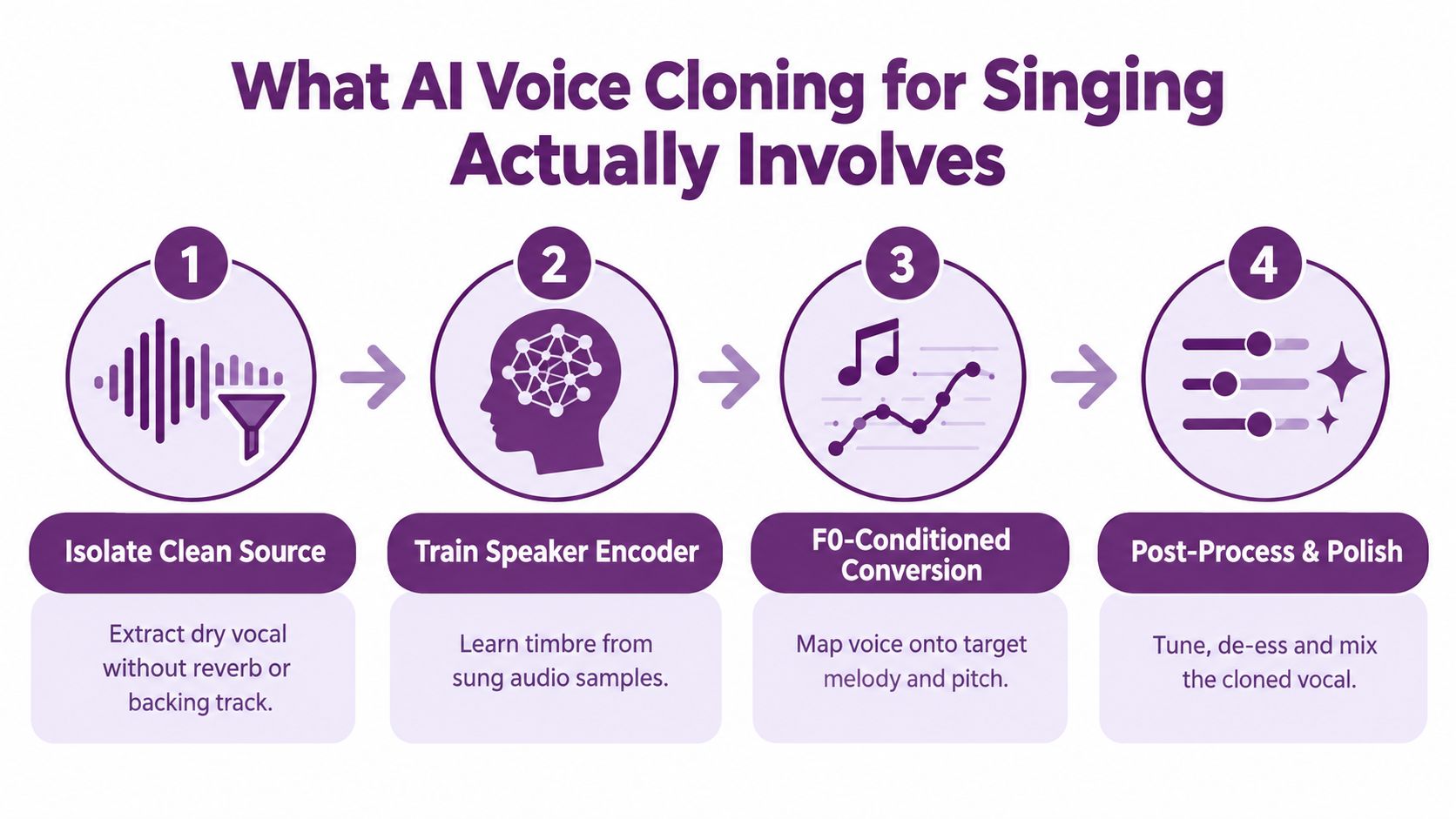
What AI Voice Cloning for Singing Actually Involves
A singing clone doesn't copy a spoken voice and ask it to follow lyrics. The pipeline must preserve who is singing, which notes are being sung, how each phrase moves, and how the result sits inside the arrangement.
Start with a clean vocal source. If the reference comes from a full mix, separate the vocal from drums, bass, instruments, and ambience before training. Reverb and backing music become learned contamination. The model may reproduce room reflections or bleed as if those artifacts were part of the singer's identity.
Next, a speaker encoder learns the target timbre from sung audio. Singing data matters because the model needs examples of sustained vowels, pitch transitions, breath, vibrato, consonants at pitch, and changes in intensity. A speech-only model can preserve vocal color while producing a result that still sounds like speech forced onto notes.
The conversion stage uses an F0-conditioned model, often in the SVC, DiffSinger, or RVC family, to separate melody from identity. The input pitch contour supplies the musical movement, while the speaker representation supplies the vocal character. Post-processing then handles de-bleed, sibilance, formants, timing, compression, and reverb matching.
The real production trade-off
Clean data reduces troubleshooting later, but it creates work at the front of the pipeline. Raw multitracks preserve natural phrasing and performance detail, yet they demand stronger denoising and more careful source selection. I'd rather spend time rejecting bad clips before training than spend days tuning a model around room tone, chorus bleed, or clipped consonants.
A workable personal dataset often sits in the 10 to 30 minute range of clean singing, depending on the model and the range of the intended output. A separate research result shows that a data-efficient approach produced convincing target-singer output with as little as 2 minutes of target data after adapting a multispeaker base model. In a Japanese pseudo-singing test, a model adapted with 1m49s of target data was preferred 45% of the time, compared with 35% for a model trained on the full 14m48s dataset in the reported experiment. That result doesn't mean short, dirty clips are enough. It shows why a strong base model and clean adaptation can matter more than raw duration.
You'll make better decisions if you separate the work into four connected stages:
- Dataset preparation: capture or isolate dry singing, clean it, segment it, and label it.
- Model tuning: control F0, vibrato, pitch stability, breath, and high-register formants.
- Lip-sync: use the rendered vocal to drive phoneme timing and facial movement.
- Legal review: confirm consent, licenses, territories, disclosure, and release documentation.
If you're also deciding whether a project needs a singer, narrator, or on-screen performer, a practical guide to choosing a voice over actor can help clarify the human-performance alternative. For teams evaluating the broader production context, the LunaBloom AI company overview provides additional background on an end-to-end video workflow.
Recording a Clean Singing Dataset
A cloned vocal will only reproduce information captured in the source recording. If one take has room reflections, another has heavy processing, and a third comes from a phone microphone, the model must learn those inconsistencies alongside the singer's identity. Build the dataset like a controlled studio session.
Use a large-diaphragm condenser or dependable dynamic microphone in a treated booth. Put a pop filter between the singer and microphone, keep the performer away from reflective walls, and hold the same distance across takes. Record 48 kHz, 24-bit, mono files. This preserves useful vocal detail without creating unnecessary multichannel storage.
Capture variety, not random duration
Cover the range and delivery styles required by the finished songs. Include:
- Sustained vowels: These show how timbre changes across held notes.
- Fast passages: These capture consonant timing, melisma, and pitch transitions.
- Breathy and intense dynamics: These preserve expression instead of teaching one fixed vocal texture.
- Low and high registers: These provide examples of changing formants and vocal weight.
- Different articulation patterns: Open vowels, clipped consonants, plosives, and sibilants behave differently at pitch.
Record dry whenever possible. Leave reverb, delay, chorus, heavy saturation, and backing vocals out of the training source. If the material comes from full-mix references, run source separation first and inspect every phrase manually. A practical pipeline can include vocal isolation, lyric or speech generation, F0-conditioned conversion, and final remixing. Clean input still determines how much control the later stages have.
Clean before you train
Use RX or an equivalent restoration tool to remove mouth clicks, room noise, harsh headphone bleed, and obvious mechanical sounds. De-ess enough to prevent distorted sibilants, while keeping the distinction between “s” and “sh.” Over-cleaning can make the identity sound dull or artificial.
Slice the material into 4 to 10 second chunks. Keep phrases musically complete where possible, then normalize peaks to approximately -6 dB. The trainer needs consistent levels without clipping. The exact normalization method matters less than applying one method throughout the dataset.
Before importing the files, audition them against a short checklist:
- Is there backing-track bleed?
- Does room tone change between takes?
- Is microphone distance consistent?
- Are consonants distorted or clipped?
- Do breaths remain natural rather than chopped?
- Do clips include each phrase's beginning and ending?
Producer rule: A smaller folder of clean, varied phrases usually gives you more control than a larger folder full of contradictory processing.
Keep a source log with the recording date, performer consent, microphone chain, processing applied, and intended use. That record should stay connected to the model version, isolated vocal files, conversion settings, and disclosure plan. The creative pipeline and compliance record depend on the same source history.
For teams building a broader custom-voice workflow, the LunaBloom AI starter app offers one example of a platform-led approach.
Tuning the Model for Melodic Content
A speech clone can capture a person's vocal color while missing the musical line. Singing conversion must preserve both identity and performance: the target timbre comes from the speaker representation, while the melody comes from pitch and timing information.
F0-conditioned architectures separate those jobs. An input MIDI or MIDI-like contour supplies the notes, and the speaker embedding supplies timbre. The model therefore follows an explicit melodic path instead of inferring musical intent from lyrics alone. That separation also makes later review easier, because pitch decisions remain visible in the conversion settings.
Controls that change the musical result
Pitch stability loss limits octave jumps and unstable note centers. Breath and aspiration preservation keep phrase endings from turning abruptly synthetic. Vibrato transfer determines whether the result follows the source singer's modulation or uses a narrower movement. Formant handling shapes vowels as pitch rises, especially on high notes that can otherwise become nasal, hollow, or detached from the target voice.
Pitch-shift augmentation can broaden a narrow dataset, but excessive artificial shifting teaches the wrong relationship between pitch and timbre. Conservative augmentation, often around ±2 to ±4 semitones, extends coverage while keeping the original performances as the main reference.
| Parameter | What it controls | Risk if mis-set |
|---|---|---|
| F0 conditioning | Note path, pitch contour, and melodic timing | The vocal may drift, jump octaves, or miss the intended melody |
| Pitch stability loss | Resistance to unstable note centers | Too little can sound wobbly, too much can remove expressive movement |
| Vibrato transfer | Depth and timing of pitch modulation | Excess creates theatrical wobble, too little makes sustained notes lifeless |
| Breath preservation | Air, aspiration, and phrase release | Weak settings make lines sound clipped and synthetic |
| Formant handling | Vowel shape as pitch rises or falls | Poor control can create thin, nasal, or artificial high notes |
| Inference pitch correction | Final tuning strength | Heavy correction can erase expression and create audible artifacts |
Tune with short musical tests
Start with a sustained vowel, a rapid lyric passage, a breathy line, and a high note. These tests expose different failure modes before a full-song render consumes time. Compare each conversion with the source melody, then inspect pitch drift and consonant timing.
Stronger tools typically stay within approximately ±6 to ±9 cents of the original vocal pitch, while weaker systems can drift around ±12 to ±18 cents. Use those ranges as a practical reference, not as a guarantee across every model, singer, or register.
At inference, apply the lightest pitch correction that solves the audible problem. Heavy correction can flatten expressive bends and introduce artifacts. After conversion, run a de-bleed pass and match the vocal's room character to the backing track. A clean isolated stem can still sound pasted into a reverberant arrangement if its ambience does not match.
Keep the model settings tied to the same source log used for consent and intended-use records. The selected training takes, augmentation range, pitch controls, isolated vocal, and final disclosure should remain traceable as one production chain. That connection matters when the converted vocal is later paired with a lip-synced visual, because the audio settings and the public description must refer to the same generated performance.
For creators comparing a browser-based workflow with a controlled technical stack, the LunaBloom AI app provides one platform-led option for generated voice and video production.
Wiring Cloned Vocals Into Lip-Synced Visuals
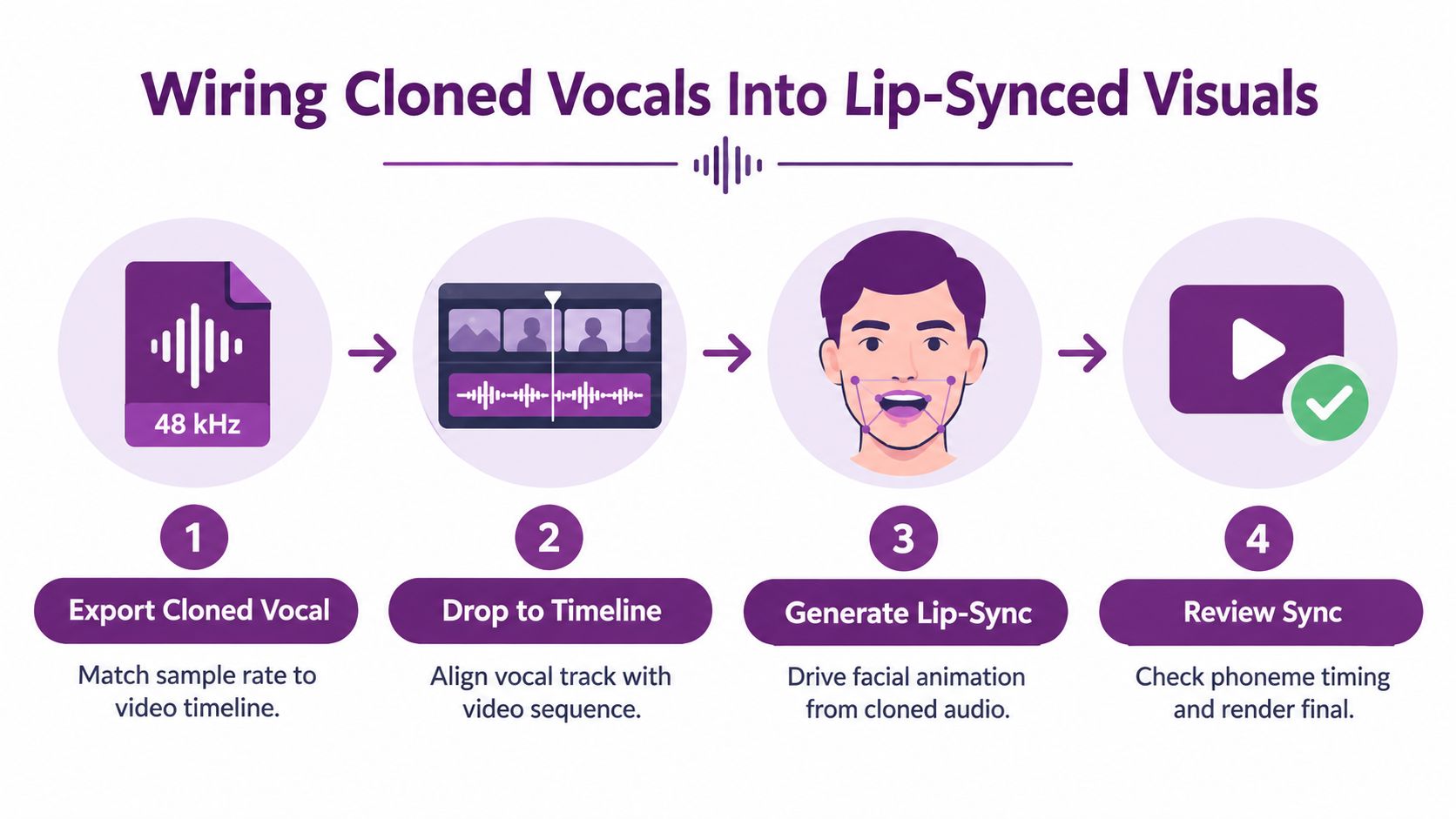
A convincing singing avatar can fail because the audio and face were treated as separate assets. Lip-sync depends on timing, phoneme boundaries, facial expression, lighting, and the small movements that make a performance feel alive.
Export the cloned vocal at the same sample rate used by the video timeline. Place it against the backing track in a DAW or editor, then verify that the first consonant, downbeat, breath, and phrase ending land where the visual performance expects them. If the audio is correct but the timeline interpretation changes sample rate or frame timing, the mouth can drift gradually across the shot.
Choose the visual model for the shot
Feed the rendered vocal waveform and target face sequence into a Wav2Lip-style system, SadTalker, or MuseTalk. Each balances realism, temporal stability, and compute differently. A short social clip may tolerate a faster pass, while a close-up music-video shot needs more manual review around teeth, lips, jaw movement, and facial identity.
Use transient markers from the vocal to anchor mouth movement to phoneme boundaries. Plosives such as “p,” “b,” and “t” need sharper closure than sustained vowels. High notes may require a wider mouth shape, raised cheeks, or more visible breath timing, but those movements should remain consistent with the performer's visual style.
After the initial render, add subtle head movement and breathing cues. A perfectly still face with animated lips creates the familiar uncanny artifact. Excessive motion creates a different problem, especially when the model invents gestures that don't match the vocal phrasing.
Frame review matters more than a clean export. Check every difficult consonant, high note, breath, and cut. A viewer may forgive a slightly imperfect timbre, but a mouth that closes late is immediately visible.
Denoise and color-grade the generated footage so skin tone, exposure, and lighting match the surrounding performance. For short-form or live-oriented workflows, Wav2Lip ONNX or sync.so can support CPU inference. For a music video, batch processing on a GPU can make sense, followed by a careful frame-by-frame pass rather than blind acceptance of the render.
The finished process should look like this in practice:
- Export the vocal: Match sample rate and timeline settings.
- Align the track: Lock the vocal to the beat and visual beats.
- Generate facial motion: Drive mouth shapes from the actual cloned performance.
- Review and refine: Correct phoneme timing, facial artifacts, lighting, and edits.
Copyright, Consent, and Disclosure in 2026
“Clone your own voice and you're fine” is too broad for a commercial release. Your own voice may reduce identity risk, but it doesn't clear the song, the source recordings, the collaborators, the vocal performance, or the contracts attached to the project.
The safest workflow starts with written permission and traceable source material. If you clone another person's recognizable voice, the license should specify permitted uses, territories, term, monetization, public performance, platform distribution, and whether synthetic outputs must be labeled. Verbal consent leaves too many questions unanswered when a distributor, collaborator, or rights holder challenges the release.
The legal risk also begins before publication. If your system extracts vocals from copyrighted recordings to create a clone, the training-input stage may create an infringement issue even if the final synthetic output doesn't contain a fixed sample as discussed in this legal analysis of voice cloning. Commercial sample packs, stems, and third-party libraries need a license that permits the intended use. Don't assume that a license to use audio in a song also permits model training.
Why copyright alone doesn't answer the question
A legal-technical analysis explains that sound-alike vocals generally don't infringe the underlying sound recording unless fixed samples were copied. Disputes may instead involve publicity rights, unfair competition, or state identity protections in the analysis of AI-generated sound-alike vocals.
Another academic review notes that people generally don't hold copyright in their voices, and that songs using AI voice clones may be treated as new works. That makes copyright an imperfect remedy for singers whose vocal identity has been imitated in the Seattle University Law Review discussion. The practical question is not only whether the waveform is a new recording. It's whether audiences could reasonably believe the recognizable performer authorized or made it.
The rules also differ by market. The EU AI Act's transparency obligations for synthetic audio begin applying in August 2026, China already requires labels on AI-generated audio, and United States regulation remains patchwork, with state laws developing while the proposed NO FAKES Act isn't law according to this 2026 legal overview.
| Jurisdiction | Disclosure Required | Voice Rights Holder |
|---|---|---|
| European Union | Synthetic audio transparency obligations begin applying in August 2026 | Consent and identity protections remain relevant to the release |
| China | AI-generated audio must carry labels | Voice owners may still object to unauthorized or misleading use |
| United States | Requirements vary by state, and the proposed NO FAKES Act isn't law | State publicity and voice-protection laws can create claims |
| Tennessee | Unauthorized recognizable voice use is specifically criminalized under the state's voice-protection law | Voice-protection rights can apply to commercial impersonation |
A 2026 legal summary describes recognizable-person voice imitation without consent as illegal in most U.S. states and specifically criminalized in Tennessee, while cloning your own voice or using a licensed model is the lower-risk commercial route in this legal overview of AI voice clones in songs.
For a wider view of how emerging AI voice-call laws affect individuals and businesses, this contextual guide for injured riders offers useful legal context outside music. Also keep your release permissions and privacy choices organized in the platform workflow, including the LunaBloom AI privacy information.
Putting the Workflow Together
The fastest reliable workflow begins before you open a trainer. Define the release first. Is this an original song or a cover? Is the cloned voice yours, licensed from a performer, or only being used for an internal draft? Will the output appear in a monetized video, a public performance, a social post, or a private review?
Those answers determine the dataset you can use, the permissions you need, and the disclosure language you'll attach to the final asset. They also tell you whether you need a melody-focused F0 pipeline or a faster voice-and-video workflow for short-form content.
Make each stage constrain the next
Run a short source-separation test before committing serious compute. If the vocal stem already contains reverb, backing vocals, or audible residue, discard or repair it before training. Then record or assemble the clean singing dataset, verify the clips, and choose the model architecture according to the musical control the release demands.
Render a short A/B comparison against the target voice. Listen for timbre drift, vowel changes, octave jumps, breath loss, and consonants that land late. Fix the source or model settings before generating the full song. This single checkpoint often saves more time than additional training.
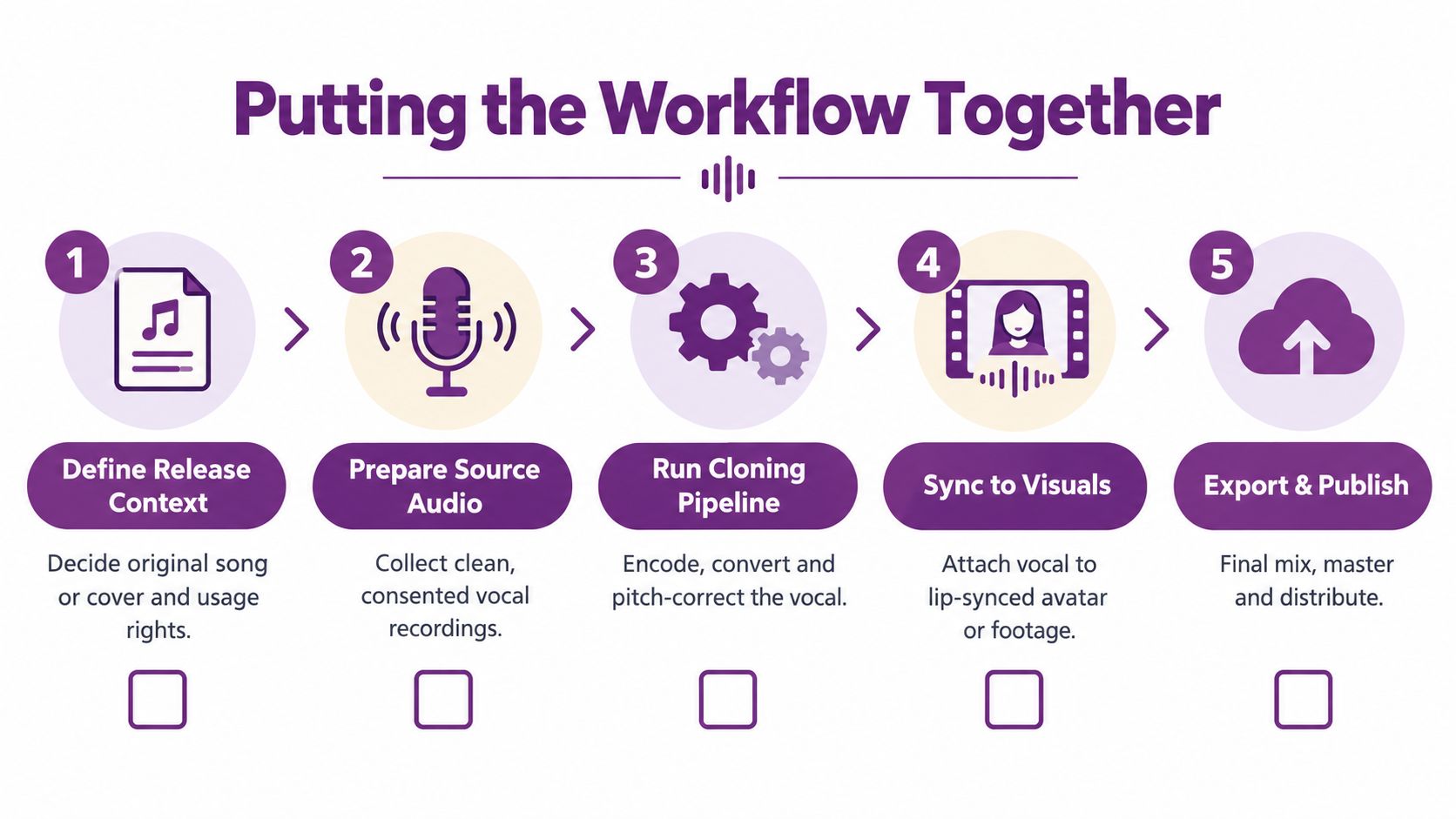
The completed chain should look like this:
- Define release context: Decide whether the song, voice, and visual identity are authorized for the intended audience and territory.
- Prepare source audio: Collect consented recordings, separate vocals where necessary, and reject contaminated files.
- Run the cloning pipeline: Encode the voice, convert against the target melody, tune pitch, and match the mix environment.
- Sync to visuals: Attach the vocal to a face or performance, lock phonemes, and review difficult frames.
- Export and publish: Finish the mix, package disclosure metadata, preserve license documents, and provide a takedown contact.
The common failure is optimizing one stage in isolation. Training for days on a dataset you would have rejected after a short separation check isn't engineering discipline. It's delayed quality control.
Keep a release folder containing source audio, cleaned stems, model version, conversion settings, consent records, licenses, disclosure copy, final exports, and the contact responsible for rights complaints. Review the platform's LunaBloom AI terms before using any hosted workflow, especially when a project involves uploaded voices, generated songs, avatars, or commercial distribution.
AI voice cloning singing becomes practical when production and compliance travel together. Start with clean, authorized material, control melody through F0 rather than hoping a speech model will infer musical intent, review lip-sync at the frame level, and disclose synthetic performance where the applicable rules or platform policies require it.
LunaBloom AI offers tools for custom voice cloning, AI-generated songs, sing-and-dance music videos, and lip-synced visuals for uploaded tracks, which can help creators connect voice and video production in one workflow. Visit LunaBloom AI to test a voice-led video workflow and move an authorized singing concept from draft to publishable content.