You're at your desk with one strong product photo, a launch deadline, and no budget or time for another shoot. The image looks polished on a product page, but it feels static beside the moving clips filling TikTok, Instagram Reels, and YouTube placements. You need a way to turn the asset you already own into something people can watch, hear, and act on.
That's the job of an image to video generator. It creates motion from a still image, then lets you build the rest of the campaign around that clip, including voiceover, avatars, captions, localization, editing, and publishing. The important shift is to treat it as one stage in a production pipeline, not as a magic button that replaces every creative decision.
Why a Still Image Is No Longer Enough
The marketer with the product photo has several possible choices. They can ask a designer to animate it manually, book a new shoot, search a stock library, or generate a short clip from the existing image. Each option affects the launch schedule, creative control, and number of variations the team can produce.
A still image remains useful because it preserves the exact product appearance, packaging, color, and composition. The problem comes after that asset reaches a video-first channel. A static image can communicate information, but motion can show scale, texture, interaction, and sequence. A slow camera push can make a package feel premium. A controlled rotation can reveal its shape. A subtle background movement can give a lifestyle image more presence without changing the central subject.
That makes an image to video generator a bridge between what the brand already has and the format the audience expects to watch. A marketer can begin with a hero image, describe the intended movement, select a vertical or horizontal layout, and review several directions before adding copy and audio.
Practical rule: Use generated motion to extend the meaning of a good image, not to distract from a weak one.
A strong source image still matters. The subject should be clear, the background should support the intended movement, and important text or logos should remain easy to recreate in post-production. If the source contains several overlapping objects, tiny typography, or unusual perspective, the generator has more opportunities to misinterpret the scene.
The category has moved beyond experimental software. The AI video generator market was estimated at $788.5 million in 2025, projected to reach about $946.4 million in 2026 and around $3.44 billion by 2033, at roughly a 20.3% CAGR, according to AI video market statistics from Adwave. That commercial growth reflects a practical need for more short-form ads, explainers, product demonstrations, and social variations.
For marketers evaluating a platform such as LunaBloom AI, the useful question isn't, “Can it animate this photo?” Ask instead, “Can it take this photo through the rest of my workflow and produce a publishable version?”
How an Image to Video Generator Actually Works
Think of the process as a recipe. You supply the ingredients, the model constructs movement, and an editor prepares the result for a specific channel.
Step one starts with the source
The main ingredient is a still image. You might add a written prompt that describes the action, such as a gentle camera push, drifting fabric, a product rotation, or a presenter speaking to the viewer. Other controls can include duration, aspect ratio, and motion strength.
The image gives the model a visual reference. The prompt gives it direction. If you ask for a dramatic camera move when the product needs to remain perfectly stable, the output may look energetic but fail the campaign brief.
Step two maps the scene
The model analyzes the image for objects, depth cues, faces, surfaces, background structure, and visual style. It tries to determine which areas should remain stable and which areas can move.
That interpretation isn't the same as understanding the image like a human art director. The system predicts plausible relationships from visual patterns. Clear inputs and restrained instructions usually make the result easier to review.
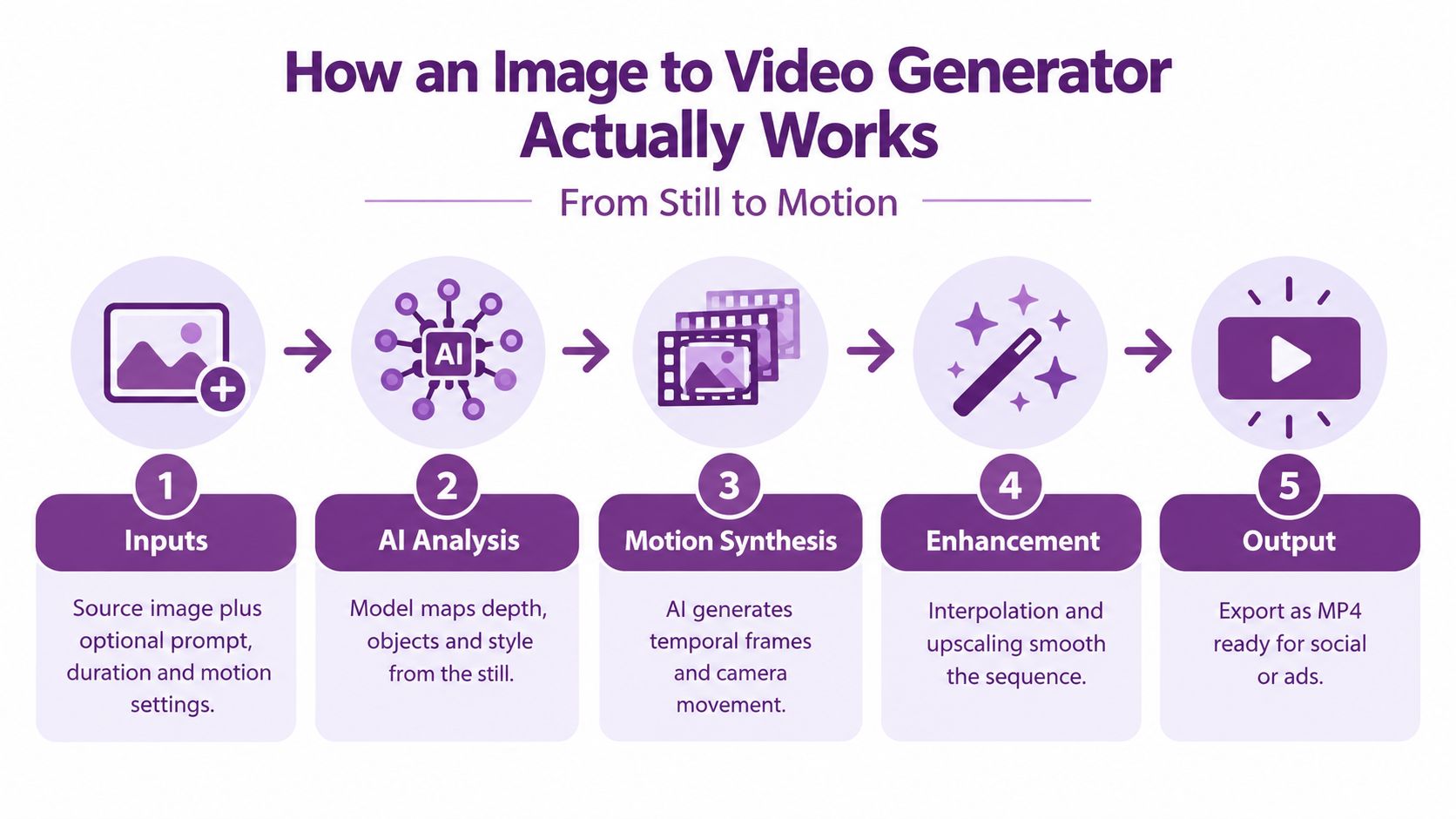
Step three synthesizes motion
The generator creates a sequence of frames between the visual states it predicts. It may simulate camera movement, subject movement, environmental motion, or a combination of these.
The central technical challenge is temporal consistency. The subject, background, and identity should remain stable while the scene changes. AIGCBench evaluates image-to-video systems across 11 metrics in four dimensions, including control-video alignment, motion effects, temporal consistency, and video quality, as described in the AIGCBench research paper. More movement isn't automatically better. A useful clip balances movement with stability.
Step four adds sound and enhancement
Audio can be created separately or layered onto the generated frames. Depending on the workflow, that may include silence, music, stock voiceover, uploaded narration, or a synthetic presenter voice.
Post-processing can include frame interpolation, upscaling, color adjustments, captions, logo overlays, and cropping. These steps matter because the generated sequence is often a visual draft rather than the finished campaign asset.
A video workflow also needs more than one quality score. UI2V-Bench tests spatial understanding, attribute binding, category understanding, and reasoning using about 500 text-image pairs, while VBench++ adds an adaptive image suite for image-to-video comparisons across settings, according to the benchmark research. That's why you should inspect whether the output follows the image and instruction, not just whether it looks attractive in a thumbnail.
Step five exports the deliverable
The final stage is practical. Export the clip in the ratio, file format, caption style, and resolution required by the destination.
You don't need to train the underlying model. Your job is to choose a suitable image, describe controlled motion, set the output requirements, and review the result frame by frame before publication.
For a visual walkthrough of the process, this image-to-video demonstration shows how the still-to-motion workflow fits into a wider creation process.
Key Capabilities That Decide What You Can Make
A generator can produce motion and still be a poor fit for a campaign. The deciding factor is usually what happens after the first clip appears. Marketers need to know whether the platform can turn that visual starting point into a coherent message for a specific audience.
Avatars solve the presenter problem
A portrait can become a talking avatar that delivers a script. This helps when the campaign needs a human guide but the team doesn't want to schedule a camera session for every variation.
Avatar quality depends on more than a realistic face. Look for controllable gestures, stable identity, natural posture, and a clear relationship between the presenter and the surrounding visual. A talking head placed over a product image may work for a quick explainer, while a product demonstration may need the avatar to occupy less screen space.
Lip-sync solves the credibility problem
Lip-sync aligns mouth movement with the narration or dialogue. Poor alignment creates an uncanny result even when the voice sounds natural, because viewers notice that the visible speech and audio disagree.
Review consonants, pauses, facial expressions, and transitions between words. A short script with clean audio is easier to validate than a long, dense paragraph with rapid delivery.
Voiceover solves the consistency problem
Voice tools can provide stock voices, cloned voices, or uploaded narration. Each option serves a different purpose:
- Stock voices are useful for fast testing and campaigns without a defined narrator.
- Cloned voices can preserve a recognizable brand or presenter identity, but require permission and careful review.
- Uploaded narration gives the creative team the greatest control over tone, pacing, pronunciation, and legal approval.
Localization solves the scale problem
Localization can combine multilingual voice generation, subtitles, translated scripts, and region-specific edits. A single product explanation may need different terminology, pronunciation, examples, or calls to action for different markets.
Don't treat translation as a final button. Check whether the localized version still matches the original timing, whether captions fit the screen, and whether the visual sequence works without relying on a phrase that doesn't transfer well.
| Capability | Problem It Solves | Typical Input |
|---|---|---|
| Avatar generation | Creates a presenter without a new shoot | Portrait, character brief, script |
| Lip-sync | Aligns visible speech with narration | Avatar video, voice track, dialogue |
| Voiceover | Adds narration and brand tone | Script, voice selection, uploaded audio |
| Localization | Adapts the message for other audiences | Original script, target language, subtitles |
| Caption generation | Makes dialogue easier to follow silently | Video, transcript, style settings |
Adoption now reflects this broader workflow. In 2026, 63% of video marketers reported using AI tools to help create or edit marketing videos, compared with 51% the year before, according to AI video adoption data from VdoBloom. The practical implication is clear. Buyers aren't only looking for animation. They need connected tools for production, editing, narration, and distribution.
Image to Video vs Text to Video vs Traditional Shoots
No production method wins every assignment. The right choice depends on the source of truth, the control required, and how often the team needs to create related clips.
Image to video is strongest when one photograph already defines the product, actor, setting, or visual style. A product photo can become a restrained showcase, while a portrait can become the starting point for an avatar-led explanation. The image anchors the output, which helps the team protect the look that has already passed brand review.
Text to video is more useful when the concept exists mainly as an idea. A marketer can describe an abstract visual, imagined environment, or piece of B-roll without first commissioning a source image. The trade-off is that the result may need more review for brand consistency and factual accuracy.
Traditional shooting remains the better choice for premium hero films, real-world physics, live events, physical demonstrations, and performances where the exact action matters. A camera captures the actual product, environment, and talent rather than predicting them.
| Criterion | Image to Video | Text to Video | Traditional Shoot |
|---|---|---|---|
| Starting material | One or more still images | A written concept or script | Location, product, crew, and talent |
| Visual consistency | Strong when the source image is clear | Depends on prompt control and model behavior | Direct creative control |
| Iteration speed | Fast for variations from one asset | Fast for concept exploration | Slower because changes may require another setup |
| Best use | Product shots, portraits, catalog assets, social clips | Abstract scenes, imagined settings, B-roll | Hero content, events, physical demonstrations |
| Main trade-off | Motion can drift from the reference | Output may not match brand details | Greater production planning and resource needs |
If your team manages property or catalog assets, a focused resource on how to create listing videos fast can help translate the same principle into real-estate workflows.
Use this decision rule:
- If the source of truth is a photograph, start with image to video.
- If the source of truth is a paragraph, start with text to video.
- If the source of truth is a live event or physical performance, shoot it.
Real Use Cases for Marketers and Creators
The same image-to-video pipeline can support very different jobs. The change isn't the core technology. It's the starting asset, the added layers, and the destination.
Paid ads begin with a hook
A single product photo can become a short vertical ad. The generator adds a controlled push-in or product movement, an avatar introduces the benefit, and captions keep the message understandable without sound. The deliverable is a compact ad variant that can move into testing without arranging another product shoot.
Product demos turn screens into guided stories
A static software screenshot can become the opening frame for a guided walkthrough. Motion can highlight a menu or move the viewer toward an important interface area, while voiceover explains what to click. Keep the actual interface text in an editor overlay whenever possible, so the final version stays legible and accurate.
Social content gives lifestyle assets more life
A lifestyle portrait or environmental product image can become a looping social clip with a subtle camera movement and music. The goal isn't to make the person perform an impossible action. A small, repeatable movement can be enough to create a more natural feed asset.
Training uses the same script in multiple regions
A headshot can serve as the visual identity for an internal explainer. Add a script, voice, subtitles, and language variants, then route each version to the relevant learning or communications channel. This approach is useful when the content changes frequently and repeated reshoots would slow approval.
E-commerce listings need product context
A catalog photo can become a showcase that suggests rotation, detail, or a change in viewing angle. The output should support the product page rather than inventing features. For more guidance on animating product imagery, see BEDHEAD's mattress animation guide.
These examples share a disciplined sequence:
- Start with the approved asset: Use a photo or screenshot that already reflects the brand.
- Choose one visual action: Push in, pan, rotate, highlight, or speak.
- Layer the message: Add narration, captions, music, or an avatar only when it serves the job.
- Export for the destination: Match the platform ratio, text placement, and publishing requirements.
- Review the complete clip: Check the generated movement, the overlay text, the audio, and the disclosure.
Teams that want to connect static assets to broader creation workflows can also review LunaBloom's platform overview before choosing how much of the pipeline to keep in one workspace.
Quality Limits and Platform Rules You Cannot Ignore
The most common mistake is treating an attractive preview as a finished ad. Image-to-video systems still struggle with temporal consistency, especially when a clip asks a face, hand, logo, product edge, or detailed background to move at the same time.
The five-to-eight-second wall remains a practical constraint in many workflows, with temporal drift becoming more visible as a sequence continues, according to the 2026 state of AI image and video generation review. Longer stories often work better as several short shots that a human editor assembles.
Inspect the frame, not only the first impression
Watch for:
- Identity drift: The face, person, or product subtly changes between frames.
- Background flicker: Edges, patterns, and shadows jump as the scene moves.
- Anatomy errors: Hands, eyes, teeth, and joints can distort during action.
- Typography failures: Generated letters and logos may warp or change.
- Unwanted physics: Reflections, liquid, fabric, and product parts may move incorrectly.
Put critical copy, logos, prices, and legal text in post-production overlays. That keeps the generated scene flexible while preserving exact brand information.
Plan the destination before generation
Vertical 9:16 video is a common requirement for TikTok, Instagram Reels, Instagram Stories, and Snapchat Spotlight, with platform specifications commonly citing 1080 x 1920 resolution, according to social media video specifications from Picto. Instagram Reels may run up to 3 minutes, while an Instagram Story card may be limited to 60 seconds, so the same concept may need different edits.
Instagram caption design also affects the workflow. Captions can be up to 2,200 characters, but only 125 characters are visible before truncation, according to Instagram video guidance from Maken Media. Put the hook, essential context, and any important disclosure near the beginning.
Treat disclosure and rights as production steps
EU rules require providers of generative AI systems to mark synthetic outputs such as video in a machine-readable format. Deployers must disclose when image, audio, or video is artificially generated or a deepfake, and watermarking may use an invisible, detectable signature linked to the AI model, as explained in guidance on EU rules for AI-generated visual content.
Before publishing, confirm:
- Source rights: You own or have permission to use the image, voice, likeness, and music.
- Output quality: The subject remains stable throughout the clip.
- Platform fit: Ratio, duration, resolution, captions, and safe areas match the destination.
- Disclosure: Required synthetic-media labels and machine-readable markers are present.
- Human review: Someone has checked factual claims, pronunciation, visuals, and accessibility.
For information about service conditions and usage responsibilities, review LunaBloom's terms before adding generated assets to a commercial workflow.
Where LunaBloom Fits in the Production Pipeline
LunaBloom fits between the approved static asset and the distribution-ready video. The platform's image-to-video workflow can turn a product shot, artwork, or photo into a motion base, while the remaining steps shape that base around the campaign.
A practical four-step handoff
- Generate motion: Start with the still image and choose a camera movement or visual action that supports the message.
- Refine the brand: Add captions, logo placement, colors, music, and other overlays in the editor rather than asking the generative model to reproduce precise typography.
- Add the presenter layer: Select a talking avatar and script when the campaign needs a human narrator. Use voice cloning or uploaded narration when voice consistency matters, then check lip-sync against the audio.
- Publish and scale: Export the clip in the required ad or social ratio, create localized versions where needed, and send the approved files to the appropriate channels.
This structure prevents a common workflow error. Teams often generate a visually attractive clip first, then discover that the voice, captions, aspect ratio, and disclosure requirements don't fit the destination. Deciding those requirements before generation makes the source image and motion prompt more useful.
LunaBloom also supports broader video creation tasks around the image-to-video stage, including natural voiceovers, captions, custom avatars, voice cloning, multilingual localization, automated subtitles, and social publishing. It can therefore serve as one workspace for teams that would otherwise move a still image through several disconnected tools.
The right place to evaluate it is the LunaBloom application, using a real asset from your campaign rather than a generic demo image. Check whether the output preserves your subject, whether the editing controls support your brand system, and whether the final export matches the channel you use.
Choosing the Right Starting Point
The useful mental model is simple: image to video is a production stage, not the whole production system. The still image establishes the visual truth. The generator adds movement. Editing, audio, localization, review, disclosure, and publishing turn that movement into a campaign asset.
Start by making three decisions:
- Choose the right image: Select a clear, approved asset with enough space for the intended movement and text overlays.
- Choose the necessary layers: Add an avatar, voiceover, captions, music, or translation only when each one solves a campaign problem.
- Choose the destination early: Set the ratio, duration, resolution, caption placement, and disclosure requirements before exporting.
Audit your existing asset library next. Mark product photos, portraits, interface screenshots, diagrams, and catalog images that already communicate something clearly. Then test a small group with restrained motion and review the outputs for consistency, rights, readability, and platform fit.
A practical image to video generator should let you control the source image, motion, audio, captions, branding, localization, export, and review process without hiding the important decisions. Use LunaBloom's starter app to evaluate that workflow with assets your team already understands.
In 2026, the technology is mature enough for everyday campaign work, provided you use it as part of a controlled pipeline. Start with a strong still, generate modest motion, add the message in post-production, and publish only after a human has checked the complete result.
LunaBloom AI turns product photos, portraits, artwork, and other static assets into editable videos with motion, voiceovers, captions, avatars, localization, and social-ready exports. Visit LunaBloom AI with one approved image from your asset library, create a short test clip, and see how the full image-to-video workflow fits your next campaign.