A marketing lead publishes a polished 90-second product demo on YouTube. Organic traffic from Mexico, Spain, and Argentina starts climbing, yet watch-through rates stay flat. The Spanish-language comments all ask the same question: are subtitles or a dubbed version available?
That moment exposes the problem with video in Spanish translation. Translating the transcript alone won't make the video discoverable, comfortable to watch, or consistent with the brand. The captions, dubbed audio, title, description, thumbnail text, chapters, and on-screen terminology all need to agree.
Spanish localization has never been a minor add-on. Spanish-language dubbing traces back to the early sound-film era, with Río Rita commonly associated with the first Spanish-dubbed film in 1929, followed by dubbing studios in Barcelona in 1932 and Madrid in 1933. Spain's 1941 dubbing decree helped turn translated audio into a mass distribution standard, a history documented in research on Spanish dubbing and localization.
The practical lesson is simple. A repeatable workflow prevents missing metadata, unreadable subtitles, mistranslated product names, mismatched scripts, and last-minute regional decisions. Whether you use a specialist team, a translation platform, or a resource such as translate Spanish with AI, treat the project as synchronized asset production, not a subtitles-versus-dubbing debate.
Why Your English Video Needs a Spanish Workflow
Spanish-speaking viewers won't experience your English video in the same way your production team does. They may find it through a translated title, encounter a Spanish thumbnail, select captions, switch to a dubbed audio track, or leave after the first sentence if none of those options exist. Each surface shapes the next action.
Spain illustrates how translated audio can influence viewing habits. Data cited from the Federation of Spanish Cinemas for 2015 recorded roughly 3,500 large-screen cinemas, but only about 200 showed international films in their original language. Of 94 million moviegoers that year, 3.8 million attended original-language screenings, accounting for €24.5 million of the €572 million box office, according to The Local's reporting on Spain's dubbing culture.
Those figures don't mean every online video needs a dub. They do show why a team shouldn't assume that English audio plus a translated description is enough for Spanish audiences. Preferences differ by country, channel, genre, and audience age, but the localization decision needs to happen before publishing.
Three costs appear when teams skip the workflow
- Discoverability loss: An untranslated title, description, thumbnail, or chapter structure gives Spanish-speaking viewers fewer relevant entry points.
- Engagement loss: Viewers who must read dense subtitles while following a fast product demonstration may stop watching even when the translation itself is accurate.
- Trust loss: A machine-generated caption that corrupts a product name, legal phrase, or technical term makes the entire brand look careless.
The most common operational failure is a late change. Legal updates a product name after the dub has been recorded. The subtitle editor changes the SRT, but nobody updates the title card or thumbnail. The video launches with three different versions of the same term.
A shared source of truth fixes that chain reaction. The localization lead locks the approved terminology, target Spanish variant, timing references, and deliverable list before production begins. Every downstream asset then inherits the same decision.
Use LunaBloom's background and product information when evaluating how an AI video workflow might fit into your broader production process. The tool matters less than the discipline behind it. If the source is unstable, automation only spreads inconsistency faster.
Preparing Your Source Before You Translate
Translation quality starts before the first Spanish sentence is written. A weak source forces every later stage to guess, repair, or compromise.
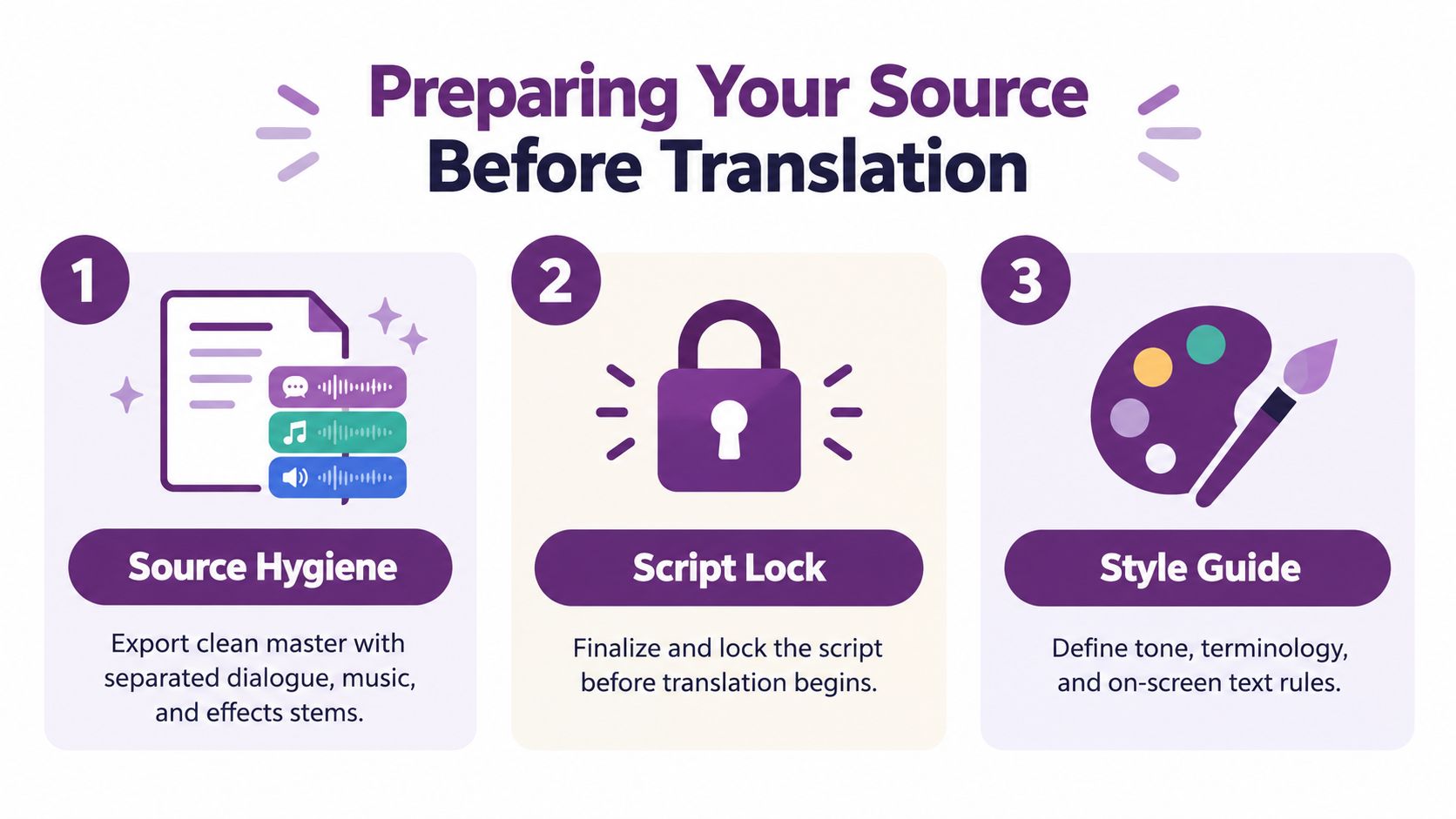
Start with source hygiene
Export a clean master with separated dialogue, music, and effects stems. A finished stereo mix may sound fine in English, but it doesn't give an engineer enough control to remove the original speech while preserving the music and sound design for a Spanish dub.
Lock the script or transcript against the final picture. Every spoken line, on-screen phrase, product name, and legal disclosure should correspond to what viewers see and hear. A clean transcript also supports accurate subtitle timing and gives speech systems a stable input when a consented voice clone is part of the approved workflow.
Before translation begins, create a terminology glossary. Include:
- Product names: Specify exact spelling, capitalization, and whether the name stays in English.
- Taglines: Mark approved translations and phrases that must remain unchanged.
- Legal language: Supply the authorized wording rather than asking translators to improvise.
- Technical terms: Define preferred translations, forbidden alternatives, and abbreviations.
- On-screen text: Connect each string to its timecode or visual location.
The glossary should be a controlled document, not an email attachment that different vendors can interpret differently. Give translators, subtitle editors, voice directors, metadata writers, and designers access to the same approved version.
Choose the market before casting
Decide whether the first output is neutral Latin American Spanish, Castilian Spanish for Spain, or a country-specific version. That choice affects vocabulary, formality, idioms, pronunciation, voice casting, and search metadata. It also determines whether one subtitle file can serve the campaign or whether the team needs multiple regional packages.
Finish with a handoff checklist:
- Clean master video.
- Locked script and transcript.
- Separated dialogue, music, and effects stems.
- Approved terminology glossary.
- Target-market decision.
- Separate SRT or VTT caption files.
- Layered audio exports.
- Title-safe text and localized thumbnail overlays.
Teams that need a practical production workspace can review LunaBloom's starter app, but no platform removes the need for source approval. Automation works best after the creative and linguistic inputs are stable.
Choosing Between Subtitles, Dubbing, or Both
There isn't one correct Spanish output. The right choice depends on how much viewers need to watch the speaker, how much information appears on screen, and whether the channel depends on quick, low-friction viewing.
| Mode | Relative Cost | Typical Turnaround | Lip-Sync Risk | Accessibility Fit |
|---|---|---|---|---|
| Subtitles | Lower | Faster | None for translated text | Supports language access, but isn't the same as captions |
| Dubbing | Higher | Longer | High if timing and mouth movement aren't controlled | Supports viewers who prefer translated audio |
| Hybrid | Moderate | Moderate | Lower than full on-camera dubbing | Useful when original audio and translated text both matter |
Subtitle-only output is usually the efficient default for tutorials, webinars, internal communications, and product demos. It preserves the original speaker's voice, avoids mouth-movement constraints, and can be revised without re-recording. The trade-off is cognitive load. Viewers must divide attention between the screen, the English audio, and the Spanish text.
Dubbing makes more sense for advertising, entertainment, narrative brand films, and short-form social content where audiences may scroll away rather than read. It costs more because the team must adapt the script for performance, select voices, record, edit, mix, and review synchronization. Dubbing is also not a literal audio replacement. A line that translates perfectly on paper may be too long for the actor's available mouth movement.
A dubbed on-camera speaker creates the largest risk. If the Spanish voice continues after the visible speaker stops, or lands on a different facial movement, the result feels artificial. For animated content or voice-led footage, that constraint may be less severe, but it still requires timing review.
Hybrid localization keeps the original audio present while adding Spanish subtitles, often with the original voice reduced beneath the translated track. It can suit documentaries and long-form educational content where the source performance carries authority but viewers need Spanish comprehension support.
The W3C distinction matters here. W3C guidance on captions defines captions as synchronized text for speech and non-speech audio, while subtitles translate spoken language for viewers who can hear the audio but don't understand it. A Spanish subtitle file doesn't automatically satisfy accessibility requirements for deaf or hard-of-hearing viewers.
A practical default is:
- Training and corporate communications: Start with subtitles, then add captions in the source language where accessibility requires them.
- Ads and entertainment: Test dubbing when performance and immersion matter more than preserving the original voice.
- Long-form educational video: Consider hybrid treatment when the original delivery should remain audible.
Building Spanish Subtitles That Read Well
A Spanish subtitle file can be accurate and still fail during playback. Start with the translated Spanish transcript, then rebuild the cues around Spanish reading time rather than copying the English caption boundaries. Spanish commonly expands by roughly 20 to 25 percent compared with English, as explained in the Spanish Latin American and Spain timed-text guide. Without that adjustment, lines may overrun, overlap, or disappear before viewers finish reading.
Translate for the screen
The translator must preserve meaning, tone, terminology, and relevant regionalisms without forcing every English word into the subtitle. Compression is part of professional subtitling. Remove repetition that the image already communicates, shorten filler, and choose a natural Spanish construction that fits the available time.
Break lines at syntactic points. Keep related words together, avoid separating a preposition from its noun, and do not reproduce English line breaks automatically. The same Netflix guide allows up to 42 characters per line and sets reading-speed limits of up to 17 characters per second for adult programs and up to 13 characters per second for children's programs.
A separate Spanish subtitling guide recommends one or two lines, a minimum on-screen duration of 1 second, a maximum of 6 seconds, and at least 3 frames, or 150 milliseconds, between subtitles. These limits prevent cues from flashing, colliding, or forcing viewers to rush.
Time the cue, then inspect it
Align subtitles with natural dialogue boundaries first. Then check reading speed, line length, shot changes, speaker changes, and on-screen text. The AVTpro Spanish style guide recommends a minimum 2-frame gap between subtitles, timing to audio within 3 frames, and limiting any out-time extension to 12 frames.
Use a three-pass review:
- Linguistic pass: A native Spanish reviewer checks grammar, tone, terminology, names, and regional fit.
- Timing pass: An editor watches against the audio and confirms entry, exit, gaps, line breaks, and shot changes.
- Playback pass: Review the exported video at normal speed, then spot-check at 1.25x playback to expose cues that technically fit but vanish too quickly.
SDH elements, including speaker labels, music notes, and non-speech sound descriptions, belong in an accessibility plan rather than every translated subtitle file. They add information beyond dialogue, but indiscriminate use crowds the screen and changes the viewing experience.
For a repeatable workflow that keeps generated subtitles subject to human linguistic and timing review, LunaBloom's platform can support the initial asset preparation. Product terminology, fast dialogue, and visual context still require editorial checks before delivery.
Dubbing and Voice Cloning for Spanish Audio
Dubbing is a layered audio build, not a replacement track. The first decision is the voice brief: neutral Latin American Spanish for broad regional reach, Castilian Spanish for Spain, or a specific regional voice for a campaign aimed at Mexico, Colombia, or Argentina.
The voice's natural pace should resemble the source speaker's rhythm. A mismatch creates more synchronization trouble than a slightly different timbre. Before casting, mark the lines that must fit visible mouth movements, gestures, title cards, demonstrations, or edits.
The dubbing script needs adaptation, not literal substitution. As research on dubbing synchronization and audiovisual translation.pdf?sequence=3) explains, dubbing must satisfy both linguistic fidelity and mouth-movement synchronization. Idioms may need a different Spanish expression, and terminology must remain consistent across spoken lines and on-screen text.
Record against the locked picture
Record the Spanish performance against the final video with timecodes. If a line drifts more than 3 frames from visible mouth movement, schedule an ADR retake or rewrite the line to fit. Don't wait until the final mix to discover that the actor has no time to deliver a sentence naturally.
Build the mix in layers:
- Spanish dub: The primary translated performance.
- Music and effects bed: The original M&E material, preserved beneath the new voice.
- Optional English guide: A low-level reference track at -20 dB when the review process needs it.
- Final M&E export: A reusable mix that allows another language to replace the Spanish track without rebuilding the sound design.
Consent matters when using a voice clone. Use a voice only with documented permission, and tell reviewers whether they're assessing a human performance, a clone, or a synthetic voice. Long sentences often expose robotic phrasing even when short lines sound convincing.
The same layered thinking applies to AI-voiced property videos, where translated narration needs to remain synchronized with visual tours, room changes, labels, and calls to action.
Here is the type of studio review that catches problems an automated transcript can't identify:
Play the complete track at conversational volume with native reviewers. Ask them to flag unnatural phrasing, incorrect emphasis, borrowed English that sounds out of place, and any moment where the voice appears to fight the edit.
A production team evaluating automated creation and localization can also inspect LunaBloom's app. The tool can support Spanish voiceover and subtitle workflows, but approval should remain with people who understand the target audience and the picture lock.
Keeping Captions, Audio, and Metadata in Sync
Most Spanish video projects don't fail because nobody translated the script. They fail because different teams translate different assets at different times.
The dub gets updated, but the SRT still contains last month's wording. A title card is replaced in Spanish, but the YouTube title remains in English. The thumbnail says one product name while the description uses another. Viewers experience those as one brand, not as separate production departments.
Create one asset manifest
Use a spreadsheet or JSON manifest as the source of truth. Each locale should list:
- Video master: Version identifier and picture-lock status.
- Captions: SRT, VTT, accessibility captions, and approval state.
- Audio: Spanish dub, M&E, guide track, and mix status.
- Discoverability: Localized title, description, tags, chapters, and end-screen text.
- Design: Thumbnail text, title cards, lower thirds, and safe-area checks.
- Delivery: Platform, upload owner, publication state, and final review.
Version the manifest beside the video master. When a legal team changes a product name, the project owner should update one approved string and trigger every dependent asset for regeneration.
A useful validation pass checks whether:
- The video version matches the subtitle and audio versions.
- All product names match the glossary.
- The title, thumbnail, description, and chapters use the same Spanish variant.
- The captions cover the complete audio track.
- The dubbed script and subtitle script reflect the same approved message.
- On-screen text doesn't contradict the metadata.
Automate repetition, retain judgment
Platforms such as LunaBloom can connect a master file and Spanish script to caption generation, voice synthesis, thumbnail text replacement, and metadata preparation for channels including YouTube, Vimeo, TikTok, and LMS players. That kind of automation is useful for propagating approved changes, but a human still needs to review idioms, timing, pronunciation, regional fit, and legal language.
File delivery can create avoidable failures too. Use a documented SendPhoto video format guide when your team needs to standardize exports before uploading localized packages. Format consistency won't solve a translation error, but it prevents technical variation from obscuring a linguistic one.
Keep privacy and access rules visible in the workflow. Teams handling scripts, recordings, customer footage, or voice data should review the relevant LunaBloom privacy information before assigning files to an automated pipeline.
The payoff is operational rather than flashy. When a phrase changes late at night, the team updates the source string, regenerates the dependent files, validates the bundle, and publishes one coherent Spanish experience instead of manually hunting through disconnected folders.
Picking the Right Spanish Variant for Your Audience
A single file labeled “Spanish” isn't a localization strategy. It hides the decision that matters most, which is whether the vocabulary, accent, register, and idioms sound appropriate to the people you're trying to reach.
Three commercial targets cover many projects:
- Neutral Latin American Spanish: A broad option for audiences across Mexico, Central America, Colombia, and nearby markets when the campaign doesn't depend on country-specific humor or terminology.
- Castilian Spanish: The appropriate starting point for Spain-focused retail, broadcast, and local campaigns.
- US Spanish: Often close to Mexican Spanish in vocabulary, but shaped by bilingual environments, local media habits, and English influence.
A practical decision rule is to choose neutral Latin American Spanish when more than 70% of expected viewers are in Latin America, the US Hispanic market, or YouTube audiences with geographically mixed viewing. Choose Castilian when the brief explicitly targets peninsular Spain. Produce multiple versions when paid campaigns run in both Spain and Mexico, or when character names, jokes, legal language, or idioms carry regional meaning.
That 70% threshold is a planning rule, not a universal audience law. Validate it against the actual country list, channel mix, creative concept, and media plan before recording.
Avoid the false comfort of one locale tag
An es-ES label doesn't force Castilian vocabulary into every asset. A neutral Mexican delivery can sound patronizing in Buenos Aires, while Catalan-influenced phrasing may feel wrong to viewers in Chile. Regional Spanish guidance also warns that accents, slang, technical language, background noise, and fast dialogue can create accuracy problems for automated translation, as discussed in this Spanish video translation guide.
Before dubbing begins, confirm:
- Which countries the campaign names explicitly.
- Where paid and organic traffic is expected.
- Whether the channel needs one shared version or several.
- Which words, names, and legal phrases vary by market.
- Whether the voice should sound pan-regional or locally grounded.
- Who owns final regional approval.
Spanish video localization has a long history of adapting distribution to audience expectations. In modern workflows, the same principle applies to every asset. Pick the variant before translation, carry it through captions, audio, metadata, and design, and don't let a generic file label make the decision for you.
LunaBloom AI supports video localization across 50+ languages, including Spanish, with multilingual voices, voice cloning, subtitle generation, localized titles, metadata, and thumbnail workflows. Visit LunaBloom AI to prepare a synchronized Spanish video package from your script or master video, then review the generated assets before publishing.