At 11 PM, a freelance video editor finishes a 60-second brand spot. The client has approved the cut, but the licensed track costs more than the edit, and every stock-music option sounds like it came from the same three libraries. The social version stays unreleased, the next project gets pushed back, and the editor loses the momentum that keeps a small creative business moving.
An AI song generator from text can close that gap. It turns a written brief into a starting point for lyrics, melody, vocals, arrangement, and a usable soundtrack. The useful mindset isn't “press a button and accept the result.” Treat text-to-song as a production pipeline, with prompt design, selection, editing, mixing, visual sync, rights checks, and disclosure all forming part of the job.
The technology has moved beyond novelty. One industry report valued the AI music generation market at about $300 million in 2023 and projected it to reach $3.1 billion by 2028, roughly a tenfold increase over five years. The report also connects the acceleration of AI investment with ChatGPT's launch in November 2022, noting about $50 billion invested in Europe alone since then. Music Business Worldwide reports those figures as part of the category's rapid commercial expansion.
This guide focuses on what helps creators ship songs for ads, social videos, training, and short-form edits, rather than what merely sounds impressive in a demo reel.
Why a Creator Without Music Has Half a Story
A video can have a sharp script, clean cuts, strong color, and convincing voiceover, then still feel unfinished because the audio has no identity. Editors often discover the problem late, after the visual work has been approved and the remaining music budget is either small or already committed.
That gap creates more than an artistic inconvenience. A delayed track can hold back a social cut, a product launch, or a client review. The editor may spend an hour searching libraries, another hour testing licenses, and then settle for a track that competes with the dialogue or makes the brand sound interchangeable.
Text-to-song tools address the blank-audio bottleneck. A brief such as “warm electronic pop about a team turning a complicated morning into a simple workflow, restrained verse, memorable chorus, clean female vocal” gives a generator enough direction to produce material that can be judged against the edit. The first result might fail. The process still moves forward because the creator now has something concrete to trim, replace, rearrange, or reject.
The production problem is speed, not composer replacement
A professional composer remains valuable when a campaign needs a distinctive theme, live performers, complex revisions, or a long-term sonic identity. An AI song generator serves a different need. It gives editors, marketers, educators, and small teams a way to turn a written concept into an audio draft without waiting for a separate production cycle.
That distinction matters for short content. A 20-second hook, a loop under a product demonstration, or a playful lyric for an internal announcement may not justify a full custom composition. It still needs to fit the message, hit the right emotional beat, and leave enough room for speech.
Practical rule: Use AI generation to remove uncertainty early, then apply human judgment where the track meets the picture, the brand, and the audience.
The category is already large enough to create operational pressure. Deezer reported receiving about 75,000 AI-generated tracks per day in 2026, representing 44% of newly uploaded content on the platform, according to reporting summarized by HackerNoon. That abundance makes selection and differentiation more important than access to raw output.
A creator who can move from script to rough song in one sitting has a practical advantage, but only if the result survives editing and release checks. The rest of this workflow is about making that happen through LunaBloom AI, alongside the other tools and production methods that fit the job.
How Text-to-Song AI Actually Works
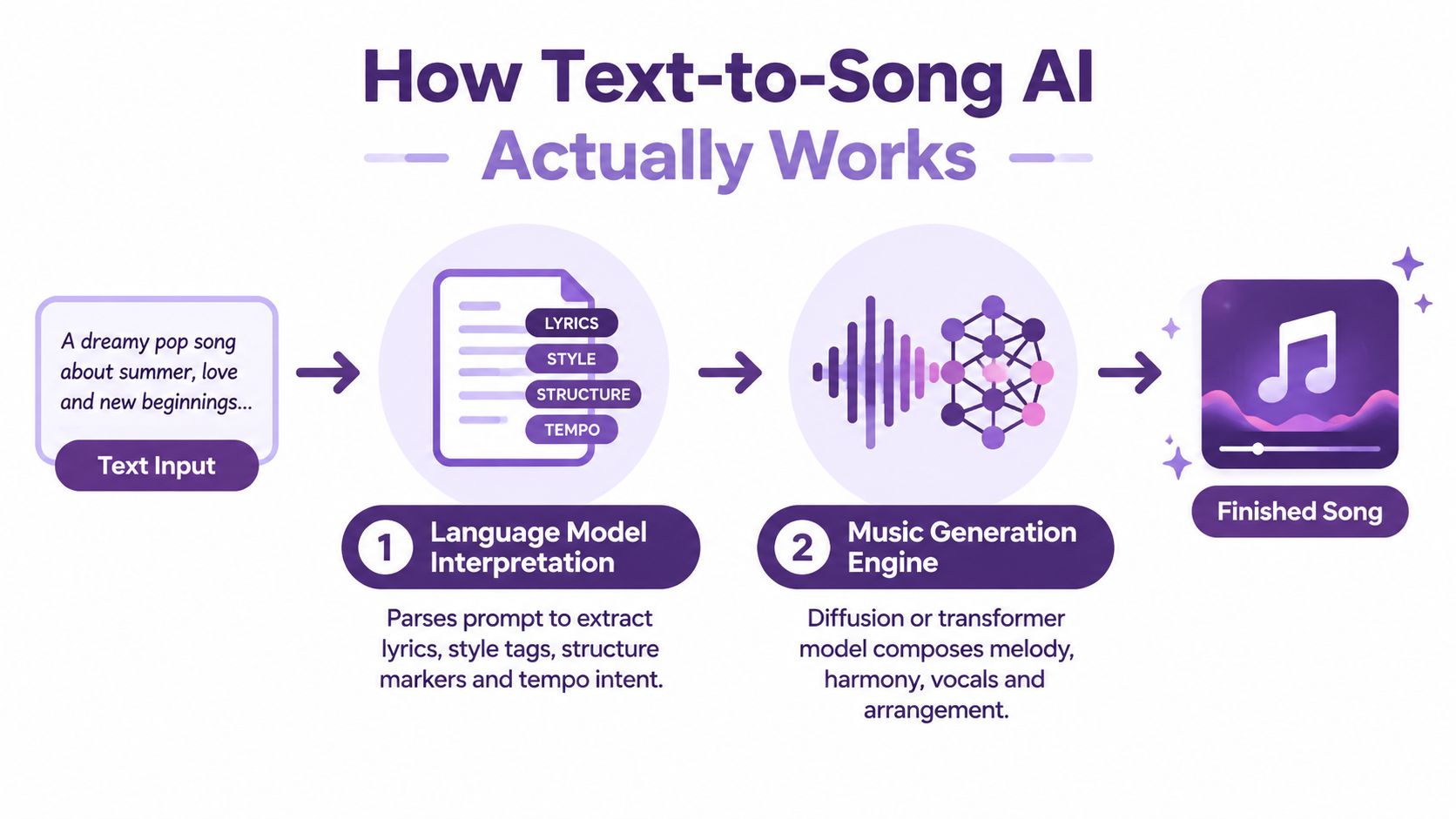
A text-to-song system usually hides a multi-stage process behind one prompt box. A survey of text-to-music systems describes a pipeline that moves from text encoding, to sequence generation, to output synthesis, often using MIDI or another symbolic representation before rendering audio. The survey provides the technical foundation for understanding why a short wording change can alter the entire result.
Step one turns language into musical instructions
The language layer interprets the prompt and identifies several kinds of information:
- Lyrics intent: The subject, message, emotional direction, and wording to sing.
- Style tags: Genre, instrumentation, vocal character, energy, and production references.
- Structure markers: Verse, pre-chorus, chorus, bridge, intro, outro, or loop behavior.
- Tempo intent: Fast, slow, relaxed, driving, or an explicit BPM request.
The model doesn't treat “lo-fi” as a strict rule that guarantees a particular drum pattern. It encodes the term as part of a learned representation, then conditions the generation system on related musical patterns. Lyrics and melody also interact. A line with too many syllables may force rushed phrasing, while short, balanced lines leave more space for a singable contour.
Research on lyrics-to-melody generation illustrates this relationship. One cited system used a conditional GAN with an LSTM backbone and more than 10,000 paired MIDI-and-lyrics examples to learn associations among lyrics, rhythm, punctuation, and emotion. The Melon project documents that approach.
Step two renders the song
The generation engine then creates musical sequences and synthesizes them as audio. Some systems work incrementally, generating lyric and melody segments before stitching them into a complete track. A neural composition model described in this research paper generates lyrics sentence by sentence, composes melody for each segment, and joins the aligned pairs.
That explains why a generator can produce a strong chorus but lose coherence in a later verse. The model may be solving local alignment well while struggling with long-range structure. Newer research is moving toward whole-song, singable sheets containing both melody and lyrics under instruction, as described in the 2025 ACL paper.
Consider the same basic idea with two style treatments:
- Lo-fi version: “Rainy city at night, intimate lo-fi vocal, dusty drums, soft Rhodes, sparse bass, slow and reflective, leave space between phrases.”
- Synthwave version: “Rainy city at night, dramatic synthwave vocal, pulsing arpeggiator, gated drums, wide analog pads, neon energy, rising chorus.”
The subject stays constant, but the rhythmic density, instrumentation, vocal delivery, and arrangement direction change. For a broader view of the company and its creative tools, see LunaBloom's about page.
Vocal systems add another layer. A singing synthesizer may generate a voice directly from lyrics and melody, while a voice-conversion or cloning pipeline maps a speaker identity onto an existing performance. That process can produce useful consistency, but it also introduces rights and artifact risks that need attention before release.
A short visual explanation can help connect the language prompt to the generated audio:
Choosing the Right AI Song Generator From Text
Tool choice should follow the bottleneck. A social editor who needs a finished vocal track quickly has a different requirement from a sound designer who needs clean stems, and both differ from a brand building a repeatable signature voice.
Three categories cover most production needs
End-to-end song platforms such as Suno and Udio accept a prompt and return a relatively complete song with vocals, arrangement, and mix. They're usually the fastest route from concept to a shareable demo or social asset. Their weakness is control. You may get a compelling chorus without the isolated vocal, drum, or bass files needed for a careful commercial edit.
Melody generators such as UVI and Soundverse are more useful when the editor wants to arrange the result around dialogue, cuts, or a product reveal. They can fit a sync workflow better because the creator controls the vocal layer, structure, and sometimes the individual parts. The trade-off is extra production work.
Vocal-first engines such as Synthesizer V and Kits.ai focus on singing or voice conversion. They make sense when the music layer already exists or when a brand wants a recognizable voice treatment across multiple tracks. They aren't complete song solutions on their own.
| Tool Category | Prompt Control | Stem Export | Vocal Cloning | Commercial License | Price Tier |
|---|---|---|---|---|---|
| End-to-end platforms | Fast, broad control over mood and style | Varies by platform | Available in some tools, with restrictions | Must be checked per plan and output | Subscription or usage-based |
| Instrumental generators | Strong control over arrangement direction | Often central to workflow | Usually secondary | Review output and plan terms | Free tiers, subscriptions, or usage-based |
| Vocal-first engines | Focused control over voice and performance | Usually depends on the separate music layer | Core feature in some tools | Requires careful voice and output review | Subscription, license, or usage-based |
The table shows why a flashy demo can mislead. An end-to-end platform may win a casual listening test, but an editor working under dialogue may prefer a less polished generator that exports separated material. A vocal engine may sound convincing but still leave you responsible for composition, instrumental production, and final mixing.
For teams comparing creative software more broadly, Exerta homepage can provide another reference point when assessing tools and workflow options. The important question remains practical: where does the current process break?
Pick the category that removes your bottleneck, not the one with the most impressive demo reel.
For a workflow that combines generated songs with video production, creators can also review the LunaBloom AI app. LunaBloom AI supports AI-generated songs, music videos, voiceovers, captions, avatars, and lip-synced visuals, so it fits teams that need the soundtrack and the finished video in the same production environment.
Use this decision rule:
- Need a complete idea today: Start with an end-to-end platform.
- Need dialogue-friendly stems: Choose a track-focused workflow.
- Need a consistent vocal identity: Test a vocal-first engine with properly authorized voice material.
- Need video and music together: Consider a platform that handles both the audio asset and the final edit.
Writing Prompts That Produce Real Songs
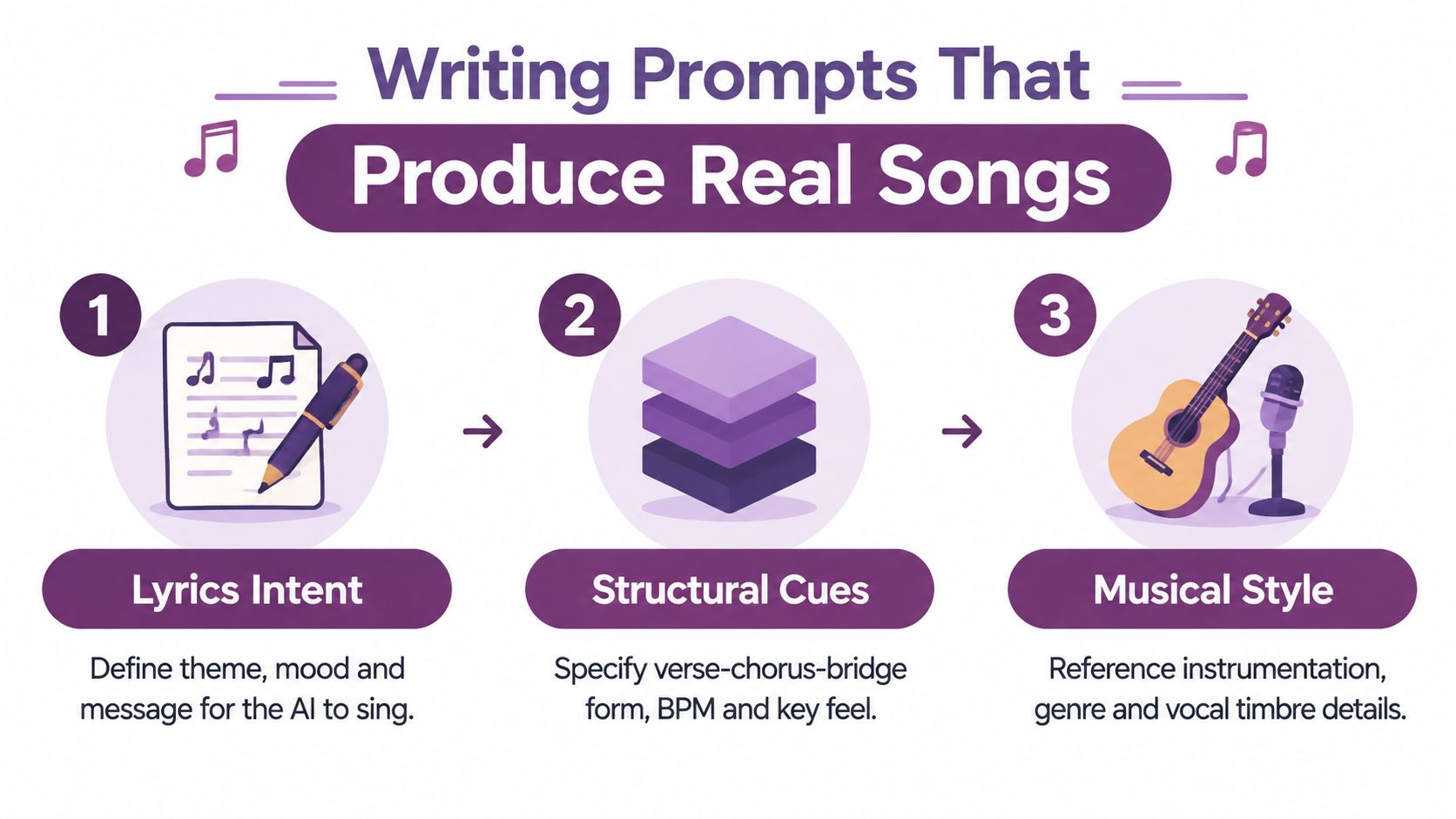
A useful prompt has three layers: lyrics intent, structural cues, and musical style. The model needs a message to sing, a map for how the song should unfold, and enough sonic direction to avoid returning a generic genre imitation.
Build the prompt in layers
Start with the message. “A song about teamwork” is too broad for a reliable result. “A confident but warm chorus about a remote team turning scattered tasks into one clear launch” gives the lyric model a subject, emotional temperature, and usable conflict.
Add structure next. Specify a verse, pre-chorus, chorus, and bridge if the platform responds to those labels. State whether the track should be a loop, a compact ad cue, or a full song. Phrase length matters because the system has to fit syllables into musical time.
Finish with style. Include tempo, key feel, instrumentation, vocal timbre, and mix direction. A request for “minor-key, mid-tempo, brushed drums, muted piano, close conversational vocal” is more actionable than “make it emotional.”
Three prompts to adapt
30-second ad jingle
Create a 30-second upbeat brand jingle for a simple project-management app. Lyrics should explain turning scattered tasks into one clear plan. Use a short verse, an instantly repeatable chorus, bright handclaps, clean electric guitar, light synth bass, and a friendly mixed-gender vocal. Keep the words easy to understand under dialogue. End with a clean musical button. No long intro, no vocal runs, no dramatic key change.
Moody lo-fi loop for a short film
Create a loop-friendly lo-fi instrumental for a rainy city scene. Use soft Rhodes chords, restrained vinyl texture, muted kick, brushed snare, warm sub-bass, and a sparse minor-key piano motif. Keep the arrangement steady enough to loop without an obvious ending. Leave space in the midrange for quiet dialogue. No sax solo, no bright lead synth, no sudden drum fill.
Pop-style brand anthem
Create a polished pop anthem about a small team solving a difficult problem together. Verse should feel intimate and restrained, pre-chorus should build tension, and chorus should open into an optimistic sing-along hook. Use a clear lead vocal, layered harmonies only in the chorus, punchy drums, clean guitar arpeggios, warm pads, and a controlled modern mix. Target a mid-tempo feel. Avoid clichés, excessive melisma, and distorted vocals.
Negative constraints help because generative systems otherwise fill unused space with familiar but unwanted choices. “No auto-tune effect,” “no sax solo,” or “no spoken intro” won't work perfectly every time, but they narrow the failure modes.
Lyrics first or full song first
Prompting for lyrics and prompting for a full song are different jobs. If the wording must include legal copy, a product phrase, a character name, or a multilingual message, draft and edit the lyrics separately before asking the song model to perform them. A two-step process also gives you better control over syllable count and repeated hooks.
A full-song prompt is faster for exploration. Use it when the brief is emotional rather than exact, when you're testing several directions, or when the visual edit can adapt to the result.
Small wording changes have outsized effects. “Relaxed” may produce a softer groove than “slow,” while “anthemic” may push the chorus toward wider harmony and louder drums. Reference artists can communicate texture, but they also create legal and stylistic risk, so descriptive traits are safer than asking for a direct imitation.
Creators who want to turn a written concept into a video can test the LunaBloom starter app after preparing the lyric and visual brief.
Refining Vocals, Mix, and Visual Sync
The generated file is a draft until it survives the edit. The most reliable results come from treating the output like a session delivered by another producer. Keep the useful parts, replace weak sections, and make the track obey the picture.
Separate the parts you need
Start by checking what the platform exports. Some services provide a full stereo file only. Others separate vocals, drums, bass, and additional instruments, while stem-separation tools can create approximations from a mixed track. Approximation matters. Separation can leave reverb tails, phase artifacts, or watery high frequencies, so listen to each stem in isolation before building a client deliverable around it.
Vocal cloning needs an even stricter check. Use a clean, authorized source take with consistent mic technique and minimal room noise. Map the approved voice onto the generated melody, then inspect consonants, sustained vowels, breaths, and word endings. A de-esser can control harsh sibilance, breath edits can reduce distracting noise, and light pitch correction can stabilize notes without flattening the performance.
The cleanest vocal clone still needs a producer. Voice identity doesn't fix bad timing, awkward lyrics, or a melody that sits outside the speaker's natural range.
Arrange for the edit, not the model
Generated songs often spend too long arriving at the point. Trim the intro if the video opens on a product or spoken line. Bring the hook forward when the visual reveal happens early. Reduce pad density under dialogue, and use sidechain compression or volume automation to create room without crushing the music.
For short-form work, create alternate versions rather than forcing one master to do everything:
- Full cue: The most complete arrangement for a longer cut.
- Hook cut: Starts near the strongest lyric or musical motif.
- Dialogue bed: Reduced density and controlled low-mid energy.
- Loop cut: Matching start and end points with no distracting transition.
- Button ending: A clean final hit for an ad or presentation close.
Beat markers help align edits to musical events. Place markers on kick patterns, snare accents, chord changes, and the first syllable of the hook. Then adjust the visual cut to the strongest accents instead of trying to retime every generated phrase.
Export with a target in mind
Loudness targets vary by platform, content type, codec behavior, and delivery specification. Don't treat one loudness setting as universal. Use a true-peak limiter, check the file after encoding, and compare it on headphones, laptop speakers, and a phone.
| Platform | Target Loudness (LUFS) | Format | Ideal Length |
|---|---|---|---|
| Streaming release | Use the service's current delivery guidance | High-resolution WAV for distribution | Full song or approved edit |
| YouTube video | Set a balanced master that preserves dialogue and avoids clipping | WAV for video mastering, AAC in the final video | Match the edit |
| TikTok short | Prioritize clear hook, dialogue space, and codec-safe peaks | WAV before video encoding | Fit the short-form cut |
The table intentionally avoids pretending that one fixed LUFS value fits every upload. Platform normalization, dialogue presence, and arrangement density change the correct choice. Export a clean master first, then create platform versions from that master rather than repeatedly converting a compressed file.
Copyright, Disclosure, and Safe Release
“No one will know” isn't a release strategy. Rights and disclosure questions matter most when a track moves from a private draft into an advertisement, a monetized channel, a client campaign, or a public streaming catalog.
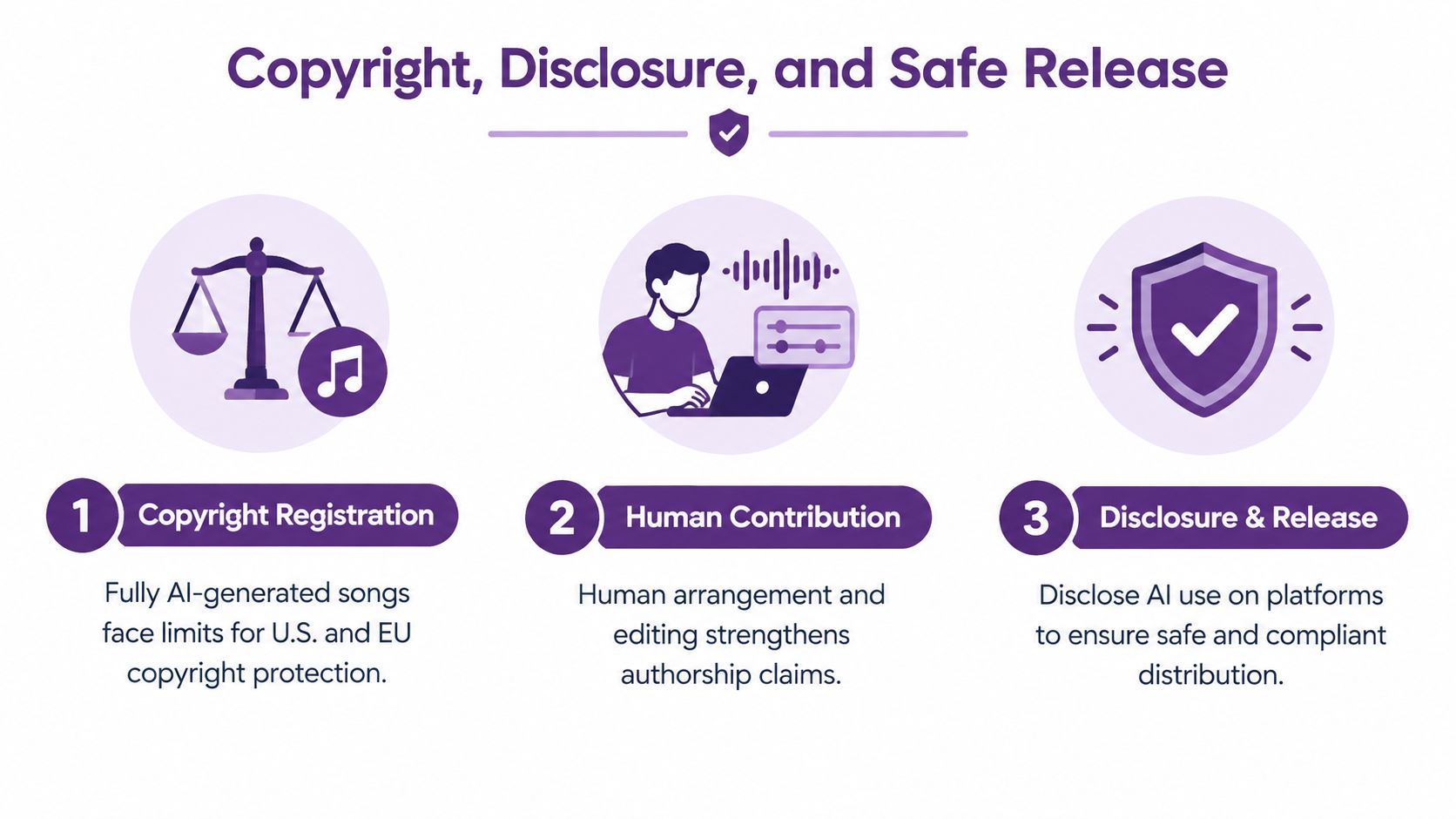
The central distinction is between fully machine-generated output and work shaped by meaningful human contribution. Legal protection can depend on how much human authorship enters the lyrics, arrangement, performance, selection, editing, and final composition. Scholarship summarized in the available research indicates that musical works with sufficient human assistance may receive protection, while fully machine-generated output may not. Rules differ by jurisdiction and continue to evolve, so check official guidance before commercial release.
Risk areas that deserve a real review
- Voice identity: Don't clone a real artist or another person without clear permission and documented rights.
- Training echoes: Listen for unusually recognizable phrases, melodies, or vocal characteristics before publishing.
- Style references: Use genre and production descriptors instead of asking for a living artist's exact style.
- License scope: A subscription may cover generation but not every commercial use, redistribution method, or client handoff.
- Platform rules: TikTok, YouTube, Spotify, and Meta may apply different disclosure, labeling, monetization, or synthetic-media requirements.
Before release, save the prompt, source lyrics, generation date, selected takes, edits, stem work, and final export. Document which parts you wrote, arranged, performed, or substantially modified. Add an AI label wherever the platform requires one, and keep the tool's license terms with the project files.
Read the applicable LunaBloom terms before using generated music in a client or commercial workflow. The same habit applies to every platform in your stack. Terms change, and a permission that covers social use may not cover registration, resale, or a broad advertising campaign.
Troubleshooting and a Ready-to-Use Workflow
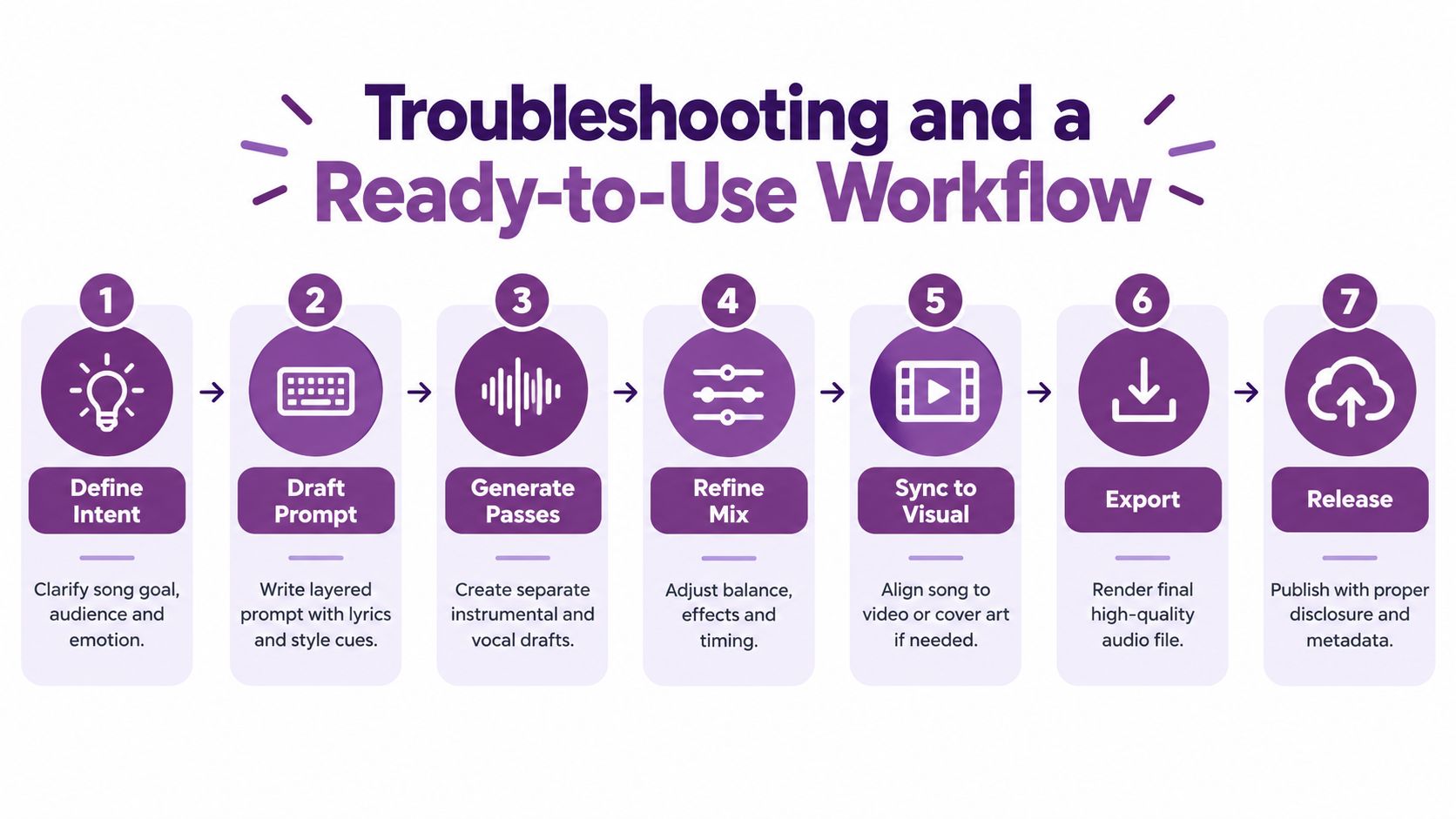
A repeatable pipeline beats endless regeneration. Start with the asset's job, then make each decision serve that job.
The seven-stage production pass
- Define intent: Write down the audience, emotional response, duration, and role of the music. If the track supports dialogue, mark the sections that must stay sparse.
- Draft the prompt: Separate lyric intent, structure, and style. Generic lyrics usually mean the brief was generic, so add a concrete image, action, or message.
- Generate passes: Make backing track and vocal candidates separately when control matters. Melody drift often improves when the chorus wording and syllable count stay consistent.
- Refine the mix: Remove muddy low mids, tame harsh vocal artifacts, and reduce effects that mask the message. If the vocal sounds artificial, test a different source take or voice treatment before adding more processing.
- Sync to visual: Place beat markers, align the hook with the reveal, and trim the intro. Timing mismatches usually need editing, not another complete generation.
- Export: Render a clean high-quality master, then create versions for dialogue, looping, and short-form delivery. Check the encoded file for clipping.
- Release: Confirm commercial rights, retain your prompt log, document human edits, and apply required disclosure. For an added verification routine, use a step-by-step audio verification process before publishing.
Common failure modes and fast fixes
- Lyrics ignore the brief: Rewrite the chorus with the product, scene, or emotional turn stated plainly.
- Melody loses shape: Shorten lines, balance syllables, and regenerate the section rather than the entire song.
- Vocals contain artifacts: Change the voice source, reduce aggressive effects, and inspect consonants at normal listening volume.
- The video feels late: Move the hook or cut the visual to beat markers.
- The master sounds muddy: Lower competing pads and bass, then check the vocal under the actual dialogue.
- The track feels generic: Replace broad mood words with specific instrumentation, imagery, and arrangement behavior.
A Monday-to-Friday shipping checklist is simple: define the brief on Monday, write and test prompts on Tuesday, select and arrange on Wednesday, mix and sync on Thursday, then verify rights and export on Friday. If you still haven't chosen a platform, return to the category comparison above and match the tool to the bottleneck.
LunaBloom AI helps creators turn lyrics, scripts, and ideas into videos with AI-generated songs, voiceovers, captions, avatars, and lip-synced visuals. Visit LunaBloom AI to test a text-to-song workflow inside a broader video production process, then export a finished asset for social, advertising, training, or client delivery.