You've rendered the clip five times, and the mouth still lands behind the voice. The problem usually isn't that the AI tool is incapable. It's that the audio has a hidden delay, the jaw is cropped, the source and export frame rates disagree, or the dubbed language asks for mouth shapes the original speaker never made.
Learning how to lip sync well means treating the process as production, not a one-click effect. Clean the inputs, understand what the model is trying to match, choose a workflow suited to the footage, then inspect the result frame by frame. That discipline matters even more with side profiles, low-resolution clips, multilingual dubbing, and music, where idealized talking-head tutorials stop being useful.
Why Lip Sync Still Goes Wrong in 2026
Lip syncing has been around far longer than current AI tools. Its roots reach into early sound-film and music production, with modern performance history often traced to the 1940s “soundies,” short music films made for jukeboxes. Television variety shows later helped normalize pre-recorded vocals for broadcast audiences in the 1960s, as documented by The Conversation's history of lip syncing.
The modern failure pattern is familiar. A creator records a clean-looking performance, replaces the audio, runs an AI lip-sync pass, and discovers that every stressed word feels late. The mouth may technically move, but the performance still looks wrong because timing, framing, and articulation interact.
Four pressure points cause most failures
- Unclean source audio: Room noise, music bleed, reverberation, and breaths can confuse alignment. The system may follow an echo instead of the intended consonant.
- A cropped jaw: If the chin or lower lip disappears, the model loses the visual evidence needed to construct mouth closures and open shapes.
- Frame-rate conflict: A clip interpreted at one rate and exported at another can accumulate apparent drift, even when the audio file itself is correctly timed.
- Language mismatch: A translated line may place vowels, plosives, and syllable stress in different positions from the original performance.
That's why a practical guide for faceless video creators can be useful for thinking about voice and picture as one assembled asset, rather than treating narration as an afterthought. The same principle applies when the face is synthetic, animated, or only partially visible.
Production rule: AI can refine alignment, but it can't recover visual information that the camera never captured.
For a broader creation workflow, LunaBloom AI is one option among AI video platforms that combine generated visuals, voice, and lip-synced elements. Whatever tool you choose, input preparation remains the part that determines whether the final render feels intentional or merely automated.
Setting Up Audio, Video, and Frame Rate for Clean Sync
The best lip-sync render often begins before the AI tool opens. Prepare the audio, inspect the face, lock the project settings, and label every version so you can identify which change improved or damaged the result.
Prepare the audio first
Start with denoising, but keep it conservative. Heavy noise removal can create watery consonants, and those consonants are exactly what alignment needs. After cleanup, normalize the mix to -14 LUFS and export a 48 kHz WAV, following the setup specified for this workflow. If breaths are distracting or inconsistent, hard-cut breath tracks before alignment so the model anchors to speech rather than incidental noise.
Listen for:
- Stressed words, which need believable mouth emphasis.
- Pauses, which should produce a natural resting position rather than a frozen frame.
- Visible consonants, especially P, B, and M.
- Music transients, which can compete with speech in vocal or performance clips.
Give the model a usable face
Keep the face large enough to read, with the face occupying at least 30 percent of the frame height. Include the complete jaw and chin, keep the eyes around the upper third, and avoid exposure changes across the shot. A centered face is easier, but consistent lighting and a visible lower face often matter more than perfect symmetry.
For video, shoot and export at a consistent 24, 25, or 30 fps. Don't casually cross-convert from 23.976 to 25 without interpolation. Delivery guidance also distinguishes 23.976 fps, true 24 fps, 25 fps, and 29.97 fps, so match the project's native rate rather than letting an editor or platform interpret it automatically, as explained in this frame-rate delivery guidance.
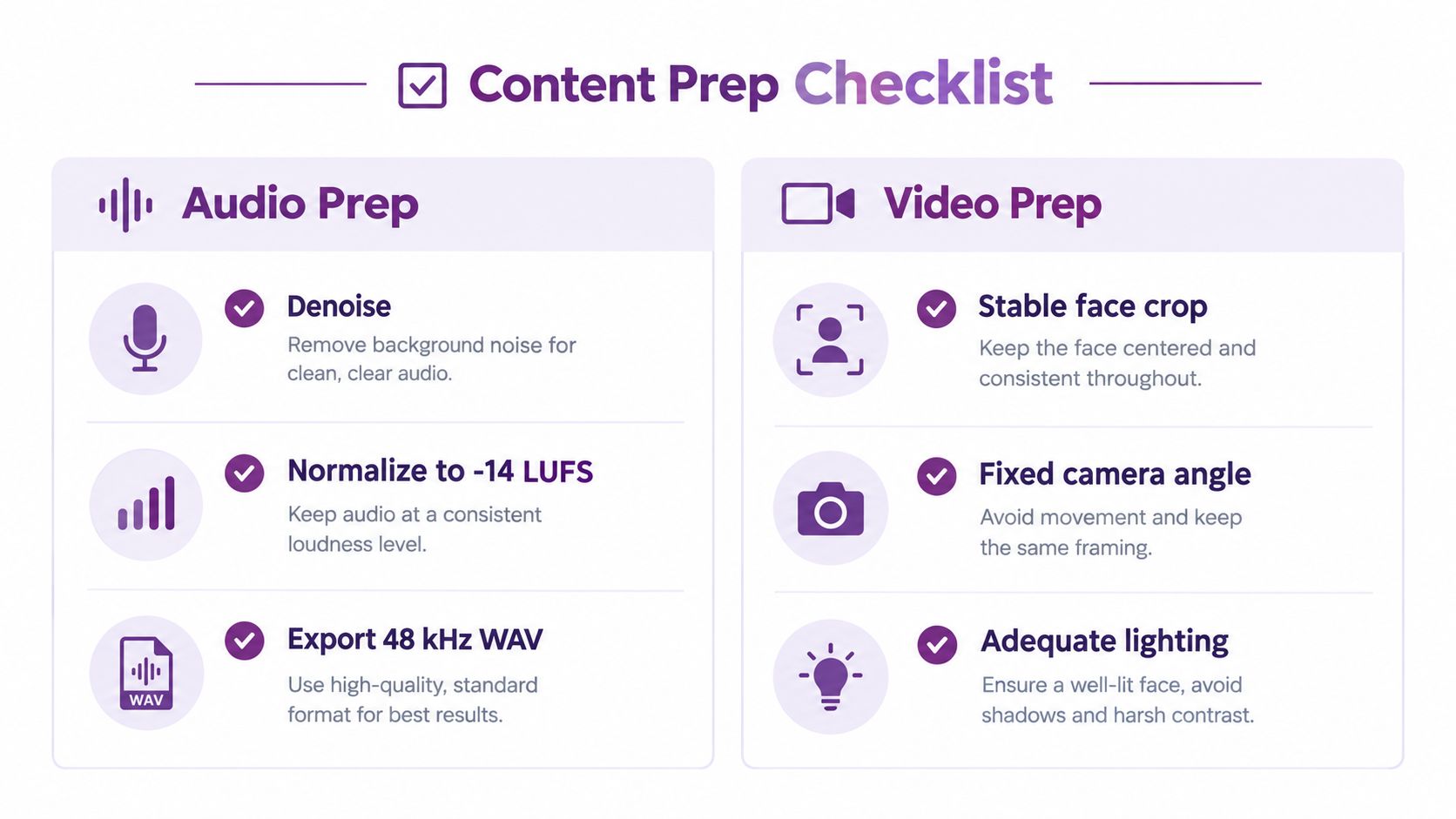
Finally, use asset hygiene. Name files with scene and take numbers, preserve the original media, and keep a project log recording the processed clip, audio version, frame rate, resolution, and model settings. That log saves time when a client asks for a revision and you need to reproduce a particular result.
For a simple starting point, you can review the available workflow at LunaBloom AI's starter app, then apply the same preparation discipline before generating anything.
Understanding Phonemes, Visemes, and Forced Alignment
A phoneme is a distinct speech sound. A viseme is a visible mouth shape that can represent one or more sounds. English contains roughly 40 phonemes that collapse into about 12 visemes, because several sounds look similar on the speaker's lips. That compression is useful, but it also creates one of the main sources of uncanny results.
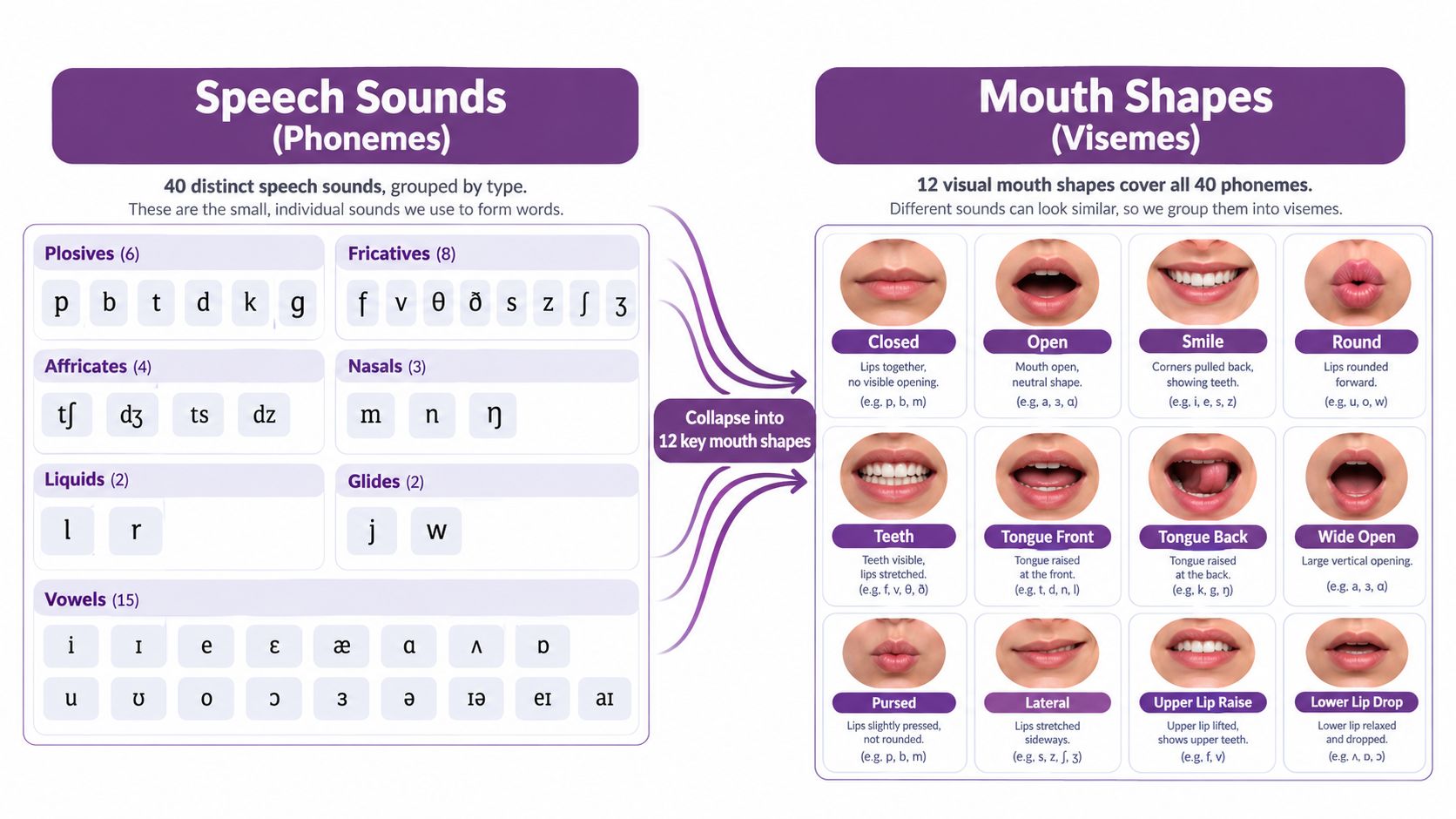
Consider M, B, and P. They're different sounds, but each commonly produces a closed-lip visual anchor. That closure should land on the plosive moment itself, not drift onto the vowel that follows. If the audio says “map” and the mouth closes after the vowel, viewers may not identify the exact technical error, but they'll sense that the performance is late.
Forced alignment creates the timing map
Forced alignment maps phonemes to precise positions in the audio waveform. The system then converts that timeline into visemes and compares the expected mouth motion with the face, frame by frame. A practical description of this pipeline is available in this explanation of phonemes, visemes, and tolerance.
The important limitation is that the timing map can be accurate while the visual vocabulary is wrong. A model may know exactly when a sound occurs, yet generate a mouth shape that doesn't fit the language, speaker, accent, or character design. Multilingual dubbing exposes this problem quickly because translated phrases change syllable timing and articulation.
Use the waveform and visible closures as your first diagnostic tools. If the M, B, or P closures land correctly but the vowels look slightly broad, the issue may be model style. If the closures consistently miss, fix alignment or the audio before changing the face model.
The End-to-End AI Lip-Sync Workflow
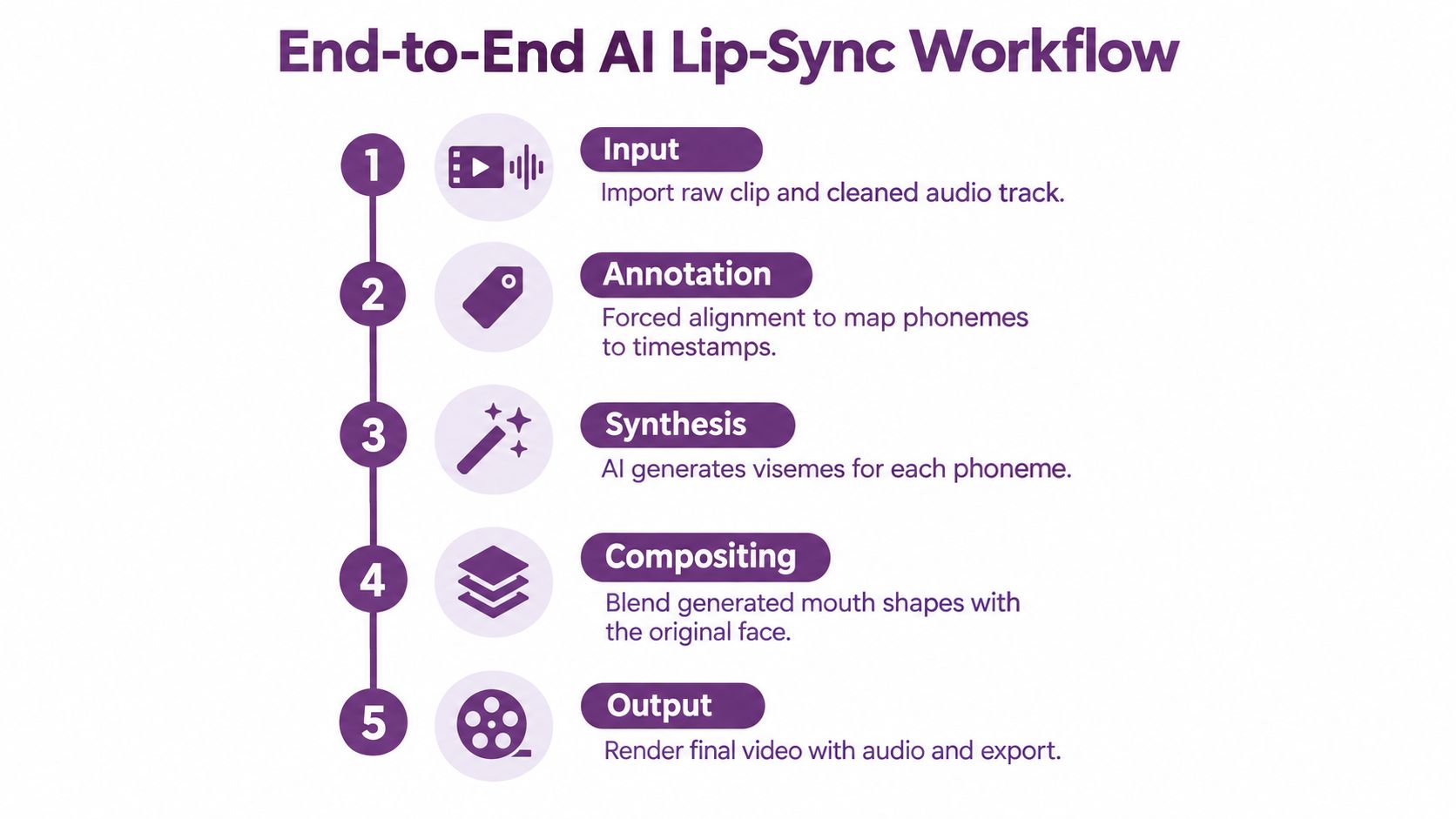
A dependable workflow has five practical stages. Each stage answers a different production question, and skipping one usually pushes the problem into the final render.
1. Prepare the input
Use the cleaned audio at the target sample rate, a reference crop that shows the full mouth area, and a defined output resolution. Don't start with a full sequence if the shot contains several camera angles. Isolate a representative segment first, including a pause, a stressed phrase, and visible consonants.
2. Match the model to the job
A talking-head dialogue clip, multilingual dub, and singing performance aren't interchangeable tasks. Dialogue models prioritize speech articulation. Dubbing workflows need language-aware timing and often voice treatment. Singing requires the system to follow sustained vowels, rapid lyrical changes, and musical phrasing rather than ordinary conversational cadence.
3. Keep parameters restrained
Expression intensity, pose preservation, and temporal smoothing control the trade-off between visible performance and stability. Increasing expression intensity can make a weak input look more animated, but excessive values often introduce jitter around the lips and jaw. Preserve pose when the original head movement matters, and use smoothing when small frame-to-frame changes are more distracting than expressive.
4. Review the composite
The generated mouth should blend with the original face, not look pasted over it. Check skin texture, teeth, lip edges, jaw movement, and transitions into silence. A short review with the audio waveform visible will reveal timing problems that are easy to miss during casual playback.
Tools such as AI lip sync for creators fit into this wider category of workflows. They can simplify generation, but the editorial decisions still belong to the producer: which take to use, how much expression to preserve, and when an imperfect generated frame should be rejected.
5. Export for review and delivery
Choose the codec and bitrate based on the next stage, not just the final platform. Keep audio separate during review if you expect multiple mix changes, then bake it back into the delivery container once the sync is approved. Preserve an unprocessed master and a clearly named final render.
You can also test a comparable process through LunaBloom AI's app, especially when the project combines generated scenes, voiceovers, and lip-synced visuals.
Handling Side Profiles, Multilingual Dubbing, and Noisy Clips
Most tutorials assume a front-facing, well-lit talking head. That's the easiest input, not the normal one. Production footage includes profile angles, fast movement, compression damage, overlapping speakers, and characters whose faces don't follow human anatomy.
Match the remedy to the failure
| Input scenario | Best-fit approach | Prep step before AI |
|---|---|---|
| Side profile with part of the mouth hidden | Pose-conditioned generation or masked re-rendering | Track the visible cheek, jawline, and mouth edge |
| Multilingual dubbing | Matched-timing audio with a language-aware or viseme-agnostic model | Re-time the translated script and inspect plosive placement |
| Noisy or reverberant recording | Denoising before forced alignment | Separate speech from music and room reflections |
| Stylized or non-human character | Landmark-free or mesh-based approach | Confirm that the tool supports the character's facial structure |
A side profile needs more than a generic face-reenactment pass. The hidden side of the mouth has no direct pixel evidence, so a pose-conditioned model or masked re-render can preserve the visible contour while synthesizing only what the angle requires. If the tool expects two clearly visible lips, lowering the intensity may produce a stable but lifeless result, while raising it can create an obviously invented jaw.
Multilingual dubbing creates a different problem. The translated audio may be grammatically correct and perfectly timed as a soundtrack, yet its mouth shapes may not correspond to the source performance. Generate or edit the replacement audio with timing in mind, then use a model that doesn't depend too heavily on the original language's viseme sequence.
Noisy audio should never go directly into alignment. Forced alignment on a signal with strong background interference can drift because the recognizer hears competing energy. Stylized characters need separate testing too. A human-face detector may fail on a painted design, mask, puppet, or 3D character, so landmark-free or mesh-based systems are safer starting points than repeatedly forcing a conventional face pipeline.
Troubleshooting Drift, Jitter, and Frozen Mouths
Post-render errors become easier to fix when you name the visual symptom precisely. Don't immediately regenerate the entire clip. First determine whether the problem is temporal, expressive, geometric, or audio-related.
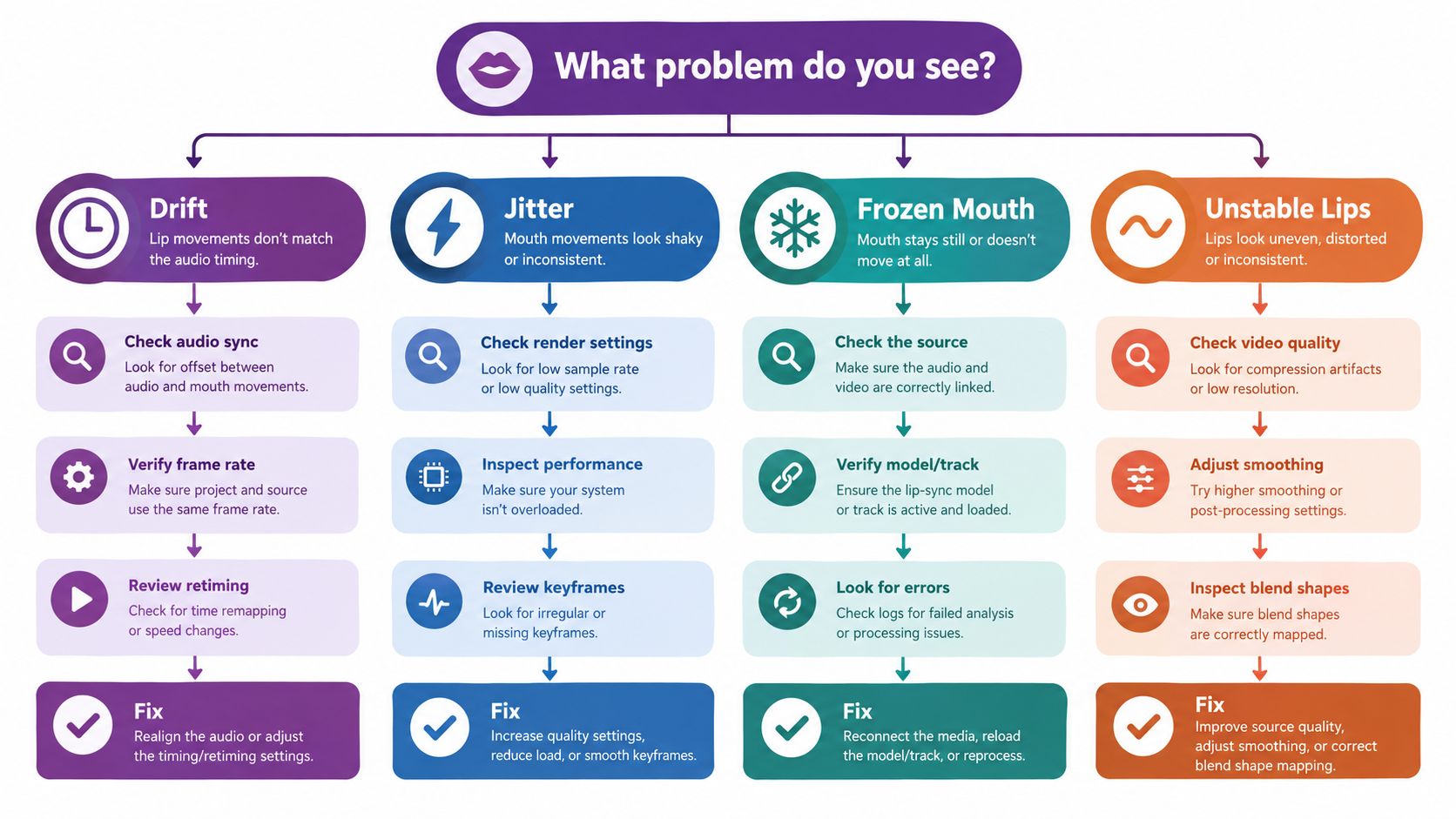
When the mouth drifts
Long clips can gradually lose alignment when temporal consistency weakens. Split the render into shorter chunks, add overlap between segments, and crossfade the transitions. The overlap gives you room to choose a stable handoff instead of joining two independently generated mouth states at an arbitrary frame.
When the lips jitter
Rapid micro-flicker usually means the expression setting is too aggressive or the motion is under-smoothed. Lower expression intensity first, then apply a Gaussian temporal filter carefully. Too much filtering can erase consonant closures, so compare the filtered result against the original waveform and preserve the moments that carry speech identity.
When the mouth freezes
A frozen mouth with moving eyes or head almost always points to an ingest mismatch. Re-pair the audio and video, then verify the relationship with a waveform overlay before running the model again. Regenerating the same incorrectly paired assets won't solve the timing error.
When the audio sounds metallic
Metallic ringing often indicates that the input sample rate doesn't match what the model expects. Resample to 16 kHz or 24 kHz, depending on the tool's requirement, and avoid repeated conversions between different rates. Keep the original WAV so you can return to a clean source if the processed audio develops artifacts.
Practical rule: Fix one variable per test render. If you change the audio, model, frame rate, and smoothing together, you won't know which decision solved the problem.
If the shot still fails after those checks, document the exact clip, settings, and visible symptom before asking for technical help through LunaBloom AI's contact page. A reproducible report is more useful than saying that the result “looks weird.”
Responsible Use, Disclosure, and What to Do Next
Convincing lip sync has an ethical boundary that technical tutorials often ignore. A lip-synced deepfake can generate mouth movements that match altered or entirely new audio, and detection research examines temporal inconsistencies between sound and picture to expose manipulation. The more accessible these tools become, the more important it is to distinguish legitimate editing from deceptive synthetic media, as discussed in research on lip-forgery detection and audio-visual manipulation.
Responsible-use FAQ
When is disclosure required?
Follow the rules of the platform, jurisdiction, client, and project. Disclose synthetic or materially altered speech and facial performance when viewers could reasonably mistake it for an authentic recording. Clear labeling is especially important for public figures, political material, medical claims, testimonials, and reconstructed events.
When is disclosure recommended even if it isn't clearly required?
Use disclosure for entertainment, parody, marketing, and dubbing when the edit changes what a person appears to say. A brief on-screen label, description note, or end card can prevent confusion without distracting from the work.
How should dubbed work credit performers?
Credit the original performer, the translator or adapter, the voice performer or licensed voice system, and the production team according to the project agreement. Don't imply that the original speaker personally delivered newly generated words unless that's true.
What crosses the line?
Using someone's likeness without consent can create publicity and privacy issues, including right-of-publicity concerns in the United States. In the European Union, biometric and personal-data obligations may apply under the GDPR. Political and medical contexts deserve particular caution because viewers may act on false statements or apparent evidence.
Consent should cover the footage, voice, likeness, translated use, distribution, and any synthetic alteration. Keep records rather than relying on an informal verbal approval. For commercial work, ask legal counsel to review releases and local requirements, especially when the subject is recognizable or the content could affect reputation.
The field's technical literature also shows why responsible testing matters. The AIGC-LipSync benchmark evaluates 615 short videos at about 30 FPS and uses Generation Success Rate as an outcome metric. One published system reports 97.40% overall success, compared with 92.20% for MuseTalk and below 75% for several other methods, according to the AIGC-LipSync benchmark. Those results are useful for comparison, but they don't guarantee success on your side profile, noisy recording, or stylized character.
Evaluation can also mislead when clips are too short. Research on Wav2Lip notes that reconstruction losses may miss local mouth-shape errors, so synchrony objectives and expert metrics such as LSE-D, LSE-C, or AVS-based scores matter. In one published evaluation, SyncNet reached 96.1% accuracy at 15-frame clips, while VocaLiST reached 99.6% on LRS2 at the same length. SyncNet reached only 75.8% at 5 frames, showing why extremely short timing windows are risky for evaluation and deployment, as reported in the Wav2Lip paper.
Before committing to a full project, run a 60-second test clip that includes speech, silence, visible P, B, and M sounds, a head turn, and the final delivery frame rate. Then follow this recap:
- Confirm consent for the voice, likeness, translation, and distribution.
- Label clearly when the performance is synthetic or materially altered.
- Export with metadata, preserving the original files, settings, and disclosure information.
For additional background on the platform and its production capabilities, visit LunaBloom AI's about page.
LunaBloom AI lets creators build videos with generated visuals, natural voiceovers, custom avatars, multilingual localization, and lip-synced visuals for uploaded tracks. Run your 60-second test clip with LunaBloom AI, inspect the mouth closures and frame timing, then decide whether the workflow fits the full project.