You've polished the script, fixed the lighting, and published a product video that works beautifully at home. Then you share it with a new market, and viewers leave. The video hasn't changed. The audience's language, habits, and access needs have.
That's the moment teams first ask what is video localization, and why a translated script didn't solve the problem.
Why Localization Is No Longer Optional for Video
Video localization is the adaptation of audiovisual content for audiences in specific languages and cultures. It combines subtitle translation, dubbing, voice-over, cultural adaptation, timing, and formatting. Translation changes words. Localization changes how those words are heard, read, timed, and understood on screen.
A locale is narrower than a language. Spanish for Mexico and Spanish for Spain can require different vocabulary, delivery, and references. English for the United States and English for India raise the same issue. If you choose only a language, you've left half the decision unfinished.
The vocabulary you'll actually use
- Subtitles: Translated dialogue shown as text while the original voices remain.
- Captions: Same language or translated text that also represents meaningful non-speech audio.
- Dubbing: A translated voice performance that replaces the original dialogue.
- Voice-over: Translated narration or speech placed over, or instead of, the original track without full lip-sync performance.
These aren't interchangeable deliverables. Each asks something different from the viewer. Subtitles ask them to read. Dubbing lets them listen. Captions support people who can't rely on audio. Voice-over often suits narration, interviews, and documentary material where exact mouth matching matters less.
Demand for that choice is concrete. A European Commission summary on language access and viewing reported that 62% of Europeans watched only films or series with audio or subtitles in their country's language or languages. The same European context shows why one format won't fit everywhere. Subtitling was the most widely used practice across 28 countries or linguistic regions, while dubbing predominated in Spain, Italy, Germany, Austria, French-speaking Belgium, and parts of Switzerland.
Practical rule: Don't ask whether your video has been translated. Ask whether this audience can comfortably follow, trust, and act on it.
That's why localization matters for tutorials, advertisements, product demonstrations, entertainment, and training. A viewer who misses a safety instruction, a joke, or your call to action hasn't received the same video, even if every translated word is technically correct.
The Core Building Blocks of Video Localization
The map below separates the parts teams often bundle under one vague request to translate the video.
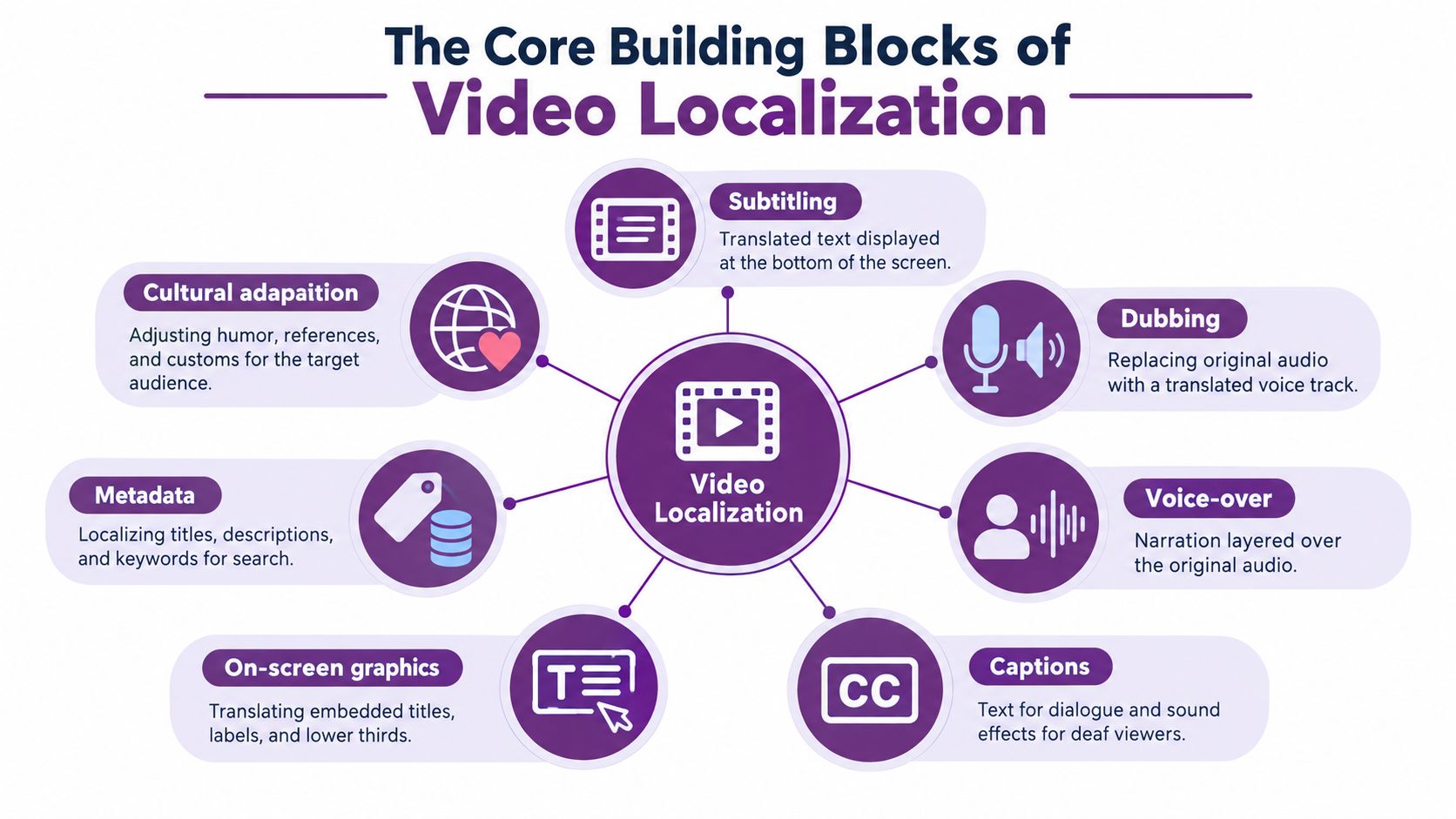
The European Union identifies subtitling, dubbing, and voice-over as the three principal language-transfer practices for audiovisual works. Start there. Then add the layers that make the result usable in a real market, including captions, graphics, metadata, and cultural adaptation.
Subtitles are not captions
Subtitles primarily translate spoken dialogue. Captions do more. The Web Content Accessibility Guidelines 2.2 definition of captions describes them as a synchronized visual or text alternative for both speech and relevant non-speech audio, including effects, music, laughter, and speaker information. For prerecorded video containing audio, WCAG Success Criterion 1.2.2 requires captions at Level A unless the video is clearly labeled as a media alternative for text.
That distinction changes production. A door slam, an alarm, applause, or an off-screen speaker may carry meaning. Translate only the presenter's words and a deaf viewer loses that context. A dialogue-only file may look complete in your editor while remaining incomplete as an accessible deliverable.
Audio, image, and discovery layers
Dubbing replaces the spoken performance. Voice-over commonly carries narration or translated speech with less emphasis on matching every visible mouth movement. Before either is recorded or generated, noisy source audio can undermine intelligibility, which is why studio-quality dialogue cleanup tips are useful when you're preparing interviews or location recordings for another language.
- On-screen graphics: Translate titles, labels, charts, lower thirds, prices, dates, and interface text inside the frame.
- Cultural adaptation: Recheck humor, idioms, examples, imagery, gestures, and claims that may not transfer cleanly.
- Metadata: Localize the title, description, thumbnail text, and keywords so viewers can find the version made for them.
- Audio description: Narrate meaningful visual information for blind or low-vision viewers without competing with dialogue.
A complete inventory prevents a common embarrassment. The narration is Spanish, the burned-in chart is still English, and the thumbnail makes a promise the localized title doesn't match. Viewers experience those pieces as one product, so your workflow should treat them that way too.
How a Localization Pipeline Actually Works
A typical job begins before anyone translates a sentence. The producer confirms the locale, audience, format, and access requirements, then prepares a clean source package with the final edit, transcript, speaker names, brand terms, graphics, and music or sound cues. Starting from an unfinished edit almost guarantees rework.
The sequence below shows how those decisions move from source preparation to export.
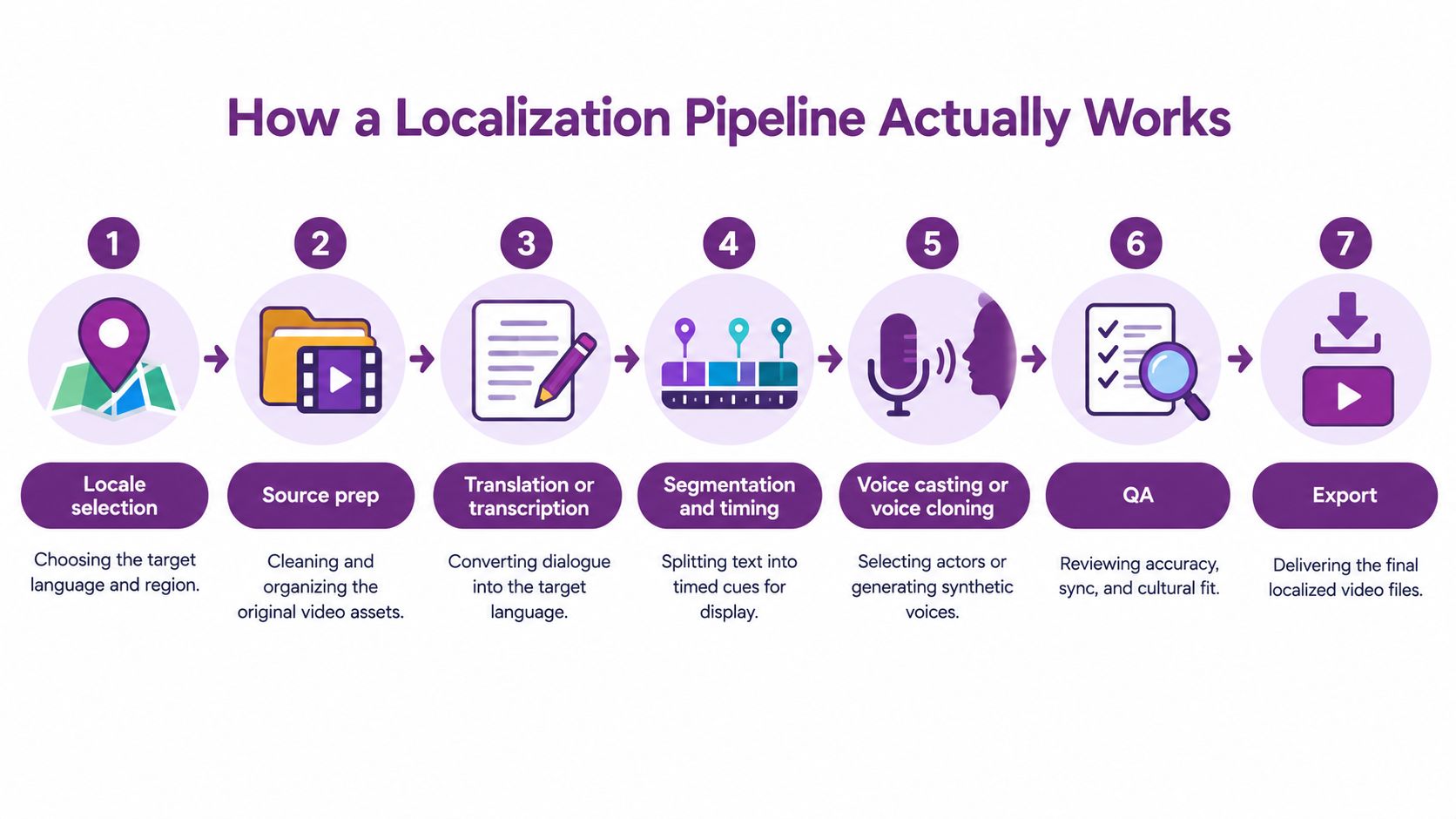
Next, translators adapt the script or transcript for meaning, tone, terminology, and timing. Subtitle editors then segment the text at natural linguistic boundaries and set cue-in and cue-out points against the speech. Dubbing teams cast a voice or prepare a cloned voice, record or generate the lines, and fit pauses and speech rate to the picture.
Why literal translation breaks on screen
Subtitles have physical limits. Research on subtitle reading speed and screen constraints reports typical ranges of approximately 12 to 21 characters per second, with subtitles generally limited to two lines and about 20% of the screen area, plus a minimum display time of roughly one second. A faithful sentence that needs four seconds to read can't sit inside a two-second shot without condensation.
Dubbing has a mirror problem called isochrony, fitting the translated utterance into the source timing. Large-scale dubbing research summarized in the same body of verified material indicates that this constraint can reduce translation adequacy or fluency compared with off-screen dubbing. In close-ups, visible mouth movements, especially sounds made with both lips, add another limit.
You can see the timing and review stages illustrated in the walkthrough below.
Quality assurance should separate language quality from synchronization quality. Check characters per second, line breaks, shot changes, gaps between cues, names, idioms, lip alignment, voice quality, and timing drift. Then export each locale with its intended caption, audio, graphic, and metadata package. A team trying this workflow can begin with LunaBloom's starter app for a first localized project, provided a human still reviews high-value claims and cultural references.
Dub, Subtitle, or Keep the Original
Dub every market sounds decisive. It's also often wrong.
Some audiences value the original performance, some need spoken access because reading is impractical, and some watch in places where sound is off. Genre matters too. A presenter's personality may be the product in influencer content, while a safety tutorial needs maximum comprehension with as little friction as possible.
Preference is not a universal law
Research on viewers aged 16 to 34 in Denmark, Germany, the Netherlands, and Italy found that most preferred British content in English, with subtitles or without. The study of young European viewers and language settings found dubbing among the top two settings for only 18% of German respondents and 33% of Italian respondents. That challenges any rule that native-language dubbing always wins.
Other content points the opposite way. A 2021 industry analysis of Netflix localization volume estimated Netflix subtitled about 7 million runtime minutes and dubbed about 5 million runtime minutes during that year. Netflix has reported that more than 40% of viewing for its branded Korean unscripted series is dubbed, with especially strong dubbing preferences in Brazil, Mexico, Latin America, and the Europe, Middle East and Africa region.
Both findings can be true. Age, English exposure, country habits, viewing context, and content type change the answer.
| Market Signal | Best Fit | Why |
|---|---|---|
| Younger viewers comfortable with the source language | Original audio with subtitles | Preserves performance and brand voice while aiding comprehension |
| Strong local dubbing tradition or children's content | Localized dub | Removes the reading burden and matches established expectations |
| Muted feeds, public spaces, or sound-off viewing | Subtitles or captions | Carries the message without requiring audio |
| Instruction where misunderstanding creates risk | Dub plus captions | Gives viewers two routes to the same information |
| Presenter trust and personality drive the content | Original or voice-cloned dub | Keeps identity recognizable across markets |
Don't settle the question by opinion or views alone. Compare completion rate, comprehension, conversion, watch time, subtitle engagement, and correction or complaint rates. Sometimes the best localization keeps the source voice and changes the captions, examples, pacing, metadata, and accessibility package around it.
Accessibility and Localization in the Same Workflow
More languages doesn't automatically mean more access. A campaign can exist in ten languages and still exclude deaf, hard-of-hearing, blind, or low-vision viewers in every one of them.
The unified model below places language transfer and disability access on the same production timeline.
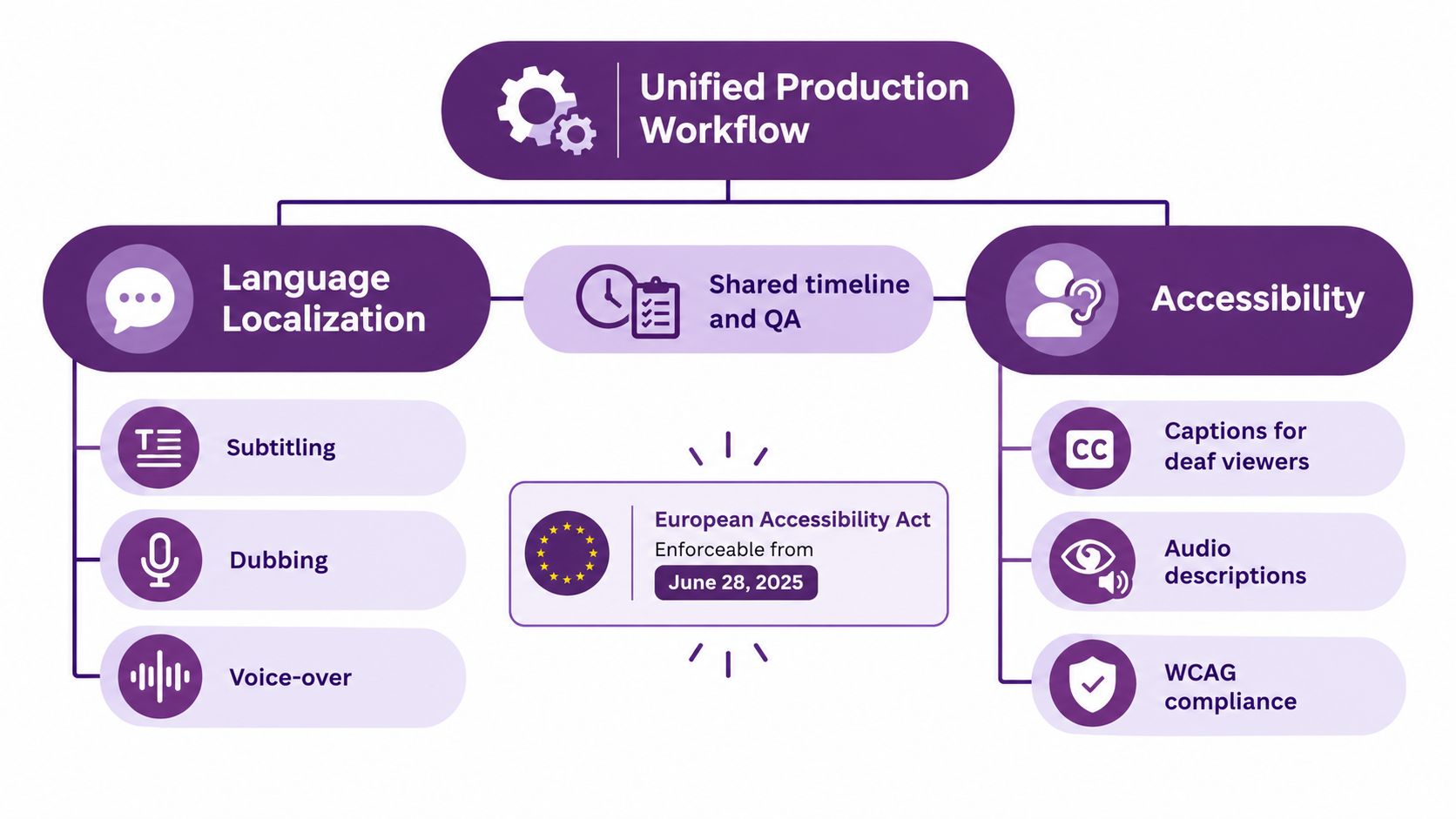
The European Accessibility Act became enforceable on June 28, 2025, and it requires covered digital services to support accessibility features such as captions and audio description. Legacy content may receive extended compliance treatment through 2030. Legal teams should confirm how those duties apply to a specific service, but production teams shouldn't wait for a legal memo to build accessible files.
Build a market-by-market accessibility matrix
For each locale, record the language variant, subtitle type, caption requirements, audio description, possible sign-language needs, reading-speed limits, player compatibility, and transcript quality. That matrix exposes gaps early. It also prevents vendors from delivering files that technically exist but don't work in the chosen player.
- Captions: Include speakers and meaningful sound, then check synchronization against the final audio.
- Audio description: Describe visual actions, settings, and on-screen information during suitable pauses.
- Transcripts: Make names, terminology, and speaker turns consistent with captions and dubbed scripts.
- Player checks: Confirm viewers can select tracks, resize text where supported, and use the controls accessibly.
United States Section 508 guidance on synchronized media says captions should include sounds needed to understand or enjoy the experience and should appear approximately when the corresponding audio occurs. Automatic captions therefore need human review for timing, spelling, speaker changes, sound descriptions, and language accuracy before publication.
A translated subtitle track is not automatically a caption track, and an AI voice-over is not automatically audio description.
Put both through the same source inventory and QA timeline. The team then localizes meaning once, in a controlled way, instead of creating separate language and accessibility versions that slowly contradict each other.
How LunaBloom Handles Localization at Scale
Scaling localization isn't mainly a typing problem. It's a variant-management problem. Each market may need a different voice, text track, graphic package, thumbnail, title, and access deliverable, all tied to the same approved source.
The workspace below shows the production environment used to manage those variants.
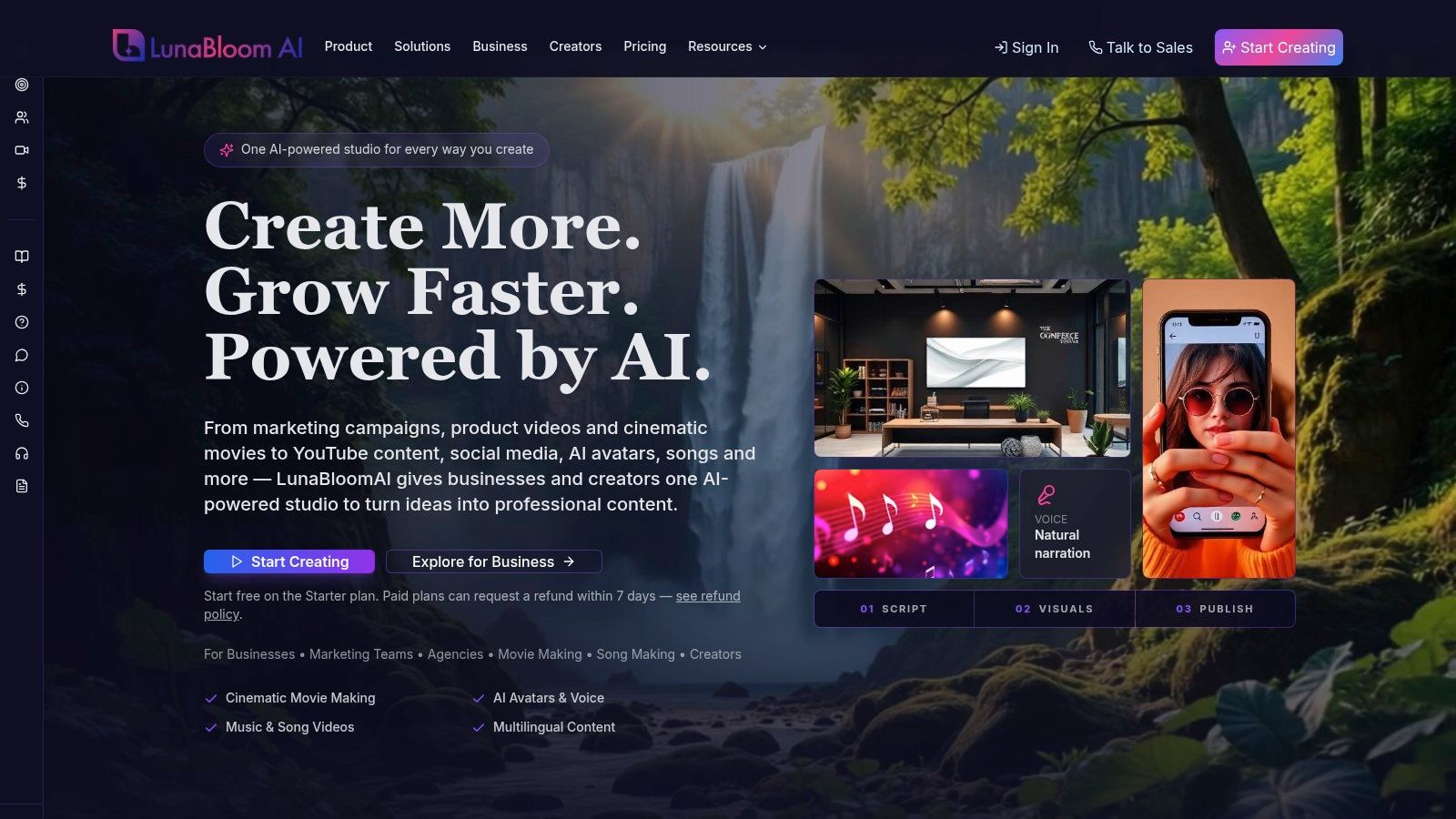
LunaBloom supports content generation across 50+ languages and regional accents. In practical terms, a creator can start from a script, prompt, or image, produce the source video, then create versions with translated subtitles, localized voices, or the original voice paired with market-specific text. Voice cloning and avatar lip-sync support dubbed variants where preserving the presenter's identity matters.
Match the feature to the production need
Regional variants come first. Netflix's published guidance on English language variants distinguishes codes such as en-US, en-GB, en-AU, and en-IN and requires spelling, punctuation, vocabulary, grammar, and speech style appropriate to the selected variant. One generic English export therefore isn't a serious localization plan. In LunaBloom, regional accents and separate language versions let teams apply that same locale logic rather than treating English or Spanish as a single setting.
Voice and performance come next. A cloned presenter voice can keep a founder, educator, or spokesperson recognizable in a dub. An avatar can deliver repeated training or product material consistently across locales. Review remains essential because close-ups expose phoneme timing, unnatural pauses, and prosody problems faster than wide shots do.
- Automated subtitles and captions: Create timed text tracks, then edit names, sound cues, line breaks, and reading speed.
- Localized metadata: Adapt titles, descriptions, thumbnails, and search terms for each market instead of reusing the source packaging.
- Version control and analytics: Keep variants organized and compare audience response instead of scattering exports across folders.
- Collaboration and API integrations: Route scripts, reviews, and repeat production through team workflows.
The LunaBloom app for building localized variants is most useful when you treat it as a pipeline, not a magic translate button. Generate the subtitle, dub, and original-with-captions options where the market justifies them. Review terminology and claims, compare audience results, and keep the format your viewers finish and understand.
That discipline matters because automation moves errors faster too. A mistranslated product term can appear in the voice, subtitles, transcript, and thumbnail within minutes. Shared source control plus human review is what turns scale into an advantage rather than a multiplier for mistakes.
Common Use Cases and Which Format to Pick
Different jobs reward different formats. Start with the viewer's situation, not your preferred production method.
Fast routing by use case
- Social ads: Lead with readable subtitles or captions because feeds often autoplay without sound. Localize thumbnail and opening-line text so the hook survives the first glance.
- Product demos and tutorials: Use a localized dub or clear voice-over when viewers must watch hands, interfaces, or steps instead of reading continuously. Add captions for sound-off viewing and terminology reinforcement.
- Training and onboarding: Provide accessibility-grade captions, consistent translated terminology, and transcripts. Dubbing can help comprehension, but controlled language and review matter more than performance flair.
- Education: Keep the teacher's original voice with localized subtitles when authenticity and language exposure matter. Choose dubbing when younger learners or complex material make reading a barrier.
- Influencer and founder-led content: Preserve the original or use voice cloning carefully. Personality is part of the value, so robotic delivery can damage trust.
For a broader view of the production options behind these choices, LunaBloom's main platform overview connects video creation with localization, captions, avatars, and publishing. Pick one high-value video, produce two sensible variants, and learn from completion and response before localizing the whole library.
Your Localization Decision Checklist
Run this check before export.
- Locale confirmed: Language, regional variant, accent, measurements, dates, and terminology match the intended market.
- Text fits the screen: Subtitles respect reading speed, line length, cue timing, and semantic breaks.
- Captions carry meaning: Speakers, music, effects, and other relevant sounds are present and synchronized.
- Audio fits the picture: Dubbing passes isochrony, pause, lip-sync, and voice-quality review.
- Access is complete: Audio description, transcript, player controls, and any sign-language need have been considered.
- Discovery is localized: Title, description, thumbnail, and on-screen graphics match the version.
- Learning is wired in: Completion rate and subtitle engagement will show whether the chosen format works.
Choose deliberately, review like a viewer, and let audience evidence refine the next market.
Turn one approved video into market-ready variants with localized voices, subtitles, captions, avatars, and metadata by visiting LunaBloom AI. Start with your highest-value tutorial, demo, ad, or training video, test the format your audience prefers, and build from evidence.