You set up a clean product shot, lock a label to the bottle, and for the first second it sits perfectly. Then the camera slides past a plain wall, your presenter crosses the frame, and the label starts swimming. That's not a rendering problem. It's a tracking camera movement problem, and it started before you opened any software. A usable solve is built on set, stress tested in post, and proven only when something virtual stays glued to the plate.
Understanding the Complete Camera Tracking Workflow
A tracking shot is defined by physical camera displacement, not by turning the lens. A pan or tilt rotates the camera in place, while tracking carries it through space, changing the relationship between subject and background as film reference material distinguishes rotation from displacement. That distinction sounds academic until your virtual object needs correct parallax. Rotation alone won't give it to you.
The craft is old, which explains why its vocabulary still shapes AI prompts. Tracking shots emerged in the late 1890s as "phantom rides" from moving vehicles, narrative films used parallel tracking by 1903, and Cabiria in 1914 helped popularize nonparallel moves as the camera movement history in Encyclopedia.com records. Filmmakers then strapped cameras to operators' bodies for The Last Laugh in 1924 and swung one on a pendulum for Napoléon in 1927. Movement became language early. We are still programming that language, just with data instead of rails.
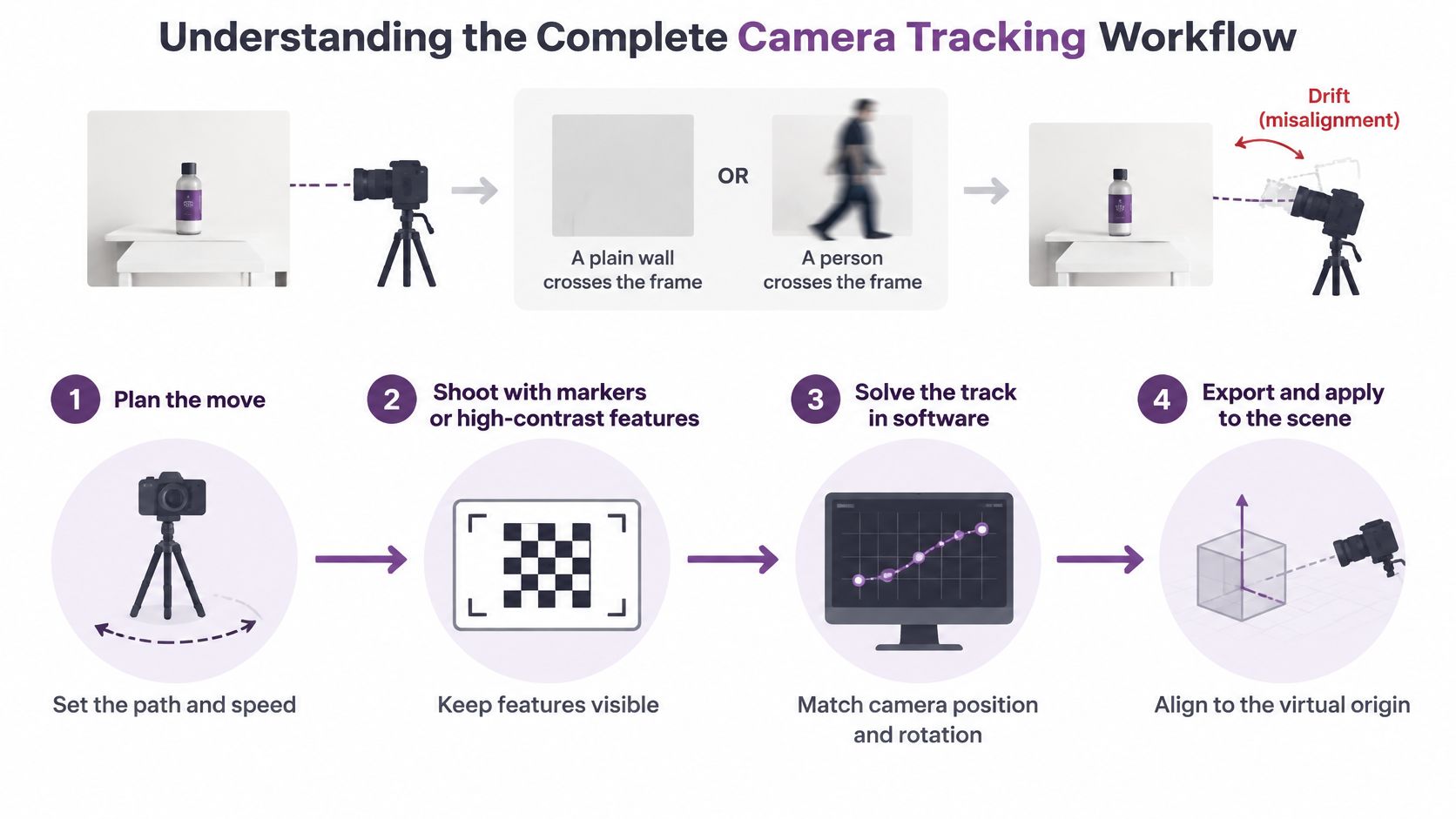
Four Stages One Chain
Treat tracking as a chain with four links, and judge each link separately.
- Shot design: You decide the move, the path, and what the camera will see at the start, middle, and end, not just in the hero frame.
- Capture: You record stable, distributed visual information the solver can follow, plus lens, frame rate, and scale references.
- Solve: Software estimates camera position and orientation per frame, you clean bad correspondences, and you refine until the plate agrees.
- Application: You export that motion into CGI, compositing, or an AI video workflow, then verify alignment inside that downstream scene.
Practical rule: If you can't point to the frame where confidence drops, you don't have a workflow yet. You have a hope.
Most failures get blamed on the solver because that's where the error becomes visible. In practice, the solve often fails honestly, telling you the plate never contained enough information. A plain wall, a crossing presenter, or a reflective tabletop starved it. Your job across the lifecycle is simple to state and hard to fake. Give the system evidence, remove misleading evidence, then validate the exported transform against the original footage before anyone builds on it.
Plan and Shoot a Trackable Camera Move
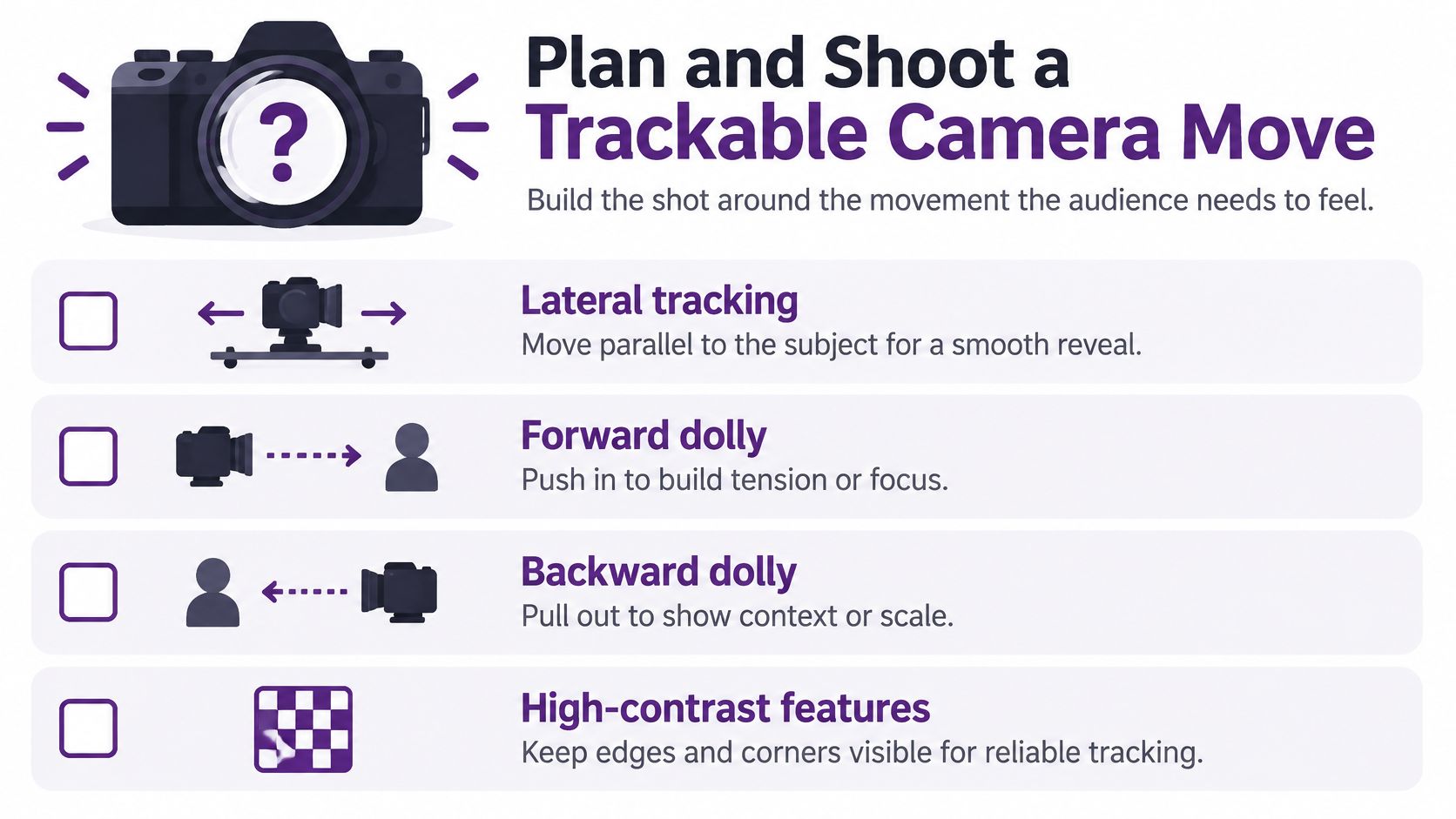
Start with the feeling, then make it survivable. A lateral tracking move reveals space through foreground and background sliding at different rates. A forward dolly builds intimacy. An orbit shows volume, but it's the first move to expose a thin set because the background must hold up from changing angles.
A dolly shot physically travels toward or away from the subject, so a dolly-in and dolly-out change perspective, not just size as the LibreTexts camera movements guide explains for dolly shots. A zoom does the opposite. The camera stays put, focal length changes, and foreground to background relationships flatten. If you want a product to grow while the room opens behind it, move the camera. If you zoom instead, no solver can invent the missing parallax later.
Freedom of movement improved sharply with the Steadicam. Garrett Brown worked with Cinema Products in the early 1970s, the invention is commonly dated to 1974, and the system was introduced publicly in 1975, combining handheld responsiveness with dolly-like smoothness as documented in the peer-reviewed history of visual motion in film. That same analysis measured 160 English-language films released between 1935 and 2010 and found contemporary films had more motion and movement than earlier films. Modern audiences expect fluid travel. Your plate still has to earn it.
Design the Scene for Evidence
Solvers don't see your subject. They see corners, edges, and texture that persists between frames. Build for that without turning the set into a calibration lab.
- Spread features wide: Keep usable texture in the corners and midground, not clustered behind the subject. A solver fed from one region guesses everywhere else.
- Respect blank surfaces: A textureless wall, fogged glass, or blown white sky contributes almost nothing. Break it up with furniture, shelving, a plant, or practical lighting shapes.
- Control reflections: Mirrors, glossy counters, and windows create features that move opposite to reality. Flag them, angle them, or plan to mask them.
- Protect fallback references: Leave a static plane visible during occlusions, such as a floor edge, table corner, or door frame, so the track has somewhere to land when a person crosses.
Markerless doesn't mean constraint free. Research on markerless motion capture identifies shadows, reflections, lighting changes, high-speed movement, missing markers, and incomplete trajectories as persistent accuracy problems as reviewed in the MDPI Sensors analysis of markerless capture limitations. Remove physical markers and the burden shifts to scene design, lighting, and recovery work. Small printed markers you can paint out beat a pristine set you can't solve.
Lens Exposure and Motion Decisions
Lock what you can. Changing focal length mid-shot is legitimate, but record it and expect the solver to need that information. Autofocus hunting alters framing subtly and breaks feature consistency. Slow shutter settings smear texture into motion blur, which looks cinematic and tracks badly, so test at your intended speed before the actual take.
Watch rolling shutter on fast lateral moves, especially with vertical architecture. Bent door frames in the plate become bent geometry in the solve. Shoot a short test pass, track it on the spot if you can, and simplify early. Shortening the move, slowing the pass, or splitting one heroic shot into two trackable sections isn't a creative failure. It's how professionals keep the effect the audience sees.
Choose Manual or Automatic Camera Tracking
Neither method wins in the abstract. The right choice depends on what your footage contains, how much control you need over individual points, and how much cleanup time you have. Picking by feature name or fashion is how simple shots become weekend projects.
Manual tracking means you select and supervise specific reference points, correct them frame by frame when they slip, and decide which points the solve should trust. It's slow, transparent work. You always know why the camera moved, because you approved the evidence. That control matters on short product shots, locked marker layouts, and plates where one hero surface must stay perfect while everything else can drift slightly.
Automatic or AI-assisted tracking detects and follows large numbers of features without you placing each one. It handles natural environments, travel footage, and plates shot without markers far more practically than hand work. But it doesn't understand intent. It will happily track a moving crowd, a reflection, or foliage in wind if those features look stable for a few frames, so your job shifts from placing points to auditing them.
Manual and Automatic Camera Tracking Compared
| Decision factor | Manual tracking | Automatic or AI-assisted tracking |
|---|---|---|
| Setup burden | Needs planned markers or clear chosen points, plus time to place them | Needs usable natural texture, correct lens assumptions, and sensible search settings |
| Suitable footage | Short, controlled moves with clean reference surfaces | Longer or natural shots with rich, stable detail across the frame |
| Controllability | High, you decide exactly which evidence drives the solve | Lower at first, you supervise and prune what the system found |
| Cleanup profile | Steady frame by frame correction, predictable but labor intensive | Fast first pass, then concentrated cleanup where features were wrong |
| Failure sensitivity | Breaks when chosen points leave frame or get occluded | Breaks when misleading motion dominates or texture disappears |
If you need to defend every frame of a short shot, track manually. If you need coverage across a long natural move, automate first and spend your time rejecting bad data.
Hybrid work is normal in production, not a compromise. Run an automatic pass to establish the broad camera path, then hand place a small set of trusted points on the surface your CGI will touch. Or track manually through a short occlusion where the automatic system guesses, then return to automation once clean texture reappears. Budget supervision either way. Lens metadata, a known sensor size, or a quick calibration frame improves both methods, and skipping calibration rarely saves time. It usually relocates the work into mysterious scale and horizon problems you will meet again during export.
Solve and Export Camera Movement in Post
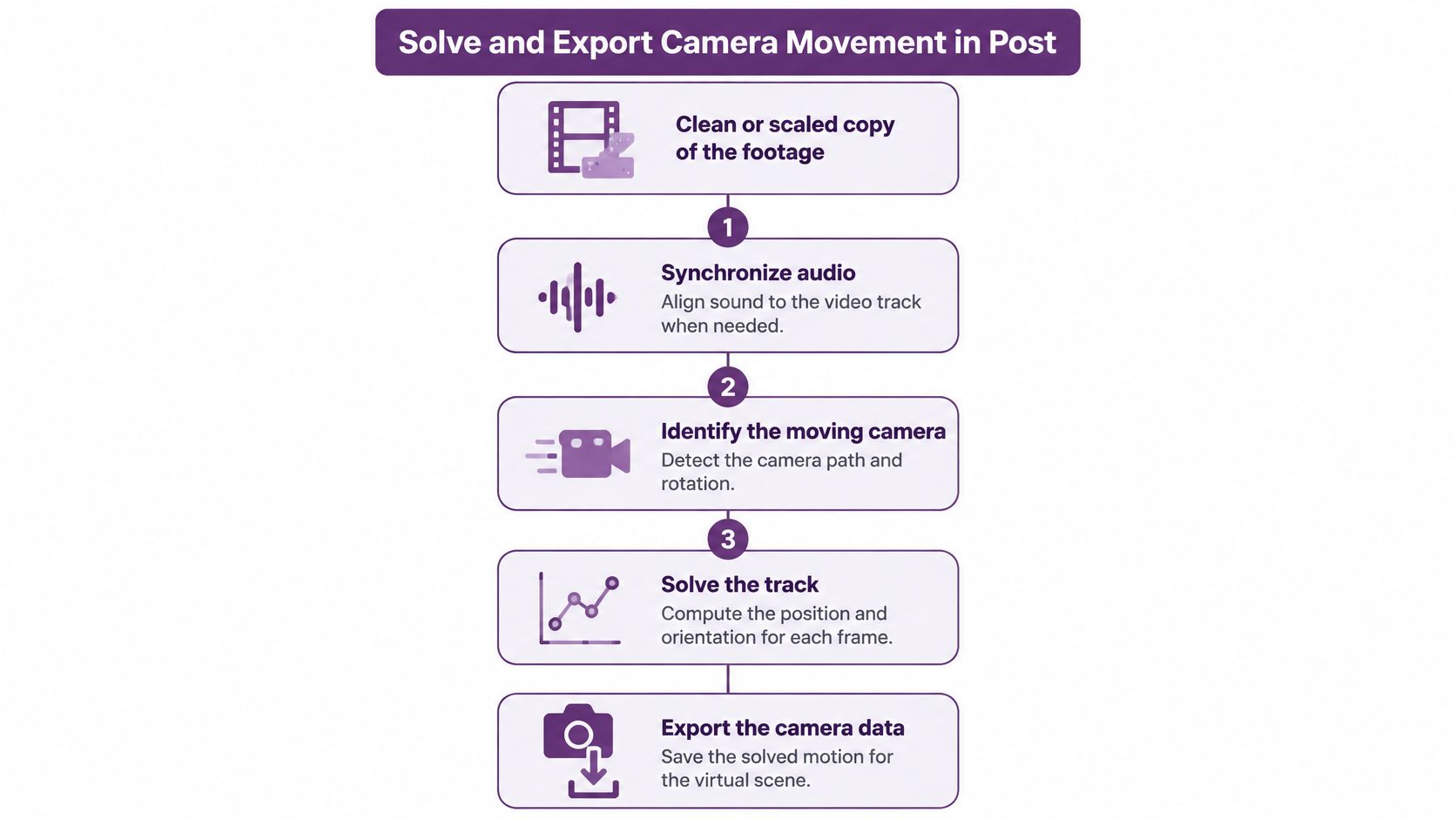
Work on a clean copy, never your only plate. If you downscale for speed, note the factor, because point positions and lens values must map back to full resolution faithfully. Synchronize audio now if editorial timing matters later. Retiming a solved shot after export is a reliable way to desynchronize a camera that was correct.
Decide which portion of the shot defines the solve. A shaky ramp up before the operator settles, or a whip into the next scene, can poison an otherwise clean move. Trim to the usable range, solve that, and extend only if the plate supports it.
How a Monocular Solve Actually Works
Under the interface, a practical tracker follows a consistent sequence as described in the visual odometry pipeline review on monocular tracking. Understanding it tells you where to intervene instead of randomly changing settings.
- Detect high-gradient features: The system finds corners and textured points that stand out from their surroundings in each frame.
- Track between adjacent frames: It follows those points with KLT optical flow or descriptor matching, building short chains of correspondence.
- Reject mismatches with RANSAC: Random sample consensus throws out point pairs that disagree with the dominant motion, which is where many moving subject points should die.
- Estimate relative motion: From surviving matches it computes the essential matrix and recovers camera rotation and translation between frames.
- Triangulate and refine: Stable points become 3D landmarks, then bundle adjustment adjusts poses and landmarks together to minimize reprojection error.
Your advantage sits in steps one to three. Mask moving people, vehicles, water, trees, and reflections before solving, not after a bad result. Demand features distributed across the frame. Twenty points clumped on one poster will produce a confident, wrong camera. Add keyframes when parallax grows or tracked point quality drops, because fresh reference frames stop small errors from compounding over time.
Know the hard cases in advance. Dynamic subjects, textureless walls, and motion blur reduce reliable correspondences. Pure camera rotation makes monocular translation and scene depth poorly observable, so a tripod pan may solve its angles beautifully while inventing its position. Don't ask that data to anchor a 3D object. Related spatial workflows face the same geometry problem, and it's worth studying how to animate a 360 photo if you work with panoramic source material, since viewpoint change there also exposes missing depth immediately.
Export Without Breaking the Solve
A solve is only finished when another application can use it. Before export, confirm these items in writing inside your project notes.
- Coordinate conventions: Which axis points up, which direction is forward, and whether rotations arrive as the target application expects them.
- Units and scale: Whether your scene unit represents a meter, a centimeter, or an arbitrary value anchored to one measured object on set.
- Origin placement: Where world zero sits relative to the plate, ideally on a stable surface your CGI will contact.
- Timing: Matching frame rate, starting frame number, and any handles you trimmed before solving.
Then validate in the most boring way possible. Place a simple test object, such as a cube or a floor grid, into the solved scene and play the whole shot at full speed, then scrub the start, middle, and end slowly. Check frame to frame residuals for jitter, then check whole shot behavior for drift. A track can look smooth locally while ending in the wrong place, and that second failure is the expensive one because artists build on it. If the test object swims, fix the solve now. Never hand downstream a camera you haven't watched.
Apply Solved Motion to CGI and AI Video
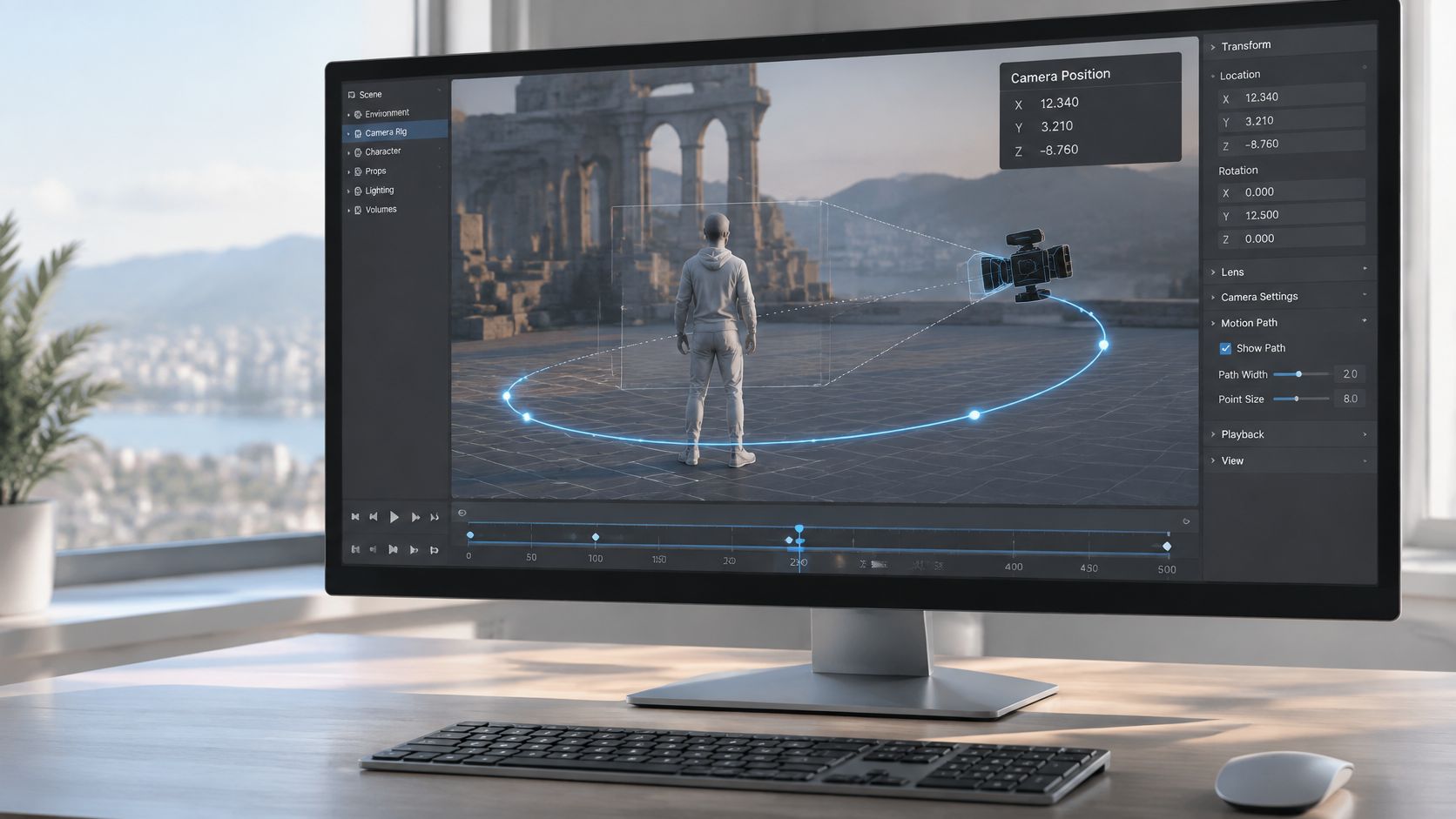
Exported data becomes useful when a virtual camera inherits your real camera's position and orientation for every frame. The renderer then updates the virtual environment in sync with the plate, so a background, product, or character holds its place while the viewpoint travels. Getting there usually requires aligning a camera relative solve to the rendered scene's origin, matching lens behavior, and confirming timing frame for frame.
The screenshot below shows the working state you're aiming for, a 3D scene where the camera path is visible and editable rather than guessed.
Three Jobs Solved Motion Does Well
First, it stabilizes a virtual background behind a real subject, so a replaced room or scene moves with the original camera instead of sliding like wallpaper. Second, it attaches a CGI object or AI avatar to tracked footage, preserving contact with a desk or floor while the shot travels. Third, it extends a set, letting you widen a location beyond the physical build while keeping the original viewpoint and horizon.
Realism is where these jobs separate. A movement can be named correctly and still look physically wrong if subject scale breathes, background layers don't separate, or the horizon rolls against the plate. Market estimates put virtual production camera tracking at about $0.6 billion in 2025, projected to reach $2.8 billion by 2034, with Asia-Pacific forecast as the fastest growing region at 22.8% CAGR according to the MarketIntelo camera tracking system market report. Adoption is clearly expanding. Measurable checks still matter more than vocabulary. Verify subject size consistency, parallax continuity, horizon stability, camera roll, lens distortion, and occlusion edges where real objects pass in front of virtual ones.
A lateral move is your harshest audit. Depth rich backgrounds separate into layers, and any positional error shows as sliding between those layers. A flat background hides the same error. Test with depth present before you approve the shot.
The walkthrough below demonstrates how solved motion behaves once it's driving a scene, which is the point where small errors stop being numbers and become visible movement.
For AI generation workflows, prepare reference motion and clearly specified scene intent rather than assuming every tool imports solve data natively. In LunaBloom AI, for example, camera direction is shaped through image to video prompting with instructions such as a slow dolly-in, a stable horizon, and no rotation, which you can explore in the LunaBloom app workspace. The discipline transfers. State the move, the speed, and what must not change, then inspect scale and parallax in the result. Teams producing content at volume sometimes pair this with automation that can turn any URL into a video automatically for source material, but generated or assembled footage still needs the same movement checks before publishing. Intentional handheld energy has irregular, human rhythm. Tracking error has mechanical swimming. Learn to tell them apart and you'll stop approving the second while aiming for the first.
Troubleshoot Drift and Tracking Failures
Diagnose by symptom, not by setting. Each visible failure points at a specific constraint, and random parameter changes waste the one resource you can't recover, which is time before delivery.
- One frame jump: A feature set died and got replaced abruptly, often at an occlusion, a flash of motion blur, or a lighting change. Inspect tracks at that exact frame.
- Gradual drift: Small errors accumulated across a long move, usually through weak texture or points clustered in one region. The start aligns and the end doesn't.
- Wobble or swimming: Rolling shutter distortion, an incorrect lens model, or points on flexible surfaces such as clothing, hair, and foliage are bending your camera.
- Wrong scale: The scene solves coherently but virtual objects sit too large or float, which traces back to scale ambiguity or a wrong origin.
- Unstable horizon: Rotation is solving against misleading verticals, reflections, or a dominant moving crowd.
Don't trust a green confidence readout. Test the whole shot with loop closure. A photometrically calibrated benchmark of 50 real-world sequences totaling more than 100 minutes measures accumulated drift by using sequences that return to their starting position, avoiding full external ground truth as set out in the benchmark for visual odometry evaluation. Steal that method. Record a move that returns to its starting view, align start and end poses, and report translation drift as a percentage of traveled distance alongside rotational drift and reprojection error. For external scale, a visual LiDAR odometry system reported 0.75% relative position drift on the KITTI odometry benchmark in that same source. Don't expect a monocular phone plate to match a LiDAR corrected system consistently. Scale starts ambiguous and long sequences accumulate error.
A Recovery Hierarchy That Saves Time
Work from cheapest to most expensive. Add or restore reference points in the weak section. Mask the moving foreground you tolerated earlier. Segment the shot at the occlusion and solve each section on its own clean evidence. Correct the lens data if straight architecture bows against your grid. Add depth or inertial data when your capture device recorded it, since independent motion evidence disciplines a guessing solve.
Sometimes the plate itself needs help before retracking. A restless handheld shot can be pre stabilized for analysis using a video stabilization tool, provided you remember that stabilization changes the camera path you're measuring, so document it and solve the version you will composite. And know when to stop. If the hero surface was occluded, textureless, and reflective at the same time, reshooting a shorter, better dressed move is faster than a heroic cleanup. Prevention is cheaper still. In crowds, glass, and changing light, shoot shorter takes, keep one static reference plane visible, and resist the long orbit until a test solve proves the location can support it.
Build a Repeatable Tracking Camera Movement Workflow
Repeatability comes from checklists, not memory. Run the same gates on every shot and your results stop depending on how the day felt.
Before capture, confirm the movement intent in one sentence, walk the full path while watching the frame edges, place or identify distributed features, record lens and frame rate settings, set exposure to limit blur at your travel speed, and keep one fallback reference visible through any planned occlusion.
During the solve, protect the original plate, mask independently moving subjects before the first pass, segment difficult sections instead of forcing one solve through them, document every assumption about scale and origin, and add keyframes where point quality thins out.
Before delivery, play the composite at speed, scrub the endpoints, and check subject scale, parallax, horizon, and contact points where virtual objects meet real surfaces. Archive the solve with its project settings so a revision next month doesn't become a reconstruction. The starter workspace at LunaBloom starter app is a reasonable place to rehearse prompt based moves against these same checks.
Reliable tracking camera movement comes from controlling the shot, solving deliberately, and validating the exported transform. Skip any one of the three and the other two can't compensate.
Start with one short, slow, well lit lateral move across a textured room. Solve it, break it on purpose by masking badly, fix it, and learn what each failure looks like. Then add difficulty in order, a crossing person, a reflective surface, a crowd edge, an AI generated character. That progression builds judgment, which is the actual skill. Software estimates cameras. You decide whether the estimate deserves to be believed.
Turn the moves in this guide into finished content with LunaBloom AI, where you can generate studio quality video from text, scripts, and images with controlled camera motion, hyper-realistic avatars, natural voiceovers, and captions in minutes. Apply the same scale, parallax, and horizon checks to every generated shot, then publish to social channels with one click when the movement holds up.