Let’s be honest, training videos for employees aren’t just a nice-to-have anymore. They’re a core part of growing a business. When you invest in solid video content, you’re making a smart move that directly lifts productivity, sharpens your team’s skills, and makes a real difference to your bottom line and retention.
Why Better Training Videos Are a Business Imperative

It’s time to stop thinking of video as just another checkbox for the learning and development (L&D) department. In reality, it’s a powerhouse tool with a clear return on investment. When employees get their hands on well-made video content, they pick things up faster and actually remember what they learned. This isn’t just a hunch; it’s a proven edge in today’s fast-moving work world.
Think about it: employees are 75% more likely to watch a video than to sift through documents or articles. This natural pull toward visual learning means your training will land with a bigger, more tuned-in audience right from the get-go.
The Direct Link to Profitability and Productivity
The numbers don’t lie. Organizations that build out comprehensive employee training programs see an incredible 218% higher income per employee compared to those that don’t have formalized training. It’s a straight line connecting your investment in people to your company’s financial health.
And it doesn’t stop there. Companies that provide the right kind of training also report 17% higher productivity and 21% greater profitability. These stats make it crystal clear: good training isn’t just an expense. It’s an investment that pays you back through a smarter, more effective team.
Your training program is a direct reflection of your company’s commitment to employee growth. High-quality video shows you value your team’s time and are invested in their success, which is a powerful driver for retention..
Boosting Retention in a Competitive Market
Keeping your best people is tough, but a strong training program can be your secret weapon. When people feel like their employer genuinely cares about their professional growth, they’re far more likely to stick around. Video makes learning easy to access, fitting into packed schedules and offering help right when it’s needed.
By using platforms that make video creation simple, like the AI-powered tools at LunaBloom AI, you can create a whole library of valuable training content without breaking the bank. This approach helps you scale up your L&D efforts, making sure every single person on your team has the tools they need to shine. At the end of the day, better training videos create a smarter, more loyal, and more profitable company.
Planning Your Video Content for Maximum Impact
Before you even think about hitting record, a solid plan is what separates an effective training tool from a complete waste of time. Great training videos for employees don’t just happen. They’re the result of a clear strategy that starts with one simple but critical question: What should the employee be able to do after watching this?
Getting this first step right sets the stage for everything else. Without a specific goal, your video can easily wander off-topic, wasting your production time and, more importantly, your team’s attention.
Define Your Learning Objectives
You need to start by defining sharp, measurable learning objectives tied directly to business goals. Are you trying to speed up onboarding for new hires, roll out new software without a million support tickets, or get everyone up to speed on a new compliance policy?
Your objectives have to be crystal clear. Vague goals like “teach employees about the new CRM” just won’t cut it. Instead, get specific:
- Objective: “After watching this video, a sales team member will be able to create a new client profile, log a sales call, and generate a quarterly report in the new CRM.”
- Objective: “This video will enable any employee to correctly identify and report a phishing email within five minutes of viewing.”
This kind of precision keeps your script focused and respects your employees’ time by delivering exactly what they need to know—no fluff.
The data below shows how targeted content often leads to much better outcomes, with average completion and retention rates for common training video types.
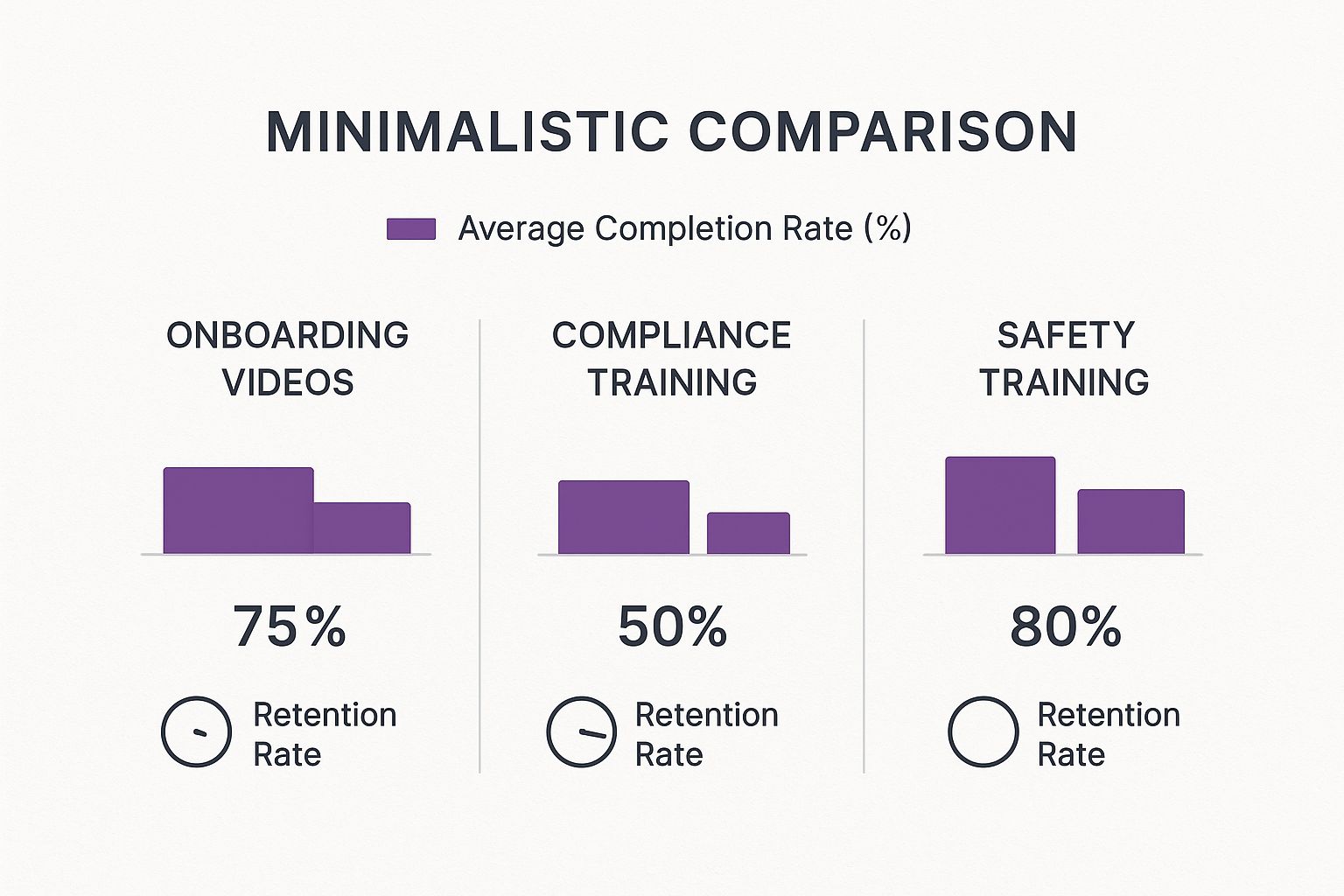
As you can see, shorter and more focused content like onboarding and safety videos tends to have higher completion and retention rates. This really drives home the importance of clear, goal-oriented planning from the get-go.
Know Your Audience and Choose the Right Format
Next up, think about who you’re actually making this video for. A technical tutorial for the engineering team is going to look and sound completely different from a benefits overview meant for the entire company. Taking the time to analyze your audience helps you nail the right tone, language, and complexity.
Don’t make the mistake of creating a one-size-fits-all video. A rookie employee needs foundational knowledge, while a seasoned veteran might only need a quick update on a new feature.
Once you know your objectives and your audience, you can pick the right video format. Different goals call for different approaches. To help you decide, here’s a quick comparison of the most common training video formats, their best use cases, and what to watch out for.
Choosing the Right Video Format for Your Training Goal
| Video Format | Best For | Pros | Cons |
|---|---|---|---|
| Screen Recording | Software tutorials, process walkthroughs, demonstrating digital tasks | Fast to create, highly practical, requires minimal equipment | Can be visually static if not edited well |
| Talking Head | Policy updates, leadership messages, conceptual explanations | Builds personal connection, conveys tone and sincerity effectively | Relies heavily on the presenter’s charisma and delivery |
| Animated Explainer | Explaining complex or abstract concepts, compliance training | Highly engaging, simplifies difficult topics, visually appealing | Can be time-consuming and more expensive to produce |
| Role-Playing | Customer service training, sales techniques, conflict resolution | Shows real-world application, highly relatable and memorable | Requires actors (employees) and more coordination to film |
Choosing the right format is key to making sure your message actually lands. A quick screen recording is perfect for a software update, but a dry compliance topic might come to life with an animated explainer that holds attention and makes the material easier to digest. Ultimately, by matching your format to your purpose, you create training that truly works.
Bringing Your Training Videos to Life

This is where the rubber meets the road—turning your careful planning into an actual, watchable video. The idea of producing training videos for employees can feel pretty daunting, but I promise you don’t need a Hollywood budget or a full film crew to make something that looks and sounds great.
With just a few practical tricks up your sleeve, you can create surprisingly high-quality videos right from your office. It all starts with the script.
Scripting for Clarity and Connection
Before you hit record, you need a solid script. This is the foundation for everything. A good script not only keeps you on track but also ensures your key learning points are delivered clearly and without any confusing jargon.
Your goal is to sound less like a corporate manual and more like a helpful colleague showing someone the ropes. Read every line out loud. Does it sound stiff? Robotic? If so, rewrite it until it flows naturally, like a real conversation.
It also helps to break down complex ideas into smaller, bite-sized pieces. This makes the information easier for your team to absorb and makes your life way easier when you get to the editing stage.
The point here is education, not entertainment. Your script needs to be direct, crystal clear, and completely focused on the learning goal. If a sentence doesn’t help someone understand the topic better, cut it.
A tight script respects your employees’ time and keeps them tuned in.
Getting the Right Look and Sound on a Budget
Let’s be real: high production value doesn’t mean you have to spend a fortune on gear. You probably have the most powerful tool you need right in your pocket—a modern smartphone. The cameras on today’s phones are incredible, but the secret to making them look professional comes down to two things: lighting and audio.
Here’s a simple, budget-friendly setup that works wonders:
- Lighting: Natural light is your best friend, and it’s free. Set up near a window whenever you can. If that’s not an option, a basic ring light provides that soft, even lighting that gets rid of harsh shadows and makes your subject pop.
- Audio: This one is non-negotiable. People will forgive so-so video quality, but they will click away instantly if the audio is terrible. A simple lavalier (or lapel) mic that plugs right into your phone can make a world of difference, and you can find great ones for under $30.
- Stability: Nobody likes shaky cam. A small, cheap tripod is all you need to keep your shots steady and give your videos a much more polished, professional feel.
Nail these three elements, and your training videos for employees will look and sound fantastic without blowing your budget.
Coaching Your On-Screen Talent
More often than not, your on-screen “talent” is going to be a subject matter expert or manager who has zero experience being on camera. That’s perfectly fine—nerves are totally normal. Your job is to make them feel comfortable and take the pressure off.
Gently coach them to speak just a little bit slower than they normally would and to just be themselves. Remind them that mistakes are no big deal; that’s what editing is for! Encourage some simple hand gestures and have them look directly into the camera lens. This creates a much stronger connection with the viewer. A relaxed presenter is an effective one.
Editing for Engagement
Alright, you’ve got your footage. The final piece of the puzzle is editing it all together into a clean, engaging video. The goal here isn’t to win an Oscar; it’s to trim out the fluff, tighten up the pacing, and add a few simple touches that reinforce the key lessons.
Tools like Descript or Camtasia are user-friendly and make this process much less intimidating. Just focus on the basics:
- Cut out any long, awkward pauses, filler words like “um” and “uh,” and any bits where the speaker goes off on a tangent.
- Add simple text overlays to highlight important terms, steps, or takeaways.
- Mix in relevant B-roll footage, like screen recordings of a software process or simple graphics, to keep things visually interesting.
A well-paced video with clear visual cues is what will keep your audience locked in and make sure your training actually sticks.
The True ROI of Video-Based Employee Training
When you’re trying to get buy-in for a new initiative, let’s be honest: numbers do the talking. Moving to high-quality training videos for employees isn’t just about looking modern; it’s a smart financial move with a return on investment (ROI) that’s hard to ignore. The real value is so much more than just cutting travel and hotel bills for in-person seminars.
One of the biggest wins right off the bat is scalability. Think about it. You create one great training video, and it can be used to train hundreds, even thousands, of employees across different locations and time zones. You pay for production once. That single investment completely changes the per-person training cost, freeing up your L&D budget for what really matters—creating even more impactful content.
It’s Not Just About Saving Money—It’s About Better Learning
Here’s where it gets really interesting. The true power of video training is baked into how our brains work. We’re visual creatures, hardwired to process images and motion way faster than blocks of text. It’s why people don’t just prefer watching a video; they actually remember more from it.
And this isn’t just a gut feeling; the data is crystal clear. While someone might only remember 8-10% of what they heard in a traditional classroom-style training, video learning sends that number soaring to between 25% and 60%. That massive jump in knowledge retention is exactly why giants like IBM saved a staggering $200 million by switching to digital training. Dow Chemical saw similar results, dropping their per-learner cost from $95 to just $11 and saving $34 million in the process. You can dig into more of these eye-opening employee training statistics on peoplegoal.com.
When employees actually remember what they’ve learned, they make fewer mistakes, require less supervision, and become proficient in their roles faster. That translates directly to increased productivity and a healthier bottom line.
Calculating Your Potential Return
So, how do you start putting numbers to this for your own company? It’s easier than you think. Just start by tallying up the obvious costs you can slash or get rid of entirely.
- Instructor Fees: What are you spending on external trainers? Or how much time are your internal experts losing by teaching the same orientation session over and over?
- Travel and Accommodation: Add up the flights, hotels, and per diems for trainers and your team members.
- Printed Materials: Those binders and handouts aren’t free. Think about the recurring costs of printing, shipping, and updating them.
- Opportunity Cost: This one’s huge. What’s the cost of pulling entire teams off their jobs for a full day of training? That’s a lot of lost productivity.
Once you have those figures, stack them up against the one-time cost of creating a library of reusable training videos for employees. The financial argument usually becomes undeniable pretty quickly, giving you the hard data you need to make your case. The ROI isn’t just about the money you save—it’s about building a more capable, confident, and productive workforce.
Getting Your Videos Seen and Measuring Success
Let’s be honest, creating fantastic training videos for employees is a huge accomplishment, but it’s only half the job. A brilliant video nobody watches is just a file taking up server space. This is where you need a smart plan for getting it in front of people and a meaningful way to measure if it’s actually working.
The first big decision? Where your videos will live. This single choice impacts everything from how easily employees can find them to the kind of data you can collect on engagement.
Choosing the Right Home for Your Videos
Where you host your content completely shapes the employee experience. You need a platform that’s a breeze for them to use but also gives you the analytics you need to see what’s landing and what’s not.
- Learning Management System (LMS): This is the go-to for most companies. An LMS keeps all your training in one place, tracks progress automatically, and lets you pair videos with quizzes or other learning materials. It’s perfect for creating structured, step-by-step learning paths.
- Private Video Host (e.g., Vimeo, Wistia): If you want deep insights and a polished viewing experience, platforms like Vimeo or Wistia are fantastic. They offer top-notch analytics on viewing habits, robust security controls, and make it easy to embed videos securely on an internal site.
- Internal Company Portal or Intranet: Sometimes, simple is best. For quick, informal videos—like a short process update—your existing company intranet can be a great, low-friction option. It’s a familiar space for employees, so there’s no learning curve.
The main goal here is to make finding and watching your training videos completely seamless. The less your team has to hunt for information, the more likely they are to actually use it.
Launching Your Video for Maximum Engagement
You can’t just hit “upload” and cross your fingers. A mini-launch plan builds anticipation and makes sure your hard work gets the attention it deserves from the start.
Treat it like a small internal marketing campaign. Drop an announcement in your company-wide Slack or Microsoft Teams channels. Send out a clear, concise email.
Most importantly, tell them what’s in it for them. Will this video save them an hour every week? Help them finally master that tricky new software? Solve a problem that’s been bugging everyone?
A great launch message frames training not as a mandatory task, but as a valuable resource. It sends a clear signal: “We’ve created something to help you win.”
This simple shift in framing encourages people to jump in and sets a positive tone right away.
Measuring What Truly Matters
Views are nice, but they don’t tell you if anyone actually learned anything. To understand the real impact of your training videos for employees, you need to look at metrics that show genuine understanding and behavior change.
Forget vanity metrics and focus on these instead:
- Completion Rate: Are people watching all the way through? A big drop-off halfway might mean the video is too long, confusing, or just plain boring.
- Comprehension Checks: Pop a short, simple quiz at the end of the video. Seeing that employees can answer a few key questions correctly is a much stronger signal of learning than a simple view count.
- Employee Feedback: Don’t be afraid to ask! Use a quick survey to see if your team found the video helpful and clear. This direct feedback is pure gold for making your next video even better.
There’s a reason the corporate eLearning market is projected to hit $462.6 billion by 2027. Companies are seeing incredible returns on their investment. In a famous study, IBM found that every $1 spent on online training delivered about $30 in productivity.
Tracking the right metrics is how you prove that value inside your own organization. If you want to dive deeper into the numbers, check out these corporate eLearning statistics on continu.com. When you measure success correctly, you can keep refining your strategy and build a library of training content that truly moves the needle.
Common Questions About Employee Training Videos
When you start making training videos for employees, a few questions always seem to come up. Let’s get those sorted out right away so you can avoid common mistakes and keep your project on track.
Remember, the aim isn’t to create a Hollywood blockbuster. You’re building practical, clear tools to help your team get better at their jobs. So, let’s tackle the questions that pop up most often.
How Long Should a Training Video Be?
This is the big one, and the answer is almost always “shorter than you think.” For people to actually watch and remember what you’re teaching, the sweet spot for a single training video is between 3 to 7 minutes.
If you’re covering a complex topic, resist the urge to cram it all into one epic video. Instead, break it down into a series of bite-sized, focused “micro-learning” videos. This respects your team’s time and makes the information much easier to absorb. Plus, it makes it simple for them to find and re-watch just the part they need later.
What Is the Easiest Way to Make Videos Engaging?
Engagement isn’t about fancy graphics or special effects. It’s about being relatable and genuinely helpful. The simplest way to make your video more engaging is to write your script in a natural, conversational tone. Write like you’re explaining something to a coworker over a cup of coffee, not giving a formal presentation.
Engagement starts with a simple promise to the viewer: “This video will solve a problem for you.” When the content is directly relevant to their daily work, they will naturally pay more attention.
To keep the visuals interesting, use simple on-screen text to emphasize key takeaways or use screen recordings with callouts to walk through a process. Anchoring your video in a real-world scenario that employees will immediately recognize is another incredibly powerful trick.
Do I Need Expensive Software to Create Professional Videos?
Absolutely not. While professional editing suites are powerful, you can get incredible results with today’s user-friendly tools. Many teams are producing top-notch training videos for employees with affordable software like Camtasia or even the editors that come built into most computers.
Your focus should be on the fundamentals because they make a much bigger difference than the software you choose.
Here are the three things that truly matter:
- Crisp, Clear Audio: Nothing makes a viewer click away faster than bad sound. A simple external microphone is the single best investment you can make.
- Good Lighting: You don’t need a pro lighting rig. Just filming near a window with plenty of natural light usually does the trick perfectly.
- A Well-Planned Script: A tight, well-written script ensures your message is clear and concise. That’s the real mark of a professional video.
Ready to create stunning training videos in minutes, not days? LunaBloom AI turns your scripts into polished, professional videos with AI avatars and voiceovers in over 50 languages. Start creating more effective training content today at https://lunabloomai.com.