| TL;DR: Text to Video AI Tools What is it? It transforms your written content into complete videos. How Does It Work? You input text, AI analyzes it, selects visuals, adds voiceovers, composes the video, and renders it ready to share. Advantages Over Traditional Video: AI videos are faster, cheaper, scalable, and consistent, letting you focus on creativity instead of technical tasks. Who Can Benefit? Marketing, learning and development, sales, internal communications, and content creators. Choosing the Best Tool: Look for ease of use, accuracy, customization, output quality, pricing, and realistic AI voiceovers. |
Want to create professional, engaging videos in minutes without spending hours editing? Text to video AI tools have advanced to make this possible.
They read your script, generate visuals, add voiceovers, and deliver polished videos instantly. Imagine producing content in multiple languages, with consistent quality, and reaching audiences worldwide effortlessly.
How much time could you save creating videos this fast? With AI handling all the technical work, you can focus on creativity, storytelling, and connecting with your audience. Now making studio-quality videos has never been this easy, fast, or accessible.
What Exactly Is a Text to Video AI Tool?
A text to video AI tool helps you turn your script into a complete video. You just add your text, and the AI does the rest. It takes care of everything, from generating the script to creating the final video. Sounds easy, right? All you need to do is put in your idea, and the AI brings it to life in video form.
How Does an AI Text to Video Generator Work?
Here’s how it works:
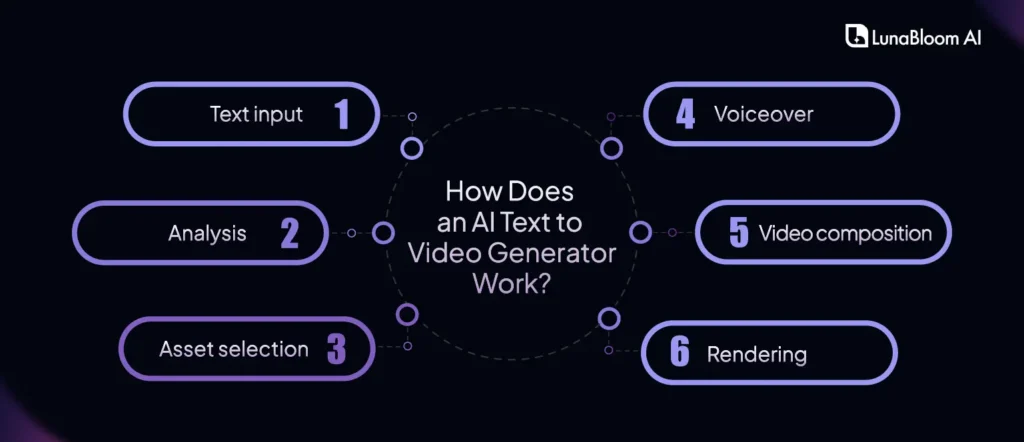
- Text input: You start by typing your script or text into the software.
- Analysis: The AI reads your text and understands the meaning, tone, and key ideas. It’s pretty amazing how quickly it figures that out.
- Asset selection: It then picks the right images, clips, and graphics. Sometimes, it even generates new ones to match your message.
- Voiceover: The AI uses text to speech technology to add a voiceover to your script. You get to choose from different voices and languages to make it fit your style.
- Video composition: The AI puts everything together into a smooth and engaging video that tells your story.
- Rendering: Finally, the AI renders your video in the resolution and format you want. It’s ready to share or upload right away.
Why Is AI Text to Video Maker a Big Improvement Over Traditional Video Creation?
Traditional video creation can feel slow, expensive, and full of technical challenges. But with the rise of text to video AI tools, things have changed. Video creation is now more accessible, faster, and affordable, without losing quality.
Curious how both compare? Here’s a detailed look at the key features:
| Feature | Traditional Video Creation | Text to Video AI Creation |
| Accessibility | Requires technical expertiseDemands professional equipment & services | No technical skills needed |
| Speed & Efficiency | Takes days or weeks for productionRequires multiple revisions | Generates videos in minutesAllows quick adjustments. |
| Cost Savings | High costs equipment, studio rentals, & professional fees. | Much more affordableNo need for external services. |
| Enhanced Creativity | Need for technical executionReduces creative freedom | Automates the technical aspectsFreedom for more creativity |
| Consistency and Quality | Depends on the creator’s skills and available resources. | AI ensures consistent & high-quality results |
| Scalability | Limited scalabilityRequires significant resources for more videos | Easy to scale upCan create hundreds of videos in the same amount of time |
| Customization and Control | High control over the final product Requires manual input at every step. | Simple customization optionsLess manual effort is needed |
What Are the Main Benefits of Using a Text to Video AI Tool?
- Time Savings
One of the biggest advantages of using an AI video generator from text is the time you save. Tasks like script writing, video shooting, editing, and finalizing usually take days. With AI, you can complete all of this in just a few minutes.
- No Technical Skills Needed
You don’t need to be a video expert to make videos of good quality. The AI automates the complex video editing process for you. All you need to do is provide your script or text, and the tool creates a video.
- Consistent Quality
Maintaining consistent quality across all your videos is important for building a strong brand image. AI tools make sure every video comes out with the same level of quality. Whether you create one video or a hundred, the standard stays the same.
- Creative Freedom
While the AI manages the technical work, you stay in control of the creative parts. You can adjust visuals, voiceovers, and even the tone to match your brand’s personality. These tools let you create a fun, casual vibe or a formal corporate feel, depending on what you want.
- Boosts Audience Engagement
Video is, undoubtedly, the most engaging content format online. It catches attention much faster than text and keeps viewers interested for longer. AI videos turn your written content into dynamic visuals that stand out. This helps you increase engagement, get more shares, and improve conversion rates.
Who Benefits from Using a Text to Video AI Tool?
Text to video AI tools bring a lot of versatility, making them useful for many industries and teams. It helps you turn written text into engaging videos quickly and easily. This allows you to save time and improve your results.
Curious who gains the most from this tool? Let’s take a closer look.
Marketing Teams
Marketing teams can create social media videos, Facebook ads, Instagram product ads, and explainer videos to connect with their audience.
What are the benefits they gain?
- Increased engagement on social media platforms.
- Quicker production of promotional content.
- Consistent video output for campaigns.
- Cost-effective video creation without the need for specialized teams.
- Easy adaptation to different platform requirements, like YouTube and Instagram.
Learning & Development Teams
L&D teams can produce AI-powered videos for corporate training, onboarding processes, and e learning modules.
What are the benefits they gain?
- Scalable and repeatable training content.
- More engaging training materials.
- Faster content creation for diverse learning needs.
- Increased learner retention with visual storytelling.
- Ability to update training materials quickly when needed.
Sales Enablement Teams
Sales teams can make personalized sales videos, product demos, and advertise ready clips for their sales funnels.
What are the benefits they gain?
- Personalized content tailored to prospects.
- Shorter sales cycles with compelling video demonstrations.
- Ability to scale outreach efforts.
- Enhanced customer engagement through video.
- More effective lead conversion with dynamic and informative videos.
Internal Communications Teams
Internal teams can create company updates and announcement videos on the go.
What are the benefits they gain?
- Efficient communication across departments.
- Quick sharing of important updates.
- Enhanced clarity and engagement with employees.
- Reduced reliance on lengthy emails or meetings.
- Easy to scale communication across teams.
Content Creators
Content creators can generate videos for YouTube, Reels, and TikToks. They can also create online ads with ease, especially for Facebook and Instagram.
What are the benefits they gain?
- Streamlined video creation for rapid content production.
- Consistent content quality across all videos.
- Increased social media engagement.
- Flexibility in creating videos in various formats.
- Ability to scale content production without additional resources.
How to Choose the Best AI Text to Video Tool for Your Needs?
Choosing the right AI text to video tool is very important if you want your videos to fit your exact needs. It could be for marketing, training, or content creation. Do you know what factors matter the most when making this choice? Here are the key things to keep in mind.
- Ease of Use: Look for a tool that feels simple and user-friendly, especially if you have no technical background. A tool that you can navigate with little training will save you time and frustration.
- Accuracy: The AI should read your text correctly and create visuals that match your message. Take time to check reviews and demo videos to see how well it interprets scripts. Stay away from tools that go off topic or fail to capture your intended meaning.
- Customization: Think about how much customization the tool allows. Can you change the video style, voiceover, and visuals to match your brand or your taste? Features like adding your videos or voice give you more control over the final video.
- Output Quality: Always test the output quality before choosing a tool. Look for smooth animations, clear visuals, and a voiceover that sounds natural. Some tools may have glitches or poor animations. This can reduce the professional look of your videos.
- Pricing: Some free online text to video generators come with limits like watermarks or fewer customization options. Paid tools offer better quality and more features. Think about your budget and compare it with the features you need before deciding.
- AI Voiceover Support: Make sure the tool offers quality voiceover options. Some tools provide many voices and languages, while others may sound robotic or unnatural. The best choice is a tool that gives you realistic voices so you can set the right tone for your video.
How Do You Write a Good Prompt for a Text to Video AI Tool?
The quality of AI videos depends a lot on how well you structure your prompt. Here are the main components to include in your prompts for the best output.
Structural Components of Effective Prompts:
- Subject Definition: Give a clear description of the main elements, characters, or objects in your video. The more specific you are, the easier it is for the AI to visualize your idea.
- Environmental Context: Describe the setting, lighting, and atmosphere in detail. A clear environment helps the AI create the right backdrop for your video.
- Action Description: Use exact language to show the motion and interactions in the scene. The more detailed you are about what is happening, the more dynamic and accurate the video will be.
- Stylistic Guidance: Mention visual styles, artistic influences, or overall aesthetics. This guides the AI to capture the vibe of your video, like cinematic, vintage, or modern.
- Technical Parameters: Include any preferences for camera angles, movement, or transitions. These details help the AI handle how the video will be shot and make it look professional.
Example prompt for a marketing video for an online shopping app
A happy young woman holds a smartphone while browsing a colorful online shopping app in a bright, modern living room. She smiles and taps the screen as animated icons and product highlights appear around her. The video has a clean, vibrant, and energetic style, with upbeat background music and smooth transitions. Use a close-up camera angle to focus on her expressions and the app interface, capturing a lively and engaging marketing vibe.
LunaBloom AI: The Ultimate Cinematic AI Video Generator
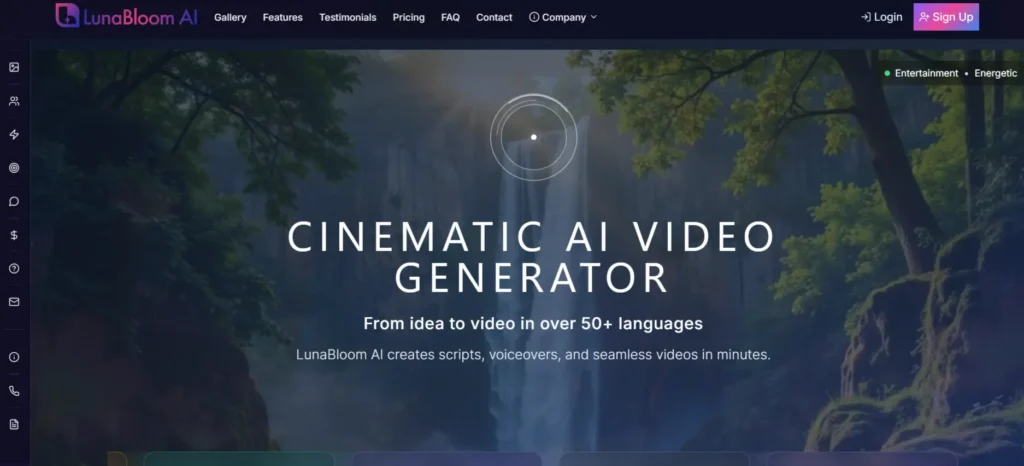
Bring your ideas to life in minutes with LunaBloom AI. Whether it’s marketing campaigns, training videos, or social content, this tool turns scripts into professional, studio-quality videos effortlessly. With support for over 50 languages and hundreds of natural-sounding voices, you can create global content faster and easier than ever.
Forget complex video editing. LunaBloom AI handles scripts, voiceovers, animation, and editing so that you can focus on your message. Realistic AI avatars, auto-generated subtitles, and translations let you produce professional videos without any technical skills. Imagine turning ideas into polished videos in minutes, not days.
- 100+ Ready-to-Use AI Avatars: Quickly create professional videos with diverse characters.
- 50+ Languages & 150+ Natural Voices: Reach global audiences with realistic voiceovers and localization.
- Lightning-Fast Text-to-Video Creation: Transform scripts into polished videos in minutes with no skills required.
- Custom AI Avatars: Turn photos into high-fidelity avatars with authentic voiceovers for consistent branding.
- Create Any Video Genre: Produce marketing, animation, or training videos effortlessly with AI-powered generation.
- Auto-Imported News & Live Clips: Keep your content fresh by integrating trending media instantly.
- SEO-Optimized Thumbnails & Metadata: Boost discoverability with AI-designed titles, descriptions, and visuals.
- Automatic Subtitles & Translations: Instantly reach a global audience with over 50 languages for accessibility and engagement.

Conclusion
Creating videos has never been this quick, easy, or accessible. AI text to video tools let you turn your scripts into polished visuals with natural voiceovers. You can produce consistent, professional content in multiple languages without spending hours editing.
Can you imagine how much time you could save while still making videos that grab attention and engage your audience?
Now is the perfect time to start making videos that truly stand out. LunaBloom AI delivers studio-quality results, lightning-fast production, and unmatched ease of use. Why wait? Bring your ideas to life and connect with your audience like never before.

FAQs
1. Is the content created safe to use?
Yes, the videos you create with LunaBloom AI stay fully copyright compliant. You can safely use them across all platforms for marketing, business, and social media without any worries.
2. Does it support multiple languages?
Yes, LunaBloom AI supports more than 50 languages for both script generation and voice synthesis. You can create multilingual content with subtitles and translations that make it easy to reach a global audience.
3. Can it generate videos for social platforms and advertising?
Yes, LunaBloom AI creates videos optimized for platforms like YouTube, Instagram, Facebook, TikTok, and more. You can quickly make content that works perfectly for ads, social media posts, and different campaigns.
4. Are these AI-made videos good enough for business use?
Yes, the videos from LunaBloom AI deliver high professional quality. They work well for business use, marketing campaigns, training, and customer engagement.
5. Is this only for professionals, or can beginners use it too?
Beginners can use LunaBloom AI with ease since no technical expertise is required. You also get full customer support with tutorials, documentation, and live assistance to guide you step by step.
6. What is the best text to video generator?
LunaBloom AI stands out as one of the best text to video generators. It offers realistic avatars, fast script to video creation, and simple usability. With customization, multilingual support, and smooth integrations, it sets a new standard in AI video creation.