
Video content has become a significant element for engaging audiences, driving conversions, and building brand awareness. However, if your video creation process is not productive, it can silently drain your team’s time, energy, and budget.
Whether you are struggling with missed deadlines, rising production costs, or low video output, these are all signs that it’s time to adopt quick video creation tools.
In this blog, we will explore the top 9 signs that indicate you need to add a video creation tool to your business.
Let’s jump in!
What’s the Cost of Staying Slow?
Is your video production process holding your team back? If you find that creating video content takes much longer than expected, you’re not alone.
According to a recent report, 51% of marketers say they have used AI tools for video creation. And the AI video creation tool delivers results they’ve never had before. So, adopting the tool in your business is an excellent idea.
The real cost of slow video creation is not just financial; it impacts the speed at which you can deliver your marketing campaigns, reach your audience, and capitalize on trends. This is why it’s essential to embrace quick video creation tools that streamline the process and let your team create more with less effort.
The Real Problem: How Slow Video Creation Impacts Productivity?
When video creation is a slow, manual process, it impacts your team’s overall productivity in several ways.
Here’s how:
- Marketing Delays: Campaigns and promotions are pushed back because your video content is still in production.
- Sales Enablement Gaps: Sales teams lack timely videos to nurture leads or close deals.
- Missed Opportunities: Trends and opportunities pass by because your team is bogged down with time-consuming video production.
This all leads to a compounding effect that hinders your business from scaling at the pace it needs to. And it’s no surprise that over-relying on designers or video editors for every small task is a scalability bottleneck. The solution? that remove these bottlenecks and accelerate production.Quick video creation tools
9 Signs You Need Faster Video Creation Tools
Now, let’s dive into the 09 signs that indicate your team needs to adopt faster video creation tools.
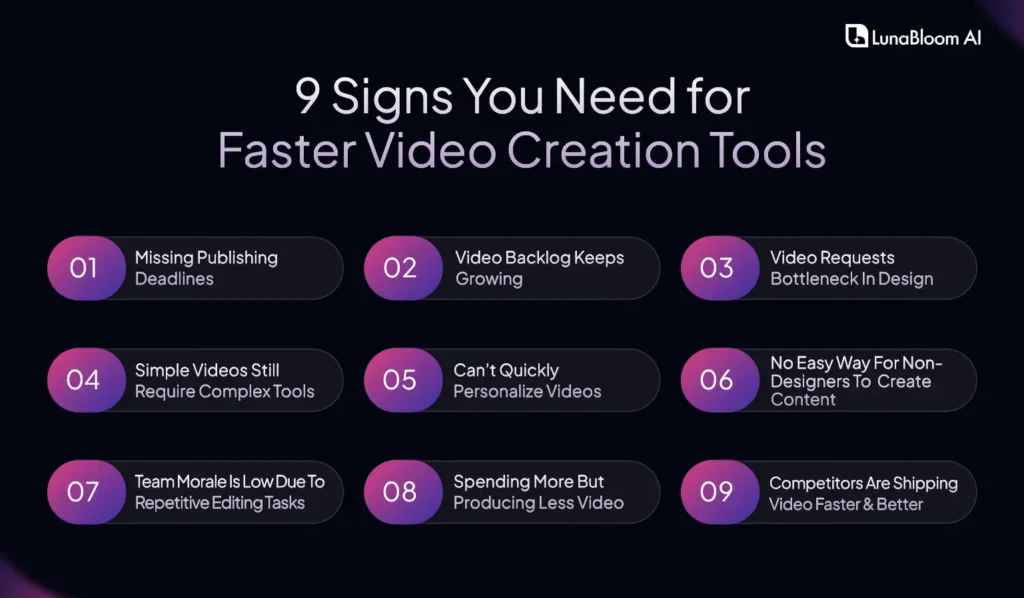
Sign 1: Missing Publishing Deadlines
In the world of digital marketing, timing is everything. If your videos are delayed, it’s not just your content that’s affected; it’s your entire campaign. Missing deadlines can lead to lost opportunities, whether it’s a product launch, seasonal promotion, or a social media trend you were hoping to ride.
- Content Calendar Delays: Publishing delays push other campaigns back.
- Missed Social Media Moments: Trends and real-time events become irrelevant by the time you release your video.
- Rising Costs: The longer your video takes, the more resources you waste on production and editing.
In a competitive environment, waiting too long to publish content will cost you. Quick video creation tools can eliminate these delays and help you stay ahead.
Sign 2: Video Backlog Keeps Growing
If your team is constantly dealing with a growing list of video requests that never seem to be completed, you’re not alone. Video backlogs are common when the production process is slow and inefficient. If this sounds familiar, it’s time to rethink your tools.
- Backlog in Project Management Tools: Unfinished videos pile up, creating project delays.
- Disorganization and Chaos: Lack of a streamlined workflow means content gets stuck at various stages.
- Stress and Frustration: Your team becomes overwhelmed by the growing list of tasks, leading to burnout.
Switching to quick video creation tools helps manage this backlog efficiently by enabling your team to produce videos faster and keep everything organized in one place.
Sign 3: Video Requests Bottleneck In Design
When video requests are funneled directly to your creative or design team, they quickly become overwhelmed, leading to delays. Not only does this slow down the process, but it also places unnecessary pressure on key team members.
- Long Wait Times: Videos go into a queue, often waiting for a designer’s availability.
- Missed Content Opportunities: Your team doesn’t have time to respond to urgent video requests.
- Resource Drain: The creative team becomes the bottleneck, limiting video production.
With quick video creation tools, anyone on the team, marketing, sales, or HR can create videos without relying on specialized skills, helping distribute the workload.
Sign 4: Simple Videos Still Require Complex Tools
Creating basic videos should not require advanced editing software or hiring external agencies for simple tasks. If your team is still using complex tools or outsourcing basic video work, you’re missing out on speed and efficiency.
- High Costs for Simple Content: You’re paying agencies or contractors for routine videos that could be handled internally.
- Complicated Editing Process: What should be a simple task becomes a multi-step, lengthy process.
- Slow Production: Every small change requires hours of back-and-forth or waiting on external teams.
Quick video creation tools simplify video production with templates, automated features, and intuitive user interfaces, meaning your team can create videos quickly without needing external help.
Sign 5: Can’t Quickly Personalize Videos
Personalized video content can significantly boost engagement, but creating these videos manually can be time-consuming. If you’re unable to personalize videos for specific campaigns or audiences quickly, you’re missing out on a significant opportunity.
- Limited Customization: Customizing videos for different audiences takes too long.
- Missed Targeting Opportunities: Videos that could be tailored for specific segments aren’t produced fast enough.
- Inefficient Reuse of Content: Personalizing videos for different platforms or campaigns requires a lengthy editing process.
AI Video Generation Platform let you personalize videos at scale, enabling you to adapt content for various campaigns in a fraction of the time.
Sign 6: No Easy Way For Non-Designers To Create Content
When only designers or video editors can create videos, it creates a significant bottleneck in the workflow. If you’re relying on your design team to produce videos for every department, whether it’s marketing, sales, or HR it’s a clear sign that you need quick video creation tools.
- Dependence on Specialists: Only the design team can create or edit videos, limiting productivity.
- Slow Collaboration: Teams outside of design have to wait for video creation, hindering collaboration.
- Limited Output: The total volume of video content created is constrained by the availability of your design team.
With quick video creation tools, even non-designers can create polished videos, freeing specialists to focus on higher-level tasks.
Sign 7: Team Morale Is Low Due To Repetitive Editing Tasks
Repetitive tasks like editing, rendering, and file management can take a toll on your team’s creativity and motivation. If your video production process is monotonous and tedious, your team’s morale can suffer.
- Burnout: Constantly working on the same types of tasks can lead to burnout.
- Decreased Creativity: Time spent on repetitive editing takes away from creative thinking and innovation.
- Declining Productivity: Fatigue from endless tasks slows work and leads to mistakes.
AI Video Creation Software automates many of these repetitive tasks, allowing your team to focus on more creative aspects and improving overall productivity.
Sign 8: Spending More But Producing Less Video
If your video production costs are skyrocketing, but you’re not seeing a corresponding increase in output, it’s time to reevaluate your tools. High costs for minimal results mean your workflow is inefficient.
- Rising Agency Costs: You’re paying agencies for basic video tasks.
- High Software Subscriptions: Expensive software or subscriptions that don’t deliver value.
- Slow Output: Despite spending more, your team still can’t meet demand.
Switching to quick video creation tools helps cut costs by streamlining video creation and reducing reliance on agencies, allowing you to produce more content at a lower price.
Sign 9: Competitors Are Shipping Video Faster & Better
If your competitors are consistently producing video content faster and at a higher quality, it’s time to act. Staying competitive in today’s market requires quick, efficient video creation that keeps up with trends, seasons, and customer expectations.
- Lack of Agility: Your video production process is slower than agile competitors.
- Missed Marketing Opportunities: Your competitors are capturing audience attention with timely videos while you’re still editing.
- Lower Engagement: Faster production allows competitors to maintain high engagement with fresh content.
Adopting quick video creation tools will give you the edge, enabling your team to create content faster and stay competitive.
Why Quick Video Creation Tools Are the Future of Scalable Content
Video creation tool is any platform or software that enables teams to produce high-quality videos with minimal time and effort. Features often include automation, pre-built templates, drag-and-drop functionality, and AI capabilities that accelerate video production.
Benefits of Quick Video Creation Tools
- Speed: Automation and AI features dramatically reduce production time.
- Democratization: These tools allow non-designers to create videos easily.
- Cost-Efficiency: By reducing reliance on external agencies or complex software, you cut costs.
How Lunabloom AI Helps You Move at the Speed of Content?
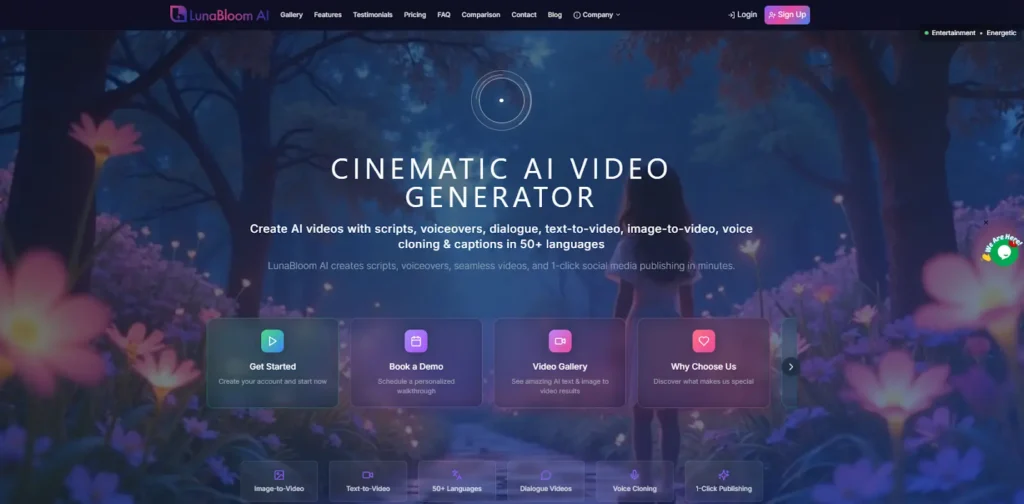
LunabloomAI is quick video creation tool a designed for teams that need to produce video content quickly and efficiently. Powered by AI, LunabloomAI streamlines video creation, enabling your team to deliver high-quality, branded content in minutes.
Key Features Of LunabloomAI
- Image-to-Video: Transform static images into dynamic, engaging videos in just a few clicks. Whether you’re showcasing a product or telling a brand story, this tool’s image-to-video feature brings your visuals to life. Perfect for social media, ads, or explainer videos.
- Text-to-Video: No script? No problem. With the text-to-video feature, you can turn any written content into engaging videos within minutes. Simply input your text, and let the AI handle the video creation, adding animations ready to be shared.
- 50+ Languages: Global reach is at your fingertips. It supports over 50 languages, ensuring your videos are accessible to audiences worldwide. Whether you are expanding into new markets or targeting multilingual regions, the platform ensures your content speaks the language of your audience, broadening your brand’s impact.
- Dialogue Videos: Engage your audience with dialogue-driven videos. Need to create a conversation between characters or presenters? This tool makes it easy to generate realistic dialogue videos, ideal for tutorials, product demos, and even customer service scenarios, saving you hours of editing.
- Voice Cloning: Make your videos even more personal with voice cloning. Upload a sample of your voice, and it will recreate it for use in your videos, creating a consistent voice across all your content. Perfect for maintaining brand voice or creating localized content in multiple languages.
- 1-Click Publishing: Publishing video content should be as simple as creating it. With 1-click publishing, you can instantly push your videos to your YouTube Channel. Spend less time on distribution and more time making and engaging with your audience.
- Realistic Custom AI Avatars: Looking to take personalization to the next level? It’s custom AI avatars allow you to create lifelike virtual presenters or characters that can speak your scripts in a natural, engaging manner.
- SEO-Optimized Thumbnails & Metadata: Stand out in search results with SEO-optimized thumbnails and metadata. It automatically generates thumbnails and tags for your videos, making them more discoverable and improving your content’s performance on platforms like YouTube.

What To Look For In The Right Quick Video Creation Platform
When choosing a quick video creation tool, look for the following essential features:
- Drag-and-Drop UI: A simple, intuitive interface lets anyone, regardless of technical skill, start creating videos quickly. This feature is key for non-designers who need to create professional-quality videos without complex software.
- Brand Presets: Pre-set brand templates allow you to maintain consistent branding across all your videos without spending time on design adjustments. This ensures that your content stays on-brand, even when created by different team members.
- Team Access: A platform that enables team access allows multiple people to work on the same project simultaneously. This feature helps improve workflow efficiency and accelerates production timelines.
- AI Automation: AI-powered features such as auto-editing, automated voiceovers, or text-to-video capabilities can drastically reduce production time. This allows your team to focus more on creativity while the AI handles the repetitive, time-consuming tasks.
- Analytics: Built-in tools track your videos’ performance, helping you understand engagement metrics and optimize future content. This data-driven approach ensures you can fine-tune your video strategy for maximum impact.
Final Vector
Don’t Let Slow Video Creation Cost You Speed, Scale, and Success!
You’ve likely recognized some of these signs in your own team. If so, it’s time to act. Adopting quick video creation tools will save you time, reduce costs, and empower your team to scale content creation without sacrificing quality.
Platforms like LunabloomAI are designed to help you modernize your video production, allowing your team to create videos faster, smarter, and more efficiently.
FAQ Section
Q1: What is quick video creation, and how is it different from traditional methods?
Quick video creation involves using tools that automate or simplify video production, enabling you to create professional-quality videos in much less time than traditional methods.
Q2: How can LunabloomAI help my team scale video production?
LunabloomAI uses AI-powered automation to streamline video creation, enabling your team to produce more videos in less time and improving overall efficiency.
Q3: Are AI video generation tools difficult to use for non-designers?
Not at all. LunabloomAI and other quick video creation tools are built for ease of use, allowing even non-designers to create high-quality videos with minimal effort.
Q4: What kind of businesses benefit most from quick video creation tools?
SaaS companies, marketing agencies, HR teams, and e-commerce brands that need to produce video content quickly and at scale will benefit most from quick video creation tools.
Q5: Why choose LunabloomAI over other quick video creation tools?
LunabloomAI combines powerful AI features, such as script-to-video automation and team collaboration, in a simple-to-use platform that ensures high-quality videos without the need for complex editing or external help.