Ever wonder what makes a great tutorial or training video truly effective? It’s not just slick graphics or a charismatic presenter. The secret lies in applying solid instructional design principles. Think of them as the proven blueprint for creating learning experiences that actually work—transforming a simple "information dump" into a memorable, skill-building journey.
This guide will walk you through the core principles, their battle-tested origins, and how you can use them to create content that captivates your audience and delivers real results.
What Are Instructional Design Principles?

Imagine trying to build IKEA furniture without the instructions. You might end up with something that looks like a bookcase, but it's probably wobbly and unreliable. Creating training or marketing content without a plan leads to the same shaky results.
Instructional design principles are your blueprint. They are a set of research-backed guidelines that help you structure content in a way that resonates with the human brain. This isn't about dry academic theory; it's a practical, common-sense approach to ensuring your message not only lands but sticks.
By applying these principles, you build a clear, logical path that guides your audience from confusion to confidence. The result? They gain real skills they can actually use.
Why This Matters for Creators and Marketers
For anyone creating videos—whether for employee training, customer onboarding, or a marketing campaign—this framework is a game-changer. A thoughtfully designed learning experience doesn't just feel better; it delivers measurable results.
Let's look at how these principles can elevate your content.
Core Instructional Design Principles at a Glance
Before we dive deep, here's a quick snapshot of the core ideas that underpin effective learning content. Consider these the foundational pillars of any great training.
| Principle | Core Idea | Impact on Learning |
|---|---|---|
| Active Learning | Learners engage with material through tasks, not just passive viewing. | Boosts retention and critical thinking. |
| Chunking | Break down complex information into small, manageable pieces. | Prevents cognitive overload and makes learning easier. |
| Feedback | Provide clear, timely feedback on performance and understanding. | Corrects misunderstandings and reinforces learning. |
| Relevance | Connect new information to the learner's existing knowledge and real-world needs. | Increases motivation and practical application. |
| Spaced Repetition | Revisit key concepts over time to strengthen long-term memory. | Moves knowledge from short-term to long-term memory. |
When you weave these simple concepts together, they create a powerful learning experience that drives real change. The benefits are immediate and impactful.
- Sky-High Engagement: Content designed to be interactive and interesting keeps people watching.
- Information That Sticks: Presenting information in a brain-friendly way ensures your audience can recall it when needed.
- Real-World Application: The focus shifts from simply knowing things to doing things—building practical skills, not just passing a quiz.
- Consistent Quality: A solid framework allows you to produce high-quality, effective content every single time, without guesswork.
For more hands-on strategies, these 10 K-12 instructional design best practices offer fantastic, actionable tips that apply far beyond the classroom.
Instructional design is the art and science of creating an instructional environment and materials that will bring the learner from the state of not being able to accomplish certain tasks to the state of being able to accomplish those tasks.
This systematic approach separates content that makes a difference from content that just adds to the noise, ensuring every minute you invest pays off.
You can explore more guides and tips on the LunaBloom AI blog. Ultimately, mastering these core ideas is your first step from being a content creator to becoming a truly effective educator.
The Battle-Tested Origins of Modern Learning Design
To truly appreciate why instructional design is so effective, it helps to understand its origins. These aren't just academic theories; they were forged in the high-stakes world of military training during the mid-20th century. This history makes a compelling case for their power today.
Imagine the challenge during World War II: millions of civilians needed to be trained for complex, technical jobs—and fast. The traditional "lecture and hope" method was too slow and unreliable when lives were on the line.
This crisis sparked a revolution in thinking. Psychologists and educators were tasked with creating systematic, results-focused training. They shifted from merely presenting information to designing structured experiences that guaranteed job performance. This was the birth of modern instructional design.
From Boot Camp to Boardroom
The core idea that emerged from this pressure cooker was simple but profound: start with a clear, measurable goal. What does a soldier absolutely need to be able to do after training? Every piece of material, every activity, and every test was then built backward from that specific outcome.
This systematic approach worked wonders. Trainee performance skyrocketed, and training times were slashed. The success was so undeniable that these methods quickly spread from the military to the corporate world.
These foundational strategies—focusing on performance, breaking down tasks, and providing immediate feedback—became the bedrock of effective learning. It proved that a structured approach was a game-changer.
Shaking Up Public Education
The impact didn't stop in the corporate world. By the 1960s and 70s, these same design principles began transforming public schools, proving far more effective than traditional teaching methods.
Groundbreaking studies from that era showed that courses built with these systematic approaches led to a 2:1 increase in student achievement over conventionally designed ones. This wasn't a small improvement; students learned more and showed four times greater gains than control groups.
This shift also led to less variation in student performance and reduced the time needed to finish courses. It was undeniable proof that a well-designed learning path lifts everyone up. You can explore the history of instructional design research to see just how deep these roots go. This isn't just a boring history lesson; it's the origin story of the very strategies that help us create content that actually works.
Modern Tools, Proven Foundation
Today, we have incredible tools like AI video generators that allow us to create content faster than ever. But technology is only as good as the strategy behind it. The core principles developed decades ago—clear objectives, structured content, and putting the learner first—are what make these modern tools so effective.
Understanding this battle-tested history gives us confidence. These methods were created to solve urgent, real-world problems and have been proven to work time and again. When you apply these principles, you’re not just following a trend; you’re tapping into a legacy of success that truly changes how people learn.
Practical Frameworks for Structuring Your Content
Knowing the theory is great, but how do you actually put it into practice? That's where instructional design models come in. Think of them as your roadmap—a repeatable process for creating effective learning content every time.
These aren't stuffy theories. They are practical guides that walk you from a rough idea to a polished product, ensuring you don't skip crucial steps. They provide the scaffolding needed to build a learning experience that genuinely connects with your audience.
The ADDIE Model: Your All-Purpose Blueprint
If there’s one framework you need to know, it’s the ADDIE model. It's the most famous and widely used model for a reason: it's a versatile, five-phase process that provides a clear, step-by-step path for developing any training program. The name is an acronym for its five stages.
- Analysis: This is where you play detective. Dig deep to understand your audience, their existing knowledge, their learning environment, and the ultimate business goal. A solid analysis prevents you from creating a perfect solution for the wrong problem.
- Design: Now you draw up the blueprint. Based on your analysis, you'll map out clear learning objectives, storyboard your content, choose the right teaching strategies, and decide how you’ll measure success.
- Development: Time to bring the plan to life. This is the hands-on part where you write scripts, create visuals, build quizzes, and assemble all the materials you outlined during the design phase.
- Implementation: You’re ready to go live. The training is delivered to your learners, whether through a Learning Management System (LMS), a live workshop, or an online video series.
- Evaluation: The final step is checking your results. Did the training hit the mark? Did it solve the original problem? This feedback is gold for improving future content.
Because it’s so structured, ADDIE is a fantastic, reliable choice for larger projects where you have a clear understanding of the goals from the start.
Merrill’s Principles for Problem-Centered Learning
While ADDIE provides the project plan, Merrill’s Principles of Instruction focus on what makes a single lesson or video module truly effective. The entire model is built around a simple yet powerful idea: people learn best when solving real-world problems.
Instead of a rigid process, Merrill’s model offers five interconnected principles to weave into any learning experience:
- Problem-Centered: Start with a real-world task or problem, not abstract theory.
- Activation: Prompt learners to connect new information to what they already know.
- Demonstration: Don’t just explain the new skill—show it in action.
- Application: Give learners a chance to practice and apply what they've learned with guidance.
- Integration: Help learners reflect on how they'll use this new skill in their own work or life.
This model is a perfect fit for skills-based training where hands-on practice is key. If you're using AI tools, you can explore how to build effective training scenarios with LunaBloom AI by applying these very principles.
Comparing Popular Instructional Design Models
So, how do you choose between a big-picture framework like ADDIE and a lesson-focused model like Merrill's? It depends on what you're building. One gives you the project structure, while the other helps you craft the learning experience itself. Here’s a quick breakdown.
| Aspect | ADDIE Model | Merrill's Principles of Instruction |
|---|---|---|
| Focus | A complete, end-to-end project management process for course development. | A set of principles for designing effective, problem-based learning experiences. |
| Best For | Large, complex projects with well-defined requirements and a clear beginning and end. | Designing individual lessons, modules, or skill-based training videos. |
| Structure | A linear, five-phase process: Analysis, Design, Development, Implementation, Evaluation. | Five interconnected principles: Problem-Centered, Activation, Demonstration, Application, Integration. |
| Use Case | Building a comprehensive employee onboarding program from scratch. | Creating a training video that teaches a salesperson how to handle a specific objection. |
Ultimately, you don't have to pick just one. Many of the best learning experiences use ADDIE as the overall project framework and then apply Merrill's Principles to make each activity as engaging and effective as possible.
Bloom's Taxonomy for Deeper Thinking
Another foundational tool every creator should know is Bloom's Taxonomy. It isn't a process model like ADDIE; instead, it's a hierarchy for classifying learning objectives. It’s a brilliant tool for designing content that pushes learners beyond simple memorization toward higher-level thinking.
Think of it as a six-level pyramid, with each level building on the one before it:
- Remembering: Can the learner recall facts and basic concepts?
- Understanding: Can they explain ideas or concepts in their own words?
- Applying: Can they use the information in a new situation?
- Analyzing: Can they draw connections between different ideas?
- Evaluating: Can they justify a decision or point of view?
- Creating: Can they produce new, original work based on what they've learned?
Using Bloom's Taxonomy helps ensure your content challenges learners appropriately, guiding them from foundational knowledge to sophisticated, real-world application. It’s perfect for writing sharp, effective learning objectives during the Design phase of the ADDIE model.
These frameworks aren't mutually exclusive. The most effective instructional designers often blend elements from different models to fit the specific needs of a project. You might use ADDIE for your overall structure, Merrill's principles to design your core activities, and Bloom's Taxonomy to write your objectives.
Choosing the right framework—or the right combination—comes down to your goals, audience, and topic. By keeping these models in your toolkit, you have proven strategies to design learning experiences that are structured, engaging, and deliver real results. They are the practical application of sound instructional design principles.
Using Gagné’s Nine Events as Your Content Blueprint
Once you have a high-level framework like ADDIE, it’s time to focus on the lesson itself. This is where Gagné’s Nine Events of Instruction becomes one of the most practical tools in your arsenal. Don't see it as a rigid theory, but as a reliable, step-by-step checklist for building a learning experience that flows naturally—because it’s based on how our brains actually learn.
The beauty of this framework is its flexibility. You can map these nine events to a five-minute tutorial, a full-hour webinar, or an entire course. It provides a solid structure to ensure you hit every crucial beat, guiding your audience from initial curiosity to long-term application.
Defining Your Destination First
Before planning a journey, you need to know where you're going. This simple idea, championed by Robert F. Mager in 1962, revolutionized education by emphasizing clear learning objectives as the bedrock of instructional design. Mager’s ideas, which developed alongside Robert Gagné's work in 1965, shifted the focus from vague goals to sharp, measurable outcomes.
This means defining exactly what a learner must be able to do after the training. This philosophy has shaped everything from WWII training manuals to modern digital content, and it’s the non-negotiable first step before applying Gagné’s events.
The ADDIE model puts this principle into practice. Notice how defining objectives is a core part of the Design phase—long before any content is created.
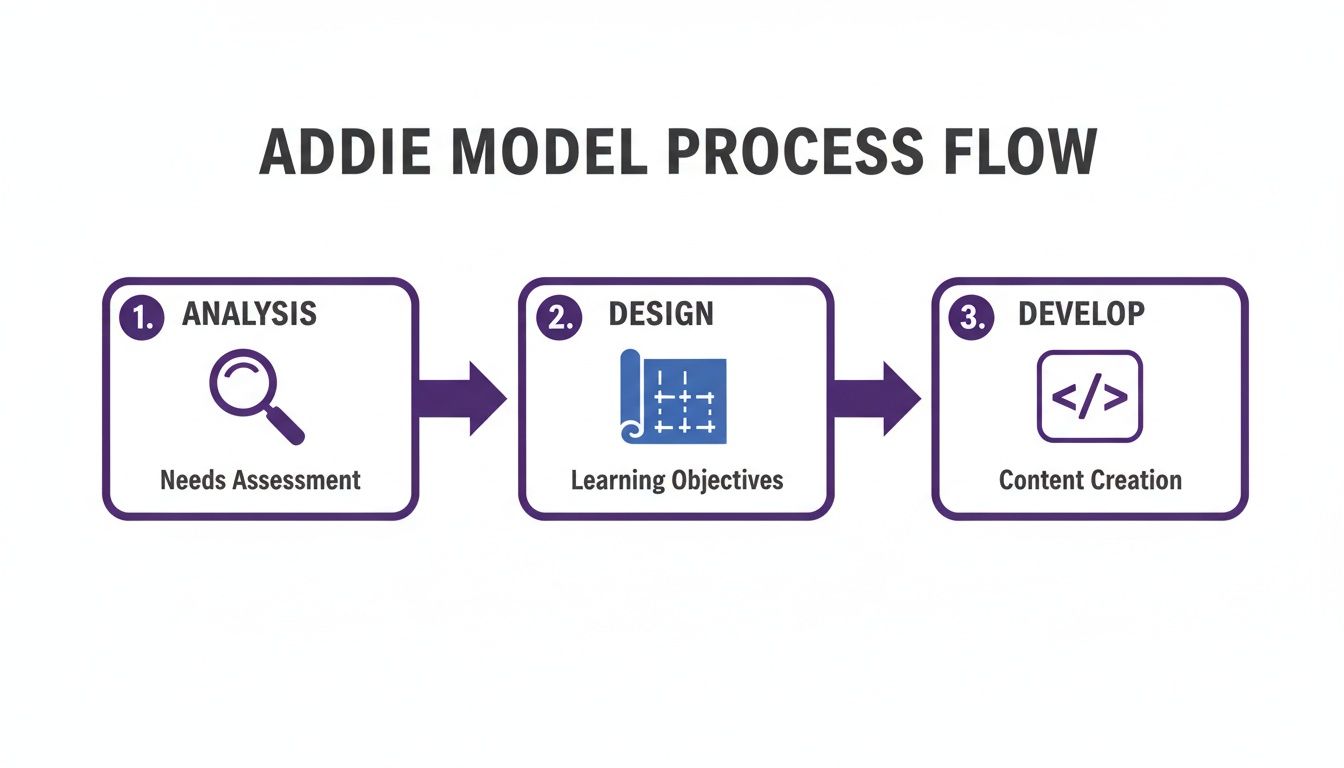
This process ensures every piece of content you create is built with a clear purpose, just as Mager advocated.
The Nine Events in Action
So, what does this look like in the real world? Let's walk through each of the nine events with practical examples for creating training or marketing videos.
Gain Attention: Start with a hook. Use a surprising statistic, a relatable problem, or a thought-provoking question. For a video, this could be a dynamic intro or an AI avatar asking a direct question to instantly grab the viewer.
Inform Learner of Objectives: Be direct. Tell them exactly what they’ll learn. For example: "In the next three minutes, you'll learn how to create your first AI avatar in LunaBloom AI." This sets clear expectations and gives them a reason to stick around.
Stimulate Recall of Prior Learning: Connect the new information to something they already know. An analogy works wonders: "Just like you add an image to a social media post, you'll add an avatar to your video project." This builds a mental bridge, making the new concept feel less intimidating.
Gagné’s model isn't just about presenting information. It’s a carefully crafted sequence that supports the brain's internal learning process. Each step primes the mind for the next, making it easier to absorb and retain knowledge.
Present the Content: This is the core of your lesson. Keep it simple and deliver information in small, digestible chunks. Use clear visuals, on-screen text, and a crisp voiceover to explain the main points.
Provide Learning Guidance: Don't just show what to do; explain why. Use case studies, analogies, or a narrated walkthrough. In a software tutorial, this means sharing your screen and explaining your thought process as you click each button.
Elicit Performance (Practice): Give them a chance to try it. A simple prompt works well: "Okay, now it's your turn. Pause the video and click the 'Generate' button." This active participation is where real learning happens.
Provide Feedback: Let them know if they're on the right track. In a video, you can simulate this by showing the correct outcome on screen. "If you did it right, your screen should now look like this." This confirms understanding and builds confidence.
Assess Performance: Check if they got it. This doesn't need to be a formal test. It could be a simple knowledge-check question in the video or a quick quiz at the end. The goal is to confirm your learning objectives were met.
Enhance Retention and Transfer: Help them remember and apply the skill later. Wrap up with a quick summary, offer a downloadable cheat sheet, or give them a challenge to apply the new skill to one of their own projects.
If you need help structuring your next project, a dedicated lesson plan generator can help you outline everything systematically.
By following this blueprint, you transform a simple presentation into an effective learning experience. Ready to see it in action? Try building your first AI-driven video with the LunaBloom AI starter app.
Putting Instructional Design into Practice with AI Video
Theory is great, but the magic happens when you apply it. This is where we stop talking about abstract principles and start building high-impact learning experiences with modern tools. AI-powered video, in particular, is a massive accelerator, letting you put these proven strategies to work faster and more effectively than ever.
Let’s get practical. Imagine you need an onboarding video for new sales reps to teach them your company's CRM software. Instead of a dry, hour-long screen recording, you could build a dynamic and genuinely useful learning module using an AI video tool like LunaBloom AI.

Applying the ADDIE Model with AI Speed
The ADDIE model provides the perfect roadmap. Here’s how you can supercharge each step with an AI video platform.
Analysis: Who is our audience? New sales hires. They're tech-savvy, short on time, and need to get up to speed fast. Their goal isn't to become CRM experts; it's to hit their sales targets. We're solving the frustrating learning curve that comes with any new tool.
Design: Time to storyboard. We’ll create three bite-sized, five-minute micro-learning modules: "Setting Up Your Dashboard," "Logging Your First Call," and "Creating a Sales Report." For the first module, our objective is crystal clear: "By the end of this video, you will be able to customize your CRM dashboard with three key performance indicators."
Development: This is where things get exciting. Traditionally the biggest time-sink, development becomes a breeze with AI. Write a script for each module and use a tool like LunaBloom AI to instantly generate a professional video with an AI avatar. No cameras, no mics, no actors needed. Need it in multiple languages for your global team? It only takes a few clicks.
This completely changes the game, dramatically cutting development time so you can focus on instructional quality.
The real win with AI isn't just speed—it's the freedom to iterate. If feedback shows a section is confusing, you can tweak the script and regenerate a better video in minutes, not days.
Weaving Gagné's Nine Events into Your Video
Now, let's zoom in on one of those five-minute videos—"Logging Your First Call"—and structure it using Gagné’s Nine Events. This is what turns a simple demo into a true learning experience.
Here’s the step-by-step breakdown:
Gain Attention: Kick off with a hook. Your AI avatar could open with: "Did you know that sales reps who consistently log their calls close 32% more deals? Let’s make sure you’re one of them."
Inform Learner of Objectives: Be direct. The avatar gets straight to the point: "In the next three minutes, you'll learn exactly how to log a customer call, tag it correctly, and set a follow-up task."
Stimulate Recall: Connect to existing knowledge. "Think of this like creating a social media post. You're just adding a note, tagging topics, and setting a reminder."
Present the Content: Use a clean screen recording of the CRM. The AI avatar's voice guides the viewer through each click, while on-screen text highlights key buttons and fields.
Provide Guidance: Offer a pro-tip. "Here’s a best practice from our top performers: use the 'Urgent' tag for any follow-up that needs to happen within 24 hours. It’s a simple way to prioritize."
Elicit Performance: It's "your turn." The video pauses with a prompt: "Okay, pause this video and try logging a test call in your own CRM training environment."
Provide Feedback: After resuming, the video shows a correctly logged call. The avatar confirms, "Great! Your screen should now look like this, with the call logged and a new task in your calendar."
Assess Performance: A quick knowledge check solidifies the learning. A multiple-choice question pops up: "Which tag should you use for a follow-up required within 24 hours? A) Important, B) Urgent, C) General."
Enhance Retention: End with a call to action. The avatar summarizes the steps and issues a challenge: "Your goal for today: log five real customer calls using this exact method. Repetition builds the habit."
This structured flow, built on proven instructional design principles, turns a simple how-to video into powerful micro-learning. By blending timeless learning theories with modern tech like LunaBloom AI, you can create training that’s both easy to produce and incredibly effective.
Your Next Steps in Creating Effective Content
Let's pull it all together. The key takeaway is that instructional design principles aren't just for academics; they are practical, powerful tools for anyone creating content that needs to teach, train, or persuade. The core ideas are simple: know your audience, define clear goals, structure your content with a logical flow, and always focus on engagement.
You now have the blueprint to transform a simple presentation into an experience that sticks. For your next project, try applying just one of these frameworks. You might be surprised at the difference it makes.
When you're ready to bring that thoughtfully designed content to life, a tool like LunaBloom AI is the perfect next step. It lets you combine proven learning strategies with smart AI to create professional videos at a speed and scale that would be impossible otherwise. You'll produce videos that don't just grab attention—they build real skills.
Ready to see how it all works in practice? Our team is here to help you get started. Feel free to contact LunaBloom AI, and we can show you how to put these strategies into action.
Frequently Asked Questions
Jumping into instructional design can feel a bit overwhelming, but it doesn't have to be. Here are answers to a few common questions that pop up when you start applying these ideas to your own content.
What Is the Most Important Principle for Beginners?
If you’re just starting out, focus on one thing: clear learning objectives. This is the North Star for your entire project. Before you write a single word of your script, you must know exactly what you want your audience to be able to do after watching.
This single idea, championed by pioneers like Robert Mager, gives your work purpose. It helps you cut irrelevant information and makes every other decision—from which activities to include to how you'll check for understanding—so much easier.
It's like planning a road trip; you need to know the destination before you map the route. An objective like, "The viewer will be able to create an AI avatar in under three minutes," gives you a clear target. A vague goal like, "Teach people about our software," gets you lost.
How Can I Use Instructional Design if I'm Not a Teacher?
You absolutely can, and you're probably already doing it without realizing it. Instructional design isn't about classrooms; it's about solving problems by guiding someone from "I don't know how" to "Aha, I get it."
Whether you're creating a marketing video, a software tutorial, or a customer onboarding guide, you're doing exactly that.
Just think like a problem-solver:
- What problem is my audience facing? (e.g., "They don't know how to use our new feature.")
- How does my video provide the solution? (e.g., "This video will show them the three simple steps to get started.")
Framing your content as a clear path from A to B is the heart of instructional design, no matter your field.
Do AI Tools Replace the Need for an Instructional Designer?
No, they empower them. Think of AI tools as an incredibly fast and talented production assistant, not a replacement for strategy. An AI video generator can crush the "Development" and "Implementation" phases of a model like ADDIE, turning your script into a polished video in minutes.
However, the "Analysis" and "Design" phases—understanding audience needs, setting critical learning objectives, and structuring the entire journey—are creative, strategic tasks that still require a human touch. AI can’t do that for you.
The magic happens when you pair a smart, human-led strategy with AI-powered execution. AI handles the heavy lifting, freeing you up to focus on what truly matters: designing an experience that connects and teaches effectively.
Ready to put all this into practice? With LunaBloom AI, you can take your carefully designed script and turn it into a professional video with an engaging AI avatar in just a few minutes. Stop wrestling with complicated editing software and start creating content that makes a real impact. Create your first AI video for free today!