If you’ve ever tried creating a training video with AI, you know the old way was a headache. You needed expensive gear, complicated software, and a whole lot of time. But now, the process is way simpler: figure out your goal, write a clear message, and let an AI tool handle the first draft.
This new approach means anyone can produce professional-looking training content without the typical production nightmares.
The New Blueprint for Creating a Training Video
Forget about blocking off a week for shooting and editing or begging for a bigger budget. Making a training video today is less about being a technical wizard and more about smart planning and using the right tools. The rise of AI-powered platforms has completely changed the game, allowing teams to create engaging, consistent training materials whenever they need them.
And the need is huge. The corporate training market hit an estimated USD 370 billion in 2023 and is expected to climb to USD 487 billion by 2032. This isn’t just a random spike; it’s driven by the urgent need to get employees up to speed on things like AI and data analytics. Fast, effective video creation is no longer a “nice-to-have”—it’s a core business need.
Why AI Changes Everything
Using an AI tool like LunaBloom AI flips the entire video creation workflow on its head. Instead of juggling cameras, actors, and editors, you get to focus on what actually matters: the content. The AI does all the heavy lifting—narration, finding visuals, and putting together a polished first cut from your script.
To see how much things have changed, just look at the difference between the old way and the new AI-powered approach.
AI-Powered vs Traditional Video Creation Workflow
| Phase | Traditional Method | AI-Powered Method (LunaBloom) |
|---|---|---|
| Pre-Production | Lengthy planning, storyboarding, scriptwriting, casting, location scouting. | Define goals, write the script. |
| Production | Filming with cameras, lighting, sound equipment, actors, and crew. | Input script into the AI platform. |
| Post-Production | Manual editing, color grading, sound mixing, adding graphics and effects. | AI generates video, adds voiceover, selects visuals, and applies branding automatically. |
| Revisions | Time-consuming feedback loops and re-edits. | Quick text-based edits to the script for instant video updates. |
As you can see, the AI method cuts out the most time-consuming and expensive parts of the process, letting you get to a finished product in a fraction of the time.
This modern blueprint is built on a solid strategy. Before you even think about writing a script, you need to nail down the fundamentals.
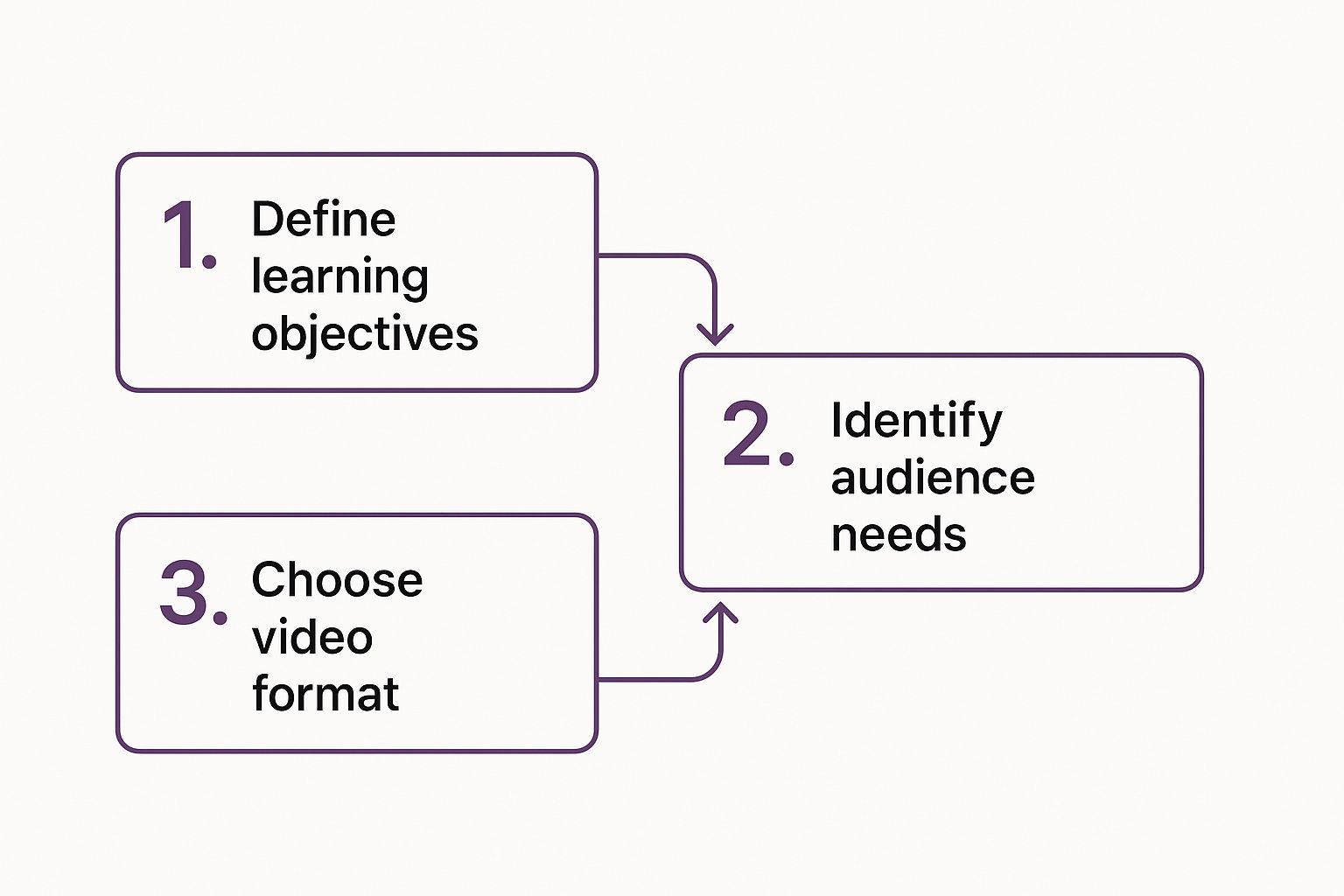
This flow shows that the tech is just a tool; the strategy comes first. Knowing your objectives and what your audience needs are the absolute must-dos for creating a training video that actually works.
The real magic here isn’t just the speed—it’s the ability to scale. You can create a dozen different microlearning videos for specific teams in the time it used to take to produce one generic training module.
This guide will walk you through this entire modern process, from planning and scripting to publishing your final video, showing you how to get high-impact results without the old-school headaches.
Defining Your Training Video’s Purpose and Audience

Before you even think about scripting or firing up a video tool, you need a plan. Trust me, jumping straight in is a recipe for disaster. It’s like trying to build a house without a blueprint—you’ll waste a ton of time and end up with something that doesn’t work.
The best training videos start by answering two simple but critical questions: What is this video supposed to accomplish, and who are we making it for? Nailing these down first saves a ton of headaches later. Without a clear goal, you just get a jumble of information that doesn’t actually teach anyone anything.
Pinpoint Your Core Learning Objective
Your first job is to define a single, razor-sharp learning objective. Don’t go broad with something like “CRM Training.” That’s way too vague.
Get specific. A much stronger objective sounds like this: “After watching this video, a new sales rep will be able to create a client record, log a call, and schedule a follow-up task in the CRM.” See the difference? That level of clarity will guide every single decision you make from here on out.
Think about the outcome you want. What specific skill should the viewer be able to perform the second the video ends? This keeps your content tight, focused, and effective—which is exactly what you need to keep learners engaged.
By focusing on one primary learning outcome, you avoid the classic mistake of cramming too much into a single video. This makes your training easier to digest and far more likely to stick.
Understand Your Audience’s Needs
Once your objective is locked in, it’s time to think about who you’re talking to. A video for fresh-faced new hires will be worlds apart from one aimed at seasoned pros learning an advanced feature. If you get this wrong, people will either tune out from boredom or get lost in confusion.
Dig into these key audience factors:
- Existing Knowledge: Are they total beginners or experts in the field? A video for rookies might need to explain basic jargon, while one for experts can jump right into the complicated stuff.
- Their “Why”: Why do they even need this training? Knowing their motivation helps you frame the content in a way that clicks. A sales team, for instance, just wants to know how a new feature will help them close deals faster.
- Job Role: How does this training fit into their day-to-day work? Customizing your examples to their specific roles makes the content instantly more relevant. A support agent has different needs than a marketing manager.
Let’s say you’re creating a video about new expense reporting software. For the general staff, you’d focus on the basics: submitting a report and checking its status. Easy enough.
But for the finance team? They need the advanced course. You’d cover approving reports, running analytics, and troubleshooting errors. This targeted approach ensures your video delivers real value to the right people without wasting anyone’s time.
Crafting Your Script to Guide the AI

Alright, you’ve got your objective nailed down and you know exactly who you’re talking to. Now it’s time to move from the big picture to the nuts and bolts. This is where you create the single most important asset for LunaBloom AI: a killer script.
Think of your script as the blueprint the AI uses to construct your video. The clearer and more detailed your instructions, the better the final video will be. It’s that simple. A fantastic AI video always starts with a script that sounds like it was written by a human, for a human.
Your goal here is to write for the ear, not the eye. Keep your language conversational and natural. Ditch the corporate jargon and stiff, complicated sentences. That stuff not only trips up the AI’s text-to-speech engine but, more importantly, it bores your audience to tears.
The training software market is booming, largely because remote and hybrid teams need learning solutions they can access anytime. AI is a huge part of this shift, making personalized, on-demand training a reality. In fact, a whopping 68% of marketers who haven’t used video for training are planning to jump in by 2025. This shows just how critical it is to get good at creating effective content, fast. You can dig deeper into the training software market trends here.
From Outline to Detailed Script
That outline you created earlier? It’s the skeleton. Now it’s time to add the muscle. This means fleshing out every point with full sentences and detailed directions. And I’m not just talking about what the narrator says—you’re also directing the entire visual experience.
For an AI tool like LunaBloom, a powerful script needs two key things for every scene:
- Narration: This is the word-for-word script for your AI avatar. Write it out exactly as you want it spoken.
- Visual Cues: These are quick, simple notes describing what should be on the screen. Think things like
[Show a close-up of the 'Export' button]or[Animated text: 'Key Takeaway'].
This two-column approach is your secret weapon. It ensures your visuals and voiceover are perfectly in sync, which creates a seamless learning experience that’s actually easy to follow.
Pro Tip: Before you even think about uploading your script, read it out loud. Seriously. It’s the oldest trick in the book for a reason. You’ll immediately catch clunky phrases, run-on sentences, and anything that just sounds… weird. If it feels awkward for you to say, it will definitely sound awkward in the final video.
Structuring for Conversational Flow
Want your script to sound authentic? Write like people talk. Short sentences are your best friend. Simple words are even better. They’re easier for your audience to digest and help the AI deliver a much more natural, lifelike narration.
Here’s a dead-simple structure you can use for each section to keep things engaging:
- Hook: Kick things off with a question or a problem your audience can relate to. Something like, “Ever get stuck trying to find a client’s purchase history?”
- Explain: This is where you deliver the goods. Clearly explain the concept or walk through the step.
- Reinforce: Wrap it up with a quick summary of the main point. For example, “And just like that, you can pull up a complete client history in less than 30 seconds.”
This simple “Hook, Explain, Reinforce” pattern keeps the energy up and helps your key messages stick. By building your script with these conversational bits and clear visual notes, you’re not just writing a document—you’re directing your AI partner. Getting this groundwork right saves you a ton of editing headaches later and helps LunaBloom knock out a polished, professional video on the very first try.
Refining Your Video with Branding and Visuals

The first draft from LunaBloom AI is your raw material—a solid foundation ready for your finishing touches. This is where the real magic happens. It’s time to transform a good AI-generated video into a great, on-brand training tool that truly speaks your company’s language.
Think of it this way: the AI has built the house, and now you get to paint the walls, hang the art, and arrange the furniture. You’re infusing the video with personality and visual context, making sure it not only teaches but also reinforces your brand’s unique look and feel.
Infusing Your Brand Identity
Brand consistency isn’t just for your marketing team. It’s absolutely critical for internal communications, too. When your training videos look and feel like they belong to your company, they instantly carry more weight and authority. This small detail builds trust and helps employees connect with the material on a deeper level.
Inside LunaBloom, you can layer in your brand’s core components without any fuss. A great place to start is by uploading your company logo and setting it as a watermark in the corner of the screen. Next, tweak the color palette for on-screen text and graphics to match your official brand colors. It’s a subtle but powerful step that makes the video instantly recognizable.
Your goal is to create a seamless experience. An employee shouldn’t feel a disconnect between a training video and other company resources. Consistent branding makes everything feel part of a cohesive, professional ecosystem.
Elevating Content with Supporting Visuals
Let’s be honest, narration alone can only do so much. To make complex information truly stick, you need to show, not just tell. This is non-negotiable when you’re creating a training video for a new software or a hands-on process. Visuals provide the essential context that turns abstract instructions into concrete, understandable steps.
LunaBloom makes it incredibly simple to mix in different types of media to back up your script. You can upload screen recordings to demonstrate a software workflow, add b-roll footage of a physical task, or insert diagrams to break down a complex concept. These elements cut through the monotony of a single talking head or a static screen, which is proven to keep viewers hooked.
For example, if you’re training new hires on your CRM, don’t just describe how to create a new lead. Upload a crisp screen recording that walks them through every single click. This leaves zero room for misinterpretation and will dramatically speed up their learning curve.
Fine-Tuning Pacing and Emphasis
The final layer of polish is all about getting the video’s rhythm and flow just right. The AI does an excellent job with the initial pacing, but you know your content—and your audience—best. You might notice that a particular segment feels a bit rushed, or that a critical point needs a little more time to sink in.
Jump into LunaBloom’s timeline editor to make these subtle adjustments. You can easily extend the duration of a specific slide to give viewers more time to absorb a complex chart. Or, you can add animated text callouts to draw the eye to a key takeaway. These small tweaks can have a massive impact on how well your team understands and remembers the information.
To help you get started, here’s a quick look at the types of visual elements you can add in LunaBloom and where they shine the brightest.
Visual Elements to Enhance Training Videos
| Visual Element | Best Used For | Example Scenario |
|---|---|---|
| Screen Recordings | Demonstrating software or digital processes. | Showing an employee how to submit an expense report in your company’s portal. |
| B-Roll Footage | Illustrating physical tasks or real-world concepts. | Displaying the correct way to assemble a product on the factory floor. |
| Animated Text | Highlighting key statistics or important takeaways. | Making a critical safety number pop on screen during a compliance training. |
| Custom Backgrounds | Maintaining a professional, branded look. | Replacing the default background with a subtle, branded graphic or office image. |
By layering in your branding, adding relevant visuals, and fine-tuning the pacing, you take the AI’s draft and elevate it into a polished, professional, and seriously effective training asset. This level of customization ensures your video not only educates but also truly resonates with your team.
Distributing and Managing Your Training Content
Making a great training video is a huge win, but let’s be real—the job isn’t done until your team actually sees it. A polished video collecting digital dust on your hard drive has zero impact. Now comes the final, crucial phase: getting your content in front of the right people and keeping it organized for the long haul.
Your first move is exporting the video from LunaBloom AI. Before you do, think about where it’s going to live. If you’re uploading it to a company intranet or a Learning Management System (LMS), a standard MP4 file is almost always your best bet. These platforms are built to host video files directly, so you can count on smooth playback for your employees.
Choosing the Right Distribution Platform
The platform you pick will completely shape how your team engages with the training. Each option has its own strengths, so you need to match the platform to your goals.
- Learning Management System (LMS): This is the go-to for formal training where you need to track who’s completed what, assign quizzes, and issue certifications. It creates a structured, measurable learning path.
- Company Intranet (e.g., SharePoint): A fantastic choice for housing “how-to” guides and process docs that employees need to find on the fly. It keeps all your knowledge in one central, searchable spot.
- Private Video Channels (e.g., Vimeo, YouTube): These offer top-notch accessibility and playback quality, which is especially handy for a remote workforce. You can lock down the privacy settings to keep your content strictly internal.
The move toward quick, accessible learning is impossible to ignore. Microlearning is king here, using short video clips to boost engagement by up to 80% and knowledge retention by a staggering 70%. This isn’t just a fad; video is expected to make up an estimated 82% of all internet traffic by 2025, and people are just used to learning this way now. You can find more insights on the growth of eLearning content here.
Building a Scalable Video Library
Once you start creating more than a handful of training videos, you’ll quickly learn that organization is non-negotiable. Without a solid system, your library becomes a digital junk drawer where good content goes to die. And trust me, nothing discourages employees faster than not being able to find the resources you worked so hard to create.
The easiest win? Implement a smart naming convention from day one. A simple, consistent format makes everything instantly searchable.
For example, a reliable naming structure might look like this: [Department][Topic][Version]_[Date]. A file would then be named
Sales_CRM-Lead-Creation_V1_2024-10-26.mp4. That kind of clarity is a lifesaver.
Beyond file names, make full use of tags and metadata within your hosting platform. Tagging videos with relevant keywords like “onboarding,” “software,” “CRM,” or “compliance” is a game-changer. It empowers an employee to search a broad topic and instantly pull up every related video, letting them find answers on their own without needing to ask for help.
A well-organized library transforms your training videos from one-off projects into a powerful, lasting knowledge base for the entire company.
Common Questions About AI Video Creation
As you start making training videos with AI, you’re bound to have some questions. It’s totally normal. Getting these sorted out early will help you avoid the usual bumps in the road and make the whole process feel a lot smoother.
Let’s dive into some of the questions we hear all the time.
How Long Should a Training Video Be?
The short answer? Keep it short. For most training topics, the sweet spot is somewhere between 3 to 7 minutes. This microlearning format is perfect for today’s attention spans and actually helps people remember what they learned.
Think about it—your team is much more likely to watch and absorb information when it’s delivered in small, focused pieces.
If you’re explaining a really complex process, resist the urge to create a 30-minute epic. Instead, break that beast down into a series of shorter videos. This makes the content way easier to digest and lets employees jump straight to the specific part they need a refresher on, exactly when they need it.
What Are the Biggest Mistakes to Avoid?
Sure, there are the classic video mistakes like bad audio or cramming way too much info into one session. But when you’re working with AI, there’s a unique pitfall to watch out for.
The single biggest mistake we see is accepting the AI’s first draft as the final cut. While a tool like LunaBloom AI gives you an amazing head start, it doesn’t have the deep, nuanced context of your company culture and processes. That’s where you come in.
Always, always take the time to customize the output. Add your company’s branding, drop in relevant screen recordings to show exactly what you mean, and tweak the AI narration to get the pacing just right. This final polish is what turns a generic AI video into a powerful training tool that actually connects with your team.
Think of the AI’s first draft as a talented apprentice’s work. It’s about 80% of the way there, but it needs your expert eye to guide it to the finish line and ensure it meets your high standards.
How Can I Measure If My Video Is Effective?
To figure out if your video is actually working, you need to look past simple view counts. The real story is in a mix of hard data and real human feedback.
Here’s what to track:
- Quantitative Metrics: Look at the numbers. What are the video completion rates? How are people engaging with it in your learning platform? If you have a quiz at the end, what are the scores looking like?
- Qualitative Feedback: Just ask! Send out a quick, simple survey and get direct feedback. Ask learners if the video was clear, if it was useful, and what they thought of the quality.
Ultimately, the best measure of success is a change in behavior. Are employees performing the task better? Have the number of help desk tickets about that process gone down? When you see that, you know you’ve nailed it.
How Easy Is It to Update an AI-Generated Video?
This is where AI platforms like LunaBloom really change the game and blow traditional video production out of the water. Forget about expensive re-shoots and endless editing cycles.
When a process gets an update or your software’s interface changes, you just open the original project in LunaBloom. From there, you can edit a few lines in the script, swap an old screen recording for a new one, and regenerate the video. That’s it.
This kind of agility means you can actually keep your entire training library up-to-date without a massive headache or budget. As your business changes, your training can change right along with it.
Ready to stop spending weeks on video production and start creating effective training content in minutes? Discover how LunaBloom AI can streamline your entire workflow. Start creating your first training video for free today!