Ever thought about turning a simple text script into a professional-looking video? It used to sound like something out of a sci-fi movie. Today, with tools like LunaBloom AI, you can create polished videos in minutes, complete with realistic presenters and voiceovers. This completely skips the need for expensive cameras, mics, or confusing editing software.
The New Reality of AI Video Creation
Welcome to a new era of making videos. For a long time, creating high-quality content was a huge challenge unless you had a big budget or serious technical skills. But the game has changed. Powerful AI tools are completely transforming how we produce and share visual stories.
What once required a film crew, actors, and days of editing can now be done right from your web browser. This isn’t just a fleeting trend; it’s a massive shift. AI video generators are quickly becoming the go-to creative partner for businesses, marketers, and creators everywhere.
Why Is This Technology Exploding?
Let’s be honest: the demand for video content is through the roof, but traditional production is still a major time and money drain. AI video creation tools were built to solve this exact problem. They automate the most tedious and difficult parts of the process, freeing you up to focus on telling a great story.
This efficiency is driving incredible market growth. The global AI video market, currently valued at USD 3.86 billion, is projected to soar to USD 42.29 billion by 2033. That’s a massive 32.2% compound annual growth rate. According to Grandview Research, this boom is fueled by industries like marketing, entertainment, and corporate training all seeking faster, smarter ways to communicate.
Here’s a quick look at the LunaBloom AI interface. It’s designed to be clean and simple, so you can turn your ideas into video without getting lost in complicated menus.

The main goal is to keep things straightforward, letting you focus on your message instead of wrestling with complex settings.
Empowering All Kinds of Creators
This technology opens the door for everyone, making high-quality video production accessible to almost anyone. Whether you’re a small business owner filming a product demo, a marketer creating a social media campaign, or an educator developing training modules, AI offers a powerful and practical solution.
AI video generation brings several key benefits to the table, making it an attractive alternative to traditional methods. Let’s break down the main advantages.
Key Benefits of Using AI for Video Creation
| Benefit | Description |
|---|---|
| Cost Savings | Dramatically cuts expenses by eliminating the need for actors, equipment rentals, and lengthy post-production. |
| Speed and Efficiency | Generates complete, ready-to-publish videos in a fraction of the time it takes to produce them manually. |
| Scalability | Easily create dozens of video variations for different audiences or A/B testing without starting from scratch each time. |
| Accessibility | No prior video editing experience is required. The user-friendly interfaces guide you through the process. |
Ultimately, these tools make it easier than ever for anyone with an idea to bring it to life visually.
The real magic of using AI to make videos is its power to democratize creation. It levels the playing field, empowering anyone with a good idea to produce content that looks and feels just as professional as something shot in a studio.
Bringing Your First AI Video to Life
Alright, enough with the theory. It’s time to roll up our sleeves and actually create something. This is where the fun begins, and trust me, it’s much less intimidating than you might think. Modern platforms are designed to do all the heavy lifting for you.
When you’re starting out, user-friendly tools like the v30.ai AI video creation platform can be a great place to experiment. For this guide, we’ll walk through the process using LunaBloom AI, which makes the entire workflow surprisingly simple.
Your First Steps Inside LunaBloom
Getting started is as simple as creating an account. Once you log in, you’ll land on a clean, intuitive dashboard—think of it as mission control for your video projects. Before jumping in, take a moment to click around and get a feel for the layout. You’ll see options for creating new videos, managing past projects, and accessing your media library.
The platform is built around one core idea: transforming your text into a video. You don’t need to mess with complex timelines, keyframes, or audio syncing. Your main job is to provide the script, and the AI handles the rest. This is your direct answer to how to make videos with AI without the usual headaches.
From Simple Script to First Draft
Let’s walk through a quick, real-world example. Imagine you’re creating a short promotional video for a new digital marketing course. The goal is a punchy clip for social media that grabs attention and directs people to a sign-up page.
Your script could be as simple as this:
“Tired of marketing strategies that don’t deliver? Our new Digital Marketing Masterclass shows you the exact tactics top brands use to drive real growth. Stop guessing and start converting. Click the link to enroll today!”
To begin, just navigate to the “Create Video” section. You’ll find a text box waiting for your script—simply copy and paste it in. This is the foundation where you tell the AI exactly what your video is about.
Once your script is entered, LunaBloom’s AI gets to work. It analyzes the text to understand the context, keywords, and overall message. From there, it automatically suggests scenes, pulls relevant stock footage or images from its library, and generates a rough draft of your video.
Here’s a look at what happens behind the scenes:
- Scene Generation: The AI intelligently breaks your script into logical chunks, creating a separate scene for each sentence or phrase.
- Media Selection: It then suggests visuals that match the keywords in your text. For “marketing strategies,” you might see clips of people collaborating. For “real growth,” it might pull up animated charts.
- Initial Timing: The platform even times each scene to match the natural pacing of a voiceover.
Within minutes, you’ll have a fully assembled video draft ready for customization. This automated first step is what makes AI video generation so powerful—it turns your words into a visual story almost instantly. You can check out all the features and get started over on the official LunaBloom AI website.
Designing Your Perfect AI Presenter
A great video often hinges on the person on screen, but let’s be realistic—not everyone is comfortable in front of a camera. This is where LunaBloom AI truly shines. Its secret weapon is the ability to create and customize AI avatars and voices, giving your content a human touch without needing an actual person.
Getting this part right is the key to making AI videos that genuinely connect with your audience.

It all starts with choosing from a library of pre-built AI avatars. Think of them as your digital talent, ready to deliver any script you provide. The avatar you select will set the entire tone for your video.
Choosing an Avatar That Aligns with Your Brand
Your AI presenter is the face of your video, so this choice is important. If you’re creating a corporate training module, a more formal, professional-looking avatar is likely the best choice.
But what if you’re making a dynamic social media ad for a new gadget? In that case, you’d want an avatar with a more energetic and approachable vibe.
Here’s what to consider when browsing the options:
- Audience Connection: Who are you trying to reach? Pick an avatar that your target audience will find relatable and trustworthy.
- Brand Personality: Is your brand modern and playful, or more buttoned-up and serious? Your avatar should feel like a natural extension of that identity.
- Video Context: The “why” behind your video should guide the presenter’s style. An explainer video needs someone who appears knowledgeable and speaks clearly.
This ability to create realistic, automated content is why the industry is booming. The AI video generator market is expected to jump from USD 534.4 million to a massive USD 2,562.9 million by 2032. Why? Because these tools handle work that once required expensive studios and production crews. You can explore more AI video generator statistics to see the full picture.
Mastering the AI Voice for Authentic Delivery
Once you’ve selected your presenter, it’s time to give them a voice. LunaBloom’s text-to-speech engine is where you can really dial in the perfect delivery. This is about more than just having text read aloud; it’s about crafting a performance.
You can choose from dozens of languages and accents, which is a game-changer for reaching a global audience. The real magic, however, lies in adjusting the emotional tone. You can make the voice sound genuinely excited for a product launch or calm and reassuring for a step-by-step tutorial.
The secret to a believable AI voiceover is in the details. Use punctuation like commas and periods in your script to create natural-sounding pauses. Don’t be afraid to test a few different emotional tones to see what really clicks with your message.
For example, a corporate video might work best with a steady, confident voice that has a slightly slower pace to project authority. In contrast, a promo clip for a travel blog should probably use a warmer, more upbeat tone to get viewers excited.
Fine-tuning these small details—pacing, pronunciation, and emotion—is what transforms a robotic narration into something truly compelling. This level of control makes all the difference when creating AI videos that people actually want to watch.
Adding Professional Polish to Your Video
You’ve got the script and your AI presenter is ready. That’s a solid foundation, but now it’s time for the details that elevate a video from “good enough” to truly professional. These finishing touches make your content more engaging, accessible, and memorable.
First, let’s address the visual environment. A plain background can feel flat and uninspired. Thankfully, LunaBloom makes it easy to add layers that support your message. You can upload your own branded images, choose from a massive stock library, or set a background color that matches your company’s style. This is also the perfect opportunity to add your logo to keep everything on-brand.
Adding Visuals and Branding
Think of these extra visuals as the supporting cast for your AI presenter. They add context and give the viewer’s eye something interesting to focus on. For instance, if you’re talking about financial growth, a subtle background image of an upward-trending chart can reinforce the point without being distracting.
Mapping out these final steps can help it become a simple, repeatable part of your workflow.
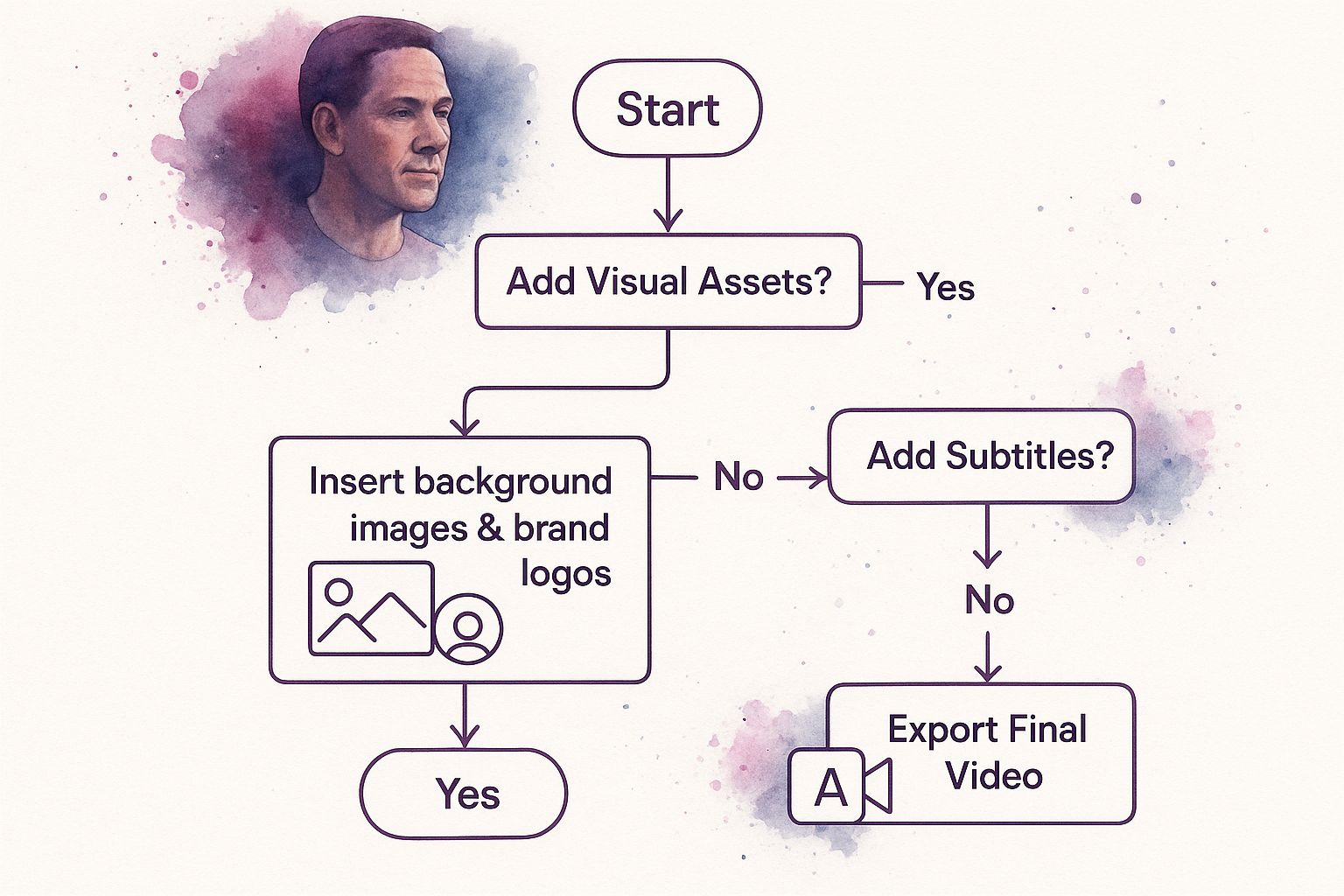
As you can see, the process is straightforward. Sort out your visual assets, then move on to accessibility features like subtitles before you hit the export button.
Boosting Accessibility with Subtitles
Next, and this is a big one, let’s talk about subtitles. They are no longer an optional extra; they’re essential. Many people scroll through social media with the sound off, and without subtitles, your message is completely lost. LunaBloom’s automatic subtitle generator is a huge time-saver here, transcribing your script and syncing it with impressive accuracy.
If you’re curious about the technology behind this, it’s worth checking out resources on Building Fastest AI Audio Transcription. It provides a fascinating look into how these systems achieve such seamless and precise results.
A polished video is a branded video. Always customize your subtitles with your brand’s font and color palette. This small detail creates a cohesive and professional look that reinforces your brand identity.
Once the subtitles are generated, you have full control over their appearance. You can change the font, adjust the color, and reposition them to ensure they are easy to read and perfectly match your branding. This level of customization is what makes modern tools so powerful. It’s no surprise the video creation market is projected to jump from USD 653.18 billion to USD 711.32 billion in just a single year—the demand for high-quality, accessible video is massive.
By pairing strong visuals with clear, branded subtitles, you create a final product that not only looks professional but also connects with the widest possible audience.
Insider Tips for Standout AI Videos
Anyone can click “generate” and make an AI video. But creating one that truly grabs—and holds—an audience’s attention? That takes a little more strategy. Moving beyond the default settings is what separates generic, forgettable content from videos that get results.
Let’s dive into a few insider tips that will help you create AI videos that don’t just look cool but actually perform.
Writing Scripts for an AI Voice
Everything starts with your script. Remember, an AI voice reads text literally, so you have to write for the ear, not the eye. Ditch complex sentences and corporate jargon. You want clear, conversational language that sounds natural when spoken.
Here’s a pro tip: Read your script out loud before you even touch the generator. Does it sound like something a real person would say? If you find yourself stumbling over words, your AI avatar will have the same problem. Shorten your sentences and break up longer thoughts.
The best scripts for AI narration have a natural rhythm, which you can control with punctuation. Think of commas as slight pauses and periods as full stops. Using them strategically injects life into the delivery and helps you avoid that flat, robotic drone. You can even use phonetic spellings to coach the AI on tricky words.
Avoiding Common Creative Pitfalls
It’s tempting to go wild with all the features, but that’s a quick path to a messy video. One of the most common mistakes is a clash between the avatar and the background. If your presenter is in a business suit, a busy coffee shop background feels out of place. Consistency is key to a believable video.
Another trap is video length. Just because you can make a 10-minute video doesn’t mean you should. Attention spans are short. Keep your message tight and impactful. For most marketing content, anything under two minutes is the sweet spot.
Your goal is to make smart creative choices that serve your message. Sometimes, a simple text overlay with a dynamic background is far more effective than a full AI avatar, especially for quick, data-driven updates or announcements.
Choosing the Right Presentation Style
Before you start, decide on the best format for your content. An AI avatar is fantastic for building a personal connection, but for some goals, other formats are simply better. Think about what you want your audience to feel or do after watching.
This quick cheat sheet can help you decide which style is the right tool for the job.
| Style | Best For | When to Avoid |
|---|---|---|
| Full AI Avatar | Explainer videos, training modules, and content where a human-like presenter adds trust and personality. | Quick announcements or data-heavy presentations where the avatar could be a distraction. |
| Voiceover with Stock Footage | Storytelling, promotional ads, and content that needs to evoke a strong emotional response through visuals. | Highly technical tutorials where seeing a presenter’s face can help with clarity and engagement. |
| Text Overlay & Animation | Social media clips, statistical highlights, and short, punchy messages designed for silent viewing. | In-depth topics that require nuanced explanation and a more personal, conversational tone. |
Ultimately, choosing the right style comes down to understanding your message and your audience. When you master your script, avoid common design traps, and choose your presentation style strategically, you’ll elevate your AI video creation from a simple task to a powerful communication tool.
Common Questions About Making Videos with AI
Jumping into new technology always comes with questions. When it comes to figuring out how to make videos with AI, a few questions tend to pop up again and again.
Let’s clear the air. Here are straightforward answers to help you get started with LunaBloom AI and feel confident from day one.
How Realistic Are the AI Avatars and Voices?
This is usually the first question people ask. The short answer? They’re surprisingly realistic. LunaBloom’s avatars have moved far beyond the stiff, robotic figures of the past. They now feature natural facial expressions and movements that look genuinely human.
The text-to-speech engine is equally impressive. You get a huge library of voices with different accents, ages, and emotional tones, allowing you to find the perfect match for your message.
Pro Tip: For the best results, write your script as if you’re talking to a person. Using commas and periods correctly helps the AI understand the natural pauses and intonation of human speech, making the final delivery sound incredibly lifelike.
Can I Use My Own Branding and Media in the Videos?
Absolutely. In fact, LunaBloom is designed for it. The goal is to ensure your videos look like your videos, not like they came from a generic template. Customization is a core feature.
You have the freedom to:
- Upload your logo and place it wherever you want.
- Set your exact brand colors for text and backgrounds.
- Import your own images and video clips to use as backdrops.
This is crucial for creating consistent marketing assets or internal training that reinforces your brand identity.
What Is the Best Length for an AI Generated Video?
There’s no single magic number here—the perfect video length depends on where you plan to share it and what you want to achieve. However, some solid rules of thumb have emerged.
Here are a few guidelines that work well:
- Social Media (TikTok, Instagram Reels, Shorts): Keep it short and sweet. Aim for under 60 seconds to grab attention quickly.
- Explainer or Tutorial Videos: When you need to provide detail, 2-5 minutes is the sweet spot. It’s long enough to be valuable but not so long that you lose your audience.
- Website or Landing Pages: A quick 30-90 second video is perfect for getting your main point across without overwhelming visitors.
One of the best things about using a tool like LunaBloom is how easily you can repurpose content. You can create one main video and then quickly edit it into smaller versions for different platforms.
Do I Need Any Video Editing Experience?
Not at all. That’s one of the biggest advantages of using an AI video generator. These tools are made for everyone, whether you’re a seasoned video editor or have never touched editing software. LunaBloom features a clean, intuitive interface that guides you through the process.
If you can write a script and click a mouse, you have all the skills you need. The AI handles the heavy lifting—syncing audio, animating scenes, and rendering the file. You get to focus on what matters most: your message.
Ready to stop wondering and start creating? With LunaBloom AI, you have everything you need to turn your ideas into compelling, professional videos in minutes. Explore our features and begin your video creation journey today at https://lunabloomai.com.