82% of people said a brand video had convinced them to buy, and 77% said a video had convinced them to purchase a software application, according to Wyzowl video marketing statistics. That's why choosing the best animated explainer video software isn't mainly about prettier templates. It's about whether you can explain one idea clearly, caption it accurately, localize it without breaking meaning, and publish a version viewers trust.
Most rankings skip those hidden costs. They reward speed and template counts, then leave you to discover caption drift, robotic voice delivery, and product screens that don't match your real interface. I'd reverse the order. Pick the job first, score tools on controls you can test, then look at price per finished minute.
Quick Picks by Use Case and Budget
The right tool depends on the job, not the brand. A 30-second social promo and a multilingual training library place completely different demands on captions, voice, and review, so start by finding your row below.
| Use case | Best-fit tool type | Prioritize | Watch out for |
|---|---|---|---|
| Social ads and short promos | AI text-to-video generator | Fast turnaround and 30-second-to-two-minute length | Generic visuals that ignore brand assets |
| Product demos and feature walkthroughs | AI generator with image-to-video | Accurate product visuals and chapter markers | Product screens that drift from the real interface |
| Training and onboarding | Template editor with narration and captions | Editable captions, timing control and transcripts | Missing speaker labels and no compliance review |
| Multilingual campaigns | Generator with translated captions and voiceovers | Terminology glossary and human approval | Mistranslations and awkward timing |
| Agency or enterprise production | Platform with collaboration, versioning and API access | Repeatable exports and team workflows | Per-seat costs and long render times |
Length should guide your first project too. In Wyzowl's longitudinal video marketing dataset, 71% of respondents considered videos between 30 seconds and two minutes the most effective length. Keep your trial inside that range and you'll test pacing, comprehension, and export quality without building a mini-course.
Say you're making a 90-second onboarding video in four languages. Read the training row and the multilingual row together, because captions, transcripts, terminology, and human approval all matter at once. For paid social, compare your shortlist against practical guidance on video ads with AdManage.ai so format and placement shape the edit from the start. Our business coverage includes marketing and advertising content, product demos and explainers, social campaigns, training and onboarding, avatar videos, multilingual content, customer education, and branded production, which maps neatly to these rows.
Find your row, note its priorities, and carry them into your scoring sheet. Don't let an impressive template gallery override a missing caption editor or weak product accuracy for the job you have.
Eight Criteria That Separate Strong Explainer Tools
A polished preview can hide problems that appear in captions, localization, or the final export. Score each tool against the same script, and record what you can verify in a trial rather than relying on feature claims.
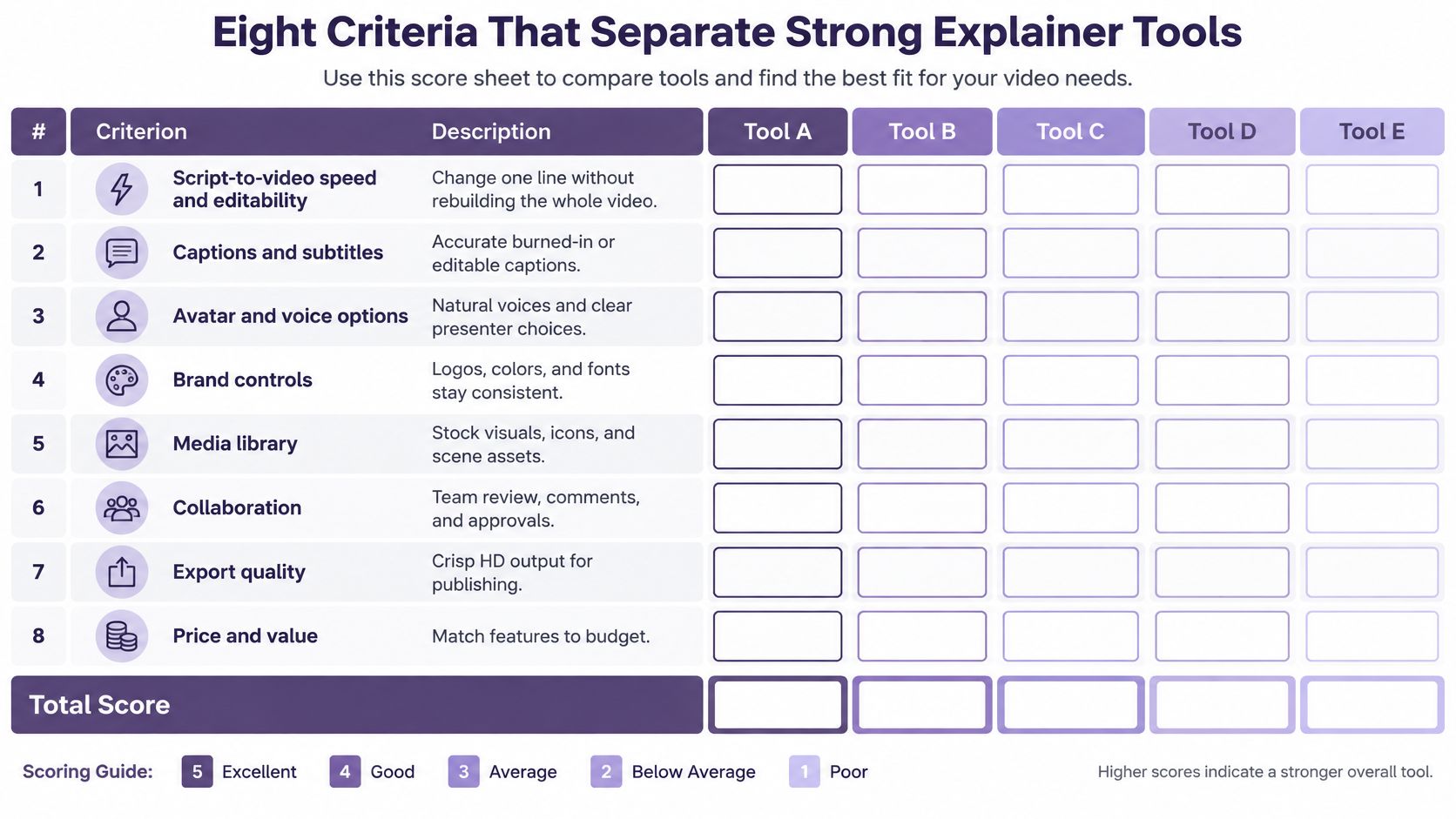
The Eight Checks
- Script-to-video speed and editability: Generate a draft, then change one line of narration. Check whether you can update the scene without rebuilding it, re-timing every visual, or losing brand settings.
- Output resolution: Confirm which resolution your plan exports for the channels you use. Check text legibility on both a phone and a large screen before choosing a tool.
- Caption export: WCAG 2.1 Success Criterion 1.2.2 requires synchronized captions for prerecorded audio in multimedia. Require editable captions with accurate timing, speaker labels, and standard files you can review outside the tool. Check that captions also account for important information conveyed by diagrams or other visuals.
- Chapter support: YouTube's chapter requirements specify that the first timestamp must be 00:00, a video needs at least three timestamps, and each chapter must be at least 10 seconds long. Structure the script so those chapters fit naturally, without padding.
- Voice control: Test product names, acronyms, and numbers for correct pronunciation. Listen for consistent pacing and tone, and check whether voice cloning stays consistent across revisions and languages.
- Brand consistency and disclosure: Add your logo, fonts, colors, and product images, then regenerate a scene. Check that brand assets remain consistent and that you can disclose AI-generated presenters or voices where your policy requires it.
- Preview and export performance: Scrub a busy timeline and note how long the preview takes to load. Export the same project three times, then record the median time and any failed renders, crashes, or stutter.
- Mixing animation with live footage: Place a short customer or employee clip beside animated scenes. Check whether the transition feels coherent and whether the footage supports trust in testimonials, leadership messages, or sensitive explanations.
A large template library cannot compensate for weak captions, inconsistent voice quality, or unreliable exports. Give each criterion a score based on the same project, then compare the trade-offs.
For the caption check, use a real export with multiple speakers, sound, and diagrams. Review the file outside the editor and confirm speaker attribution, synchronization, and access to visual information. A settings screenshot cannot show whether those details survive export.
How Platform Types Compare on Learning Curve and Localization
Four platform types cover most buying decisions, but they ask for very different skills. Read the table as a starting point for a trial, not as a guarantee, because localization and caption quality vary widely even among tools in the same category.
| Platform type | Learning curve | Voice and avatars | Localization | Output control |
|---|---|---|---|---|
| Template-based DIY editors | Low | Stock voices, limited cloning | Caption translation, fewer languages | Strong template control, limited animation depth |
| AI text-to-video generators | Low, script to draft in minutes | Stock and cloned voices, avatars | Multilingual voiceovers and captions | Fast edits, less frame-level control |
| Timeline-based motion tools | Medium to high, needs animation skills | Imported voice tracks, lip-sync added separately | Manual translation and re-timing | Full frame-level control |
| Professional animation studios | Not self-serve, vendor briefing | Custom voice talent | Full localization with dubbing | Highest control, highest cost |
What Each Row Means in Practice
Template-based DIY editors suit teams that want a clean, repeatable look with low effort. You'll move quickly inside proven layouts, but custom character movement, unusual transitions, and precise product choreography hit a ceiling early. They're often sensible for internal updates and straightforward announcements.
AI text-to-video generators turn a script or image prompt into a voiced draft quickly, which changes the job from building scenes to reviewing them. You gain multilingual voiceovers, avatars, captions, and fast revisions, but you give up some frame-level animation control. If nobody on your team can animate, start here and spend your saved time on script accuracy and review. You can open the LunaBloom AI app to see how that script-first workflow feels before comparing it with a timeline editor.
Timeline-based motion tools reward animation skill with precise control over easing, masks, layers, and timing. They're the right choice when a character must point to one interface element at one exact moment. The trade-off is production labor, because translation, caption timing, voice replacement, and lip-sync usually become manual jobs for every version.
Professional animation studios give you custom illustration, specialist direction, professional voice talent, and managed localization. That quality comes with briefing rounds, longer schedules, and the highest cost, so reserve it for a flagship homepage, investor, or campaign video where originality carries commercial weight.
My decision rule is plain. If speed, narration, and versioning drive the brief, start with a generator or template editor. If frame control drives the brief, start with a timeline tool. If the video must define your brand for a high-value audience, get a studio quote before forcing software to imitate bespoke work.
Where LunaBloom AI Fits and Where It Does Not
We built LunaBloom AI as a text-to-video and image-to-video generator for people who need a voiced, captioned, edited explainer without advanced editing skills. You can explore LunaBloom AI as a script-first route, then judge the output against the same score sheet you'd use for any rival.
For explainers, the relevant strengths are script-to-video generation, multilingual voiceovers, voice cloning for a familiar and consistent voice, AI avatars for presenter-led delivery, automatic captions, and multi-character dialogue. Our videos can include background music and customizable visuals, while the caption feature is designed to make videos clear, accessible, and ready to watch. That combination fits creators and small businesses making product demos, tutorials, and social ads without hiring an editor. It also fits marketing teams that need several channel versions from one approved script.
The differentiator is speed from script to captioned draft, provided you still review accuracy, tone, and product visuals before publishing.
The limits matter too. If you need frame-level timeline control over custom character animation, a specialist motion tool gives you more direct command. If you're producing high-stakes education, finance, healthcare, or B2B sales content, speed doesn't remove the need for subject-matter review, legal approval, and careful checks of every claim and number.
Trust is the reason that review pass isn't optional. In StudyFinds reporting on AI video and brand trust, 36% of consumers said AI-generated videos reduced their trust in the brand, and viewers identified robotic gestures, unnatural voice patterns, and weak emotional tone as warning signs. I wouldn't publish an avatar or cloned voice until a person has listened for pronunciation, emphasis, and unnatural pauses with fresh ears.
Use AI to assemble and version the explainer. Keep humans in charge of the argument, product truth, emotional delivery, and final approval. That's where we fit best, and it's also the boundary you shouldn't cross just because a draft renders quickly.
How to Test Captions and Localization Before You Commit
Language count is a weak buying signal. Kapwing's video translation statistics report that only 43% of video producers translate their content and only 56% of brand websites containing video had localized those videos. That gap creates an opportunity for agencies, educators, SaaS teams, and enterprises, but only if translated explainers preserve terminology, timing, reading speed, and cultural meaning.
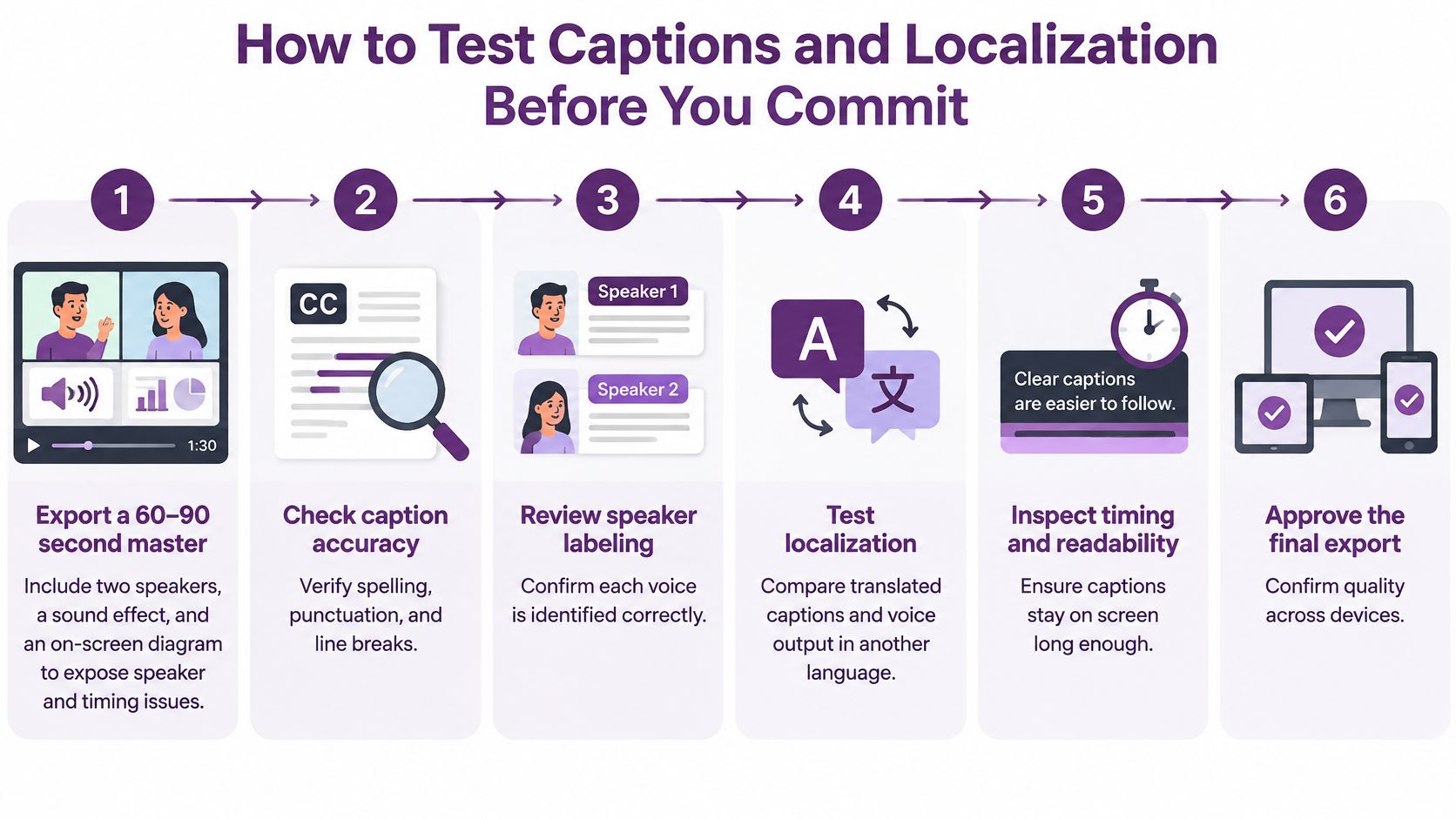
Run This Six-Step Acceptance Test
- Export a 60 to 90 second master: Include two speakers, one meaningful sound effect, and an on-screen diagram. This compact setup exposes speaker attribution, sound description, and visual-only information problems fast.
- Translate into two target languages: Choose languages you plan to publish in, including one with different sentence length or script direction if that's relevant. Watch whether captions become cramped, rushed, or too long to read.
- Check the terminology glossary: Product names, feature labels, warnings, and technical terms must stay consistent in narration, captions, and on-screen text. Give the tool your approved terms before generation, then search every version for substitutions.
- Verify caption timing against audio: Play each version at normal speed and mark lines that appear early, disappear late, overlap dialogue, or stay up after the scene changes. Correct timing inside the tool and confirm the exported file keeps your edits.
- Inspect speaker labels and transcript completeness: Each voice should be identified where needed, meaningful sounds should be represented, and the transcript should describe essential charts or diagrams. If a viewer can't understand the point without seeing the animation, the access work isn't finished.
- Get native-speaker approval: Ask a fluent reviewer to judge accent, tone, idiom, formality, and cultural fit, not just literal translation. Record their corrections in the glossary so the next video starts from better instructions.
Don't average away serious defects with a high score elsewhere. A beautiful localized render still fails if customers hear the wrong product term or captions lag behind the narration.
Pass or fail rule: Any mistranslation of a product term, or caption drift over one second, fails the tool for that use case.
That rule sounds strict because repair work multiplies by language. Fixing one master is manageable. Re-timing, re-voicing, and re-approving a whole library after launch is where a cheap tool becomes expensive.
What a Finished Explainer Costs on Each LunaBloom Plan
Price per month tells you less than price per finished, approved minute. Start with the plan limits, then calculate your expected output in seconds before you compare subscriptions. Current details are listed on our pricing page.
| Plan | Monthly price | Max length per AI video | Total AI video per month | Notes |
|---|---|---|---|---|
| Starter | Free to start | Up to 10 seconds per video, 2 free videos | 20 seconds from the 2 included videos | Text-to-video, image-to-video, 720p export |
| Fundamental – Growth | $79.99, billed monthly | 4 minutes (minimum 10 seconds) | 800 seconds | Video Editor and commercial use rights |
| Professional – Advanced | $119.99, billed monthly | 6 minutes (minimum 10 seconds) | 1200 seconds | Video Editor and commercial use rights |
The Starter plan is free to start, with no monthly commitment, and includes 2 free videos of up to 10 seconds each. Use those short exports to test voice, captions, brand fit, and whether your product visuals survive generation, not to judge a full explainer's pacing.
Here's the arithmetic on Growth. A 90-second explainer uses 90 of the 800 monthly seconds, so about eight such videos fit in a month if you don't spend seconds on other formats. A 60-second social cut uses 60 seconds, so about 13 fit. On Advanced, that same 90-second piece draws from 1200 seconds, giving you more room for variants, languages, and retries.
Count revisions carefully. If your team typically generates three versions before approval, budget for three renders where your workflow consumes allowance each time, then add localized versions separately. A plan that looks roomy for four finished videos can feel tight once hooks, captions, aspect ratios, and translations enter the queue.
Every paid creator plan includes the Video Editor and commercial use rights. I'd choose based on monthly seconds and maximum length first, then confirm the Starter allowance and current terms in the app before committing, because the free tier is a test drive rather than a production budget.
Shortlist Two Tools and Run a Two-Video Trial
Don't trial five tools with five different ideas. You'll learn which demo impressed you, not which workflow survives your real script, assets, captions, and approval process. Narrow the field to two candidates and make them solve the same problem.
- Pick two tool types from your use case: Match them to the quick-pick row you selected, then choose one representative product from each type. This keeps the comparison focused on workflow, not brand familiarity.
- Score both on the eight criteria: Use the same script, logo, product images, voice requirements, and target length. Mark missing controls as failures, not neutral scores, when your use case depends on them.
- Run the caption and localization test: Build the same 60 to 90 second master in each tool, translate it, and apply the pass or fail rule. Keep the exported caption files and reviewer notes beside each score.
- Compare cost per finished minute: Divide the monthly price by the approved minutes you can realistically produce, including revisions and localized versions. Use identical arithmetic for every rival so a low headline price doesn't hide a small allowance.
- Use the free Starter trial as a decision point: If we're on your shortlist, begin in the Starter app and produce the two included short videos to check voice, captions, and visual fit before paying. Businesses can use our platform directly or work with us to build an ongoing AI-powered content production workflow for larger volume.
Share both exports, score sheets, caption files, and cost calculations with the people who must approve the final video. Pick the tool with fewer serious failures, not the one with the longest feature list. Revisit the decision when your volume, languages, or animation standards change, because the best animated explainer video software for a first social demo may not be right for a global training library.
Turn your next script into a voiced, captioned explainer with LunaBloom AI, then test voice, captions, and product accuracy before you publish. Start free, compare the result against your score sheet, and upgrade only when your monthly output justifies it.