Meta description: Learn how to build a natural voices choir with AI using better layering, pitch scatter, timing offsets, mixing, and final audit methods that keep a generated ensemble sounding human.
You can hear the problem fast. A single AI singer may sound polished on its own, but the moment you ask it to carry a chorus, it turns flat in a different way. Not pitch-flat. Human-flat. It sits in the middle like one perfect mask repeated, with none of the tiny frictions that make a real group feel alive.
That's usually the moment creators start stacking copies of the same render, adding reverb, widening the stereo field, and hoping “bigger” will read as “choir.” It rarely does. You get haze, not ensemble.
A convincing Natural Voices Choir sound comes from the opposite instinct. Real community choirs built in the natural voice tradition are open, non-auditioned, and often taught by ear rather than by score. The sound isn't born from perfection. It comes from separate people locking into shared vowels, shared intention, and slightly unshared timing.
AI choir building works the same way. You're not chasing a cleaner solo. You're building a believable group.
When One AI Voice Isn't Enough
The failure point is familiar. You've got a lead line that sounds good in isolation. Then you duplicate it for thickness, pan the copies, maybe shift one a touch sharp and another a touch flat. On paper, that should create width. In practice, it often creates a ghost image of the same singer.
The ear catches repetition faster than most producers expect. Identical consonants land at the same millisecond. Breaths happen in the same spot. Vowels bloom with the same shape. Instead of a choir, you hear a stack.
That's why the first upgrade isn't louder layering. It's independence between parts. A believable choir needs multiple vocal identities, even when they're all generated from one source workflow. If you want a useful visual reference for multi-character singing output and AI performance workflows, LunaBloom AI shows the kind of synchronized avatar direction many creators now pair with ensemble audio.
What the ear actually misses
A real ensemble gives you things a solo render can't fake on its own:
- Tiny pitch disagreement: not enough to sound out of tune, just enough to create movement
- Breath variance: no room full of humans inhales as one machine
- Different vowel color: one singer's “ah” is never exactly another's
- Section shape: soprano, alto, tenor, and bass don't occupy space the same way
A choir isn't one great take multiplied. It's a cluster of related decisions.
What tends to fail
The most common dead ends are easy to spot once you've heard them a few times:
- Clone stacking: duplicating the same render with processing changes only
- Over-quantizing: aligning every attack to the grid
- Reverb as camouflage: trying to hide sameness inside a wash
- Hyper-correction: tuning every voice so tightly that the blend loses life
When creators say their AI choir sounds “synthetic,” this is usually what they mean. Not that the voice model is bad. The arrangement behaves like a plugin, not a group.
What Makes a Choir Sound Natural
The phrase natural voices choir means something specific in choral culture. In the UK, the movement is generally traced to grassroots singing activity that gathered force in the 1970s, then became more organized in January 1995 when the Natural Voice Practitioners' Network began at a birthday gathering for Frankie Armstrong in Herefordshire. It later added a website and membership system in 1999, became formally constituted on 4 November 2000, and changed its name to the Natural Voice Network in 2017 (Oxford Academic history of the movement).
That history matters because the sound philosophy came first. Accessibility came first. The technical polish came second.
Four things listeners hear immediately
A natural choir sound usually rests on four perceptual pillars:
Timbral variety
No two voices carry the same formant weight. Even inside one section, you hear brighter and darker singers.Micro-pitch movement
Human groups don't freeze on a pitch center. They circle it, settle into it, and sometimes lean against it.Timing asynchrony
Entrances line up musically, not mathematically. Consonants rarely fire at exactly the same instant.Unified vowels
This is the glue. Different voices can still become one instrument if the vowel shape matches.
The philosophy behind the sound
Natural voice choirs are defined by open access. They don't hold auditions and don't require sight-reading, which separates them from many traditional choral societies. By the 2010s, the network linked choirs across the UK and the Republic of Ireland and across at least 12 other countries, including Australia, Austria, Canada, the Czech Republic, France, Georgia, Germany, the Netherlands, New Zealand, Spain, Sweden, Switzerland, and the USA (Oxford Academic on open-access structure and reach).
That's a useful production lesson. Inclusive choirs don't sound human because every singer matches perfectly. They sound human because singers tune toward each other.
Practical rule: If every generated voice uses the same seed, phrasing, and prosody profile, you haven't built a choir. You've built a louder soloist.
For AI work, this means naturalness isn't just “good voice quality.” It's difference held inside unity.
Choosing the Right AI Voice Stack
Bad choir builds often start with the wrong tool order. Creators obsess over the voice model first, then discover too late that the outputs are drenched in baked-in ambience, merged into stereo, or too rigid to edit. Choir realism is mostly decided after generation.
Start with editable voice output
Pick a voice engine that gives you dry stems, controllable phrasing, and multiple distinct speaker identities. You want room to edit pitch, onset, breaths, and tone role by role. If the model prints heavy reverb into the file, you lose control before the mix has started.
For commercial work, character design matters too. If you're building spoken or sung personalities across campaigns, this guide on how to design an AI voice for TV ads is useful because it frames voice selection around role, brand fit, and repeatability rather than novelty.
Then choose the editor, not just the generator
A choir project needs a DAW or multitrack editor that lets you:
- Move timing by ear
- Pitch-adjust per track
- EQ sections separately
- Keep voices on isolated lanes
- Export clean mono stems
That's why tools like Logic Pro, Pro Tools, Reaper, Ableton Live, Melodyne, and Waves SoundShifter stay relevant even when the voice itself comes from AI. Realism happens in the edit passes.
If video matters, cast faces early
If the choir will appear on screen, your visual system should support multiple visible performers in sync. That's where multi-character avatar platforms become part of the stack. For a platform overview and company details, LunaBloom's about page is worth reviewing because it focuses on multi-character generation, lip-sync, and video assembly rather than audio alone.
AI Voice Stack for Choir Builds
| Layer | Recommended Tool | Key Feature |
|---|---|---|
| Voice engine | Any AI singing or voice platform with multiple speaker identities | Distinct voices and dry export |
| Arrangement layer | Logic Pro, Reaper, Ableton Live, Pro Tools | Per-track timing and pitch edits |
| Pitch cleanup | Melodyne, Waves SoundShifter | Fine correction without flattening the blend |
| Section shaping | Standard EQ, compression, reverb tools inside your DAW | Separate control by role |
| Visual performance | Multi-character avatar platform | One visible performer per generated voice |
Export specs that save headaches later
Use a simple handoff standard:
- Export 24-bit WAV
- Keep project sample rate consistent
- Render each voice as mono
- Remove master-bus sweetening
- Name stems by role, not by random take number
A choir session falls apart fast when the file prep is sloppy. Clean stems make everything downstream easier.
Layering Voices for Real Ensemble Depth
The fastest way to ruin an AI choir is to think in copies. Think in singers instead. Even if the source model starts from one timbre, every layer should behave like an independent person inside a section.
A useful technical reference comes from digital audio research. A DAFx paper explicitly described a system for synthesizing natural-sounding choir voices from a single singing source by algorithmically modifying pitch, timing, and timbre. The same research thread also notes that choir quality can't be judged by naturalness alone, because ensemble unity is a separate perceptual test alongside factors such as oneness, pitch, breathing, resonance, voice harmony, and vowel quality (DAFx proceedings paper and ensemble evaluation discussion).
Build the first layer set
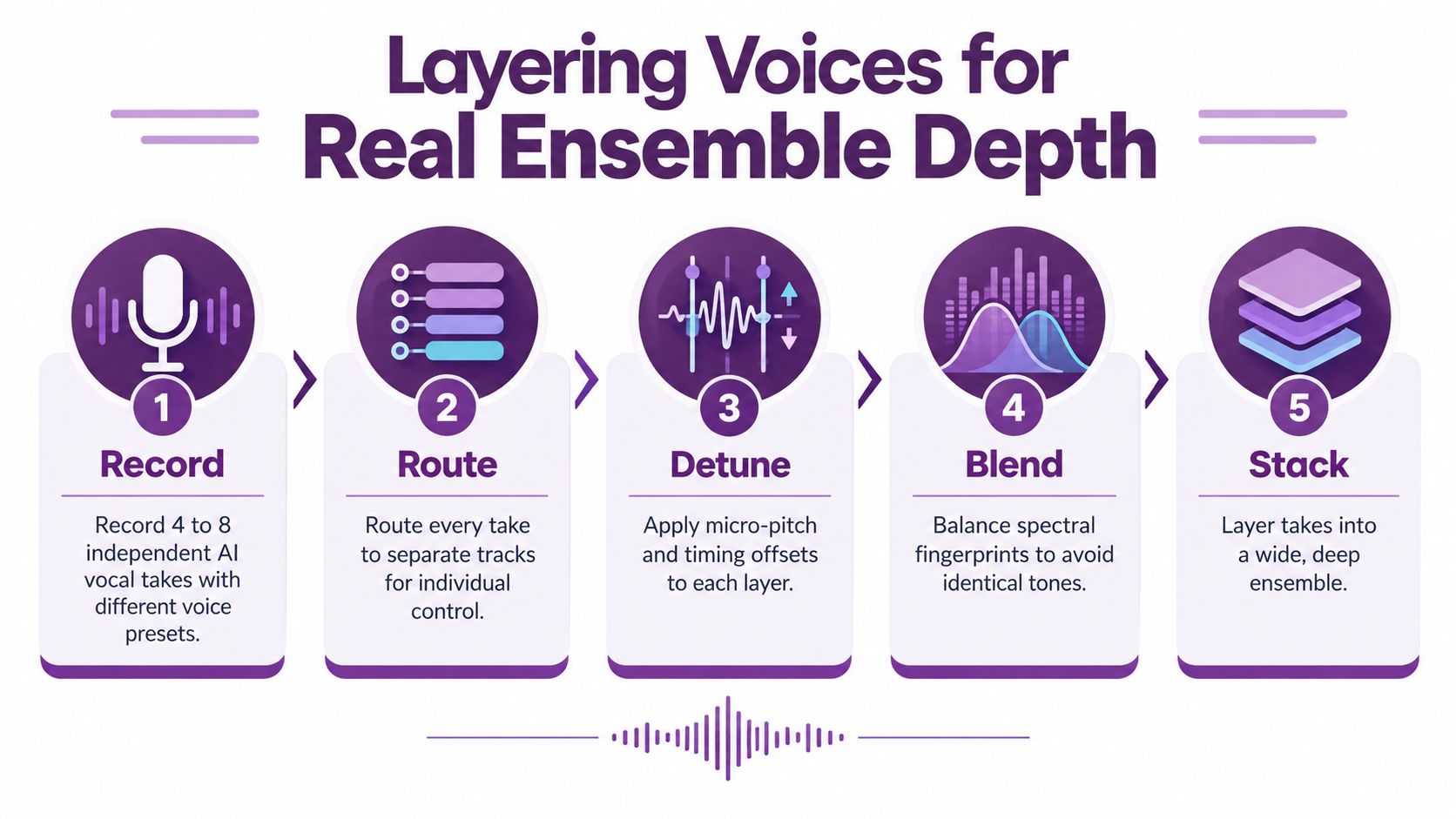
Start with four to eight independent takes of the same line. Use different voice presets, different phrasing settings, or different cloned sources so the spectral fingerprints don't collapse into one.
Label them by function, even if the generator wasn't trained as a formal SATB instrument:
- Soprano lead
- Alto support
- Tenor body
- Bass anchor
If you're testing performance visuals alongside the stems, the LunaBloom app is the kind of environment where multi-character sync becomes useful, especially when you need each line to look embodied rather than pasted on.
Separate the takes before you polish them
Every voice gets its own track. No subgroup printing yet. No “fix it later” bounce.
Here's the sequence that usually works best:
Choose one guide layer
Keep one relatively plain take low in the mix. It anchors melodic intent if the outer layers drift.Add role doubles
Give each section a second unison-style pass. Don't make it identical. Make it adjacent.Nudge timing by ear
Slight offsets are what create ensemble bloom. If everything attacks together, the illusion disappears.Protect consonants
Too much offset on hard consonants turns diction into clutter. Move vowels more freely than plosives.
Later in the process, a visual reference can help reinforce what your ears should be hearing:
What works and what doesn't
What works
- Different source identities
- Slightly different attack shapes
- Alternate breath points
- One stable guide voice under wider doubles
What doesn't
- Reusing one perfect render six times
- Hard quantizing section entries
- Correcting every layer to the same pitch trace
- Letting all voices share one bright spectral profile
The blend should feel dense, not duplicated.
A real choir is a cloud of near-matching events. Your job is to preserve the “near.”
Tuning Pitch, Timing, and Timbre
Once the layers are in place, treat each take like a separate instrument. Don't reach for global pitch correction first. That's how AI choirs get that brittle “stacked autotune” edge.
Set roles before corrections
Decide which line is the reference. Usually that's the musical lead or the voice carrying text clarity. Keep that one closest to center pitch and center timing. The supporting layers should orbit around it.
A starter workflow in LunaBloom's starter app can be useful for getting assets assembled quickly, but the realism still depends on how you shape each track after export.
Tuning Parameters by Voice Role
| Voice Role | Detune (cents) | Timing Offset (ms) | Formant Shift | Breath Placement |
|---|---|---|---|---|
| Soprano lead | Near center | Ear-led, minimal delay | Slightly brighter if needed | Earlier or clearly exposed |
| Alto support | Slightly off center | Slightly later than lead | Mildly darker | Staggered from soprano |
| Tenor body | Slight spread from center | Slightly later or varied by phrase | Neutral to warm | Different phrase breaks |
| Bass anchor | Stable, modest spread only | Conservative movement | Darker, heavier vowel body | Less frequent, not identical |
The moves that usually help
- Pitch spread: keep the chord alive by allowing gentle disagreement between adjacent voices.
- Timing lag: background layers often sound more human when they react slightly after the lead instead of landing with machine precision.
- Formant contrast: brighter top voices and darker lower support create section identity without changing notes.
- Breath desynchronization: if every inhale happens in one place, the effect collapses.
Avoid the muddy middle
A lot of creators blame the voice model when the issue is arrangement density. If alto, tenor, and duplicated lead all pile into the same center band, vowels mask each other and diction vanishes.
Try this instead:
- Pan support lines away from the lead before adding more EQ
- Filter doubles more aggressively than primary lines
- Keep one voice emotionally “close” and let the rest describe the room
If the center turns cloudy, don't add sparkle first. Remove overlap.
That single decision cleans up more fake choirs than expensive plugins do.
Mixing the Choir So It Breathes
Mixing is where many AI choir builds get overcooked. The temptation is to make the ensemble sound huge at every moment. Real choirs don't behave that way. They expand and contract phrase by phrase.
Build one believable room
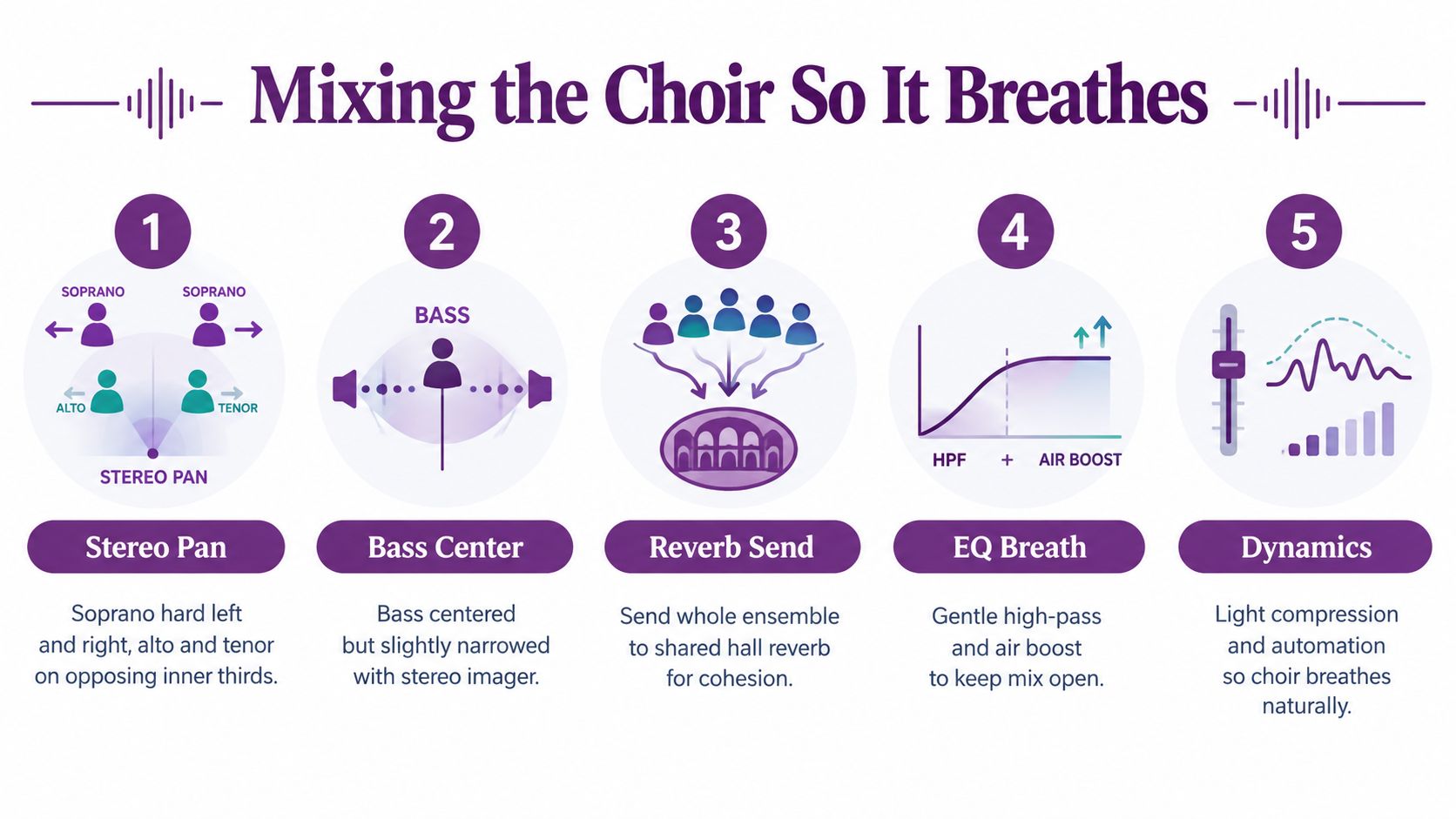
Start with panning by role. Sopranos can live wider, altos and tenors usually work well on opposing inner positions, and bass often stays more centered with a narrower image. The point isn't symmetry for its own sake. The point is to stop the mix from congealing at dead center.
Use one shared hall or plate reverb bus for cohesion. If each section gets a different room signature, the whole thing sounds assembled.
Audit with unity in mind
The most useful research insight here is that naturalness and unity are not the same test. A generated voice can sound fine by itself and still fail as a choir if harmony, oneness, or vowel blend don't hold together. That's why your mix review should listen for:
- Oneness: does the group read as one ensemble?
- Voice harmony: do chord relationships feel settled?
- Breathing: do breaths feel organic rather than copy-pasted?
- Resonance: does the room feel shared?
- Vowel quality: do section vowels fuse instead of fighting?
Small mix moves that matter more than dramatic ones
- High-pass the reverb return so low-mid mud doesn't swallow consonants
- Carve section pockets instead of boosting everyone for “clarity”
- Automate phrase swells on long notes
- Use light sidechain control if background layers blur the lead text
If you're checking whether your balances translate beyond studio speakers, this article on how to achieve transferable mixes with DigiDevice is a solid companion read because it focuses on listening translation across playback systems.
A choir mix should feel like one room with many throats, not many plugins with one preset.
Auditing the Final Result
The final pass should be boring in the best way. No more experimenting. Just a strict listen for what still breaks the illusion.
A useful framework is to score naturalness and unity separately. That follows the same split used in ensemble-singing research, where choir evaluation often separates individual vocal realism from the sense of group coherence.
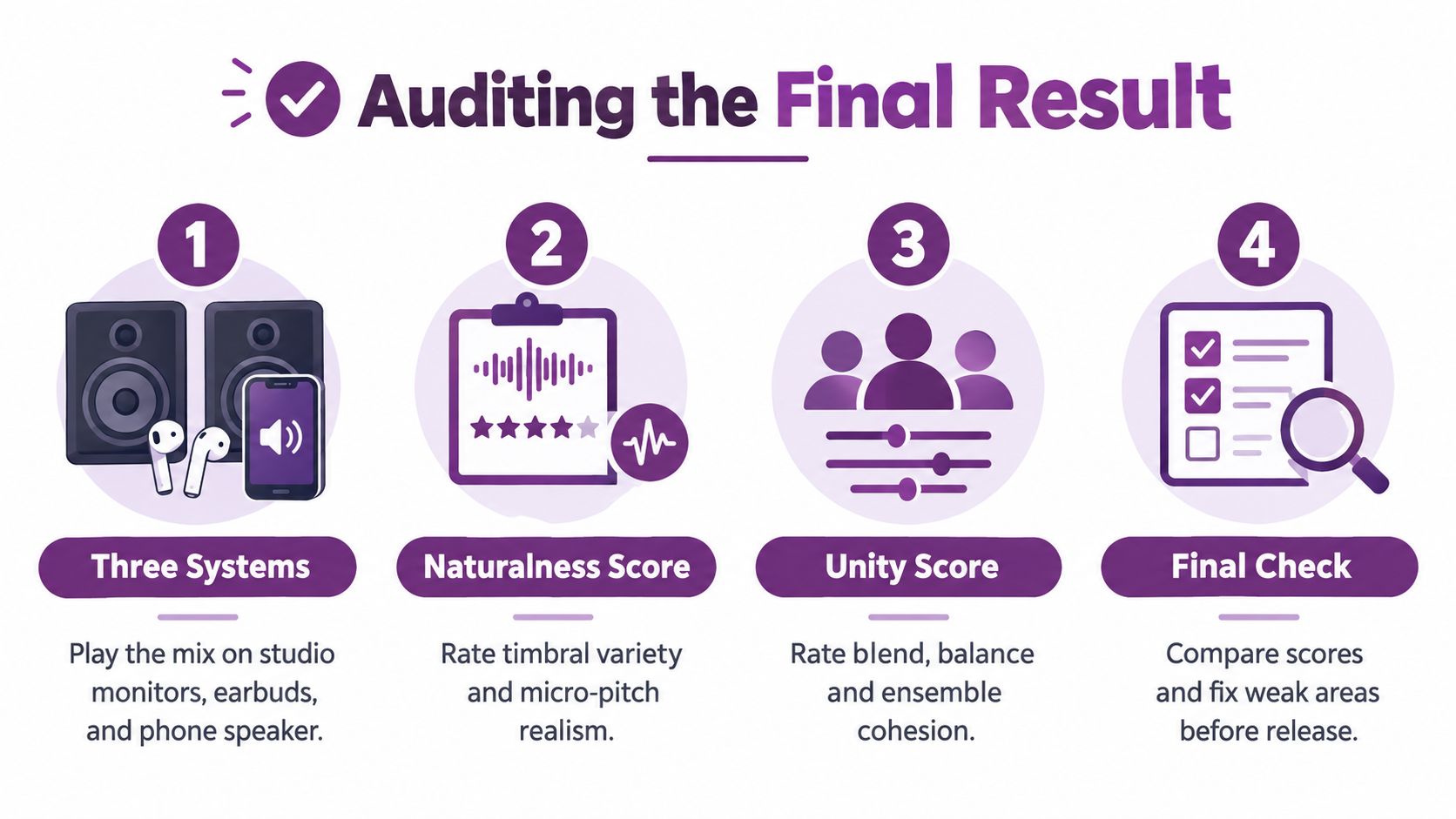
Run a three-system check
Play the mix on:
- Studio monitors
- Earbuds
- Phone speaker
You're not hunting perfection across all three. You're checking whether the choir still reads as a group when the playback collapses.
If your project includes visible performers, review the platform handling and user data expectations too. For teams working with generated singers and avatars, LunaBloom's privacy page is the right place to review those details.
Use a blunt checklist
Ask these questions and mark pass or fail:
- Do the voices feel like separate humans?
- Does the blend still hold as one ensemble?
- Are vowels too identical from track to track?
- Are breaths missing, copied, or suspiciously aligned?
- Do cutoffs vary slightly without sounding messy?
- Does the bass support the choir without swallowing it?
- Does the performance still move you, even after you know how it was built?
There's also a practical human lesson buried in the choir movement. Public descriptions of natural voice choirs emphasize that they are accessible, non-auditioned, and taught aurally, yet public onboarding guidance is often thin on how mixed abilities progress and what beginners should expect. One Oxford page even frames the first session as an “audition” by participation only, while the broader network is described as having more than 700 practitioners worldwide (Oxford choir page and onboarding gap context). For AI creators, the parallel is clear. Accessibility only works if the user experience is legible.
That applies to your choir output too. If a listener can't settle into the performance because the blend feels uncertain, the technical cleverness won't save it.
A final A/B against a real community choir recording is often enough to expose the last weak spot. Usually it's timing that's too perfect, breaths that are too neat, or vowels that are too cloned.
LunaBloom AI gives creators a practical way to pair generated choir audio with believable visual performance, including multi-character videos, lip-synced avatars, voice cloning, and fast publishing workflows. If you're building ensemble content and want the faces, timing, and delivery to support the human feel you worked for in the mix, visit LunaBloom AI.