You've just published a 12-minute product walkthrough. Within hours, comments arrive in Spanish, Japanese, and Brazilian Portuguese asking for captions. The video is finished, but the audience is telling you that access to the message still depends on language.
That's the practical reason automatic subtitles translation has become part of modern video production. A single master video can now support many markets, but the workflow changes. Automation handles much of the recognition and first-draft translation, while people spend their time checking meaning, timing, terminology, and accessibility.
The central question isn't whether a model can produce subtitles. It's which steps still need a person, and which can be left to the model.
Why a Single Video Now Needs Dozens of Subtitles
A creator may finish one product demo and receive requests for Spanish, Japanese, and Brazilian Portuguese. The original production can stay unchanged, yet each audience still needs a readable way to follow the message. Global platforms, international search, paid distribution, and accessibility expectations make a broader language plan practical for serious distribution.
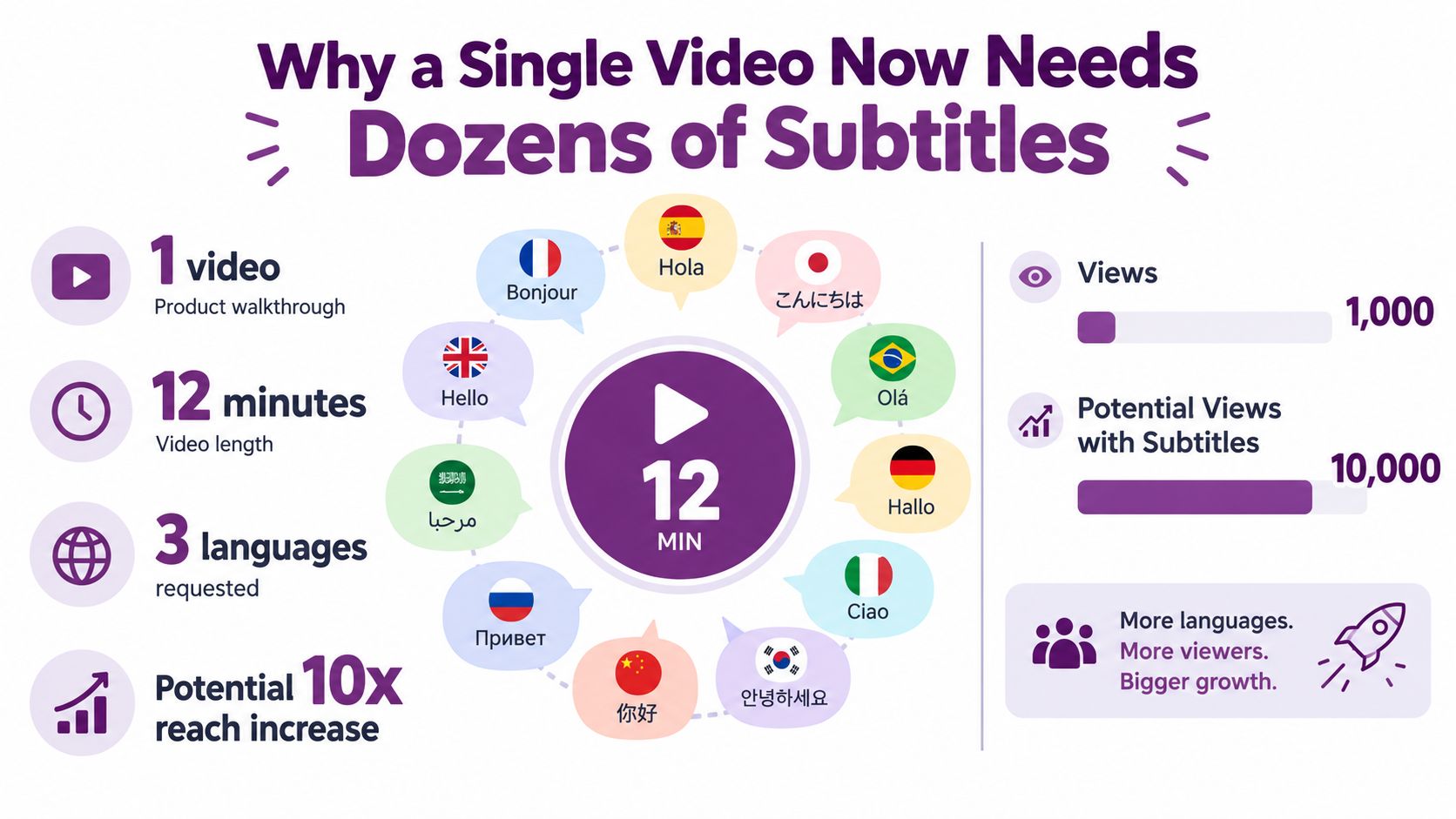
The production model separates the expensive creative asset from the localization layer. One master video can generate language-specific caption files or rendered versions. Automation supplies a first draft quickly, so a reviewer starts with text to check rather than an empty document.
That speed changes the job, not the responsibility.
The human role has changed
Subtitle translation once faced a basic infrastructure problem. Statistically trained machine-translation systems for subtitles were uncommon because freely available subtitle corpora were scarce, as described in foundational research on user perspectives and subtitle machine translation. Later research also identified mistrust of automatic interlingual subtitles as a major barrier to adoption.
The practical response is quality control supported by automation. A reviewer may correct a product name, restore a missing qualification, shorten a crowded cue, or replace a literal idiom with a natural expression. Automation handles repeated drafting work, while the reviewer checks whether the words still carry the intended meaning, timing, and tone.
Practical rule: Use automation to multiply language coverage, not to remove responsibility for what viewers read.
A viewer in Seoul or São Paulo experiences one cue at a time beside the original audio. A fluent translation can still fail if the line arrives late, packs in too much text, confuses a cultural reference, or omits an important sound cue. Quality therefore depends on both layers: the source recognition and the translated subtitle. If the source transcript is wrong, editing the translation alone may hide the problem rather than fix it.
LunaBloom AI's about page offers one example of the broader shift toward integrated video creation and localization. The useful production habit is to keep the stages visible, so a team can identify whether an error began in recognition, translation, timing, or review.
The Recognition to Translation Pipeline Explained
Automatic subtitle translation is best understood as a relay race. Each stage receives an output from the previous runner, and a dropped baton can appear later as a mistranslated phrase, a mistimed cue, or an untranslated name.
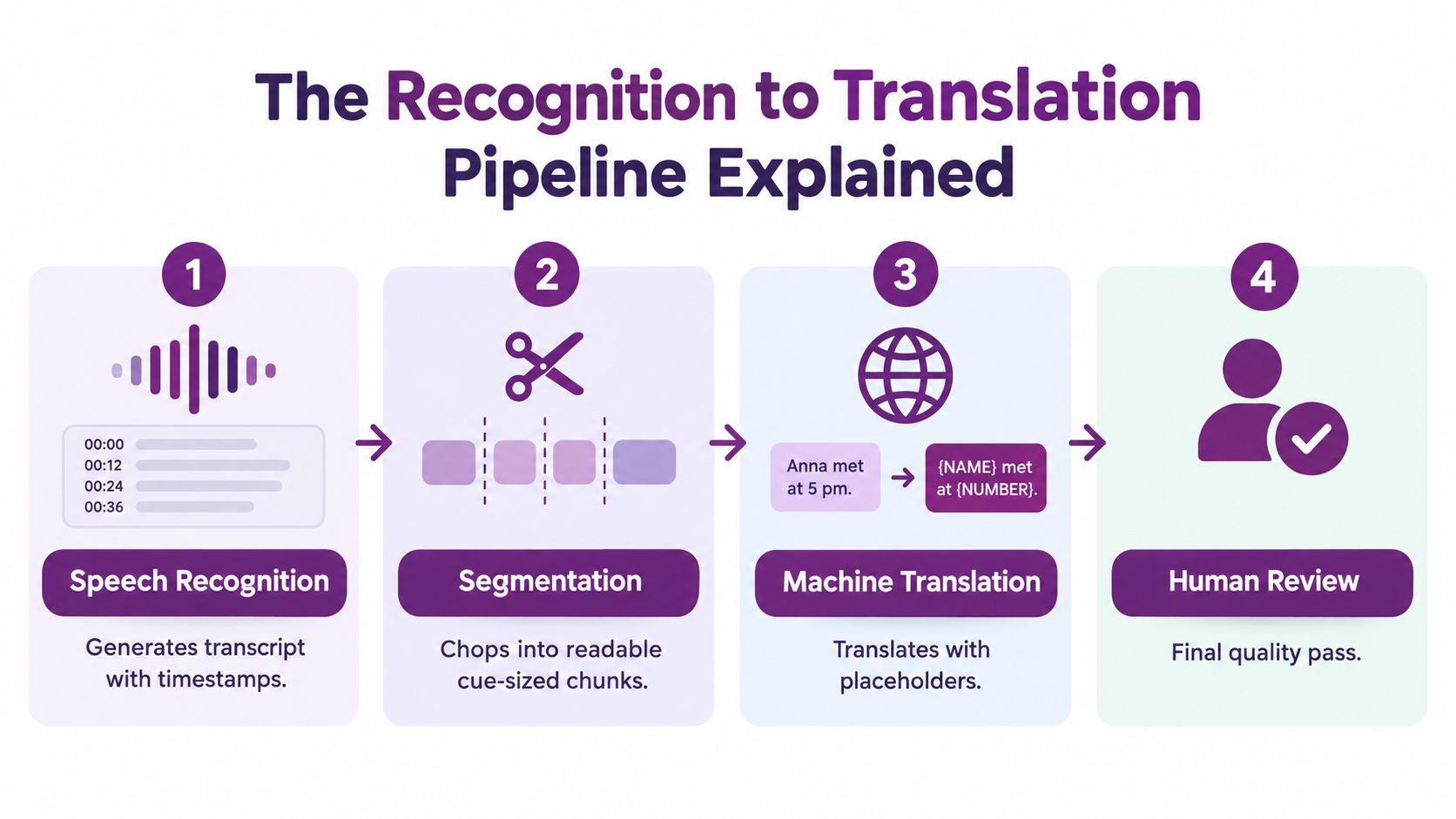
Stage one produces the source transcript
Automatic speech recognition, or ASR, converts the spoken audio into text. It should also identify timestamps, so the system knows when each phrase begins and ends.
At this point, the transcript can already contain errors caused by accents, background noise, music, overlapping speech, low recording quality, or specialist vocabulary. A wrong source word becomes a dangerous input because the translation model may render it smoothly and confidently.
Stage two creates readable subtitle cues
The raw transcript usually needs segmentation. The system divides continuous speech into subtitle units that viewers can read without losing the connection to the audio.
Segmentation controls more than line length. It decides where a sentence breaks, whether a phrase stays together, and how much context reaches the translation model. A bad break can turn an understandable sentence into two awkward fragments.
Stage three translates each unit
The machine-translation layer rewrites the source cues in the target language. A good configuration includes a glossary for brand names, product features, technical terms, and words that must remain unchanged.
Translation also needs context. Short, self-contained utterances are easier to handle than dialogue that depends on earlier lines, implied subjects, humor, or shifting formality.
Stage four restores timing and checks the result
The translated text often has a different length and word order from the source. A timing pass adjusts cue boundaries and line breaks so the target subtitles remain synchronized and readable.
Some platforms compress all these operations into one API call. That's convenient, but it hides the origin of errors. If you can access separate transcript, segmentation, translation, and timing outputs, you can fix the correct layer instead of repeatedly retranslating a flawed source.
A useful diagnostic sequence is simple:
- Read the original transcript. If the source is wrong, repair ASR or edit the transcript.
- Inspect cue boundaries. If phrases break unnaturally, change segmentation.
- Compare source and target meaning. If the source is correct but meaning shifts, retranslate or edit the target.
- Play the video with captions. If the words are right but appear late or disappear too quickly, fix timing.
Where Accuracy Comes From and Where It Breaks
A creator uploads a clear interview, receives fluent subtitles, and still finds that a product name is wrong and a warning is missing. The system has not produced one kind of error. It has combined decisions from recognition, segmentation, translation, and display. Treating the output as a single black box makes the wrong fix likely.
Research on automated subtitles has reported average ASR accuracy ranging from 60% to 90%, depending on the environment and evaluation method. In the evaluation work summarized by the IWSLT 2024 campaign paper, post-editing or voice-specific training raised accuracy to at least 98%. A separate empirical result found 68.88% accuracy, with 1,168 errors in 3,727 words, showing how far unedited recognition can fall below viewer expectations.
Subtitle quality also depends on whether viewers can read the result in time. The same IWSLT source describes a maximum reading speed of 21 characters per second, a 42-character line limit, and no more than two lines per subtitle. These settings determine whether viewers can process the words while following the image and audio.
Recognition errors and translation errors are different problems
Across five methods in the cited evaluation, recognition errors accounted for 49.4% and translation errors for 50.6%. The nearly even split gives editors a practical diagnostic rule: identify the layer before changing the text.
A transcript that turns “fork” into an unrelated word can still produce a grammatical translation. The target subtitle may read naturally while describing the wrong object. Editing that target line alone leaves the source defect in place. Correct the transcript, then translate again.
Fluency can conceal meaning loss
Smooth wording can hide a changed number, name, condition, or level of certainty. Research on English to Turkish subtitle translation found that functional equivalence improved the least and remained the main source of penalties even as total errors fell between 2022 and 2025. Readability therefore cannot stand in for fidelity.
A peer-reviewed accessibility study reported that subtitles need at least 98% accuracy to be suitable for users, according to the accessibility research on subtitle quality. That requirement makes human review particularly important for instructional, commercial, and accessibility-critical content.
| Pipeline Stage | Common Error Type | Typical Impact | Where to Intervene |
|---|---|---|---|
| Speech recognition | Wrong words, names, or punctuation | Translation begins with incorrect meaning | Improve audio, add vocabulary, edit the source transcript |
| Segmentation | Bad line breaks or missing sentence context | Choppy phrasing and mistranslation | Re-segment before translation |
| Machine translation | Literal idioms, register shifts, omitted details | Fluent but functionally inaccurate subtitles | Apply a glossary and targeted post-editing |
| Timing and layout | Dense cues, overlaps, late entrances | Viewer strain and missed information | Check reading speed, line limits, and alignment |
The useful unit of review is the subtitle segment, not the entire file. A video may seem accurate overall while a disclaimer, product instruction, or speaker exchange contains one serious error. Find that segment first, then decide whether the repair belongs in recognition, translation, or presentation.
A Production Workflow for Reliable Subtitle Translation
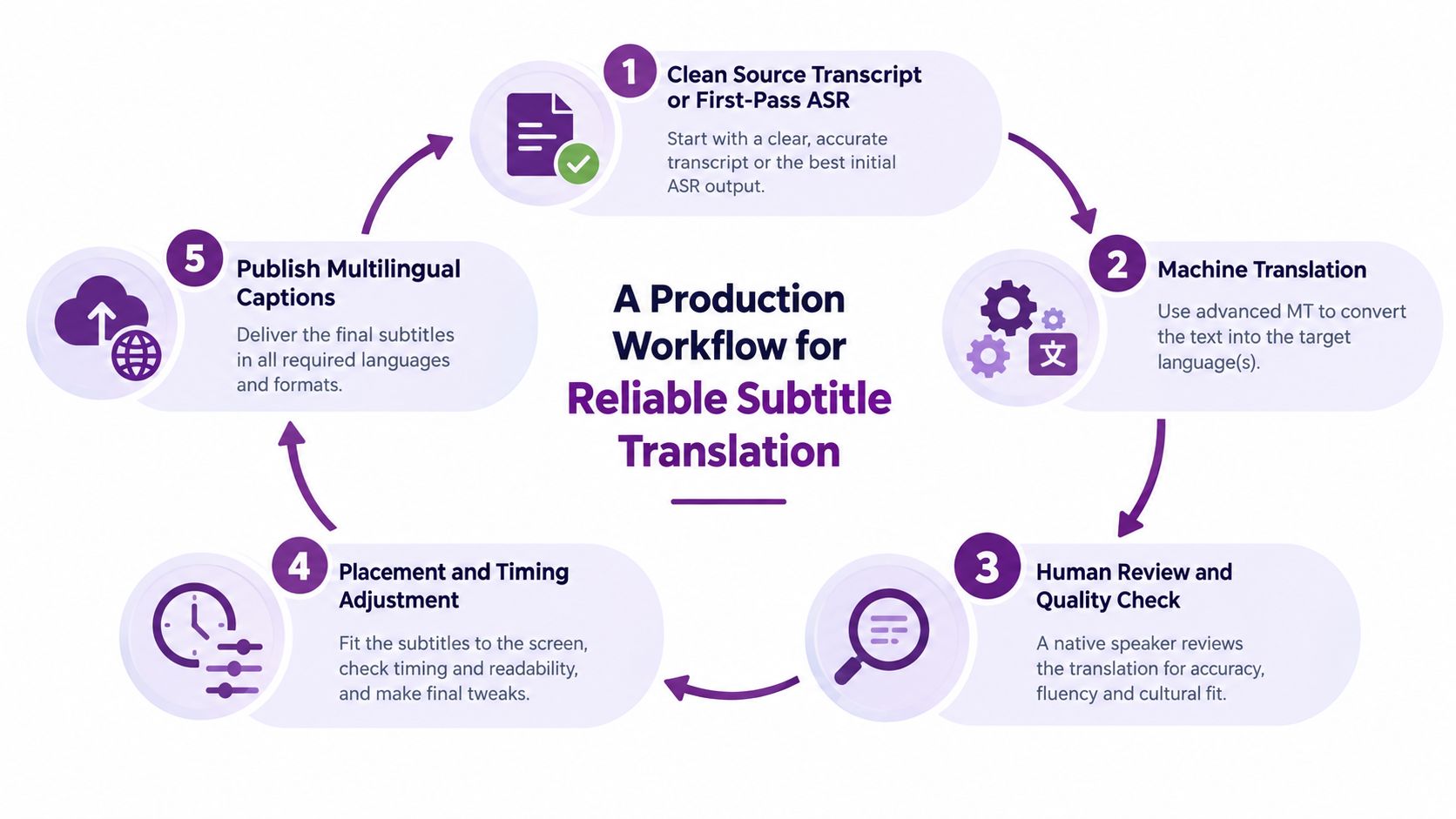
A dependable workflow turns automatic output into a controlled editorial process. The goal isn't to inspect every character with equal intensity. It's to spend human attention where errors carry the greatest consequence.
Start with the cleanest source you can make
Generate first-pass ASR if no transcript exists, then correct names, numbers, punctuation, and technical vocabulary in the original language. Every target language inherits defects from this file, so source editing usually has more impact than correcting the same mistake repeatedly.
Keep speaker labels and meaningful non-speech information. Don't strip laughter, pauses, or audible events automatically if they affect comprehension.
Translate with controlled language
Send the cleaned cues through machine translation with a glossary and style preset. The glossary should cover product names, feature names, recurring terms, forbidden translations, and preferred forms of address.
A style preset can define whether the voice should sound formal, conversational, instructional, or promotional. It won't replace a linguist, but it reduces avoidable variation across a video series.
Align the translated text to the audio
Translated lines don't always fit the source timestamps. Use forced alignment or a comparable timing pass to place the target-language cues against the spoken audio.
This step deserves more attention than endless retranslation. If the wording is accurate but the cue appears too late, changing the model won't correct the display behavior.
Run automatic checks, then review meaning
Automated validators can flag:
- Reading speed: Compare each cue with the maximum allowed characters per second.
- Line length: Identify lines that exceed the project's character limit.
- Cue overlap: Find captions that collide or remain onscreen too briefly.
- Missing fields: Check for blank text, broken timestamps, and inconsistent speaker labels.
Human reviewers still need to judge tone, cultural meaning, terminology, and whether the target line communicates the source intent.
Export the files viewers need
Export each language as an SRT or VTT file, depending on the platform. Decide whether the captions should remain switchable as sidecar files or be burned into the video. Sidecar captions offer viewer control and easier corrections. Burned-in captions are always visible, but any correction requires a new render.
A tool such as LunaBloom AI's starter app can fit into a broader workflow where video creation, captions, and localization are managed in one environment. Whatever tool you choose, preserve the editable source and final language files separately.
Three Real Videos Three Different Results
The same automatic subtitle translation pipeline can produce excellent results on one video and require intensive editing on another. Audio conditions, vocabulary, speaker behavior, and context matter more than the mere existence of a translation feature.
A short product marketing video
A 60-second product marketing short has a clean voiceover, controlled vocabulary, and visible on-screen text. The speaker pauses naturally, avoids interruptions, and repeats the product name consistently.
The dominant risk is small terminology drift. The cheapest fix is a source glossary containing the product name, feature labels, and preferred call to action. A human post-editor becomes non-optional when the video makes a regulated promise, uses a culturally specific slogan, or will represent the brand in a priority market.
A software tutorial
A 10-minute software tutorial may have strong recognition because the narrator speaks clearly, but terms such as “concurrency” and “fork” can confuse a general translation model. Clause order can also become awkward when the target language handles instructions differently.
The least expensive intervention is to correct the source transcript and inject a technical glossary before translating. A reviewer should check every command, interface label, code reference, and warning. Human editing is required if a wrong term could cause the learner to perform the task incorrectly.
A multilingual panel
A 25-minute panel with speakers switching between English and Spanish mid-sentence creates a different failure pattern. Language identification may change at the wrong point, overlapping voices can confuse ASR, and timestamp drift can spread through later cues.
The cheapest fix is cleaner speaker-separated audio and explicit language handling where the platform supports it. Human post-editing is unavoidable when speakers interrupt each other, meaning depends on the previous turn, or the captions need speaker labels and accessibility cues.
The lesson isn't that one format is automatically safe. It's that content structure predicts the kind of review you need.
The Failure Modes Nobody Talks About
Product pages often emphasize fluent output. Viewers experience a wider set of failures, especially when subtitles need to support inclusive comprehension rather than literal translation.
An idiom can be grammatically correct and culturally wrong. If a creator says “hit a home run,” a word-for-word German rendering may preserve the sports image while losing the intended meaning. A reviewer needs to identify the communicative purpose and choose an expression that works in the target culture.
Accessibility information can disappear
Subtitles for deaf and hard-of-hearing viewers may need more than dialogue. Laughter, sighs, applause, a ringing phone, overlapping voices, speaker changes, and meaningful silence can affect how a viewer interprets a scene.
A 2025 comparative study of Arabic subtitles found substantial discrepancies in paralinguistic and extralinguistic elements. It also reported omissions of important details and inconsistent layout and style, while describing Arabic SDH as an underdeveloped field in the comparative accessibility study.
Automatic translation can also create accessibility regressions by making cues too dense, merging speakers, breaking lines at unnatural points, or dropping sound descriptions. The source caption may be technically accurate while the localized version becomes harder to follow.
Accessibility check: Review what the audience needs to understand the scene, not only what the speaker says.
Compliance needs a higher threshold
Medical, legal, and financial videos contain disclaimers, conditions, and instructions where a subtle meaning shift can create risk. A fluent target line doesn't prove that the qualification survived translation.
Maintain a do-not-translate list, preserve speaker labels, enforce reading-speed checks after translation, and route regulated content to human review regardless of source quality. Keep a record of the approved language version so later edits don't replace reviewed wording without oversight.
For privacy-sensitive projects, review how your chosen provider handles uploaded media and generated transcripts. LunaBloom AI's privacy information is one place to examine before selecting a workflow, alongside the terms and retention policies of any other vendor.
Choosing the Right Implementation Path
There isn't one correct way to adopt automatic subtitles translation. The right path depends on volume, editing expectations, audience risk, and how much control you need over the files.
| Path | Cost per minute | Turnaround | Editing depth | Best fit |
|---|---|---|---|---|
| Built-in platform tools | Usually the lowest direct cost | Fast | Basic | Creators testing demand on one platform |
| Standalone subtitle apps | Subscription or usage-based | Fast to moderate | Moderate | Solo creators who need styling and SRT or VTT export |
| Human post-editing services | Higher | Moderate | Deep linguistic review | Branded, educational, or compliance-sensitive content |
| End-to-end cinematic generators | Varies by plan and volume | Fast at scale | Integrated production controls | Teams producing many localized videos |
Built-in platform captions
YouTube, Vimeo, and TikTok offer convenient caption workflows that sync directly with publishing. They're useful when speed matters and the content is low risk, but language quality can vary, and editing controls may be limited.
Start here when you're validating whether viewers want a language. Don't treat an automatically generated track as final for a sales claim, course lesson, or accessibility commitment.
Subtitle applications
Tools such as Subly, VEED, and Kapwing suit solo creators who need a visual editor, caption styling, and export to SRT or VTT. They provide more control than a platform-native caption panel and make it easier to correct individual cues.
This path works well when the creator can review the original and target text but doesn't need a full localization department.
Human post-editing
A linguist can clean a machine draft, preserve brand voice, correct cultural references, and check functional equivalence. This is the appropriate route when a small meaning error costs more than the review itself.
Integrated video platforms
End-to-end cinematic generators combine translation with voice, rendering, avatars, or publishing controls. They're useful for teams that need repeatable production across many videos, provided the workflow still exposes enough editing and approval control. LunaBloom AI's app is one example of a platform that combines video generation with multilingual caption and localization features.
Choose the lowest-cost option that meets your quality bar, then move up when language count, review demands, or brand risk outgrow the simpler path.
Your 30 Day Multilingual Launch Plan
A multilingual launch works better when you treat it as a staged production cycle rather than a single translation request.
Days 1 to 3
Lock the source script, generate clean ASR captions, and correct the transcript in the original language. Check names, numbers, punctuation, speaker changes, and non-speech cues before creating target-language drafts.
This is the foundation. If the source is unstable, every later language inherits uncertainty.
Days 4 to 7
Select two or three priority languages based on audience demand and business relevance. Generate machine-translated drafts, apply the glossary, and review timing, line breaks, and obvious meaning errors.
Use this period to identify whether the main constraint is ASR, segmentation, terminology, or translation. Don't keep changing translation models if the source transcript is still wrong.
Days 8 to 14
Add a human linguist pass for the primary market. Ask the reviewer to check functional equivalence, tone, idioms, speaker intent, and accessibility details, not only spelling.
Run automated checks for reading speed, line length, cue overlap, and missing captions. Then watch the video from beginning to end with the localized track active.
Days 15 to 21
Export SRT or VTT files and upload them to each target platform. Decide whether viewers should be able to switch captions or whether the text needs to be burned into the video for a particular social format.
Keep filenames, language codes, and approved versions organized. A clear versioning habit prevents an unreviewed draft from replacing the final file.
Days 22 to 30
Publish the localized versions, monitor viewer comments for comprehension problems, and collect corrections for the next video. Pay attention to repeated questions, complaints about speed, confusing terminology, and missing audio information.
Creators who build this review loop now will be better prepared as recognition and translation models improve. Generation may become easier, but review remains the quality advantage.
For help planning a multilingual video workflow, you can contact LunaBloom AI with details about your formats, languages, and review requirements.
LunaBloom AI helps creators and teams generate videos with captions, translated subtitles, voiceovers, and localization across supported languages in one production workflow. Visit LunaBloom AI to explore a practical way to move from script and source video to reviewable multilingual content.