You've got four Shorts drafts open, a phone full of clips, and a dashboard that says your latest video lost viewers before the point arrived. That's the daily reality for a modern YouTube Shorts creator. Shorts has grown into a major discovery surface, averaging more than 200 billion daily views worldwide by mid-2025, with 2026 coverage estimating over 2 billion monthly viewers and roughly 6.5 million creators uploading at least one Short each month. (Teleprompter's YouTube Shorts statistics)
The opportunity is bigger than reach. YouTube's Shorts revenue-sharing model allocates creators 45% of allocated ad revenue, turning short-form publishing into a potential income stream as well as a funnel into longer videos, products, services, and communities. (VoxBooster's 2026 Shorts statistics) The challenge is building a repeatable system that survives the first three seconds, produces consistently, and makes sensible trade-offs between attention and earnings.
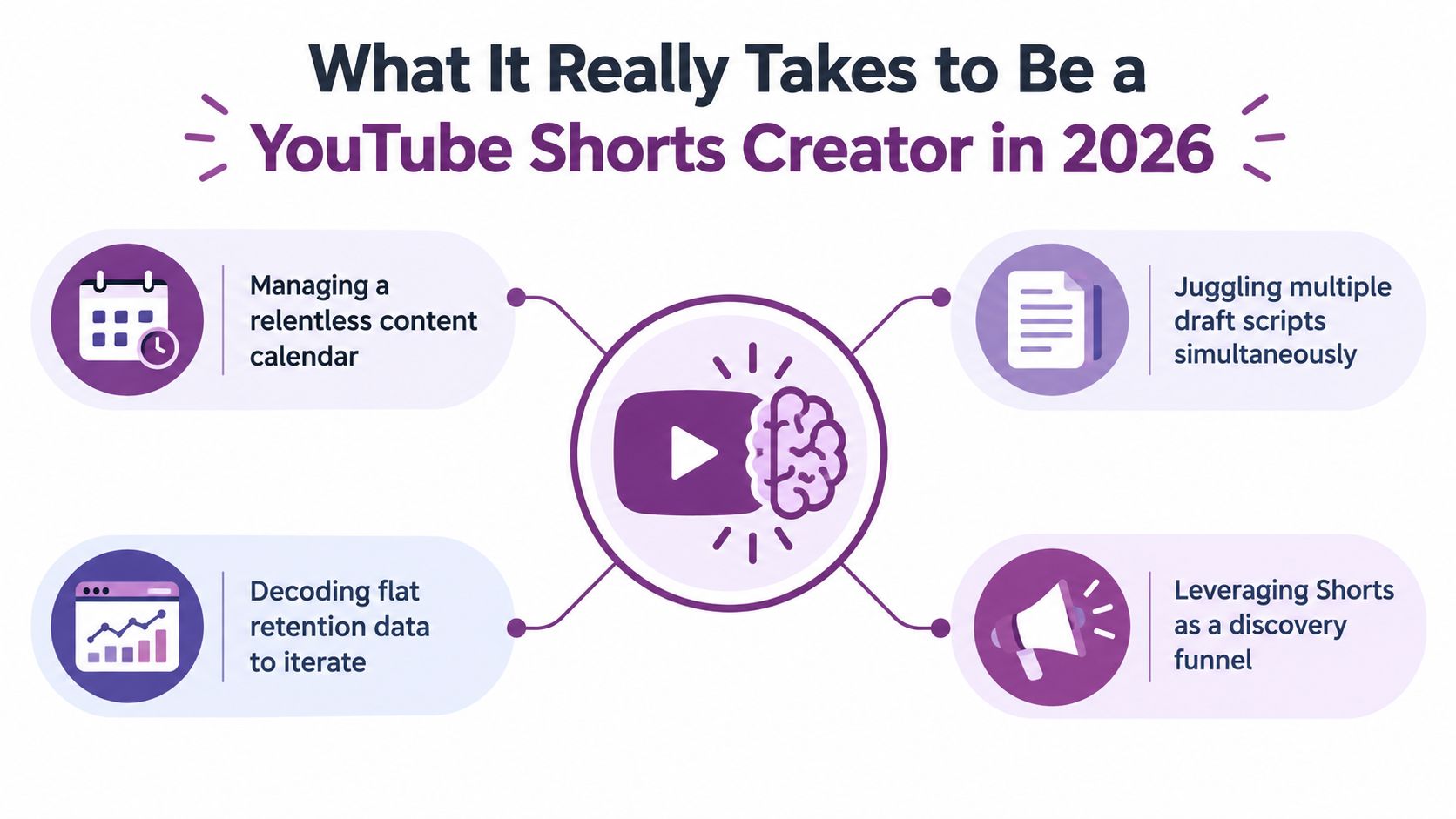
What It Really Takes to Be a YouTube Shorts Creator in 2026
It's Tuesday morning. Your content calendar needs a post, four scripts are in draft form, and the retention graph from yesterday's Short drops sharply before the explanation begins. You can either publish another rushed clip or stop and diagnose the opening, visual sequence, and payoff.
That pressure exists because Shorts now functions as both a discovery engine and a business channel. A Short can introduce viewers to your main channel, but the format also participates in YouTube's revenue system. The scale alone makes it difficult to treat Shorts as a casual side experiment. Millions of creators are competing for the same swipe, even though the strongest channels still win through clear positioning and disciplined execution.
The four pressures shaping the job
A working creator has to manage several competing demands:
- The opening: Viewers decide quickly whether to keep watching, so the first visual and spoken line need to establish tension immediately.
- Publishing cadence: Frequent output gives you more opportunities to learn, but volume without review creates a library of weak hooks.
- Longer Shorts: Square or vertical videos up to three minutes are classified as Shorts for uploads made on or after December 8, 2025, and eligible videos can participate in Shorts monetization. (YouTube's official three-minute Shorts guidance)
- Production quality: Audiences have become comfortable with polished edits, strong captions, cinematic B-roll, and clean audio. A basic setup can still work, but the idea and execution must earn attention.
You're not just a presenter. You're a writer, editor, visual designer, analytics reviewer, and distribution manager. Each week requires hook writing, filming or generating footage, cutting around retention beats, packaging the idea clearly, and repurposing winners without flattening their context.
A solo creator can handle that workflow with a phone and a straightforward editor. For larger shoots or campaigns, a guide to the best video production companies can help clarify when outside production is worth the cost. For creators building repeatable AI-assisted visuals, LunaBloom AI is another production option to evaluate alongside conventional filming.
Practical rule: Don't ask whether a Short looks impressive. Ask whether every shot earns the next second of attention.
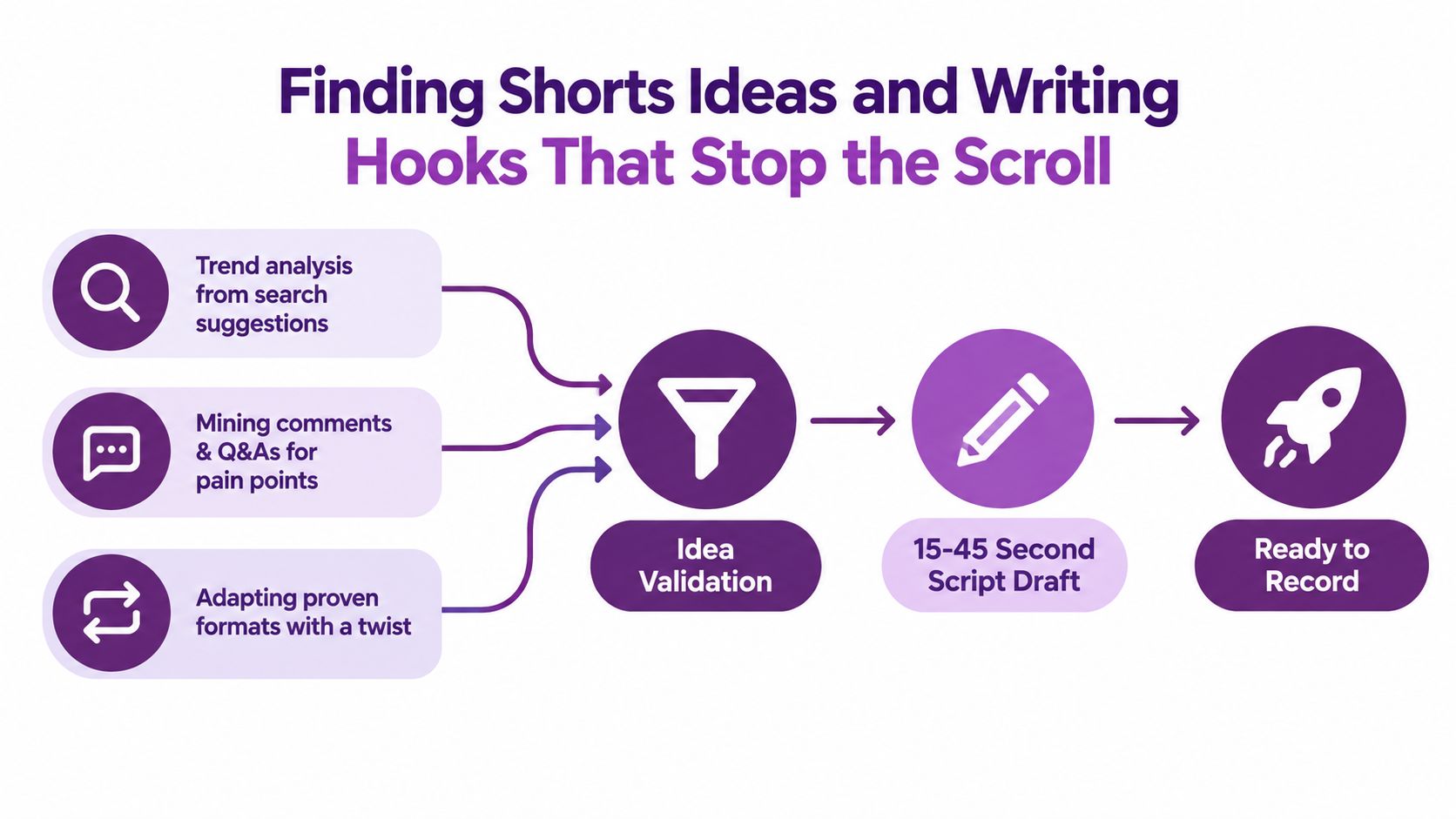
Finding Shorts Ideas and Writing Hooks That Stop the Scroll
The strongest ideas usually come from existing audience friction, not a blank document. Start with three sources that reveal what viewers already care about:
- Mine comments on competing Shorts. Look for repeated objections, follow-up questions, and requests for examples. A comment such as “Does this work for beginners?” can become a focused opening.
- Collect questions from niche communities. Subreddits and specialist forums expose language people use when they're confused or frustrated.
- Remix your own long-form work. Pull out the sharpest claim, mistake, demonstration, or before-and-after moment. Don't just cut the first section of a long video. Build a new Short around the most useful tension.
Validate the idea by completing this sentence: “After watching, the viewer will know how to…” If you can't finish it clearly, the topic is still too broad.
A hook structure that gives the viewer a reason to stay
A practical Short often has three early jobs:
- First second: Create a pattern interrupt with movement, an unexpected frame, a direct statement, or a visible mistake.
- By the third second: Open a curiosity gap. State what's at stake without explaining everything.
- By the midpoint: Deliver a one-sentence payoff or make the promised result unmistakable.
For a productivity Short of about 20 seconds:
“Your to-do list is making you slower. Delete every task that doesn't have a next action. ‘Work on marketing' becomes ‘write the opening paragraph.’ Now your brain has a move, not a vague obligation.”
For a cooking Short of about 30 seconds:
“Your pan isn't too hot, your food is too wet. Pat the vegetables dry, heat the pan first, then add them in a single layer. You'll get browning instead of steam, and the final plate changes before the sauce even goes in.”
The formats differ, but both scripts establish a problem, create a reason to continue, and state the practical payoff before the ending.
Use the following checklist before you record:
- Clarity: Can a viewer identify the topic without context?
- Tension: Does the first line introduce a mistake, contrast, risk, or desirable result?
- Payoff timing: Does the viewer understand the value before the final frame?
- Visual variety: Does the script support changes in framing, text, demonstration, or B-roll?
- Specificity: Can you replace a general word with a concrete action or example?
- Ending: Does the final beat resolve the opening rather than add an unrelated call to action?
For further practical ideas on distribution and packaging, this guide to getting more YouTube Shorts views is useful as a supplementary reference.
Filming on Camera vs Generating Shorts with AI
Phone footage and AI-generated video solve different production problems. The right choice depends on whether the audience needs your face, whether the format requires repeated scenes, and whether the concept depends on realism or visual invention.
Phone filming wins when trust is inseparable from the creator. Personal vlogs, reactions, demonstrations, interviews, coaching, and opinion-led content benefit from visible presence. A real face also makes imperfections useful. Small pauses, genuine reactions, and physical proof can communicate credibility that a generated character can't automatically provide.
AI generation becomes more practical when the idea depends on visual explanation, stylized environments, faceless presentation, or a repeated character and setting. It can help you produce variations from a consistent script without arranging another shoot. It also introduces risks: unnatural motion, inconsistent details, generic expressions, and a visual style that distracts from the message.
| Factor | Phone Filming | AI Generation with LunaBloom |
|---|---|---|
| Speed | Fast for simple talking-head or demonstration clips | Fast for scripted, visual, or faceless concepts once prompts are prepared |
| Cost per Short | Equipment and editing time are the main costs | Tool usage and review time are the main costs |
| Authenticity | Strong when personal trust and proof matter | Depends on transparent presentation and visual consistency |
| Scalability | Limited by filming time, location, and availability | Easier to vary scenes, characters, and formats |
| Retention risk | Flat framing, weak lighting, and slow delivery | Unnatural movement, visual artifacts, or generic scenes |
A simple decision rule
Choose phone footage when:
- The creator's identity is part of the value.
- The viewer needs to see a real product, process, or reaction.
- The topic depends on lived experience or trust.
Choose AI generation when:
- The script needs cinematic B-roll or explanatory scenes.
- The channel is faceless by design.
- You need a repeatable character, environment, or visual metaphor.
- Batch production matters more than documentary authenticity.
A useful prompt for a 15-second cinematic explainer might read: “Create a vertical 9:16 cinematic explainer about how a seed becomes a tree, beginning with an extreme macro shot beneath soil, then a smooth upward camera movement through roots and a growing stem, soft morning light, realistic natural textures, clean space for captions, clear visual change every few seconds, no text embedded in the scene.”
Review the generated result like any other footage. If the visual doesn't clarify the sentence or create forward motion, replace it. You can explore a browser-based workflow through the LunaBloom AI video app, but the creative decision should come from the concept, not the novelty of generation.
Editing, Captions, and Voiceovers That Lift Retention
Editing should happen in layers. Start with pacing, then captions, voiceover, sound design, and export. If the first cut is slow, polished subtitles and music won't rescue it.
The precise rhythm depends on length and subject, but a useful working framework looks like this:
| Short Length | Cut Cadence | Hook Window | Pattern Interrupts |
|---|---|---|---|
| Under 15 seconds | Change the visual roughly every 1.2 to 1.8 seconds | Visual change inside the first 500 milliseconds | Use immediate movement or a sharp contrast |
| 15 to 30 seconds | Allow roughly 2 to 3 second beats | Establish the premise immediately | Add one meaningful interruption around the middle |
| 30 to 60 seconds | Build a clear three-act progression | Make the promise before the explanation | Re-hook around 15 and 35 seconds |
These are production targets, not universal platform rules. Retention benchmarks vary by length, and one 2026 framework suggests targeting above 60% retention for Shorts under 15 seconds, above 50% for 15 to 30 seconds, and above 40% for 30 to 60 seconds. Stronger performance in that framework sits above 75%, 65%, and 55% respectively. (Retensis' 2026 audience retention benchmarks)
Captions should carry meaning
Use captions as both accessibility support and visual anchors. Keep them to two lines, make each line easy to scan, and emphasize the keyword that carries the sentence. Don't caption every filler word with equal visual weight.
For voiceover, choose the option that matches the channel:
- Recorded voiceover: Best for personality, authority, and emotional nuance.
- Auto-captions reframed as narration support: Useful when the original speaking performance is strong but the edit needs clearer emphasis.
- AI voice created with ElevenLabs: Practical for selected faceless formats, provided the voice sounds natural and the use is transparent where appropriate.
Sound design should support, not compete. Keep music beneath dialogue, use effects to mark transitions or reveals, and remove low-level noise before adding more layers. A viewer may forgive a simple image, but muddy speech makes the entire Short harder to follow.
Export vertical video at 1080×1920, use 30 fps for talking-head footage and 60 fps for motion-heavy AI footage, choose H.264, and target a bitrate of 8 to 12 Mbps. These settings preserve a clean source for platform processing. For additional workflow context and product capabilities, see LunaBloom's platform overview.
Titles, Thumbnails, and Metadata for Maximum Reach
Packaging doesn't begin after editing. The title, first frame, and metadata should express the same promise, because viewers need to understand the Short before they decide whether to keep watching.
For Shorts, the first frame often does more practical work than a separately designed thumbnail. The viewer encounters the opening image in the feed, while the title reinforces or weakens the expectation created by that image. A strong package makes one clear promise. A misleading package may attract an initial swipe-stop but creates disappointment once the video starts.
Build the first frame as a visual headline
Design frame zero before finalizing the edit:
- Put the subject, face, product, or result in a high-contrast position.
- Use a short overlay that can be understood instantly.
- Keep the wording focused on one tension, not a paragraph of context.
- Choose a visual treatment that separates the frame from nearby content.
- Make sure the first spoken line matches what the viewer sees.
The 70% impression-to-view target specified in the initial creative framework isn't an official universal YouTube threshold, so treat it as an internal packaging goal rather than a platform rule. For more general performance analysis, a 2026 Shorts statistics framework recommends reviewing swipe-away behavior first, then impressions click-through rate, then average view duration and completion patterns among videos with similar length and topic. It identifies swipe-away above 35% as a warning sign, 25% to 35% as workable, and below 15% as exceptional, while CTR below 3% indicates underperformance and above 8% is exceptional within that framework. (ShortsIntel's 2026 statistics guide)
Because these benchmarks come from third-party frameworks rather than universal YouTube requirements, compare them with your own recent uploads. A strong overall retention number can hide a weak opening if viewers who stay watch intently. Always inspect the “viewed versus swiped away” split.
Write titles that state the payoff
A concise title should name the result or tension without duplicating every word spoken in the video. “Fix This Pan Mistake” is more useful than “Cooking Tips You Need to Know,” because it gives the viewer a specific reason to watch.
Use these patterns:
- Mistake plus consequence: “Your Morning Routine Has This Problem”
- Result plus method: “Make Crispy Vegetables Without More Oil”
- Curiosity plus topic: “Why Your To-Do List Keeps Growing”
- Contrast: “Phone Footage Beats AI for This Content”
Avoid bait-and-switch wording. If the title promises a test, show the test. If it promises a solution, deliver the solution before the closing frame.
Use metadata to reinforce discovery
Metadata should clarify the subject for viewers and search systems:
- Add a branded hashtag and category hashtags that describe the Short.
- Pin a question that invites a specific response, such as “Which step would you try first?”
- Write a description containing natural long-tail phrases related to the exact problem.
- Keep captions accurate. A transcript helps viewers follow the content and gives search systems more context.
You can also sharpen YouTube thumbnail images when a source frame needs cleaner detail, but enhancement won't fix a weak idea or confusing composition.
Test without destroying the learning signal
Change one variable at a time. If you're testing a title, leave the edit and first frame untouched. The original operating framework suggests waiting until 50,000 impressions, comparing a 48-hour window, and reverting if swipe-away rises by more than 8%. Those figures should be treated as a controlled testing protocol, not a guaranteed YouTube requirement.
Publishing frequency also needs to match capacity. A solo creator can aim for 4 to 5 Shorts per week, while a small team may sustain 7 to 10 if review quality remains high. Batch filming on one day and editing on another creates a buffer, which is more durable than promising daily uploads and missing them.
Distribute in an intentional order:
- Publish the clean original on YouTube Shorts.
- Wait for the initial performance signal.
- Adapt the vertical source for TikTok and Instagram Reels.
- Remove platform watermarks and re-burn captions natively for each destination.
- Reuse the concept only when the original clearly outperformed your channel's normal baseline.
For reposting, the proposed decision rule is to reuse a Short only if it reached 1.5 times your channel median views within the first 48 hours. If it didn't, let it retire and diagnose the hook instead of repeatedly pushing the same weak package.
On Mondays, review your top three hooks, your weakest hook, and one title test to queue. When a hook wins, write three new scripts around its underlying tension. Repetition becomes a problem when the subject and payoff stay identical. A proven opening can keep working when the examples, visuals, and conclusion change.
Monetization Rules, Revenue Splits, and What Actually Pays
At an estimated $0.05 RPM, a million Shorts views returns roughly $50 in feed ad revenue. That is why volume alone is not a business model. Shorts ads appear between videos, and eligible revenue enters a creator pool before allocation. Music licensing and audience mix affect the amount available, so channels with similar view counts can earn different amounts. The 45% revenue share matters, but retention, audience quality, and the offer behind the channel matter just as much. (VoxBooster's Shorts monetization estimates)
Eligibility and timing matter
A creator must accept the Shorts Monetization Module before Shorts ad revenue sharing begins. Only eligible views earned after acceptance qualify, and earlier views are not included retroactively. (YouTube's Shorts monetization policies)
One commonly cited YPP route ties Shorts monetization eligibility to 10 million valid public Shorts views during the previous 90 days. Channels below that threshold can remain in YPP for long-form earnings, with Shorts revenue sharing resuming once the required view level is crossed again. (Kompozy's Shorts monetization rules)
The three-minute change also affects planning. Square or vertical uploads up to three minutes can qualify as Shorts when uploaded on or after December 8, 2025, subject to eligibility requirements. More runtime can support explanation or a stronger payoff, but it does not rescue a weak opening. If the first seconds lose viewers, extra duration only gives the drop-off more room to continue.
Choose topics for business value, not vanity
Choose a topic when it presents a clear viewer problem and a credible next step. That step could lead to a long-form tutorial, product demonstration, service inquiry, membership, or brand partnership.
A Short can earn attention without producing useful business results. Track views alongside subscribers, returning viewers, comments, clicks, and revenue. A topic that generates reach but little audience action belongs in the testing queue, not at the center of the channel.
AI-assisted production creates another cost decision. Phone footage may be cheaper when the setup already exists and the subject benefits from trust or immediacy. LunaBloom can make cinematic concepts possible without a shoot, but prompts, generation, rights, and review still take time. Use the option that gives the opening, visual payoff, and retention the best chance of working at a sustainable production cost.
Review LunaBloom's terms for AI-assisted video usage before building a publishing workflow around generated scenes. Pair every creative choice with the same question: can it hold attention long enough to create valuable viewing, and can that attention lead somewhere beyond feed ads?
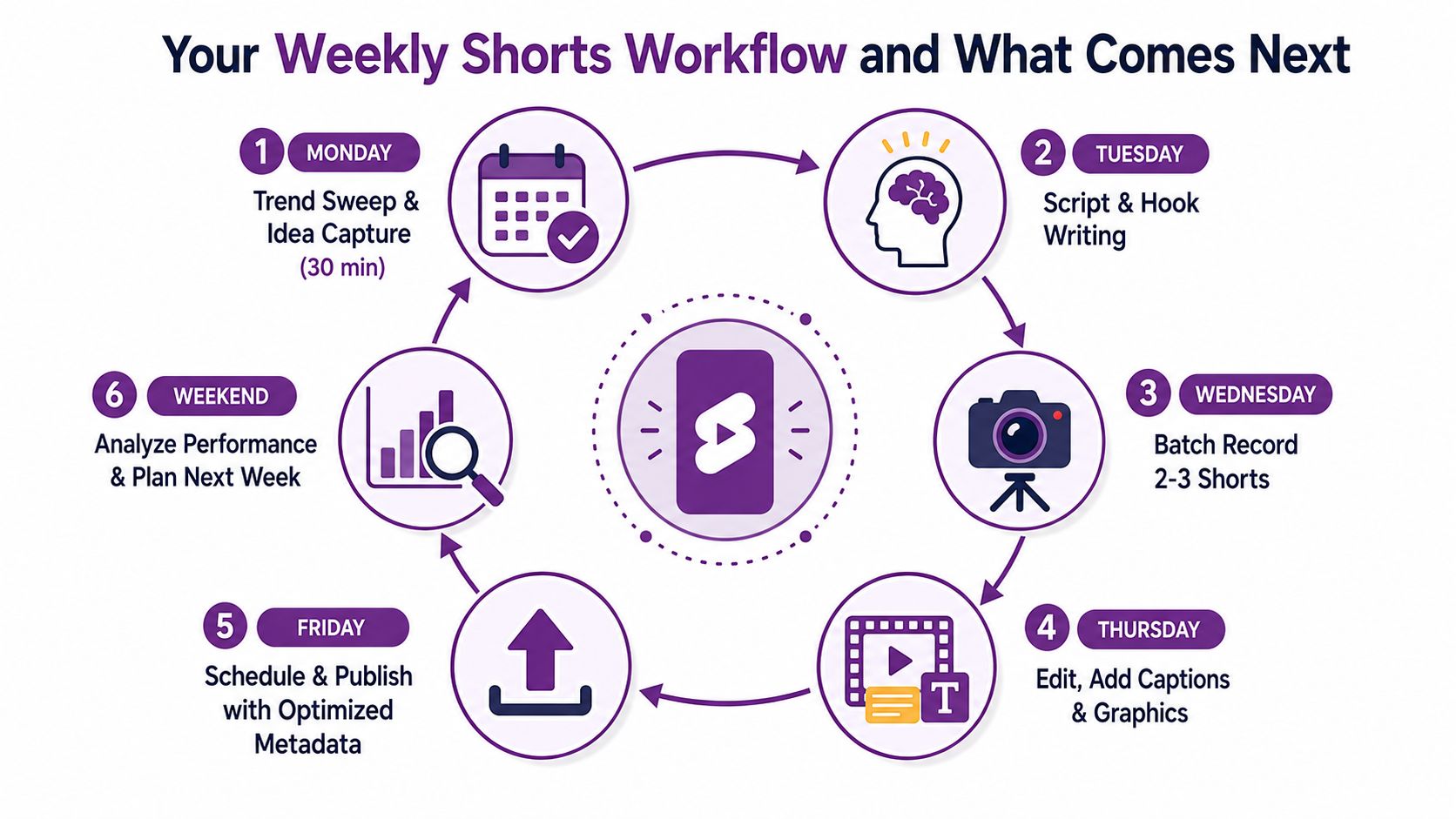
Your Weekly Shorts Workflow and What Comes Next
A sustainable week starts with a small research block and ends with a performance review. The point isn't to create a new system every week. It's to give every idea a clear place from discovery through publication and analysis.
A practical Monday-to-Sunday rhythm
- Monday: Spend 30 minutes scanning the Shorts feed, Reddit, X, and TikTok Creative Center. Capture audience questions, repeated formats, and visual patterns.
- Tuesday: Write three scripts. Draft the first line, curiosity gap, midpoint payoff, and final visual before recording.
- Wednesday: Batch-record phone footage or generate AI scenes. Save prompts, source clips, and alternate openings with the project.
- Thursday: Edit pacing first, then captions, voiceover, sound, and metadata. Prepare title variations without changing several variables at once.
- Friday: Publish one anchor Short and supporting clips that develop the same topic from different angles.
- Weekend: Reply to comments, inspect early retention, and adapt genuine winners for TikTok and Instagram Reels.
Use a lightweight production workspace such as the LunaBloom AI starter app when AI-generated scenes fit the concept. Keep the same evaluation standard for generated footage and phone footage: does the opening stop the swipe, does each visual advance the idea, and does the ending deliver the promised payoff?
Seven habits that compound
- Publish at least five Shorts weekly if that pace is sustainable for your capacity.
- Protect the first three seconds and compare your opening against your own recent work.
- Rewrite weak hooks within 48 hours instead of endlessly polishing the middle.
- Ship one pillar Short every two weeks that can feed a longer video or broader offer.
- Reply to early comments quickly while the conversation is active.
- Recycle winning hooks into new scripts with different examples and visuals.
- Review revenue dashboards weekly, not monthly, so content decisions reflect business outcomes.
The next stage of Shorts will likely favor creators who can combine AI-native production, longer eligible formats, and vertical commerce without sacrificing trust. The tools will change, but the operating principle won't: choose the right production method, make the first seconds clear, study the retention curve, and connect attention to a valuable next step.
LunaBloom AI turns scripts, prompts, and images into edited vertical videos with voiceovers, captions, avatars, and social-ready outputs, giving Shorts creators another way to batch cinematic or faceless content. Visit LunaBloom AI to test whether its AI-assisted workflow fits your next week of YouTube Shorts production.