
Trying to translate a video to English? You’re in the right place. The quickest and most effective method is using an AI platform to automatically generate subtitles or a new dubbed audio track. What once required professional studios can now be done by any creator in minutes, instantly connecting your content with a huge global audience.
This guide will walk you through everything you need to know, from choosing the right translation method to publishing your video for maximum reach.
Why Translating Video to English Is a Growth Superpower

Let's get straight to the point: translating your videos into English isn't just a bonus feature—it's a powerful growth strategy. This single action can dramatically expand your brand's visibility, build international trust, and drive revenue by taking your content beyond local borders and into the world's largest digital markets.
The results speak for themselves. Imagine a Spanish e-commerce brand doubling its US sales after dubbing its product videos, or a Korean creator seeing a 400% surge in subscribers after adding accurate English subtitles. These aren't isolated incidents; they're clear evidence of a major shift in how creators and businesses connect with people worldwide.
The Real Business Benefits
The advantages are tangible and measurable, going far beyond simple view counts. When you make your content accessible in English, you unlock several key benefits.
- Boost Your Video SEO: Platforms like YouTube favor content with accurate captions. By adding an English subtitle file (SRT), you are essentially feeding the algorithm a script of your video, helping it rank for valuable English keywords.
- Enhance Global Credibility: Presenting your content professionally in English signals to a global audience that you are a serious player. It tells potential customers and partners that your brand is established, trustworthy, and ready for international business.
- Access High-Value Markets: English-speaking regions, particularly North America, hold significant purchasing power. Translating your content creates a direct pathway to these lucrative audiences.
The demand for this technology is surging for a reason. Businesses and creators are recognizing that multilingual content is no longer a luxury but a core component of a successful digital strategy.
The technology behind this is evolving at an incredible pace. The global AI video translation market hit USD 2.68 billion in 2024 and is projected to reach an astounding USD 33.4 billion by 2034. A significant portion of that growth—over 36.4% of the market share—originates from North America, underscoring the critical importance of multilingual video.
You can explore the data in the full AI video translation market report. The key takeaway is that a once slow and costly process is now a simple, automated task thanks to powerful AI, putting global reach within everyone's grasp.
Choosing Your Translation Method: Subtitles vs. Dubbing
When you decide to translate a video to English, you face a key choice: should you use subtitles or dubbing? This isn't just a technical decision—it fundamentally shapes how your new audience experiences your content.
Think about the last foreign-language content you watched. Was it a documentary with subtitles or a dubbed animated film? With subtitles, you likely heard the speaker's original voice and emotion, preserving authenticity. With dubbing, the experience was probably so seamless you forgot it was ever in another language.
Each method has unique strengths, and the best choice depends on your video's style and your ultimate goals.
When Subtitles Are the Best Option
Subtitles are the ideal choice when preserving the speaker's original performance is essential. By keeping the original audio, you allow viewers to hear every nuance and inflection in the speaker's voice.
This makes them a perfect fit for:
- Educational and Tutorial Videos: In how-to content or expert interviews, the instructor's tone is as important as their words. Subtitles let viewers hear that tone while reading the translation, building trust.
- Documentaries and Interviews: Authenticity is paramount in these formats. Subtitles preserve the real voices of your subjects, creating a more genuine and impactful viewing experience.
- Budget-Friendly Projects: From a practical standpoint, generating and editing subtitles is almost always faster and more affordable than producing a high-quality dubbed audio track.
Additionally, subtitles provide a significant SEO advantage. Search engines can crawl the text in a subtitle file (like an SRT), helping your video appear in relevant English search results. If this sounds like the right path, this guide on how to add captions to videos is a great resource.
When AI Dubbing Creates a Better Experience
AI dubbing replaces the original audio with an AI-generated English voiceover, creating a more immersive experience. It eliminates the need for viewers to split their attention between watching the on-screen action and reading text.
This makes it the clear winner for content that is visually complex or fast-paced.
Dubbing aims to make the language barrier invisible. When done well, a viewer shouldn't even have to think about the fact that the video was translated; they can just absorb the message.
Consider using AI dubbing for these scenarios:
- Marketing and Product Demos: You need your message to land with maximum impact. A smooth English voiceover makes your product feel native to the market and removes the distraction of reading.
- Narrative and Storytelling Content: For vlogs, short films, or any story-driven video, dubbing helps maintain emotional engagement, ensuring your audience doesn't miss key visual cues.
Subtitles vs. AI Dubbing: A Quick Comparison
Still unsure? A side-by-side comparison can help clarify the decision. Here’s a quick breakdown of the key factors to consider for your video.
| Factor | English Subtitles | AI Dubbing (Voiceover) |
|---|---|---|
| Viewer Experience | Requires reading; viewers hear the original speaker's voice and tone. | Seamless and immersive; viewers hear the content in their own language. |
| Authenticity | High. Preserves the original audio performance and emotion. | Lower. Replaces the original voice, which can alter the emotional delivery. |
| Best For | Documentaries, interviews, educational content, foreign films. | Marketing videos, tutorials, animated content, storytelling. |
| Cost & Speed | Generally cheaper and faster to produce. | Can be more expensive and time-consuming, though AI speeds this up. |
| Accessibility | Great for viewers who are deaf or hard-of-hearing. | Better for visually impaired viewers or those who prefer listening. |
| SEO Benefits | Strong. Search engines can index the subtitle text file. | None. Audio isn't indexed by search engines. |
Ultimately, there's no single "best" answer. Subtitles honor the original content's authenticity, while dubbing prioritizes viewer immersion. Think about what your audience values most and what kind of experience you want to create for them.
How to Translate a Video with AI Tools
So, you've decided between subtitles and dubbing. Now comes the exciting part: making it happen. Let's walk through how to translate video to English using modern AI platforms. The process is surprisingly straightforward, even if you have no technical video editing experience.
The entire process begins when you upload your video to an AI tool. From there, the magic happens through Automatic Speech Recognition (ASR) technology, which listens to the audio and converts the spoken words into a text script.
This initial script is your foundation. Once the AI generates the text, you simply instruct it to translate that script into English. The whole process, from audio analysis to a complete English translation, often finishes in just a few minutes.
Step 1: Transcription and Translation
First, you need to get your video into the system. Most platforms allow you to upload a file directly or simply paste a link from a site like YouTube. The moment it's uploaded, the AI gets to work creating a time-stamped transcript in the original language.
For videos with clear audio, this process can achieve over 95% precision. Even so, it's always wise to give this first draft a quick review. Look for misspelled names, technical terms, or any words the AI might have misunderstood due to background noise. A small fix here can save you a bigger headache later.
Once the transcript is accurate, you select "English" as your target language and let the AI perform the translation.
This flowchart provides a high-level view of the two main paths for translating your video with AI.
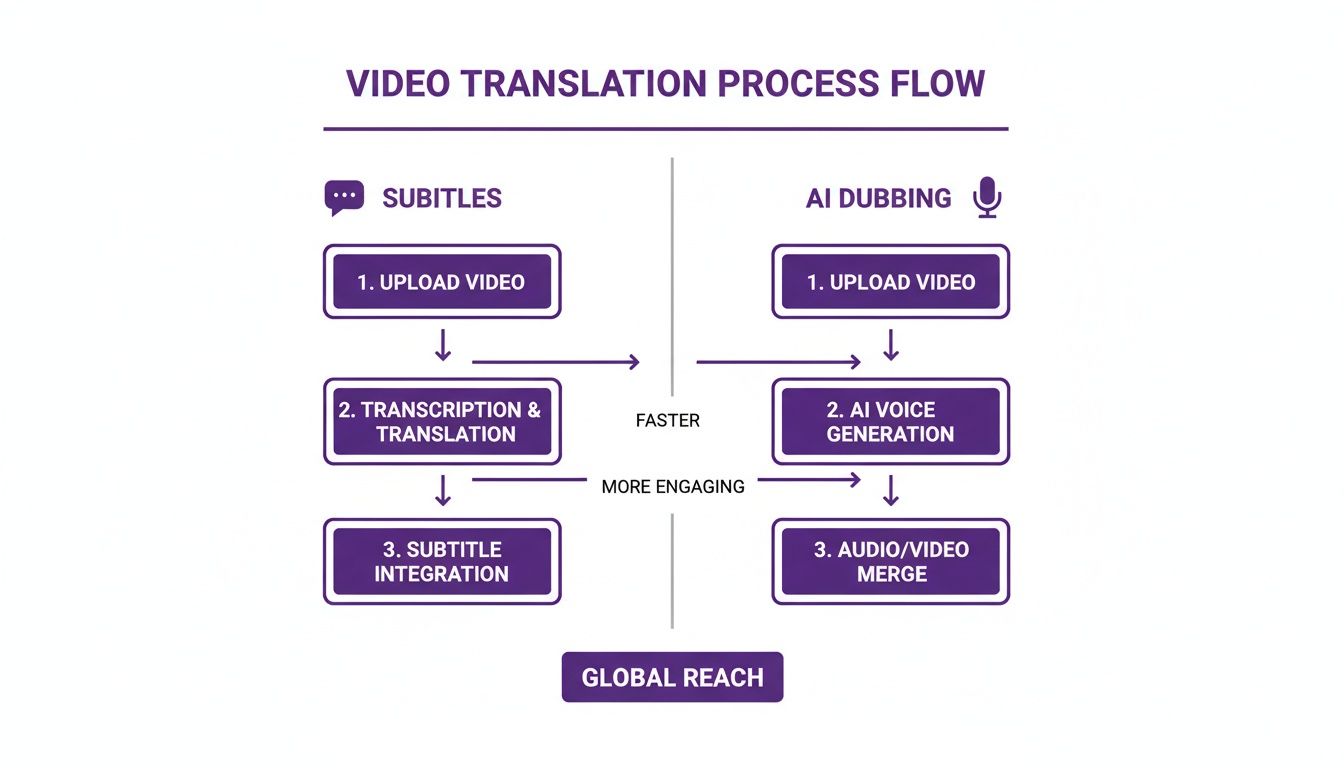
As you can see, both routes start with the core transcription and translation step. From there, your workflow diverges based on whether you chose subtitles or a full AI dub.
Step 2a: Generating English Subtitles
If you opted for subtitles, your work is nearly done once the English text is ready. The AI tool will automatically format this text into a standard subtitle file, typically an SRT file. This is the industry-standard format that contains three key pieces of information for each line of dialogue:
- The start time
- The end time
- The translated English text
You can then preview these subtitles in the platform's editor, watching the video to see how they look and feel in real-time. This is your chance to fine-tune timing and ensure the text is easy to read. For a streamlined process, a tool like Klap's dedicated video translation tool is designed specifically for this workflow.
Step 2b: Creating an AI-Dubbed Audio Track
Choosing a fully dubbed video introduces an exciting creative step: voice generation. With your English script finalized, you get to select the voice for your new audio track.
Think of this stage like casting an actor for a role. The voice you choose will become the new voice of your content, so its tone, pace, and style must align with your brand and message.
Top-tier platforms offer extensive voice libraries. You can filter AI-generated voices by gender, age, and style—perhaps you need an upbeat, friendly voice for a marketing video or a calm, authoritative voice for a tutorial. Some tools even offer voice cloning to replicate a specific person's voice for perfect consistency. You can explore how these features work on a platform like https://lunabloomai.com/.
After selecting a voice, the AI generates the new English audio, syncing it perfectly with your video. You can then preview the dubbed version and make any final adjustments to pronunciation or pacing before exporting the final video.
Refining Your Translation: From Good to Great
AI translation tools are incredibly powerful. They can handle over 95% of the work automatically, getting you remarkably close to a perfect result. But that final 5% is where you can truly make your content shine.
This quality check is what separates clunky, amateur videos from polished, professional content. Think of the AI's output as a high-quality first draft. While it's usually grammatically correct, it can sometimes lack the natural rhythm and cultural nuance that a native English speaker expects. Your goal is to add that final human touch.
This step goes beyond just fixing typos; it's about making the content feel completely natural in English.
How to Spot and Fix Common AI Errors
Even the most advanced AI can stumble over the quirks of human language. Your first editing pass should focus on these common issues.
A major one is idiomatic expressions. A phrase that is perfectly natural in one language can sound absurd when translated literally. For example, the Spanish phrase "no tener pelos en la lengua" might be translated as "to not have hairs on the tongue," which is meaningless in English. The correct idiomatic translation is "to be blunt" or "to speak frankly."
Here are a few other things to watch for:
- Cultural References: Does the script mention holidays, public figures, or events that an English-speaking audience won't recognize? You may need to replace them with a local equivalent or add a brief explanation.
- Technical Jargon: Ensure that industry-specific terms are translated to their standard English equivalents, not just a literal translation.
- Tone and Formality: The AI might not capture the intended vibe. A casual vlog requires a different tone than a corporate training video, so adjust the language until it feels right.
Perfecting Subtitle Timing and Readability
Once the text is perfect, the next step is ensuring it syncs flawlessly with the video. When you translate video to English, sentences often become longer or shorter, which can disrupt your subtitle timing.
A perfectly translated subtitle that appears too early or lingers too long is just as distracting as a typo. The goal is a seamless experience where the text supports the audio without becoming a distraction.
Always aim for a comfortable reading speed. If a line of dialogue results in a long, dense block of text, break it into two or three shorter, more digestible subtitles. And don't forget the basics: choose a clean, legible font that stands out against any background in your video.
Getting this right is crucial, and the demand for better tools is growing. The machine translation market is projected to hit USD 3 billion by 2027. Furthermore, platforms that streamline these workflows can reduce translation costs by up to 90% by catching errors early. You can find more interesting translation statistics here.
Publishing Your Translated Video for Maximum Reach
You've worked hard to translate your video to English, and the final version looks fantastic. But before you hit publish, remember that how you share your video is just as important as the translation itself. It's the difference between connecting with a new audience and getting lost in the algorithm.
Before you go live, you need to make a critical technical decision: do you export the video with subtitles "burned in" (permanently part of the video image), or do you use a separate subtitle file, like an SRT?
While burned-in subtitles are simple, they are completely invisible to search engines. For optimal SEO, especially on platforms like YouTube, always use a separate SRT file.
Why SRT Files Are an SEO Goldmine
An SRT file is a simple text document that contains your English subtitles and their timing cues. When you upload this file with your video, you are essentially providing platforms like YouTube with a complete, word-for-word transcript.
This is a massive advantage. It allows the algorithm to understand exactly what your video is about, helping it rank for a wide range of relevant English search terms. Think of it as giving the search engine a detailed map of your content.
Choosing a separate SRT file over burned-in subtitles is one of the single most effective technical SEO decisions you can make for your video. It transforms your subtitles from a simple viewing aid into a powerful discovery tool.
This one choice helps you tap into a huge and expanding market. The entire language services industry is projected to reach USD 76.78 billion globally by 2025, with video translation as a major growth driver. You can learn more about these language industry trends.
Optimizing Your Video for a Global Audience
With your SRT file prepared, the final step is to optimize your video's metadata for your new English-speaking viewers. Don't just translate your original title and description—localize them.
Think from your new audience's perspective. What search terms would an English speaker use to find your content? This requires some basic keyword research to align your video with popular searches in your niche.
Here’s a final checklist before you publish:
- Write a Compelling English Title: Make it clear, engaging, and include your primary English keywords.
- Craft a Detailed Description: Use this space to add context, incorporate secondary keywords, and include relevant links.
- Add Relevant Tags: Use a mix of broad and specific tags in English to help YouTube categorize your video.
- Create a Custom Thumbnail: Design an eye-catching thumbnail with English text that clearly communicates what your video is about.
By following these steps, you can ensure that all your hard work on the translation pays off with real visibility and engagement.
Common Questions About Video Translation
Even with powerful AI tools, translating a video for the first time can raise a few questions. Getting clear answers beforehand can help you establish a smooth and efficient workflow.
Here are the answers to some of the most common questions people ask when they decide to translate a video to English.
How accurate is AI video translation?
Modern AI translation is surprisingly accurate, often achieving over 95% accuracy for common languages. However, the final quality depends on several factors.
Poor audio quality, strong accents, or highly specialized jargon can sometimes confuse the AI. For this reason, it's always recommended to perform a quick human review. This final check catches subtle contextual errors and ensures the translation flows naturally for a native English speaker.
The AI does the heavy lifting, but a quick human check is what takes the translation from just "correct" to genuinely engaging. It’s the final polish that ensures your message truly connects.
Can I translate a video without a script?
Yes, absolutely. This is one of the biggest advantages of using an AI-powered platform. You don't need a pre-written script to get started.
The technology handles the entire process for you in two steps:
- Automatic Speech Recognition (ASR): The AI "listens" to your video's audio and automatically generates a complete, time-stamped transcript.
- Machine Translation: It then takes that newly created transcript and translates it directly into English.
This two-step process means you can start with just your video file, making the entire project faster and more accessible.
Does translating my video's audio help with SEO?
This is an excellent question with a nuanced answer. The act of dubbing your video's audio into English does not directly improve SEO, as search engines cannot "listen" to audio files to understand their content.
However, the process of creating that dubbed audio also provides you with a full English script. When you export that script as a subtitle file (an SRT file) and upload it to YouTube with your video, you give search engines a perfectly indexable text version of your content. This is what provides a massive boost to your SEO, helping your video rank for English keywords and reach the right audience.
Ready to unlock a global audience with your video content? LunaBloom AI makes it easy to translate your videos into over 50 languages with professional-grade subtitles and AI-powered dubbing. Start creating today and connect with viewers worldwide. Explore the features at https://lunabloomai.com.





