
In today's fast-paced business world, video isn't just a nice-to-have for corporate training—it's an essential part of any modern learning strategy. It delivers a consistent, scalable, and engaging way to build skills that old-school documents or day-long seminars simply can't match. With hybrid teams becoming the norm and attention spans getting shorter, video is the perfect tool to cut through the noise.
Why Is Video Essential for Corporate Training?
Let's be honest. Traditional training methods are struggling to keep up. Think about the last time you sat through a dense slideshow or tried to absorb information from a lengthy manual. These approaches often lead to poor knowledge retention and inconsistent skills across your team.
We all consume dynamic, on-demand content in our personal lives, and our professional learning should be no different. This is where a smart video production for training strategy changes the game. Video transforms learning from a passive chore into an active, engaging experience. It’s ideal for demonstrating complex physical tasks, walking through software workflows, or sharing company culture with an authenticity that plain text can never capture.
The Business Case for Video Training
Beyond engagement, video training offers significant business advantages.
Imagine you need to train a global sales team on a new product. The old way involved expensive flights, hotels, and the logistical headache of getting everyone in the same room. With a single, well-produced training video, every team member receives the exact same message, on their own schedule. This consistency is invaluable for critical information like compliance regulations, safety procedures, or core brand messaging.
The numbers support this shift. Companies are investing heavily in employee development. A recent report revealed that U.S. training expenditures surged to $102.8 billion, with a significant 29% increase in spending on external training products and services. You can explore the full breakdown of these training investments to see the trends firsthand. The takeaway is clear: organizations are putting money into more effective training methods, and video is at the forefront.
When you invest in high-quality training videos, you’re not creating disposable content. You’re building a scalable, reusable library of corporate knowledge that delivers value for years to come.
How Accessible Is Video Production Now?
Not long ago, creating professional-looking videos required deep pockets and a dedicated production team. That era is over.
Today, a new wave of user-friendly AI tools has democratized video creation. Teams of any size can now produce polished, effective training content quickly and affordably—even without a video expert on staff. This technological shift removes the barriers to entry, making it easier than ever to keep your workforce skilled, informed, and prepared for the future.
Your Pre-Production Blueprint: Planning for Success
Have you ever tried to build furniture without looking at the instructions? You might end up with something that looks like a chair, but you probably wouldn't trust it. Jumping into recording a training video without a plan yields similar results.
A solid pre-production phase is what separates effective training videos from those that are quickly forgotten. This is where you lay the essential groundwork to ensure every second of your video serves a purpose.
It all begins with a simple needs analysis. Before thinking about cameras or scripts, ask two critical questions: What must the learner be able to do after watching this? And, who exactly is my audience?
Answering these questions clarifies your learning objectives and helps you tailor the content, tone, and complexity to the right people. A video teaching new hires a specific software workflow will look and feel very different from a compliance refresher for senior managers.
From Idea to Actionable Plan
Once you've defined your "why" and "who," it's time for scripting and storyboarding. A script is more than just words; it’s the narrative backbone of your training video. Keep sentences short, write in a conversational tone, and always read your script out loud. This simple practice helps you catch awkward phrasing that looks fine on paper but sounds unnatural when spoken.
A storyboard then maps out your script visually. You don't need to be an artist. Simple stick figures or text descriptions of each shot work perfectly. This step forces you to think through the visual flow and ensures your script and visuals tell a clear, cohesive story.
This infographic highlights the shift from outdated training methods to the modern, effective solutions that video provides.
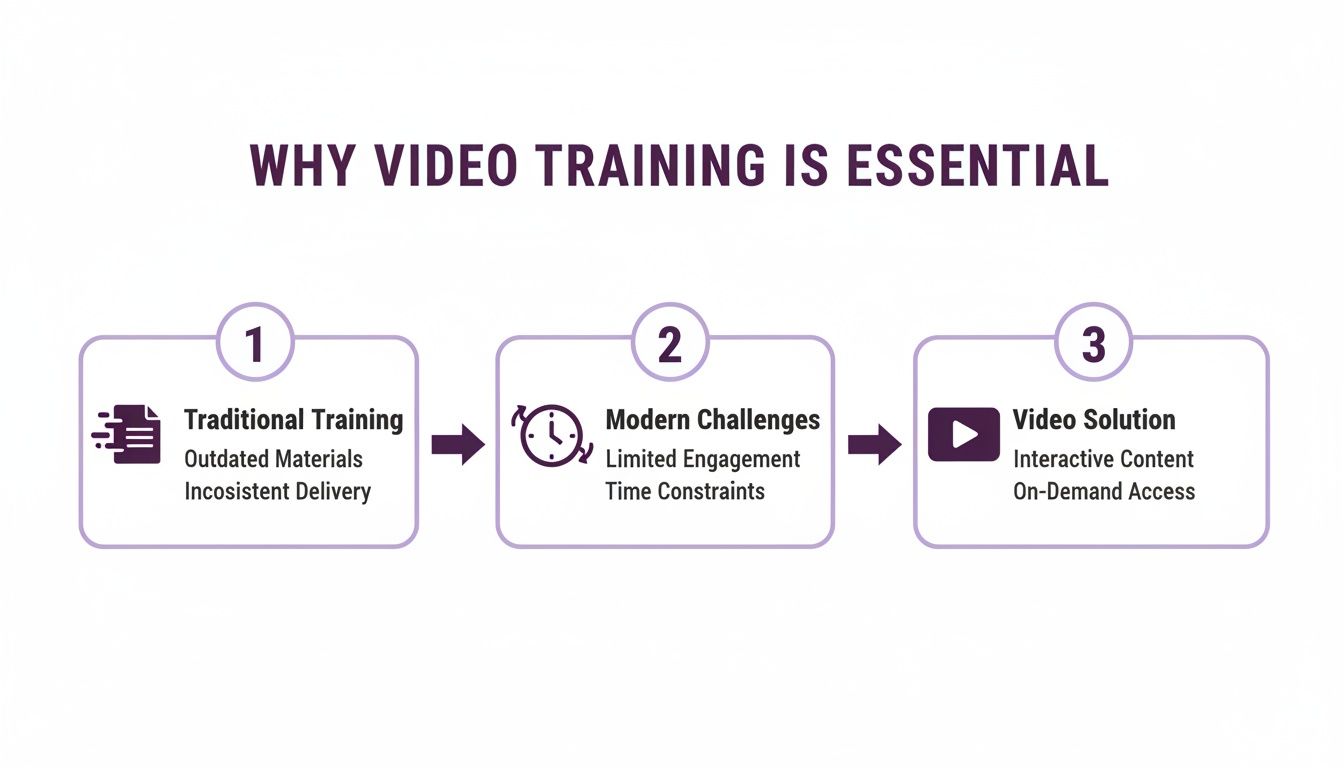
As you can see, video directly addresses today's learning challenges, such as short attention spans and the need for scalable training solutions.
Choosing the Right Video Format
Not all training needs are the same, so your video format shouldn't be a one-size-fits-all solution. The right choice depends on your learning objective and how your audience will use the content.
Selecting the best format from the start is crucial for engagement. Here’s a quick breakdown to help you decide.
Choosing the Right Training Video Format
| Format Type | Best For | Key Benefit | Example Scenario |
|---|---|---|---|
| Microlearning Videos | Single, specific skills or just-in-time support | Focused, easily digestible, and great for quick reference | A 3-minute video showing an employee how to submit an expense report in the new system. |
| Full Training Modules | Complex topics, conceptual knowledge, or detailed processes | Provides in-depth context and comprehensive understanding | A 15-minute module on company data security policies, broken into chapters. |
| Screencasts/Demos | Software walkthroughs and procedural tasks | Shows the exact steps on-screen, leaving no room for confusion | Recording your screen to demonstrate how to use a new feature in your company's CRM. |
| Role-Play Scenarios | Soft skills, sales techniques, or customer service training | Illustrates desired behaviors in a relatable, real-world context | A video showing the right (and wrong) way to handle a difficult customer complaint call. |
The goal is to match the format to the task. A quick microlearning video is perfect for a "how-to," while a deeper topic warrants a more comprehensive module.
If there’s one golden rule for video length, it’s this: be as long as necessary, but as short as possible. Respect your learner’s time by focusing on a single, core objective for every video you create.
By investing time in this pre-production blueprint, you set your entire video production for training project up for a successful outcome. This careful planning ensures your final video is focused, relevant, and achieves its intended goal.
How to Create High-Quality Videos with AI Tools
With your plan in place, it's time for the exciting part—creating your training video. In the past, this stage was often bogged down by technical challenges and high costs. Not anymore.
Today's AI-powered platforms are revolutionizing video production for training. You no longer need expensive cameras, microphones, or complex editing software. Anyone can now produce professional-grade videos directly from a web browser. This isn't just about saving money; it's about increasing speed, scaling content, and maintaining brand consistency.
Selecting Your AI Presenter and Voice
One of the most innovative features of modern video creation tools is the use of AI avatars. These digital presenters give your training content a consistent, professional face and can be customized to align with your company’s brand identity.
Choosing the right avatar is more important than you might think. Consider your audience and the topic. A friendly, casual avatar might be perfect for a new-hire onboarding video, while a more formal presenter could be better for annual compliance training. The goal is to select a persona that feels trustworthy and helps learners connect with the material.
Next is the narration. AI voice cloning can transform a simple text script into crisp, clear, human-sounding audio. You can choose from a vast library of voices or even clone your own to maintain a consistent brand voice across all your videos. This eliminates the need for expensive voice talent and recording studios.
Accelerating Production with Smart Features
The true magic of AI lies in its ability to streamline the entire production workflow, freeing you to focus on content rather than technical details.
Here are some of the game-changing features available:
- Auto-Generated Subtitles: Instantly create accurate captions. This is a massive win for accessibility, ensuring your training is inclusive. It also helps viewers absorb information in noisy environments.
- Rapid Localization: Need to train a global team? AI can translate your script and generate new voiceovers in dozens of languages in minutes, not weeks. This allows you to scale your training programs internationally at a fraction of the traditional cost.
- Automated Editing: Many platforms use AI to handle tedious editing tasks. To see what's possible, you can check out some of the best AI video editing software available today.
This transformation is already underway. A recent study found that 18% of businesses are already using AI for tasks like auto-captioning and editing, particularly as they adapt to the demands of hybrid work.
The real power of AI in video production isn't just replacing old tools; it’s enabling the creation of high-quality, scalable training content that was once out of reach for most organizations.
A Modern Workflow in Action
Let's say you need to create a short training video for a new software feature. With an AI platform, the process is remarkably simple. You can explore how AI streamlines video creation on a platform like LunaBloom AI to see it for yourself.
Here's a typical workflow:
- Write Your Script: Focus on creating a clear and concise script that explains the feature.
- Choose an Avatar: Select a pre-made avatar or upload a custom one that reflects your brand.
- Generate the Voiceover: Paste your script, choose a voice, and let the AI generate the narration.
- Add Visuals: Incorporate screen recordings, product images, or text overlays to illustrate your points.
- Finalize and Export: Add subtitles with a single click and export your finished, professional-quality video.
This modern approach to video production for training transforms what used to be a multi-week project into a task that one person can complete in an afternoon.
How to Polish and Distribute Your Training Video
You've created your training video—a major milestone. But the work isn't finished yet. The final stage is about transforming your draft into a professional learning tool that gets seen and makes a real impact. Rushing this step is like baking a cake and forgetting the frosting; the final product will fall flat.
First, focus on post-production to refine every detail for maximum clarity. This isn't about adding flashy special effects; it’s about systematically removing distractions. Start with the audio. Is it clean, crisp, and at a consistent volume? Poor audio is one of the fastest ways to lose a viewer's attention. Take the time to normalize volume levels and remove any distracting background noise.
Your Pre-Launch Quality Checklist
Before you hit "publish," run a final quality assurance (QA) check. Think of it as a pilot's pre-flight checklist—a simple but critical process that separates amateur content from professional work by catching avoidable errors before your audience does.
Here’s what your checklist should include:
- Branding Consistency: Are your company logos, colors, and fonts used correctly and consistently? A consistent brand builds trust.
- Visual Flow: Do the graphics, text overlays, and transitions support the message, or do they create clutter?
- Accuracy Check: Is every piece of information factually correct and up-to-date? Have a subject matter expert give it a final review.
- Technical Polish: Have you trimmed any awkward pauses or verbal stumbles? Does the video’s pacing feel engaging from start to finish?
A thorough quality check isn't about chasing perfection; it's about showing respect for your learners' time. A polished, error-free video demonstrates that you value their attention and are committed to their development.
Getting Your Video to Your Audience
With your video polished and approved, it's time to get it in front of the right people. Simply uploading it to a public platform and hoping for the best is rarely the right strategy for corporate training.
The most common method is hosting it on a Learning Management System (LMS). This integrates the video into your existing training ecosystem, allowing you to track viewership, monitor completion rates, and link it to quizzes or other learning resources. It’s the most secure and centralized way to manage your training content.
If you don't have an LMS, you still have great options:
- Private Hosting Platforms: Services like Vimeo or Wistia are excellent choices. They offer robust privacy controls, ad-free viewing, and detailed analytics. You can embed these videos on a company intranet or a password-protected site.
- Internal Communication Channels: For quick updates or informal microlearning, share a link on Slack or Microsoft Teams. This approach delivers just-in-time learning where your employees already are.
Whatever channel you choose, ensure the video is optimized for mobile viewing. Many team members will watch training content on their phones or tablets. A responsive design isn't just a nice-to-have; it's essential for ensuring your hard work translates into completed training.
How to Measure the Effectiveness of Your Training Videos
Congratulations, your video is live! But the process isn't over. Launching a video without tracking its performance is like flying blind. Understanding what works—and what doesn't—is how you prove the value of your efforts and make every future video even better.
It's easy to focus on vanity metrics like view counts, but those numbers don't tell the whole story. A high view count doesn't mean anyone actually learned anything. The real insights come from deeper analytics that reveal how learners are engaging with your content.
What Are the Key Metrics for Training Videos?
To get a true measure of your video's success, you need to look at engagement and retention metrics. This data shows you what's resonating with learners and, just as importantly, what's causing them to lose interest.
Here are the most important data points to track:
- Completion Rate: This is a critical metric. It tells you the percentage of viewers who watched the video all the way to the end. A low completion rate is a clear signal that your content might be too long, unengaging, or irrelevant.
- Audience Drop-Off Points: Most video platforms provide a graph showing exactly when viewers stopped watching. This feature is incredibly valuable for identifying confusing sections or moments that failed to hold attention, giving you a clear roadmap for improvement.
- Quiz and Assessment Scores: If you've included knowledge checks, the results are your most direct measure of comprehension. High scores indicate success, while low scores suggest that key concepts aren't landing and may need to be presented differently.
For a broader perspective on evaluation, you can also learn how to effectively measure training effectiveness across all your programs.
Boosting Engagement with Interactivity
Looking for a guaranteed way to improve those metrics? Make your videos interactive. Passive viewing often leads to passive learning (and multitasking). When you actively involve learners in the experience, knowledge retention soars.
Interactive videos are changing the landscape of corporate training. Studies show they can boost retention by as much as 3 times and significantly increase on-screen engagement. As more teams work remotely, employees are looking for active learning experiences that include quizzes, clickable hotspots, and branching scenarios that put them in control.
By analyzing engagement data, you transform video production for training from a creative exercise into a data-driven strategy. Each video becomes a feedback loop, helping you make the next one even better.
Ultimately, measuring effectiveness is what allows you to demonstrate the return on investment (ROI) of your training initiatives. When you can show leadership how your videos are improving performance and closing skills gaps, you build a powerful case for future investment in your team’s growth.
Common Questions About Training Video Production
Even with a solid plan, questions will inevitably arise. Getting ahead of these common queries can save you time and help you avoid typical pitfalls in video production for training.
Here are answers to some of the most frequently asked questions to help reinforce the key concepts we've covered.
What Is the Ideal Length for a Training Video?
This is the million-dollar question, and the honest answer is: it depends on your goal. There is no single magic number. What truly matters is respecting your learner's time and attention.
- For microlearning: If you are teaching a single, specific task—like how to reset a password—keep it short and focused. Aim for 2-5 minutes. This makes it easy for an employee to find, watch, and immediately apply the information.
- For deeper topics: When covering a more complex subject, like a new company policy or a detailed software feature, a longer video is acceptable. A 15-20 minute video can work well, but it's crucial to break it up with clear, titled chapters so viewers can easily navigate to the sections they need.
The golden rule is simple: stick to one core learning objective per video. Make the video as long as it needs to be to teach that one thing well, but as short as it can possibly be.
How Can I Make My Training Videos More Engaging?
Engagement isn't about flashy graphics or slick animations. It’s about creating an active learning experience rather than a passive one. This is the secret to making training memorable and effective.
The best way to boost engagement is through interaction. Modern platforms allow you to embed quizzes or knowledge checks directly into your videos. You can also build branching scenarios where a learner's choice determines the next part of the story, which is excellent for teaching soft skills or decision-making processes.
Even small adjustments can make a big impact. Tell a compelling story, ask rhetorical questions, and always end with a clear call-to-action, like downloading a resource or practicing a new skill. These simple tactics can dramatically improve engagement and knowledge retention.
What Are the Biggest Mistakes to Avoid in Video Production?
Knowing what can go wrong is half the battle. In my experience, the single biggest mistake is poor audio quality. Viewers will often forgive imperfect lighting or a shaky camera, but they will click away in seconds if the sound is muffled, scratchy, or difficult to hear. Bad audio instantly undermines your video's credibility.
Here are a few other common missteps:
- Information Overload: Trying to cram too much content into a single video overwhelms learners. Focus on one key takeaway.
- No Clear Objective: If you don't know what you want the viewer to be able to do after watching, your video will lack focus and purpose.
- Forgetting Accessibility: Skipping closed captions is a major oversight. It excludes viewers with hearing impairments and makes your content less useful for everyone.
- The Static "Talking Head": A five-minute shot of one person talking is rarely engaging. Break it up with B-roll, on-screen text, and other dynamic visuals to maintain viewer interest.
Ready to create high-quality training content without the high costs and technical headaches? LunaBloom AI makes it simple to produce professional videos with AI avatars, voice cloning, and automatic subtitles in minutes. Start creating your first training video with LunaBloom AI today!





