

Here’s a little secret I’ve learned after writing hundreds of video scripts: the best ones are never about clever lines or fancy camera work. The magic happens long before you type "SCENE 1." A truly great video is built on a solid foundation—knowing your audience, having a clear goal, and nailing the call to action.
Get these three things right, and the script practically writes itself.
The Pre-Writing Blueprint for High-Impact Videos
It’s tempting to just jump in and start writing. But that’s a rookie mistake that almost always leads to rambling, unfocused videos that go nowhere. The real work—the stuff that drives results—is all in the planning.
Think of it like building a house. You wouldn’t just start nailing boards together without a set of architectural plans. This blueprint is your plan, defining the who, why, and what for your video before you ever write a word.
Deep Dive Into Your Audience
Knowing your audience is more than just checking boxes for age and location. To write a script that really connects, you have to get inside their head. You need to understand their biggest frustrations, their secret hopes, and what keeps them up at night.
What problems are they trying to solve? What are their aspirations? Crucially, what language do they use when talking about these things?
Here are a few of my go-to methods for figuring this out:
- Become a Fly on the Wall in Online Communities: Dive into Reddit threads, Facebook groups, and product reviews related to your topic. Pay close attention to the exact phrases people use to describe their challenges.
- Mine Your Competitors' Comments for Gold: The comments section on a competitor's YouTube video or social post is an absolute goldmine. You’ll see what people loved, what left them confused, and what questions they still have.
- Talk to Your Frontline Teams: Your sales and customer support folks are talking to your audience all day, every day. They have unfiltered insights into what customers are struggling with and what they're trying to achieve.
When you truly get their world, your script will feel like a one-on-one conversation, building an instant bond.
Define One Clear Goal for Your Video
A video that tries to do everything will accomplish nothing. Your script needs one, single-minded, measurable goal.
Are you trying to generate leads? Educate new users? Build brand awareness? Drive sales for a specific product? Every single word, scene, and graphic in your video should serve that one core objective.
To lock this in, it helps to quickly map out the strategic pillars of your video. This simple table can keep you honest and ensure every element is pulling in the same direction.
Essential Pre-Scripting Elements
| Element | Objective | Real-World Example |
|---|---|---|
| Target Audience | Who are you speaking to? Get specific. | "Freelance graphic designers struggling with client management." |
| Core Problem | What specific pain point does your video solve? | "They waste hours on invoicing and project tracking instead of creative work." |
| Primary Goal | What is the ONE action you want the viewer to take? | "Get them to sign up for a free trial of our project management software." |
| Key Message | What is the single most important idea to convey? | "Our software automates the boring admin so you can focus on designing." |
By defining these elements upfront, you're not just hoping for success; you're engineering it. For a deeper look at the nuts and bolts of scripting, especially for popular platforms, it's worth checking out guides on how to write a script for YouTube videos.
Key Takeaway: If your video has more than one primary goal, it will confuse your audience and kill your conversion rate. Pick one desired outcome and make sure your entire script is laser-focused on achieving it.
Craft a Compelling Call to Action
Your Call to Action (CTA) is the grand finale. It’s where you tell your audience exactly what to do next. A vague or weak CTA can make an otherwise amazing video fall completely flat.
A powerful CTA is:
- Specific: Don't just say "Learn More." Tell them how. "Download Your Free Ebook" or "Watch the Full Demo" is much better.
- Simple: Don't ask them to like, comment, subscribe, and visit your website. That’s too much work. Pick the one action that serves your primary goal.
- Valuable: Frame the action around what's in it for them. "Start Your Free Trial" is fine, but "Start Your Free Trial and Get Instant Access to All Features" is irresistible.
The CTA shouldn't feel like a tacked-on sales pitch. It should feel like the natural, logical next step in the story you've just told them. Nail this groundwork, and you’ll transform scriptwriting from a creative guessing game into a strategic tool for getting results.
How to Craft a Compelling Narrative with Proven Frameworks
With your audience and goals locked in, it’s time for the fun part: telling a story. A good story is what makes a video stick. It creates an emotional connection that hooks people from the first second and pulls them all the way through to your call to action.
But you don’t have to stare at a blank page and wait for inspiration to strike. Some of the best stories follow a predictable pattern. Think of these frameworks as proven recipes for structuring your message in a way that just clicks with the human brain. They give you a scaffold to build on, ensuring your script has a clear beginning, middle, and end that feels satisfying.
The Problem-Agitate-Solve Framework
For marketing and sales videos, one of the most brutally effective frameworks is Problem-Agitate-Solve (PAS). It's direct, punchy, and perfect for short-form content where you have only a few seconds to grab attention.
- Problem: Kick things off by hitting on a pain point your audience knows all too well. You want them immediately nodding along, thinking, "Yep, that's me."
- Agitate: Now, don't just leave it there. Twist the knife a little. Describe the frustrations and headaches that come with that problem. Make the need for a solution feel urgent.
- Solve: This is where you ride in as the hero. Introduce your product or service as the clear, simple solution to the problem you just agitated.
Imagine a 30-second social ad for a project management tool. Using PAS, it might sound something like this:
Problem: "Tired of juggling spreadsheets, emails, and sticky notes just to keep your team's projects on track?"
Agitate: "Deadlines get missed, communication falls apart, and you spend more time managing chaos than actually getting work done."
Solve: "Our platform pulls everything into one clean dashboard. See what everyone's working on, crush your deadlines, and get your day back."
The Hero’s Journey for Brand Stories
When you have more time to play with—like in a brand documentary or an in-depth "about us" video—the Hero's Journey is a classic for a reason. It builds a much deeper, more memorable connection by casting your customer as the hero, not your company.
In this narrative, the "hero" (your customer) is living their normal life until they face a major challenge. That’s when they meet a "mentor" (your brand), who gives them the tools and guidance to overcome that obstacle and return transformed. It’s less about a quick sale and more about building a loyal community around a shared mission. Your brand becomes the trusted guide on their path to success.
The Value-First Model for Tutorials
For educational content like tutorials or how-to guides, the best script is often the most direct. That’s where the Value-First Model comes in. People clicked on your video for an answer, so give it to them—fast.
There’s no need for a dramatic, drawn-out intro. Just get straight to the point.
- State the Outcome: Tell them exactly what they'll be able to do by the end of the video.
- Provide the Steps: Break down the process into clear, actionable steps that are easy to follow.
- Summarize and Reinforce: Quickly recap the key takeaways and encourage them to go try it for themselves.
This straightforward approach respects your viewer's time and instantly establishes you as a credible source, making them far more likely to subscribe and come back for more.
The demand for skilled scriptwriting is exploding. The global screen and script writing software market hit USD 178.8 million in 2024, fueled by the relentless growth of digital content. Experts are forecasting it will reach USD 494 million by 2033. This surge shows just how much a well-told story is worth. Tools like LunaBloom AI are jumping on this trend by helping creators turn simple text into professional videos with AI avatars and voice cloning, closing the gap between a great script and an engaging final video. You can discover more insights about the script writing software market and its impressive growth.
Structuring Your Script for a Professional Production
A killer idea is one thing, but if your script isn't structured properly, it's bound to fall apart in production. Think of professional formatting as the blueprint for your video. It’s the behind-the-scenes craft that ensures everyone, from the director to the editor, is on the same page and can bring your vision to life.
A well-structured script does more than just list out dialogue. It choreographs the entire experience, syncing what the audience sees with what they hear, right down to the on-screen graphics and sound effects.
Mastering the Two-Column A/V Format
For most marketing, training, or corporate videos, the industry standard is the two-column Audio/Visual (A/V) format. It's straightforward, practical, and incredibly effective. You simply create a table with two columns, giving you a side-by-side view of the action.
- The Left Column (Visual): This is for everything the audience will see. Get specific. Describe camera shots, B-roll footage, on-screen text, graphics, and even small character actions or expressions.
- The Right Column (Audio): This is for everything they'll hear. That includes dialogue, voice-over narration, sound effects (SFX), and music cues.
This layout forces you to think about the audio and visual elements together. It’s a simple trick to avoid the common pitfall of writing a script that’s all talk and no visual punch.
Pro Tip: When you're writing visual cues, be clear but try not to be overly controlling unless a specific shot is absolutely critical. For example, instead of "Extreme close-up on the product," you could write "Shot focuses on the product's key feature." This gives the production team some much-needed creative flexibility.
Timing and Pacing Your Spoken Words
How a script sounds when read aloud is just as important as how it looks on paper. Good pacing keeps people hooked; awkward, clunky phrasing makes them click away. The secret is to write for the ear, not the eye.
To get your pacing right, you have to think about how fast people actually talk. While it varies, a solid benchmark is that the average person speaks comfortably at around 150 words per minute.
This simple rule of thumb is a lifesaver for planning.
- For a 60-second social media video: You're aiming for roughly 150 words.
- For a 3-minute explainer video: Keep your script around 450 words.
- For a 5-minute tutorial: That comes out to about 750 words.
Following this guideline helps you avoid rushing through important points or creating a video that feels like it drags on forever. It’s all about respecting the viewer's time and fitting within platform constraints.
Writing Dialogue That Sounds Human
Nothing torpedoes a video faster than dialogue that sounds like it was written by a robot. Your goal should always be to sound conversational. Write in short, punchy sentences that are easy to say and even easier to understand.
Here’s a quick gut-check for natural-sounding dialogue:
- Use Contractions: People say "it's," "you're," and "can't." They don't say "it is," "you are," and "cannot" in casual conversation.
- Read It Aloud: This is non-negotiable. If you stumble over a sentence or it just feels weird to say, rewrite it.
- Embrace Pauses: Don't be scared of a little silence. You can even write "(pause)" or "(beat)" into your script to add emphasis or let a powerful visual sink in.
This simple framework shows a powerful storytelling flow you can use to structure your script’s narrative arc.
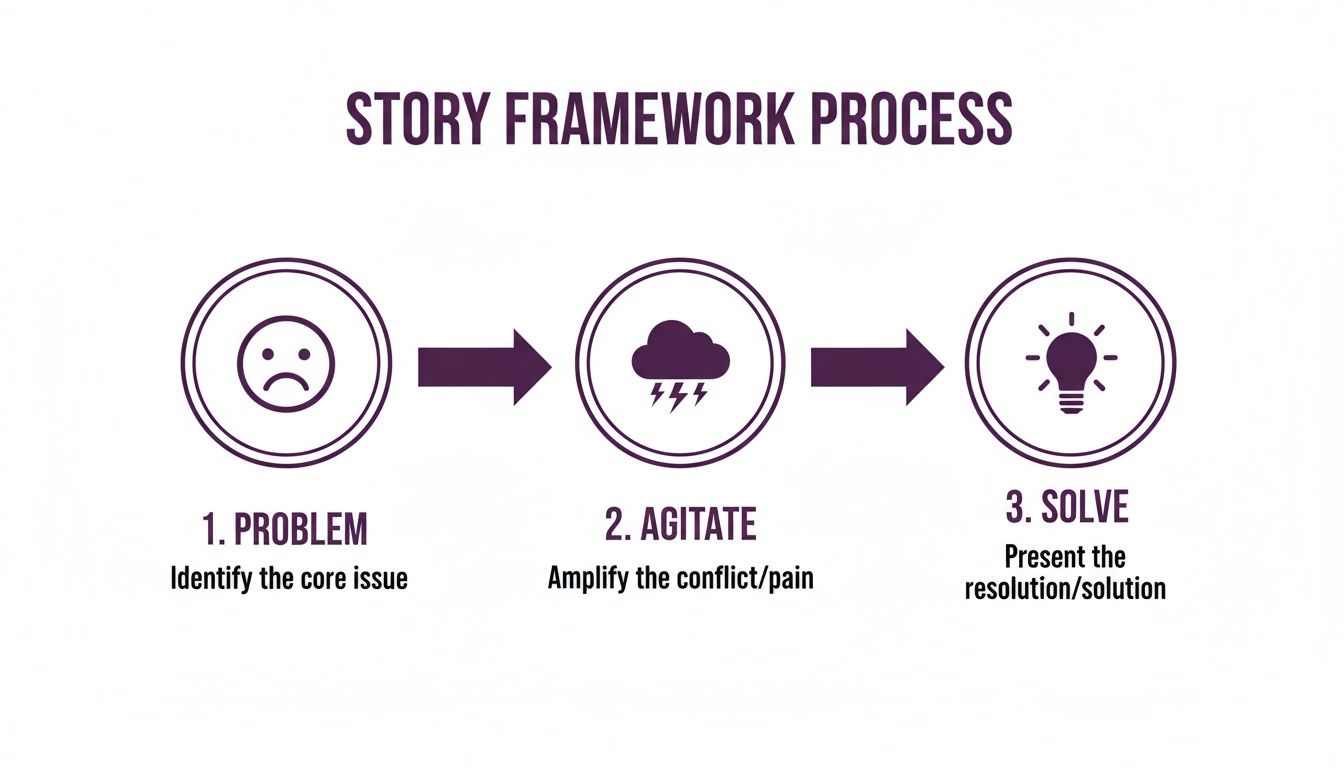
It’s a classic for a reason. By identifying a problem, agitating it to build tension, and then swooping in with the solution, you take the viewer on a journey that’s both satisfying and persuasive.
Annotating for a Seamless Production
Remember, your script isn't just for you—it's a guide for the entire production crew. Clear annotations prevent costly misunderstandings and save a ton of time on set and in the editing suite.
Essential Annotations to Include:
- On-Screen Text (GFX): Use a clear label like (GFX: "Title Here") to show any text that needs to be added graphically.
- Sound Effects (SFX): Note any sound effects you need, like (SFX: notification chime) or (SFX: gentle whoosh).
- Music Cues: Indicate where music should start, stop, or change in tone. For example: (Music: upbeat and motivational).
- B-Roll: Clearly mark where you want supplementary footage inserted. A good note would be something like (B-roll: Shots of the team collaborating in an office).
When you nail these structural elements—the A/V format, pacing, natural dialogue, and clear annotations—you’re doing more than just writing a script. You're creating a professional, actionable document that sets your video up for success from the very first take.
Using AI to Write Better Scripts, Faster
Let's be clear: Artificial intelligence isn't here to steal your creative spark. It's here to supercharge it. Think of AI as your scriptwriting co-pilot, the one who handles the tedious stuff so you can stay focused on the big picture. It’s an incredible way to bust through writer's block and speed up your entire workflow.
Instead of battling a blank page, you can ask an AI to spit out a dozen ideas, angles, or opening hooks designed for your specific audience. What used to take hours of brainstorming can now be done in minutes, giving you a running start.
From Brainstorming to First Drafts
The real magic happens when you move from scattered ideas to a structured story. Modern AI platforms can take a simple prompt—like "a 2-minute marketing script for our new productivity app"—and churn out a complete first draft.
And this isn't just a wall of text. The AI can structure the script with scenes, suggest camera shots, and even write dialogue that matches your brand's voice. You’re not starting from zero anymore; you're jumping in at the 50-yard line with a solid draft that’s ready for you to refine.
- Discover new angles: Give the AI your core message and ask it for five different ways to tell the story. You might get a customer testimonial angle, a problem-solution framework, or even a funny idea you'd never have thought of.
- Polish your dialogue: Got a line of narration that just sounds off? Ask the AI to rewrite it to be more conversational or punchier.
- Nail the summary: For longer training videos, AI can help craft a powerful conclusion that drives home your key points.
This speed is becoming essential. The demand for great video is exploding, with giants like Netflix pouring a massive $15 billion into original content in 2024 alone. This puts pressure on everyone to create more, faster. For marketing pros, tools like https://lunabloomai.com/ are closing the gap, letting you generate polished video scripts without a Hollywood budget.
The Real Game-Changer: Turning Scripts into Videos
While getting a script written by AI is a huge help, the next step is where things get really interesting. The biggest headache in video creation is usually the production itself—hiring actors, recording voice-overs, and spending days editing.
But now, some advanced AI platforms are crushing that entire script-to-video process into one smooth workflow.
Key Insight: The future isn't just about writing scripts with AI. It's about turning those scripts into finished, professional videos with a few clicks, making high-quality production accessible to everyone.
Tools like LunaBloom AI let you take your final script and bring it to life without ever picking up a camera.
You can choose a realistic AI avatar as your on-screen presenter, clone your own voice for a truly personal narration, and get perfectly synced subtitles in different languages automatically.
Think about this scenario: you need a marketing video for a product launch. You need it in three languages. And you need it by tomorrow.
- Give a simple prompt to the AI.
- It generates a sharp, 90-second script perfect for social media.
- You pick an avatar that fits your brand.
- You upload a quick audio clip to clone a natural-sounding voice-over.
- The platform instantly creates the video—complete with subtitles—in English, Spanish, and German.
This whole thing can be done in less than an hour. If you're looking for more ways to generate scripts, you can explore how to utilize AI to create viral content for platforms that move at lightning speed. By embracing these tools, you’re not just writing scripts faster—you’re completely changing how you make videos.
The Final Polish: Your Script Editing Checklist

A good script becomes a great one during the final edit. This is where you trim the fat, sharpen your message, and turn a rough draft into a production-ready blueprint. Honestly, this step is what separates amateur content from polished, high-impact videos.
The first rule of script editing is non-negotiable: read it out loud. This is the ultimate sniff test. Your ears will immediately catch clunky phrases, run-on sentences, and dialogue that just doesn't sound human. If you stumble over a line, you can bet your audience will, too.
This isn't just about catching typos; it's about fine-tuning the entire viewing experience before a single frame is ever shot.
Check for Absolute Clarity and Conciseness
Your script needs to be crystal clear to everyone—your audience, your editor, your on-screen talent. Every single word has to earn its place. Ambiguity is your enemy here, as it leads to confused viewers and a frustrated production crew.
Go through your script line by line and ask yourself a few tough questions:
- Is there a simpler way to say this? Hunt down any complex words or corporate jargon. Swap them for plain, direct language.
- Does this sentence serve the video's main goal? If a line doesn't support your core message or move the story forward, cut it. No mercy.
- Could any visual cue be misinterpreted? Make sure your descriptions for B-roll, on-screen text, and actions are specific. An editor can't read your mind.
For instance, instead of writing "(GFX: Important Stats)," get specific: "(GFX: 73% of users report increased productivity)." This leaves zero room for error and makes sure your key data points land correctly.
Maintain a Consistent Tone and Voice
Your video’s tone is its personality. It might be upbeat and energetic, serious and authoritative, or warm and empathetic. Once you establish that tone in the first few seconds, you absolutely have to maintain it from start to finish.
A sudden shift in tone can feel jarring and break the viewer's trust. As you edit, check that the language, pacing, and even the emotional arc of the script feel consistent. The voice should sound like it’s coming from one distinct person, not a committee.
Key Takeaway: A consistent tone builds a reliable brand identity. Whether your script is for a high-energy TikTok ad or a thoughtful corporate training video, the voice should feel authentic and predictable throughout the entire piece.
Perfect Your Opening Hook and Call to Action
The first five seconds and the last five seconds of your video are arguably the most important. A weak hook means viewers scroll away before you even get to your point. A confusing Call to Action (CTA) means they won’t know what you want them to do next.
On your final pass, be ruthless with these two elements.
Refining Your Hook:
- Does it grab attention instantly?
- Does it pose an intriguing question or state a surprising fact?
- Does it clearly promise a specific value or answer a key question?
Strengthening Your CTA:
- Is it a single, clear instruction? Don't ask viewers to like, subscribe, and visit your site all at once. Pick one.
- Is it direct and actionable? "Download the Guide" is much better than "Learn More."
- Does it feel like a natural conclusion to the video's message?
A polished script isn't just grammatically correct—it's strategically sound. By rigorously checking for clarity, keeping the voice consistent, and perfecting your hook and CTA, you ensure your final video script is tight, focused, and ready to make a real impact. This last editing pass is your final chance to fix mistakes before they become expensive problems in production.
Common Questions About Writing Video Scripts
Even with a solid plan, a few questions always seem to pop up once you're deep into writing. Getting answers to these common roadblocks can save you a ton of time and make the final video that much better. Let's dig into some of the most frequent questions I hear from creators and marketers.
What Is the Best Format for a Video Script?
For most marketing and corporate videos, the industry standard is the two-column Audio/Visual (A/V) script. There's a reason it's so popular—it’s incredibly practical and keeps everything organized.
The left column is for everything your audience will see: camera shots, on-screen text, graphics, and character actions. The right column is for everything they'll hear: dialogue, voice-overs, and sound effects.
This side-by-side layout is a game-changer. It forces you to think about how your visuals and audio need to sync up, giving your entire production team a clear blueprint to follow.
How Do You Make a Video Script Sound Natural?
The best trick in the book? Read your entire script out loud. Seriously. If a sentence feels clunky or you stumble over your words, it needs a rewrite. You’ll immediately catch awkward phrasing that looked perfectly fine on the page but just doesn't work when spoken.
For a more conversational feel, try these tips:
- Use contractions like "it's," "you're," and "we'll."
- Write in shorter sentences that are easy to follow.
- Talk directly to the viewer by using "you" and "your."
Imagine you're explaining the idea to a friend over coffee. That simple mental shift helps strip out the stiff, corporate jargon and makes your tone far more engaging and relatable.
How Long Should a Script Be for a 1-Minute Video?
A good rule of thumb is to aim for about 150 words per minute of video. So, for a 60-second video, your script should be right around that 150-word mark.
This gives the speaker a comfortable, natural pace and leaves room for pauses to let key points sink in. Sure, a super fast-paced social media ad might cram in up to 180 words, but 150 is a safe bet for most marketing or training content where you don't want the message to feel rushed.
The most important part of any video script is the first 3-5 seconds. This is your hook, and its only job is to give the viewer a compelling reason to stop scrolling and keep watching. Without a strong hook, the rest of your brilliant script might never be seen.
You can grab their attention with a sharp question, a surprising statistic, or a statement that hits on a major pain point. If you don't hook them immediately, you've lost them. Your script's opening is where you win or lose the battle for attention.
Your Path to Engaging Video Content Starts Here
Writing a video script might seem daunting, but it boils down to a clear, repeatable process. Start by understanding your audience and defining a single goal. Then, use a proven narrative framework to structure your story, format it for production, and polish every word until it shines. Each step builds on the last, turning your initial idea into a powerful tool for connection and conversion.
By following this guide, you’re not just writing a script; you're engineering a successful video from the ground up. The real power is in the planning, and now you have the blueprint to do it right.
Ready to turn those perfectly polished scripts into captivating videos in minutes? With LunaBloom AI, you can generate professional videos from text, complete with AI avatars and voice cloning in over 50 languages. Start creating smarter, not harder, by visiting https://lunabloomai.com today.





