
Training videos production is the complete process of planning, creating, and delivering video content designed to teach skills, share knowledge, or onboard new employees. Forget those monotonous, hour-long presentations of the past. Today's approach is all about producing engaging, concise, and accessible videos that help people learn effectively and drive measurable business results.
This guide will walk you through everything you need to know to create training videos that work.
Why High-Quality Training Videos Are Essential
Let's be real: most corporate training is instantly forgettable. But it doesn't have to be.
In today's fast-paced work environment, mastering training videos production has shifted from a "nice-to-have" luxury to a core strategy for building a skilled, agile, and aligned team. The era of handing out dense employee handbooks and expecting them to be read is over.
The shift is happening for a simple reason: video is incredibly effective. It combines visuals, sound, and narrative to break down complex topics into digestible and memorable formats. This is especially crucial for remote and hybrid teams, where consistent, scalable training is a necessity.
Boosting Employee Performance and Retention
Great training videos directly impact how well employees perform and how much information they retain. When learning material is engaging, people absorb it faster and feel more confident applying their new skills. The results are tangible.
A strong video training program delivers several key benefits:
- Improved Knowledge Retention: The combination of visual and auditory learning can increase retention by up to 65% compared to text-based materials alone.
- Streamlined Onboarding: New hires get up to speed quickly and consistently, regardless of their location, reducing the time it takes for them to become productive team members.
- Enhanced Skill Development: On-demand videos allow employees to learn at their own pace, revisiting complex sections as needed to master the material.
A great training video isn’t just an instructional tool—it’s an investment in your team's skills and confidence. It turns what used to be a business expense into a powerful engine for growth.
The Growing Demand for Video Learning
Companies are increasingly investing in video. The global market for training video production services is projected to reach approximately USD 1,165 million by 2033.
This massive growth is fueled by businesses embracing digital learning platforms and recognizing the clear ROI of effective video training. You can explore more of this data on Archive Market Research. This trend sends a clear signal: if you aren't investing in better training videos, your competitors probably are.
Planning Your Video Content for Maximum Impact
Jumping straight into filming is a common mistake that leads to ineffective videos. The real magic behind successful training videos happens long before you hit record—it's all in the planning. This is where you create the blueprint for content that not only educates but also achieves clear business goals.
A solid plan starts with mastering your video content strategy. Think of this as your roadmap, guiding every decision to ensure your training videos hit their target. The first step? Defining your objectives.
Define Your Learning Objectives
Before scripting anything, ask one vital question: What should the viewer be able to do after watching this video? Your objectives must be specific, measurable, and directly tied to a business outcome.
Avoid vague goals like "understand the new software." Instead, aim for something actionable, such as "demonstrate how to create and send a customer invoice using the new software in under two minutes."
This clarity ensures every part of your video serves a purpose, guiding the learner efficiently from point A to point B. It also provides a clear benchmark for measuring the video's success later.
Understand Your Audience Deeply
Next, you need to know who you're talking to. Are they new hires needing the basics, or are they experienced professionals looking for advanced skills? A video designed for everyone will resonate with no one.
Consider their current knowledge, job roles, daily challenges, and preferred learning styles. For example, a sales team might respond better to a high-energy, scenario-based video. In contrast, a technical tutorial for engineers will require a more detailed, screen-recording format. Tailoring content to your audience is critical for engagement and retention.
Scripting for Engagement, Not Just Information
With your objectives and audience defined, it's time to write the script. A common pitfall is creating a script that's just a dry recitation of facts. To avoid this, craft a compelling narrative that simplifies complex ideas and takes the viewer on a clear learning journey.
Here are a few scripting tips to boost engagement:
- Hook Them Early: Start with a compelling question, a surprising statistic, or a relatable problem to capture attention within the first 10 seconds.
- Use Conversational Language: Write as you would speak. Avoid corporate jargon and overly formal tones to create a more personal and engaging connection.
- Focus on the 'Why': Don't just explain how to do something—explain why it's important. Connecting the training to a larger purpose is a powerful motivator.
To help you organize your thoughts, here is a quick overview of the essential components to map out before production begins.
Core Elements of an Effective Training Video Pre-Production Plan
A summary of the essential components to address during the planning phase to ensure a smooth and successful production process.
| Component | Key Objective | Example Action Item |
|---|---|---|
| Learning Objectives | Define what viewers should be able to do after watching. | "User can successfully reset their password without assistance." |
| Audience Analysis | Understand the viewer's prior knowledge, role, and learning preferences. | Survey a sample of the target audience to identify common pain points. |
| Key Takeaways | Identify the 2-3 most critical pieces of information for retention. | For a compliance video, the key takeaways are reporting procedures and contact info. |
| Video Format & Style | Choose the best format (e.g., screencast, live-action) for the content. | A software tutorial will use a screencast with voiceover; a leadership video will be live-action. |
| Script & Storyboard | Create a detailed script and visual plan to guide production. | Write a conversational script and sketch out key scenes in a storyboard. |
| Success Metrics | Determine how you will measure the video's effectiveness. | Track the reduction in support tickets related to the topic after the video is released. |
Investing time to define these elements upfront will save you significant time, money, and headaches down the road.
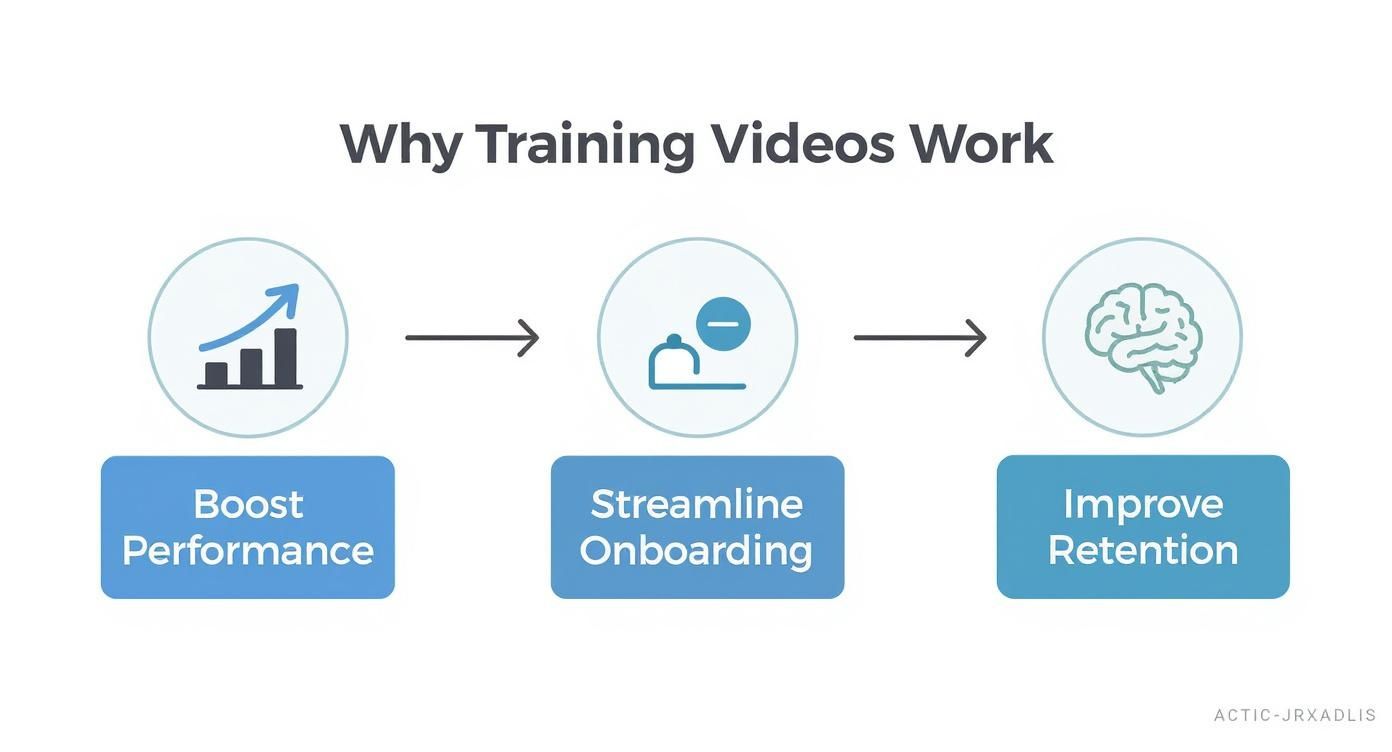
The infographic below highlights the core benefits that well-planned training videos bring, from boosting employee performance to improving knowledge retention.
This strategic approach ensures that every video directly supports key business goals, making your pre-production efforts a valuable investment.
Your Modern Production Toolkit: From Cameras to AI
Not too long ago, high-quality video production required a full crew and expensive, complicated equipment. Those days are gone. Today's toolkit for effective training videos production combines accessible hardware with powerful software, putting professional results within reach for any business.
You no longer need a Hollywood budget to create content that engages and educates your team.
The key is scalability. For beginners, a modern smartphone, a simple lavalier microphone, and basic three-point lighting can deliver surprisingly polished results. The objective isn't cinematic perfection—it's clarity, professionalism, and effective communication.
Essential Gear for In-House Production
If you choose to produce videos in-house, a few key pieces of equipment can elevate your quality without breaking the bank. This is your starter kit for creating great content.
Here are the essentials for a solid setup:
- A Quality Camera: You don't need a high-end cinema camera. A good DSLR or mirrorless camera that shoots in at least 1080p is more than sufficient for most training videos.
- Clear Audio Equipment: Viewers might forgive mediocre video quality, but they will not tolerate bad audio. Invest in a quality external microphone, such as a lavalier (lapel) mic for speakers or a shotgun mic mounted on the camera.
- Basic Lighting Kit: A simple three-light kit (key light, fill light, and backlight) is the industry standard for a reason. It eliminates harsh shadows and makes your subject stand out. Even natural light from a window can work wonders if used correctly.
The single most impactful investment you can make is in audio. Clear, crisp sound is absolutely non-negotiable if you want your video to be seen as professional and, more importantly, for its educational message to actually land.
The AI Revolution in Video Creation
While traditional hardware remains important, the true game-changer in video production is artificial intelligence. AI-powered platforms now make it possible to create high-quality training content faster, more easily, and more affordably than ever before.
This technological shift is transforming the industry. Over half of all marketers are already using AI to accelerate content creation and reduce costs. This trend is redefining what's possible in training videos production.
Platforms like LunaBloom AI are at the forefront of this movement. They allow you to convert a simple script into a finished video in minutes, complete with lifelike AI avatars, voiceovers in multiple languages, and automatic subtitles. This technology democratizes video creation, removing the traditional barriers of technical skill and high budgets.
Imagine producing an entire library of onboarding videos without ever using a camera. With AI, you can maintain brand consistency, update content effortlessly, and localize training for a global workforce with just a few clicks. This synergy of human creativity and AI efficiency is the new standard.
Creating Content That Actually Teaches and Engages
Let's face it: a beautifully shot, high-resolution video is useless if the content is boring. The core purpose of training videos production is not just to look professional; it's to create an experience that genuinely teaches, engages, and inspires your team. This is where instructional design meets creative execution.
The most effective training videos transform employees from passive observers into active learners. To achieve this, you must shift your focus from simply delivering information to crafting a true learning experience. It's about respecting your audience's time, capturing their attention, and making the material memorable.
Embrace the Power of Microlearning
One of the biggest trends in corporate education is microlearning. The concept is simple: break down large, complex subjects into short, focused videos. Think two to five minutes in length, maximum. Each video should tackle a single learning objective, making the content easy for employees to digest without feeling overwhelmed.
This bite-sized approach fits perfectly into the modern workflow. Team members can watch a video whenever they have a free moment, accessing precisely what they need, exactly when they need it. This not only boosts engagement but also significantly improves knowledge retention, as our brains are better at processing information in small, manageable chunks.
It is no surprise that a top trend for 2025 involves combining data-driven insights with neuroscience, putting formats like microlearning at the forefront. You can read more about what's coming in corporate video trends on House Sparrow Films.
Use Storytelling to Make It Stick
People are wired to remember stories, not lists of facts. Weaving a narrative into your training videos creates an emotional connection that makes the material far more memorable and impactful. Instead of simply listing rules or steps, frame them within a relatable story.
Here’s how you can apply storytelling:
- Create Relatable Scenarios: Present a common workplace challenge and show a character solving it using the skills being taught. For example, a customer service video could tell the story of an agent turning a negative customer interaction into a positive one.
- Use a Clear Arc: A good story has a beginning (the problem), a middle (the learning journey), and an end (the successful resolution). This simple structure keeps viewers engaged.
- Show, Don't Just Tell: Don't just say a new process is more efficient. Show a team struggling with the old method and then achieving their goals with the new one. The visual contrast makes your point powerfully.
Storytelling transforms abstract concepts into tangible, human experiences. An employee is far more likely to remember a process when it's tied to a story they can see themselves in.
Drive Active Learning with Interactivity
The final piece of the engagement puzzle is interactivity. Encouraging your team to participate rather than just watch is key to making knowledge stick. Modern video platforms and learning management systems (LMS) now make it easy to embed interactive elements directly into your videos.
Consider adding elements like:
- In-Video Quizzes: Pause the video to ask a quick multiple-choice question. This is a low-pressure way to check for understanding before moving on.
- Clickable Resources: Add hotspots or links that allow viewers to download a related document, visit a webpage, or open a tool you've just discussed.
- Branching Scenarios: Create "choose your own adventure" style videos where the viewer's decisions affect the outcome, demonstrating the real-world consequences of their choices.
By including these interactive moments, you are no longer just talking at your employees—you are challenging them to apply what they are learning in real-time. This makes the entire experience more dynamic, engaging, and ultimately, far more effective.
Finalizing and Distributing Your Training Videos
Bringing your video across the finish line is just as critical as the initial planning. This is the post-production stage, where raw footage is polished into a professional and effective training asset. Quality editing transforms a series of clips into a cohesive learning experience.
Here, you'll fine-tune the pacing, add graphics to emphasize key points, and ensure the audio is perfectly clear. A well-edited video doesn't just look better; it guides the viewer's attention and makes complex topics easier to understand. This is the final quality check in your training videos production workflow.
One non-negotiable step is adding captions. They make your content accessible to everyone, including team members with hearing impairments or those watching in noisy environments. Furthermore, studies show that captions improve comprehension and retention for all viewers.
Polishing Your Content in Post-Production
Post-production is where the magic truly happens. It's more than just cutting out mistakes; you're tightening the narrative, ensuring smooth transitions, and adding visual aids to reinforce your learning objectives.
This phase typically includes:
- Color Correction: This step ensures your visuals have a consistent and professional look from beginning to end, with no jarring shifts in lighting or color.
- Audio Mixing: Here, you balance voiceovers, background music, and sound effects to create a clean, distraction-free auditory experience.
- Adding Graphics and B-roll: This is your opportunity to incorporate text overlays, charts, and supplemental footage to illustrate concepts and maintain viewer engagement.
This attention to detail is what distinguishes amateur videos from professional training content that your team will take seriously.
A seamless post-production process ensures that the final video not only looks and sounds professional but also effectively meets its intended learning goals. It’s the last chance to refine your message before it reaches your audience.
Smart Distribution and Internal Promotion
Once your video is polished and ready, the next step is getting it in front of the right audience. The world's best training video is useless if no one sees it. Your distribution strategy should meet employees where they already work.
For many companies, a Learning Management System (LMS) is the ideal platform. An LMS allows you to host videos, track completion rates, administer quizzes, and build comprehensive learning paths. It serves as a centralized, easy-to-navigate hub for all your training materials.
If you don't have an LMS, a private channel on a platform like Vimeo or a dedicated section on your company intranet can also work well. Regardless of where you host it, you can't just publish it and hope for the best. You need to promote it. Announce new videos in company newsletters, highlight them in team meetings, and share links in internal communication channels. A little internal marketing goes a long way in ensuring your hard work makes an impact.
Common Questions About Training Video Production
Even with a solid plan, questions are bound to arise during the video creation process. Addressing these common challenges ahead of time can save you time and frustration, ensuring your final product is effective.
Here are answers to some of the most frequently asked questions about training videos production.
How Long Should a Training Video Be?
This is a common question. While the ideal length depends on the complexity of your topic, the sweet spot for most corporate training videos is between 2 and 7 minutes. This microlearning approach respects your team's time and keeps them engaged from start to finish.
If you need to cover a complex, multi-step process, don't try to squeeze it into a single long video. This will only lead to disengagement. Instead, break it down into a series of shorter, self-contained videos. This makes the information easier to digest and allows viewers to quickly find specific segments when they need them later.
What Is the Biggest Mistake to Avoid?
The single biggest mistake to avoid is neglecting audio quality. Viewers will often forgive a shaky camera or imperfect lighting, but they will not tolerate poor audio.
If your sound is muffled, filled with static, or competing with background noise, your message will be lost. Always invest in a decent external microphone and choose a quiet recording location. This small step makes a massive difference in the professionalism and effectiveness of your video.
The success of your training video hinges on its clarity. Bad audio is the fastest way to undermine a great message, turning a valuable learning tool into a frustrating experience for your audience.
Can I Create Good Training Videos on a Small Budget?
Yes, absolutely. You no longer need a large budget to create polished and effective training content. Modern technology has made high-quality video production accessible to everyone.
Here are a few tips for creating great videos on a budget:
- Use Your Smartphone: The camera in your pocket is likely powerful enough to shoot professional-looking video.
- Invest in a Mic: A simple lavalier (lapel) mic that plugs into your phone can be purchased for under $50 and will dramatically improve your sound quality.
- Leverage AI Platforms: Tools like LunaBloom AI are game-changers for budget-conscious creators. You can generate professional videos with AI avatars and stock footage, eliminating the need for cameras, lights, or a film crew.
For a deeper dive into the entire creation process, this external resource is very helpful. It's a comprehensive guide to becoming a training video creator and covers the topic extensively.
Ready to revolutionize your training content without the high costs and long production times? With LunaBloom AI, you can transform simple text into engaging, professional-quality videos in minutes. Create content with lifelike AI avatars, clone voices, and generate subtitles automatically in over 50 languages. Start creating smarter, more effective training videos today by visiting https://lunabloomai.com.





