A vertical video starts playing while you're standing in a coffee shop. The sound is off, as it often is in a social feed, but the message still lands because the words are already visible inside the picture. You understand the product teaser, follow the clipped webinar advice, or catch the sports highlight without touching the volume control.
The same thing happens when a creator's video is reshared by someone else, stripped of its original caption settings, or played in a place where the viewer can't listen. The text remains attached to every frame, so the story survives the journey.
That permanence can be exactly what a producer needs. It can also create expensive rework when the language changes, a legal review requires a clean version, or a regional team needs a different translation. Burned in subtitles are therefore more than a styling choice. They're a workflow and risk-management decision.
The Video Playing on Mute in Your Feed
A product manager watches a short demonstration between meetings. The video begins automatically, but the phone is silent. A few words appear over the presenter's hands, then a concise explanation follows as the product moves through the frame. The viewer doesn't need to guess what's happening, so the thumb stops scrolling.
A creator might be reviewing a new camera in a café, where background noise makes speech difficult to hear. An agency might cut a strong sentence from a webinar into a vertical advert. A sports fan might reshare a highlight whose original subtitle track never travels with the copied file. In each case, the viewer gets the message because the words are part of the visual image.
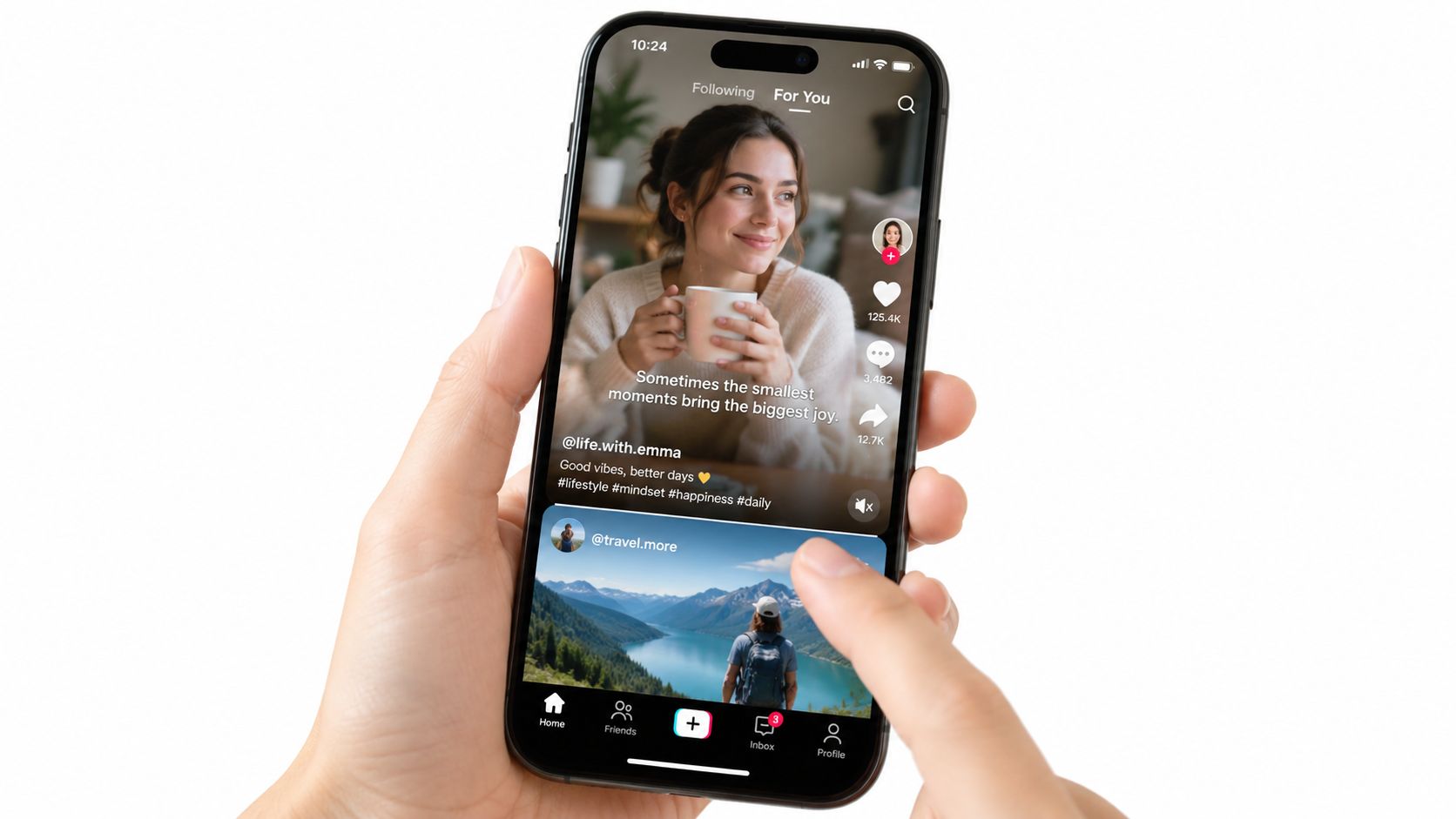
This isn't traditional captioning in the sense of a player-controlled text layer. The viewer isn't selecting a language, changing the type size, or switching the words off. The text has already been placed over the footage before the file reaches the feed.
That distinction matters because the video carries its own viewing instructions. The creator decides where the words appear, how large they are, how long they remain visible, and whether they sit over a black box, outline, or transparent background. The choice can support brand design and silent viewing, but it also becomes part of the final picture.
Producer's perspective: If the audience needs the words before taking any action, permanent on-screen text can be a deliberate distribution tool.
For teams creating social ads, tutorials, product demos, or internal communications, the first practical question is simple: will this video be watched in conditions where sound may not be available? If the answer is yes, you can explore subtitle permanence from a clear audience need rather than adding text as an afterthought. Tools such as LunaBloom AI's video workspace can fit into that broader creation workflow, where captions are planned alongside the script, voice, and edit.
What Burned In Subtitles Actually Are
Burned-in subtitles, also called hardcoded subtitles, open captions, or baked-in text, are words rendered directly into the video frame. Think of them like a tattoo on an image. Wherever the image goes, the text goes with it.
Technically, the subtitle becomes rasterized pixel data during rendering or encoding. A player sees one picture containing both the original visuals and the letters. It doesn't receive a separate caption object that it can toggle, resize, recolor, reposition, or translate.
Pixels versus a separate track
Soft subtitles, closed captions, and sidecar captions use a different arrangement. The video remains one layer, while the text travels in a separate data track or external file. A compatible player can then decide whether to display that text and how to present it.
| Format | Where the text lives | Viewer control |
|---|---|---|
| Burned-in subtitles | Inside the video pixels | Always visible |
| Soft subtitles | In a selectable subtitle track | Usually toggleable and styleable |
| Sidecar captions | In a separate file such as SRT or VTT | Controlled by the player or platform |
That vocabulary can be confusing because people sometimes use “open captions” and “hardcoded subtitles” interchangeably. In practical production terms, the defining feature is permanence. If the words are visible in every player because they're embedded in the picture, you're dealing with burned-in text.
You'll find this format in common outputs such as MP4 files using H.264, ProRes masters, social-first vertical exports, and broadcast deliverables intended for controlled airplay. The container or codec doesn't create the distinction by itself. The deciding event is whether the text has been rendered into the frames.
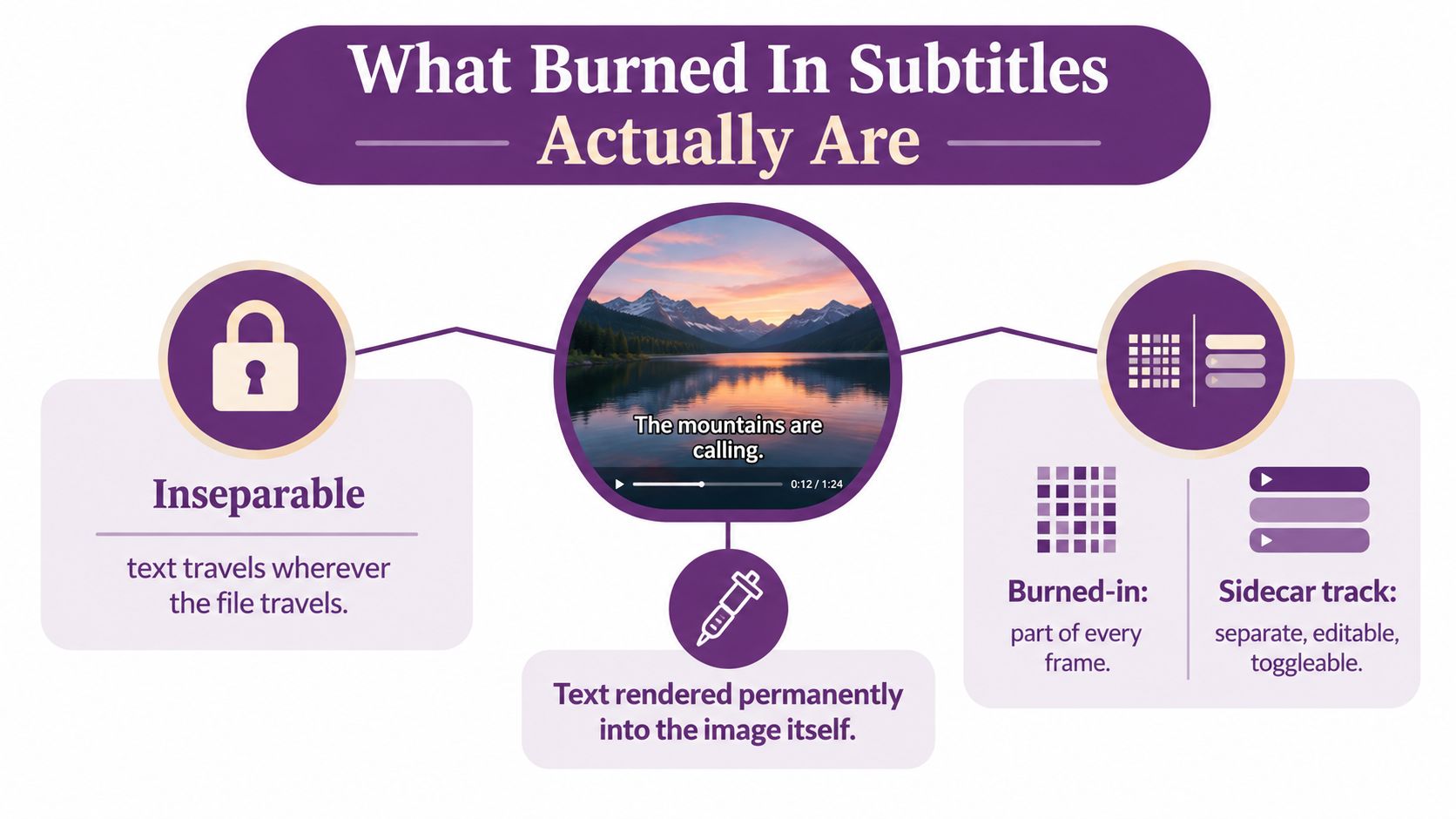
A separate caption track preserves the words as data. Burned-in subtitles preserve them as part of the image, which means the clean editable source disappears from the exported video. A caption workflow such as LunaBloom AI's starter app can help teams plan text generation and video output together, but the export decision still needs human review.
Once the text has been rendered, you can't just open the MP4 and select the subtitle layer. The words are now inseparable from the surrounding picture.
Why Hardcoded Text Refuses to Go Away
A product video starts playing without sound in a social feed. The opening promise appears as text on the image, so the viewer can follow it before touching the volume control. That is the practical reason burned-in subtitles persist: the audience may never activate a caption track. One industry analysis reports that 79% of viewers are not listening in this context (Inventive Studios describes the silent-viewing tradeoff).
A separate caption file relies on several handoffs. The platform must import it correctly, recognize its format, and expose a control the viewer can use. Burned-in text removes those dependencies because the first frame already contains the hook, explanation, or translated dialogue.
One file, fewer delivery dependencies
The reliability comes with a file cost. Rendering subtitles into the video typically adds about 5% to 15% in bitrate compared with a version without subtitles, according to the cited industry analysis. The producer accepts a less efficient file in exchange for text that does not depend on a caption-aware player.
That exchange can suit a vertical advert, a muted product teaser, or a file moving between systems that may strip sidecar data. It becomes a liability when a publisher needs several languages, viewer-selected styling, or one master asset for many distribution variants. A burned-in export is not merely a visibility setting. It is a decision about which changes the workflow can still absorb after delivery.
A habit inherited from broadcast
Film and television distribution helped establish the format. In the analog era, captions were hard-coded into the picture. As digital workflows expanded, permanent on-image text, optional captions, and separate subtitle files became distinct delivery choices. One European broadcasting case study found separate subtitle files available for only 70% of programmes, illustrating why burn-in remained practical when sidecar delivery was incomplete (Rev's history of closed captions outlines this shift).
Linear playout systems, ad servers, affiliate exchanges, and older playback environments often favored one finished file. That operating habit continued even as digital platforms adopted stronger caption standards.
For creators, agencies, and global teams, the decision is therefore about risk management. Burn-in reduces the risk that a viewer misses the message because playback ignores captions. It increases the risk that an error, legal change, or translation update requires a new render.
The candid trade-off: Burned-in subtitles are reliable because they remove uncertainty from playback, but they also remove flexibility from every later stage.
Choose permanence when consistent visibility matters more than later control. Keep text flexible when localization, accessibility settings, or repeated revisions will shape the asset's future.
Burned In Subtitles vs Sidecar Captions
Burned-in subtitles travel with the pixels. Sidecar captions travel beside the video as a separate file or signal. The right choice depends on what happens after export, not only on how the first viewer sees the file.
| Dimension | Burned In Subtitles | Sidecar Captions |
|---|---|---|
| Audience reach | Visible immediately on muted feeds and players that ignore caption tracks | Depends on platform support and viewer settings |
| Edit control | Permanently fixed in the image | Text, timing, placement, and styling can be changed separately |
| Localization speed | Each language usually requires a new rendered video | A new language track can be supplied without changing the video |
| Accessibility fidelity | Readable on screen, but not machine-readable by itself | Supports selectable text, player controls, verification, and downstream reuse |
Audience reach
For a global ad campaign, a burned-in version can make the central promise visible when the social placement starts muted. The words remain present even if a platform doesn't expose the original subtitle track. That can be a strong reason to create a dedicated social export.
A sidecar track is more adaptable on a website or long-form player. A visitor can choose a language, adjust presentation settings where supported, or turn captions off. The player manages the relationship between the video and its text layer.
Edit control and localization
Suppose a legal deposition needs a correction to one speaker's name. With burned-in text, the editor must reopen the project, correct the caption, and render the affected video again. With a sidecar file, the team can update the text and timing without altering the picture.
The same distinction shapes multilingual work. A global campaign may need regional translations, brand terminology checks, and market-specific revisions. Burned-in subtitles tie each version to a new video render. Sidecar tracks let the video remain stable while caption files change.
Teams that need a starting point for transcription can generate captions with AI, then review names, terminology, timing, and reading order before delivery. Automation can accelerate the first pass, but it doesn't remove the need for quality control.
Accessibility fidelity
A customer support library illustrates the difference. Burned-in text may help someone follow a silent screen recording, but the pixels don't provide selectable language data for search, translation, editing, or accessibility verification. A separate SRT or VTT file gives downstream systems something they can inspect and reuse.
For sensitive workflows, document the master project, subtitle file, and rendered versions together. That kind of privacy-aware workflow planning helps teams control who can access source dialogue and localized text while preserving a clean audit trail.
The trade-off producers most often miss is regional rework. Every regional cut with burned-in text must be re-encoded, while a sidecar track can usually be swapped without touching the video.
Accessibility, Compliance, and the Dual Delivery Shift
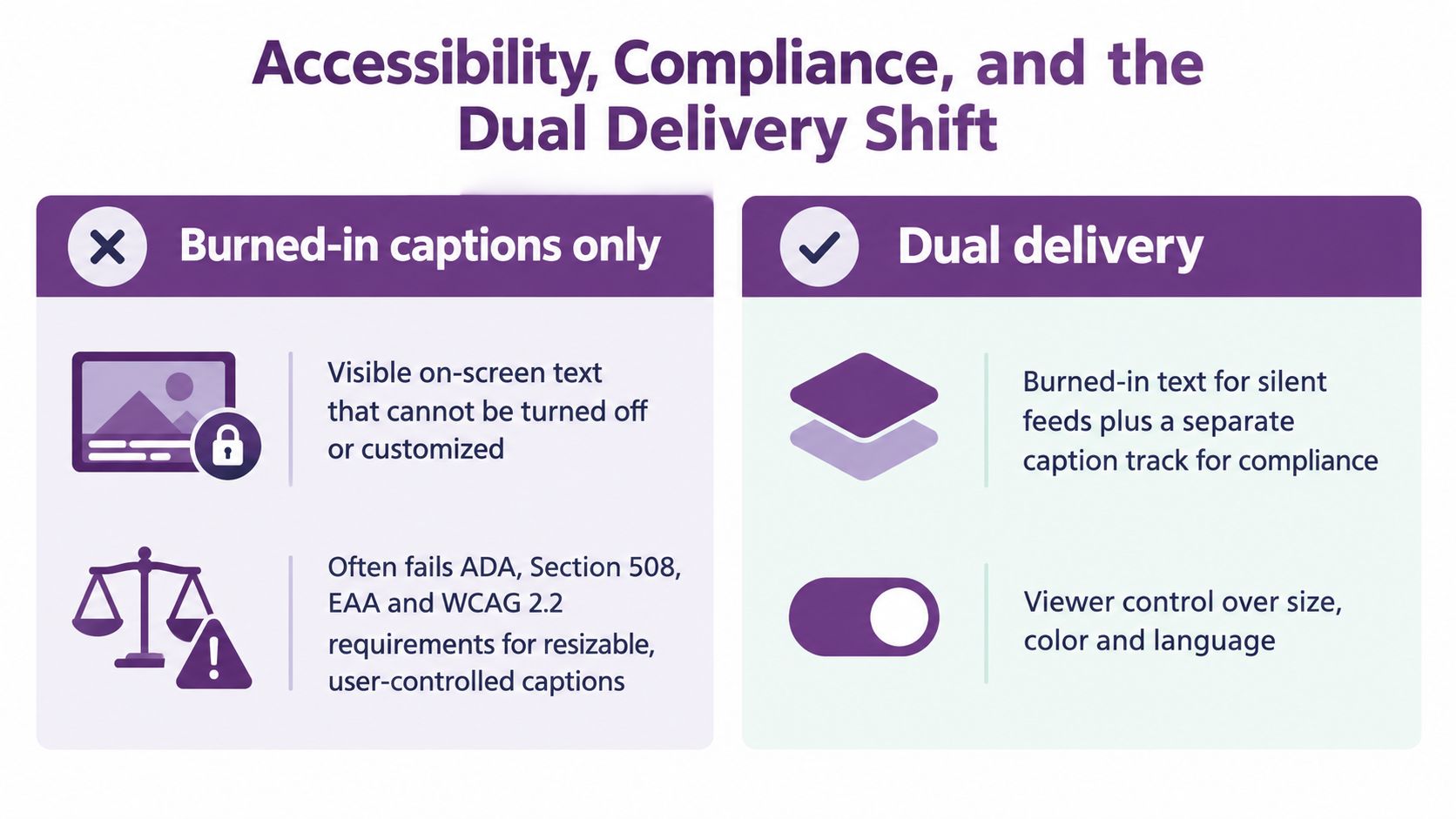
Visible words don't automatically equal accessible captions. A hardcoded subtitle can help a viewer understand a video, but it can't be resized, selected, turned off, restyled, or supplied as machine-readable text by the player.
That distinction matters for teams working under accessibility expectations connected to the ADA, Section 508, the EAA, and WCAG 2.2. A compliance review may need to inspect caption content, timing, language, and user control. Pixels alone cannot provide that verification path.
Why visibility isn't enough
Social platforms may generate captions automatically, but an automatically generated track still needs review for names, technical terms, speaker changes, timing, and meaningful sound information. A visible overlay also doesn't automatically give search tools, translation systems, assistive technology, or editors access to the words as data.
A business can therefore publish a video that looks captioned while lacking the underlying text track a reviewer expects. The practical issue isn't whether the audience can see words. It's whether the delivery includes a caption format that supports control, verification, and reuse.
A useful 508 compliance testing guide can help teams think through the difference between visual presentation and testable accessibility requirements. The exact obligations vary by organization, audience, jurisdiction, and distribution environment, so legal and accessibility specialists should review high-risk projects.
Dual delivery as the durable pattern
Dual delivery sends two related outputs:
- Social version: Burned-in subtitles make the message visible during silent playback.
- Accessible version: A reviewed SRT, VTT, or equivalent caption track supports control and machine-readable delivery.
- Localization package: Separate language files let regional teams adapt terminology without rebuilding the picture.
- Master archive: The project and source caption timeline preserve the ability to revise future exports.
Practical rule: Treat burned-in subtitles as an on-screen reach layer, not as the only caption asset your organization owns.
This layered approach resolves the apparent contradiction. The social feed gets immediate visibility, while the website, learning platform, broadcast system, or accessibility review receives the flexible text track. A team can document these delivery choices alongside its terms and workflow expectations, especially when several people handle the same source video.
When You Can and Cannot Recover Burned In Text
Once burned-in subtitles exist only as pixels, recovery becomes reconstruction. You can inspect video frames with optical character recognition, or OCR, and attempt to rebuild the words. You can't retrieve the original subtitle layer with its exact timing, styling, positioning, and edit history because that data wasn't preserved in the rendered picture.
OCR works best when the text is large, high-contrast, stable, and visually separated from the background. It becomes unreliable when characters use smart quotes, low-contrast overlays, anti-aliased edges, stylized fonts, motion, or faces behind the text. Even a correctly recognized sentence may arrive without trustworthy timing information.
The clean path is usually before export
Many editing projects still contain the original subtitle timeline. If the editor has the master project and caption source, the recovery task isn't extraction at all. The team can correct the text, replace the language, adjust the style, and render a new version from the clean source.
The difficult case is a delivered video with no project, no subtitle file, and no clean master. OCR may recover enough text to create a replacement caption file, but a person must check every segment against the audio and picture.
Run this decision check before rendering:
- Language: Is the wording final, including names, product terms, and legal language?
- Retention: Could the asset face a legal hold, archival request, or future editorial review?
- Reuse: Will the footage become shorter social cuts, training clips, or regional versions?
- Distribution: Does the destination support caption toggles and external subtitle files?
- Source control: Have you saved the project, transcript, subtitle timeline, and clean master?
Burning in is a defensible choice when a single-language asset is designed for muted playback and its wording is stable. It's a genuine mistake when a team expects translation, rebranding, compliance testing, or repeated edits but exports without preserving the source files.
Choosing the Right Subtitle Strategy for Your Video
A creator exports a social advert with text burned into the picture, then receives a regional request the next morning. The words are now part of every frame, so translation means rebuilding the video rather than replacing a caption file. Subtitle format is therefore a workflow and risk-management decision, shaped by reach, compliance, localization effort, and rework risk.
A single-language social advert may suit hardcoded words because viewers can follow the hook without activating captions. A training video in a controlled player may need a separate caption track, allowing learners to adjust the display and administrators to review the text. A global campaign often needs both versions.
A practical decision sequence
Start with the master asset, not the platform export.
- Single language and muted social placement: Burned-in subtitles make sense when immediate visibility matters and the wording is unlikely to change.
- Website, broadcast, or long-form player: Preserve a sidecar caption track so the player and viewer retain control.
- Translation or regional adaptation: Keep the video clean and manage languages as separate caption files where possible.
- Accessibility-sensitive delivery: Provide a reviewed machine-readable track, then add burned-in text for placements where silent viewing is central.
- Frequent edits or short-form reuse: Do not make permanent text the only source. Each wording change will require a new render.
The layered business answer
Dual delivery handles these competing requirements with less rework. One output carries visible text for discovery and muted playback. Another retains caption data for accessibility, localization, quality assurance, search, and future editing.
LunaBloom AI is one option for teams that want subtitle generation, translation, style customization, and captions within an AI video creation workflow, as described on the about LunaBloom AI page. The team should still treat generated text as an editable source before choosing which versions to render.
Decision test: Permanence is a feature when it protects reach. It becomes a liability when translation, rebranding, compliance review, or revision enters the plan.
Global content teams can use the burned-in version where the feed demands visible communication while retaining the soft track wherever control matters.
LunaBloom AI helps creators and businesses turn scripts, prompts, and images into edited videos with voiceovers, captions, translations, avatars, and social-ready exports. Visit LunaBloom AI to build a video with a preserved caption workflow, then choose burned-in, sidecar, or dual delivery before the final render.