What exactly is training videos software? It's your all-in-one toolkit for creating educational content. Think of it as the difference between needing an expensive film studio and just opening an intuitive app on your laptop. These modern tools make professional-quality training fast, affordable, and accessible to just about anyone.
In this guide, we'll cover everything you need to know, from must-have features to choosing the right platform for your team.
Why Training Videos Software Is a Game Changer
Not long ago, making a simple training video was a huge project. It meant wrangling cameras, mics, complicated editing software, and a team of specialists. The whole process was slow, eye-wateringly expensive, and a real headache to scale—a major bottleneck for any growing business.
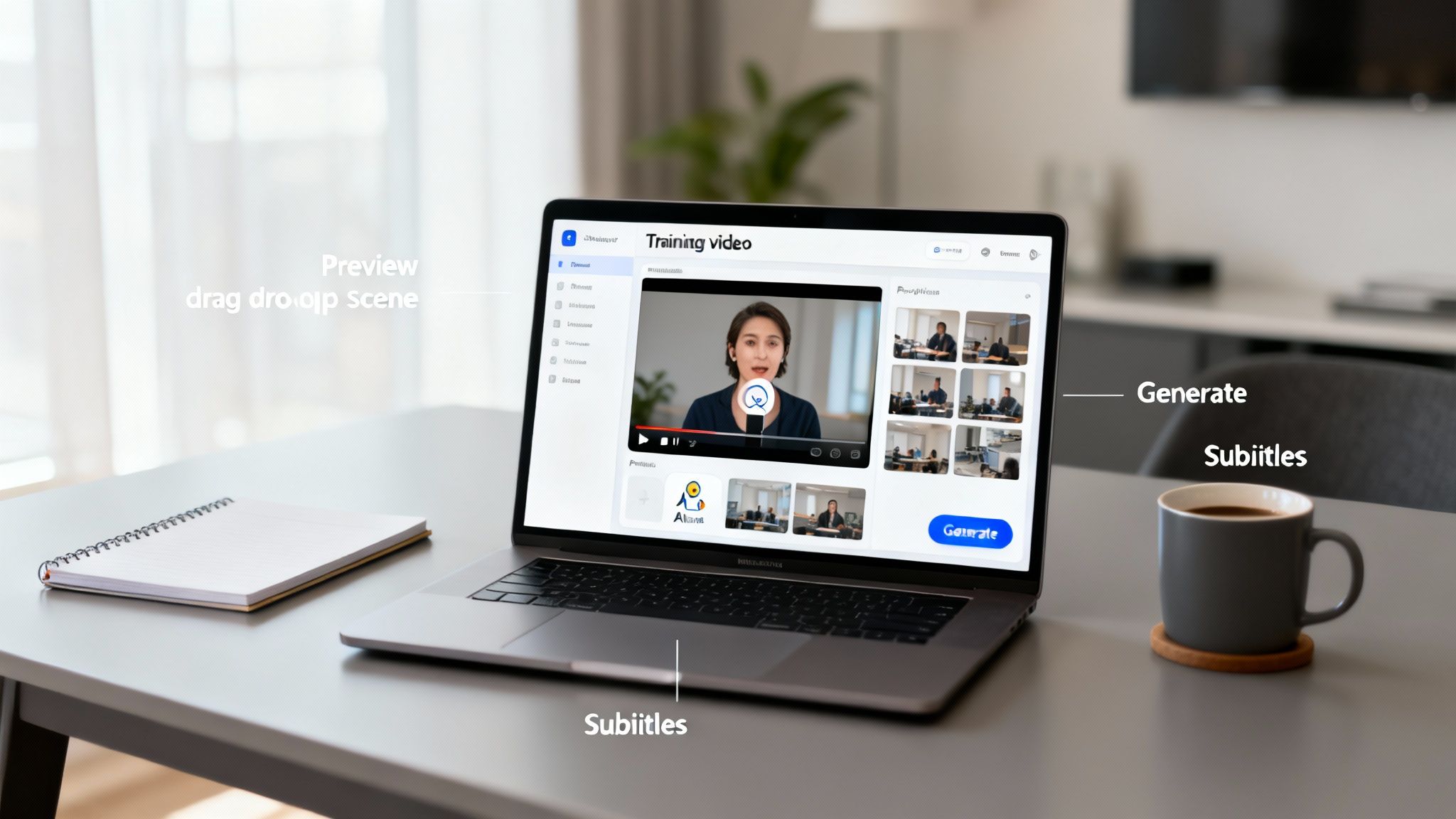
Today, that entire workflow has been packed into a single, user-friendly platform. Modern training videos software gives everyone, from HR managers to product experts, the power to create polished, engaging instructional videos without any video production experience. It’s a massive shift, and one that’s critical for today’s flexible work culture where scalable training is no longer a nice-to-have, but a must-have.
The Urgent Need for Scalable Training
Let's face it: companies are under constant pressure to get new hires up to speed, upskill their current teams, and ensure knowledge is shared consistently. Traditional, in-person training just can't keep up, especially with so many teams working remotely. This is exactly where video-based learning shines.
- On-Demand Access: People can learn whenever and wherever it works for them. This flexibility doesn't just make life easier; it genuinely boosts engagement and knowledge retention.
- Consistency: Every employee gets the same high-quality information, every single time. No more "telephone game" where the message changes with each trainer.
- Scalability: You create one great video, and it can train ten, a hundred, or even thousands of employees for a fraction of the cost of running that many live sessions.
The rise of AI has thrown gasoline on this fire. The market for AI video generation and editing software is expected to rocket from USD 3.67 billion in 2026 to a staggering USD 24.89 billion by 2036. That kind of explosive growth tells you everything you need to know about the demand for tools that sidestep old-school production nightmares.
Unlocking a Powerful Return on Investment
The real magic of this software is the return on investment (ROI). When you can create training content quickly and easily, you can react instantly to new challenges, product updates, or compliance needs. The ability to spin up a new tutorial in hours, not weeks, means less downtime and a more agile, better-informed team.
This is where you see the true business impact. These tools turn training from a necessary expense into a strategic advantage that drives performance.
Must-Have Features in Your Training Videos Software

Trying to pick the right training video software can feel overwhelming. The key is to ignore flashy interfaces and focus on the core tools that actually help you create effective, scalable training. After all, a pretty dashboard doesn’t mean much if the essentials are clunky or missing.
Think of the perfect software as a content creation Swiss Army knife. It needs to be versatile and powerful, but also intuitive enough that you can find the right tool for the job without fumbling around. Let's dig into the features that really move the needle.
Core Creation and Customization Tools
At its heart, any good software needs to let you create and polish your content fast. The best platforms handle the most tedious parts of video production for you, freeing you up to concentrate on what your training actually says.
Here are the creation features that matter most:
- Text-to-Video Generation: This is the cornerstone of modern training software. The ability to turn a simple script into a full-blown video saves an unbelievable amount of time. You just feed it the text, and the AI builds out the visual presentation. It's a game-changer.
- AI Avatars and Voice Cloning: Consistency is a huge deal for both branding and learning retention. AI avatars provide a reliable "face" for all your training, and voice cloning keeps the tone consistent across every module. This is a lifesaver for creating content in multiple languages without hiring a new presenter each time.
- Brand Customization: Your training videos are a direct reflection of your brand. You need software that lets you easily add your company's logos, apply brand-specific color palettes, and use custom backgrounds to maintain a professional, cohesive look.
A great training video platform doesn't just help you make a video; it helps you make your video. It provides the building blocks—like avatars and branding kits—that let your organization's unique identity shine through in every lesson.
Accessibility and Engagement Features
Making the video is just step one. The next—and arguably more important—step is making sure it's accessible and engaging for everyone. These features widen your audience and make the information actually stick.
Look for tools that truly improve the learning experience:
- Automated Subtitles and Captions: Honestly, this is non-negotiable. It's crucial for accessibility and just plain good for comprehension. Studies show that 80% of viewers are more likely to finish a video if it has captions. Letting the AI generate them automatically makes this a no-brainer.
- Screen Recording and Integration: For any software tutorial or process walkthrough, you need built-in screen recording. The real magic, though, is being able to seamlessly drop those recordings right into your main video project.
- Multi-Language Support: If you have a global workforce, being able to create training in different languages is a massive competitive edge. The best training videos software can translate your scripts and generate new voiceovers in dozens of languages, making your content truly universal.
Your Step-By-Step Video Creation Workflow
Going from a great idea to a polished, shareable video can feel like a huge leap. But with modern training videos software, the process feels less like directing a movie and more like assembling LEGOs. A simple, structured workflow takes the guesswork out and helps you turn your expertise into an effective learning tool.
Instead of seeing it as one giant task, just think of it as five manageable steps. Each one builds on the last, guiding you smoothly from that first spark of an idea to the final export.
Step 1: Scripting Your Lesson
Before you even open the software, you need a script. A clear, tight script is the absolute foundation of a great training video. This is where you organize your thoughts and distill complex ideas into bite-sized, easy-to-understand pieces. To do this well, you need to understand how to create effective training materials.
- Outline First: Jot down your key talking points. Don't overthink it.
- Write Like You Talk: Write the script as if you were explaining the concept to a colleague. Keep it natural and conversational.
- Keep It Short: Chop your lesson into brief segments. Try to keep videos under five minutes to hold viewer attention.
Step 2: Generating Your Video
With your script in hand, it's time for the fun part. This is where AI-powered software really shines. Forget about setting up cameras and microphones. You just copy your script and paste it right into the platform.
The software's text-to-video engine gets to work, generating visuals and narration automatically. You can pick an AI presenter that fits your brand's vibe and choose a voice that communicates your message clearly. This step alone can shave hours—sometimes days—off traditional production time.
Step 3: Customizing Your Brand
A generic-looking video isn’t going to stick in anyone’s memory. The next move is to stamp your brand's identity all over the content. The good news is that the right software makes this incredibly simple.
Your training content is an extension of your brand. Consistent branding not only looks professional but also builds trust and reinforces your company’s identity with every lesson.
Upload your company logo, dial in your exact brand colors, and add any custom graphics you use. This step ensures every video feels like it came directly from you, strengthening brand recognition. If you're just getting your feet wet, the LunaBloom AI starter app is a super intuitive way to manage these brand assets.
Step 4: Integrating Rich Media
Sometimes, a talking presenter isn't enough. To truly demonstrate a software workflow or drive home a complex point, you need to show, not just tell. This is where you can layer in other media.
Easily drop in screen recordings, snippets of existing video clips, or relevant images right into your project. The best platforms let you switch seamlessly between your AI presenter and these other visual aids, making for a much more dynamic and engaging lesson.
Step 5: Finalizing Your Content
The last stage is all about adding that final layer of polish and making sure your video is accessible to everyone. Use the software’s one-click feature to generate accurate subtitles—this is huge for accessibility and comprehension.
Give the whole video one last watch to catch any errors. Once you're happy, just export the file. It’s now ready to share on your LMS, company intranet, or website.
How to Choose the Right Software for Your Team
Let’s be honest: picking the best training videos software isn’t about finding a mythical "best" tool. It's about finding the right fit for your team's reality. A platform that works wonders for a small business could be a compliance headache for a big corporation. The trick is to match the software’s strengths to your unique goals, budget, and workflow.
Every organization plays by a different set of rules. An educator is probably thinking about student engagement, while a startup founder is likely obsessed with speed and cost. To make the right call, you first need to figure out which camp you're in.
This decision tree gives you a visual shortcut, mapping out the different paths for educators, small businesses, and large companies.
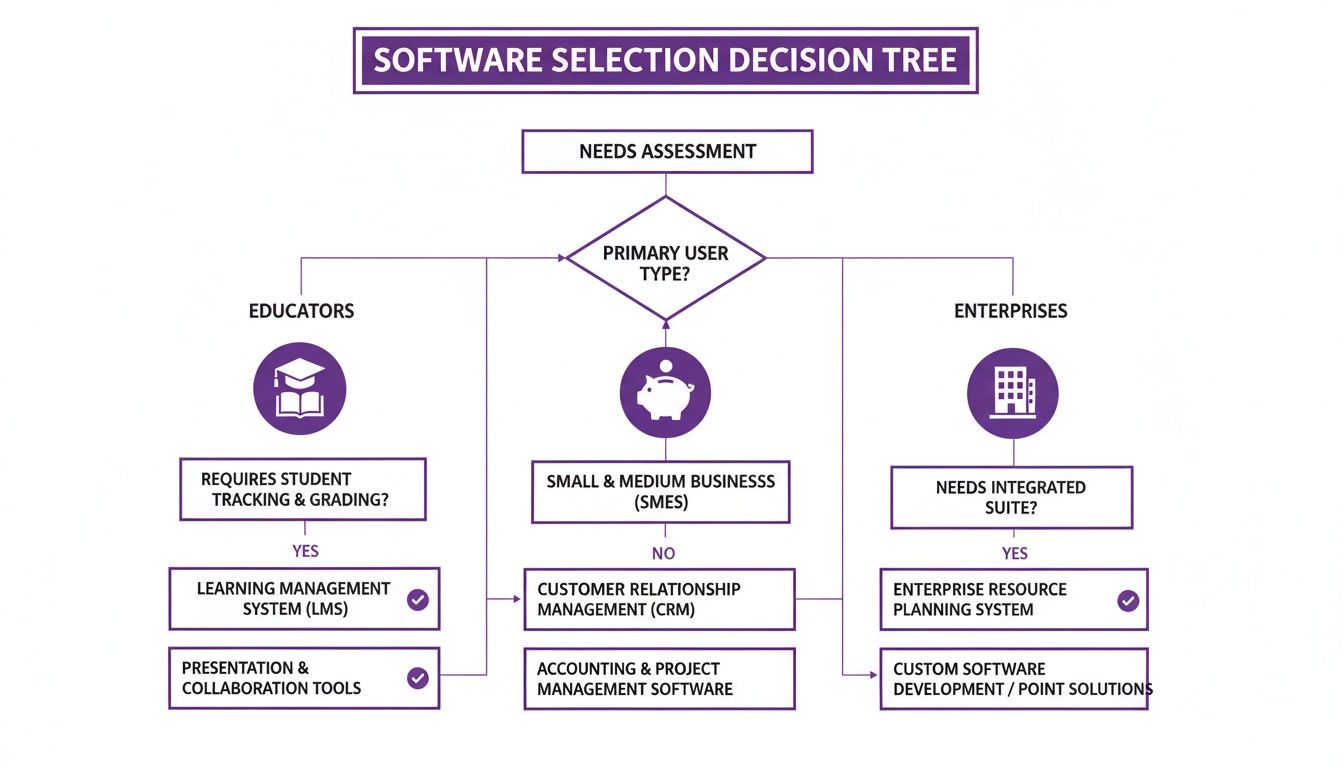
As you can see, what matters most changes dramatically—from seamless LMS integration for a classroom to ironclad security for a global enterprise.
To make this even clearer, this table breaks down how feature priorities shift depending on who you are.
Software Feature Priorities by User Type
| Feature | Educators | SMEs | Enterprises |
|---|---|---|---|
| LMS Integration | Critical | Nice-to-Have | Critical |
| Ease of Use | High Priority | Critical | High Priority |
| Cost-Effectiveness | High Priority | Critical | Moderate Priority |
| Interactive Elements | Critical | High Priority | High Priority |
| Security & Compliance | Moderate Priority | Low Priority | Critical |
| Collaboration Tools | Nice-to-Have | High Priority | Critical |
| Scalability | Low Priority | Moderate Priority | Critical |
| Brand Consistency | Low Priority | High Priority | Critical |
| Speed to Creation | High Priority | Critical | High Priority |
| Accessibility Features | Critical | Moderate Priority | High Priority |
This isn't an exhaustive list, but it highlights the fundamental differences. An SME might forgive a lack of enterprise-grade security for a tool that’s fast and cheap, whereas for a large company, that’s a dealbreaker.
For Educators and Academic Institutions
If you're an educator, your world revolves around creating clear, accessible, and engaging learning content. The last thing you need is a tool that fights with your existing tech stack.
Your non-negotiables should include:
- LMS Integration: Can the software export in formats like SCORM or connect directly with platforms like Canvas or Moodle? This is a must-have.
- Accessibility Features: Does it offer easy-to-use, accurate, and automated subtitles? What about multi-language support?
- Interactive Elements: To keep students tuned in, can you easily add quizzes, polls, or clickable elements to make learning an active experience?
The e-learning boom is real. The global video creation tool market is expected to hit USD 1,406.97 million by 2033, largely because of this shift. Just look at Coursera—they brought on 17 million new learners in 2023 alone, proving the massive appetite for quality digital education.
For Small and Medium-Sized Businesses (SMEs)
For SMEs, it all comes down to efficiency, affordability, and simplicity. You don’t have a dedicated L&D team or a blank check. You need something that just works.
Keep your eyes peeled for a solution that provides:
- Cost-Effectiveness: Is the pricing clear and flexible enough for a small team? Subscription models are often a great starting point.
- Intuitive Interface: Could someone on your team with zero video experience jump in and create a decent video in under an hour? If not, walk away.
- Speed to Creation: Does the tool use AI to handle the grunt work, like generating visuals or recording narration? Time is money.
When you're exploring options, it's worth seeing how different tools handle collaboration. Platforms like Lumi H5P Cloud can offer good insights into what's possible with cloud-based content creation.
For Large Enterprises
Enterprises are a different beast entirely. You're operating at a scale where security, collaboration, and brand consistency aren’t just nice-to-haves—they're mandatory. The software has to be tough enough to support thousands of users while playing by strict corporate rules. You can get a sense of how different platforms are built to tackle these challenges by reading the story behind platforms like LunaBloom AI.
Your evaluation checklist absolutely must include:
- Security and Compliance: Does the platform meet certifications like SOC 2 or adhere to data privacy laws like GDPR? No exceptions.
- Scalability: Can it handle a massive library of content and a huge number of users without grinding to a halt?
- Collaboration Tools: Are there built-in workflows for team reviews, approvals, and shared asset libraries? You can't scale with email and Slack messages.
How to Measure Your Training Video ROI

Buying training videos software is a great first step, but to get buy-in from stakeholders, you have to prove it's actually working. For that, you need to look past vanity metrics like view counts.
The real return on investment (ROI) isn't about how many people watched your video. It's about what changed because they watched it. A strong ROI tells a story backed by business outcomes. Are new hires getting up to speed faster? Are you seeing fewer costly mistakes? Is the support team fielding fewer basic questions? These are the results that prove your training program is making a tangible difference.
Key Performance Indicators That Matter
To figure out your ROI, you need to track the right Key Performance Indicators (KPIs). Don't get bogged down in a spreadsheet full of data. Instead, focus on a few key areas that tie directly to your company's bottom line.
- Reduced Onboarding Time: This one is a big deal. If you can shorten the time it takes a new team member to become fully productive from four weeks to three, you've just gained a whole week of output. That's a direct and easily calculated cost saving.
- Lower Support Ticket Volume: Keep an eye on the number of support requests for topics covered in your training videos. A clear drop shows that your videos are empowering users to solve their own problems, freeing up your support team.
- Improved Employee Performance: You need to measure how well people perform tasks after the training. This could be anything from fewer errors in a manufacturing process to faster completion times for a software workflow.
- Higher Employee Retention: Good training shows people you're invested in their growth, which makes them want to stick around. Better retention avoids the massive costs of recruiting and training replacements.
Your training video ROI isn't just a number—it's proof that you're building a smarter, more efficient, and more engaged workforce. The goal is to connect your video creation efforts directly to measurable business improvements.
A Simple ROI Calculation Example
Let's break it down with a simple, real-world scenario. Imagine it typically takes 40 hours to onboard a new sales rep, and the trainer's time costs the company $50 per hour. That’s a $2,000 cost for every single new hire.
Now, let's say you introduce a video training series that cuts the required hands-on training time down to just 10 hours. You’ve instantly saved $1,500 per person. If your company hires 20 new salespeople a year, that adds up to $30,000 in annual savings. That's a powerful, data-driven argument that more than justifies the cost of your software.
Putting It All Together with LunaBloom AI
Knowing the theory behind great training is one thing, but actually putting it into practice is another. All the principles we’ve covered—from writing clear scripts to measuring what works—point to one big need: a simple, powerful tool that pulls it all together.
This is exactly where a solution like LunaBloom AI fits in, helping you connect the dots and turn those abstract ideas into real, measurable results. Instead of trying to patch together different tools for scripting, recording, and editing, an AI platform brings the entire process under one roof. It’s a practical fix for the real-world headaches trainers face every day.
From Challenge to Solution with AI
Think about the biggest hurdles in creating a video. Time, money, and the need for a video expert on staff are usually the big three that stop great training ideas in their tracks. AI-powered training videos software is designed to knock down these barriers.
- Global Reach: Need to get teams in different countries on the same page? LunaBloom AI can generate videos in over 50 languages, solving the localization puzzle almost instantly.
- Professional Polish: Don’t have anyone who feels comfortable on camera? No problem. Realistic AI avatars can step in as a consistent, professional presenter for every video.
- Accessibility First: Creating subtitles is a tedious but critical step. With one-click auto-subtitling, your content becomes accessible to everyone without you lifting a finger.
The real purpose of modern training software isn’t just to help you make more videos; it's to get rid of the roadblocks that stop you from creating them in the first place. AI opens the door for subject matter experts—not just video producers—to create professional-grade content.
This approach makes high-impact training something anyone can achieve. You can explore how these features work together and start creating your own AI-powered videos to see the difference for yourself. It changes skills development from a massive, complex project into a simple, repeatable process that delivers measurable value.
Your Top Questions About Training Software Answered
Diving into the world of training video software can bring up a lot of questions. From cost concerns to making sure a new tool plays nice with your existing systems, getting clear answers is key. Let's tackle some of the most common things people ask.
What Does Training Video Software Usually Cost?
The price for training video software is all over the map, but most tools follow a few standard pricing models. Knowing what they are helps you find something that fits your budget without paying for features you'll never touch.
- Subscription Models: This is the most common route, where you pay a monthly or annual fee. Plans usually kick off around $20-$50 per month for individuals or small teams and can climb to several hundred dollars for enterprise packages.
- Pay-Per-Video or Credit-Based: Some AI platforms, like Synthesia, run on a credit system. You pay based on how many minutes of video you create, which can be a smart move if you only produce a handful of videos each month.
- One-Time License: Tools like Camtasia let you buy the software outright with a perpetual license, typically setting you back $180 to $300. This is a great option if you prefer owning your software instead of being tied to a recurring payment.
In the end, what you pay really depends on the complexity of features, how many people need access, and the level of support you need.
Can I Connect This Software with My Current LMS?
Absolutely. In fact, integration is a must-have feature for most modern training software. The goal is to ensure the videos you create can be easily tracked and managed inside the Learning Management System (LMS) you already use. This usually happens through a couple of industry-standard protocols.
The two you'll see most often are:
- SCORM (Sharable Content Object Reference Model): This has been the industry benchmark for a long time. When you export a video as a SCORM package, your LMS can track important data, like whether someone actually watched the entire video.
- xAPI (Experience API): As the newer, more flexible standard, xAPI lets you track much more than just completion. It can provide deeper insights into how learners are actually engaging with the content.
When you're looking at different software, always double-check which export formats it supports. This will save you a massive headache and ensure it works with your LMS right out of the box.
How Quickly Can I Make a Video with AI Software?
This is where AI-powered tools really shine. The speed is hands-down the biggest advantage over the old-school way of doing things. Traditional video production can easily take days or weeks when you factor in filming, editing, and post-production. AI tools slash that timeline.
With AI training video software, you can realistically go from a finished script to a polished, ready-to-share video in under an hour. For shorter, simpler videos, you might even get it done in just 10-15 minutes.
How is that possible? The AI does all the heavy lifting—generating the voiceover, syncing up the visuals, and creating subtitles automatically. This frees you up to focus on what really matters: the quality of your training content, not the technical headaches of video production. For more tips and tricks, feel free to check out our training and development blog.
Ready to see what this new workflow feels like? With LunaBloom AI, you can create professional, engaging training videos in minutes, not weeks. Explore our powerful AI features and see how easy it is to scale your educational content. Start creating with LunaBloom AI today!