A winning script for youtube videos isn't just about what you say—it's about how you sequence it. The best videos follow a simple but powerful four-part structure: a hook, an introduction, the main body, and a call-to-action. Nailing this flow is the secret to keeping viewers watching.
The Blueprint for a High-Performing YouTube Script
Before you even think about hitting record, your script is your most critical tool. Think of it as the architectural plan for your video. Without one, you're just winging it, and viewers can always tell. A solid script ensures your message is tight, clear, and engaging from the first second to the last.
This structure isn’t just a nice-to-have; it’s a direct response to how people consume content today. With an endless stream of videos competing for attention, a rambling, disorganized presentation is the fastest way to get skipped. A script keeps you on track and makes sure every minute delivers value.
Why Every Creator Needs a Script
Even if you prefer a casual, off-the-cuff style, starting with a script provides a solid foundation. It helps sharpen your ideas, organize your talking points, and ensures you don't forget that one crucial detail you meant to mention.
The benefits of scripting are immediate and obvious:
- Clarity and Focus: It forces you to cut the fluff and distill your message into its most potent form.
- Better Pacing: You can intentionally build momentum, create suspense, or slow down to break down a complex topic. You're in full control of the viewer's journey.
- Confidence on Camera: Knowing exactly what you need to say melts away a ton of anxiety. This lets your personality shine through, leading to a more polished performance.
- Efficient Production: Filming and editing become much faster when you have a clear roadmap for shots, B-roll, and on-screen graphics.
The Core Anatomy of a Winning Script
At its heart, every great YouTube script follows a proven narrative arc designed to grab and hold attention. When putting your script together, it's helpful to pull in tips from a practical guide to making educational videos, where structure is everything.
This framework breaks down into four essential pillars.
The Four Pillars of an Effective YouTube Script
This table shows the fundamental building blocks of almost every successful video script. Understanding the goal of each part is key to creating content that truly connects with your audience.
| Script Component | Primary Goal | Key Elements to Include |
|---|---|---|
| The Hook | Grab attention in the first 3-5 seconds | A bold claim, a surprising stat, a compelling question, or a quick preview of the final result. |
| The Introduction | Set expectations and build trust | Introduce yourself, state the video's value proposition, and tell viewers exactly what they will learn. |
| The Body | Deliver on your promise | Present main points logically, use concrete examples, tell stories, and add visual cues for B-roll or text. |
| The CTA / Outro | Guide the viewer's next action | Summarize key takeaways, ask for a like/comment/subscribe, and direct them to another video or relevant link. |
Master these four components, and you'll have a reliable framework that works for nearly any video format.
The sheer scale of YouTube makes this structured approach more critical than ever. In 2025, the platform is projected to have a mind-boggling 2.85 billion monthly active users. With over 500 hours of new content uploaded every single minute, a killer script is essential to get noticed.
A script isn't a creative straitjacket; it's a launchpad. It frees you from worrying about what to say next so you can focus on how you say it with energy and personality.
By mastering this blueprint, you can turn your ideas into compelling videos that don't just get views but also build a loyal audience that keeps coming back for more.
Crafting an Unforgettable Hook and Introduction
Let's be real: you have about five seconds. That's it. In that tiny window, your viewer decides whether to stick around or bounce. Your hook is the single most important part of your script for YouTube videos because it’s your one shot to stop the scroll.
This isn't about cheap clickbait; it's about making a genuine, instant connection. A killer hook doesn't just grab eyeballs—it immediately tells the viewer, "You're in the right place, and this is worth your time."
Mastering the Art of the Hook
To nail the hook, you have to get inside your viewer's head. Why did they click? What problem are they trying to solve? Your job is to answer that unspoken question right away.
Top creators use several go-to techniques that work like a charm. They all aim to spark curiosity and make the viewer need to know what happens next.
Here are a few hook strategies that work time and time again:
- The Cold Open: Forget the intro for now. Drop the viewer right into the action. If it's a cooking video, show the final, mouth-watering dish. If it's a tech review, smash the phone.
- The Bold Promise: Tell them exactly what they’ll get. "In the next five minutes, I'm going to show you the exact trick that doubled my subscriber count in 30 days."
- The Surprising Statistic: Hit them with a number that challenges what they think they know. "Did you know that 80% of new businesses fail because of one simple mistake? Today, we're going to make sure you avoid it."
- The Relatable Problem: Start with a pain point they know all too well. This builds instant empathy and frames you as the person with the solution.
From Hook to a Solid Introduction
Okay, you've got them hooked. Now what? You need to smoothly pivot into your introduction. This is where you reward their attention, prove your credibility, and give them a quick preview of what’s coming.
A good intro does three things, and it does them fast. It confirms the video's topic, offers a quick "who I am and why you should listen," and spells out exactly what they'll learn by the end.
A hook makes a promise, and the introduction provides the evidence that you can deliver on it. This combination builds the trust you need to keep them watching.
Think of it as the "what" and the "why." You might say, "I'm Jane, a professional chef with 10 years in the trenches, and in this video, I'm breaking down the three mistakes ruining your sourdough—and how to fix them for good." Simple, right? But it builds rapport and sets crystal-clear expectations.
Real-World Examples in Action
Let’s see how this works in practice. A popular tech channel might open with a shot of a new smartphone getting dropped from a drone. That's the hook. The intro follows immediately: "You just saw the new Pixel survive a 50-foot fall. Now, we're putting it through five more insane tests to see if it's really the toughest phone you can buy."
Or how about a cooking channel? They could start with a juicy, slow-motion shot of a perfectly sliced brisket. That's the hook. Then the intro: "Getting a perfect smoke ring like this is way easier than you think. I’m going to walk you through my simple, step-by-step process that guarantees a perfect brisket every single time."
In both cases, the hook creates intrigue, and the intro provides the value proposition. Nailing this one-two punch is the foundation of a script that doesn’t just get clicks—it gets watch time.
Structuring Your Script for Maximum Engagement
Your hook gets them in the door, but the body of your video determines if they stick around. This is where you deliver on the promise made in your title and introduction. A rambling, poorly structured middle is the number one reason viewers click away.
The key is to organize your content in a way that builds and maintains momentum. A great script for youtube videos needs a solid framework. Without one, even the best information can feel confusing and overwhelming. Luckily, you don't have to reinvent the wheel—there are several proven models you can adapt.
Proven Frameworks for Your Video's Body
What is the goal of your video? Are you teaching a skill, explaining a complex concept, or persuading your audience? Each objective calls for a slightly different narrative approach. Let’s break down three of the most effective frameworks.
-
Problem-Agitate-Solve (PAS): This classic is pure gold for persuasive videos. You start by highlighting a pain point your audience knows all too well (Problem). Then, you elaborate on why it's so frustrating (Agitate). Finally, you present the solution—whether it's a product, a technique, or a new mindset (Solve).
-
Chronological Step-by-Step: This is your best friend for any tutorial or how-to video. It’s simple: you guide the viewer through a process in the exact order they need to follow. Numbering your steps ("First, you'll need to…") makes it incredibly clear and helps people follow along without getting lost.
-
Point-Example-Explain (PEE): For educational content or listicles, this method is a game-changer. You make a clear point (Point), back it up with a concrete, real-world scenario (Example), and then connect the dots on why that example proves your initial point (Explain). This cycle makes even complex ideas easy to digest.
Keeping Viewers Glued to the Screen
Once you’ve chosen a framework, the next hurdle is fighting viewer fatigue. Let's face it, long stretches of a single talking head can make anyone's attention drift, no matter how good the content is. This is where "pattern interrupts" become your secret weapon.
A pattern interrupt is any small, deliberate change that snaps a viewer's brain back to attention. Think of it as a little jolt that says, "Hey, pay attention, something new is happening!"
The goal isn't just to present information; it's to create an experience. Pacing and pattern interrupts turn a monologue into a dynamic conversation, making your content more memorable and enjoyable.
You don't need fancy editing tricks. Simple yet powerful pattern interrupts include:
- Changing your camera angle or zooming in.
- Cutting to relevant B-roll footage.
- Popping up on-screen text or graphics to highlight a point.
- Using a quick sound effect or a short musical cue.
Sprinkling these into your script creates a much more dynamic video and keeps viewers locked in.
Pacing and Personal Touches
Beyond structure, the pacing of your delivery is crucial. Don't be afraid to break down complicated ideas into smaller, bite-sized chunks. Use shorter sentences and pause for effect. This gives your audience a moment to process what you’ve just said before you move on.
And finally, let your personality shine through. Weaving in a quick personal story or an anecdote related to your topic makes your points far more relatable than just reciting facts. At the end of the day, people connect with other people, not just data points.
This kind of strategic scripting is more important than ever. It's projected that video will account for 82% of all internet traffic by 2025, with people watching over a trillion minutes of it each month. To stand out in that sea of content, you need a script built for retention. You can learn more about this trend in this in-depth video marketing report.
Writing a Powerful Call-to-Action and Outro
A brilliant video with a weak ending is a huge missed opportunity. Your outro and Call-to-Action (CTA) are where you turn a viewer's passive enjoyment into tangible channel growth. Any great script for YouTube videos has to stick the landing by telling your audience exactly what to do next.
The most common mistake is just tacking on a generic "like and subscribe" at the very end. An effective CTA doesn't feel like a demand; it feels like the natural next step in the viewer's journey. It should flow directly from the value you just delivered.
Crafting a CTA That Actually Works
The best CTAs are specific, clear, and come at the right moment. Instead of simply asking for a subscription, tell them why it benefits them. For example: "If you want more weekly tips on building your own PC, hit that subscribe button so you don't miss next Tuesday's video."
To avoid sounding repetitive, you can switch up your approach:
- Direct CTAs: These are clear and straight to the point. Think "Subscribe now for more content" or "Click the link in the description to get your free template."
- Conversational CTAs: A softer and more inviting approach. "I'd love to know your biggest takeaway from this video, so drop a comment below and let me know."
- Question-Based CTAs: These get the comment section buzzing naturally. "Which of these three techniques are you going to try first? Let me know in the comments."
The Art of CTA Stacking
Here's a pro tip: you don't have to limit yourself to one request. CTA stacking is a technique where you offer a few different ways for people to engage without being overwhelming. The trick is to present them as a low-pressure menu of options.
A great outro doesn't just end the video; it opens a door. It gives the viewer a clear path to continue their journey with your content, turning a single view into a long-term connection.
For example, you could say: "If this video helped you, the best way to support the channel is to hit the like button. If you want to keep learning, I've linked a playlist right here with my best tutorials. And of course, subscribe if you're new!" This gives viewers multiple ways to show support based on their interest level.
Structuring Your Outro for Maximum Impact
Your outro has two main jobs: wrap up the current video and funnel viewers toward your next one. A well-planned outro should be quick, action-oriented, and make smart use of YouTube’s end-screen elements.
Here’s a simple flow that works wonders:
- Summarize the Value: Quickly recap the main takeaway. A simple one-sentence summary reinforces what they just learned.
- Deliver Your CTA Stack: This is where you smoothly roll out your calls-to-action, as discussed above.
- Point to the Next Video: Use the end screen to visually and verbally guide viewers to another relevant video. Say something like, "If you liked this, you'll love my video on [Related Topic], which you can watch by clicking right here."
By scripting your outro with this level of intention, you create a seamless viewing loop that keeps people on your channel longer, boosting both watch time and subscriber growth.
Integrating SEO and AI into Your Scripting Workflow
A brilliant script doesn't mean much if no one ever finds your video. This is where the art of writing meets the science of YouTube. The real magic happens when you blend a great story with smart search engine optimization (SEO) and the efficiency of AI.
Your goal is to make your content discoverable for both real people and the YouTube algorithm. Thinking about SEO right from the scripting stage is a total game-changer. It's not about stuffing keywords; it's about clearly signaling what your video is about.
Weaving SEO into Your Script Naturally
Your script is a powerful SEO tool. YouTube automatically transcribes your video to create captions, and its algorithm reads every word. When you say your target keywords out loud, you’re literally telling YouTube what your video is about.
To make this work, it's helpful to follow current SEO content writing best practices. Start by identifying the phrases and questions your audience is searching for. Then, look for natural places to include those terms in your hook, intro, and main talking points.
For example, if your keyword is "beginner sourdough recipe," you could open with: "Today, I'm sharing my foolproof beginner sourdough recipe that will get you a perfect loaf on your very first try." Just like that, you've aligned your spoken words with your title and description, creating a trifecta of relevance that the algorithm loves.
Leveraging AI as Your Scripting Co-Pilot
Artificial intelligence is a practical tool that creators are using every day. Think of AI as your creative partner in the scripting process—it can help you brainstorm ideas, structure your content, and overcome writer's block.
You can use AI tools to:
- Brainstorm Video Ideas: Give it a broad topic and ask for ten catchy, SEO-friendly video titles.
- Structure an Outline: Feed it your main points and ask it to arrange them into a logical flow, like the Problem-Agitate-Solve framework.
- Refine Your Dialogue: Paste a section of your script and ask the AI to make it sound more conversational or to-the-point.
With around 69 million creators on the platform, efficiency is key. Specialized tools like LunaBloom AI allow you to auto-generate scripts and create videos with customizable avatars. This can dramatically scale up your production, especially for platforms like YouTube Shorts, which rack up an incredible 50-70 billion daily views.
Scripting Cues for AI Avatars and Localization
When working with platforms that generate videos from text, like the tools at https://lunabloomai.com/, you can add simple cues right into your script. This makes the AI-generated result feel much more dynamic and human.
Think of these cues as stage directions for your digital actor. A simple [thoughtful pause] or [smile] can completely change the tone of a sentence and make the delivery feel much more authentic.
This table is a quick reference for adding simple commands to your script to control the output of your AI-generated video.
Scripting Cues for LunaBloom AI Avatars
| Written Cue in Script | AI Avatar Action/Output | Example Use Case |
|---|---|---|
[smile] or [chuckle] |
The avatar shows a friendly, warm expression. | Scripting an upbeat intro or a lighthearted moment. |
[thoughtful pause] |
The avatar pauses briefly before the next line. | Giving the viewer a moment to process a key point. |
[emphasize this] |
The AI voice delivers the line with more vocal stress. | Highlighting a critical statistic or a call-to-action. |
[B-ROLL: show a clip of mixing dough] |
Note for AI visual generation or human editor. | Cueing a visual cutaway to illustrate a point. |
These small notes give you a surprising amount of control, making your AI-generated videos feel less robotic and more engaging.
Speaking of engagement, the infographic below breaks down a few common types of Calls-to-Action that you can easily script into any video, whether it’s you on camera or an AI avatar.
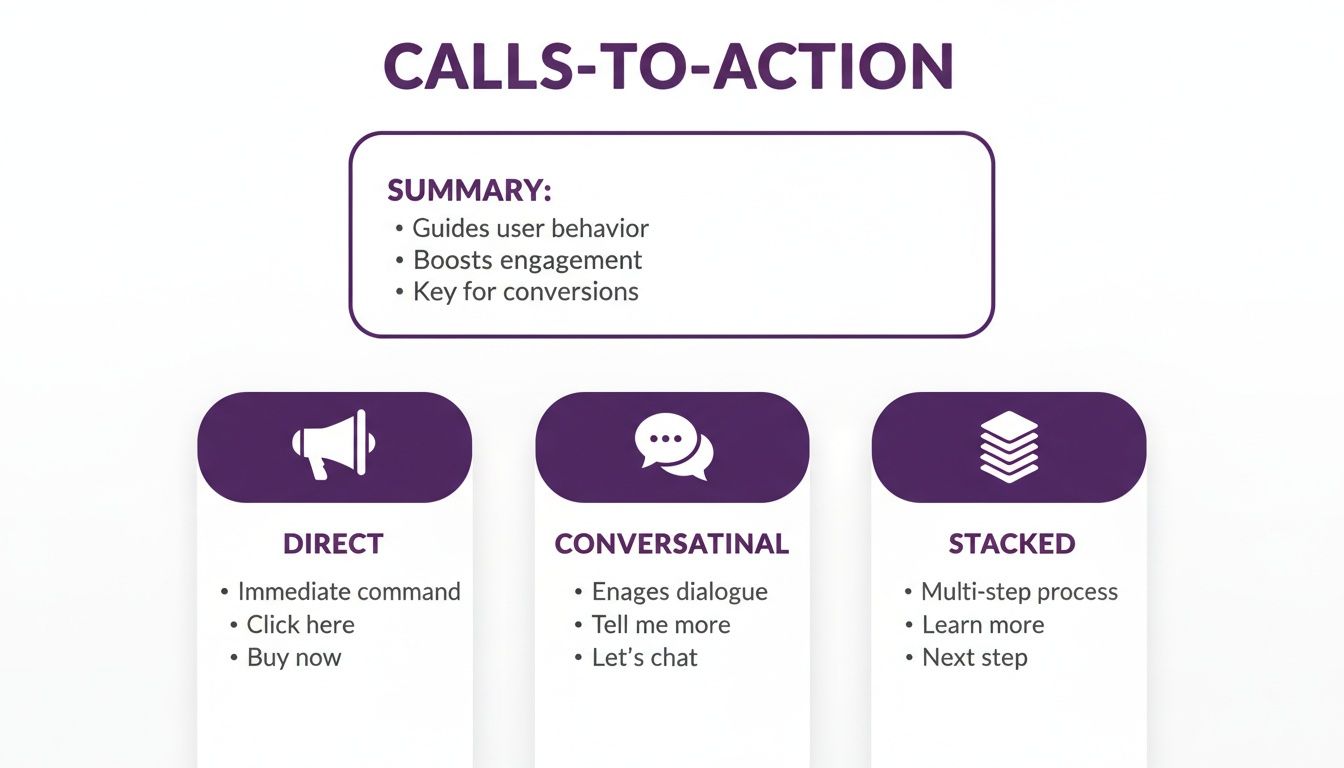
This visual guide shows how you can script direct, conversational, or stacked CTAs to guide your viewer's next step. By combining smart SEO, AI assistance, and clear scripting cues, you create a workflow that’s not just efficient but also built for discovery and engagement from the ground up.
Actionable YouTube Script Templates and Examples
Theory is one thing, but putting it into practice is what gets videos made. To help you get started, here are a few annotated, fill-in-the-blank templates.
Think of these as a launchpad for your next script for YouTube videos. You can adapt these frameworks to almost any niche and save yourself hours of staring at a blank page. Each one is built on the principles we've already covered, from the hook to the call to action.
The 'How-To' Tutorial Script Template
This structure is a lifesaver for any video where you're teaching a skill. It's clear, logical, and walks the viewer through the process without being overwhelming.
- Hook (0-5 seconds): [Show the amazing final result immediately.] "In the next five minutes, you're going to learn how to create this exact [Awesome Thing] from scratch, even if you've never done this before."
- Intro (5-20 seconds): "Hey, I'm [Your Name], and on this channel, I help you [Achieve a Goal]. Today, we're diving into the simple, three-step process to [Accomplish the Task]. We'll cover [Tool 1], [Technique 2], and the one common mistake you need to avoid."
- Body – Step 1 (20 seconds – 2 minutes): "First things first, you'll need to [Action for Step 1]. Let’s start by [Explaining the first action in detail]. [Visual Cue: B-roll of you performing this step]. Make sure you [Mention a critical tip or detail for this step]."
- Body – Step 2 (2-4 minutes): "Now that you've got that down, it's time for [Action for Step 2]. This is where many people mess up, so pay close attention. [Visual Cue: On-screen text highlighting a key point]. The secret here is to [Explain the second action]."
- Body – Step 3 (4-6 minutes): "Finally, let's bring it home with [Action for Step 3]. This part is actually pretty easy. All you have to do is [Explain the final action]."
- CTA / Outro (Final 30 seconds): "And just like that, you've created your very own [Awesome Thing]! If this tutorial helped you out, do me a favor and hit that like button. For more guides like this, subscribe, and don't forget to check out my video on [Related Topic] right here."
The Product Review Script Template
A great product review is all about balance and trust. This template helps you build credibility by showing, not just telling. You’re not just listing specs; you're explaining what they mean for the viewer.
A great review script isn't a sales pitch; it's a balanced report from a trusted friend. Your job is to help the viewer make an informed decision by weighing the good against the bad.
- Hook: "Is the new [Product Name] really worth $[Price]? I've spent the last 48 hours putting it to the test, and the answer might surprise you."
- Intro: "In this video, we're doing a deep dive into the [Product Name]. I'm going to cover its top three features, the one big flaw no one is talking about, and my final verdict on who should—and shouldn't—buy it."
- Body – Feature 1: "First up, let's talk about the [Key Feature]. The company claims it can [Do Something Amazing], so I had to see for myself. [Visual Cue: Demo of the feature in action]. As you can see, it works incredibly well for [Specific Use Case]."
- Body – Pros vs. Cons: "Okay, let's get real for a second. The biggest pro is definitely [List a major benefit]. But on the flip side, the biggest downside is [Explain a significant drawback]. For me, that's a bit of a dealbreaker because [Explain why it matters to you or your audience]."
- CTA / Outro: "So, what's the final verdict? If you're a [Type of Person], the [Product Name] is a fantastic choice. But if you're more of a [Different Type of Person], I'd actually recommend you check out the [Alternative Product] instead. I'd love to hear your thoughts in the comments below!"
Frequently Asked Questions About Scripting
Even with a solid plan, questions are bound to pop up when you sit down to write. Here are quick answers to the most common hurdles creators face.
How Long Should a Script for a YouTube Video Be?
There’s no single magic number. A good rule of thumb is that 150-160 words of script will equal about one minute of video. So, for a 10-minute video, you'd aim for a script that's around 1500-1600 words.
However, the real goal is to cover your topic thoroughly without adding fluff. Your video should be exactly as long as it needs to be—and not a second longer. A smart move is to check the top-performing videos in your niche to see what length your audience already enjoys.
Should I Use a Full Script or Just Bullet Points?
This really comes down to your personality and the type of video you're making. If you're just starting out, a word-for-word script for YouTube videos is your best friend. It guarantees you’ll hit all your key points and helps you avoid rambling on camera.
On the other hand, if you're more experienced or filming something casual like a vlog, a detailed outline with bullet points might feel more natural. It provides structure without sounding stiff. For tutorials, reviews, or anything with a lot of data, a full script is almost always the safest bet for clarity and accuracy.
How Do I Make My Script Sound Natural and Not Robotic?
The secret is simple: write like you talk. Use the same conversational language and contractions you'd use with a friend (think "it's" instead of "it is"). Keep your sentences from getting too long and complicated.
But the most powerful trick is to read your entire script out loud.
If a sentence feels awkward or clunky to say, it will sound ten times worse on camera. Rewrite it until it rolls off the tongue.
Practicing your script a few times before you hit record also makes a huge difference. It helps you internalize the content, letting more of your real personality shine through when it counts.
Ready to turn that perfect script into a stunning video in minutes? With LunaBloom AI, you can generate professional videos with customizable AI avatars and voices from just your text. Skip the expensive equipment and complex editing—start creating today. Explore the future of video at https://lunabloomai.com.