What if you could create professional, engaging training videos in minutes, not weeks? It's not a far-off dream. With AI-driven platforms like LunaBloom AI, you can take a simple script and instantly transform it into a polished video, complete with a professional AI presenter and a perfect voiceover.
This is a complete game-changer for anyone tasked with creating learning content. It makes the entire process faster, more affordable, and incredibly easy to scale.
The New, Smarter Way to Create Training Videos
Are you tired of the high costs and painfully long timelines of traditional video production? We’ve all been there. The old way means juggling tight budgets, coordinating with multiple vendors, and waiting weeks just to see a final cut. It’s slow, expensive, and rigid.
AI-powered text-to-video engines flip the script entirely. With a tool like LunaBloom AI, you simply paste in your script, choose an AI avatar that fits your brand, and generate a first draft in minutes. Think about what that means. You can get feedback, make changes, and push out updated training faster than ever, all while keeping your branding perfectly consistent across every single video.
- Slash production time from weeks to mere minutes.
- Maintain a consistent style with customizable AI avatars and brand kits.
- Effortlessly scale content with auto-subtitles and one-click multilingual output.
Comparing Production Methods
To truly grasp the difference, let’s put the old and new methods side-by-side. It’s not just about speed; it represents a fundamental shift in resources, cost, and flexibility.
Traditional Video Production vs. AI-Powered Creation
| Factor | Traditional Method | AI-Powered Method (LunaBloom AI) |
|---|---|---|
| Time to First Draft | Weeks of setup, filming, and post-production. | Minutes using a simple text-to-video engine. |
| Presenter Options | Requires booking on-site talent and scheduling shoots. | Instant access to a library of AI avatars with custom looks. |
| Localization | A separate, often costly, workflow for translation and subtitles. | One-click multilingual output for immediate global reach. |
| Cost | High expenses for crew, equipment, studio rentals, and editing. | A predictable subscription model with a minimal per-video cost. |
The contrast is stark. The AI approach removes nearly all the logistical headaches and financial barriers that hold Learning & Development (L&D) teams back.
“With AI text-to-video, teams cut production timelines by over 70%, freeing instructors to focus on content quality instead of logistics.”
This isn't just about making things faster. It’s about ensuring your training is consistent across every department and region. Need to update a compliance policy or a product feature? Just tweak the script, regenerate the scene, and deploy the new version—no expensive reshoot required.
Here's what that unlocks for you:
- Customizable brand kits automatically lock in your logo, colors, and fonts.
- Voice cloning lets you create a familiar, trusted narrator without booking studio time.
- Exportable transcripts and closed captions make learning accessible for everyone.
Why This Matters for Your Business
When you shrink production cycles from weeks down to minutes, you gain incredible agility. Trainers can respond to new company policies or critical product updates almost in real-time. In fact, some corporate teams have reported rolling out compliance modules 50% faster while seeing a real jump in learner engagement.
Imagine slashing your vendor costs by $10,000+ per video and empowering your L&D team to focus on what they do best: designing learning experiences. AI tools make video production predictable, transparent, and scalable.
Key takeaway: AI-driven video creation gives instructional designers the power to produce more content with unwavering quality and true global reach.
Laying the Groundwork: Planning Your Training Video
Before you touch any AI tool or write a single word of your script, the most important work begins: planning. A beautiful-looking video that doesn't actually teach anything is a colossal waste of everyone’s time. If you want to create training videos that stick, you must start with a solid, thoughtful strategy.
This is where you get crystal clear on your purpose. You need to move from a fuzzy concept like “a video on our new software” to a laser-focused goal like “a 5-minute video that gets a new user to create and export their first project.” That precision is what makes every second of your final video count.
Nail Down Your Learning Objectives First
Here's the most important question to ask: What, exactly, do you want your audience to be able to do differently after watching your video? Goals like "understand the new policy" are too vague. You have to think in terms of real, observable actions.
Good learning objectives are always specific and measurable. Frame them by starting with a strong action verb.
- Don't say: "Learn about the expense reporting system."
- Do say: "Submit a complete and accurate expense report using the new system."
See the difference? This simple tweak gives your video a clear destination. It also becomes your filter for what content makes the cut and what gets left out.
Get to Know Your Audience—Really Know Them
Who is this video for? The answer changes everything, from the tone you use to the examples you choose. A training video for a new hire will be worlds apart from one aimed at a senior engineer who has seen it all.
Think about these key factors:
- What do they already know? Are they total beginners or seasoned experts? You don't want to bore experts with basics or drown newbies in jargon.
- What’s in it for them? Why should they watch? Are they trying to solve a problem, complete compliance training, or genuinely level up their skills?
- Where will they be watching? At a desk with dual monitors? On a noisy factory floor? On their phone during a commute? This dictates your ideal video length and style.
Tailoring content to the audience is the most powerful way to keep people engaged. When a video speaks directly to a viewer's challenges and skill level, they'll stick with it to the end.
Pick the Right Format for the Job
Not all training topics fit the same mold, so your video format needs to match the lesson. Choosing the right style makes the information much easier to digest and remember.
Here’s a quick guide to the most popular formats and where they shine:
| Video Format | Best For | Example Scenario |
|---|---|---|
| Screencast Tutorial | Software walkthroughs and showing a digital process. | Walking a sales team through how to log a new lead in the CRM. |
| Presenter-Led | Explaining concepts, company policies, or soft skills. | A manager breaking down the new performance review process. |
| Microlearning | Single, focused tasks or quick refreshers. | A 90-second clip on how to reset your forgotten password. |
| Simulations | Complex or high-stakes procedures where mistakes are costly. | An animated video showing the correct safety shutdown sequence for a piece of machinery. |
When you invest time upfront—defining goals, understanding your audience, and picking the right format—you create a clear roadmap. This strategic thinking ensures the video you ultimately create isn't just fast to produce, but genuinely effective.
How to Script and Storyboard With an AI Partner
You've got your learning objectives locked in. Now it's time to bring your ideas to life by writing the script and visualizing the flow of your training video.
The best training videos sound like a conversation, not a textbook being read aloud. The trick is to write for the ear, not for the eye. This means using simple language, shorter sentences, and a logical flow of ideas. Imagine explaining something to a colleague over coffee—that's the tone you should aim for.
Getting this right is more important than ever. The AI video market is exploding and is projected to grow from USD 788.5 million in 2025 to USD 3,441.6 million by 2033, according to Grand View Research. With large companies making up 62.2% of this market, the focus is on creating scalable training. This puts the spotlight squarely on the script, especially when strong visuals can improve learner retention by up to 65%.
Crafting a Script That Connects
A great script doesn't just list facts; it tells a mini-story. Even the most technical training has a beginning (the problem), a middle (the solution), and an end (the key takeaways). Hook your viewer right away, guide them through the solution, and wrap up with a clear summary.
Here are a few tips for writing a better script:
- Read it Aloud: This is non-negotiable. If a sentence feels awkward to say, it will sound awkward on video. You'll instantly catch clunky phrases and run-on sentences.
- Ditch the Jargon: Avoid corporate-speak. If a technical term is absolutely necessary, explain it in simple terms immediately after using it.
- One Idea Per Sentence: Keep things focused. This makes it easier for your audience to follow along and for an AI voice to deliver the lines naturally.
Once you have a draft, bring in an AI partner like LunaBloom AI to help polish it. Paste your text and ask for suggestions to make it sound more conversational or to improve the narrative flow.
Demystifying the Storyboard
The word "storyboard" sounds more intimidating than it is. You don't need to be an artist. A storyboard is simply a visual plan—a map that shows what the viewer will see on screen while the narration plays.
At its core, a storyboard ensures your visuals support what's being said. It prevents that strange disconnect where the audio and video feel like they belong to different projects. Seriously, stick figures or simple text descriptions for each scene work perfectly.
Key Takeaway: Think of your storyboard as the blueprint for your video. It ensures every visual has a purpose and lines up perfectly with the script, creating a cohesive and easy-to-follow learning experience.
Let's say you're making a training video on a new data privacy policy. Your storyboard could be this simple:
| Scene # | Narration (Script) | Visual Description |
|---|---|---|
| 1 | "Today, we're introducing an updated data privacy policy to better protect our customer information." | Title card: Company logo + "New Data Privacy Policy." |
| 2 | "The first key change involves how we handle sensitive personal data." | Simple animated icon of a padlock appearing over a customer profile graphic. |
| 3 | "All sensitive data must now be encrypted both at rest and in transit." | Animation showing data moving from a laptop icon to a cloud icon, with both glowing to represent encryption. |
Using LunaBloom AI as Your Creative Partner
This is where things get truly efficient. Instead of creating every visual from scratch, you can use LunaBloom AI as your co-creator. Drop your script into the platform, and it can start generating scenes for you.
From there, it's all about directing the AI:
- Select an AI Avatar: Pick a presenter that matches the tone of your training. Do you need someone formal and professional, or friendly and approachable?
- Generate Scene Visuals: The AI will suggest relevant stock clips, animations, or on-screen text to accompany each line of your script.
- Refine the Flow: Easily drag and drop to reorder scenes, swap out a visual you don't love, and tweak the timing until your storyboard comes to life exactly as you imagined it.
By taking this hybrid human-AI approach, you cut down production time dramatically. It frees you up to focus on what really matters: making sure the content is clear, accurate, and genuinely helpful.
Producing Your Video with LunaBloom AI
Once your script and storyboard are locked in, it’s time for the fun part: bringing your training video to life. This is where LunaBloom AI turns your text into a polished, professional video—no technical editing skills required. The platform does the heavy lifting so you can focus on the creative direction.
The process begins with LunaBloom AI’s text-to-video engine. Simply copy and paste your script into the platform. In moments, the AI analyzes your text, breaks it into scenes, and generates a complete first draft with a default AI avatar and voiceover.
This initial video isn't the final product; it's your visual foundation. Think of it as a dynamic starting point, ready for you to add your unique touch.
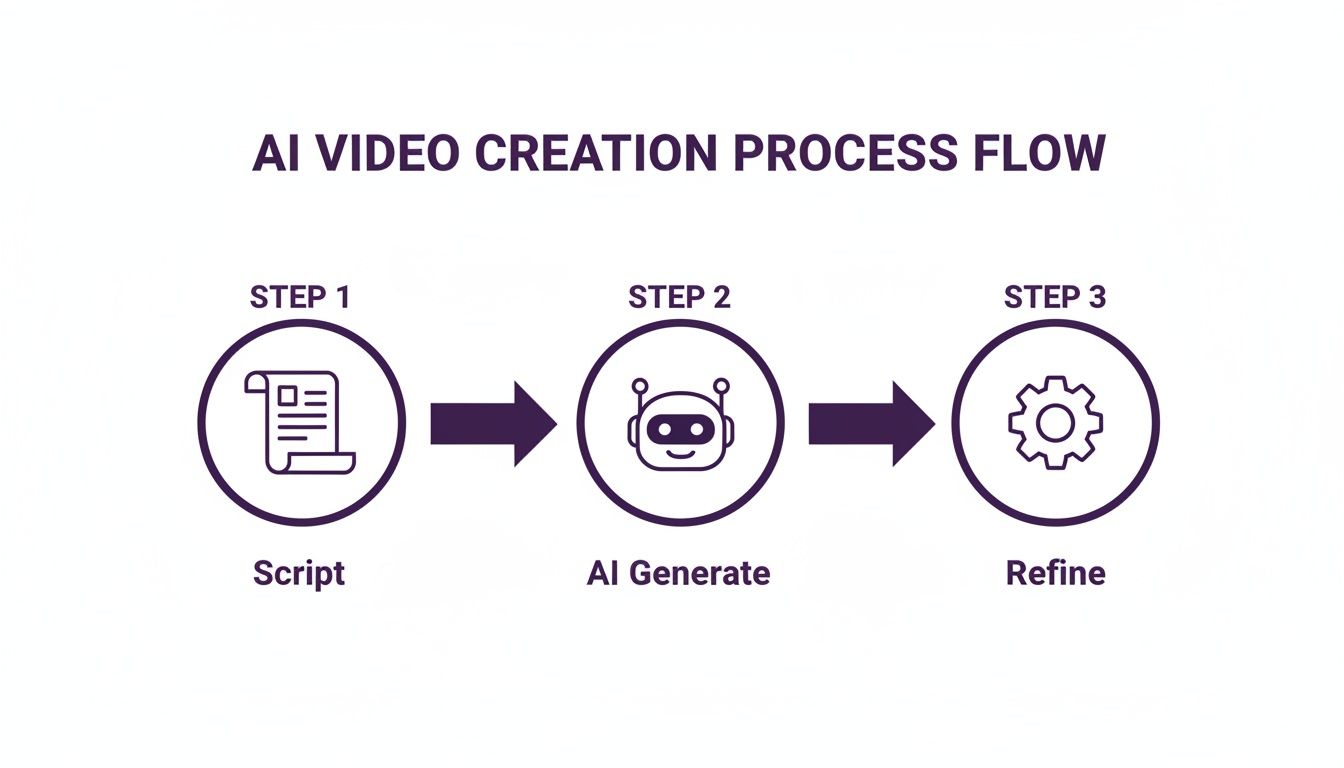
This workflow shows how direct the path is from a written script to a refined video. The AI handles the initial work, but the real power comes during the refinement stage, where you can tweak every element to perfectly match your brand and training goals.
Customizing Your AI Avatar and Voice
A generic presenter won't resonate with your team. LunaBloom AI gives you a library of customizable AI avatars, so you can pick one that truly reflects your company culture and the tone of your training.
You can get surprisingly granular with the details:
- Appearance: Change clothing styles and colors to match your corporate branding or the specific setting of the training.
- Tone of Voice: Pick from various vocal styles. Need something authoritative for compliance training? Done. How about friendly and encouraging for new hire onboarding? No problem.
- Backgrounds: Choose from professional office settings, clean abstract backgrounds, or upload your own branded images.
For ultimate brand consistency, LunaBloom AI also offers voice cloning. This feature lets you create a single, consistent narrator for all your training materials. Using a familiar voice builds trust and recognition, making the learning experience feel much more cohesive.
Unlocking Global Reach with Localization
If you have a global workforce, you know that language barriers can derail an otherwise great training program. LunaBloom AI demolishes that barrier with built-in localization features that make your content instantly accessible to international teams.
With just a couple of clicks, you can:
- Translate Your Script: The platform can automatically translate your video script into dozens of languages with impressive accuracy.
- Generate Accurate Subtitles: It also generates and syncs closed captions for every language you choose, which is a huge win for accessibility.
- Lip-Sync in Multiple Languages: The AI avatar’s lip movements will automatically sync to the translated audio, creating a natural viewing experience for every employee, no matter where they are.
This capability is a huge reason the text-to-video AI market is booming, with a compound annual growth rate (CAGR) of 30.7%. Companies using AI for training report up to 50% faster production times, and features like voice cloning can boost learner comprehension by 40% compared to text-only materials.
Adding Your Professional Brand Identity
The last step in production is ensuring every video feels like it came from your company. Inconsistent branding can make training content feel unofficial and less credible. LunaBloom AI includes branding tools that make it easy to maintain a polished, uniform look across all your modules.
Key Takeaway: Consistent branding isn't just about aesthetics. It reinforces your company’s authority and professionalism, making the training feel more official and trustworthy to your employees.
You can upload your brand assets once and apply them to any project. This includes adding your company logo as a permanent watermark, setting a custom color palette, and creating standard intros and outros. It ensures every video—from a quick software tutorial to a deep-dive compliance course—is instantly recognizable.
How to Distribute and Measure Your Training Videos
A fantastic training video is useless if no one sees it. Creating the video is only half the battle; getting it in front of your team and measuring its effectiveness is where the real value comes from.
Now it’s time to get your videos out there. This final stage is all about smart distribution and even smarter measurement, creating a feedback loop that makes every video you create better than the last.
Smart Distribution Strategies for Maximum Reach
Don't just drop your video into a shared drive and hope for the best. To ensure your content is seen by the people who need it, you have to be intentional and make your resources frictionless to access.
Think about where your employees already spend their time online. The best distribution channels are the ones that slot right into their daily routines.
- Learning Management System (LMS): This is the go-to for formal training. Uploading videos to an LMS lets you assign modules, track completions, and bundle videos with other materials like quizzes or PDFs.
- Company Intranet or Portal: For general, evergreen training, your company's intranet is perfect. It can become a central, searchable library for everything from quick tutorials to official policy updates.
- Direct Team Channels: Have a video that’s only relevant to the sales team? Share it directly in their Slack or Microsoft Teams channel. This puts content exactly where conversations are already happening.
Learning to schedule and manage content across different channels is a superpower for distribution. While this guide on scheduling social media posts to multiple platforms is for marketing, the core principles of planning and consistency apply perfectly to internal communications, too.
Optimizing for Internal Discoverability
Just because your video is internal doesn’t mean you can forget about search. When an employee types "how to submit an expense report" into the intranet search bar, you want your video to be the first result.
Use clear, descriptive titles with keywords people would actually search for. It’s also a good idea to write a short summary of what the video covers. This simple housekeeping can massively increase the shelf life and impact of your training content.
Measuring What Truly Matters
Views are a vanity metric. To know if your training is hitting the mark, you have to dig into analytics. Good data tells you not only if people are watching, but how they're watching.
Don't mistake views for value. The most important metrics reveal whether your audience learned something and can apply it to their job.
Look beyond surface-level numbers and focus on data that tells a story:
- Completion Rates: What percentage of viewers watch the entire video? If everyone drops off halfway through, your video might be too long, confusing, or irrelevant.
- Engagement Analytics: Most platforms show which parts of a video are re-watched or skipped. This is a goldmine for identifying confusing sections or the most valuable pieces of information.
- Knowledge Retention: Did the information stick? A quick quiz or assessment after the video is a great way to check for understanding and confirm you met your learning objectives.
- Learner Feedback: Never underestimate the power of asking. A simple survey asking viewers to rate the video's clarity and usefulness provides incredible context that raw numbers can't.
By tracking these key metrics, you turn video creation into a cycle of continuous improvement. The insights you gain from one video will directly shape how you produce and deliver the next one.
Common Questions About AI Training Videos
As you dive into creating training videos with AI, a few questions always come up. Let's tackle the most common ones so you can move forward with confidence.
How Long Should a Training Video Be?
The data is clear: shorter is almost always better. For most corporate training, the sweet spot is between 3 and 7 minutes. This length is perfect for microlearning, where you focus on teaching a single, specific skill.
If your topic is complex, resist the urge to create a 30-minute epic. Instead, break it down into a series of shorter, bite-sized videos. Think of it as a mini-series for your training. Engagement analytics consistently show a massive drop-off after the 10-minute mark, so keeping things concise is a strategic move.
Can I Create Professional Videos with No Design Skills?
Absolutely. That's the entire point of platforms like LunaBloom AI. These tools are built for subject matter experts, L&D professionals, and marketers—not professional video editors.
The platform provides the building blocks: pre-designed templates, a library of customizable AI avatars, and stock media. You bring the knowledge. You write the script, choose a presenter's style, set your brand colors, and the AI handles the production. It turns your text into a polished video that looks like it came from a dedicated creative team.
The goal of AI video tools is to democratize video creation. It shifts the focus from technical skill to content quality, allowing anyone to produce high-quality training materials.
How Do I Make My Training Videos More Accessible?
Thinking about accessibility from the start isn’t just about compliance; it's about making your training effective for everyone on your team. The good news is that AI tools make this much easier.
Here are four simple ways to make your content accessible:
- Generate Accurate Captions: Always include closed captions. LunaBloom AI can automatically generate subtitles in multiple languages, which helps people with hearing impairments and non-native speakers.
- Use Clear Language: Write your script like you're explaining it to a friend. Ditch corporate jargon and complex sentences.
- Ensure High Visual Contrast: Any text on screen needs to be easily readable. Make sure it has high color contrast against the background.
- Provide a Transcript: Always offer a downloadable text transcript. It’s an amazing study guide and is essential for anyone using a screen reader.
What Is the Best Way to Update Training Videos?
This is where AI platforms truly shine. The old way of updating a video—due to a small policy change or a software update—meant an expensive, time-consuming reshoot.
With an AI platform, making updates is simple:
- Edit the Script: Just open your project, find the line you need to change, and edit the text.
- Re-generate the Scene: Click a button to re-generate that specific scene or the entire video with the new script.
- Deploy Instantly: In minutes, you have a brand-new version ready to go.
This agility is a massive advantage. Your training content can finally keep pace with your business without blowing your budget or timeline, making "living" training content a reality.
Ready to meet your team's training needs with speed and quality? LunaBloom AI provides all the tools you need to create professional, engaging, and accessible training videos in minutes, not weeks. Start creating your first AI-powered video today!