Creating an educational video is about more than just hitting "record." It's about designing a learning experience that captures attention and makes complex ideas stick. The best instructional videos blend sharp teaching principles with compelling creative work, resulting in content that is not just engaging, but genuinely effective.
Why is Educational Video Production So Important?

Let's face it: holding a learner's attention is tougher than ever. In a world saturated with on-demand content, traditional teaching methods often struggle to compete. This is precisely where high-quality educational video production shines, transforming a passive lecture into an active, memorable journey.
Video engages multiple senses at once. Learners see concepts demonstrated, hear clear explanations, and watch complex ideas unfold visually. This multi-sensory approach caters to diverse learning styles and has been proven to boost understanding and recall far more effectively than text alone.
The Undeniable Shift to Visual Learning
The move toward video-based learning isn't just a trend; the data confirms it's a fundamental shift. In 2024, the global advertising-based video on demand market for education reached USD 2,171.1 million. Projections show this figure skyrocketing to USD 9,333.9 million by 2030. This explosive growth signals a clear preference for how people want to learn new skills. For a deeper analysis, you can explore the growth of the educational video on demand industry.
This guide provides a complete roadmap for creating educational videos that deliver results. We'll move beyond the basics to walk you through a structured process that ensures your content is effective, accessible, and impactful.
Effective educational video isn't just about what you show; it's about how you structure the learning experience. The goal is to guide the viewer from curiosity to comprehension, one carefully crafted scene at a time.
We’ll cover the entire workflow, from initial concept to measuring success. Here’s what we'll explore:
- Strategic Planning: Defining your learning objectives and understanding your audience.
- Content Creation: Scriptwriting, storyboarding, and choosing the right video format.
- Modern Production: Using AI tools like LunaBloom AI to generate videos from text, complete with AI avatars and voice cloning. Learn more about LunaBloom AI's mission and technology.
- Polishing and Delivery: Editing, adding accessibility features, and distributing your content.
- Measuring Success: Moving beyond view counts to assess actual learning outcomes.
By following these steps, you can create professional, high-impact videos that don’t just teach—they inspire. Let's begin.
Pre-Production: Planning for Success
An impactful educational video starts long before you press record. The most critical work happens during pre-production, the strategic planning phase that separates engaging content from videos that fall flat. Think of this as creating the blueprint for a successful learning experience.
Every decision, from the script's tone to the chosen visuals, must be intentional. Skipping this planning stage risks creating a video that is unfocused, confusing, or fails to meet your learners' needs. The goal is to ensure every second of your video serves a clear educational purpose.
1. Define Clear Learning Objectives
Before writing a single word, ask yourself this question: What should the viewer be able to do after watching this video? The answer forms your learning objective. This isn't about what the video will cover; it's about a tangible, measurable outcome for the learner.
Frameworks like Bloom's Taxonomy can be immensely helpful. They guide you from vague goals like "understand the topic" toward concrete actions.
- Remembering: Can the learner recall key terms or critical steps?
- Applying: Can the learner use the information to solve a problem?
- Analyzing: Can the learner break down a concept into its core components?
Defining a clear objective provides a North Star for the entire educational video production process, guiding your script, visuals, and assessments.
2. Know Your Audience Inside and Out
Who is this video for? You can't create effective content in a vacuum. A video for high school biology students will look and feel vastly different from a corporate compliance training module—and for good reason.
Get specific about your audience by considering these factors:
- Prior Knowledge: What do they already know? Avoid boring them with basics or overwhelming them with unfamiliar jargon.
- Motivation: Why are they watching? Understanding whether it's for a required course, professional development, or personal curiosity will shape your tone.
- Viewing Environment: Where will they watch? Short, mobile-friendly videos are ideal for learners on the go, while detailed tutorials suit a desktop setting.
Tailoring your content's complexity, examples, and tone is essential for creating a video that truly connects.
3. Craft a Compelling Instructional Script
Now it’s time to write. Scripting for an educational video is a unique skill; you're writing for the ear, not just the eye. Use a natural, conversational tone, short sentences, and a logical flow that is easy to follow.
A great instructional script follows a clear structure:
- The Hook: Start with a compelling question, a surprising fact, or a relatable problem to grab attention within the first 5-10 seconds.
- The Core Content: Break your topic into small, digestible chunks. Explain one idea at a time, using smooth transitions to connect concepts.
- The Summary & Call to Action: Recap the key takeaways to reinforce learning. Then, provide a clear next step, like taking a quiz or downloading a resource.
A common mistake is simply reading a document aloud. Instead, imagine explaining the concept to a friend. This simple mindset shift will make your script feel infinitely more natural and engaging.
4. Visualize with a Storyboard
A storyboard is your video’s visual outline, mapping out each scene. It doesn’t need to be a work of art; simple sketches or text descriptions are enough. This step is critical for translating your script into a compelling visual narrative.
Storyboarding helps you:
- Pace the Content: Ensure your visuals align with the narration without feeling rushed or slow.
- Identify Visual Needs: Determine where you need graphics, animations, B-roll footage, or text overlays.
- Catch Problems Early: It’s far easier to rearrange sketches on a storyboard than to re-shoot or re-edit a finished video.
To manage the process from concept to creation, comprehensive online course creation production packages can streamline your workflow.
Production: Bringing Your Vision to Life with AI
This is where your script and storyboard become a tangible video. Traditionally, this stage involved cameras, studios, and significant technical skill, making it the most expensive and time-consuming part of the process. Today, AI-powered tools have revolutionized educational video production, making it accessible to everyone.
Forget steep learning curves and high costs. Modern platforms can transform your script into a polished, professional video in minutes. This allows educators to focus on what matters most—crafting exceptional instructional content—rather than getting bogged down in technical complexities.
The flowchart below illustrates how a solid pre-production plan sets the stage for a streamlined, AI-powered production workflow.
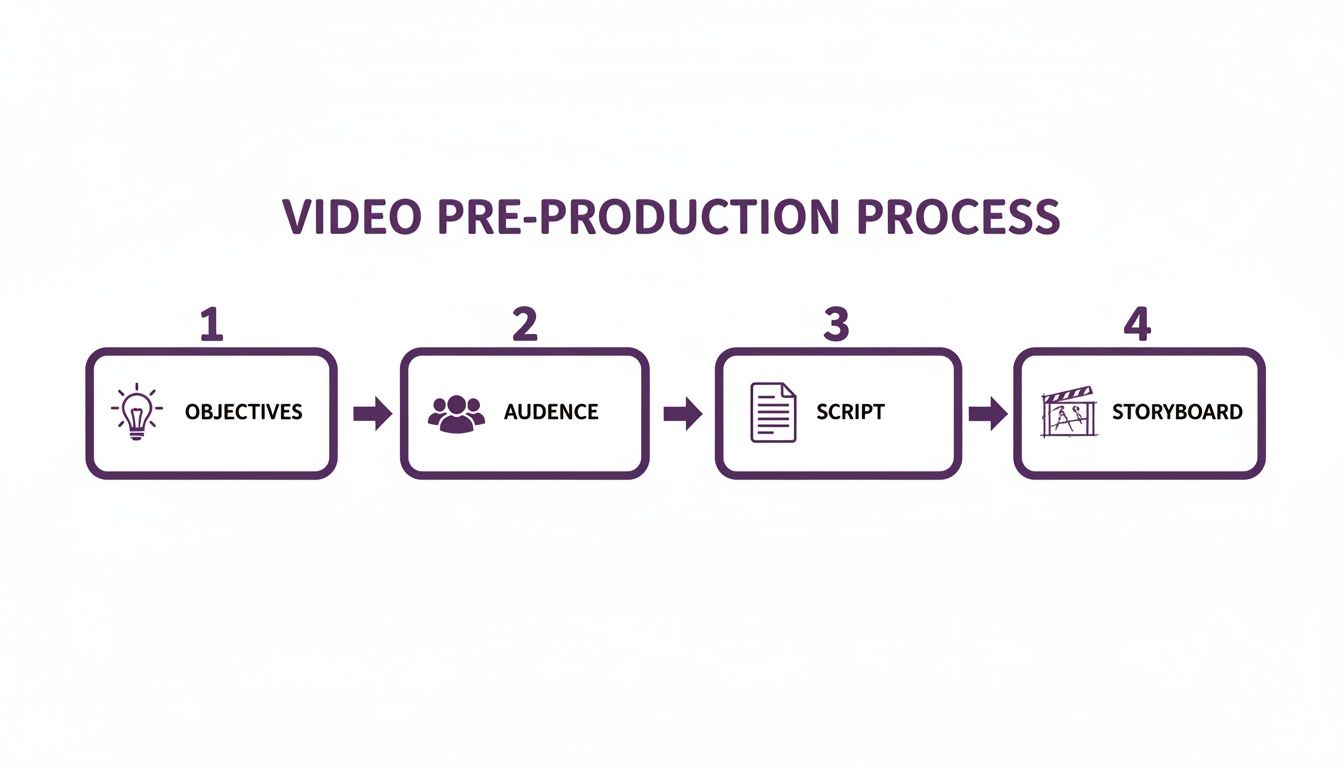
As you can see, strong planning—knowing your objectives, audience, script, and storyboard—makes the production phase far more efficient, especially with AI.
Generating Video Directly from Text
Imagine pasting your script into a tool and watching it generate a complete video. This is exactly what platforms like LunaBloom AI can do. These tools use your text as the blueprint for everything, from narration to visuals.
Here’s how the technology works:
- AI Avatars: Choose from a library of realistic AI presenters to deliver your script with natural expressions, eliminating the need for actors or filming yourself.
- Voice Cloning and Narration: Record your script once to create an AI clone of your voice for future videos. Alternatively, select from a wide range of high-quality AI voices to match your content's tone.
- Automated Scene Creation: The AI analyzes your script to suggest relevant visuals, b-roll, and animations, automatically syncing them to the narration. This saves countless hours of searching for stock footage or creating graphics.
The biggest advantage of AI in production is achieving speed without sacrificing quality. A project that once took a team weeks can now be completed by one person in under an hour.
This approach not only accelerates production but also helps maintain a consistent visual style across a video series—a crucial element for cohesive courses.
Enhancing Learning with Visuals
While AI handles the technical work, your expertise as an educator is still vital. Guide the AI's visual choices to maximize learning effectiveness. Remember, visuals should always clarify the content, not merely decorate it.
When selecting b-roll, animations, or on-screen text, always ask: does this help explain the concept?
- Use B-Roll for Context: Show real-world examples. If teaching a scientific process, include footage of it in action.
- Use Animations for Abstraction: Animate complex ideas, such as the inner workings of a machine or a theoretical model.
- Use Text Overlays for Emphasis: Reinforce key terms, definitions, or steps by displaying them on-screen.
Following these guidelines ensures every visual element serves a clear pedagogical purpose.
Achieving Global Reach with Automation
AI-driven video production makes reaching a global audience incredibly simple. Most platforms include automated tools for subtitles and localization.
For how-to and explainer videos, this is a game-changer. An incredible 90% of how-to videos are watched on mobile devices, and with over 3.7 billion people expected to watch videos on their phones by 2026, accessibility is non-negotiable.
Here’s how AI simplifies this:
- Automatic Subtitle Generation: The tool creates accurate, time-synced subtitles or closed captions, which are essential for accessibility and viewers in noisy environments.
- Instant Localization: Translate subtitles and even the AI voiceover into dozens of languages with a single click, instantly expanding your reach to learners worldwide.
To learn more, this comprehensive video transcription guide explains how AI is improving efficiency and accuracy. Ready to try it yourself? Start creating at https://www.lunabloomai.com/app.
Post-Production: Polishing Your Video for Maximum Impact
Post-production is where you transform raw footage into a polished, professional learning asset. This stage is about more than just cutting out mistakes; it’s about shaping the narrative, sharpening key messages, and ensuring your content is accessible to all learners.
The best educational videos feel effortless. The pacing is perfect, the graphics clarify concepts, and the audio is crisp. A thoughtful post-production workflow elevates a good video into a truly memorable learning experience.
The Essentials of Editing for Learning
Editing an educational video requires a different approach than editing a marketing promo. Every cut, transition, and graphic must serve the goal of enhancing learning. Clarity and retention are your guiding principles.
Start by trimming unnecessary content. Remove filler words, awkward pauses, and repetitive sentences. A tighter video respects the viewer's time and keeps them focused.
Next, focus on pacing. Does the video allow enough time for complex ideas to sink in? Simple transitions, like a clean cut or a soft fade, are usually sufficient to guide the viewer's focus.
Finally, layer in supporting elements to reinforce learning:
- Text Overlays: Use them to highlight key terms, display important data, or summarize steps.
- Graphics and Animations: A simple animation can bring a dry process to life, while a well-designed chart can make data instantly understandable.
- Music and Sound: A subtle background music track can enhance the viewing experience, but it should never overpower the narration.
A Laser Focus on Accessibility
Accessibility isn't an optional feature; it's a fundamental part of effective educational video production. If some learners can't access your information, the video has failed its purpose. Integrating accessibility from the start ensures you create truly inclusive content.
Start with accurate, perfectly synced captions. They are essential for viewers who are deaf or hard of hearing and helpful for non-native speakers or anyone watching in a quiet environment.
Designing for accessibility doesn't just help a few users; it creates a better, clearer experience for everyone. High-contrast visuals, for instance, are easier for all viewers to see.
Beyond captions, consider these elements:
- Audio Descriptions: A separate audio track describing important on-screen visuals is crucial for learners with visual impairments.
- High-Contrast Visuals: Ensure all text and graphics have sufficient color contrast against their backgrounds.
- Readable Fonts: Use clean, sans-serif fonts for on-screen text, and make sure they are large enough to be read comfortably on a mobile device.
Your Pre-Flight Quality Assurance Checklist
Before publishing, a final quality assurance (QA) check is a must. This is your last chance to catch small errors that can distract learners and undermine your credibility.
Essential Post-Production Quality Checklist
Use this checklist to ensure your educational video is polished, professional, and accessible before you go live.
| Check Area | Key Action | Why It Matters |
|---|---|---|
| Audio Quality | Listen with headphones. Is the audio clear, level, and free of background noise? | Poor audio is the #1 reason viewers abandon a video. It makes content inaccessible and frustrating. |
| Visual Consistency | Are the colors, fonts, and branding consistent throughout the video? | Consistency creates a professional look and prevents visual jarring that can distract from the lesson. |
| Pacing and Flow | Does the video move at a comfortable pace? Are the transitions smooth? | Good pacing keeps learners engaged and prevents cognitive overload or boredom. |
| Factual Accuracy | Double-check all names, dates, statistics, and technical information. | Inaccuracies destroy trust and credibility, rendering the entire educational effort useless. |
| Accessibility | Are captions accurate and synced? Is on-screen text high-contrast and readable? | Ensures all learners can access and benefit from the content, promoting inclusivity. |
By systematically reviewing these areas, you can be confident your final video is ready to make a real impact. For a platform that simplifies this process, explore the LunaBloom AI starter app.
Distribution and Measurement: Reaching Learners and Tracking Success
Creating a great educational video is a significant achievement, but it's only half the battle. If your content isn't seen by the right audience, it can't achieve its purpose. The final phase of educational video production involves distributing your video effectively and measuring whether it actually worked.
The first question to ask is: where are your learners? The answer will determine your entire distribution strategy. A video for internal corporate training requires a different platform than a public tutorial intended for a global audience.
Choosing the Right Distribution Platform
Your chosen platform is more than just a host; it's the virtual classroom. Each option offers a unique environment, audience, and set of analytical tools.
- Learning Management System (LMS): Ideal for formal corporate or academic training, an LMS provides a secure environment to organize content, track completion, and integrate assessments.
- YouTube: The best platform for reaching the largest possible audience. As the world's second-largest search engine, it offers unparalleled discoverability, though you'll have to contend with ads and distracting recommendations.
- Your Own Website: Hosting videos on your site gives you complete control over the user experience. You can eliminate ads, maintain brand consistency, and surround your video with supplementary resources.
Once you’ve chosen a platform, optimize your video with a keyword-rich title, a detailed description, and relevant tags to improve its discoverability.
Driving Engagement Beyond the Play Button
A view doesn't automatically equal learning. True engagement occurs when viewers actively interact with the material, transforming passive watching into an active learning experience.
A common mistake is thinking the video is the entire learning experience. The best videos are actually centerpieces, supported by other materials that help lock in the concepts.
Build a small learning ecosystem around each video with resources like:
- Supplementary Worksheets: A downloadable PDF with key questions or exercises can prompt viewers to apply what they've learned.
- Interactive Quizzes: Short, low-stakes quizzes are excellent for checking comprehension and helping learners identify areas for review.
- Discussion Prompts: Encourage conversation by asking viewers to share their thoughts or experiences in a comments section or dedicated forum.
These additions don't need to be complex. A simple one-page summary can significantly improve retention. You can see how LunaBloom AI helps create engaging video content on our main site.
Measuring What Truly Matters: Learning Outcomes
Vanity metrics like view counts and likes feel good, but they don't tell you if anyone actually learned something. To demonstrate the value of your videos, you must focus on measuring real learning outcomes.
Shift your focus from "Did they watch it?" to "Did they get it?"
Here’s how you can measure actual learning:
- Assessments: Pre- and post-video quizzes are the most direct way to measure knowledge gain. An increase in scores provides clear evidence of learning.
- Surveys: Ask learners to rate their confidence on a topic before and after watching. Open-ended questions can also provide valuable qualitative feedback.
- Behavioral Observation: For skills-based training, observe whether learners can apply what they were taught. This can be measured through practical tests or on-the-job performance metrics.
By focusing on these metrics, you can gather the data needed to refine future content and prove the tangible impact of your work.
Conclusion: Your Path to Impactful Educational Video
Creating high-quality educational videos is a powerful way to engage learners, simplify complex topics, and make knowledge more accessible than ever before. The process may seem detailed, but it boils down to a few core principles: plan with purpose, create with clarity, and measure for impact.
By focusing on clear learning objectives and truly understanding your audience, you lay the foundation for success. Modern AI-powered tools have removed the technical barriers, allowing you to focus on crafting compelling content rather than wrestling with equipment. Finally, by distributing your videos strategically and measuring what truly matters—learning outcomes—you can create a continuous cycle of improvement and demonstrate real value.
The demand for engaging, effective video learning will only continue to grow. Armed with the strategies in this guide, you are now equipped to produce educational videos that don't just inform, but inspire.
Ready to create professional-grade educational videos without the hassle of cameras or editing? With LunaBloom AI, you can transform your text into engaging video content in minutes. Generate your first AI video for free at LunaBloom AI