
An explainer video is a short, engaging video that simplifies a complex idea, product, or service into a compelling story. Think of it as your best salesperson—one that works 24/7 to show your audience exactly what problem you solve and why your solution is the one they need.
These videos are designed to be brief, usually under 90 seconds, and use a combination of clear visuals and concise language to get the point across quickly.
What is the Main Purpose of an Explainer Video?
At its core, an explainer video cuts through the noise and answers one critical question for any potential customer: "What is this, and why should I care?" It’s designed to replace dense web copy and technical jargon with something that’s not just easy to understand but also memorable.
The real magic isn't just in informing; it's in creating that "aha!" moment for the viewer.
Instead of making people read paragraph after paragraph, you simply show them. This visual storytelling approach builds trust and delivers your message much faster, making it an essential tool for any business looking to connect with its audience.
To break it down, here’s a look at the fundamental parts of a great explainer video.
The Anatomy of a Great Explainer Video
| Component | Description | Primary Goal |
|---|---|---|
| The Problem | A relatable scenario introducing a common pain point the audience faces. | Build an immediate connection and show you understand their struggle. |
| The Solution | Your product or service is presented as the hero that resolves the problem. | Clearly position your offering as the ideal answer. |
| How It Works | A simple, step-by-step demonstration of your solution in action. | Demystify the process and build confidence in your product. |
| The Value | Highlights the key benefits and the positive outcome the user will experience. | Reinforce the "why" and demonstrate tangible value. |
| Call to Action | A clear, direct instruction telling the viewer what to do next. | Guide the viewer toward conversion, such as a sign-up or purchase. |
Every component works together to take the viewer from confused or curious to clear and convinced.
Why are Explainer Videos so Effective in Marketing?
There’s a simple reason explainer videos have become a cornerstone of modern marketing: they work. The data is clear—an overwhelming 96% of consumers report watching an explainer video to learn more about a product or service. This isn't just a passing trend; it's a proven method for capturing attention and driving results.
In fact, 73% of video marketers name explainers as their most-used type of video, ranking them above even social media clips and customer testimonials.
An effective explainer video doesn't just list features; it tells a story. It frames a common problem, introduces the solution as the hero, and ends with a clear path forward for the viewer.
What are the Key Objectives of an Explainer Video?
While the ultimate goal is often to drive sales, a truly great explainer video achieves this by hitting three key objectives along the way:
- Educate: It breaks down complex topics into simple, visual terms. This is why explainer videos for complex tech are so effective at making intricate software or hardware feel approachable.
- Engage: By using animation, compelling storytelling, and a conversational tone, it grabs and holds viewer attention far better than a wall of text ever could.
- Convert: By clearly showing the value you offer, it gives viewers the confidence and motivation to take the next step, whether that’s signing up for a trial, booking a demo, or clicking "buy now."
Finding the Right Style for Your Message
Choosing the right style for your explainer video is like picking the perfect outfit. It has to fit the occasion, your brand's personality, and most importantly, the message you want to convey. Not all explainer videos are the same, and the format you choose can make or break how your story connects with viewers.
The right style doesn't just deliver a message; it creates an experience. Whether you need something playful and imaginative or grounded and personal, there's a format ready to bring your idea to life.
Animation: Your Go-To for Creative Freedom
When you think of explainer videos, animation is probably the first thing that comes to mind—and for good reason. It offers incredible creative freedom, which is perfect for breaking down abstract concepts or showing off products that are tricky to film in the real world.
You have a few different styles of animation to choose from:
- 2D Animation: This is the classic, flat style you see everywhere. It’s friendly, approachable, and super versatile, making it a fantastic choice for explaining a service, showing how software works, or mapping out a business process in a clean, engaging way.
- 3D Animation: By adding depth and realism, 3D animation gives your video a more premium, polished feel. It's the ideal way to visualize physical products, architectural designs, or complex machinery where every detail counts.
- Motion Graphics: This style focuses on bringing text, icons, and shapes to life instead of characters. It feels sleek and modern, perfect for data-heavy videos or quick, branded clips on social media where you need to be clear and visually punchy.
Live-Action and Screen Recordings: Keeping It Real
Sometimes, the best way to connect with your audience is to show them real people and real products. This is where live-action videos and screen recordings shine, bringing a level of authenticity and clarity that animation can’t always match.
Live-action videos build an immediate human connection and foster trust, while screencasts offer undeniable proof of how your software actually works. They ground your message in reality.
These styles work best in a few specific scenarios:
- Live-Action: When you want to build trust and an emotional connection, nothing beats seeing a real person. This format is perfect for customer testimonials, company culture videos, or for any service-based business where putting a human face to your brand makes all the difference.
- Screencasts: If you're showing someone how to use software or navigate a digital workflow, a screencast is the most direct approach. It literally shows your product in action, walking viewers step-by-step through its features. It’s the ultimate format for tutorials and product demos.
Deciding when you actually need an explainer video often boils down to the complexity of your idea. This flowchart breaks it down nicely.
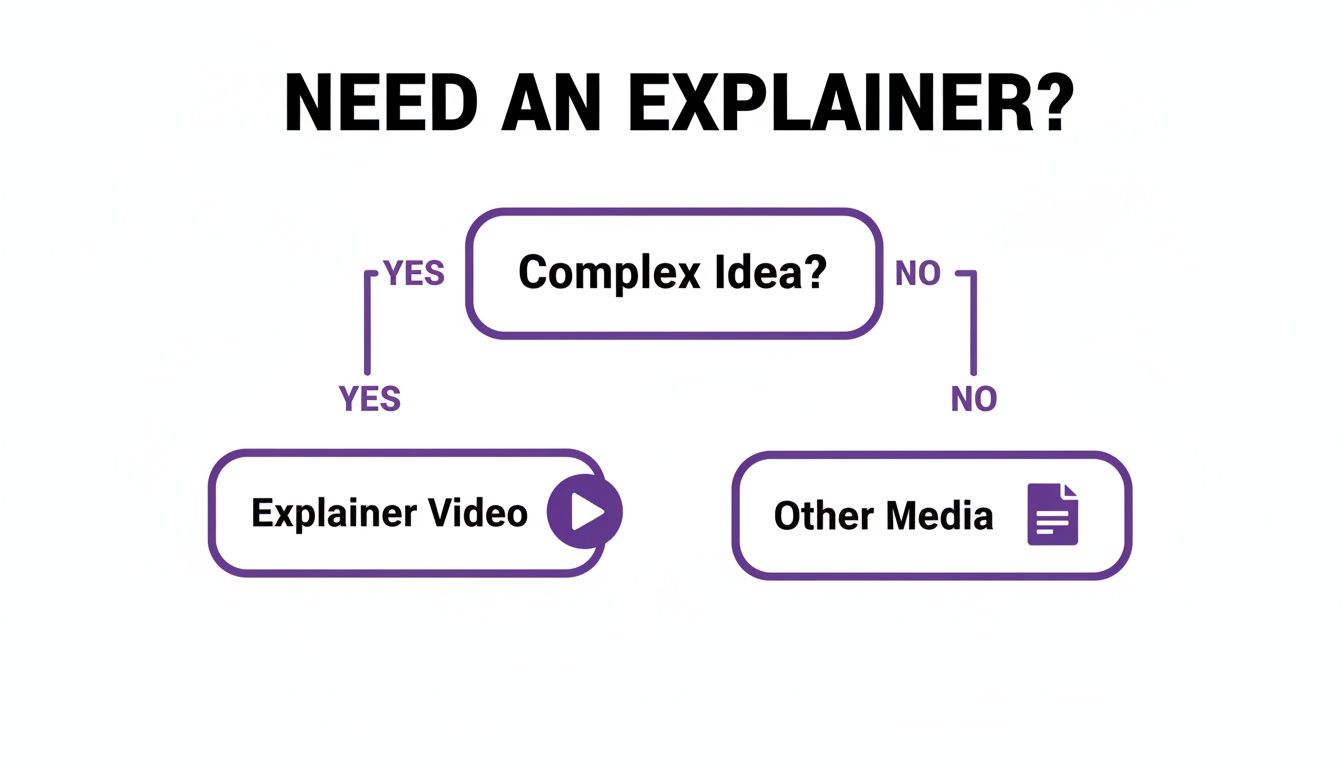
As the guide shows, when your message gets complicated, an explainer video is often the clearest path forward.
How to Choose the Right Explainer Video Format
With so many options, how do you pick the right one? The best format depends entirely on what you're trying to achieve—from building brand trust to simplifying a complex process. This table breaks down the strengths of each style to help you decide.
| Video Type | Best For | Key Advantage | Example Use Case |
|---|---|---|---|
| 2D Animation | Simplifying services or abstract concepts. | Friendly, versatile, and cost-effective. | A SaaS company explaining how its platform solves a customer pain point. |
| 3D Animation | Visualizing physical products or complex machinery. | High-end, realistic, and detailed. | A real estate developer showing off a new building design before it's built. |
| Motion Graphics | Presenting data, stats, or quick brand messages. | Modern, clean, and great for grabbing attention. | A marketing agency creating a short video for social media highlighting key results. |
| Live-Action | Building trust and emotional connections. | Authentic, relatable, and personal. | A non-profit sharing a powerful customer testimonial to drive donations. |
| Screencast | Demonstrating software or digital products. | Clear, direct, and provides proof of functionality. | A software company creating a tutorial to guide new users through onboarding. |
Ultimately, the goal is to match the format to your message and your audience. A fun, animated video might be perfect for a B2C app, while a polished live-action testimonial could be the key to landing a big B2B client.
The Business Impact of a Great Explainer Video
A great explainer video does more than just look professional; it’s a strategic asset for your business that delivers real, measurable results. Think of it less as another piece of content and more as a powerful tool that moves the needle on key goals across marketing, sales, and even customer support.
Let's be real: your landing page has just seconds to grab someone's attention. An explainer video accomplishes this almost instantly. Research shows that landing pages with an explainer video can see a massive jump in conversions—some studies report they are twice as effective as pages without one. It builds trust and clarity fast, which is exactly what you need to convince a visitor to stay and take the next step.
Driving Sales and Shortening Cycles
A powerful explainer video acts like your best salesperson, working 24/7 to simplify complex pitches and handle objections before they even arise. For sales teams, it’s a secret weapon. They can share it with prospects to ensure the core message is delivered perfectly, every time. This clarity speeds up the sales cycle by educating potential customers far more effectively than a long email or dense PDF ever could.
This isn’t just a hunch. The global market for explainer videos is booming, driven by its proven ability to improve B2B and B2C communication. Projections show this growth continuing through 2030, with 73% of marketers naming explainers a top priority for achieving better ROI and engagement. When 95% of consumers say they’ve watched an explainer to learn about a business, it's a channel you simply can't ignore. You can find more details on the growing explainer video market here.
An explainer video doesn't just inform; it accelerates the customer journey. By simplifying the 'what' and emphasizing the 'why,' it moves prospects from consideration to decision with greater speed and confidence.
Enhancing SEO and Reducing Support Load
The benefits don't stop at sales. Search engines like Google love video content because it keeps people on your site longer. This increased time-on-page sends a strong signal that your content is high-quality and engaging, which can give your search rankings a nice boost. A well-made video gives you a better shot at ranking for terms like "what is an explainer video" and related searches.
On top of that, these videos can take a huge load off your customer support team. By showing people exactly how to use a product or service visually, you answer their questions before they even have to ask. This leads to fantastic outcomes:
- Fewer Support Tickets: Customers can help themselves by watching a quick video, often more effective than digging through a knowledge base.
- Improved Customer Onboarding: New users can get up to speed in no time, leading to happier customers and better retention from the start.
- Greater Scalability: A single video can teach thousands of users, offering a scalable way to handle common questions and freeing up your support team for more complex issues.
Crafting a Video That Captivates and Converts
Making an explainer video that works is part art, part science. It’s about more than just slick animations; you're building a clear, compelling story that takes someone from curious to convinced. Get the ingredients right, and a simple video becomes one of your most powerful tools for growth.
The absolute bedrock of a great explainer video? The script. A solid script is your roadmap, ensuring every second has a purpose. Without it, even the most beautiful visuals will fall flat.
The Power of a Solid Script
The best scripts don't just list features—that's a surefire way to lose your audience. Instead, they follow a simple storytelling formula that hooks viewers by building a narrative where your solution is the hero. Think of it as a mini-story with a clear beginning, middle, and end.
This classic structure is often called the "Problem-Solution-Benefit" formula. It works so well because it mirrors how your viewer thinks.
- Hook with the Problem (0-10 seconds): Kick things off by hitting on a pain point your audience knows all too well. This creates an instant connection and shows them you understand their problem.
- Introduce the Solution (10-50 seconds): This is where you bring in your product or service as the clear, simple answer. Explain how it works, but keep it straightforward.
- Show the Benefit & CTA (50-60+ seconds): Don't just tell them what it does; show them the positive outcome. How does their life get better? Wrap it up with one clear call-to-action (CTA) telling them exactly what to do next.
Key Elements for Maximum Impact
Beyond the script, a few other key pieces must come together to create a polished and professional video. Each one plays a huge role in setting the tone, building trust, and making your message stick. A professional voiceover, for example, adds a layer of credibility that a robotic or amateur recording can't touch.
The first 8 seconds of your explainer video are the most critical. If you don't capture the viewer's attention and present the core problem in that window, you've likely lost them for good.
The visuals must do more than look pretty; they need to support what the script is saying. Whether you choose animation or live-action, your visuals should simplify complex ideas and keep the viewer's eyes focused. The right music and sound effects also set the emotional tone, turning a dry explanation into something genuinely engaging.
Here are the absolute must-haves:
- Professional Voiceover: The narrator's voice should fit your brand's vibe—whether that's friendly, authoritative, or energetic.
- Engaging Visuals: Use high-quality animation or footage that makes your concepts easy to grasp and keeps viewers watching.
- Fitting Music: The background track sets the entire mood and pace of the video.
- A Clear Call-to-Action: Never leave them hanging. End with a clear next step, like "Start Your Free Trial" or "Book a Demo."
- Optimal Length: Keep it short and sweet. The sweet spot is under 90 seconds to hold onto as much viewer attention as possible.
How to Create Explainer Videos with AI
Let's be honest: producing a video can feel out of reach. We often think of high costs, complicated software, and steep learning curves. But what if there was another way?
AI-powered tools are completely changing the game. They're breaking down old barriers, making it possible for anyone to create a professional-looking explainer video without ever setting foot in a studio.
This new approach flips the entire production model on its head. Forget hiring animators, voice actors, and editors. Now, all you need to get started is a simple text script. AI platforms do the heavy lifting, turning your words into a polished video with visuals, sound, and a presenter.
The AI-Powered Production Workflow
Creating an explainer video with AI boils the process down to just a few simple steps. The entire workflow is built for speed and simplicity, removing the friction that used to make video creation a massive undertaking. It lets you focus on your message, not on wrestling with software.
The path from a rough idea to a finished video is surprisingly quick:
- Start with Your Script: First, write a clear, concise script that gets your message across. This is the foundation for everything that follows.
- Choose Your Presenter: Next, pick a customizable AI avatar to be the face of your video. You can tweak their appearance to perfectly match your brand's style.
- Generate the Voice: Use text-to-speech technology to create a professional voiceover. Many platforms now offer voice cloning, letting you use your own voice for an even more personal touch.
- Add Visuals and Branding: This is where you make it yours. Customize the background, drop in your logo, and add any images or screen recordings that help tell your story.
- Render and Share: The AI platform pulls everything together and generates the final video. Most tools even create subtitles automatically, making your content instantly ready for a wider audience.
AI video creation isn't about replacing creativity; it's about making it accessible. It empowers anyone with a great idea to produce a powerful explainer video, regardless of their budget or technical skill.
Key Features of AI Video Makers
Platforms like LunaBloom AI come loaded with features that make once-complex production tasks feel effortless. These tools are designed to give you maximum control with minimum effort, helping you turn a great idea into a polished video in minutes, not weeks. To get a deeper look at using this tech, check out this guide on how to make AI videos that convert and drive growth.
Some of the most useful features include:
- Text-to-Video Generation: The core engine that magically transforms your script into a visual story.
- Customizable AI Avatars: A whole library of digital presenters you can tailor to fit your brand’s look and feel.
- Multilingual Support: Instantly produce your video in dozens of languages to connect with a global audience, all without re-recording a single thing.
- Automatic Subtitles: A must-have for boosting accessibility and engagement, especially for people watching on social media with the sound off.
With these capabilities, you can efficiently create high-quality explainer videos that look and sound like they were made by a pro, freeing you up to focus on what matters most: telling a great story.
Frequently Asked Questions About Explainer Videos
As you start thinking about making an explainer video, a few practical questions always come up. To help you get clarity, we've rounded up the most common ones we hear.
Let's clear up any confusion and get you the details you need to move forward.
How Long Should an Explainer Video Be?
This is a common question, and the data gives a clear answer. The sweet spot for an explainer video is between 60 and 90 seconds.
That’s just enough time to outline the problem, introduce your solution, and show people the next step without them getting bored and clicking away. Once you go past the two-minute mark, viewer engagement starts to drop significantly. The goal is to be concise and powerful, not exhaustive.
For social media platforms like Instagram or TikTok, the rules change. You need to be even quicker. Aim for under 60 seconds to match the lightning-fast pace of those feeds.
No matter the total length, the first 8 seconds are everything. That’s your entire window to hook someone with a problem they recognize or a question that sparks their curiosity. If you don't grab their attention immediately, you've already lost them.
What Is the Typical Cost of an Explainer Video?
The price of an explainer video can vary widely depending on how you get it made. The final cost comes down to the style, length, and overall production complexity.
Going the traditional route and hiring a professional agency for a custom animation can be a significant investment. You could be looking at anywhere from $5,000 to over $25,000, based on the studio and the scope of work. You'll get amazing, bespoke work, but that's often out of reach for a startup or small business.
But here’s the good news: AI video tools have completely changed the game. Platforms like LunaBloom AI have removed the financial barriers, making professional-quality video accessible to anyone. Instead of a massive one-time cost, you can now create unlimited videos for a simple monthly subscription that is a tiny fraction of the traditional price.
Where Is the Best Place to Use an Explainer Video?
An explainer video is an incredibly versatile tool that you can—and should—use in multiple places. To get the most impact, put it in high-traffic spots where people are looking for answers and are ready to make a decision.
Here are some of the best places to feature your video:
- Website Homepage: Place it front and center to quickly answer the "What do you do?" question for every new visitor.
- Landing Pages: Add it to a landing page to boost conversions by quickly showing the value of your product, service, or offer.
- Email Campaigns: Embedding a video in your emails is a proven way to increase click-through rates and engagement.
- Social Media Channels: Share it on YouTube, LinkedIn, and other platforms where your audience spends time to build awareness and drive traffic.
- Sales Presentations: Equip your sales team with a powerful asset. A short video simplifies their pitch and ensures a consistent message.
- Onboarding Flows: Help new customers get started successfully. A quick how-to video can reduce support tickets and improve user satisfaction.
What Makes a Good Explainer Video Script?
The script is the heart and soul of your explainer video. Everything else—the visuals, voiceover, and music—is built on top of it. A weak script will lead to a weak video, no matter how great the animation looks.
The best scripts follow a simple, time-tested formula that works. It’s a narrative structure that walks the viewer through a logical and emotional journey.
- The Problem: Start by showing you understand your audience's pain point. This builds an instant connection.
- The Solution: Introduce your product or service as the hero that solves this problem.
- How It Works: Provide a quick, simple breakdown of the process. Focus on clarity, not overwhelming detail.
- The Call-to-Action (CTA): End with one clear, direct instruction. Tell your viewer exactly what to do next, whether it’s "Start Your Free Trial" or "Schedule a Demo."
Ready to create a powerful explainer video that simplifies your message and drives results? With LunaBloom AI, you can turn a simple script into a professional video with AI avatars, voice cloning, and automatic subtitles in minutes. Start telling your story today by visiting https://lunabloomai.com.





